ALTER TABLE — изменение таблицы в SQL
Рассказываем о команде ALTER TABLE и учим вносить с ее помощью изменения в таблицы и столбцы.
Эта инструкция — часть курса «MySQL для новичков».
Смотреть весь курс
Введение
ALTER TABLE — один из самых незаменимых инструментов в работе с базами данных SQL. В этой статье мы рассмотрим SQL оператор ALTER TABLE и его применение. Узнаем, как добавить или удалить поля с помощью этого инструмента, и рассмотрим различные примеры его использования. В данной статье мы не будем рассматривать MS SQL и остановимся на синтаксисе наиболее популярной версии — MySQL.
Синтаксис оператора ALTER TABLE в SQL
Синтаксис оператора ALTER TABLE выглядит следующим образом:
Из этой записи мы видим, что сценариев применения данной команды достаточно много. Давайте рассмотрим их. В качестве примера мы будем использовать базу данных slcbookshelf, которую мы создавали в статье о первичных и внешних SQL ключах.
Добавление столбца в таблицу (ADD COLUMN)
Сейчас наша таблица выглядит следующим образом:
Давайте добавим в нашу таблицу новый столбец, в котором будет отображаться автор каждой книги:
Данным запросом мы создали в нашей таблице новый столбец authors с типом NVARCHAR и длиной в 50 символов, который не может принимать пустое значение. Если мы не знаем автора произведения, тогда наша команда будет иметь такой вид:
Теперь для существующих данных, для которых не заполнен столбец author, значение по умолчанию будет «Неизвестен».
Переименование столбца и таблицы
Переименование столбца (RENAME)
С помощью ALTER TABLE можно переименовать существующий столбец. Для этого выполните команду:
Переименование таблицы (RENAME)
При помощи ALTER TABLE можно переименовать таблицу. Выполняем запрос:
Удаление столбца (DROP)
Чтобы удалить столбец из таблицы с помощью ALTER TABLE, требуется выполнить следующий запрос:
Изменение столбца (ALTER COLUMN)
Иногда бывают случаи, когда необходимо изменить уже созданный ранее столбец. Это действие можно выполнить с помощью команды ALTER TABLE. Для изменения существующего столбца необходимо выполнить такой запрос:
В данном примере мы изменили максимальное количество символов, которое может использоваться в полях столбца book_category с 255 до 200.
Также с помощью ALTER TABLE можно сделать действие сразу с несколькими столбцами. Чтобы изменить сразу несколько столбцов, вам потребуется использовать эту команду:
Таким запросом мы изменили сразу два столбца: book_category и book_name.
Изменение типа столбца
При помощи ALTER TABLE можно изменить тип столбца в таблице SQL. Изменение типа существующего столбца осуществляется при помощи команды:
Выполнив эту команду, мы изменили тип book_category на NVARCHAR(200).
Добавление первичного и внешнего ключей при помощи ALTER TABLE
Вы можете определить существующий столбец в таблице в качестве первичного ключа с помощью команды ALTER TABLE. Запрос, добавляющий в таблицу первичный ключ, будет выглядеть следующим образом:
Аналогично при помощи ALTER TABLE можно добавить внешний ключ таблицы. Чтобы создать внешний ключ для таблицы MySQL выполните команду:
В результате выполнения этой команды поле author_id в таблице books будет внешним ключом для аналогичного поля в таблице authors.
Работа с ограничениями
Ограничения — специальные правила, которые применяются к таблице, чтобы ограничить типы данных в таблице. Ограничения очень важны, так как их правильное применение помогает обеспечить целостность данных в таблицах и наладить стабильную работу базы. Давайте рассмотрим одно из таких ограничений — ограничение CHECK. Применяя ограничения CHECK к столбцу таблицы, мы создаем правило, по которому при добавлении данных СУБД будет автоматически проверять их на соответствии заданным правилам.
Создание ограничения
Например, если нам необходимо, чтобы все клиенты в базе данных Customers имели возраст больше 21 года, мы можем установить следующее ограничение:
При применении такого ограничения стоит учитывать, что если в столбце уже существуют данные, не соответствующие ограничению, то команда будет выполнена с ошибкой. Чтобы избежать подобного поведения, вы можете добавить ограничение со значением WITH NOCHECK. Таким образом, текущие значения столбца не вызовут ошибок при выполнении запроса при несоответствии ограничению:
Добавление ограничений с именами
Так как ограничений в таблицах может быть много, добавление имен к ограничениям может в значительной мере упростить будущую работу с таблицей. Создать имя для ограничения можно при помощи оператора CONSTRAINT:
Удаление ограничений
ALTER TABLE можно пользоваться и для удаления ограничений. Для удаления существующих ограничений необходимо выполнить следующую команду:
После выполнения этой команды ограничение перестанет применяться при добавлении новых данных в столбец.
Заключение
В данной статье мы с вами узнали что такое ALTER TABLE, рассмотрели работу с этой командой и научились вносить с ее помощью изменения в таблицы и столбцы, а также рассмотрели несколько примеров использования данной команды, которые сильно упростят будущую работу с базами данных.
SQL-Ex blog

Запросы SQL для изменения типа данных столбца
- SQL Server 2019
- MySQL Server
- PostgreSQL
SQL-запрос для изменения типа столбца в базе данных SQL Server
Мы можем использовать оператор ALTER TABLE ALTER COLUMN для изменения типа столбца в таблице. Использует следующий синтаксис:
- tbl_name: задает имя таблицы.
- col_name: задает имя столбца, тип которого мы хотим изменить. col_name должно быть указано после ключевых слов ALTER COLUMN.
- DATA_TYPE: задает новый тип данных и длину столбца.
Предположим, что вы хотите изменить тип данных [address] с varchar(max) на nvarchar(1500). Выполните следующий запрос для изменения типа столбца.
Проверим изменения с помощью следующего скрипта.
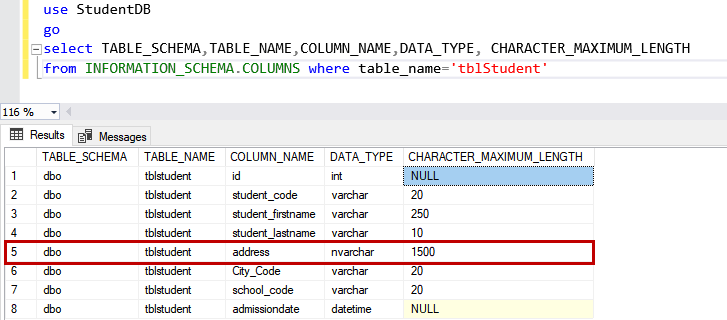
Видно, что тип данных столбца изменился.
- При уменьшении размера столбца SQL Server проверит данные в таблице и, если данные превышают новую длину, вернет предупреждение и прервет выполнение оператора.
- При изменении типа данных nvarchar на varchar, если столбец содержит строку Юникод, то SQL Server возвращает ошибку и прерывает оператор.
- В отличие от MySQL изменение типа данных нескольких столбцов не допускается.
- Вы не можете добавить
а. ограничение NOT NULL, если столбец содержит NULL-значения;
б. ограничение UNIQUE, если в столбце имеются дубликаты.
Запрос SQL для изменения типа столбца в MySQL
Для изменения типа данных столбца мы можем использовать оператор ALTER TABLE MODIFY COLUMN. Синтаксис изменения типа данных столбца имеет следующий вид:
- Tbl_name: задает имя таблицы, содержащая столбец, который мы хотим изменить.
- Col_name: задает имя столбца, тип которого мы хотим изменить. Col_name должно быть указано после ключевых слов MODIFY COLUMN. Мы можем изменить тип данных нескольких столбцов. При изменении типа данных нескольких столбцов, столбцы разделяются запятой (,).
- Datatype: задает новый тип данных и длину столбца. Тип данных должен указываться после имени столбца.
Рассмотрим несколько примеров.
Пример 1: Запрос для изменения типа данных одного столбца
Мы хотим изменить тип столбца address с varchar(500) на тип данных TEXT. Выполните следующий запрос для изменения типа данных.
mysql> ALTER TABLE tblActor MODIFY address TEXT
Для проверки изменений выполните следующий запрос:
mysql> describe tblactor 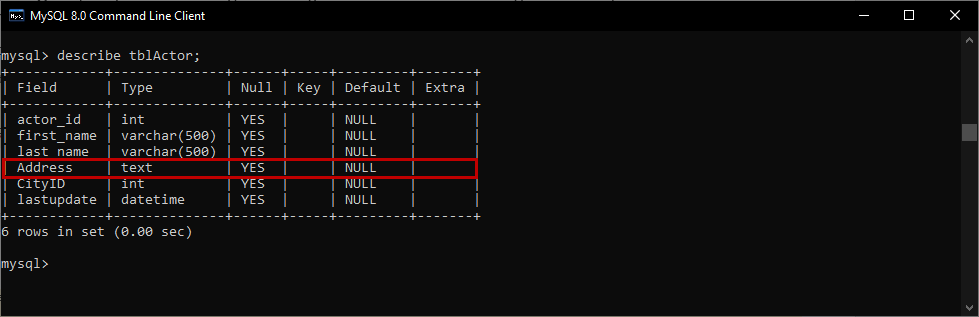
Как можно увидеть, тип данных столбца address был изменен на TEXT.
Пример 2: SQL-запрос для изменения типа данных нескольких столбцов
Мы можем изменить тип данных нескольких столбцов в таблице. В нашем примере мы хотим изменить тип столбцов first_name и last_name. Новым типом данных столбцов становится TINYTEXT.
mysql> ALTER TABLE tblActor MODIFY first_name TINYTEXT, modify last_name TINYTEXT;
Выполните следующий запрос, чтобы проверить изменения:
mysql> describe tblActor 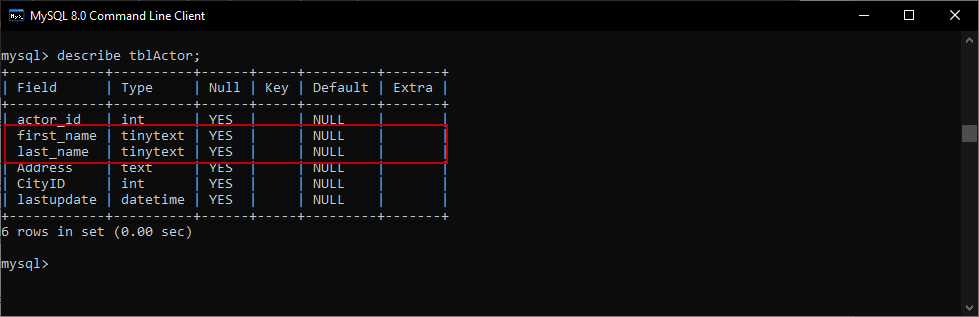
Как видно, тип данных столбцов first_name и last_name изменился на TINYTEXT.
Пример 3: Переименование столбца в MySQL
Чтобы переименовать столбцы, мы должны использовать оператор ALTER TABLE CHANGE COLUMN. Предположим, что вы хотите переименовать столбец CityID в CityCode; вы должны выполнить следующий запрос.
mysql> ALTER TABLE tblActor CHANGE COLUMN CityID CityCode int
Выполните команду describe, чтобы увидеть изменения структуры таблицы.
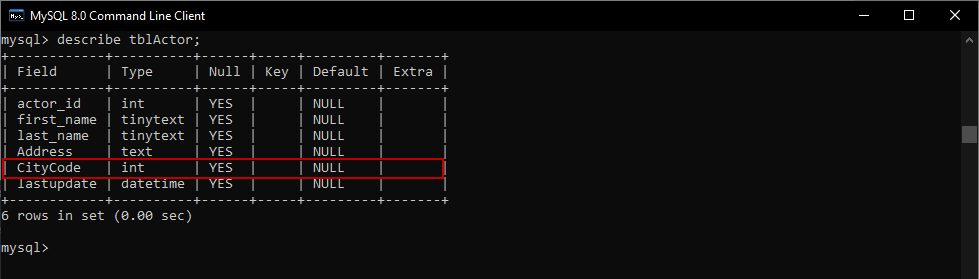
Видно, что имя столбца изменилось.
Запрос SQL для изменения типа столбца в базе данных PostgreSQL
Мы можем использовать оператор ALTER TABLE ALTER COLUMN для изменения типа данных столбца. Синтаксис изменения типа данных столбца:
- Tbl_name: задает имя таблицы, содержащая столбец, который вы хотите изменить.
- Col_name: задает имя столбца, тип которого мы хотим изменить. Col_name должно быть указано после ключевых слов ALTER COLUMN. Мы можем изменить тип данных нескольких столбцов.
- Data_type: задает новый тип данных и длину столбца. Тип данных должен быть указан после ключевого слова TYPE.
Теперь рассмотрим несколько примеров.
Пример 1: Запрос SQL для изменения типа данных одного столбца
Мы хотим изменить тип столбца movie_id с типа данных int4 на int8. Для изменения типа данных выполните следующий запрос.
Для проверки изменений выполните следующий запрос:
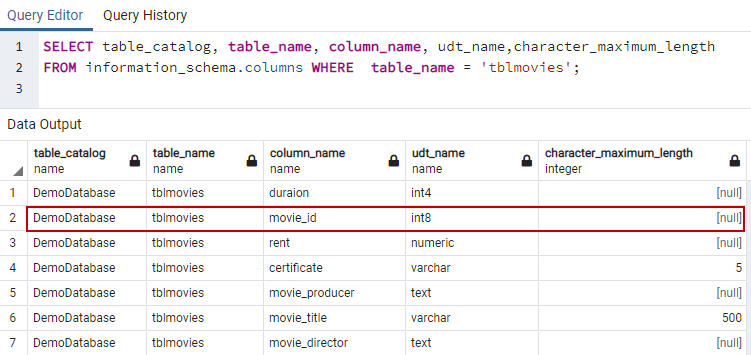
Как видно, тип данных столбца movie_id стал int8.
Пример 2: Запрос SQL для изменения типа данных нескольких столбцов
Мы можем изменить тип данных сразу нескольких столбцов таблицы. В нашем примере мы хотим изменить тип столбцов movie_title и movie_producer. Новым типом данных для столбца movie_title становится TEXT, а для movie_producer — varchar(2000).
Выполните следующий запрос для проверки изменений:
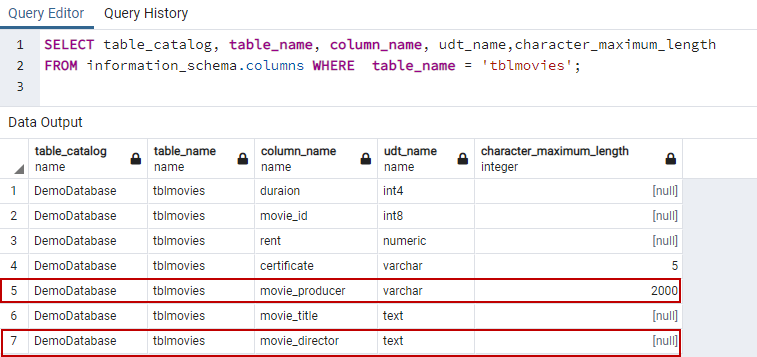
Как видно, типом данных столбца movie_title является TEXT, а movie_producer — varchar(2000).
Name already in use
sql-docs / docs / t-sql / functions / cast-and-convert-transact-sql.md
- Go to file T
- Go to line L
- Copy path
- Copy permalink
- Open with Desktop
- View raw
- Copy raw contents Copy raw contents
Copy raw contents
Copy raw contents
CAST and CONVERT (Transact-SQL)
These functions convert an expression of one data type to another.
. image type=»icon» source=»../../includes/media/topic-link-icon.svg» border=»false». Transact-SQL syntax conventions
The target data type. This includes xml, bigint, and sql_variant. Alias data types can’t be used.
An optional integer that specifies the length of the target data type, for data types that allow a user specified length. The default value is 30.
An integer expression that specifies how the CONVERT function will translate expression. For a style value of NULL, NULL is returned. data_type determines the range.
Returns expression, translated to data_type.
Date and time styles
For a date or time data type expression, style can have one of the values shown in the following table. Other values are processed as 0. Beginning with [!INCLUDEssSQL11], the only styles supported, when converting from date and time types to datetimeoffset, are 0 or 1. All other conversion styles return error 9809.
[!NOTE]
[!INCLUDEssNoVersion] supports the date format, in Arabic style, with the Kuwaiti algorithm.
| Without century (yy) 1 | With century (yyyy) | Standard | Input/output 3 |
|---|---|---|---|
| — | 0 or 100 1, 2 | Default for datetime and smalldatetime | mon dd yyyy hh:miAM (or PM ) |
| 1 | 101 | U.S. | 1 = mm/dd/yy 101 = mm/dd/yyyy |
| 2 | 102 | ANSI | 2 = yy.mm.dd 102 = yyyy.mm.dd |
| 3 | 103 | British/French | 3 = dd/mm/yy 103 = dd/mm/yyyy |
| 4 | 104 | German | 4 = dd.mm.yy 104 = dd.mm.yyyy |
| 5 | 105 | Italian | 5 = dd-mm-yy 105 = dd-mm-yyyy |
| 6 | 106 1 | — | 6 = dd mon yy 106 = dd mon yyyy |
| 7 | 107 1 | — | 7 = Mon dd, yy 107 = Mon dd, yyyy |
| 8 or 24 | 108 | — | hh:mi:ss |
| — | 9 or 109 1, 2 | Default + milliseconds | mon dd yyyy hh:mi:ss:mmmAM (or PM ) |
| 10 | 110 | USA | 10 = mm-dd-yy 110 = mm-dd-yyyy |
| 11 | 111 | JAPAN | 11 = yy/mm/dd 111 = yyyy/mm/dd |
| 12 | 112 | ISO | 12 = yymmdd 112 = yyyymmdd |
| — | 13 or 113 1, 2 | Europe default + milliseconds | dd mon yyyy hh:mi:ss:mmm (24-hour) |
| 14 | 114 | — | hh:mi:ss:mmm (24-hour) |
| — | 20 or 120 2 | ODBC canonical | yyyy-mm-dd hh:mi:ss (24-hour) |
| — | 21 or 25 or 121 2 | ODBC canonical (with milliseconds) default for time, date, datetime2, and datetimeoffset | yyyy-mm-dd hh:mi:ss.mmm (24-hour) |
| 22 | — | U.S. | mm/dd/yy hh:mi:ss AM (or PM ) |
| — | 23 | ISO8601 | yyyy-mm-dd |
| — | 126 4 | ISO8601 | yyyy-mm-ddThh:mi:ss.mmm (no spaces) 6 |
| — | 127 8, 9 | ISO8601 with time zone Z | yyyy-MM-ddThh:mm:ss.fffZ (no spaces) 6 |
| — | 130 1, 2 | Hijri 5 | dd mon yyyy hh:mi:ss:mmmAM 7 |
| — | 131 2 | Hijri 5 | dd/mm/yyyy hh:mi:ss:mmmAM |
1 These style values return nondeterministic results. Includes all ( yy ) (without century) styles and a subset of ( yyyy ) (with century) styles.
2 The default values (0 or 100, 9 or 109, 13 or 113, 20 or 120, 23, and 21 or 25 or 121) always return the century ( yyyy ).
[!IMPORTANT]
By default, [!INCLUDEssNoVersion] interprets two-digit years based on a cutoff year of 2049. That means that [!INCLUDEssNoVersion] interprets the two-digit year 49 as 2049 and the two-digit year 50 as 1950. Many client applications, including those based on Automation objects, use a cutoff year of 2030. [!INCLUDEssNoVersion] provides the two digit year cutoff configuration option to change the cutoff year used by [!INCLUDEssNoVersion]. This allows for the consistent treatment of dates. We recommend specifying four-digit years.
3 Input when you convert to datetime; output when you convert to character data.
4 Designed for XML use. For conversion from datetime or smalldatetime to character data, see the previous table for the output format.
5 Hijri is a calendar system with several variations. [!INCLUDEssNoVersion] uses the Kuwaiti algorithm.
6 For a milliseconds ( mmm ) value of 0, the millisecond decimal fraction value won’t display. For example, the value 2022-11-07T18:26:20.000 displays as 2022-11-07T18:26:20 .
7 In this style, mon represents a multi-token Hijri unicode representation of the full month name. This value doesn’t render correctly on a default US installation of SSMS.
8 Only supported when casting from character data to datetime or smalldatetime. When casting character data representing only date or only time components to the datetime or smalldatetime data types, the unspecified time component is set to 00:00:00.000 , and the unspecified date component is set to 1900-01-01 .
9 Use the optional time zone indicator Z to make it easier to map XML datetime values that have time zone information to [!INCLUDEssNoVersion] datetime values that have no time zone. Z indicates time zone at UTC-0. The HH:MM offset, in the + or — direction, indicates other time zones. For example: 2022-12-12T23:45:12-08:00 .
When converting smalldatetime to character data, the styles that include seconds or milliseconds show zeros in these positions. When converting from datetime or smalldatetime values, use an appropriate char or varchar data type length to truncate unwanted date parts.
When converting character data to datetimeoffset, using a style that includes a time, a time zone offset is appended to the result.
float and real styles
For a float or real expression, style can have one of the values shown in the following table. Other values are processed as 0.
money and smallmoney styles
For a money or smallmoney expression, style can have one of the values shown in the following table. Other values are processed as 0.
For an xml expression, style can have one of the values shown in the following table. Other values are processed as 0.
If enabled, the server can use the following information that is provided in an internal DTD subset, to perform nonvalidating parse operations.
— Defaults for attributes are applied
— Internal entity references are resolved and expanded
— The DTD content model is checked for syntactical correctness
For a binary(n), char(n), varbinary(n), or varchar(n) expression, style can have one of the values shown in the following table. Style values not listed in the table will return an error.
If the length of the converted expression exceeds the length of the data_type, the result is right truncated.
Fixed length data_types larger than the converted result has zeros added to the right of the result.
A data_type of type character requires a binary expression. Each binary character is converted into two hexadecimal characters. Suppose the length of the converted expression exceeds the length of the data_type. In that case, it’s truncated.
For a fixed size character type data_type, if the length of the converted result is less than its length of the data_type, spaces are added to the right of the converted expression to maintain an even number of hexadecimal digits.
Implicit conversions don’t require specification of either the CAST function or the CONVERT function. Explicit conversions require specification of the CAST function or the CONVERT function. The following illustration shows all explicit and implicit data type conversions allowed for [!INCLUDEssNoVersion] system-supplied data types. These include bigint, and sql_variant, and xml. There is no implicit conversion on assignment from the sql_variant data type, but there is implicit conversion to sql_variant.
[!TIP]
The Microsoft Download Center has this chart available for download as a PNG file.
. image type=»content» source=»../data-types/media/cast-and-convert-transact-sql/data-type-conversions.png» alt-text=»Diagram showing a table of the possible data type conversions.».
The above chart illustrates all the explicit and implicit conversions that are allowed in [!INCLUDEssNoVersion], but the resulting data type of the conversion depends on the operation being performed:
- For explicit conversions, the statement itself determines the resulting data type.
- For implicit conversions, assignment statements such as setting the value of a variable or inserting a value into a column will result in the data type that was defined by the variable declaration or column definition.
- For comparison operators or other expressions, the resulting data type will depend on the rules of data type precedence.
When you convert between datetimeoffset and the character types char, nchar, nvarchar, and varchar, the converted time zone offset part should always have double digits for both HH and MM . For example, -08:00 .
Because Unicode data always uses an even number of bytes, use caution when you convert binary or varbinary to or from Unicode supported data types. For example, the following conversion doesn’t return a hexadecimal value of 41. It returns a hexadecimal value of 4100:
Large-value data types
Large-value data types have the same implicit and explicit conversion behavior as their smaller counterparts — specifically, the nvarchar, varbinary, and varchar data types. However, consider the following guidelines:
- Conversion from image to varbinary(max), and vice-versa, operates as an implicit conversion, as do conversions between text and varchar(max), and ntext and nvarchar(max).
- Conversion from large-value data types, such as varchar(max), to a smaller counterpart data type, such as varchar, is an implicit conversion, but truncation occurs if the size of the large value exceeds the specified length of the smaller data type.
- Conversion from nvarchar, varbinary, or varchar to their corresponding large-value data types happens implicitly.
- Conversion from the sql_variant data type to the large-value data types is an explicit conversion.
- Large-value data types can’t be converted to the sql_variant data type.
For more information about conversion from the xml data type, see Create Instances of XML Data.
When you explicitly or implicitly cast the xml data type to a string or binary data type, the content of the xml data type is serialized based on a defined set of rules. For information about these rules, see Define the Serialization of XML Data. For information about conversion from other data types to the xml data type, see Create Instances of XML Data.
text and image data types
The text and image data types don’t support automatic data type conversion. You can explicitly convert text data to character data, and image data to binary or varbinary, but the maximum length is 8000 bytes. If you try an incorrect conversion, for example trying to convert a character expression that includes letters to an int, [!INCLUDEssNoVersion] returns an error message.
When the CAST or CONVERT functions output a character string, and they receive a character string input, the output has the same collation and collation label as the input. If the input isn’t a character string, the output has the default collation of the database, and a collation label of coercible-default. For more information, see Collation Precedence (Transact-SQL).
To assign a different collation to the output, apply the COLLATE clause to the result expression of the CAST or CONVERT function. For example:
Truncating and rounding results
When converting character or binary expressions (binary, char, nchar, nvarchar, varbinary, or varchar) to an expression of a different data type, the conversion operation could truncate the output data, only partially display the output data, or return an error. These cases will occur if the result is too short to display. Conversions to binary, char, nchar, nvarchar, varbinary, or varchar are truncated, except for the conversions shown in the following table.
| From data type | To data type | Result |
|---|---|---|
| int, smallint, or tinyint | char varchar |
Too short to display |
| nchar nvarchar |
Error 1 | |
| money, smallmoney, numeric, decimal, float, or real | char varchar |
Error 1 |
| nchar nvarchar |
Error 1 |
1 Error returned because result length is too short to display.
[!INCLUDEssNoVersion] guarantees that only roundtrip conversions, in other words conversions that convert a data type from its original data type and back again, yield the same values from version to version. The following example shows such a roundtrip conversion:
[!WARNING]
Don’t construct binary values, and then convert them to a data type of the numeric data type category. [!INCLUDEssNoVersion] does not guarantee that the result of a decimal or numeric data type conversion, to binary, will be the same between versions of [!INCLUDEssNoVersion].
The following example shows a resulting expression that is too small to display.
When you convert data types that differ in decimal places, [!INCLUDEssNoVersion] will sometimes return a truncated result value, and at other times it will return a rounded value. This table shows the behavior.
| From | To | Behavior |
|---|---|---|
| numeric | numeric | Round |
| numeric | int | Truncate |
| numeric | money | Round |
| money | int | Round |
| money | numeric | Round |
| float | int | Truncate |
| float | numeric | Round 1 |
| float | datetime | Round |
| datetime | int | Round |
1 Conversion of float values that use scientific notation to decimal or numeric is restricted to values of precision 17 digits only. Any value with precision higher than 17 rounds to zero.
For example, the values 10.6496 and -10.6496 may be truncated or rounded during conversion to int or numeric types:
Results of the query are shown in the following table:
| trunc1 | trunc2 | round1 | round2 |
|---|---|---|---|
| 10 | -10 | 11 | -11 |
When converting data types where the target data type has fewer decimal places than the source data type, the value is rounded. For example, this conversion returns $10.3497 :
[!INCLUDEssNoVersion] returns an error message when converting nonnumeric char, nchar, nvarchar, or varchar data to decimal, float, int, numeric. [!INCLUDEssNoVersion] also returns an error when an empty string (» «) is converted to numeric or decimal.
Certain datetime conversions are nondeterministic
The styles for which the string-to-datetime conversion is nondeterministic are as follows:
- All styles below 100 1
- 106
- 107
- 109
- 113
- 130
1 With the exception of styles 20 and 21
Supplementary characters (surrogate pairs)
Starting with [!INCLUDEssSQL11], when using supplementary character (SC) collations, a CAST operation from nchar or nvarchar to an nchar or nvarchar type of smaller length won’t truncate inside a surrogate pair. Instead, the operation truncates before the supplementary character. For example, the following code fragment leaves @x holding just ‘ab’ . There isn’t enough space to hold the supplementary character.
When using SC collations, the behavior of CONVERT , is analogous to that of CAST . For more information, see Collation and Unicode Support — Supplementary Characters.
In earlier versions of [!INCLUDEssNoVersion], the default style for CAST and CONVERT operations on time and datetime2 data types is 121, except when either type is used in a computed column expression. For computed columns, the default style is 0. This behavior impacts computed columns when they are created, used in queries involving auto-parameterization, or used in constraint definitions.
Under compatibility level 110 and higher, the CAST and CONVERT operations on the time and datetime2 data types always have 121 as the default style. If a query relies on the old behavior, use a compatibility level less than 110, or explicitly specify the 0 style in the affected query.
| Compatibility level value | Default style for CAST and CONVERT 1 | Default style for computed column |
|---|---|---|
| < 110 | 121 | 0 |
| > = 110 | 121 | 121 |
1 Except for computed columns
Upgrading the database to compatibility level 110 and higher won’t change user data that has been stored to disk. You must manually correct this data as appropriate. For example, if you used SELECT INTO to create a table from a source containing a computed column expression described above, the data (using style 0) would be stored rather than the computed column definition itself. You must manually update this data to match style 121.
A. Use both CAST and CONVERT
These examples retrieve the name of the product, for those products that have a 3 as the first digit of list price, and converts their ListPrice values to int.
[!INCLUDEssResult] The sample result set is the same for both CAST and CONVERT .
B. Use CAST with arithmetic operators
This example calculates a single column computation ( Computed ) by dividing the total year-to-date sales ( SalesYTD ) by the commission percentage ( CommissionPCT ). This value is rounded to the nearest whole number and is then CAST to an int data type.
C. Use CAST to concatenate
This example concatenates noncharacter expressions by using CAST . It uses the AdventureWorksDW2019 database.
D. Use CAST to produce more readable text
This example uses CAST in the SELECT list, to convert the Name column to a char(10) column. It uses the AdventureWorksDW2019 database.
E. Use CAST with the LIKE clause
This example converts the money column SalesYTD values to data type int, and then to data type char(20), so that the LIKE clause can use it.
F. Use CONVERT or CAST with typed XML
These examples show use of CONVERT to convert data to typed XML, by using the XML Data Type and Columns (SQL Server).
This example converts a string with white space, text and markup into typed XML, and removes all insignificant white space (boundary white space between nodes):
This example converts a similar string with white space, text and markup into typed XML and preserves insignificant white space (boundary white space between nodes):
This example casts a string with white space, text, and markup into typed XML:
G. Use CAST and CONVERT with datetime data
Starting with GETDATE() values, this example displays the current date and time, uses CAST to change the current date and time to a character data type, and then uses CONVERT to display the date and time in the ISO 8601 format.
This example is approximately the opposite of the previous example. This example displays a date and time as character data, uses CAST to change the character data to the datetime data type, and then uses CONVERT to change the character data to the datetime data type.
H. Use CONVERT with binary and character data
These examples show the results of binary and character data conversion, using different styles.
This example shows that Style 1 can force result truncation. The characters 0x in the result set force the truncation.
This example shows that Style 2 doesn’t truncate the result, because the result doesn’t include the characters 0x.
Convert the character value ‘Name’ to a binary value.
I. Convert date and time data types
This example shows the conversion of date, time, and datetime data types.
Ensure the values are within a compatible range when considering a conversion from date to datetime or datetime2. The minimum year value for datetime is 1753 , while the minimum year value is 0001 for date and datetime2.
J. Use CONVERT with datetime data in different formats
Starting with GETDATE() values, this example uses CONVERT to display of all the date and time styles in section Date and Time styles of this article.
| Format # | Example query | Sample result |
|---|---|---|
| 0 | SELECT CONVERT(NVARCHAR, GETDATE(), 0) | Aug 23 2019 1:39PM |
| 1 | SELECT CONVERT(NVARCHAR, GETDATE(), 1) | 08/23/19 |
| 2 | SELECT CONVERT(NVARCHAR, GETDATE(), 2) | 19.08.23 |
| 3 | SELECT CONVERT(NVARCHAR, GETDATE(), 3) | 23/08/19 |
| 4 | SELECT CONVERT(NVARCHAR, GETDATE(), 4) | 23.08.19 |
| 5 | SELECT CONVERT(NVARCHAR, GETDATE(), 5) | 23-08-19 |
| 6 | SELECT CONVERT(NVARCHAR, GETDATE(), 6) | 23 Aug 19 |
| 7 | SELECT CONVERT(NVARCHAR, GETDATE(), 7) | Aug 23, 19 |
| 8 or 24 or 108 | SELECT CONVERT(NVARCHAR, GETDATE(), 8) | 13:39:17 |
| 9 or 109 | SELECT CONVERT(NVARCHAR, GETDATE(), 9) | Aug 23 2019 1:39:17:090PM |
| 10 | SELECT CONVERT(NVARCHAR, GETDATE(), 10) | 08-23-19 |
| 11 | SELECT CONVERT(NVARCHAR, GETDATE(), 11) | 19/08/23 |
| 12 | SELECT CONVERT(NVARCHAR, GETDATE(), 12) | 190823 |
| 13 or 113 | SELECT CONVERT(NVARCHAR, GETDATE(), 13) | 23 Aug 2019 13:39:17:090 |
| 14 or 114 | SELECT CONVERT(NVARCHAR, GETDATE(), 14) | 13:39:17:090 |
| 20 or 120 | SELECT CONVERT(NVARCHAR, GETDATE(), 20) | 2019-08-23 13:39:17 |
| 21 or 25 or 121 | SELECT CONVERT(NVARCHAR, GETDATE(), 21) | 2019-08-23 13:39:17.090 |
| 22 | SELECT CONVERT(NVARCHAR, GETDATE(), 22) | 08/23/19 1:39:17 PM |
| 23 | SELECT CONVERT(NVARCHAR, GETDATE(), 23) | 2019-08-23 |
| 101 | SELECT CONVERT(NVARCHAR, GETDATE(), 101) | 08/23/2019 |
| 102 | SELECT CONVERT(NVARCHAR, GETDATE(), 102) | 2019.08.23 |
| 103 | SELECT CONVERT(NVARCHAR, GETDATE(), 103) | 23/08/2019 |
| 104 | SELECT CONVERT(NVARCHAR, GETDATE(), 104) | 23.08.2019 |
| 105 | SELECT CONVERT(NVARCHAR, GETDATE(), 105) | 23-08-2019 |
| 106 | SELECT CONVERT(NVARCHAR, GETDATE(), 106) | 23 Aug 2019 |
| 107 | SELECT CONVERT(NVARCHAR, GETDATE(), 107) | Aug 23, 2019 |
| 110 | SELECT CONVERT(NVARCHAR, GETDATE(), 110) | 08-23-2019 |
| 111 | SELECT CONVERT(NVARCHAR, GETDATE(), 111) | 2019/08/23 |
| 112 | SELECT CONVERT(NVARCHAR, GETDATE(), 112) | 20190823 |
| 113 | SELECT CONVERT(NVARCHAR, GETDATE(), 113) | 23 Aug 2019 13:39:17.090 |
| 120 | SELECT CONVERT(NVARCHAR, GETDATE(), 120) | 2019-08-23 13:39:17 |
| 121 | SELECT CONVERT(NVARCHAR, GETDATE(), 121) | 2019-08-23 13:39:17.090 |
| 126 | SELECT CONVERT(NVARCHAR, GETDATE(), 126) | 2019-08-23T13:39:17.090 |
| 127 | SELECT CONVERT(NVARCHAR, GETDATE(), 127) | 2019-08-23T13:39:17.090 |
| 130 | SELECT CONVERT(NVARCHAR, GETDATE(), 130) | 22 ذو الحجة 1440 1:39:17.090P |
| 131 | SELECT CONVERT(NVARCHAR, GETDATE(), 131) | 22/12/1440 1:39:17.090PM |
K. Effects of data type precedence in allowed conversions
The following example defines a variable of type varchar(10), assigns an integer value to the variable, then selects a concatenation of the variable with a string.
The int value of 1 was converted to a varchar.
This example shows a similar query, using an int variable instead:
In this case, the SELECT statement will throw the following error:
In order to evaluate the expression @notastring + ‘ is not a string.’ , [!INCLUDEssNoVersion] needs to follow the rules of data type precedence to complete the implicit conversion before the result of the expression can be calculated. Because int has a higher precedence than varchar, [!INCLUDEssNoVersion] attempts to convert the string to an integer and fails because this string can’t be converted to an integer.
If we provide a string that can be converted, the statement will succeed, as seen in the following example:
In this case, the string ‘1’ can be converted to the integer value 1, so this SELECT statement will return the value 2. When the data types provided are integers, the + operator becomes addition mathematical operator, rather than a string concatenation.
L. Use CAST and CONVERT
This example retrieves the name of the product for those products that have a 3 in the first digit of their list price, and converts the ListPrice of these products to int. It uses the AdventureWorksDW2019 database.
This example shows the same query, using CONVERT instead of CAST . It uses the AdventureWorksDW2019 database.
M. Use CAST with arithmetic operators
This example calculates a single column value by dividing the product unit price ( UnitPrice ) by the discount percentage ( UnitPriceDiscountPct ). This result is then rounded to the nearest whole number, and finally converted to an int data type. This example uses the AdventureWorksDW2019 database.
N. Use CAST with the LIKE clause
This example converts the money column ListPrice to an int type, and then to a char(20) type, so that the LIKE clause can use it. This example uses the AdventureWorksDW2019 database.
O. Use CAST and CONVERT with datetime data
This example displays the current date and time, uses CAST to change the current date and time to a character data type, and finally uses CONVERT display the date and time in the ISO 8601 format. This example uses the AdventureWorksDW2019 database.
This example is the rough opposite of the previous example. This example displays a date and time as character data, uses CAST to change the character data to the datetime data type, and then uses CONVERT to change the character data to the datetime data type. This example uses the AdventureWorksDW2019 database.
ALTER TABLE в SQL
Мы можем изменить структуру таблицы с помощью команды ALTER TABLE. Мы можем:
Добавить столбец в таблицу
Мы можем добавить столбцы в таблицу с помощью команды ALTER TABLE с оператором ADD. Например:
Здесь мы добавили столбец с именем phone в таблицу Customers.
Добавить несколько столбцов в таблицу
Мы также можем добавить сразу несколько столбцов в таблицу. Например:
Здесь мы добавили столбцы phone и age в таблицу Customers.
Переименовать столбец в таблице
Мы можем переименовать столбцы в таблице с помощью команды ALTER TABLE с оператором RENAME COLUMN. Например:
Здесь мы изменили имя столбца customer_id на c_id в таблице Customers.
Изменить столбец в таблице
Мы также можем изменить тип данных столбца с помощью команды ALTER TABLE с оператором MODIFY или ALTER COLUMN. Например: