# Classes and IDs
Classes and IDs make referencing HTML elements from scripts and stylesheets easier. The class attribute can be used on one or more tags and is used by CSS for styling. IDs however are intended to refer to a single element, meaning the same ID should never be used twice. IDs are generally used with JavaScript and internal document links, and are discouraged in CSS. This topic contains helpful explanations and examples regarding proper usage of class and ID attributes in HTML.
# Giving an element a class
Classes are identifiers for the elements that they are assigned to. Use the class attribute to assign a class to an element.
To assign multiple classes to an element, separate the class names with spaces.
# Using classes in CSS
Classes can be used for styling certain elements without changing all elements of that kind. For example, these two span elements can have completely different stylings:
Classes of the same name can be given to any number of elements on a page and they will all receive the styling associated with that class. This will always be true unless you specify the element within the CSS.
For example, we have two elements, both with the class highlight :
If our CSS is as below, then the color green will be applied to the text within both elements:
However, if we only want to target div ‘s with the class highlight then we can add specificity like below:
Nevertheless, when styling with CSS, it is generally recommended that only classes (e.g. .highlight ) be used rather than elements with classes (e.g. div.highlight ).
As with any other selector, classes can can be nested:
You can also chain the class selector to only select elements that have a combination of several classes. For example, if this is our HTML:
And we want to colour this specific piece of text pink, we can do the following in our CSS:
# Giving an element an ID
The ID attribute of an element is an identifier which must be unique in the whole document. Its purpose is to uniquely identify the element when linking (using an anchor), scripting, or styling (with CSS).
You should not have two elements with the same ID in the same document, even if the attributes are attached to two different kinds of elements. For example, the following code is incorrect:
Browsers will do their best to render this code, but unexpected behavior may occur when styling with CSS or adding functionality with JavaScript.
To reference elements by their ID in CSS, prefix the ID with # .
To jump to an element with an ID on a given page, append # with the element name in the URL.
This feature is supported in most browsers and does not require additional JavaScript or CSS to work.
# Acceptable Values
# For an ID
The only restrictions on the value of an id are:
- it must be unique in the document
- it must not contain any space characters
- it must contain at least one character
So the value can be all digits, just one digit, just punctuation characters, include special characters, whatever. Just no whitespace.
So these are valid:
This is invalid:
This is also invalid, when included in the same document:
An id value must begin with a letter, which can then be followed only by:
- letters (A-Z/a-z)
- digits (0-9)
- hyphens ("-")
- underscores ("_")
- colons ("��
- periods (".")
Referring to the first group of examples in the HTML5 section above, only one is valid:
These are also valid:
Again, if it doesn’t start with a letter (uppercase or lowercase), it’s not valid.
# For a Class
The rules for classes are essentially the same as for an id . The difference is that class values do not need to be unique in the document.
Referring to the examples above, although this is not valid in the same document:
This is perfectly okay:
# Important Note: How ID and Class values are treated outside of HTML
Keep in mind that the rules and examples above apply within the context of HTML.
Using numbers, punctuation or special characters in the value of an id or a class may cause trouble in other contexts, such as CSS, JavaScript and regular expressions.
For example, although the following id is valid in HTML5:
. it is invalid in CSS:
In CSS, identifiers (including element names, classes, and IDs in selectors) can contain only the characters [a-zA-Z0-9] and ISO 10646 characters U+00A0 and higher, plus the hyphen (-) and the underscore (_); they cannot start with a digit, two hyphens, or a hyphen followed by a digit. (emphasis added)
In most cases you may be able to escape characters in contexts where they have restrictions or special meaning.
# W3C References
# Problems related to duplicated IDs
Having more than one element with the same ID is a hard to troubleshoot problem. The HTML parser will usually try to render the page in any case. Usually no error occurs. But the pace could end up in a mis-behaving web page.
In this example:
CSS selectors still work
But JavaScript fails to handle both elements:
In this case html variable bears only the first div content ("a") .
Разница между class и id на примере тега div
Сегодня уже трудно найти сайт, где не использовался бы такой нужный и важный тег <div>. Посмотрите код любого сайта, который найдете в интернете и увидите, что тег <div> чаще других тегов встречается в HTML документе. Причина такой популярности – это блочная верстка. Иными словами с помощью блочного тега <div> верстаются сайты.
Благодаря этому тегу весь HTML код документа имеет наглядную и логически понятную структуру. В которой легко разобраться не только верстальщику, но и другим специалистам, совместно работающим над одним проектом. Однако тег <div> без своих «сателлитов» — селекторов id и class ничего не стоит.
Классы и идентификаторы
Классы (class) и идентификаторы (id) выполняют одни и те же задачи. Они задают разные стили для тега <div>, как во внешнем CSS файле, так и внутри документа, через тег style. Тут надо пояснить, что они работают в связке не только с тегом <div>, но и со многими другими тегами.
Рассмотрим на примере ниже следующий код HTML-разметки:
Зададим внешний вид HTML документу с помощью CSS файла стилей:
/* знак # перед именем — обозначение id */
#content <
padding: 20px;
font-size: 20px;
color: black;
background: #ddd;
border: 1px solid black;
width: 250px;
>
/* (.) перед именем обозначает class */
.content <
padding: 20px;
font-size: 20px;
color: black;
background: #ddd;
border: 1px solid black;
width: 250px;
>
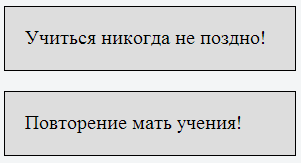
Имена id и class задает сам разработчик произвольно, исходя из смысловой нагрузки. Мы назвали их просто content. Нельзя давать имена русскими буквами, можно использовать цифры, символ дефиса (-) и подчеркивания (_).
Мы видим два абсолютно одинаковых блока. К верхнему блоку применяется селектор id, а к нижнему блоку применятся селектор class. Вы спросите, где же разница между div-ами id и class? Чисто внешне, пока никакой разницы, до тех пор, пока мы применяем по одному id и class на одну страницу.
В чем тогда различие между class и id?
Различие кроется в самом названии id, значит идентификатор, то есть уникальный. Главное отличие от классов в том, что селектор id может использоваться на странице только один раз. Селектор class, наоборот может применяться на одной странице бесконечное количество раз.
.content /* может применяться к любым тегам */
div.content /* применяется только к тегам div с классом .content */
div#content /* для id такая запись не имеет смысла, он уникален */
Так же стоит отметить, что у id свойств выше приоритет, чем у свойств классов.
Этот пример наглядно демонстрирует, что несмотря на то, что class с синим текстом находится ниже, текст все равно красный. Если бы id не имел приоритета, то текст был бы синий.
Кроме того конкретному тегу можно задавать несколько классов, перечисляя их через пробел. Такая система позволяет не создавать лишних классов, а использовать их более эффективно. У id селектора разумеется такой возможности нет.
Есть еще одно важное отличие, оно касается программистов. Если планируется обратиться к элементу HTML документа через язык JavaScript, то обязательно надо применять id, реализовывать это через классы намного сложнее.
Когда лучше использовать id, а когда class?
Если на странице какой-нибудь из элементов, например, шапка сайта, меню, кнопка, используется только один раз, то надо применять id. Селектор class применяется к одному тегу или к разным тегам столько раз, сколько раз они прописаны на странице. Например, картинки, маркированные списки, абзацы.
В заключении хочу дать дружественный совет всем тем, кто хочет научиться самостоятельно создавать сайты. Очень долго и не эффективно черпать знания о сайтостороении из статей и уроков. Обратите внимание на мой видеокурс по данной тематике. Это один из лучших курсов для начинающих.

Копирование материалов разрешается только с указанием автора (Михаил Русаков) и индексируемой прямой ссылкой на сайт (http://myrusakov.ru)!
Добавляйтесь ко мне в друзья ВКонтакте: http://vk.com/myrusakov.
Если Вы хотите дать оценку мне и моей работе, то напишите её в моей группе: http://vk.com/rusakovmy.
Если Вы не хотите пропустить новые материалы на сайте,
то Вы можете подписаться на обновления: Подписаться на обновления
Если у Вас остались какие-либо вопросы, либо у Вас есть желание высказаться по поводу этой статьи, то Вы можете оставить свой комментарий внизу страницы.
Порекомендуйте эту статью друзьям:
Если Вам понравился сайт, то разместите ссылку на него (у себя на сайте, на форуме, в контакте):
Она выглядит вот так:
Комментарии ( 0 ):
Для добавления комментариев надо войти в систему.
Если Вы ещё не зарегистрированы на сайте, то сначала зарегистрируйтесь.
Type, class, and ID selectors
In this lesson, we examine some of the simplest selectors, which you will probably use most frequently in your work.
| Prerequisites: | Basic computer literacy, basic software installed, basic knowledge of working with files, HTML basics (study Introduction to HTML), and an idea of how CSS works (study CSS first steps.) |
|---|---|
| Objective: | To learn about the different CSS selectors we can use to apply CSS to a document. |
Type selectors
A type selector is sometimes referred to as a tag name selector or element selector because it selects an HTML tag/element in your document. In the example below, we have used the span , em and strong selectors.
Try adding a CSS rule to select the <h1> element and change its color to blue.
The universal selector
The universal selector is indicated by an asterisk ( * ). It selects everything in the document (or inside the parent element if it is being chained together with another element and a descendant combinator). In the following example, we use the universal selector to remove the margins on all elements. Instead of the default styling added by the browser — which spaces out headings and paragraphs with margins — everything is close together.
This kind of behavior can sometimes be seen in «reset stylesheets», which strip out all of the browser styling. Since the universal selector makes global changes, we use it for very specific situations, such as the one described below.
Using the universal selector to make your selectors easier to read
One use of the universal selector is to make selectors easier to read and more obvious in terms of what they are doing. For example, if we wanted to select any descendant elements of an <article> element that are the first child of their parent, including direct children, and make them bold, we could use the :first-child pseudo-class. We will learn more about this in the lesson on pseudo-classes and pseudo-elements, as a descendant selector along with the <article> element selector:
However, this selector could be confused with article:first-child , which will select any <article> element that is the first child of another element.
To avoid this confusion, we can add the universal selector to the :first-child pseudo-class, so it is more obvious what the selector is doing. It is selecting any element which is the first-child of an <article> element, or the first-child of any descendant element of <article> :
Although both do the same thing, the readability is significantly improved.
Class selectors
The class selector starts with a dot ( . ) character. It will select everything in the document with that class applied to it. In the live example below we have created a class called highlight , and have applied it to several places in my document. All of the elements that have the class applied are highlighted.
Targeting classes on particular elements
You can create a selector that will target specific elements with the class applied. In this next example, we will highlight a <span> with a class of highlight differently to an <h1> heading with a class of highlight . We do this by using the type selector for the element we want to target, with the class appended using a dot, with no white space in between.
This approach reduces the scope of a rule. The rule will only apply to that particular element and class combination. You would need to add another selector if you decided the rule should apply to other elements too.
Target an element if it has more than one class applied
You can apply multiple classes to an element and target them individually, or only select the element when all of the classes in the selector are present. This can be helpful when building up components that can be combined in different ways on your site.
In the example below, we have a <div> that contains a note. The grey border is applied when the box has a class of notebox . If it also has a class of warning or danger , we change the border-color .
We can tell the browser that we only want to match the element if it has two classes applied by chaining them together with no white space between them. You’ll see that the last <div> doesn’t get any styling applied, as it only has the danger class; it needs notebox as well to get anything applied.
ID selectors
An ID selector begins with a # rather than a dot character, but is used in the same way as a class selector. However, an ID can be used only once per page, and elements can only have a single id value applied to them. It can select an element that has the id set on it, and you can precede the ID with a type selector to only target the element if both the element and ID match. You can see both of these uses in the following example:
Warning: Using the same ID multiple times in a document may appear to work for styling purposes, but don’t do this. It results in invalid code, and will cause strange behavior in many places.
Note: As we learned in the lesson on specificity, an ID has high specificity. It will overrule most other selectors. In most cases, it is preferable to add a class to an element instead of an ID. However, if using the ID is the only way to target the element — perhaps because you do not have access to the markup and cannot edit it — this will work.
Summary
That wraps up Type, class, and ID selectors. We’ll continue exploring selectors by looking at attribute selectors.
Difference between Class and ID in HTML

In HTML, every element has a unique identification (ID) and can be defined as belonging to a particular class of elements. Class is an attribute that allows the same element to have a different style or appearance. Understanding the difference between ID and class in HTML will help you understand how to use these attributes in your coding. Read on to know more about both ID and Class in HTML and also their usage.
What is an ID in HTML?
An ID is an identification used in HTML to uniquely identify a single element and can not be used more than once on a page. An element with an ID can be styled and identified with CSS using that ID. The ID is enclosed in curly braces, i.e. < >and must start with a letter followed by a combination of letters, numbers, and dashes “-“. Letters must be in lowercase and numbers should be in uppercase. The entire attribute is case-sensitive so if you start the attribute with a capital letter, the ID will not work.
How to use an ID in HTML?
A unique identifier (ID) is used to identify a specific element. For example, if you want to identify a header on your page, you can give it an ID and then write code to make the header stand out. Similarly, you can use an ID to style hyperlinks, anchors, images, paragraphs, and tables. For example, if you want to target a specific image on your page to make it look different, you can use an ID like this:
This is how an element with an unique id is defined in HTML:
Output:
What is Class in HTML?
A class is a type of identifier that is used to mark elements of a similar kind. A class is used to apply CSS to multiple elements on a page. Every element on a page can be given a class name. A class attribute is enclosed in curly braces, i.e. < >and can be defined as a name or a keyword. A class can be used with any HTML element such as a paragraph, a list, etc. Class is a very useful attribute while designing a page because it allows you to style many elements with just a single line of code. For example, you can give the p> tag a class name such as “red” and then use a CSS code to make all p> elements on the page red. This saves you a lot of time and effort as you don’t have to write separate CSS code for each p> element.
How to use Class in HTML?
A class is used to mark a specific element as belonging to a certain type of element. For example, you can use a class to mark a hyperlink as a link to your website’s contact page. Similarly, you can use classes to mark tables, paragraphs, lists, images, anchors, etc.
This is how multiple elements with same class is defined in HTML:
Output:
How to use id and class together?
Any HTML element (div, input, nav, body, etc.) can have both “id” and “class” at the same time. The only difference is that “id” can only have one unique value, whereas “class” can have multiple.
The id and class attributes can be used together to define a style for a particular element. For example:
Output:
Differences between ID and Class in HTML
- An ID is used to identify a single element whereas a class is used to identify a group of elements.
- An ID can be used only once on a page whereas a class can be used multiple times on a page.
- You can define an ID in CSS as # followed by the ID, whereas a class can be defined as. followed by the class name.
- An ID is used as a selector which is followed by #, whereas a class is used as a selector which is followed by. View important HTML Questions asked in interviews.
We have seen a lot of differences between the two. But, when you look at it from the viewpoint of the browser, they are very similar. The main difference between them is that an ID is used to identify a single element whereas a class is used to identify a group of elements. You can use an ID only once on a page whereas you can use classes multiple times on one page. Also, CSS supports both of them but with different syntaxes.
Conclusion
Throughout the article, you have been introduced to the difference between ID and class in HTML and how they are used in coding. It is important to understand the difference between ID and class in HTML because they are used in almost all coding languages. If you really want to get into web development and coding, you need to know the basics of HTML as it is the language used to write all code.