HTML Table Background
This page contains HTML table background code. This code enables you to modify the background of your HTML tables. For example, you can change the background color or add a background image to your tables.
Setting All Background Styles
There is a shorthand CSS property that allows you to set all your background styles in one go. This property is the background property.
This is the property that most web developers use for setting their table backgrounds, as it’s quicker to use and it helps to minimize code. This property allows you to set the background color and a background image properties using one property. You can see it in action with the following example.
If you have difficulty understanding this property, have a look at the other examples on this page. They should make things a bit clearer for you.
Background Color
The following example demonstrates how background color can be applied to the table using the background-color property. Check out HTML Table Background Color to see more examples of adding background color to a table.
Table Background Image
Here’s an example of adding a background image to your table by using the CSS background-image property.
The background image in this example automatically repeats across the full width and height of the table. In other words, if the background image is smaller than the table, it will be displayed again and again until it reaches the edge of the table.
Here’s the actual image that we will use in the following example:
As you can see, this image is smaller than the width of the table, so it repeated across the full width and height of the table.
In this example, we also add a thin border to our table. Here’s more about HTML table borders.
Non-Repeating Background Image
Sometimes you might not want the background image to repeat. Sometimes you might want it to appear once only. For this effect, you can use the CSS background-repeat property. You can also use the background-position property to define where the image is positioned within the table. For example, you could position the image in the center of the table, or at the top-left or bottom-right etc.
Background Image on Table Cells
You could also add a background image to each individual table cell. You could use a different image for each cell or the same image. If you use the same image, it would give it that «repeat» effect and the «repeat» could be precisely aligned with each table cell (but it doesn’t have to be). You could also achieve this effect using a repeating background image on the whole table, but you’d need to ensure that each cell is exactly the same size as the image, and you might need to play around with the table border.
Here’s an example of adding a background image to each cell using a CSS class with an embedded style sheet:
HTML Table Background
By  Priya Pedamkar
Introduction to in HTML table Background
Like other HTML elements, there are many things to do with HTML Table. So we can set the Table background with different styles in the HTML table too. HTML Table background can be used to set control over the table’s background. It can be in the form of colors or images set as a background to the table. In this topic, we are going to learn about HTML Table Background.
This code allows users to do changes to HTML Table’s background. CSS code sets style to the table’s background using a property called background. As per the table’s width, we can also set a particular image as a background to the table. But this will repeat in table size. To avoid this case, we can use a property called background-repeat.
Web development, programming languages, Software testing & others
Syntax
There are multiple ways to set the background to the Table in HTML. Let’s see all the ways and syntax for the same one by one as follows:
The basic syntax to set background to any HTML element is as follows:
Same thing we can set as background to the table. In this scenario, we are going to set
color as the background to the Table.
One can also set an image as a background to the Table in HTML. It can be done using a CSS property called a background image. This image will automatically set to the table background. In case this image is smaller in size than table width, then it will show repeat and repeat again.
In the above case, we are able to avoid this condition of showing image repeat and repeat by using CSS property as follows:
It is also possible to set an image as a background to the one specific sell also. This can be done as follows:
Like an image to a specific cell, one can set the color to the specific cell also as follows:
We can set the color to the specific row also by using the following syntax:
By defining class to the table and apply CSS property to that specific class is also helpful to set background to the table. The syntax for this is as follows:
Examples of HTML Table Background
Here are the following examples mention below :
Example #1
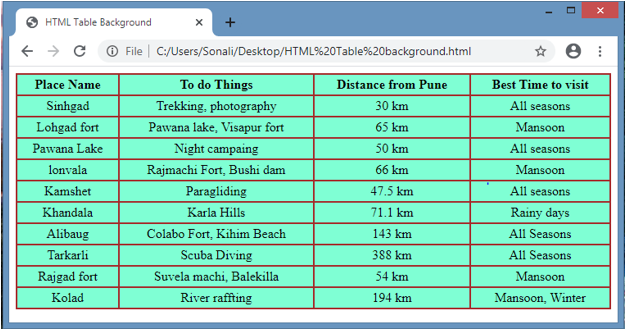
This example is for setting the background as a color. So can set the color to the table background as per their choice.HTML code and output for it as follows:
Code:
Output:
Example #2
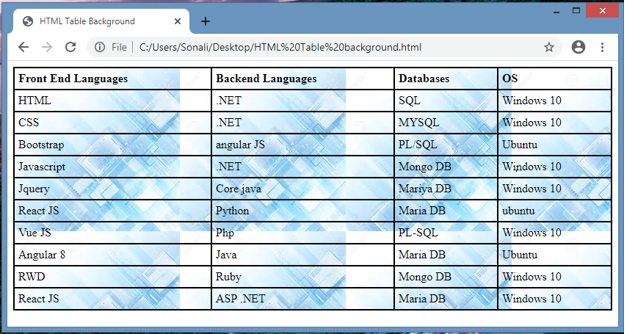
This example is for setting the background as an image. So one can set an image to the table background as per their choice. Image is in repeat mode as output, HTML code and output for it as follows:
Code:
Output:
Example #3
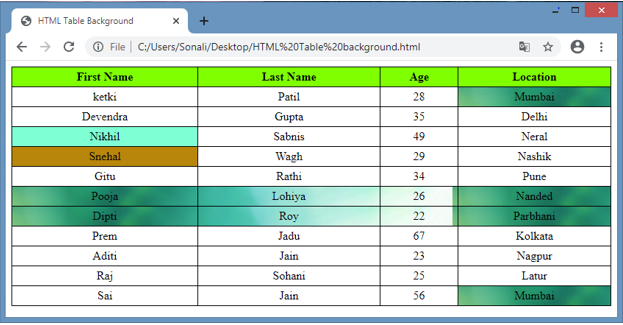
This is one more scenario in which we are going to add both image and color as a background but to the particular cell.
Code :
Output:
Conclusion
Like other elements, it’s also possible to set the background in the form of an image and color to the HTML Table. One can set an image or color to the specific table attributes like the whole table or to the table head, table row or table column. This is also possible using table background property in code.
Recommended Articles
This is a guide to HTML Table Background. Here we discuss the Examples of HTML Table Background along with the code and output. You can also go through our other suggested articles to learn more –
HTML Table background
We can change background of a table in two ways. We can add different Colors as background of an HTML Table as well as we can add pictures as a Table background.
HTML Background Color
We can use bgcolor attribute of a Table to add colors as background.
You can use color names or use hexadecimal color code in bgcolor attribute.
HTML Source Code :
Cell background color
You can set bgcolor attribute either in Table level or in each Cells.
The above code will change only the particular cell color to red.
HTML Source Code :
HTML Table Background Images
The background attribute allows you to change the background inside your table to that of an image of your choice.
Cell Background Images
You can set background images to each cells.
If the image dimensions are smaller than the table dimensions and there is enough space in the table, the image will repeat.
Note : The bgcolor and background attributes are deprecated in HTML 4.01.
Backgroung image for a table
How can we integrate a picture as a background image for a table..
4 Answers 4
Are you asking how to assign a background image to a table? Like for any other HTML element.
see that page for the additional parameters background-repeat and background-position .

following on from Pekka’s example.
would let you put a background image in each cell
if you applied a class attribute to the <td > you could then add a custom background to individual cells.
inline css like — style=»background-image: url(your_image.gif);» — is not quite good.
in my opinion best way to put bg to table is ;
html : table > tr > td.wide
-
The Overflow Blog
Related
Hot Network Questions
Subscribe to RSS
To subscribe to this RSS feed, copy and paste this URL into your RSS reader.
Site design / logo © 2023 Stack Exchange Inc; user contributions licensed under CC BY-SA . rev 2023.5.24.43458
By clicking “Accept all cookies”, you agree Stack Exchange can store cookies on your device and disclose information in accordance with our Cookie Policy.