How to Change Font with HTML

Kolade Chris

Back in the days of HTML4, there was a <font> tag you could use to change the font size, font family, and the color of a text.
But with HTML5, the <font> tag has been deprecated. So if you want to change anything related to the font, you have to do it with CSS.
In this article, I will show you how to change the font size, font weight, font style, and font family of text using CSS.
How to Change the Font Size of Text
The font size of text represents how big that text is.
To change the font size of some text, you need to use the font-size property and then specify the value in pixels ( px ), rem , or em .
You can do it using inline CSS like this:
You can also do it in embedded or internal CSS:
And finally you can do it in external CSS:
To get rid of the default white background and center the text both horizontally and vertically, I wrote this CSS:

In the browser, it looks as shown below:
How to Change the Font-weight of Text
Font-weight is the property that helps set how bold or light specific text will be.
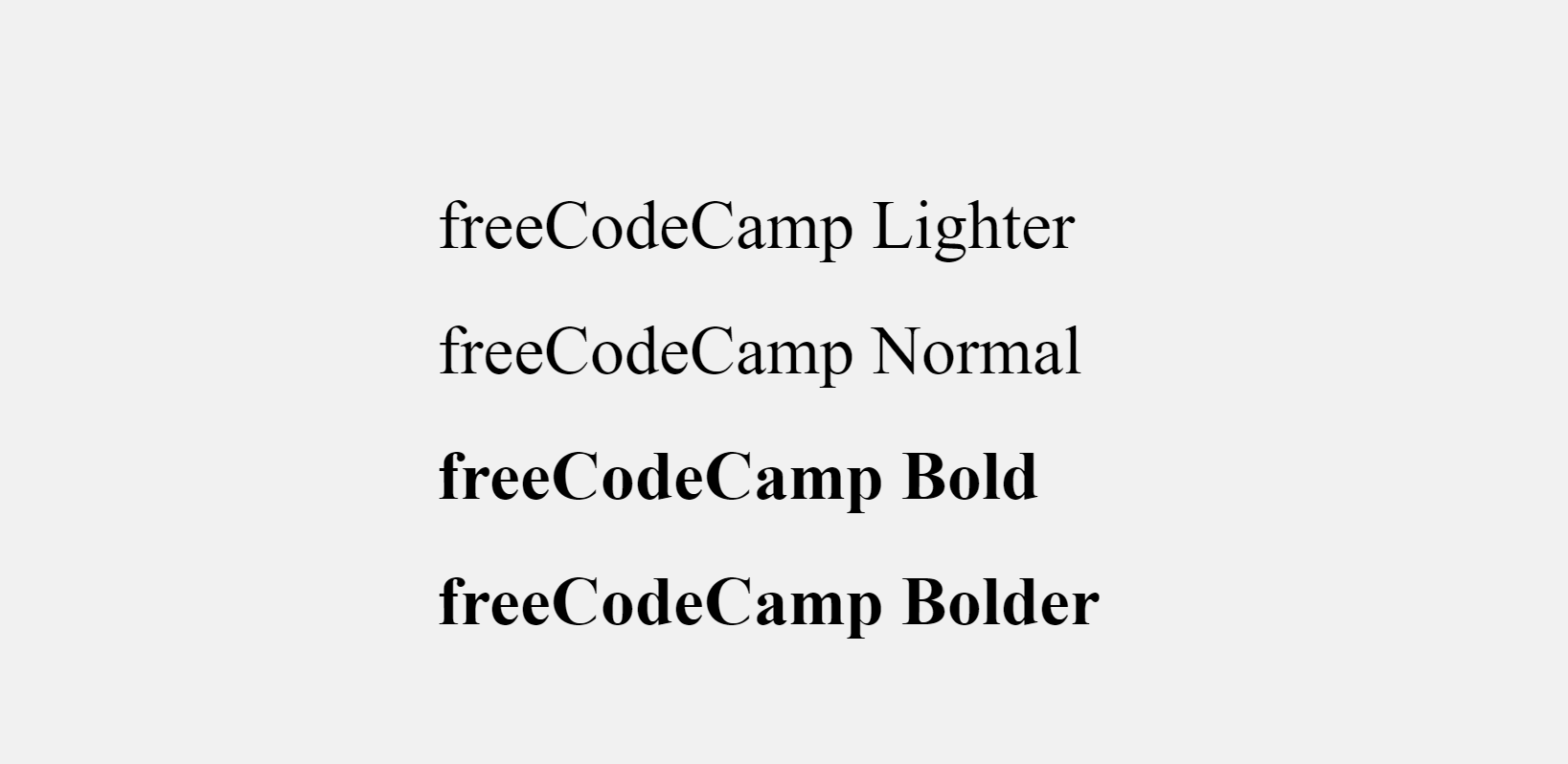
You can use font-weight to change the lightness or boldness of text, then give it a value such as normal , lighter , bold , or bolder . You can also use values like 100, 200, 500, and so on.
Just like font size, you can change the font-weight in inline, embedded, or external CSS.
How to Change the Font Style of Text
Font style is the typeface variation of the text. This typeface variation could be normal , bold , or italic .
To change the font style, you need the font-style property with a value of normal , oblique , or italic .
Normal is the default font style, so you don’t need to specify it unless you have to override it.
As usual, you can change the font style in inline, internal, or external CSS.
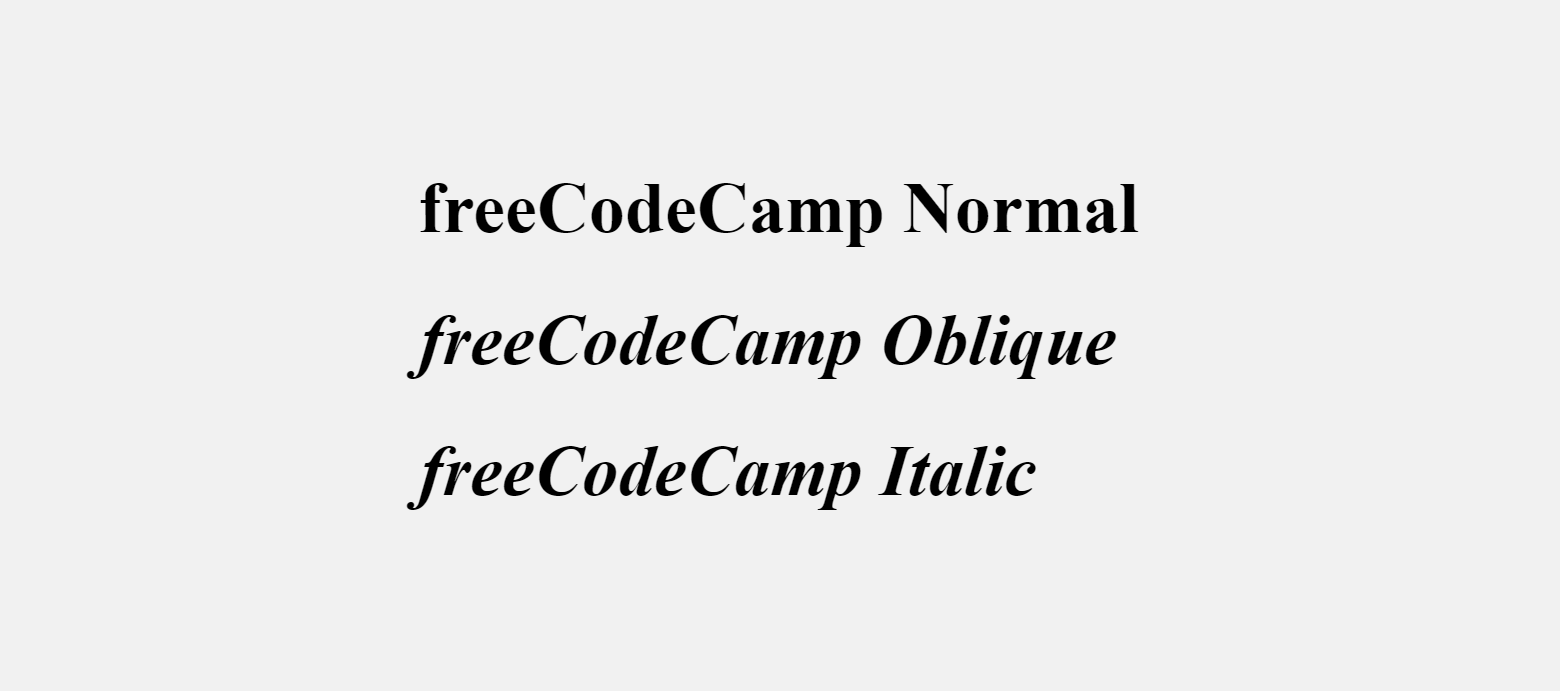
Here’s the output in the browser:
How to Change the Font Family of Text
A font family represents a collection of fonts that share the same design and typography.
To change the font family of some text, you need to use the CSS font-family property.
You can then choose to do it with inline CSS, internal CSS, or external CSS.
The code snippet below shows how to change the font-family in inline CSS:
In an external CSS file you can change the font family like this:
Make sure the external CSS is linked to the HTML file, otherwise it won’t work.

The Verdana font family looks like this inside the Google Chrome browser:
You might have noticed that there are other font families in the value – Geneva, Tahoma, and sans-serif.
Those are fallbacks the browser can use in case Verdana is not available on the user’s device.
If you don’t like the fonts built into your device, you can get other ones from Google Fonts.
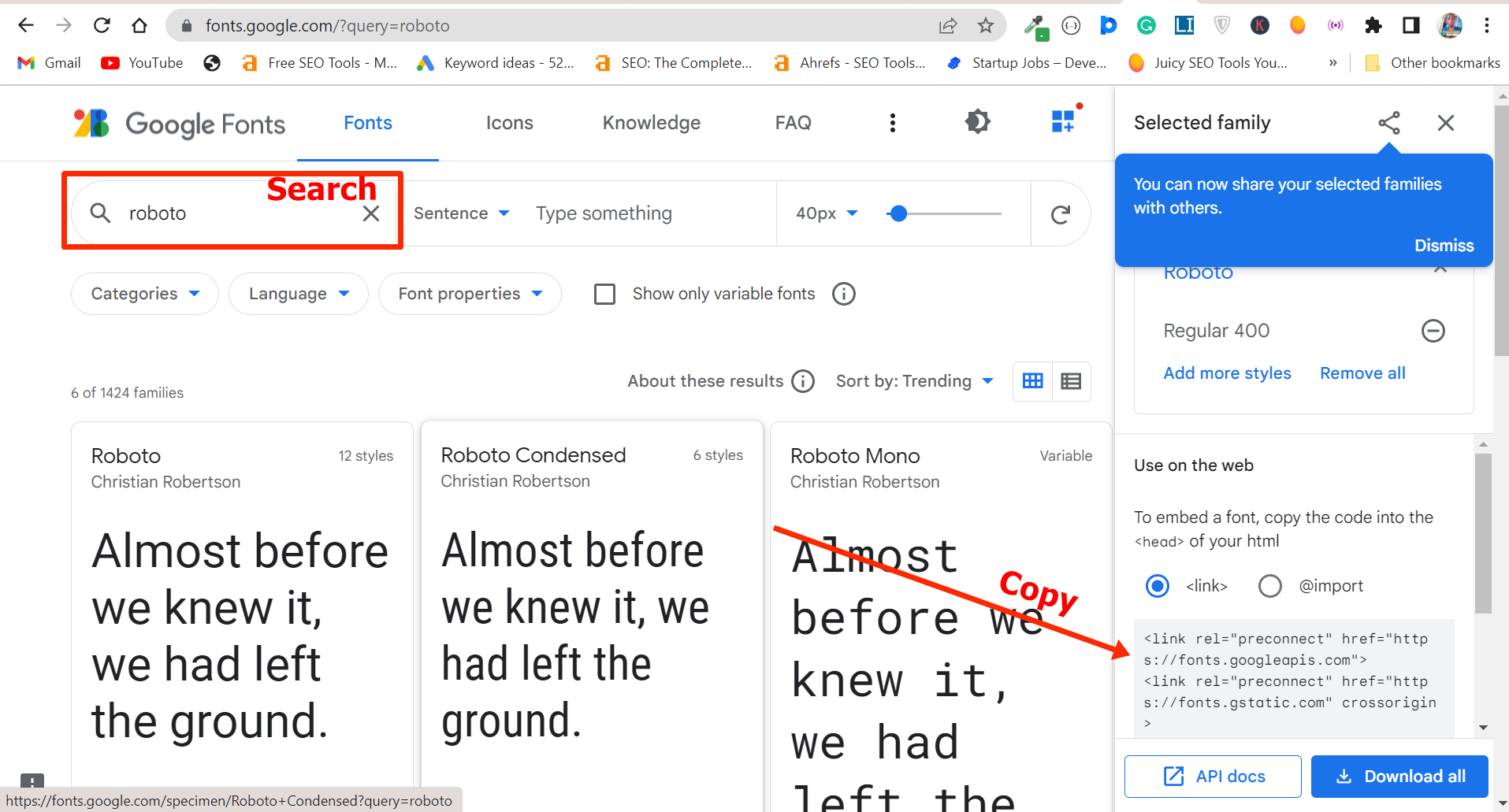
Search for your favorite font and copy the link to it, then paste the link in the <head> section of your HTML so you can have access to it in your HTML stylesheet
In my case, I used the Roboto font like this:

And this is how it looks in the browser:
Conclusion
This article walked you through how to change the font size, font weight, font style, and font family of text in inline, internal, or external CSS.
You might be wondering which is best to use between inline, internal, or external CSS.
If you’re working on a small project, you can use internal or embedded CSS, but if you’re working on a big project or in a team, you should not use internal CSS.
This is because it is a best practice to keep your CSS away from your HTML.
Inline CSS is a no-no in most situations because it might affect the readability of your HTML.
It’s also been suggested that inline CSS can negatively affect the SEO of a website.
Как изменить шрифт html css
The font CSS shorthand property sets all the different properties of an element’s font. Alternatively, it sets an element’s font to a system font.
Try it
As with any shorthand property, any individual value that is not specified is set to its corresponding initial value (possibly overriding values previously set using non-shorthand properties). Though not directly settable by font , the longhands font-size-adjust and font-kerning are also reset to their initial values.
Constituent properties
This property is a shorthand for the following CSS properties:
Syntax
The font property may be specified as either a single keyword, which will select a system font, or as a shorthand for various font-related properties.
If font is specified as a system keyword, it must be one of: caption , icon , menu , message-box , small-caption , status-bar .
If font is specified as a shorthand for several font-related properties, then:
- it must include values for:
Values
See the font-style CSS property.
See the font-variant CSS property.
See the font-weight CSS property.
See the font-stretch CSS property.
See the font-size CSS property.
See the line-height CSS property.
See the font-family CSS property.
System font values
The system font used for captioned controls (e.g., buttons, drop-downs, etc.).
The system font used to label icons.
The system font used in menus (e.g., dropdown menus and menu lists).
The system font used in dialog boxes.
The system font used for labeling small controls.
The system font used in window status bars.
Prefixed system font keywords
Browsers often implement several more, prefixed, keywords: Gecko implements -moz-window , -moz-document , -moz-desktop , -moz-info , -moz-dialog , -moz-button , -moz-pull-down-menu , -moz-list , and -moz-field .
Как изменить или подключить шрифт в CSS
Большинство текстовых элементов по умолчанию имеют шрифт Times New Roman. В CSS есть возможность установить другие шрифты. Также в CSS можно подключить шрифт, который изначатьно не был предусмотрен в браузерах. В этой теме мы рассмотрим, как это сделать.
Семейства шрифтов
Шрифты подразделяются на семейства. Существуют такие семейства шрифтов:
serif — с засечками
sans-serif — без засечек
Безопасные шрифты
Существует достаточно много шрифтов. Сложность их использования заключается в том, что каждая операционная система имеет свой набор шрифтов. Кроме того, различные браузеры также отображают не все шрифты. Если для какого-то текстового элемента установлен шрифт, которого нет в операционной системе компьютера пользователя, то текст будет отображаться каким-то другим шрифтом. Шрифты, которые отображаются на всех компьютерах и во всех браузерах, называются безопасными. Считается, что абсолютно безопасных нет. Но всё же, существует ряд шрифтов, которые есть у абсолютного большинства пользователей. Далее приведены безопасные шрифты с указанием их семейства.
Times New Roman, serif
Trebuchet MS, sans-serif
Courier New, monospace
Comic Sans MS, cursive
Другие шрифты Вы можете найти, если наберёте в любом поисковике: стандартные шрифты.
Установка шрифта
Чтобы изменить или подключить шрифт в CSS используется свойство font-family . Значением этого свойства является название шрифта. Для примера создадим абзац и установим ему шрифт:
Если в названии шрифта больше одного слова, то оно пишется в кавычках. Пример:
Свойство font-family позволяет указать несколько шрифтов через запятую. Также можно указать семейтсво шрифтов. При этом, будет использоваться шрифт, указанный первым. Если такого нет, то используется следующий шрифт, и так далее. В основном, на реальных страницах так и делают. Это делается для того, чтобы быть уверенным, что страница будет отображаться так, как нужно.
Как подключить нестандартный шрифт в CSS
Кроме шрифтов, которые содержатся в операционной системе пользователя, можно использовать и другие шрифты. Их можно найти в интернете или создать самостоятельно. Существует много нестандартных шрифтов. Их можно найти, через поисковик. Файл шрифта нужно скачать и присоединить к странице. Некоторые шрифты являются платными. Об этом должна быть информация на странице, с которой Вы скачиваете шрифт.
Сложность использования нестандартных шрифтов заключается в том, что каждый браузер поддерживает свой набор форматов. Поэтому, при использовании нестандартрого шрифта нужно проверять, как отображается страница в разных браузерах. Форматов шрифтов достаточно много. Наиболее универсальным является формат woff. Он должен работать в большинстве современных браузеров. Также распространены ttf и otf.
Чтобы подключить нестандартный шрифт CSS используется правило @font-face. В нём обязательно должны быть два свойства: в свойстве font-family указывается название шрифта, под которым он будет использоваться на сайте. Название Вы выбираете сами. А в свойстве src указывается путь к файлу шрифта.
После этого, шрифт можно использовать для любого селектора. В свойстве font-family нужно указать название, которое Вы выбрали для шрифта.
Для примера я использую файл шрифта unineue.woff. Он располагается в той же папке, что и страница. Шрифт я назову Nfont.
Чтобы шрифт работал в разных браузерах, можно использовать несколько файлов с разными форматами. В свойстве src путь к файлам пишется через запятую. Каждый браузер сам определяет, какой тип файла использовать. При этом желательно указывать форматы файлов, чтобы браузер мог правильно выбрать файл. CSS правило @font-face будет выглядеть так:
Web Style Sheets CSS tips & tricks
After the color, the font is probably the most basic property of a page. On this page I won’t show any «tricks,» but I will show the range of font variations that CSS allows.
Since not all fonts are available on all computers (there are thousands of fonts, and most are not free), CSS provides a system of fallbacks. You list the font that you want first, then any fonts that might fill in for the first if it is unavailable, and you should end the list with a generic font, of which there are five: serif, sans-serif, monospace, cursive and fantasy.
Font styles
Most fonts have various styles within the same family, typically a bold and an italic one, often also a bold italic style, somewhat less often a small-caps and in a few cases extra-light/extra-bold or stretched/condensed versions.
The CSS Fonts Module has more properties to specify special styles (for fonts that provide several variants), in particular the font-variant property has many more values.
Site navigation
 Bert Bos, style activity lead
Copyright © 1994–2021 W3C ® Privacy policy