Циклы for и while в Python
Еще одной важной инструкцией языка Python является цикл for/in , который можно смело назвать универсальным итератором последовательностей, поскольку он позволяет выполнять обход элементов в любых объектах, поддерживающих возможность совершения итераций. При этом сюда относятся как встроенные объекты, например, строки, списки или словари, так и объекты, создаваемые с помощью классов (о них чуть позже).
В общем виде для цикла for используется следующий синтаксис:
В ходе выполнения цикла for интерпретатор один за другим присваивает переменной заголовка элементы итерируемого объекта и выполняет для них инструкции тела цикла (см. пример №1 ). Если цикл нужно прервать, используется ключевое слово break , которое передает управление инструкции, следующей сразу за циклом. Кроме того, в цикле for разрешается использовать необязательный блок else , набор инструкций которого выполняется только после удачного завершения цикла (т.е. при отсутствии ошибки или прерывания за счет использования инструкции break ).
Пример №1. Использование цикла for (часть 1).
В примере с помощью инструкции цикла for список проверяется на превышение лимита суммы его элементов. Для этого используется знакомая нам вложенная условная инструкция if/else , которая и проверяет сумму на достижение лимита. Если в ходе очередной итерации цикла сумма не достигает указанного предела, значение счетчика суммы sum увеличивается на значение переменной заголовка цикла elem , т.е. sum += elem . После этого цикл переходит к следующей итерации и присваивает переменной elem значение следующего элемента списка. И так до тех пор, пока не будет завершен обход всех элементов списка или не будет достигнут лимит суммы. Если лимит суммы достигнут не будет, сработает набор инструкций блока else цикла, т.е. итоговая сумма будет выведена на экран. После этого будет выполнена инструкция, следующая за циклом. В случае достижения лимита, сработает набор инструкций блока else условной инструкции if , т.е. будет выведено предупреждение, а цикл будет прерван инструкцией break , которая передаст управление инструкции, опять же, следующей за циклом.
Обратите внимание, что в нашем примере были использованы два блока else : один принадлежит условной инструкции if , а другой – инструкции цикла for/in . Отличить их легко по уровню отступов. Оба блока не являются обязательными в своих конструкциях, но в нашем случае конструкция for/else , позволяет выводить итоговое сообщение не всегда, а только в случае успешного завершения цикла.
Также стоит помнить, что значение переменной заголовка цикла elem при каждой новой итерации обновляется, поэтому после завершения цикла в ней будет храниться значение, присвоенное в ходе последней итерации.
Давайте рассмотрим еще несколько наглядных вариаций цикла for/in , чтобы увидеть, как он используется на практике (см. пример №2 ).
Пример №2. Использование цикла for (часть 2).
Как видим, инструкция цикла for в Python действительно имеет весьма простой синтаксис и с легкостью позволяет совершать обход элементов в любых итерируемых объектах, в особенности внутри упорядоченных последовательностей вроде строк или списков, в которых обход осуществляется поочередно в порядке возрастания индексов их элементов.
Цикл while
Инструкция цикла while представляет собой универсальный цикл общего назначения. Он служит для повторного выполнения кода, расположенного в его теле, до тех пор, пока условие цикла остается истинным, т.е. имеет значение True . В общем случае синтаксис цикла while в Python можно представить в следующем виде:
Работает цикл while следующим образом: каждый раз перед выполнением новой итерации, т.е. перед очередным выполнением блока инструкций в теле цикла, происходит проверка его условия и, если результат будет иметь значение True , код в теле цикла выполняется; далее интерпретатор возвращается в начало цикла и снова проверяет его условие, повторяя все процедуры заново до тех пор, пока условие цикла не вернет значение False ; в этом случае интерпретатор прерывает выполнение цикла и, пропустив блок инструкций в его теле, передает управление либо необязательному ключевому слову else , выполняя дополнительный блок инструкций, либо инструкции, следующей за циклом. При этом следует иметь в виду, что набор инструкций блока else выполняется только тогда, когда выход из цикла производится не инструкцией break (см. пример №3 ).
Пример №3. Использование цикла while (часть 1).
В нашем примере цикл совершил три итерации. На первых двух итерациях сумма элементов списка наращивалась, но не достигла допустимого предела. В результате этого цикл пошел на третий виток, где сумма элементов все-таки превысила лимит. Это привело к тому, что цикл был прерван инструкцией break , а интерпретатор начал обрабатывать выражение вызова функции print() , следующее за циклом. Если бы общая сумма всех элементов списка оказалась меньше допустимого лимита, цикл продолжил бы работу до тех пор, пока переменная счетчика не стала бы равной четырем, а условие цикла не вернуло бы False . Далее интерпретатор пропустил бы блок инструкций тела цикла и стал бы обрабатывать дополнительный набор инструкций его блока else . Попробуйте уменьшить значение элементов списка и убедитесь в этом.
Стоит заметить, что в языке Python отсутствует цикл do/while , имеющийся в других языках программирования. Однако его можно имитировать, добавив в конец тела цикла условную инструкцию одновременно с инструкцией break (см. пример №4 ).
Пример №4. Использование цикла while (часть 2).
Как видим, в данной имитации тело цикла при любом значении счетчика будет выполнено как минимум один раз, что является побочным эффектом проверки условия в конце цикла свойственного реальной конструкции do/while .
Кстати, обратите внимание, что при использовании счетчиков в наших примерах мы инициализировали их вне циклов. Это нужно для того, чтобы при каждой новой итерации их значения не сбрасывались циклом в первоначальное состояние.
Инструкции break и continue
Инструкции break и continue используются только внутри циклов и выполняют примерно те же функции, что и в других языках программирования: break прерывает объемлющий цикл и передает управление следующей за циклом инструкции, а continue прерывает только текущую итерацию и производит переход в начало цикла, т.е. в строку заголовка. При этом обе инструкции могут появляться в любом месте внутри тела цикла, но как правило, их используют во вложенных в цикл условных инструкциях if , чтобы выполнить необходимое действие в ответ на некоторое условие (см. пример №5 ).
Пример №5. Использование инструкций break и continue (часть 1).
Здесь хотелось бы обратить внимание на то, что все виды циклов в Python могут иметь другие вложенные циклы и условные инструкции, позволяя нужным образом изменять дальнейший ход выполнения программы. Но дело в том, что каждая отдельная инструкция break или continue относится только к одному ближайшему объемлющему циклу. Поэтому, например, выйти сразу из всех внешних циклов при помощи всего лишь одной инструкции break расположенной в самом глубоком вложенном цикле не получится, нужно использовать инструкцию во всех циклах текущей иерархии (см. пример №6 ).
Пример №6. Использование инструкций break и continue (часть 2).
В Python отсутствует возможность использования конструкций вида break n или continue n , где n указывало бы на количество прерываний внешних циклов. Вместо этого необходимо использовать собственные инструкции для каждого из n циклов по отдельности.
Краткие итоги параграфа
- Для обхода элементов в любых объектах, поддерживающих возможность совершения итераций, в Python предназначен цикл for/in . В ходе выполнения этого цикла интерпретатор один за другим присваивает переменной заголовка элементы итерируемого объекта и выполняет для них инструкции тела цикла.
- Для многократного повторного выполнения кода (не только обхода элементов) служит универсальный цикл общего назначения while , который выполняет блок инструкций, расположенный в его теле, до тех пор, пока условие цикла остается истинным, т.е. имеет значение True .
- При необходимости в циклах for и while разрешается использовать необязательный блок else , набор инструкций которого выполняется только после удачного завершения цикла (т.е. при отсутствии ошибки или прерывания за счет использования инструкции break ).
- При использовании счетчиков следует инициализировать их вне циклов, чтобы при каждой новой итерации их значения не сбрасывались циклом в первоначальное состояние.
- Для прерывания циклов в Python используется инструкция break , которая прерывает объемлющий цикл и передает управление следующей за циклом инструкции. Если нужно прервать только текущую итерацию, необходимо использовать инструкцию continue , которая после прерывания итерации производит переход в начало цикла, т.е. в строку заголовка. Обе инструкции могут появляться в любом месте внутри тела цикла, но как правило, их используют во вложенных в цикл условных инструкциях if , чтобы выполнить необходимое действие в ответ на некоторое условие.
- Следует помнить, что в Python разрешается использовать многоуровневые вложенные циклы, однако при этом отсутствует возможность использования конструкций вида break n или continue n , где n указывало бы на количество прерываний внешних циклов. Вместо этого необходимо использовать собственные инструкции для каждого из n циклов по отдельности.
Вопросы и задания для самоконтроля
1. Для чего в программировании используются циклы? Какие виды циклов присутствуют в арсенале языка Python ? Показать решение.
Ответ. Циклы в программировании используются для организации многократного исполнения набора инструкций. В языке Python циклы представлены конструкциями for/in и while : основным предназначением цикла for является обход элементов итерируемого объекта, а while представляет собой универсальный цикл общего назначения. Стоит заметить, что с помощью инструкции while можно сымитировать в том числе и счетный цикл for , однако программный код, как хорошо видно из наших примеров выше, получится менее компактным и может выполняться медленнее.
2. Допустимо ли в Python использование вложенных друг в друга циклов? Показать решение.
Ответ. В Python разрешается использовать как вложенные циклы, так и вложенные условные инструкции if .
3. Обязательно ли использование блока else в циклах? При каких условиях он выполняется? Показать решение.
Ответ. Блок инструкций оператора else в циклах не является обязательным, а его инструкции выполняются только после удачного завершения цикла (т.е. при отсутствии ошибки или прерывания за счет использования оператора break ).
4. В чем заключается основное отличие инструкции break от инструкции continue ? Показать решение.
Ответ. Инструкция break полностью прерывает объемлющий цикл и передает управление следующей за циклом инструкции, в то время как инструкция continue прерывает только текущую итерацию и производит переход в начало цикла, т.е. в строку его заголовка.
5. Выведите все элементы списка [10, 20, 30] на экран сперва при помощи цикла for , а затем и цикла while . Показать решение.
6. Дополнительные упражнения и задачи по теме расположены в разделе «Циклы for и while» нашего сборника задач и упражнений по языку программирования Python .
Python как продолжить цикл после ошибки
Using loops in Python automates and repeats the tasks in an efficient manner. But sometimes, there may arise a condition where you want to exit the loop completely, skip an iteration or ignore that condition. These can be done by loop control statements. Loop control statements change execution from its normal sequence. When execution leaves a scope, all automatic objects that were created in that scope are destroyed. Python supports the following control statements.
Break statement
The break statement is used to terminate the loop or statement in which it is present. After that, the control will pass to the statements that are present after the break statement, if available. If the break statement is present in the nested loop, then it terminates only those loops which contains break statement.
Syntax:
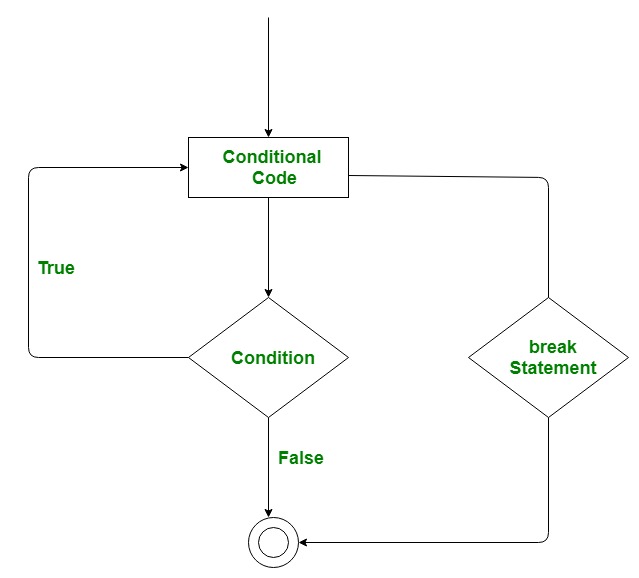
Example: Consider a situation where you want to iterate over a string and want to print all the characters until a letter ‘e’ or ‘s’ is encountered. It is specified that you have to do this using loop and only one loop is allowed to use. Here comes the usage of break statement. What we can do is iterate over a string using either a while loop or for loop and every time we have to compare the value of iterator with ‘e’ or ‘s’. If it is ‘e’ or ‘s’ we will use the break statement to exit the loop. Below is the implementation.
Python Break, Continue, and Pass
In this article, you will learn how to use the break , continue and pass statements when working with loops in Python. We use break, continue statements to alter the loop’s execution in a certain manner.
| Statement | Description |
|---|---|
| break | Terminate the current loop. Use the break statement to come out of the loop instantly. |
| continue | Skip the current iteration of a loop and move to the next iteration |
| pass | Do nothing. Ignore the condition in which it occurred and proceed to run the program as usual |
Loop control statements in Python
The break and continue statements are part of a control flow statements that helps you to understand the basics of Python.
Table of contents
Break Statement in Python
The break statement is used inside the loop to exit out of the loop. In Python, when a break statement is encountered inside a loop, the loop is immediately terminated, and the program control transfer to the next statement following the loop.
In simple words, A break keyword terminates the loop containing it. If the break statement is used inside a nested loop (loop inside another loop), it will terminate the innermost loop.
For example, you are searching a specific email inside a file. You started reading a file line by line using a loop. When you found an email, you can stop the loop using the break statement.
We can use Python break statement in both for loop and while loop. It is helpful to terminate the loop as soon as the condition is fulfilled instead of doing the remaining iterations. It reduces execution time.
Syntax of break :
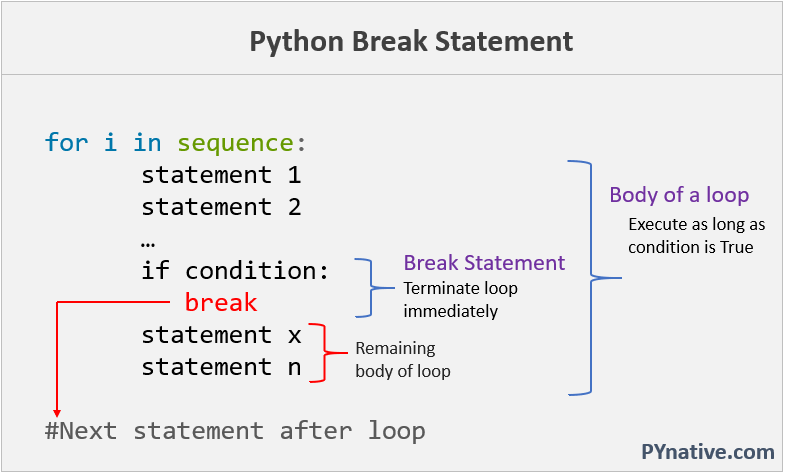
Break loop in Python
Let us see the usage of the break statement with an example.
Example: Break for loop in Python
In this example, we will iterate numbers from a list using a for loop, and if we found a number greater than 100, we will break the loop.
Use the if condition to terminate the loop. If the condition evaluates to true, then the loop will terminate. Else loop will continue to work until the main loop condition is true.
Output:
Note: As you can see in the output, we got numbers less than 100 because we used the break statement inside the if condition (the number is greater than 100) to terminate the loop
How break statement works
We used a break statement along with if statement. Whenever a specific condition occurs and a break statement is encountered inside a loop, the loop is immediately terminated, and the program control transfer to the next statement following the loop.
Let’s understand the above example iteration by iteration.
- In the first iteration of the loop, 10 gets printed, and the condition i > 100 is checked. Since the value of variable i is 10, the condition becomes false.
- In the second iteration of the loop, 20 gets printed again, and the condition i > 100 is checked. Since the value of i is 40, the condition becomes false.
- In the third iteration of the loop, the condition i > 100 becomes true, and the break statement terminates the loop
Example: Break while loop
We can use the break statement inside a while loop using the same approach.
Write a while loop to display each character from a string and if a character is a space then terminate the loop.
Use the if condition to stop the while loop. If the current character is space then the condition evaluates to true, then the break statement will execute and the loop will terminate. Else loop will continue to work until the main loop condition is true.
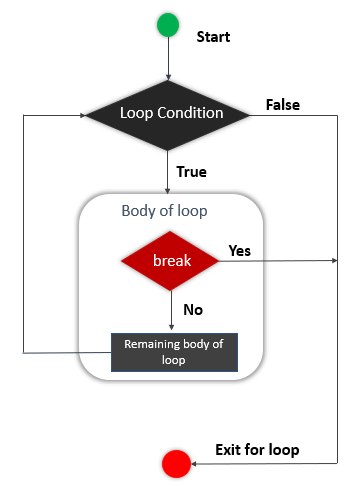
Flow chart of a break statement
Break Nested Loop in Python
To terminate the nested loop, use a break statement inside the inner loop. Let’s see the example.
In the following example, we have two loops, the outer loop, and the inner loop. The outer for loop iterates the first 10 numbers using the range() function, and the internal loop prints the multiplication table of each number.
But if the current number of both the outer loop and the inner loop is greater than 5 then terminate the inner loop using the break statement.
Example: Break nested loop
Break Outer loop in Python
To terminate the outside loop, use a break statement inside the outer loop. Let’s see the example.
In the following example, we have two loops, the outer loop, and the inner loop. The outer loop iterates the first 10 numbers, and the internal loop prints the multiplication table of each number.
But if the current number of the outer loop is greater than 5 then terminate the outer loop using the break statement.
Example: Break outer loop
Continue Statement in Python
The continue statement skip the current iteration and move to the next iteration. In Python, when the continue statement is encountered inside the loop, it skips all the statements below it and immediately jumps to the next iteration.
In simple words, the continue statement is used inside loops. Whenever the continue statement is encountered inside a loop, control directly jumps to the start of the loop for the next iteration, skipping the rest of the code present inside the loop’s body for the current iteration.
In some situations, it is helpful to skip executing some statement inside a loop’s body if a particular condition occurs and directly move to the next iteration.
Syntax of continue :
Let us see the use of the continue statement with an example.
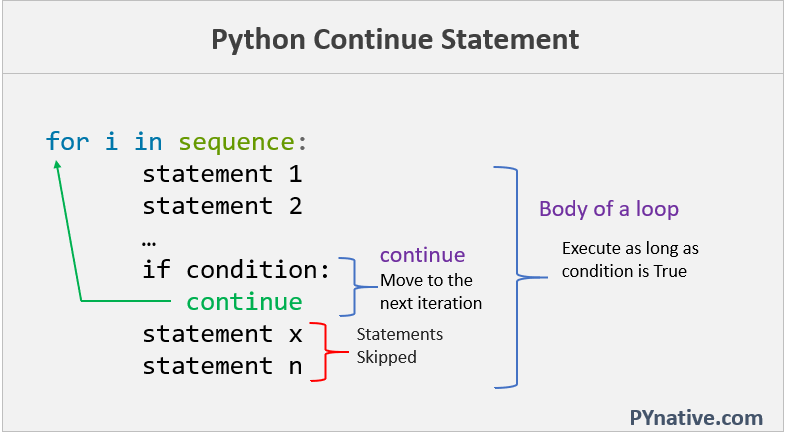
Python continue statement in loop
Example: continue statement in for loop
In this example, we will iterate numbers from a list using a for loop and calculate its square. If we found a number greater than 10, we will not calculate its square and directly jump to the next number.
Use the if condition with the continue statement. If the condition evaluates to true, then the loop will move to the next iteration.
Output:
Note: As you can see in the output, we got square of 2, 3, and 7, but the loop ignored number 11 because we used the if condition to check if the number is greater than ten, and the condition evaluated to true, then loop skipped calculating the square of 11 and moved to the next number.
How continue statement works
We used the continue statement along with the if statement. Whenever a specific condition occurs and the continue statement is encountered inside a loop, the loop immediately skips the remeaning body and move to the next iteration.
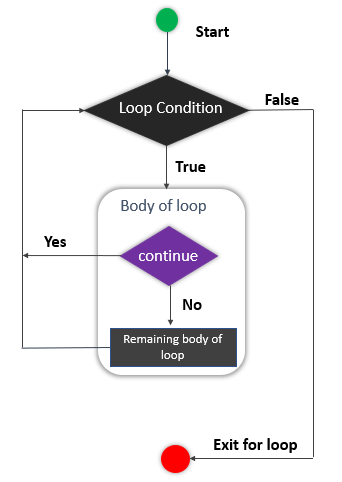
Flow chart of a continue statement
Let’s understand the above example iteration by iteration.
- In the first iteration of the loop, 4 gets printed, and the condition i > 10 is checked. Since the value of i is 2, the condition becomes false.
- In the second iteration of the loop, 9 gets printed, and the condition i > 10 is checked. Since the value of i is 9, the condition becomes false.
- In the third iteration of the loop, the condition i > 10 becomes true, and the continue statement skips the remaining statements and moves to the next iteration of the loop
- In the second iteration of the loop, 49 gets printed, and the condition i > 10 is checked. Since the value of i is 7, the condition becomes false.
Example: continue statement in while loop
We can also use the continue statement inside a while loop. Let’s understand this with an example.
Write a while loop to display each character from a string and if a character is a space, then don’t display it and move to the next character.
Use the if condition with the continue statement to jump to the next iteration. If the current character is space, then the condition evaluates to true, then the continue statement will execute, and the loop will move to the next iteration by skipping the remeaning body.
Output:
Continue Statement in Nested Loop
To skip the current iteration of the nested loop, use the continue statement inside the body of the inner loop. Let’s see the example.
In the following example, we have the outer loop and the inner loop. The outer loop iterates the first 10 numbers, and the internal loop prints the multiplication table of each number.
But if the current number of the inner loop is equal to 5, then skip the current iteration and move to the next iteration of the inner loop using the continue statement.
Example: continue statement in nested loop
Continue Statement in Outer loop
To skip the current iteration of an outside loop, use the continue statement inside the outer loop. Let’s see the example
In the following example, The outer loop iterates the first 10 numbers, and the internal loop prints the multiplication table of each number.
But if the current number of the outer loop is even, then skip the current iteration of the outer loop and move to the next iteration.
Note: If we skip the current iteration of an outer loop, the inner loop will not be executed for that iteration because the inner loop is part of the body of an outer loop.
Example: continue statement in outer loop
Pass Statement in Python
The pass is the keyword In Python, which won’t do anything. Sometimes there is a situation in programming where we need to define a syntactically empty block. We can define that block with the pass keyword.
A pass statement is a Python null statement. When the interpreter finds a pass statement in the program, it returns no operation. Nothing happens when the pass statement is executed.
It is useful in a situation where we are implementing new methods or also in exception handling. It plays a role like a placeholder.
Syntax of pass statement:
Example
Output
Did you find this page helpful? Let others know about it. Sharing helps me continue to create free Python resources.
About Vishal
Founder of PYnative.com I am a Python developer and I love to write articles to help developers. Follow me on Twitter. All the best for your future Python endeavors!
Related Tutorial Topics:
Python Exercises and Quizzes
Free coding exercises and quizzes cover Python basics, data structure, data analytics, and more.
Python Break and Python Continue – How to Skip to the Next Function

If you ever need to skip part of the current loop you are in or break out of the loop completely, then you can use the break and continue statements.
In this article, I will cover how to use the break and continue statements in your Python code.
How to use the break statement in Python
You can use the break statement if you need to break out of a for or while loop and move onto the next section of code.
In this first example we have a for loop that loops through each letter of freeCodeCamp.
This is what is printed to the console:

If we wanted to stop our loop at the letter «o», then we can use an if statement followed by a break statement.
This is what is printed to the console:

In this next example, we are using a while loop to increment num as long as num is less than 20.
This is what is printed to the console:

We could add a condition inside our while loop that says if num is 9, then break out of the loop.
This is what is printed to the console:

How to use the continue statement in Python
You can use the continue statement if you need to skip the current iteration of a for or while loop and move onto the next iteration.
In this example, we are looping through a string of my name.
Inside the for loop, we have a condition that says if the letter is «i» then skip that iteration and move onto the next iteration.
This is what the code looks like all together:
This is what is printed to the console:

You should notice that the letter «i» was not printed to the console and the continue statement skipped that iteration.
In this next example, we are going to print numbers in increments of 10 using a while loop. We are going to add a condition in the loop that says if the number is 50, then skip that iteration and move onto the next one.
This is what is printed to the console:

As you can see, the number 50 is not printed to the console because of the continue statement inside the if statement.
Conclusion
The break and continue statements in Python are used to skip parts of the current loop or break out of the loop completely.
The break statement can be used if you need to break out of a for or while loop and move onto the next section of code.
The continue statement can be used if you need to skip the current iteration of a for or while loop and move onto the next iteration.