Функция slice() в Python
Строка Python поддерживает slice() для создания подстроки. Обратите внимание, что строка является неизменной, при нарезке из исходной строки создается новая подстрока, а исходная строка остается неизменной.
Нарезка начинается с индекса start_pos (включен) и заканчивается индексом end_pos (исключая). Параметр step используется для указания шагов, которые нужно выполнить от начала до конца индекса.
slice() в Python всегда следует этому правилу: s [: i] + s [i:] == s для любого индекса ‘i’.
Все эти параметры являются необязательными – значение по умолчанию start_pos равно 0, значение по умолчанию end_pos – длина строки, а значение шага по умолчанию – 1.
Давайте посмотрим на несколько простых примеров функции slice для создания подстроки.
Обратите внимание: поскольку ни один из параметров нарезки не был предоставлен, подстрока равна исходной строке.
Давайте рассмотрим еще несколько примеров.
Обратите внимание, что значение индекса начинается с 0, поэтому start_pos 2 относится к третьему символу в строке.
Как перевернуть строку с помощью slice?
Мы можем перевернуть строку, используя slice(), указав значение шага как –1.
Давайте посмотрим на некоторые другие примеры использования шагов и отрицательных значений индекса.
Здесь подстрока содержит символы из индексов 2,4 и 6.
Здесь значения индекса берутся от начала до конца. Подстрока состоит из индексов с 1 по 7 от конца до начала.


slice() также работает с отрицательными индексами, в этом случае start_pos исключается, а end_pos включается в подстроку.

slice() в Python изящно обрабатывает индексы вне диапазона.
Функция slice() в Python возвращает объект среза, представляющий набор индексов, заданных диапазоном (start, stop, step).
Обратите внимание, что функция slice() возвращает объект среза. Мы можем передать этот объект, как набор индексов с последовательностями, такими как строка, список, кортеж и т.д.
Функция позволяет нам легко создавать пошаговую подпоследовательность, не выполняя полную итерацию существующей последовательности.
Аргументы функции
- start: указывает начало значения индекса. Это необязательно, по умолчанию – None.
- stop: указывает конец значения индекса. Это обязательный параметр.
- step: указывает шаги, которые нужно выполнить от начала до остановки index. Это необязательный параметр, значение по умолчанию – None.
Объект фрагмента в Python имеет атрибуты данных только для чтения – start, stop и step, которые возвращают значения аргументов (или значение по умолчанию).
Давайте посмотрим, как создавать объекты-срезы.
Объект фрагмента не используется сам по себе, он полезен при использовании в сочетании с последовательностями для создания подпоследовательности.
Строка фрагмента
Давайте посмотрим, как использовать функцию среза со строкой. Мы передадим объект-срез, как обычный индекс, чтобы получить значение подстроки из строки.
Обратите внимание, что если индексы срезов превышают длину последовательности, исключение не возникает и данные возвращаются до максимального доступного индекса.
Мы также можем передавать отрицательные значения для функции slice(). В этом случае итерация будет выполняться в обратном направлении, т.е. от конца до начала.
Список и массив фрагментов
Давайте посмотрим на пример использования функции slice() со списком или массивом.
Кортеж фрагментов
Мы также можем использовать нарезку с кортежем, потому что это последовательность.
Синтаксис расширенного индексирования фрагментов
Поскольку нарезка очень популярна в числовом питоне, существует сокращенный способ создания объекта среза.
Давайте посмотрим на несколько примеров нарезки с использованием сокращенного подхода.
Вывод не требует пояснений, а важные детали уже упомянуты в комментариях.
Резюме
Python slice() – очень полезная функция. Мы можем легко создать подпоследовательность на основе шагов, начального и конечного индексов без выполнения полной итерации.
Python Slices

In this post I want to tell you a little bit about slicing in Python. Slicing is a powerful tool, but it’s also quite easy to make mistakes with if you’re not careful.
So, what exactly is slicing? Slicing is the process of creating a new sequence from some portion of an existing sequence. It’s actually quite an intuitive concept, with very clear parallels to something like cutting a cake in order to get a slice of the whole.
We can perform slicing on any sequence type in Python. This includes string, lists, tuples, byte objects and byte arrays.
Because slicing relies on the position of items in a sequence, it cannot be used on things like sets, which do not preserve order. More importantly, they aren’t indexed by consecutive non-negative integers, which is why dictionaries also cannot be sliced, despite having a reliable ordering in modern Python.
Creating a slice
Let’s define our first slice.
While slice may look like a function here, it’s actually a class. We therefore just bound slice_instance to some slice object.
We can see this if we print the type of slice_instance :
So far so good. So what are those numbers we passed into slice when we created this slice object?
If we take a look at the documentation for the slice class, we see that slice has three parameters:
If you’re not familiar with the notation in the documentation for parameters, items inside the square brackets are optional.
Great, so we passed in arguments for the start and stop parameters. We’ll come back to step in a little while. These start and stop values represent indexes in some as yet unspecified sequence.
So how do we use this slice object? Well, we need some sequence to try it out on.
Let’s go with a simple list to start:
We can get a slice of a sequence using subscript syntax:
Since our slice_instance goes from index 0 to index 2, we got that part of the x list only.
There are a couple things to note here:
- x_slice is of type list.
- The item at index 2 of x wasn’t included in x_slice .
This leads us to our first warning regarding slices: the index we provide for the stop parameter is not inclusive.
Slicing other sequence types
Slicing other sequence types uses exactly the same syntax.
We can define a slice object and then use it for any sequence type like so:
What you might have noticed from the example above is that slicing a sequence gives us a sequence of the same type back.
Remember that strings are just sequences of characters, and are therefore perfect candidates for slicing!
Defining a slice object inline
Instead of going through this process of defining a slice object, binding it to a variable, and then providing that variable name as part of the subscript syntax, we can do the following:
However, there is a faster way still, which we’re going to cover next.
A faster way
Python has an alternative syntax for defining a slice directly in the square brackets we use as part of the subscript syntax.
Let’s define the same slice object as we used above, but using the new syntax:
As you can probably tell, the first number is our starting index, then we provide a colon to separate our values, and the second value is the stop index. Just like before, this stop index is not inclusive.
This new syntax functions the same way for all sequence types.
Leaving some values empty
What might surprise you is that each of the following is valid syntax:
So, what exactly do each of these mean?
When we miss off the starting index, this means «start from the beginning of the sequence».
When we miss off the stopping index, this means «stop at the end of the sequence».
In the latter case, the final element is included in the new slice.
Putting these together, we can guess what the final example means: «give me the whole sequence». When you miss off both starting and ending indices, you get everything back.
Using step values
Right at the start of this post I mentioned that we can also provide an optional step value when creating a slice object. This allows us to skip over values by providing a step greater than 1 .
We go from the item at index 1 , and then go straight to the item at index 3 .
Negative step values
Step values don’t need to be positive, and this is actually a really useful property. When a step value is negative, we start at the starting index as usual, but then move along the sequence in reverse.
For example, we might want to start at index 4 , stop at index 2 , and move in steps of -1 .
Notice that the results came back in the reverse order to the original tuple. This is because the values at the end of the tuple were encountered first, and we kept stepping towards the start of the tuple.
Using extended slicing, we can still grab a whole list using the following syntax: [::] . It looks a little arcane, but it just means start at the beginning of the sequence, stop at the end, and use the default step value: 1 .
In combination with a negative step values. we can use syntax like this to check if a sequence is a palindrome, for example:
A warning about negative step values
One thing about slices is that it’s very easy to end up with an empty slice, particularly when negative values come into play.
For example, we might try to use a negative step with one of our older slices:
But the example above will give us back an empty tuple. This is because it’s impossible to get from index 1 to index 4 in steps of -1 . What would should have written is t[4:1:-1] , starting at a higher index than where we finish, which would print (5, 4, 3) .
Negative indices
In addition to providing a negative step value, we can also provide negative numbers for indices.
When using a negative index, we start counting backwards from the end of the sequence. In our tuple t above, the index -1 is the same as index 4 . In other words, the last item in the tuple.
The item at index 0 in t is also at index -5 . We can therefore write a slice like this:
I chose this example for a particular reason, because it highlights another easy trap to fall in when working with slices. When using negative indices, the stop value is still not inclusive. In order to include the item at index 0 , we would have to write:
Recap
- Slices can be used to create sequences from some portion of another sequence.
- Only sequence types can be sliced, as slicing relies on the items being indexed by non-negative indices.
- We can define a slice object creating an instance of the slice class, which has three parameters: a starting index, a stopping index, and an optional step value. Remember that the item at the stopping index of a given sequence is not included in the slice.
- We can create a slice of a specific sequence by passing a slice object into a pair of square brackets directly after that sequence, e.g. some_sequence[slice(1, 2)] . We can also use special slice syntax inside these square brackets, removing the need for use to explicitly create a slice object, e.g. some_sequence[1:2] .
- Both indices values and step values can be negative, but we have to be careful when using negative values, as it’s easy to end up with a slice that contains nothing. One use case for a negative step is quickly reversing a sequence like so: some_sequence[::-1] .
I hope you learnt something new, and if you’re looking to upgrade your Python skills even further, you might want to try out our Complete Python Course.
Make sure to also check out next week’s post where we cover slicing in even more depth.
Phil Best
I'm a freelance developer, mostly working in web development. I also create course content for Teclado!
Что такое слайс slice python
Output:
A sequence of objects of any type (string, bytes, tuple, list, or range) or the object which implements __getitem__() and __len__() method then this object can be sliced using slice() method.
Python slice() Function Syntax
Syntax: slice(start, stop, step)
Parameters:
- start: Starting index where the slicing of object starts.
- stop: Ending index where the slicing of object stops.
- step: It is an optional argument that determines the increment between each index for slicing.
Note: If only one parameter is passed, then the start and step are considered to be None.
slice() Function in Python Examples
Python slice string
We have created the string GeeksforGeeks, and we are using the slice function to slice the string. The first slice function is slicing the string to the 2nd index, the second slice function is used to slice the string to the 4th index with a leaving 2nd index. Finally, we are printing both sliced strings in the terminal.
Slicing in Python: The slice() Function & [::] Notation
Slicing in Python means accessing a subsection of an iterable, such as a string or a list.
For example, let’s get the 3 first elements from a list as a slice:
This returns the three elements in a list:
Generally, the slicing follows this syntax:
- start is the starting index. Defaults to the first element.
- stop is the index until which values are sliced. Defaults to the last element.
- stepsize is how many items to jump over. Defaults to 1.
Slicing in Python can be used to access, modify, and delete subsequences of iterables.
This guide teaches you how to slice iterables, such as lists in Python. The theory is backed up with great examples.
Python Indexing
In Python, you can access an element in a sequence with an index. This index is an integer that represents the position of that particular element.
In case you are unfamiliar with indexing or negative indexing, please read this section before heading to the slicing part.
Zero-Based Indexing in Python
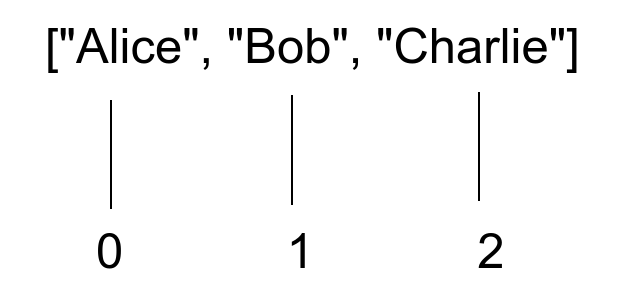
In Python, indexing starts from zero.
This means the first element has an index of zero, and the second element has an index of one, and so on.
Here is an illustration:
How to Use the Index to Access Elements in Python
Now that you know what indexing means, let’s take a look at how to use indexes to get values from sequences.
In Python, you can access the nth element of an iterable, such as a list, with an index. To do this, use the square bracket operator by passing the index as an argument.
For instance, let’s create a list of numbers, and let’s access the 2nd and the 3rd element of it:
As you can see, the 2nd argument goes with an index of 1, and the 3rd one with an index of 2.
Indexing is not limited to lists only. It also works for strings and tuples.
Here are examples:
Negative Indexing in Python
Python also supports negative indexing. This way of indexing starts at the end of the iterable, such as a list.
Unlike (positive) indexing, negative indexing does not start from 0. Instead, it starts from -1, where -1 is the last element (the right-most one). Then -2 is the second last and so on.
Here is an illustration of negative indexing in Python:
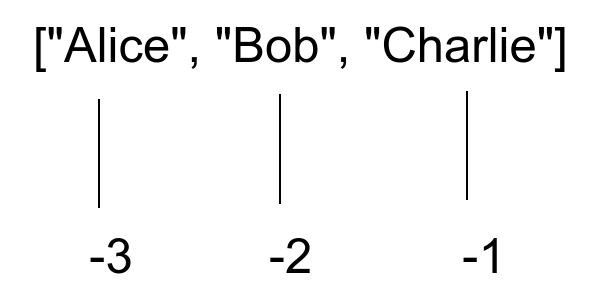
For example, let’s access the last and the first element of a list with negative indexing:
Similar to positive indexing, negative indexing works with tuples and lists as well.
Now you have a basic understanding of how indexing works in Python.
Next, let’s move on to slicing, which is heavily related to indexing.
Slicing Iterables in Python
Python slicing allows you to access a range of elements from an iterable. For instance, you can get the first three numbers from a list of numbers with slicing.
Slicing in Python is based on zero-based indexing.
The syntax of slicing is as follows:
This syntax is called the indexing syntax of slicing. (Later on, you will learn an alternative syntax.)
- start marks the starting index of the slice. Defaults to the beginning of a list.
- stop marks the end of the slice. Represents the first value that is not selected to the slice. Defaults to returning the rest of the list.
- stepsize specifies how many elements to jump over. Defaults to 1.
Example 1. Let’s access the 2nd, 3rd, and 4th elements of a list.
To do this, you need to
- Start slicing from the 2nd element (1 index).
- Stop slicing before the 5th element (4 index).
- Step over 1 value at a time.
Here is how it looks in the code:
As the step size is 1 by default, you do not need to write it separately. Instead, you could have written names[1:4] .
Example 2. Let’s access the first three elements of a list.
To do this, you need to
- Start slicing from the beginning of the list.
- Stop slicing before the 4th element (3 index).
- Step over 1 value at a time.
But as you already know, the start means starting from the beginning by default. Also, the stepsize is 1 by default. So we can omit both of those.
Here is how it looks in the code:
Example 3. Let’s get every third element of a list.
- Start slicing from the beginning.
- Stop slicing at the end.
- Step over 3 values.
As you start from the beginning and end at the end, you do not need to specify the start and stop parameters. The only thing left is the stepsize, which needs to be set 3.
Here is how it looks in the code:
Negative Slicing in Python
In Python, similar to negative indexing, you can use negative slicing. This means you access a range of values by using negative indexes as start and stop parameters.
Negative slicing follows the same syntax as positive slicing with parameters start and stop being negative.
By the way, you can also define a negative stepsize to go backward when slicing.
Example 1. let’s get the last three elements from a list.
To do this, you need to:
- Start slicing at the 3rd last element (-3 index).
- Stop at the end of the list.
- Step over 1 value at a time.
This means you only need to specify the start parameter at -3 when slicing. This makes the slice start from -3 and automatically go through the rest of the list.
Here is how it looks:
Example 2. Reverse a list of numbers.
To do this, you can use slicing.
- Start from the end of the list.
- Stop at the beginning of the list.
- Step backward 1 value at the time (-1 stepsize).
In other words, you do not need to specify the start or stop parameters. The only thing you need to specify is the stepsize of -1 to start from the end and end from the start.
Here is how it looks in the code:
Now you understand how slicing works in Python using indexing syntax.
Alternatively, you can use built-in slice objects when slicing iterables.
Slice Objects in Python
In Python, there is a built-in type called a slice.
To create a slice object, use the built-in slice() function with the following syntax:
- start is the starting index at which slicing starts. Defaults to None.
- stop is the ending index until which the slicing continues. Slicing stops at stop – 1.
- stepsize is the number of items to jump over when slicing. Defaults to None.
The point of a slice object is you can replace the indexing for slicing ( iterable[start:stop:end] ) with iterable[slice_obj] to slice an iterable.
Let’s jump back to one of the previous examples where we retrieved the 2nd, 3rd, and 4th elements from a list:
Here you used the slicing syntax where you define the start, stop, and stepsize directly inside the square brackets.
Now, instead of doing it this way, let’s use a slice object:
As you can see, this results in the exact same outcome.
You can use a slice object to slice a list any way you want. But instead of omitting start, stop, or stepsize, use None.
For example, let’s reverse a list with a slice object:
Here the slice(None, None, -1) behaves the same way as ::-1 .
When Use Slicing in Python
Slicing is useful if you want to access, modify, or delete parts of an iterable.
Let’s see some examples of each use case.
Access Elements with Slicing in Python
Accessing ranges of elements with slicing is a popular use case for slicing.
In this guide, you have already seen dozens of examples of accessing parts of iterables with slicing.
For example, let’s get the first three values from a tuple:
A very common application of accessing iterables with slicing is to reverse an iterable in Python.
For example, let’s reverse a string:
Modify Elements with Slicing in Python
Sometimes you may want to modify a range of items in a sequence. Instead of modifying the values separately or using a for loop, you can utilize slicing.
As a simple example, let’s replace two first elements of a list with another two:
As a slightly more advanced example, let’s turn every second number negative in a list of numbers:
Delete Elements with Slicing in Python
You can use slicing to get rid of ranges of items in an iterable. To do this, use the built-in del statement on a slice.
For instance, let’s delete every second element in a list:
Conclusion
Today you learned how slicing works in Python.
To recap, slicing means accessing multiple elements in an iterable at once. Slicing returns a subsequence of the original one.
There are two ways you can slice an iterable:
- Use the indexing syntax of slicing ( iterable[start:stop:stepsize] )
- Using a slice object ( iterable[slice(start, stop, stepsize)] )
You can use slicing to access and modify/delete ranges of elements in an iterable.