PHP-What is thread safe or non-thread safe in PHP
For multithreaded webservers, such as IIS5 and IIS6, you should use the threaded version of PHP.
Non-Thread Safe:
If you choose to run PHP as a CGI binary, then you won’t need thread safety, because the binary is invoked at each request.
For multithreaded webservers, such as IIS5 and IIS6, you should use the threaded version of PHP. … Apache + FastCGI: Non-Thread Safe. IIS: Thread Safe
Uses of thread safe and non-thread safe:
A thread-safe version should be used if you install PHP as an Apache module, as a worker MPM (multi-processing model).
The non-thread safe version should be used if you install PHP as a CGI binary.
FastCGI
FastCGI is a binary protocol for interfacing interactive programs with a web server.
FastCGI is a variation on the earlier Common Gateway Interface (CGI).
FastCGI’s main aim is to reduce the overhead associated with interfacing the web server and CGI programs, allowing a server to handle more web page requests at once.
What does thread safety mean when downloading PHP
Thread Safety means that binary can work in a multithreaded webserver context, such as Apache 2 on Windows.
Thread Safety works by creating a local storage copy in each thread, so that the data won’t collide with another thread.
So what do we choose? If you choose to run PHP as a CGI binary, then you won’t need thread safety, because the binary is invoked at each request.
For multithreaded webservers, such as IIS5 and IIS6, you should use the threaded version of PHP.
Following Libraries are not thread safe. They are not recommended for use in a multi-threaded environment.
SNMP (Unix)
mSQL (Unix)
IMAP (Win/Unix)
Sybase-CT (Linux, libc5)
Difference between PHP thread safe and non thread safe binaries
There have been a few options available for a while to get PHP performing well on IIS.
Firstly is the use of an opcode cache such as eAccelerator which stores PHP scripts in a partically precompiled state on disk and/or memory which drastically decreases script execution time.
Another option is to configure IIS to use PHP in FastCGI mode which allows PHP processes to be recycled rather than killed off after each PHP request and also allows you to run several PHP processes at once, making PHP much much faster with the added bonus that as it is using the CGI interface there is little or no incompatibility issues with PHP extensions.
This is still the fastest way to serve PHP, and is the way the IIS Aid PHP Installer is configured to install PHP on your IIS Environment.
What the non thread safe binaries allow you to do is to configure IIS (and other Windows based webservers) to use PHP as a standard CGI interface with massively increased performance as the PHP process is not required to wait for thread syncronisation.
The performance increase is not to be sneezed at either as seen figures of upto 40% mentioned (though I’m yet to confirm myself), but it is still not as fast as the opcode/FastCGI method mentioned above.
One of the biggest catches we seen people getting themselves hooked on is that non thread safe binaries cannot be reliably used with the thread safe ones, and vise versa.
This means that (for the moment at least) you cannot use opcode cache systems such as eAccelerator to give your non thread safe PHP environment a boost in the arm as they are all currently compiled as thread safe.
If the non thread safe binaries are not as fast as what you can configure the thread safe binaries to be then what is the point you ask? Here we come back to FastCGI, and in particular the efforts Microsoft have been making over the last year or so with the development of their own FastCGI handler.
This new FastCGI handler from Microsoft enables you to configure the non thread safe PHP binaries in FastCGI mode, which is one massive shot in the arm for performance.
Easiest way to put it is using the non thread safe PHP binaries with Microsoft’s new FastCGI handler is like putting twin turbos on your car (without the inherent risk of blowing up your engine), and there is little doubt in my mind that this will be the future of PHP on IIS.
PHP Thread Safe and Non-Thread Safe for Windows:
Thread Safety means that binary can work in a multithreaded webserver context, such as Apache 2 on Windows.
Thread Safety works by creating a local storage copy in each thread, so that the data won’t collide with another thread.
So what do I choose? If you choose to run PHP as a CGI binary, then you won’t need thread safety, because the binary is invoked at each request. For multithreaded webservers, such as IIS5 and IIS6, you should use the threaded version of PHP.
So for example, if you use FastCGI with Apache, go for the non-thread safe, and if you use LoadModule, go for the thread-safe version.
So it really depends on the way that you want to use PHP:
Apache + LoadModule: Thread Safe
Apache + FastCGI: Non-Thread Safe
IIS: Thread Safe
IIS + FastCGI: Non-Thread Safe
AFAIR running PHP with FastCGI is the preferable way.
It performs faster and allows for more fine-grained security configuration.
Php Thread Safe Vs Non Thread Safe? The 6 Correct Answer
Are you looking for an answer to the topic “php thread safe vs non thread safe“? We answer all your questions at the website barkmanoil.com in category: Newly updated financial and investment news for you. You will find the answer right below.

Php Thread Safe Vs Non Thread Safe
Table of Contents
What is the difference between thread-safe and non thread-safe PHP?
Non-thread-safe: It does not check the safety of the threads which makes it faster to run but at the same time, it becomes more unstable and crashes very frequently. It refers to a single thread only builds.
Is xampp PHP thread-safe or not?
XAMPP uses the Apache Software Foundation builds, and ‘that’ Apache build is Thread Safe.
PHP : What is thread safe or non-thread safe in PHP?
Images related to the topicPHP : What is thread safe or non-thread safe in PHP?
Php : What Is Thread Safe Or Non-Thread Safe In Php?
What does NTS mean with PHP?
The non-thread safe version should be used if you install PHP as a CGI binary, command line interface or other environment where only a single thread is used.
What does not being thread-safe mean?
If this bank account is not threadsafe, then the bank allows you to perform two transactions at the same time and then the bank will become bankrupt. Threadsafe means that an object’s state doesn’t change if simultaneously multiple threads try to access the object.
How does Fast CGI work?
Basically, FastCGI is a program that manages multiple CGI requests within a single process, saving many program instructions for each request. Without FastCGI, each instance of a user requesting a service causes the Web server to open a new process that gets control, performs the service, and then is closed.
What is Zend thread safety?
ZTS is Zend Thread Safety. This is a layer of code that controls access to Thread global variables, using TLS as of PHP 7 (Thread Local Storage). When we develop the PHP language, or as a PHP extension writer, we must differentiate between two kinds of globals in code.
What is PHP FPM service?
PHP-FPM (an acronym of FastCGI Process Manager) is a hugely-popular alternative PHP (Hypertext Processor) FastCGI implementation. As you may or may not know, PHP is one of the biggest open-source software programming languages utilized online.
See some more details on the topic php thread safe vs non thread safe here:
What is thread safe or non-thread safe in PHP – GeeksforGeeks
Non-thread-safe: It does not check the safety of the threads which makes it faster to run but at the same time, it becomes more unstable and …
Should I Get Thread Safe Or Non Thread Safe Php? – Lotus
In this version, multiple threads of execution can be run simultaneously for different requests on the web server. The thread-safe version of …
Obtaining PHP – Manual
Thread Safety means that binary can work in a multithreaded webserver context, such as Apache 2 on Windows. Thread Safety works by creating a local storage copy …
determine PHP version, architecture and thread safety mode
A thread-safe PHP version creates a local storage copy in each thread, so that the data won’t collide with another thread; that’s great when we …
What is thread-safe and non thread-safe in Java?
When multiple threads are working on the same data, and the value of our data is changing, that scenario is not thread-safe and we will get inconsistent results. When a thread is already working on an object and preventing another thread on working on the same object, this process is called Thread-Safety.
How do I turn PHP on?
- Step 1: Edit the PHP configuration file. sudo gedit /etc/apache2/mods-enabled/php5.conf. …
- Step 2: Save changes, and exit emacs. control-x, control-s.
- Step 3: Restart Apache, and you are done. sudo /etc/init.d/apache2 restart.
What is my current PHP version?
1. Type the following command, replacing [location] with the path to your PHP installation. 2. Typing php -v now shows the PHP version installed on your Windows system.
How do I install PHP?
- Step 1: Download the PHP files. You’ll need the PHP Windows installer. …
- Step 2: Extract the files. …
- Step 3: Configure php. …
- Step 4: Add C:\php to the path environment variable. …
- Step 5: Configure PHP as an Apache module. …
- Step 6: Test a PHP file.
Why is thread-safety important?
Thread safety simply ensures that when a thread is modifying or reading shared data, no other thread can access it in a way that changes the data. If your code depends on a certain order for execution for correctness, then you need other synchronization mechanisms beyond those required for thread safety to ensure this.
Is static method thread-safe?
A data type or static method is threadsafe if it behaves correctly when used from multiple threads, regardless of how those threads are executed, and without demanding additional coordination from the calling code.
Everything you should know about thread safety in 2 minutes or less
Images related to the topicEverything you should know about thread safety in 2 minutes or less

Everything You Should Know About Thread Safety In 2 Minutes Or Less
Is mutex thread-safe?
Shared mutexes and locks are an optimization for read-only pieces of multi-threaded code. It is totally safe for multiple threads to read the same variable, but std::mutex can not be locked by multiple threads simultaneously, even if those threads only want to read a value.
Does PHP use CGI?
cgi is a simply a path where people commonly put their CGI script. Web server are commonly configured by default to fetch CGI scripts from that path. a CGI script can be implemented also in PHP, but all PHP programs are not CGI scripts.
What is the difference between CGI and FastCGI?
What makes a difference from CGI is that with FastCGI the running process of the application lasts longer and it is not immediately terminated. After the application finishes processing and returns the output data, the process is not terminated and is being used for processing further requests.
Is FastCGI faster than CGI?
PHP FastCGI Process Manager (PHP-FPM) is an alternative FastCGI daemon for PHP that allows a website to handle strenuous loads. PHP-FPM maintains pools (workers that can respond to PHP requests) to accomplish this. PHP-FPM is faster than traditional CGI-based methods, such as SUPHP, for multi-user PHP environments.
What are pThreads in operating system?
POSIX Threads, commonly known as pthreads, is an execution model that exists independently from a language, as well as a parallel execution model. It allows a program to control multiple different flows of work that overlap in time.
How do I download PHP for Windows?
Install PHP on Windows manually
You have to download zipped binary version of PHP from http://www.php.net/downloads.php. Extract the downloaded file to php folder which must be created at the root of any of your windows drives (e.g. c:\php or d:\php). Enter php folder and rename the file php. ini-recommonded to php.
What is the difference between PHP CLI and PHP-FPM?
php-fpm ist running in its own process all the time. It can use apc because it uses continuously the ram over several requests. The memory is only released through the garbage collector or if you kill the fpm process. But the a CLI process lives only for one command and when its finished the memory is released.
Does WordPress use PHP-FPM?
WordPress performance on PHP-FPM 5.6
By default, EasyEngine installs PHP-FPM 5.6, so I didn’t have to do any configuration except setting up WordPress, installing theme & pointing my test domain to Linode VM IP.
What is PHP-FPM and NGINX?
PHP-FPM is an alternative FastCGI for PHP, which intends to handle high loads. NGINX uses event-driven architecture and occupies around 10MB of RAM while handling a large number of requests. PHP-FPM is enhanced in terms of speed. It is a lot better than a mod_php module – a default module in Apache HTTP server.
When should I use FastCGI?
Why Use FastCGI Proxying? FastCGI proxying within Nginx is generally used to translate client requests for an application server that does not or should not handle client requests directly.
Is CGI a script or program?
A CGI script is any program that runs on a web server. CGI defines a standard way in which information may be passed to and from the browser and server.
What are the technical differences between the Thread Safe and Non Thread safe PHP Windows Installa
Images related to the topicWhat are the technical differences between the Thread Safe and Non Thread safe PHP Windows Installa

What Are The Technical Differences Between The Thread Safe And Non Thread Safe Php Windows Installa
What is CGI protocol?
CGI is a protocol between the web server and a external program or a script that handles the input and generates output that is sent to the browser. CGI is a simply a way for web server and a program to communicate, nothing more, nothing less.
What language is CGI?
CGI applications can be written in any computer programming language that is supported by the host computer, including compiled languages such as C and FORTRAN and scripting languages such as Perl and TCL.
Related searches to php thread safe vs non thread safe
- How to enable thread safety in PHP
- how to enable thread safety in php
- check php thread safe or not
- what is thread safe in php
- what is thread-safe and non thread-safe in java
- non thread safe vs thread safe php windows
- install php 7 4 windows
- php fork vs thread
- php 7 thread safe vs non thread safe
- Check php thread safe or not
- php thread safe vs non thread safe windows apache
- Install PHP 7.4 Windows
- php thread safe vs non
- PHP thread safe or not
- php thread safe or not
- is @transactional thread safe
- php multi thread
- thread safe php vs non safe
- which php build is for 32-bits systems?
- php thread safe vs non thread safe iis
- which php build is for 32 bits systems
- install php 5
- PHP multi thread
Information related to the topic php thread safe vs non thread safe
Here are the search results of the thread php thread safe vs non thread safe from Bing. You can read more if you want.
You have just come across an article on the topic php thread safe vs non thread safe. If you found this article useful, please share it. Thank you very much.
Introduction
Let’s start by some confusion many people fall in when it comes to such a subject. PHP is not a threaded language. PHP doesn’t use threads itself into its heart, and PHP does not natively allow userland code to use threads as parallel mechanism, in any way.
So PHP is very far from other technologies, such as Java (for exemple). In Java, both the language itself is heavily threaded, and it also allows its users to make use of threads into their own programs. Not PHP. And this is for some reasons.
PHP’s heart is not threaded, mainly for simplicity. When you’ll read next chapter, you’ll learn that threads is not "a magical technology that allows any program to run faster". Seems like a sales speech isn’t it ? We are not sales, but technical , and so we know what we talk about. So PHP’s engine does not use threads at the moment. It could in the future, but using threads introduce many many new difficulties in programming, for a result that could not be what you expect. The main difficulty is cross platform thread programming. The second one is shared resources and lock management, and the third one is that not every program can be turned to thread programming. PHP’s design was born mainly around year 2000, at this time, thread programming was not that spreaded and mature, and engineers behind PHP (mainly Zend) decided to create a full monolithic engine with no threads (also they did not have the resource to ship a stable crossplatform threaded engine).
Second point is that PHP userland code can’t use threads, because it is not how PHP expects your code to run. PHP is a fire-and-forget language, you should treat your request as fast as possible, and release PHP so that it can treat the next-to-come request. PHP has been designed as a glue language : you don’t compute complex tasks that could require the usage of threads, but instead you access fast-and-ready resources, glue all together, and send that back to the user. With PHP you do things, and whatever could take "more time than usual" should not be done in PHP. That’s why we use "Queue based" system to async some heavy tasks in PHP (Gearman, AMQP, ActiveMQ etc. ). Unix way of seeing things : "develop small self-contained tools and link them together". So PHP is not designed to allow massive parallelism but other specialized technologies are — use the right tool for the right problem.
Some quick words on threads
Let’s quickly remind souls about threads. Remember that we won’t detail many things, and that you may find in books or on the Web everything you ever wanted to know about threads, in deep.
Threads are light unit of work treatment that reside into processes. Note the ownership : a process can spawn threads, and a thread must be part of one process (and just one). Process is the base unit of work under an Operating System (OS). Processes are heavy units of work treatment. On multi-CPU machines (nowadays’ machines), several CPUs will run in parallel and will compute some load o behalf of running tasks. If two processes A and B are ready to be scheduled, and two CPUs (or two CPU cores) are ready to take some load, then A and B should get scheduled in the same time. The machine will then effectively compute several things in one solo unique unit of time (time frame), we call that "parallelism".
A thread : 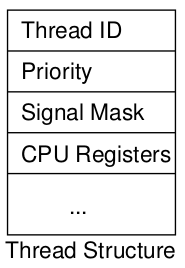
A and B previously were processes : full independant workloads. Threads are not processes. Threads are unit of executions that live into a process. That is, a process can decide to cut its job into several more little tasks, that could run concurrently. For example, process A and B could each spawn threads, A1, A2 and B1, B2. If the machine hosts several CPUs (8 CPUs for example), then A1, A2, B1 and B2 could be run in the same timeframe.
Using threads, a programmer can decide to cut his process job into several more little tasks, that could run concurrently.
Threads, are a way to cut a process job into several small jobs, that could be run in parallel (in the same timeframe). Threads are run barely the same way processes are : they own a state that the Kernel thread scheduler will use to manage them.
Threads are lighter than processes, they only need a stack and some registers, whereas a process needs many more things (a new VM frame from the kernel, a heap, some signal informations, some file descriptor informations, some locks informations etc. ).
Processes memory is hardware managed by the Kernel and the MMU, whereas thread memory is software managed by the programmer and the threading library used.
What you can memorize is that threads are lighter than processes and more easily manageable. If well used, they’ll run faster than processes, as the OS Kernel is very less involved in thread management and scheduling that it would be with processes.
Threads memory layout
As we’ve seen, threads have their own stack, that is when they access variables declared into a function, they own their own copy of such data.
But we can’t say the same about the process heap : that latter is shared accross threads, so are global variables and file descriptors. This is an advantage, or a drawback. If you only read from global memory, you need to read at the right moment (after thread X and before thread Y for example). If you happen to write to it, you then need to make sure several threads don’t try to write to the same memory area at the same time : they would corrupt that area and leave the memory in an unpredictable state; what we call a race condition. This is the main challenge behind thread programming.
For those concurrent access to happen, you need to incorporate into your code some programming technics such as reentrancy or synchronization routines.
Reentrancy prevents concurrency, whereas synchronization masters concurrency in a predictable way.
Processes don’t share any memory between them, the OS perfectly isolate them. Threads, however, share a big amount of the same process memory.
Having a big part of the memory shared, there is a need to synchronize common memory access, technical tools are used such as semaphores or mutexes (the most common ones). Those are based on a "lock" concept, that is if the resource is locked and a thread tries to access it, it will (by default) block, waiting for the shared resource to be available.
And this is why using threads doesn’t automatically mean your program will run faster. If you don’t divide the tasks efficiently, and if you don’t manage the shared memory locking efficiently, you’ll end up having a program that takes more time to run than it would in one solo process with no threads : just because your threads keep waiting for each other (and I don’t talk about dead locks, starvation, etc. ).
Thread programming is trully complex if you are not used to it. You’ll need many many hours of practice, and tons of WTF moments to gain experience to work with threads.
Should you forget one little detail and your whole program will blow up at your face. Debugging threads is harder than debugging a thread-free program, as we are talking about real use cases of hundreds or thousands of threads running into a process. You get lost into your mind, and you quickly sink deep in the pool.
Thread programming is hard. Good thread programming, and good program parallel computing is really a challenge that takes many time to master.
As sharing memory that way is not always what we want, Thread Local Storage (TLS) appeared. TLS is mainly a concept of "globals owned by one thread and not shareable to others", those are memory areas that represent global state, but private to each thread (like in a process-only way).
To implement TLS, on thread creation, one must allocate some process heap memory, ask the thread library for a key and associate that key to that storage. Every further access will use the key to unlock the thread-specific storage. A destructor is needed at the end of thread life to destroy allocated resources (traditional heap usage here).
An application is said "thread safe", when it fully masters every global resource access in a 100% predictable way. If not : you get bitten by the scheduler : random things start to happen and the game is over.
Thread libraries
As you may have guessed, threads require some OS Kernel help. Threads have appeared in OS back in mid nineties, so that’s quite a long time ago : they are mature and managed by OS Kernels since a long time.
But there still exists some crossplatform issues. Especially Windows against Unix worlds. Both have adopted different threading models, and different thread libraries.
Programming with threads and supporting crossplatform is still a challenge as of nowadays.
Under Linux, to create both a thread or a process, the Kernel system call is clone() . But that system call is extremely complex, thus as usual some C code have emerged around the syscalls to ease day to day programming using threads. Thread operations are not yet managed by the libc (C11 standard has started such a move), but by external libraries. Nowadays, under Unix flavors, pthread is used (though other libraries exist). Pthread stands for "Posix threads", which is a POSIX normalization of thread usage and behavior dating back from 1995. Hence, if you want to use threads in your program, you’ll need to link it with libpthread, aka pass the -lpthread switch to GCC. Also, libpthread is a library. It is written in C, open source, and have its own version control and management.
So nowadays we mainly use the pthread library to program threads under Unix flavors. Not going into details again, pthread allows concurrency but parallelism is dependant on the OS and the machine.
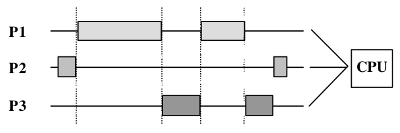
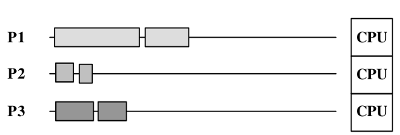
Concurrency is multiple threads running on the same CPU out of order. Parallelism is multiple threads running at the same time on different CPUs.
Here is some concurrency :
Here is some parallelism :
PHP and Threads
What happens to PHP in there ?. Let’s start by reminders :
- PHP is not a threaded language : its engine and its code don’t manage threads to parallelize its own internal work.
- PHP doesn’t offer threads to users : You can’t use threads with the PHP language natively. Joe Watkins, PHP Core developper, created a nice library that adds threads to userland : ext/pthread. It is a nice project, but I personnaly wouldn’t use PHP for such tasks : it’s not the right language for that, I’ll go with C or Java for example.
So, what about threads and PHP, what’s the point ?
How PHP treats requests
It is all about how PHP will handle HTTP requests. To serve several clients at the same time, a webserver needs some concurrency (or some parallelism). You can’t pause everyone as you are answering to just one client right ?
Thus, what servers usually do is they use multiple processes, or multiple threads , to answer clients.
Historically, under Unix, the process model is used. Simply because processes is the basic of Unix, once Unix was born, processes was born with the ability to create new ones ( fork() ), destroy them ( exit() ) and synchronize them ( wait() , waitpid() ). In such environnements, multiple PHP will serve multiple requests for clients, but each one will be in its own process.
If you remember the introduction chapters, in such a case, there is nothing to do into PHP code : processes are fully isolated between them, and process A treating request A about client data A will not be able to communicate (read or write) with process B treating request B about client B. And this is what we want.
Such models include php-fpm, and Apache with mpm_prefork. Usually in 98% of cases you use one of theses two architectures.
Things get more complicated under Windows, or under Unixes where your server uses threads.
Windows is a great operating system (true). It has just one drawback : its source code is closed. But many technical resources about its internal engine can be found on the Web or into books. Microsoft engineers share many knowledge about how Windows works into its heart.
Microsoft Windows has taken a different path from Unixes when it comes to concurrency or parallelism. Windows heavily relies on threads. In fact, creating a process in Windows is such an overkill heavy task that you usually don’t do it. Under Windows you use threads, everywhere, everytime. Windows threads are order of magnitude more powerful that Linux ones ; yes they are.
So when you run PHP under Windows, the webserver (whatever it is, IIS , Apache, FooBarBaz) will treat different clients into threads, and not into processes.
That means that in such an environment, PHP will run into a thread ; and in that case; PHP must be extra carefull about thread specifications : it must be thread safe.
PHP must be thread safe, that is it must master the concurrency it hasn’t itself created, but leaves in/with. As you may have guessed, that means PHP will have to find a way to protect its access to its own global variables ; and there are many of them into PHP’s heart.
The layer that is responsible of such a protection is called Zend Thread Safety, aka ZTS.
Please, note that the same is true under Unix if you happen to use threads as the way of parallelize client request treatments, but that is a very uncommon situation as under Unix we are usually used to using classical processes for such a task, though using thread is still possible and may be an advantage in term of performances. Traditionaly a system can run many more threads that it could with processes : threads are lighter.
Also, if you happen to use a PHP extension that requires thread safety to be activated — such as ext/pthread — you will need a thread safe PHP.
Zend Thread Safety internal details
Ok here we go. ZTS is activated using the —enable-maintainer-zts switch. As said before, you usually don’t need this switch, until you run PHP under Windows, or you run PHP with an extension that needs the engine to be thread safe (like ext/pthread for example).
To check against ZTS, you have several ways to achieve that. Use CLI and php -v , which tells you NTS (Not Thread Safe) or ZTS (Zend Thread Safe).

You can also ask phpinfo() :

In your code, you can read the PHP_ZTS constant value from PHP.
All PHP’s heart is thread safe when compiled with ZTS. What could not be thread safe are extensions you activated. Official PHP extensions (distributed with PHP) are all thread safe, but for other third-party ones, who knows ? You will see in a few moment that mastering thread safety from PHP extensions needs some special programming API usage, and as always with threads : one miss and you risk to have your whole server blow at your face.
Remember that with threads, if you dont call reentrant functions (many from libc) or if you access a true global variable blindly, you are going to generate some weird behaviors in all the sibling threads. Translated to the PHP use-case : if you mess-up with threads in one of your extension, you are going to impact every client occupied in every other thread of the webserver! This is absolutely dramatic situation, as one client could corrupt every other clients data.
When designing PHP extensions, ultra care and very good knowledge of thread programming are necessary. If not, when running in a thread environment, you’re gonna break the whole webserver in a very nasty random way that you won’t be able to debug in reasonnable time.
When designing PHP extensions, if you mess-up with threads, you are going to impact every client occupied in every other thread of the webserver. You could even not notice that, as bad thread programming usually leads to horrible random behaviors you can’t reproduce easilly.
Use and design reentrant functions
When designing a PHP extension, use reentrant functions. Reentrant functions are functions that don’t rely on any global state to work. This is simplified, the true definition is that reentrant functions are functions that can be called as they’ve not finished to be called yet. Think about functions that can be run in parallel in two or more threads. It then becomes obvious that if such functions use global state, they are not reentrant (but they could lock their global state, and thus be thread-safe either ;-)).
Many libc traditional functions are not reentrant, because they’ve been designed in a time where threads simply did not exist yet. So some libc (especially glibc) publish reentrant equivalent functions as functions suffixed by _r() . Also, the new C11 standard gives a big room to threads, and C11 libcs benefit from a rewrite with an s suffix : _s() ( localtime_s() for example).
Aka, strtok() => strtok_r() ; strerror() , strerror_r() ; readdir() => readdir_r() ; or gethostbyname() => gethostbyname_r() etc.
PHP itself provides some of them mainly for crossplatforms purpose. Have a look at main/reentrancy.c.
Also, if you happen to write your own C functions, think about reentrancy. If you can pass your function everything it needs as arguments (on the stack or through registers so), and if that function doesn’t use any global/static variables and any non-reentrant function; it is then reentrant.
Don’t link against non-thread safe libraries
Still obvious, remember that thread programming is about the whole process memory image being shared, and the whole process memory image includes any linked libraries.
If your extension links against a known-to-not-be-thread-safe library, then you will have to develop you own thread safety tricks to protect access to global state into such a library. Something really common in C and thread programing, but that is easy to miss.
ZTS usage and details
ZTS is Zend Thread Safety. This is a layer of code that controls access to Thread global variables, using TLS as of PHP 7 (Thread Local Storage).
When we develop the PHP language, or as a PHP extension writer, we must differentiate between two kinds of globals in code.
We have true globals, those are plain traditionnal C global variables. As we have seen, such variables are not bad in design, but as we did not protect them against concurrency in threads, we are only allowed to read them when PHP is treating a request.
The case is that those variables (we call them "true globals") are created and written to before any thread is created yet. That step is called the module init step in PHP internal vocabulary , and we can clearly see it in PHP extensions, as they are hooked about it :
The above pseudo-code details what every PHP extension could look like. Extensions owns several hooks that get triggered throught PHP’s life, the so-called MINIT() hook is about PHP initialization. During such a step, PHP is starting, and one can then write or read to a global variable safely, like its done in the example.
Then come the second important hook, RINIT(), or request initialization. This step is called on every extension for every new request to deal with. That is, RINIT() may be called thousands of times in an extension.
At this step, PHP already leaves in a thread. The webserver will have threaded the initial process, so in RINIT(), you must be thread safe.
As threads are created to handle several requests at the same time, this is perfectly logical. What one should keep in mind, is that you don’t create the thread. PHP doesn’t thread itself, never. This is the webserver that does it.
We use so called globals, or thread globals. Those are global variables, but that are thread protected by the ZTS layer. Like this :
To access thread globals, we used a macro, WOW_G() here. We will now detail what happens behind the scene of this macro.
The need of macros
Remember. When PHP is threaded, all the request-related global state must be protected in access. But when PHP is not threaded, the protection is not needed anymore, as each process got its own part of memory : nothing is shared.
So, the way of accessing a request-related global will differ by the environment (multitask engine used). That means that we had to find a way so that accessing a request-bound global is done apparently the same way, whatever the environment.
We used macros for that, as they are just dedicated to such tasks.
The WOW_G() macro above will resolve very differently according to the multitask engine PHP is running on (process or threads).
And that is something you change by recompiling your extension, this is why PHP extensions are not compatible between ZTS mode and non-ZTS mode : this is not binary compatible !
Obviously ZTS is not binary compatible with NZTS. Extensions must be recompiled when switching from one mode to the other
See it : the WOW_G() macro usually resolves something like this in a process mode :
And something like this in a threaded mode :
Looks more complex for ZTS mode isnt it ?
In process mode, that is in NZTS (Non Zend Thread Safe), a true global is used, here it is named wow_globals. This variable represents a structure containing the global variables, and you access every member into it with the macro. WOW_G(foo) leads to wow_globals.foo .
Obviously, you’ll need to declare such a variable, and eventually to zero it at startup. This is done using a macro as well (as the way to do that will differ in ZTS mode). You do it like this :
The macros then resolves to
And that’s it. Pretty easy in process mode.
In threaded mode, aka using ZTS, like you can spot, there is no C true global anymore but the globals declaration look the same. Look :
Declaring our globals is done the same way in ZTS or NZTS.
But accessing them looks a lot different. In ZTS, there is a call to the function tsrm_get_ls_cache() . This is the call to the Thread Local Storage (TLS), that is it will return a memory area that is bound to the current specific thread. Like you can see, this memory area seem complex, as the first cast we perform to it is a (void ***) cast, which let us smell that there is a lot of complexity behind it.
The TSRM layer
ZTS is designed using what we call the TSRM layer. Thread Safe Resource Manager layer. This is just some plain C code, nothing more !
TSRM is a layer of code, that makes ZTS possible. It is mainly stuck into the /TSRM folder of PHP source code. Have a look at it, it is interesting even if we’ll detail it here.
TSRM is not a perfect layer, it is globally well designed and ages back from PHP 5 beginning era (
2004). It is able to deal with several low-level threading libraries : Gnu Portable Thread, Posix Threads, State Threads, Win32 Threads or BeThreads. The layer you want it to use can be chosen at configuration time (./configure —with-tsrm-xxxxx).
We will only deal with the pthreads implementation when analysing TSRM in deep.
TSRM boot
At PHP boot, that is at module initialization, PHP quickly calls for tsrm_startup() . As PHP doesn’t know yet how many threads and resources to build a thread-safe protection for, it prepares thread tables with just one element into them. Those tables will later grow, they are then allocated using a traditionnal malloc() .
This startup step is also important as it is here that we create both the TLS key, and the TLS mutex we’ll need to synchronize.
TSRM Resources
Now that TSRM layer is booted, it is time to add new resources to it. A TSRM resource, is a memory area that represents a set of global variables, usually dedicated to a PHP extension, and that must be own by the current thread or protected for access.
So, that memory area has a size, and would need some initialization (constructor) and deinitialization (destructor). Usually initialization is just about zeroing the area whereas deinit does nothing.
That memory area, which is called a TSRM resource, will be given a unique resource ID by the TSRM layer. The caller then should save such an ID, as it will need it later on to be given back the protected memory area from TSRM.
Here is the TSRM function that creates a new resource :
As you can see, this function requires a mutex lock. If it is called into a child thread (it will be, for every of them), it will then lock other threads for the time it needs to manipulate the global thread storage state.
Our new resource is added to the dynamic resource_types_table[] array and is given a unique identifier, rsrc_id , which keeps incrementing as we add resources.
On request startup
Now we are ready to treat requests. Remember that each request will be served into its own thread. So, what happens when a new request shows in ?
At the very beginning of every new request, the ts_resource_ex() function is called. This function reads the current thread id and tries to fetch the ressources allocated for this thread, aka the memory areas dedicated for globals for the current thread. If none found (new thread), then it will create the ressources for the current thread, based on the model it built at PHP Startup.
This is done using allocate_new_resource()
Extensions Local Storage cache
In PHP 7, each extension may declare a local storage cache. That is each extension should read its own thread local storage area at every new thread startup, instead of iterating the list of storages at every global access.
This is not done magically, and requires several things.
First, you must compile PHP to support the cache : pass -DZEND_ENABLE_STATIC_TSRMLS_CACHE=1 to your compilation line. This should be the default however.
Then, you should now use the ZEND_TSRMLS_CACHE_DEFINE() macro when you declare your extension globals :
Like you can see, that declares a true C global, but with the special __thread declaration. This is used to tell the compiler that this variable will be thread specific.
Then now, what you must do is populate this void* storage with the storage reserved for your globals by the TSRM Layer.
You may use ZEND_TSRMLS_CACHE_UPDATE() in your globals constructor for that :
Here is the macro expansion :
And for pthread implementation :
Finally you should better understand how globals are now accessed in extensions, using macros :
Like you can see, using the MY_G() macro to access globals, when using a thread environment, it will expand to probe the _tsrm_ls_cache area using the id of this extension : my_globals_id .
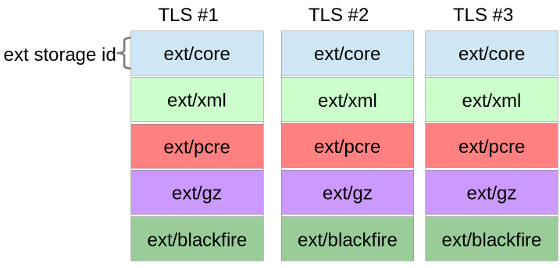
As we’ve seen, every extension is considered a resource and is given some space for its globals. The id is used to get back the storage for this specific extension. TSRM will have created that storage for the current thread when a new request/thread is born.
Conclusion
Thread programming is not an easy task. Here, I just showed you how PHP deals with program globals management : it isolates every global storage using a TLS that is created for each new thread at request startup, by the engine and the dedicated layer : TSRM.
It locks a mutex, creates the storage for the current thread globals, then releases the mutex.
That way, every extension and every part of PHP may access its own storage without having to lock the mutex on each access.
Everything is abstracted behind the TSRM layer : a layer of C code that ease globals management, especially for extension creators. You use a macro to access your global space, and if you run under ZTS, that macro will expand to the specific code to access only your little storage in the middle of every extensions.
Using the TSRM cache, you don’t need a lookup for every global access but you are given a pointer to your specific storage, you cache it and use it back when you need access to a global.
Obviously, this is for request-bound globals. You may still use true C globals, but don’t try to write to them as you are servinf a request : you’ll mess up the entire colossus and experiment hard-to-debug strange behaviors, if not crashing the whole webserver.
Don’t Believe The Lies: PHP Isn’t Thread-Safe Yet
If you took everything you heard for granted, you’d have been lead to believe that the official PHP distributions (from php.net) have been thread-safe since version 5.2.0.
That’s not true. Don’t fall for it. Don’t attempt to use PHP in a multi-threaded environment (mpm_worker on Apache, ISAPI on IIS, etc.), because PHP thread-safety is a myth.. nothing more than a bunch of lies, if you will.
If you look at the PHP download page, you’ll see that the pre-built binaries (in this case, Windows) are split into two: thread-safe and non-thread-safe:
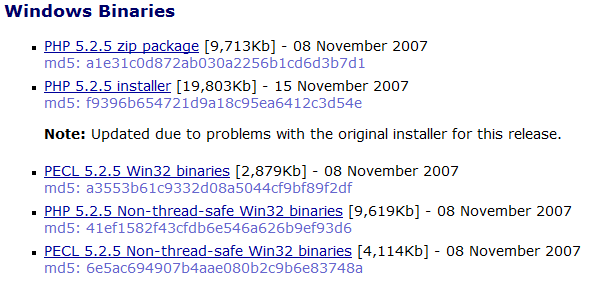
The problem is, no matter which you choose, PHP isn’t thread safe. You’ll still get the same, old, dreaded “PHP has encountered an access violation at memory_address” error.
It’s not a question of server configuration so much as it is one of PHP writing bad code and pretending that’s not the case. PHP isn’t multi-threading ready and most everyone knows it… but it seems they still feel the need to pass it off as if it were, never mind the complaints and bug reports that come.
There isn’t a known solution to this problem. The source code for the official PHP distribution is simply not re-entrant and isn’t capable of being used in multi-threaded environments. It’s filled with race conditions and lacks the proper monitors/locks on shared memory spaces (which needn’t be shared in the first place). Unfortunately, there’s not much more to be said; making this post more of a rant than a guiding light for those of you experiencing this issue.
At NeoSmart Technologies we still recommend the only other production-ready, decently-performing *sapi alternative; which is the deployment of PHP by means of the FastCGI protocol. Whether on Linux or Windows, FastCGI scripting engines are considerably faster than their age-old CGI implementations (though the outcome is more-clearly felt on Windows where the CGI model is hideously slow). But we’ve already discussed this before, countless times.
The moral of the story is that PHP isn’t multi-threaded – yet if you go by what they say, you’d come to think it was… until you try it out for yourself and realize that not a darn thing has changed in the 5.2.x releases when it comes to thread-safety and the deployment of PHP in multi-threaded environments.
If you still insist on using ISAPI implementations, you should probably use the latest versions of the PHP4 distribution instead. The older PHP line is less-apt to cause an access-violation error on your machine, and will more than outclass the PHP5 “thread-safe” distributions when it comes to reliability.
PHP needs to clean up their act and either produce real (and verifiably so) thread-safe, re-entrant code or stop the false propaganda that would lead you to believe it’s thread-safe in its current incarnation – especially when most other dynamic scripting languages (such as Perl) have proper, thread-safe engines available.
Related Posts
45 thoughts on “ Don’t Believe The Lies: PHP Isn’t Thread-Safe Yet ”
Yeah, this is so true. More than once I’ve filed a bug report about stability of PHP under multi-threaded environments and it’s been blown-off as a “low-priority, known issue” by the people in charge.
I notice they don’t explicitly call the first release “thread safe” but slyly lead you to believe so by explictly labeling the second “non-thread-safe” – that’s a dirty trick to play.
It would seem that attaining true thread-safety is going to be critical for PHP’s future. We’ve reached the point today where almost every computer sold has more than one processing core. It’s a huge challenge. I’ve worked on multithreaded development projects since the early 1990s, mostly multithreading old Fortran algorithmic libraries. Today I’m community manager for the Threading Building Blocks open source project — a C++ template library for multithreading applications.
Multithreading existing code is not easy, so I can certainly sympathize with the PHP developers. But, if your language is not threadsafe, you’re going to fall away as a viable language as we proceed into the multicore future…
You might want to give Caucho’s implementation of PHP called Quercus a try. It offers some great performance gains, and in combination with BEA’s JRockit it might make a great alternative to the standard PHP interpreter.
Thanks for the links, Stephen.
We’ve looked at a number of alternative PHP processing engines, but haven’t found a stable, reliable, and – most importantly – compatible implementation out there. (The bigger ones are RoadRunner and Phalanger; neither of which work well with the majority of the apps we tested).
Quercus sounds like a promising solution, I’m testing it now ��
and btw thanks for the caucho + jrockit tip, really interesting stuff.
Given this (ant not only) issue and many language defficiencies and problems I’m on my way to switch every simple to moderate project to .NET.
If there is no acceptable production-safe PHP engine alternative, then you’re better of leaving PHP and begin using some real language.
It’s a shame a language with almost no reasonable planning and designing behind it has become so widespread and we are stuck to it when it comes to some website that needs to run everywhere.
Even worse, MS is planning a ‘good’ future for it on Windows. Maybe MS should take control and make it much better.
I finally got around to testing Quercus + Resin; unfortunately the combination’s load times for individual PHP pages is around 110-120% of that for our currently (very finely-tuned) IIS + PHP + FastCGI implementation.
Perhaps Resin Professional, which stores the compiled PHP opcode instead of acting as a real-time interpreter, would provide a better performance output but the free solution isn’t good enough. ��
Hi, I think you have something very confused… ‘mpm_worker on Apache, ISAPI on IIS, etc’ are SAPI interfaces. Whether they are threadsafe or not is a matter of how they are coded. The PHP library itself *is* threadsafe.
This fact can be seen by looking at the source in php-5.2.x/sapi/cgi/fastcgi.c, as well as the rest of PHP’s source tree. If you use PHP via fastcgi on windows, you are using a threaded PHP environment, its that simple.
However, ff you look at the source of php-5.2.x/sapi/isapi/php5isapi.c you will see that the SAPI does *not* use zends thread safty and is *not* threadsafe. This is a matter of the SAPI, not PHP itself.
The source for the files above can be viewed via googles code search
And for what its worth, Quercus is not a PHP implementation, it is PHP emulation. It is a set of Java wrappers to perform php functions. It can be called useful if it does the job that you need, but it is not PHP.
Even if the latest versions 5.3.0 or even older 5.2.10 are not thread-safe?
Otherwise, I firmly believe that PHP is not built for Microsoft world and even less for IIS and cloudy way to implement it with IIS anyway.
Apache under Windows could be better solution but could not be reliable enough, don’t you think?
We’re now running Apache for Windows on NeoSmart Technologies, and it’s plenty reliable ��
I am quite new to PHP – but I do have a lot of experience with Java. Is the concern that there are no mutual exclusion constructs in PHP? Going through the PHP documentation it looks like there is support for mutual exclusion in PHP 4 and 5 – e.g., the semaphore and shared memory related functions.
While the language itself does not offer any synchronization or mutual exclusion mechanisms, the library of functions seem to be providing that – this is something similar to (say) C.
Am I missing something here?
I must admit, that one more time I feel ashamed for the answers I must read and for the time wasted – so to make it a turn I will write about what you made me think, just to justify the time lost. People are so unbelievably underdeveloped, this is real a problem. I totally do not understand why anybody has to argue about the question of PHP beeing Thread safe or not. It is OPEN SOURCE and you can take a look if it is or it is not. Its that simple! Do you argue about the question if a camel can fly? Another simple truth: if you are not able to find the answer yourself in the sourcecode – why are you concerned then anyway? If you are not competent to understand from the sources you can look at, what will it give you somebody telling you “it is threadsafe” or “it is not threadsafe”. What exactly? A good feeling? Wouldn´t it be the same like somebody givin you a red balloon and telling you “boy, you can fly to the moon with this balloon”- and then making a blog post “i can not fly with the red balloon the guy out there gave me” – what would it feel like?
But one thing is proven here: incompetent people always are like a magnet for their kind, yuo never get them alone… of course real “xperts” are coming here – guys that run a webserver on Windows – har har! Man, having concerns if your PHP is threadsafe under Windows is like a man wanting to cross the ocean with a camel and beeing concerned about the camel having good sunglasses. no sense. plain stupid.
Go and THINK, LEARN or leave the brainwork to the people who did already before talking BS.
Please learn basic C++, then comment again, oh Visitor from the future. Unless you have a special gift that allows you to detect un-thread-safe code just like that.
Visitor from The Future, what’s the point?
You are pointless and worthless in affirmations.
Present visitor and user
ok all posters especially the delusional future visitor.
I was looking for a ACTUAL definition of thread safe and non-thread safe.
I am sorry many here do not think it should matter to someone wanting to install php.
Maybe they should check into the original of the language PERSONAL HOME PAGE (PHP).
It was not intended to be convoluted and confusing but simple and easy for all to use.
We know then difference between 32bit and 64bit programs and why one is better.
It would appear to me Thread Safe would be best for multi-threaded or mult-processor systems, but honestly i can’t find a understandable explaination. Seems all that exists are opinions on whythings don’t seem to work either way with cgi, fast scripts, IIS, Apache ect. I still am clueless as to why i would choose one over the other.
Ron, give me a bit and I’ll write up a post explaining the differences between the two and the ideal world, when you’d use which of the PHP implementations.
If you want to see what thread-safety can achieve have a look at what TrustLeap did:
G-WAN is (on average) 120x faster than Apache/PHP (7,000x faster for high-concurrencies).
And the more CPUs will have cores, the more the gap will widen (in favor to TrustLeap).
So, the question is not if thread-safety is useful or not but rather if you can afford to use 100x more servers than necessary for the comfort of still using badly designed development tools.
BTW, Linux and Solaris ports are expected by the end of year 2009… and, ahem, G-WAN is free.
Now G-WAN is 4-month old, you will not wonder why this is one of the best kept secrets of year 2009.
I think it’s easy for people to show charts and graphs but in real situations, what is worth? G-WAN never heard of it but looks great… on “paper”. All depends on what is compared here.
I jumped to the G-WAN site immediately because I’m really looking for a new solution. Unfortunately, it’s a C++ webserver. Don’t get me wrong, I love C++ and all my development is done on it.. But all your graphs that show C++ being the most popular language mean nothing in the web world. We don’t use PHP because we’re choosing to write something, we use PHP because it’s compatible with all the web apps we need. And unfortunately, G-WAN doesn’t even support fastcgi or any other means of getting PHP scripts parsed and loaded externally.
I was seriously concerned there for a moment. Then I realized all you guys are running Windows. Well, I’m still concerned you for you. At least I realized that all this hype is just plain hype.
Of course you should be using .NET! I mean come on! You’re using Windows for crying out loud. You should use .NET, IIS, MSSQL, and everything from MS. Don’t use code written for a *nix operating system then ported over to Windows and complain that you are having problems. Why is PHP wide spread? Not because Windows is widespread – that’s for sure. It’s because Linux and Apache is wide spread, and because the Personal Home Page author wrote it so long ago.
So Windows users, go suck and put some more money into MS coffers by buying the latest releases from MS.
As all the little buys say: LULZ.
This isn’t a Windows issue. NST is currently running on Linux actually – it’s nothing to do with the platform you use. On Linux, non-multi-threading is “the norm” but if you were to use the PHP multi-threaded binaries, you’d run into the same problem there, too. PHP claims to be multi-thread-safe and isn’t. If you try to run it in a multi-threaded environment – Windows, Linux, Mac, BSD…. whatever – it will crash and burn under load.
Yeah… AFAIK, PHP was developed on Linux. That means processes. Of course it’s going to suck on Windows.
I mean, PHP doesn’t even have threads. Does it? Last I checked, there was no such thing. Then why run multi-threaded PHP binaries? What kind of gain can you expect *on Linux*? Is it even a good idea to have a PHP run one thread per script, rather than one process per script? If two visitor access a script on a server, what relevance to the two instances’ memory have to each other?
I agree, PHP does have a way to go – since it doesn’t even have threads. But really, it’s a web scripting language. Heavy stuff can be done in another language. And running it under Windows seems like a bad idea.
Actually, sims, yes it does.
The PHP-CGI instance can be run in multi-process or multi-thread mode. In general, multi-thread is always better than multi-process but it’s so much harder to develop. On Linux, the performance benefit of multi-thread isn’t that much better than multi-process that by and large, many server applications eschew multi-threading for multi-processing.
But given that PHP does offer a multi-thread mode, they must do it right. Even worse, when they label their multi-thread packages as “thread-safe” they are purposely misleading their users. It’s a known issue to all PHP developers that PHP isn’t multi-thread safe. If you want to do something, you need to do it right. Either don’t offer multi-thread PHP binaries or offer them and make sure they work.
100$ agree about doing things correctly. I was just worried that this (in reality) Windows issue was actually affecting me. I was surprised I didn’t have any issues. I understand why. I think the reason why many server applications eschew multi-threading for multi-processing is obvious from a security point of view. Why would one server process need to share any memory with another? This is especially true of PHP. More importantly, if one process dies, it doesn’t affect the others. So it is rather sad that Windows doesn’t implement multi-processes in an efficient manner. Why use Windows in a web server environment anyway? I fail to see the benefit. If you are stuck with an ASP or .NET app that you cannot rewrite, I understand. Any other reason I cannot find.