Функции CHARINDEX и PATINDEX
Здесь необязательный целочисленный параметр стартовая_позиция определяет позицию в строковом выражении, начиная с которой выполняется поиск. Если этот параметр опущен, поиск выполняется от начала строкового_выражения. Например, запрос

 Консоль
Следует отметить, что если искомая подстрока либо строковое выражение есть NULL , то результатом функции тоже будет NULL .
Следующий пример определяет позиции первого и второго вхождения символа a в имени корабля California:
Консоль
Обратите внимание, что при определении второго символа в функции CHARINDEX используется стартовая позиция, которой является позиция следующего за первой буквой a символа — CHARINDEX(‘a’, name)+1 . Правильность результата — 2 и 10 — легко проверить.
Функция PATINDEX имеет следующий синтаксис:
Главное отличие этой функции от CHARINDEX заключается в том, что поисковая строка может содержать подстановочные знаки — % и _. При этом концевые знаки % являются обязательными. Например, использование этой функции в первом примере будет иметь вид
Консоль
SQL Server CHARINDEX Function
Summary: in this tutorial, you will learn how to use the SQL Server CHARINDEX() function to search for a substring in a string.
SQL Server CHARINDEX() function overview
SQL Server CHARINDEX() function searches for a substring inside a string starting from a specified location. It returns the position of the substring found in the searched string, or zero if the substring is not found. The starting position returned is 1-based, not 0-based.
The following shows the syntax of the CHARINDEX() function:
- substring is the substring to search for. Its length is limited to 8,000 characters.
- string can be a literal string, expression or column. It is a string to search.
- start_location is the location at which the search starts. The start_location is an integer, big integer or an expression that evaluates to a value of those data types.
The start_location parameter is optional. If it is skipped, zero, or negative value, the search starts at the beginning of the string .
Note that the CHARINDEX() function can perform both case-sensitive and case-insensitive searches based on the specified collation.
SQL Server CHARINDEX() function examples
Let’s take some examples of using the CHARINDEX() function.
A) Using CHARINDEX() to perform a single search
The following example uses the CHARINDEX() function to perform a simple search of the string ‘SQL’ in the ‘SQL Server CHARINDEX’
Here is the output:
B) Using CHARINDEX() function to perform a case-insensitive search
This statement shows a case-insensitive search for the string ‘SERVER’ in ‘SQL Server CHARINDEX’ :
Here is the output:
C) Using CHARINDEX() function to perform a case-sensitive search
The following example shows a case-sensitive search for the string ‘SERVER’ in searched string SQL Server CHARINDEX .
Here is the output:
D) Using CHARINDEX() function to search for a nonexistent substring
The following example illustrates a search for the substring ‘needle’ in the string ‘This is a haystack’
E) Using CHARINDEX() function to searching from a specific position
This example uses the start_location parameter to start the search for ‘is’ at the fifth and tenth character of the string ‘This is a my sister’ :
Here is the output:
In this tutorial, you have learned how to use the SQL Server CHARINDEX() function to search for a substring in a string starting from a specified location and return the position of the substring.
T-SQL Regular Expressions: SUBSTRING, PATINDEX, and CHARINDEX

We use the SQL CHARINDEX function to find the position of a substring or expression in a given string. We might have a character in different positions of a string. SQL CHARINDEX returns the first position and ignores the rest of matching character positions in a string.
SQL CHARINDEX Function Syntax
It takes following parameters in SQL CHARINDEX function.
- expression_to_find: In this parameter, we specify a character or string that we want to search in another string
- expression_to_search: We can specify a string or sentence in which we want to search expression_to_find
- start_location: It is an optional parameter. We can specify an integer value in this parameter to specify start location. If we want to search expression_to_find in expression_to_search with a specified start location, we can specify it. By default, if we do not mention any value in this parameter, it starts a search from the index position 0
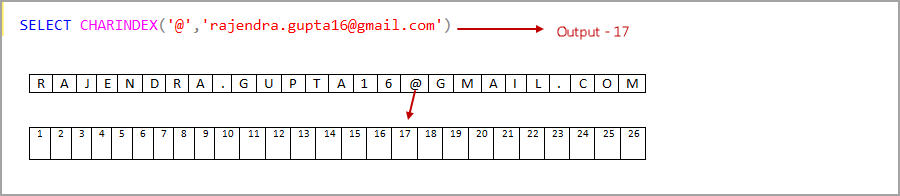
Example 1: Search a character position in a string
In this example, we want to find position of @ character in a specified email address rajendra.gupta16@gmail.com
In the following screenshot, we can see position of each character in the email address string. The character ‘@’ is in position 17. We get this position in output of SQL CHARINDEX.
Example 2: Use of optional parameter Start_position in SQL CHARINDEX
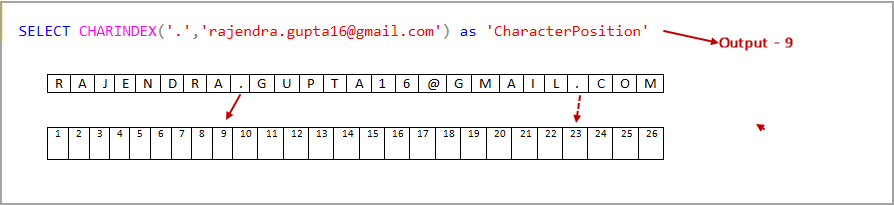
Similarly, let’s search dot (.) position in this string. We can see that the dot is on position 9th and 23rd in the specified string (email address).
Once we execute this script, it returns the first position of the dot in the output. It starts the search from starting position of a string and stops once it finds a suitable match.
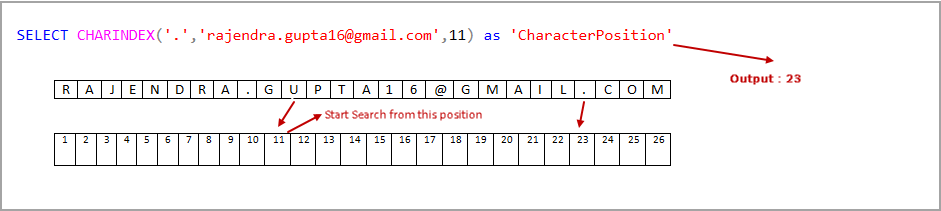
Suppose we want to get the position of the second dot (.) in this email address. We can specify a value for an optional parameter to start searching from a specific position. It starts from a specific character position and checks for the character position. We still get the actual position of the character that is 23rd in this example.
Example 3: Search a substring position in a specified string in SQL CHARINDEX
In previous examples, we searched a specific character in a specified string. We can also search a substring as well in a string.
In the following query, we declared a variable @ExpressionToSearch for the string and set a value on it. We want to search for substring Rajendra in this string.
It searches for the substring in a specified string. If it gets an exact match of the substring, it returns the starting position of the substring.
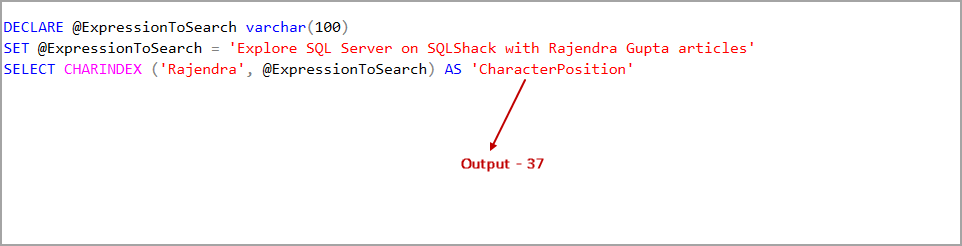
If an exact match is not found it returns 0 in the output.
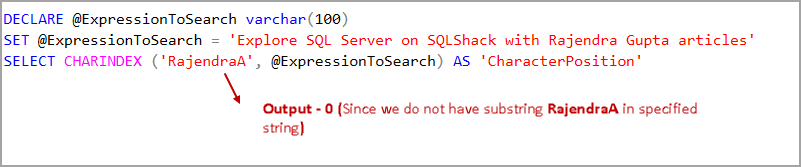
Example 4: Search a substring position in a specified string with multiple matching in SQL CHARINDEX
Suppose we want to search a substring in a specified string. In the string we have multiple matching substrings. For example, in the following query, we want to search for SQLShack and find its position.

We can use start_location in SQL CHARINDEX with a substring as well. For example, let’s start with position 24 and see the result. It starts from character position 24 and searches for a particular substring. We can see the substring starting position is now at 63.

Example 5: SQL CHARINDEX with SQL CASE statement
We can use SQL CHARINDEX with SQL Case statement to search a particular substring existence in a specified string.
In the following screenshot, we can see that SQL CHARINDEX function checks for a particular substring. If it returns a value greater than 0 it means substring exists in specified string else it does not exist.
- Substring SQLShack exists in a specified string that’s why the output is Exists
- Substring Rajendra does not exist in a specified string that’s why the output is Not Exists
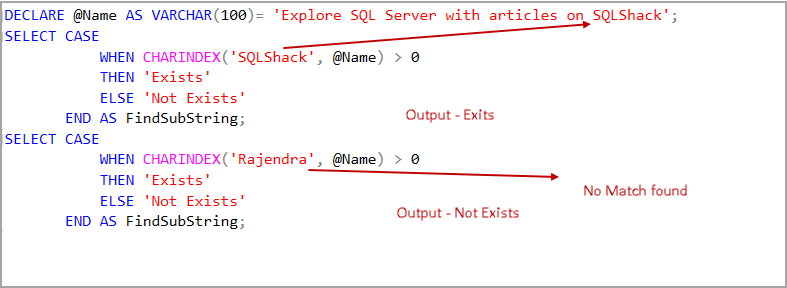
Example 6: Case sensitive search with SQL CHARINDEX
In the previous examples, we did not use case sensitive search. For example, in the following query, we want to search for substring sqlshack in our string. This substring exists does but it exists in upper case.
It does not perform case sensitive search, and we still get the correct output.

We can use collation to perform case sensitive search. In the following examples, we use COLLATE Latin1_General_CS_AS to perform case sensitive search. We need to note that all character case in a substring should match within a string. Execute the following query to understand this.

Example 7: SQL CHARINDEX and table column
We can use SQL CHARINDEX for existing data in a table. We can use it to get output in a separate column. In the following example, we want to check the position of character R in empname column values of the Employee table.
In the following screenshot, we have a new column to get position of character R in EmpName column values. If Empname does not contain specified character R, it returns 0.
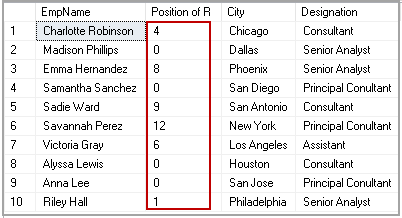
Let’s update one record in Employee table and replace empname with NULL.
Rerun the SQL CHARINDEX query, and we see value NULL in Position of R column. If we have a NULL value in a column, it also returns a NULL value.
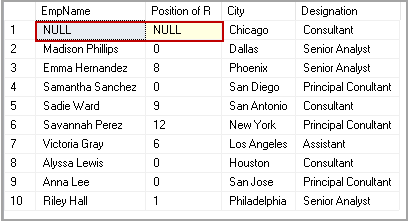
Example 8: SQL CHARINDEX and Numeric value
We can search for numeric value as well as using SQL CHARINDEX. Suppose we want to find a position of character 1 in empid column of the employee table.
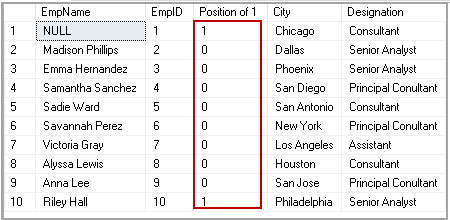
We need to specify numeric value as well in single quotes. If we do not put single quotes, it gives following error message.
Quick Recap of SQL CHARINDEX
- SQL CHARINDEX Returns a position of a substring within a string
- If the target string varchar(max), nvarchar(max), it returns Big Int value else it returns Int data type
- By default, it performs a case insensitive search
- If there is no match found, it returns 0 in return
Conclusion
In this article, we explored SQL CHARINDEX function and its usage with various examples. Please feel free to provide feedback or ask questions in the comment section below.
Hi! I am Rajendra Gupta, Database Specialist and Architect, helping organizations implement Microsoft SQL Server, Azure, Couchbase, AWS solutions fast and efficiently, fix related issues, and Performance Tuning with over 14 years of experience.
I am the author of the book «DP-300 Administering Relational Database on Microsoft Azure». I published more than 650 technical articles on MSSQLTips, SQLShack, Quest, CodingSight, and SeveralNines.
I am the creator of one of the biggest free online collections of articles on a single topic, with his 50-part series on SQL Server Always On Availability Groups.
Based on my contribution to the SQL Server community, I have been recognized as the prestigious Best Author of the Year continuously in 2019, 2020, and 2021 (2nd Rank) at SQLShack and the MSSQLTIPS champions award in 2020.