NumPy: numpy.linspace() function
The numpy.linspace() function is used to create an array of evenly spaced numbers within a specified range. The range is defined by the start and end points of the sequence, and the number of evenly spaced points to be generated between them.
Syntax:
Parameters:
| Name | Description | Required / Optional |
|---|---|---|
| start | The starting value of the sequence. | Required |
| stop | The end value of the sequence, unless endpoint is set to False. In that case, the sequence consists of all but the last of num + 1 evenly spaced samples, so that stop is excluded. Note that the step size changes when endpoint is False. | Required |
| num | Number of samples to generate. Default is 50. Must be non-negative. | Optional |
| endpoint | If True, stop is the last sample. Otherwise, it is not included. Default is True. | Optional |
| retstep | If True, return (samples, step), where step is the spacing between samples. | Optional |
| dtype | The type of the output array. If dtype is not given, infer the data type from the other input arguments. New in version 1.9.0. |
Optional |
Return value:
ndarray — There are num equally spaced samples in the closed interval [start, stop] or the half-open interval [start, stop) (depending on whether endpoint is True or False).
step : float, optional — Only returned if retstep is True
Size of spacing between samples.
Example: Generating evenly spaced values with numpy linspace()
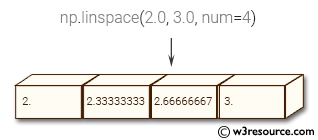
The above code demonstrates the usage of numpy’s linspace() function for generating evenly spaced values within a specified interval. The function takes three main arguments: start point, end point, and the number of values to be generated.
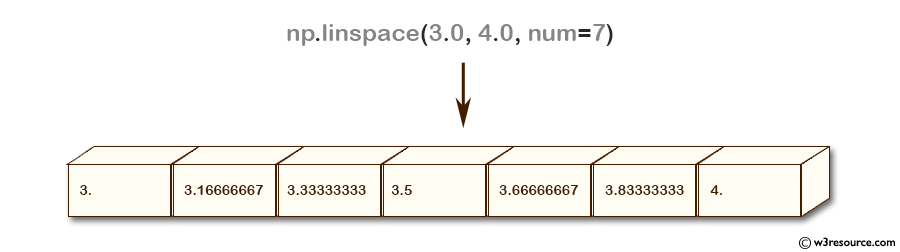
In the first example, linspace() generates 7 values between 3.0 and 4.0, including the endpoint of 4.0.
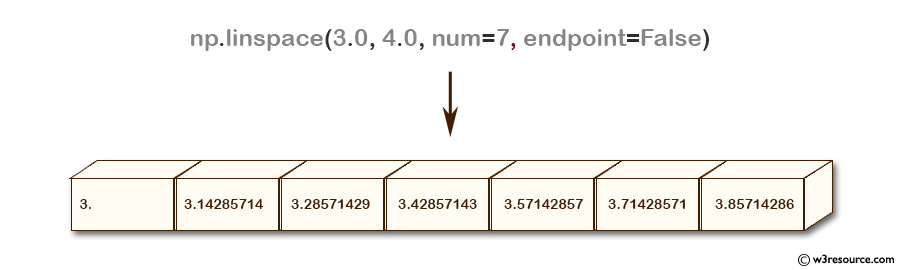
In the second example, the endpoint is excluded by setting the optional parameter ‘endpoint’ to False, and linspace() generates 7 values with equal spacing between 3.0 and 4.0.
In the third example, the optional parameter ‘retstep’ is set to True, which returns a tuple containing the generated array and the step size between adjacent values.
Pictorial Presentation:
Example: Plotting Points with Matplotlib
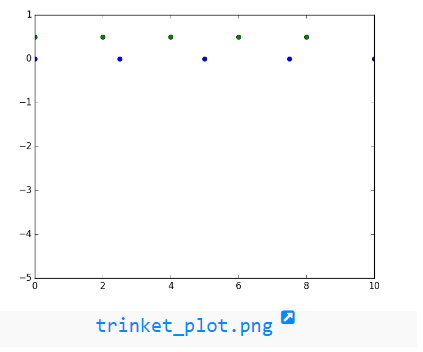
The above code uses the numpy and matplotlib.pyplot libraries to create a simple plot of points.
1. A is set to 5 and x is created as a numpy array of 5 zeros.
2. Two arrays a1 and a2 are created using numpy.linspace method, which returns evenly spaced numbers over a specified interval.
3. plt.plot is used to create two sets of points on the plot.
numpy.linspace.plot show
Python — NumPy Code Editor:
Previous: arange()
Next: logspace()
Follow us on Facebook and Twitter for latest update.
- Weekly Trends
We are closing our Disqus commenting system for some maintenanace issues. You may write to us at reach[at]yahoo[dot]com or visit us at Facebook
Numpy linspace() method
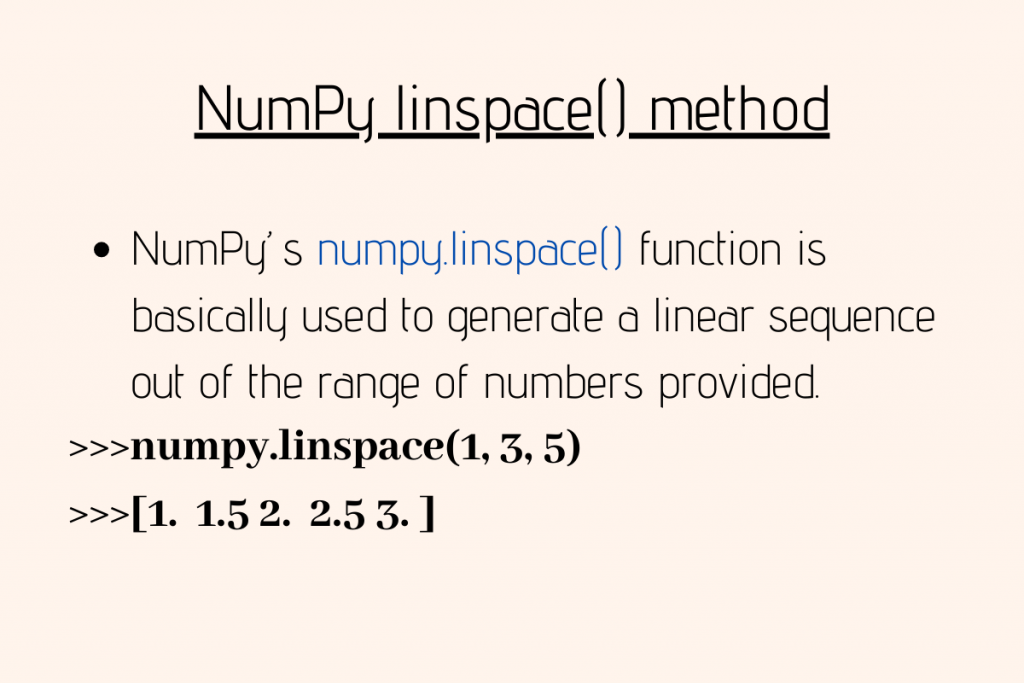
In this article, we will be having a look at the Numpy linspace() function. Python NumPy module has got different functions to manipulate the arrays and perform operations on the elements in it.
Getting Started with NumPy linspace()
NumPy’s numpy.linspace() function is basically used to generate a linear sequence out of the range of numbers provided.
Usually, numpy.arange() function can be used to generate sequences out of a range of numbers. The problem with numpy.arange() function is that it provides a loss of precision in the result if a floating type argument is provided to it.
Thus, numpy.linspace() function can be preferred over it.
Syntax:
- start : This value indicates the starting point of the sequence. Default value is considered as zero(0).
- stop : This value indicates the endpoint of the sequence.
- num : It indicates the number of steps or elements to be generated between the start and stop range.
Example:
Output:
The retstep parameter of Numpy linspace()
The retstep parameter is basically a boolean value. If provided as True, it specifies the size of the steps taken between every element to generate the sequence. Then it results in the sequence as a tuple.
Example:
As mentioned above, when retstep = True is passed as an argument to the linspace() method, it generates a tuple as output. So the length of tuple would be 2, not 6!
Output:
The endpoint parameter of linspace() method
The endpoint parameter is a boolean value. If set to False, it excludes the last number of the sequence in the result. The default value of the endpoint is True.
Example:
Output:
The axis parameter of linspace() method
The axis parameter basically allows the user to provide an axis for the generated sequences to be stored along. The axis parameter can be applied only when the start and endpoint of data are of an array type.
Example:
When axis = 0, it takes the sequence limits from the first provided axis. The sub-array pairs [10, 20, 30] and [1, 3, 9] along with [70, 40, 50] and [5, 7, 11] are considered as limits to derive the sequence from inp1 to inp2.
When axis = 1, it uses column sequence to generate the elements from the given range.
Output:
NumPy linspace() function with Python matplotlib.pylab module
NumPy linspace() function can be understood by representing it with the help of pylab from the matplotlib library.
Example:
Output:

NmpPy Linspace
Using the numpy linspace() method
In this tutorial, we will look at the numpy linspace method with the help of some examples. We will also look at a range of different use-cases where you might need this method.
What does numpy linspace do?

The numpy linspace() function is used to create an array of equally spaced values between two numbers. The following is its syntax:
It returns a numpy array of evenly spaced numbers over the specified interval with both the endpoints “start” and “stop” included.
- You can exclude the “stop” endpoint by passing False to the endpoint parameter which is True by default.
- It returns an array with 50 values. You can specifiy the number of values to generate by passing the desired number to the num paramter which is 50 by default.
Examples
Let’s look at some examples of using the linspace() function for a variety of use-cases:
1. Equally spaced numbers between two integers
Let’s create an array of equally spaced values between the numbers 1 and 10.
We get 50 equally spaced values between 1 and 10 (both inclusive). Let’s confirm the size and type of arr –
The returned object is a numpy array of size 50. The size is 50 because the default value of the num parameter is 50.
2. Getting custom number of values with numpy linspace()
Let’s now provide a custom value for the parameter num . For example, let’s create 10 equally spaced values between 2 and 20
We get 10 numbers that are equally spaced between 2 and 20.
The syntax np.linspace(start, stop, num) will be the one that you might end up using the most.
3. numpy linspace() not including the stop endpoint
By default, the np.linspace() function includes both the start and the stop endpoints in the generated array. If you don’t want the stop endpoint to be included, pass False to the endpoint parameter. For example, let’s create 10 equally spaced values between 2 and 20 with 20 not included.
In the output, you can see that we get 10 values but 20 is not included. The step size is different for the same start and stop values as in the previous example and is calculated using (stop-start)/(num+1) which comes out to be around 1.8 in this example. Note that this way of step size calculation is used only when endpoint=False . That is when the stop endpoint is not included.
4. numpy linspace() in reverse order
If you want to get values between two numbers starting from the largest, pass the larger number as the start value and the smaller number as the end value. For example, let’s get 10 equally spaced values between 2 and 20 but in the reverse order.
Here we passed 20 as the start value and 2 as the end value. You can see that we get 10 equally spaced values between 2 and 20 in the reverse order.
4. Using numpy linspace() for negative numbers
You can also apply the linspace() function on negative values. For example, let’s get 5 equally spaced values between -10 and -2.
The function works similarly as it did for positive numbers. We can see that we get 5 equally spaced values between -10 and -2.
We can also get values between a range of negative and positive numbers. For example, let’s get 5 equally spaced values between -10 and 10.
For more on the numpy linspace() function, refer to its documentation.
With this, we come to the end of this tutorial. The code examples and results presented in this tutorial have been implemented in a Jupyter Notebook with a python (version 3.8.3) kernel having numpy version 1.18.5
Subscribe to our newsletter for more informative guides and tutorials.
We do not spam and you can opt out any time.
NumPy linspace(): How to Create Arrays of Evenly Spaced Numbers

This tutorial will teach you how to use NumPy linspace() to create an array of evenly spaced numbers in Python.
You’ll learn the syntax of NumPy linspace() , followed by examples that’ll help you understand how to use it.
Note: To follow along with this tutorial, you need to have Python and NumPy installed.
Don’t have NumPy yet? We’ve put together a quick installation guide for you.
Install and Import NumPy
Before starting the tutorial, let’s quickly run through the steps to install the NumPy library.
⏩ If you already have NumPy installed, feel free to skip to the next section.
- If you’re using Google Colab—a cloud-based Jupyter notebook environment, you can import NumPy and start coding right away. (recommended for this tutorial ✅)
- If you’d like to set up a local working environment, I recommend installing the Anaconda distribution of Python. Anaconda comes with several useful packages pre-installed. You may download the installer for your Operating System. The setup process takes only a few minutes.⌛
- If you already have Python installed on your computer, you can still install the Anaconda distribution. You may use conda or pip to install and manage packages. You may run one of the following commands from the Anaconda Command Prompt to install NumPy.
As a next step, import numpy under the alias np by running the following command. Doing this will help you reference NumPy as np —without having to type down numpy every time you access an item in the module.
Going forward, we’ll use the dot notation to access all functions in the NumPy library like this: np.<func-name> .
The Case for Evenly Spaced Numbers
When you’re working with NumPy arrays, there are times when you’ll need to create an array of evenly spaced numbers in an interval.
Before we go any further, let’s quickly go over another similar function np.arange() .
NumPy linspace() vs. NumPy arange()
If you’ve used NumPy before, you’d have likely used np.arange() to create an array of numbers within a specified range.
You know that np.arange(start, stop, step) returns an array of numbers from start up to but not including stop , in steps of step ; the default step size being 1.
However, the value of step may not always be obvious. Let’s see why this is the case.
For example, if you need 4 evenly spaced numbers between 0 and 1, you know that the step size must be 0.25. But if you’re using np.arange() , it does not include the stop value of 1. So you will have to pick an interval that goes beyond the stop value.
The following image illustrates a few more examples where you need a specific number of evenly spaced points in the interval [a, b].

Evenly-spaced points in an interval
Our first example of 4 evenly spaced points in [0,1] was easy enough. You know that the step size between the points should be 0.25.
Suppose you have a slightly more involved example—where you had to list 7 evenly spaced points between 1 and 33. Here, the step size may not be very clear immediately. You can, however, manually work out the value of step in this case.
However, np.linspace() is here to make it even simpler for you! ��

Use NumPy linspace
When using np.linspace() , you only need to specify the number of points in the interval—without worrying about the step size. And you’ll get back the array as desired.
With this motivation, let’s proceed to learn the syntax of NumPy linspace() in the next section.
Syntax of NumPy linspace()
The syntax for using NumPy linspace() is shown below:
At the outset, the above syntax may seem very complicated with many parameters.
However, most of them are optional parameters, and we’ll arrive at a much simpler syntax in just a couple of minutes.
Now let’s start by parsing the above syntax:
- start and stop are the starting and end points of the interval, respectively. Both start and stop can be scalars or arrays. We’ll limit ourselves to scalar start and end values in this tutorial.
- num is the number of evenly spaced points. And it is an optional parameter with a default value of 50.
- endpoint is also an optional parameter that can be either True or False.
- The default value is True, which means the end point will be included in the interval by default. However, you may set it to False to exclude the end point.
- retstep is yet another optional parameter that takes the Booleans True or False. When set to True, the step value is returned.
- dtype is the data type of the numbers in the array. The type is usually inferred as float and need not be provided explicitly.
- axis is another optional parameter denoting the axis along which the numbers should be stored. And this is relevant only when the start and the stop values are arrays themselves.
▶️ So what does np.linspace() return?
It returns an N-dimensional array of evenly spaced numbers. And if the parameter retstep is set to True , it also returns the step size.
Based on the discussion so far, here is a simplified syntax to use np.linspace() :
The above line of code will return an array of num evenly spaced numbers in the interval [start, stop] .
Now that you know the syntax, let’s start coding examples.
How to Create Evenly Spaced Arrays with NumPy linspace()
#1. As our first example, let’s create an array of 20 evenly spaced numbers in the interval [1, 5].
You can specify the values of start , stop , and num as keyword arguments. This is shown in the code cell below:
Notice how the numbers in the array start at 1 and end at 5—including both the end points. Also, observe how the numbers, including the points 1 and 5 are represented as float in the returned array.
#2. In the previous example, you had passed in the values for start , stop , and num as keyword arguments. If you pass in the arguments in the correct order, you might as well use them as positional arguments with only the values, as shown below.
#3. Now let’s create another array where we set retstep to True .
This means that the function will now return both the array and the step. And we can unpack them into two variables arr3 : the array, and step_size : the returned step size.
The following code cell explains how you can do it.
#4. As a final example, let us set endpoint to False , and check what happens.
In the returned array, you can see that 1 is included, whereas 5 is not included. And the last value in the array happens to be 4.8, but we still have 20 numbers.
So far, we’ve only generated arrays of evenly spaced numbers. In the next section, let’s visualize by plotting these numbers.
How to Plot Evenly Spaced Numbers in an Interval
In this section, let us choose [10,15] as the interval of interest. And then, use np.linspace() to generate two arrays, each with 8 and 12 points, respectively.
After this is complete, we can use the plotting function from the matplotlib library to plot them.
For clarity, we’ll clamp the two arrays of N1 = 8 and N2 = 12 evenly spaced points at different positions along the y-axis.
The following code snippet demonstrates this.

Generating evenly spaced points can be helpful when working with mathematical functions. We’ll learn about that in the next section.
How to Use NumPy linspace() with Math Functions
After you’ve generated an array of evenly spaced numbers using np.linspace() , you can compute the values of mathematical functions in the interval.
In the code cell below, you first generate 50 evenly spaced points in the interval 0 to 2π. And then create the array y using np.sin() on the array x . Note that you may skip the num parameter, as the default value is 50. We’ll still use it explicitly.
As a next step, you can plot the sine function in the interval [0, 2π]. To do this, you can use matplotlib, as in the previous example. Specifically, the plot() function in matplotlib.pytplot is used to create a line plot.

Now, run the above code by setting N equal to 10. You’ll get the plot as shown in the figure below.

And you can see that the plot is not very smooth—as you’ve only picked 10 points in the interval.
In general, the larger the number of points you consider, the smoother the plot of the function will be.