Python String Methods

In this article, you will learn how to use some built-in methods for Python. Strings in python are surrounded by either single or double quotation marks and each character in a string is assigned an index.
Section Overview
- count()
- center()
- swapcase()
- find()
- split()
- startswith()
- endswith()
- ljust() and rjust()
- string capitalization
- zfill()
- strip()
Let’s look at string methods:
Section 1. count()
The count() method returns the number of occurrences of a substring in the given string.
Syntax:
Parameters:
- substring (Required) is the string whose count is to be found.
- start (Optional) is the starting index for the string.
- end (Optional) is the ending index for the string.
Let’s look at the example without optional parameters:
Let’s look at the example using optional parameters:
Section 2. center()
The center() method creates and returns a new string. Whitespace is the default.
Syntax:
Parameters:
- length (Required) is the length of the string.
- fillchar (Optional) is the character which needs to be padded.
Let’s look at the example without optional parameters:
Let’s look at the example using optional parameters:
Section 3. swapcase()
The swapcase() method converts all uppercase characters to lowercase or all lowercase characters to uppercase.
Syntax:
Let’s look at the example:
Section 4. find()
The find() method returns the lowest index in the string where substring sub is found within the slice s[start:end] .
Syntax:
Parameters:
- substring (Required) which is to be searched in the given string.
- start (Optional) is the starting position where substring is to be checked within the string.
- end (Optional) is the ending position where substring is to be checked within the string.
Let’s look at the example without optional parameters:
Let’s look at the example using optional parameters:
Section 5. split()
The split() method returns a list of strings in a string for breaking the given string by the specified separator. Also, default separator is any whitespace.
Syntax:
Parameters:
- separator (Optional) is delimiter. The string splits at this specified separator. Default separator is any whitespace.
- maxsplit (Optional) is a number of splits. If it is not used than there is not limit.
Note: You can use rsplit() for splits a string from the right.
Let’s look at the example:
Section 6. startswith()
The startswith() method return True, if starting with the given specified value in a string. Otherwise, it return False.
Syntax:
Parameters:
- search_string (Required) is the string to be searched.
- start (Optional) is the starting position where substring is to be checked within the string.
- end (Optional) is the ending position where substring is to be checked within the string.
Let’s look at the example without optional parameters:
Let’s look at the example using optional parameters:
Section 7. endswith()
The endswith() method return True, if ending with the given specified value in a string. Otherwise, it return False.
Syntax:
Parameters:
- search_string (Required) is the string to be searched.
- start (Optional) is the starting position where substring is to be checked within the string.
- end (Optional) is the ending position where substring is to be checked within the string.
Let’s look at the example without optional parameters:
Let’s look at the example using optional parameters:
Section 8. ljust() and rjust()
The ljust and rjust will left or right align the string, using a specified character (space is default) as the fill character.
Syntax:
Parameters:
- length (Required) is the width of string to expand it.
- fillchar (Optional) is the character to fill in remaining space.
Let’s look at the example:
Section 9. String Capitalization
Section 9.1. capitalize()
The capitalize() method converts only the first character of a string to capital (uppercase) letter.
Syntax:
Let’s look at the example:
Section 9.2. upper()
The upper() method converts all characters of the a string to uppercase letter.
Syntax:
Let’s look at the example:
Section 9.3. title()
The title() method converts all the first character of the a string to uppercase letter.
Syntax:
Let’s look at the example:
Section 10. zfill()
The zfill() method returns a copy of the string with “0” characters padded to the leftside of the given string.
Syntax:
Parameters:
- length is the length of the returned string from zfill() with “0” digits filled to the leftside.
Let’s look at the example:
Section 11. strip()
The strip() method returns a copy of the string with both leading and trailing characters removed.
-
: strips characters from the right in a string. : strips characters from the left in a string.
Syntax:
Parameters:
- character (Optional)→ set of characters to be removed.
Let’s look at the example:
Conclusion
In this article you’ve learned how to use some built-in methods for Python. You can visit Python documentation for learning deeper.
inserting characters at the start and end of a string
Strings are immutable so you can’t insert characters into an existing string. You have to create a new string. You can use string concatenation to do what you want:
Note that you can also create a string with n L s by using multiplication:
For completeness along with the other answers:
Or, more forward compatible with Python 3.x:

You can also use join:

If you want to insert other string somewhere else in existing string, you may use selection method below.
Calling character on second position:
Calling range with start and end position:
Calling part of a string before that position:
Calling part of a string after that position:
Inserting your string in 5th position.
Also s is equivalent to s[:] .
With your question you can use all your string, i.e.
or if «L» is a some other string (for example I call it as l ), then you may use that code:
Append to a string Python + Examples
Let’s see how to append to a string python.
In this example, we will use “+” operator to append to a string in python. The code below shows appending of two string.
Example:
You can refer to the below screenshot to see the output for append to a string python.

This is how we can append to a string in Python.
Prepend to a string python
Now, we will see how to prepend to a string python.
Prepend to a string will add the element to a string. In this example, we have two strings and to get the output we will print my_string.
Example:
You can refer to the below screenshot to see the output for prepend to a string python

This is how we can prepend a string in Python.
Insert to a string python
Here, we will see how to insert to a string python.
- To insert into a string we will use indexing in python.
- Inserting into a string returns the string with another string inserted into it at a given index.
- In this example, we are inserting “New York” into “Los Angeles, Chicago” and it returns “Los Angeles, New York, Chicago”.
Example:
This is how we can insert to a sting in Python.
Append 0 to a string python
Let’s see how to append 0 to a string python.
In this example, we will use rjust function for appending 0 to a string as it offers a single line way to perform the task.
Example:
You can refer to the below screenshot to see the output for append 0 to a string python.

The above Python code we can use to append 0 to a string in Python.
Append character to a string python
Now, we will see how to append character to a string python.
- To append a character to a string we will insert the character at an index of a string and it will create a new string with that character.
- To insert a character we will use slicing a_str[:1] + “n” + a_str[1:] and the “+” operator is used to insert the desired character.
Example:
You can refer to the below screenshot to see the output for append character to a string python

This is how to append character to a string in Python.
Python append to beginning of a string in a loop
Here, we will see Python append to the beginning of a string in a loop
In this example, we will append to the beginning of a string using the for loop, and the “+” operator is used.
Example:
You can refer to the below screenshot to see the output for python add to string in a loop.
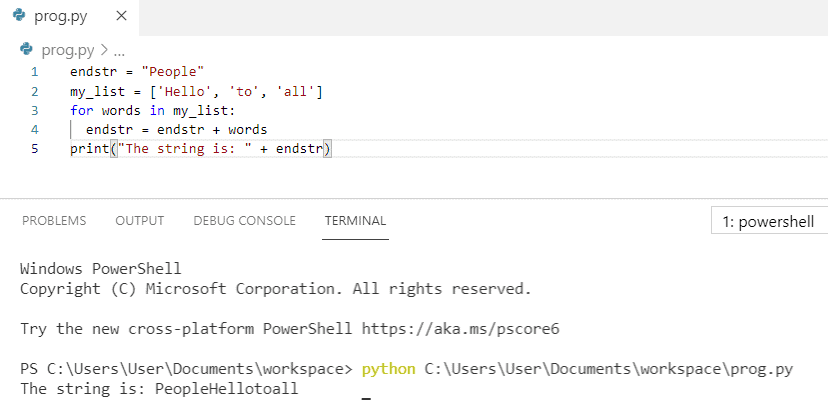
The above code, we can use to append to beginning of a string in a loop in Python.
Add letter to a string python
Here, we will see how to add letter to a string python.
To add letter to a string python we will use f”
Example:
You can refer to the below screenshot to see the output for add letter to a string python
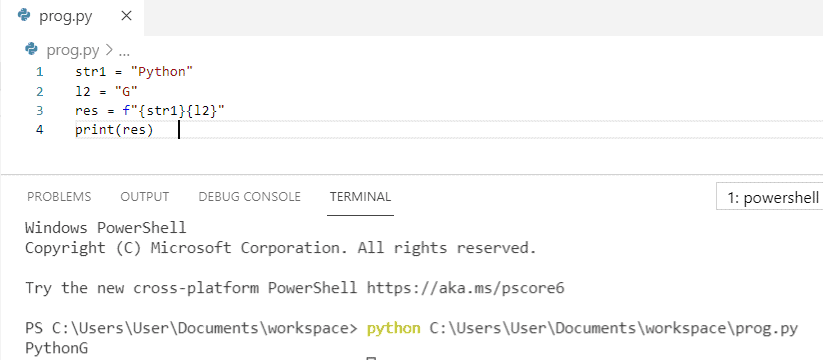
This is python code to add letter to a string in Python.
Add variable to a string python
Let’s see how to add variable to a string python.
In this example, we will use “+” operator to add a variable to a string.
Example:
You can refer to the below screenshot to see the output for add variable to a string python

This is how to add variable to a string in Python.
Add int to a string python
Now, we will see how to add int to a string python.
Firstly, we will initialize the string and a number and by using the type conversion we will insert the number in the string, and then to get the output we will print.
Example:
You can refer to the below screenshot to see the output for add int to a string python

This is how to add int to a string in Python.
Append to end of a string in python
Here, we will see how to append to the end of a string in python
In this example, we will use the “+” operator, and to get the output we will print(string3).
Example:
You can refer to the below screenshot to see the output for append to the end of a string in python.

The above code we can use to append to end of a string in python.
How to append a new line to a string in python
Let us see how to append a new line to a string in python
In this example, to append a new line to a string we have specified the newline character by using “\n” which is also called an escape character. Hence, the string “to python” is printed in the next line.
Example:
You can refer to the below screenshot to see the output for how to append a new line to a string in python.

The above code we can use to append a new line to a string in python.
How to append backslash to a string in python
Now, we will see how to append backslash to a string in python
In this example, to append backslash to a string in python we have used the syntax “\\” to represent single backslash to a string.
Example:
You can refer to the below screenshot to see the output for how to append backslash to a string in python.

The above code we can use to append backslash to a string in python.
How to append to an empty string in python
Let’s see how to append to an empty string in python.
To append to an empty string in python we have to use “+” operator to append in a empty string.
Example:
You can refer to the below screenshot to see the output for how to append to an empty string in python.

The above code we can use to append to an empty string in python.
How to append double quotes to a string in python
Here, we will see how to append double quotes to a string in python.
To append double quotes to a string in python we have to put the string in the single quotes.
Example:
You can refer to the below screenshot to see the output for how to append double quotes to a string in python.

The above code we can use to append double quotes to a string in python.
How to append to a string in python
In python, to append a string in python we will use the ” + ” operator and it will append the variable to the existing string.
Example:
After writing the above Python code (how to append to a string in python), Ones you will print then the output will appear ” My name is Misheil and my salary is around 10000 “. Here, the ” + ” operator is used to append the variable. Also, you can refer to the below screenshot append to a string in python.

In this Python tutorial, we have learned about how to Append to a string python. Also, we covered these below topics:
- Append to a string python
- Prepend to a string python
- Insert to a string python
- Append 0 to a string python
- Append character to a string python
- Python append to the beginning of a string in a loop
- Add letter to a string python
- Add variable to a string python
- Add int to a string python
- Append to the end of a string in python
- How to append a new line to a string in python
- How to append backslash to a string in python
- How to append to an empty string in python
- How to append double quotes to a string in python
- How to append to a string in python

I am Bijay Kumar, a Microsoft MVP in SharePoint. Apart from SharePoint, I started working on Python, Machine learning, and artificial intelligence for the last 5 years. During this time I got expertise in various Python libraries also like Tkinter, Pandas, NumPy, Turtle, Django, Matplotlib, Tensorflow, Scipy, Scikit-Learn, etc… for various clients in the United States, Canada, the United Kingdom, Australia, New Zealand, etc. Check out my profile.
Add character to String in Python

Strings are considered as a sequence of characters in programming. In Python, string objects are considered immutable. What this means is that string objects cannot be changed once created, and a new string is created with a different block of memory when we edit a string.
In this article, we will discuss how to add a character to string in Python.
Table of Contents
Using the + operator
Apart from its arithmetic use, the + can also be used as a concatenation operator. It can combine one or more strings or characters based on our desired position. Given its flexibility and simple logic, this method is used very commonly for adding characters in a string.
In the following code, we will add a character at different positions in a string.
Output:
In the above code, we added a character to a string at the start, end, and some particular index. While adding a character at some index, we simply slice the string into two substrings. One substring contains the part before the index and the other contains after the index. We simply concatenate the two substrings with the character in between to get the final result.
Further reading:
Python remove character from String
Remove whitespace from String in Python
Using the join() function
The join() function can work on iterable objects for combining their constituents based on a specified separator character or string. It can be used to add a character in a string at our desired position.
Output:
In the above example, we specify the separator character for the join() function as an empty character to avoid any space.
Using the % operator
In Python, we can use many methods to format strings and get the output in our desired form. We can use the % operator to format and add characters to a string.
Output:
Using the format() function
The format() function is also used for string formatting in Python. It uses the same pattern to specify the format to add character to a string as discussed above.
Output:
If any error is encountered in the above method, try changing the format to <0>.
Using the f-strings
The f-strings were introduced in Python 3 and are very popular when it comes to formatting strings in Python. It has an advantage over the % operator and format() function in terms of its speed and simplicity. We just have to prefix the string with f to use this method.
We can add a character to a string using this as shown below.
Output:
That’s all how to add character to String in Python.
Was this post helpful?
Share this
Python find number in String
Remove Comma from String in Python
Related Posts
Author

Related Posts

Python Hex to String
Table of ContentsUsing bytes.fromhex() MethodUsing binascii ModuleUsing codecs ModuleUsing List Comprehension The representation of data in Hexadecimal is commonly used in computer programming. It is used to represent binary data in a human-readable form, as understanding the machine language (i.e., Binary) is difficult for humans. Hexadecimal notation is used in networking protocols, e.g., IPv6 and […]

Encode String to UTF-8 in Python
Table of ContentsEncode String to UTF-8 in PythonUsing the encode() functionUsing the codecs.encode() functionConclusion The UTF-8 encoding is used by default in Python and represents 8-bit Unicode values. The upgrade to Python 3 saw a major change in using ASCII characters to Unicode characters by default for strings. Encode String to UTF-8 in Python This […]
How To Do Line Continuation in Python
Table of ContentsUsing Backslash (\) OperatorLine Continuation in StringLine Continuation in Number ExpressionUsing Parentheses ()Line Continuation in StringLine Continuation in Number Expression Using Backslash (\) Operator We can use \ operator for line continuation in string and number expression as follows. Line Continuation in String To do line continuation in Python Strings: Use the backslash […]
Convert List to Comma Separated String in Python
Table of ContentsUse .join() MethodUse .join() with map() MethodUse .join() with List Comprehension Use .join() Method To convert a list to a comma separated string in Python, use the .join() method. join() method takes all elements in an iterable and joins them into one string with delimiter as separator. [crayon-6482a4664172b764691899/] [crayon-6482a46641730287075391/] First, we created a […]