How to run a Python file from a PHP file .

Isn’t it exciting to see how we can mange to use two powerful programming languages . Well I must say that It will be an epic marriage of those two language. So let’s get started.
I’m assuming that you have already installed Python in your system. I am using a Windows System so I have installed Xampp for PHP.
Step 1: PHP & Python File
You just need to create two files in your current working directory.
- index.php
- test.py
Step 2: PHP Code
In you index.php file, you just need to write this lines to run your python file from your current php file.
So, here we can see we are calling shell_exec() function to call the python file. The shell_exec() function is an inbuilt function in PHP which is used to execute the commands via shell and return the complete output as a string.
And also notice one more thing , We are passing a string data, not just a word from the PHP file to Python file. So watch carefully how we can easily manage that in python file.
After that we are printing the $output variable to show the result that is coming from the python file. I have also added few extra lines for your understanding how the program is executing.
Step 3: Python Code
In you test.py file, you just need to write this lines to handle the incoming string data & return the output to PHP file.
In this way, we can easily mange to get the entire string value that was coming from the PHP file & that print statement is returning to PHP file again.
This is how your output should look like if you follow this correctly.
Key Note:
So just to recap, there are two important topic that you should really attentive enough to understand as a good developer.
- How easy to call a python file from a PHP file with Data.
- How You can mange to get the entire data, in your python file.
Thanks a lot for reading till the end. You can contact me in case you need any help.
Запустить python скрипт из php и получить результат обратно в php
Всем привет. Интересует такой вопрос. Каким образом можно из php скрипта запустить python скрипт, обработать в нем некоторые данные, и получить результат работы скрипта и данные обратно в php ?

В зависимости от того, что вы делаете, system () или popen ().
Используйте system (), если код Python не имеет выхода, или если вы хотите, чтобы выход скрипта Python переходил непосредственно в браузер.
Используйте popen (), если вы хотите записать данные на стандартный ввод скрипта Python или прочитать данные из стандартного вывода сценария Python в php. Popen () позволит вам читать или писать, но не то, и другое. Если вы хотите оба, проверьте proc_open (), но с двухсторонней связью между программами вы должны быть осторожны, чтобы избежать взаимоблокировок, где каждая программа ждет другого, чтобы что-то сделать.
Если вы хотите передать данные, предоставленные пользователем, в сценарий Python, то самое важное, о чем нужно заботиться, — это командная инъекция. Если вы не будете осторожны, ваш пользователь может отправить вам такие данные, как «; evilcommand»; И заставить вашу программу выполнять произвольный код.
Escapeshellarg () и escapeshellcmd () могут помочь с этим, но лично мне нравится удалять все, что не является известными хорошими данными, используя что-то вроде
Запуск скрипта Python из PHP
Я пытаюсь запустить Python script из PHP, используя следующую команду:
exec(‘/usr/bin/python2.7 /srv/http/assets/py/switch.py arg1 arg2’);
Однако PHP просто не производит никакого вывода. Отчет об ошибках установлен в E_ALL, а display_errors включен.
Вот что я пробовал:
- Я использовал python2 , /usr/bin/python2 и python2.7 вместо /usr/bin/python2.7
- Я также использовал относительный путь вместо абсолютного пути, который тоже ничего не менял.
- Я пробовал использовать команды exec , shell_exec , system .
Однако, если я запустил
он отлично работает, а shutdown now ничего не делает.
У PHP есть разрешения на доступ и выполнение файла.
EDIT: Благодаря Алехандро, я смог решить проблему. Если у вас есть такая же проблема, не забывайте, что ваш веб-сервер, вероятно, не работает с правами root. Попробуйте войти в систему как пользователь вашего веб-сервера или пользователь с аналогичными разрешениями и попробуйте сами выполнить команды.
8 ответов
Протестировано на Ubuntu Server 10.04. Я надеюсь, что это поможет вам и в Arch Linux.
Выполнить команду через оболочку и вернуть весь вывод в виде строки.
Он возвращает выходные данные выполненной команды или NULL, если произошла ошибка или команда не выдает никаких результатов.
В файле Python test.py проверьте этот текст в первой строке: (см. Объяснение shebang):
Также файл Python должен иметь правильные привилегии (выполнение для пользователя www-data/apache, если PHP-скрипт запускается в браузере или curl) и/или должен быть «исполняемым». Также все команды в .py файле должны иметь правильные права:
Просто быстрое напоминание для тех, кто пытается использовать shell_exec на платформе Unix-типа и не может заставить его работать. PHP выполняется в системе как веб-пользователь (обычно www для Apache), поэтому вам необходимо убедиться, что веб-пользователь имеет права на любые файлы или каталоги, которые вы пытаетесь использовать в команде shell_exec. В остальном, похоже, он ничего не делает.
How to Run a Python Script in PHP
PHP (which is a recursive acronym for PHP Hypertext Preprocessor) is one of the most widely used web development technologies in the world. PHP code used for developing websites and web applications can be embedded directly along with the rest of the HTML markup. This, along with a rich amount of libraries to perform system tasks, or to integrate with other application, makes PHP the go-to language for the Internet.
While there are plenty of libraries (or modules) in PHP, there can be cases when a module for a certain task is either missing or is not properly implemented; while the same module is available in Python.
Apart from this, for certain scripting tasks the user might find Python more suitable, while he finds PHP suitable for the rest of his codebase.
In this article, we will take a look at how a Python script can be run from a PHP interpreter in a Linux terminal.
Calling a Python Script in PHP
Let us consider the following PHP code (test.php).
Note: The ‘\n’ at the end of the string is a newline character, which will move the cursor to the new line for the next commands on the terminal.
Let’s now call a simple Python script ‘ test.py ’, which simply prints ‘Hello World’.
To call this script from PHP, use the ‘exec’ function.
We can call the script with the command line program ‘php’, which is nothing but the PHP interpreter.
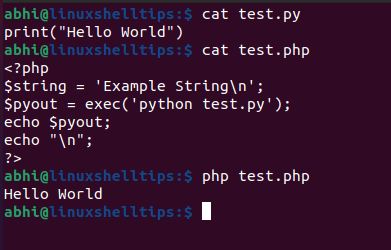
Run Python Script Using PHP
As we can see, the output of Python script test.py was displayed.
Next, let’s consider the following Python script file, ‘test2.py’, which takes one argument, a String, and prints it.
Now let’s call this script from PHP, passing the argument.

Execute Python Script Using PHP
As we can see, the Python Script got executed and printed the parameter value ‘Example’.
Conclusion
In this article, we saw how to call a Python script from within our PHP code. This can be used on more complex Python scripts, the output of which will be stored in the PHP variable as shown in our examples above.
This can especially be helpful when some complex Python libraries, eg. the machine learning and data science libraries, are to be used. If you have any questions or feedback, make sure you leave a comment below!