Lenovo Photo Master 2.0 Makes Pictures One Click Closer to Perfect
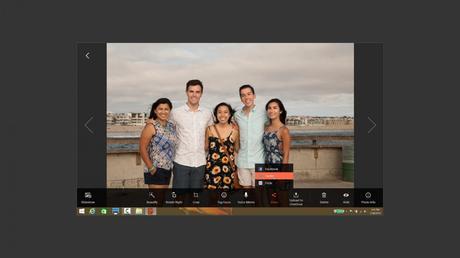
Lenovo today released Lenovo ™ Photo Master 2.0 to improve and simplify the photo editing, storing and sharing experience for hobbyist photographers. The modern photo library is paired with powerful, easy-to-use editing and navigation tools that intuitively ensure “chief memory officers” always put their best picture forward.
The new software ensures treasured memories can be easily edited to perfection by even the most novice photographers – with a user experience so natural and seamless it becomes addictive. Smart new features that improve the overall photo management experience for the amateur photographer include Auto Face Replace, OneKey Beautifier, Smart Event Sort and Just Visiting.
Preloaded on select Lenovo ™ YOGA ™ and ideapad™ laptops coming out this month 1 , the upgraded Photo Master 2.0 offers smart new ways to improve, organize and share photos.
Auto Face Replace Fixes Faces
Auto Face Replace technology is a handy consumer photo-editing “recommendation” tool. The technology is capable of fixing facial features in seemingly unusable group photos by creating the best photo from a series of shots. Additionally, it can make a recommendation for users to swap and edit the faces within group photos by replacing them with faces from other photos. The auto-swapping capabilities and other new improvements in Photo Master 2.0 make this version of the photo editing and management software tool a standout for photo enthusiasts and hobbyists who are eager to effortlessly make the most of each shot.
Instead of tossing out pictures because one person’s eyes were closed or forgot to smile, Photo Master 2.0 leverages facial recognition algorithms to “surgically” replace unwanted facial outcomes with more appealing ones from other photos. The result is a perfect image from every group shot. From wedding events to vacations and family photo sessions, Auto Face Replace ensures that photographic efforts are more likely to produce ideal images.
OneKey Beautifier
In response to the explosion of selfie-sharing and photo-based social networks, Photo Master 2.0 includes several one-click editing options for beautifying people and scenery. With unique and practical features such as Eye Enlarger, Blemish Removal, Skin Toner, and Eye Bag Removal, subjects in photos can receive a digital makeover in just seconds. The end result makes everyone look better, without complicated photo adjustments or knowledge of advanced photo editing techniques.
Tools for Photo Sharing
Effortlessly create a multimedia story from photo archives, including professional-quality photo collages and slideshows, with the help of Smart Event Sorting. It automatically organizes photos into collections and enables the sharer to simply pick a favorite song or audio track and bring a photo series instantly to life. The finished slideshow or photos can be quickly exported or shared via social media seamlessly from within the application.
Key Features
- Auto Face Replace helps create the best photo from group shots by swapping faces from other similar photos
- Smart Event Sort automatically organizes photos into collections by time, location, holiday or occasion
- OneKey Beautifier offers powerful editing tools for people and scenery to give every photo the facelift it needs
- Just Visiting automatically reminds users of upcoming personal special occasions through past photo collections
- Photo Collage and Slideshow creation tools enable users to seamlessly create multimedia presentations from photos
- Social media sharing from within the application saves time and makes it easier to show off photo creations
Quote
“Photo sharing is a big part of our daily lives, and finding a picture perfect image is important to both amateur and hobbyist photographers alike,” said Bai Peng, vice president and general manager, Lenovo Notebook Business Unit, PC Group. “With Photo Master 2.0, we’ve upped the ante with photo editing and sharing capabilities that users can use everyday to enhance their photos and cherish their special memories.”
Pricing and Availability
Photo Master 2.0 is a software that will be preloaded onto all Lenovo™ YOGA™ and ideapad™ laptops (except for the K and E series) starting in July 2015 1 .
A free trial version compatible with Windows 7, Windows 8.1 and Windows 10 will be available for download. Full version starts at US $9.95 later this year.
Lenovo Photo Master
A way to uninstall Lenovo Photo Master from your system
Lenovo Photo Master is a Windows application. Read below about how to uninstall it from your PC. It is made by CyberLink Corp. . You can read more on CyberLink Corp. or check for application updates here. Click on http://www.cyberlink.com to get more data about Lenovo Photo Master on CyberLink Corp.’s website. Usually the Lenovo Photo Master program is found in the C:\Program Files (x86)\Lenovo\Lenovo Photo Master folder, depending on the user’s option during setup. The full command line for uninstalling Lenovo Photo Master is C:\Program Files (x86)\NSIS Uninstall Information\
Lenovo Photo Master installs the following the executables on your PC, occupying about 21.91 MB ( 22974864 bytes) on disk.
- AddLogonTask.exe (26.93 KB)
- CpuChecker.exe (63.43 KB)
- MotionMenuGenerator.exe (87.93 KB)
- PhotoMaster.exe (719.43 KB)
- PhotoMasterAgent.exe (719.43 KB)
- PhotoMasterGadget.exe (719.43 KB)
- PhotoMasterWorker.exe (719.43 KB)
- vthum.exe (79.43 KB)
- MUIStartMenu.exe (219.43 KB)
- PhotoDirector5.exe (267.93 KB)
- PhotoDirectorCDP5.exe (255.43 KB)
- PhotoDirectorXPT5.exe (255.43 KB)
- CLImageCodec.exe (7.58 MB)
- CLUpdater.exe (397.26 KB)
- CES_AudioCacheAgent.exe (93.43 KB)
- CES_CacheAgent.exe (93.43 KB)
- Boomerang.exe (2.15 MB)
- CLImageCodec.exe (7.57 MB)
The current page applies to Lenovo Photo Master version 2.1.3024.01 alone. You can find below a few links to other Lenovo Photo Master releases:
- C:\Program Files (x86)\Lenovo\Lenovo Photo Master
- HKEY_LOCAL_MACHINE\Software\Microsoft\Windows\CurrentVersion\Uninstall\
- HKEY_LOCAL_MACHINE\Software\Microsoft\Windows\CurrentVersion\Uninstall\InstallShield Uninstall Information\
- HKEY_CLASSES_ROOT\Local Settings\Software\Microsoft\Windows\Shell\MuiCache\C:\Program Files (x86)\Lenovo\Lenovo Photo Master\PhotoMaster.exe.ApplicationCompany
- HKEY_CLASSES_ROOT\Local Settings\Software\Microsoft\Windows\Shell\MuiCache\C:\Program Files (x86)\Lenovo\Lenovo Photo Master\PhotoMaster.exe.FriendlyAppName
A way to uninstall Lenovo Photo Master with the help of Advanced Uninstaller PRO
Lenovo Photo Master is a program released by CyberLink Corp.. Some computer users try to remove this program. Sometimes this is easier said than done because deleting this manually requires some advanced knowledge regarding Windows program uninstallation. One of the best QUICK procedure to remove Lenovo Photo Master is to use Advanced Uninstaller PRO. Here are some detailed instructions about how to do this:
1. If you don’t have Advanced Uninstaller PRO on your Windows system, install it. This is good because Advanced Uninstaller PRO is a very potent uninstaller and general utility to optimize your Windows PC.
- navigate to Download Link
- download the setup by pressing the green DOWNLOAD NOW button
- install Advanced Uninstaller PRO
3. Click on the General Tools button
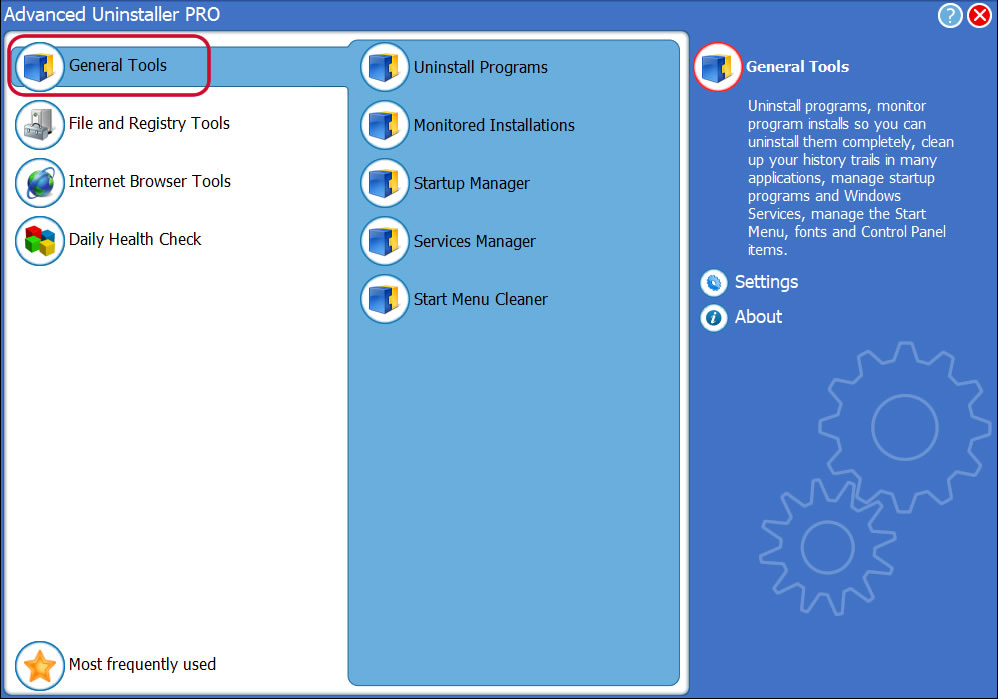
4. Click on the Uninstall Programs button
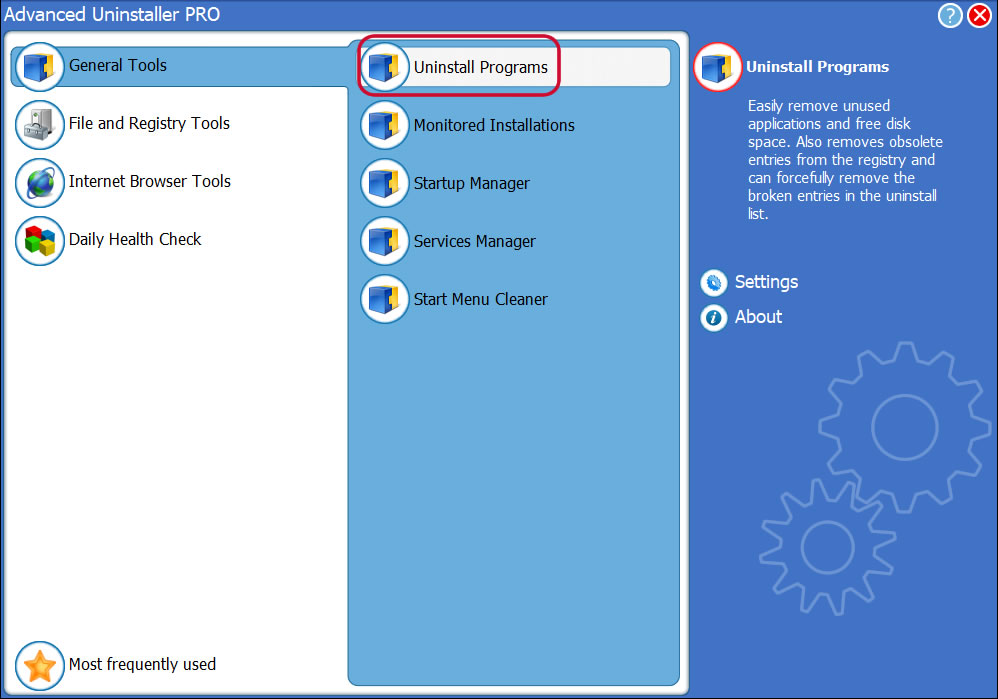
5. All the programs installed on the computer will be shown to you
6. Navigate the list of programs until you locate Lenovo Photo Master or simply activate the Search feature and type in » Lenovo Photo Master». If it exists on your system the Lenovo Photo Master app will be found automatically. Notice that when you select Lenovo Photo Master in the list of apps, the following data regarding the application is available to you:
- Star rating (in the left lower corner). The star rating tells you the opinion other people have regarding Lenovo Photo Master, ranging from «Highly recommended» to «Very dangerous».
- Opinions by other people — Click on the Read reviews button.
- Details regarding the app you wish to remove, by pressing the Properties button.
- The web site of the program is: http://www.cyberlink.com
- The uninstall string is: C:\Program Files (x86)\NSIS Uninstall Information\
\Setup.exe _?=C:\Program Files (x86)\NSIS Uninstall Information\
8. After uninstalling Lenovo Photo Master, Advanced Uninstaller PRO will ask you to run an additional cleanup. Press Next to proceed with the cleanup. All the items that belong Lenovo Photo Master that have been left behind will be detected and you will be able to delete them. By uninstalling Lenovo Photo Master using Advanced Uninstaller PRO, you are assured that no registry items, files or directories are left behind on your disk.
Your computer will remain clean, speedy and able to take on new tasks.
Geographical user distribution
| United States | 39.34% | |
| Netherlands | 9.84% | |
| India | 6.56% | |
| Poland | 4.92% | |
| United Kingdom | 3.28% | |
| Italy | 3.28% | |
| Germany | 3.28% | |
| Sweden | 3.28% | |
| Philippines | 3.28% | |
| United Arab Emirates | 1.64% |
- 10.0
- Windows 8 (6.2)
- Windows 7 (6.1)
Disclaimer
This page is not a recommendation to uninstall Lenovo Photo Master by CyberLink Corp. from your PC, nor are we saying that Lenovo Photo Master by CyberLink Corp. is not a good application for your PC. This page simply contains detailed instructions on how to uninstall Lenovo Photo Master in case you want to. The information above contains registry and disk entries that Advanced Uninstaller PRO stumbled upon and classified as «leftovers» on other users’ PCs.
Lenovo photo master что это за программа

Lenovo Lenovo Inc. · Tools 50 M+ 4.3 ★ 21 MB
Gallery Google LLC · Photography 500 M+ 4.4 ★ 12 MB
Polish InShot Inc. · Photography 100 M+ 4.9 ★ 24 MB
PhotoDirector: AI Photo Editor Cyberlink Corp · Photography 50 M+ 4.4 ★ 144 MB
Photoshop Express Adobe · Photography 100 M+ 4.6 ★ 127 MB
Simple Gallery App Simple Mobile Tools · Photography 10 M+ 2.0 ★ 26 MB
YouCam Perfect Perfect Mobile Corp. Photo & Video Beauty Editor · Photography 100 M+ 4.4 ★ 129 MB
Photo Editor — Lumii InShot Video Editor · Photography 50 M+ 4.8 ★ 30 MB
Photo Studiо KVADGroup App Studio · Photography 50 M+ 4.6 ★ 114 MB
Gallery — picture gallery Photo Gallery Tools · Photography 10 M+ 4.7 ★ 11 MB
Photo Lab Linerock Investments LTD · Photography 100 M+ 4.7 ★ 37 MB
Photo Editor dev.macgyver · Photography 50 M+ 4.4 ★ 8 MB
Lenovo Smart Frame Beijing Lenovo Software co., Ltd. · Tools 5 K+ 3.4 ★ 74 MB
Обзор Фотомастер – мощное приложение для обработки фото
Фотомастер – это полноценный и качественный редактор фотографий различных форматов. Дистрибутив доступен для таких операционных систем, как Windows XP, 7, 8, 8.1, 10 любой разрядности, а язык интерфейса русифицирован. Функции программы довольно разнообразны. Помимо улучшения и редактирования фотографий, https://photo-master.com/download.php, как Photoshop, может удалять объекты, регулировать слои и устранять недостатки при максимальном увеличении картинки.

Фотомастер не требует специальных навыков и умений, чтобы обрабатывать фотографию максимально детально. Это быстрый и качественный инструмент, чтобы с помощью даже простого ноутбука, внести исправления как можно быстрее, не обращаясь к перегруженной продукции компании Adobe или других программ. В самый короткий срок, максимально быстро и качественно, всего лишь умея включать свой ноутбук, Фотомастер отлично отредактирует любое фото, которое можно будет использовать в социальных сетях или же рамки на стену.
Программа имеет целый материал комплексного обучения, как можно правильно работать в программе. Сверху имеется панель управления такими пунктами, как ретушь, эффекты, текст и рамки. Настройка тех самых вкладок более детально можно обнаружить в боковой панели.
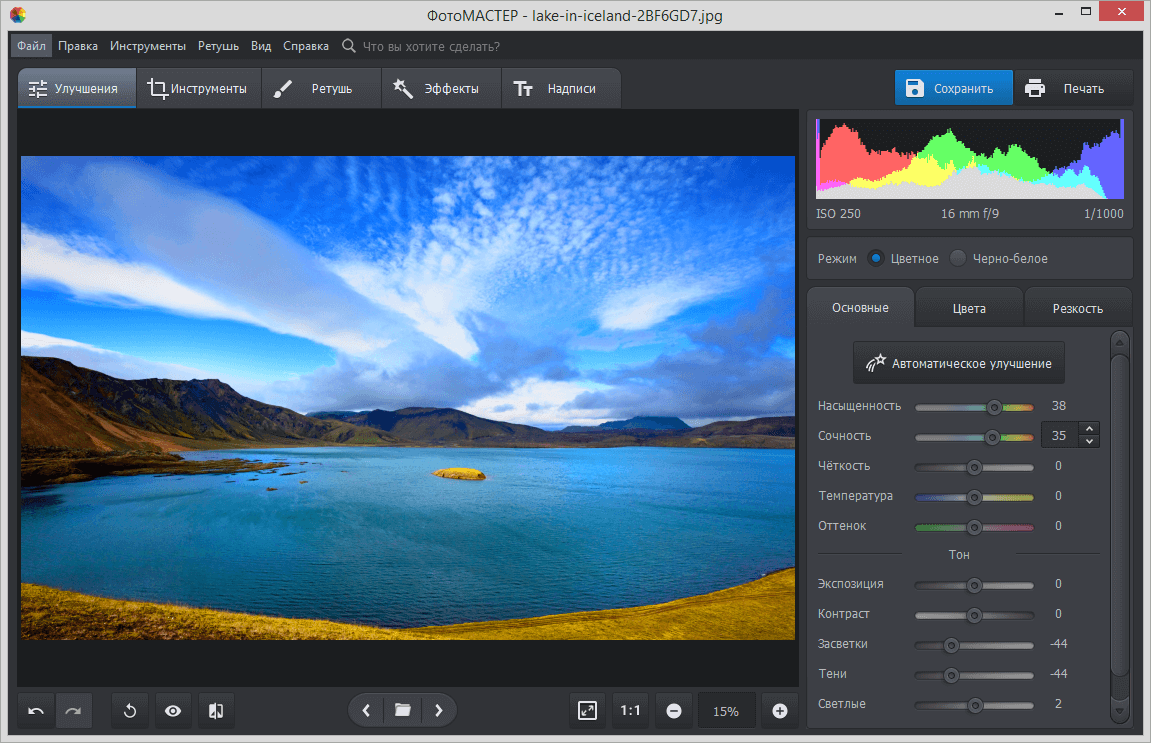
Общая вкладка инструменты, содержит такие пункты подменю, как кадрирование. геометрия, виньетирование. Нижняя панель содержит в себе удобную кнопку сравнения обработанного изображения с оригиналом и управление шагами вперёд и назад, с целью убрать ненужный артефакт, либо отказаться от редактирования и вернутся к полученному кадру. На той же панели находятся кнопки масштабирования изображения.
Отличном примером оптимизации качества и скорость обработки, это использование ресурсов GPU, где основным компонентом может выступать дискретная видеокарта. При открытии любого поддерживаемого файла, можно заметить наличие гистограммы, чтобы точно определить баланс белого, соотношения цвета, отклонение цветовых фильтров и яркости
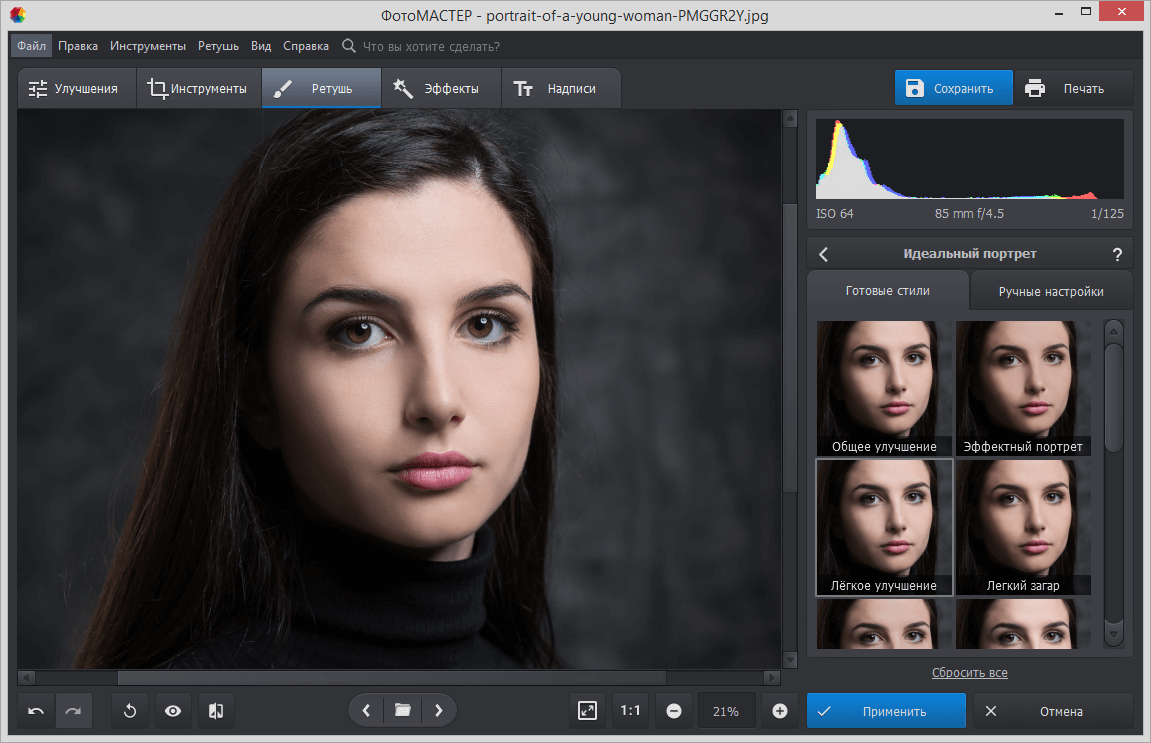
Обработанное изображение можно распечатать на лазерном или струйном принтере, используя различные форматы. вплоть до коллажей.
Стоимость продукта составляет от 690 рублей за версию стандарт и 1490 рублей за версию профи. Это позволит работать не только с изображениями формата JPEG, а также будет предоставлена поддержка RAW и TIFF без сжатия фотографии в полноценном размере. Разработчики смогут обновлять продукт и оказывать техническую поддержку для пользователя.