Windows boot manager has been blocked by current security policy.
Usually, the Windows boot manager has been blocked by current security policy occurs when you reinstall operating systems in some latest PC. Even I have faced this error and going to share you the solution for this. This problem is common in Acer and LENOVO model laptops.
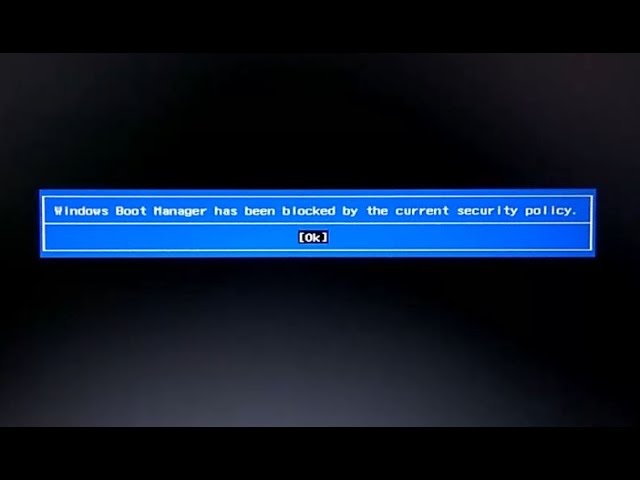
Windows Boot Manager error usually occurs:
- The time you reinstall your operating system.
- After the completion of the installation, your laptop will reboot.
- And once restart, you usually get this error message, “Windows Boot Manager has been blocked by the current security policy”, Click OK.
The time you click on OK, the laptop is going to restart and show you the error. Here is the solution on how to fix this,
SOLUTION 1:
Reset your BIOS settings by default:
- Completely shut down the computer.
- Power on the system.
- The time first logo screen appears, immediately press F2 to enter the BIOS.
- Press F9 key on your keyboard to reset the BIOS settings and then F10 to save.
- Restart your PC, the problem should be fixed.
SOLUTION 2:
Secure Boot is a feature designed to prevent malicious software and unauthorized media from loading during the boot process. This option is enabled by default but can be turned off in BIOS. This option may be in different place of your BIOS settings. I will share for two laptops, LENOVO and ACER.
How to disable Secure Boot in LENOVO laptops:
- Completely shut down the computer.
- Power on the system.
- The first logo screen appears, immediately press F2 to enter the BIOS.
- Go to Security and find Secure Boot.
- Disable Secure Boot, press F10 to save and restart.
How to disable Secure Boot in ACER laptops:
- Completely shut down the computer.
- Power on the system. As soon as the first logo screen appears, immediately press F2 to enter the BIOS.
- Use the right arrow key to select Security.
- Use the down arrow key to highlight Set Supervisor Password and press Enter.
- Create a password and press Enter. Retype the password to confirm and press Enter again.
- Use the right arrow key to select Boot.
- Press the down arrow key to select Secure Boot and press Enter.
- With the arrow key, highlight Disabled and press Enter.
- Press the F10 key and select Yes to save the changes and exit the BIOS
We suggest removing the supervisor password immediately after enabling Secure Boot. If you choose not to remove your supervisor password, make sure you write it down for future use.
Проблемы с UEFI и Linux
Всем привет, пишу первый пост на данном форуме, но не суть. Уже давно возникла следующая проблема: на своём ноутбуке Lenovo B50-30 решил установить свежевышедшую Ubuntu 16.04 (до этого ставил 15.10 и проблем не было, проблемы начались с 16.04), при установке меня попросили придумать пароль для отключения Secure Boot, иначе сторонние драйвера устанавливаться не будут (см. скрин). Придумав пароль после перезагрузки у меня высветилось синий экран (см. скрин), где была возможно ввести данный пароль. Ввести правильно мне не удалось, т.к. 1) не видно, ввожу ли я что либо 2) даже если я набираю придуманный пароль меня снова просят ввести снова [Enter password character 7, затем Ent. passw. char. 2,3]. Т.к. пароль я так и не ввёл, началась простая загрузка ОСи, и данный синий экран я никак больше не могу вызвать, только при установке 16.04 (пытался проделать действия снова). НО главная проблема, это нерабочий BIOS после всех этих действий, т.е. я вхожу в BIOS (UEFI) и у меня просто чёрный экран и белый курсор. Обновить BIOS я немогу, батарейку уже вытаскивал, сброс при нажатии кнопрки питания без аккумулятора тоже пробовал. Без решения данной проблемы не могу толковый дистр, кроме Ubuntu поставить. Надеюсь, найдутся знатоки, которые смогут помочь.

Мб просто отключить secure boot через биос?
Ты нет, а в сервисном центре или ремонтник с программатором какой — могут.
По теме как быть не в курсе, но лучше навсегда и везде отключить Secure boot, если есть (будет) такая возможность.
Я в курсе, что лучше отключать, так то даже и не знаю почему он включён у меня, наверное, когда биос обновлял настройки слетели.
ошибка has been blocked by the current security policy
когда пытаюсь загрузиться с загрузочной флешки в windows 10, то выкидывает эту ошибку и грузиться 10-ка.

Это делается в BIOS (или UEFI) — как правило во вкладке «Boot». Там есть пункты «Boot mode» и «Boot priority». В каком-то из них или в обоих будет стоять что-нибудь связанное с UEFI. Нужно изменить на Normal(как вариант Legacy) — обычная загрузка.
Дизайн сайта / логотип © 2023 Stack Exchange Inc; пользовательские материалы лицензированы в соответствии с CC BY-SA . rev 2023.5.30.43465
Нажимая «Принять все файлы cookie» вы соглашаетесь, что Stack Exchange может хранить файлы cookie на вашем устройстве и раскрывать информацию в соответствии с нашей Политикой в отношении файлов cookie.
Fix Windows boot manager has been blocked by the current security policy

Most probably the error Windows boot manager has been blocked by the current security policy occurs after the re-installation of new operating systems. And it is most commonly experienced by the Acer and Lenovo laptop users.
This usually indicates a problem in the Unified Extensible Firmware Interface ( UEFI ). The UEFI is installed on all the new computers which intends to speed up the boot process. But the most important function of it is to provide a secure boot. For this purpose the UEFI performs a signature test. If the PC fails to pass this test the operating system will simply not load and display the error,
''Windows boot manager has been blocked by the current security policy''
Even after pressing Ok, the PC is going to restart and display the error again. By this way the UEFI can identify authorized operating systems. However there are numerous publicized solutions that you can try to overcome this error.
In this article, we will see the solutions for Fix Windows boot manager has been blocked by the current security policy. This can be tried for all the popular computer models.
Let's get started,
1. Reset BIOS
Basic Input Output System ( BIOS ) is the software which controls the computer's startup process. It essentially exists in every motherboard. Overtime a corrupted BIOS may be the reason behind this error. The BIOS can be corrupted due to many reasons. It can be either because of a bad update or due to a malware attack. Any boot error that occurs in your computer can be fixed by resetting the BIOS.
To reset BIOS,
1. Turn on the PC
2. Press F2 key immediately
3. Press F9 key to reset BIOS
4. Press F10 key to save and exit
2. Disable Secure Boot
Secure boot is a feature present in UEFI and the traditional BIOS. It protects the PC boot process by blocking any malicious programs from loading. Malwares especially the rootkits has the capability to replace the boot loader. Therefore, this could load your operating system with no any possible signs. Secure boot takes preventive measures from not loading them. However this feature is enabled by default which has proven to solve this error by disabling them.