Третья версия reCAPTCHA срабатывает в фоне незаметно для пользователей
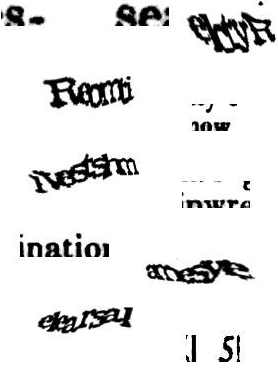 В мае этого года на конференции конференции Google I/O 2018 представили третью версия технологии reCAPTCHA — reCAPTCHA v3 (бета). Как известно, это самая популярная система типа CAPTCHA, которая создана для блокировки ботов, то есть автоматизированных действий на разных сервисах.
Систему критиковали за эксплуатацию бесплатного человеческого труда (в случае первой версии, которую Google использовала для оцифровки книг), за осложнение жизни людям с нарушениями зрения и другими болезнями вроде дислексии. Ещё reCAPTCHA критикуют за излишнюю сложность: людям трудно или невозможно правильно ответить на вопрос: тест становится просто абсурдным. На иллюстрации слева показы несколько примеров с первой версии reCAPTCHA. Ситуация не слишком улучшилась с выпуском второй версии (где нужно выбрать картинки, содержащие указанный объект).
Но третья версия — совершенно другое дело. Она точно никому не помешает, потому что работает незаметно для пользователей, используя методы поведенческого анализа.
Сначала немного истории. Первая версия reCAPTCHA появилась в далёком 2007 году и служила благой цели: одновременно с блокировкой спама и ботов она ещё помогала в оцифровке книг. К 2011 году с её помощью уточнялись результаты OCR в оцифровке архивов газеты The New York Times (более 13 млн статей с 1851 года) и книг Google Books.
С 2012 года в систему добавили фрагменты фотографий домов из сервиса Google Street View. Примерно с 2013 года Google начала применять поведенческий анализ действий пользователя в браузере (advanced risk analysis), а в 2014 году была реализована вторая версия системы, где нужно было выбрать несколько «правильных» картинок из набора девяти изображений, но при этом появилась возможность пройти тест в один клик. Если действия были похожи на человека, то пользователь проходил тест без решения каких-либо задач вообще: просто достаточно нажать кнопку «Я не робот» (так называемая NoCAPTCHA). Если действия похожи на бота — ему давали усложнённый тест с распознаванием объектов на изображениях.
Здесь проблема была в том, что кроме поведенческого анализа проверялись ещё куки на компьютере — и NoCAPTCHA была практически недоступна для браузеров в анонимном режиме или тех, кто чистит куки по окончании сессии.
Третья версия

Презентация третьей версии системы на конференции Google I/O 2018
В третьей версии reCAPTCHA усовершенствован поведенческий анализ (или слежка Google за пользователями, если кто-то представляет это в таком свете), то есть та самая вышеупомянутая система advanced risk analysis, продвинутого анализа риска.
Теперь система работает «в фоне» и незаметно для пользователей. Достаточно загрузить вместе со страницей библиотеку reCAPTCHA и запустить grecaptcha.execute в определённый момент или сразу в момент загрузки страницы. И это всё. Пользователь ничего не замечает — а вы через через JavaScript API получите с сервера reCAPTCHA оценку этого пользователя на основании его взаимодействия с сайтом и других параметров.
Есть предположения, что кроме движения курсора мыши, система начала отслеживать и другие параметры, такие как нажатия мыши. Об этом можно только догадываться. Никакой информации о внутренней работе системы Google на даёт, чтобы не помогать спамерам и владельцам ботов.
С точки зрения веб-мастера, может быть, главное отличие третьей версии — что по запросу через API сервер reCAPTCHA выдаёт не бинарное значение, а оценку в диапазоне от 0.0 (вероятный бот) до 1.0 (вероятный человек) для данного конкретного запроса. Ответ присылается в формате JSON:
Как видно из ответа сервера, в reCAPTCHA v3 представлена новая концепция «действий» (actions). Если определить разные названия действий в разных местах сайта, то система как бы начнёт «подстраиваться» под разные нужды: станет адаптивной (adaptive risk analysis).
Другими словами, владелец сайта сам выбирает «уровень отсечения» и какие действия предпринимать для пользователей выше или ниже этого уровня на разных страницах. По умолчанию уровень установлен в 0.5. Например, на главной странице рекомендуется блокировать только явные скраперы (скажем, только 0.0). На форме авторизации можно фильтровать всех, кто ниже 0.5, предлагая им двухфакторную авторизацию или верификацию почтового адреса, чтобы защититься от брутфорс-атак. Теперь проверку можно запускать несколько раз на одной странице, в нужные моменты времени и незаметно для пользователя.
Чтобы принять участие в бета-тестировании третьей версии системы, необходимо зарегистрировать на этой странице.
What Is reCAPTCHA? Everything You Need to Know
reCAPTCHA is a free Google service that protects websites from spam and abuse by distinguishing human users from automated bots. Using machine learning and advanced risk analysis, it is a more advanced version of the traditional CAPTCHA system.
The Turing test is a method to determine whether or not computers can exhibit human-like behavior. This kind of behavior is examined by reCAPTCHA and is often employed to prevent abuse of sign-up, contact forms, or comment sections.
There are multiple types of CAPTCHA tests available, from using a real-life image or a simple checkbox. This article will share how the different types of tests work and how to install this kind of test on your site.
How Does reCAPTCHA Work
The reCAPTCHA verification process uses artificial intelligence (AI) to recognize human behavior that the bots can’t follow. The tests need to be passable by any human user, regardless of age, gender, education, or language.
CAPTCHAs are all automated so that the computer program can grade the test without the interference of humans. Due to this reason, the tests are constantly evolving as both the CAPTCHA AI and malicious bots become more advanced.
The verification process of traditional CAPTCHAs works by forcing users to solve tests before allowing access. The CAPTCHA tests use random letters and numbers, warping them in a way that is hard for automated programs to translate. Previously, this has been a sufficient deterrence method, as bots would have difficulty recognizing these distorted letters or numbers.
However, more advanced bots have been developed, with the ability to quickly solve traditional CAPTCHAs with algorithms trained in pattern recognition. The traditional CAPTCHAs then were replaced with more complex tests in the form of reCAPTCHA v1.
These reCAPTCHA tests used a computer-generated word and distorted text via images from old books or news articles. However, this version is no longer available as it was found to be too easy for the bots and too hard for human users.
reCAPTCHA v2 followed afterward, hoping to provide more complex tests to deter bots while remaining solvable by humans. This updated reCAPTCHA test requires users to select images matching a theme or check a box next to the text, stating “I’m not a robot”.
An even newer version – reCAPTCHA v3 – aims to avoid disrupting the user experience. This version limits user interaction by calculating a score according to the present user behavior and history. Computers then determine the score for the user in a preliminary Turing test.
The website owner has three possible responses based on the score – to grant access, block the user, or deploy reCAPTCHA v2 tests. The two available tests for this method are the image reCAPTCHA and checkbox reCAPTCHA.
Image reCAPTCHA
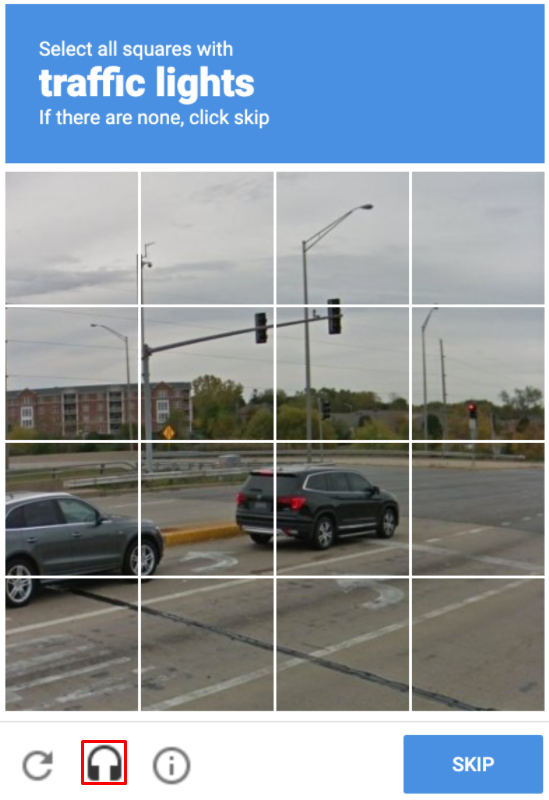
The image recognition reCAPTCHA test uses either nine or 16 lower resolution real-life images in the form of a square. Above these images, users will find displayed instructions on which image sections should be selected. For example, the instruction might ask users to select all squares featuring crosswalks or fire hydrants.
Once the user has selected the squares, the computer program will compare the response with other responses. If the user’s response matches that of most other users, they pass the test.
The test presents images that humans see every day and can easily recognize. Whereas even advanced bots will have a hard time selecting objects from low-resolution images.
This test is also available in an audio version, which makes it accessible to visually impaired users. The audio test will vocalize random letters and numbers using distorted audio, prompting users to answer using text input.
Checkbox reCAPTCHA
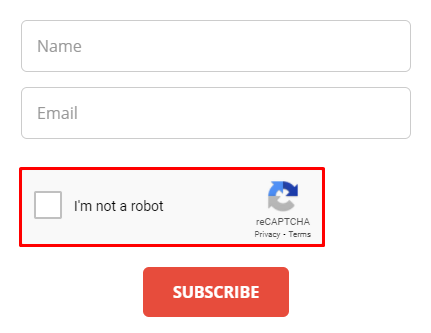
Users don’t need to solve or recognize anything to pass the checkbox reCAPTCHA test. Simply check a box next to the statement saying “I’m not a robot”.
This test distinguishes humans from bots by following the cursor movement as it approaches the checkbox. Even a human user with the most stable hand will display some randomness in cursor movement, even on a microscopic level. A bot, typically, will not be able to mimic this kind of movement, preferring to act in a straight line.
If the cursor movement indicates that the user is a human, a green check icon will be displayed upon clicking the box.
Other than following the cursor movement, this test also assesses HTTP cookies and history present in the web browser.
Pros and Cons of reCAPTCHA
reCAPTCHA helps to prevent bots from spamming website pages. It will always be beneficial to install this test to protect your site if you have open registration and comment sections.
However, the system does feature certain disadvantages as well. Here are some of the pros and cons of using reCAPTCHA on your site.
reCAPTCHA actively protects the integrity of your site by preventing spam, abuse, and data theft from bots.
Here are some of the most significant pros of using reCAPTCHA:
- Free. Everyone can use this service free of charge.
- Security. The test protects websites from spam, fraud, and abuse. This test is a very effective additional layer of security for websites with sign-up forms and comment sections.
- Options. There are different types of tests available and an option to use various tests for different kinds of forms.
- Integrity. Help protect the integrity of your site by avoiding attacks that might spread malware or redirect your visitors to malicious sites.
- Time. Save time by only providing services to real users. The test prevents bots from overflowing your business or comment section with fake users.
- Adaptive. As bots become more advanced, reCAPTCHA constantly adjusts its tests using a machine learning algorithm. This way, reCAPTCHA tests can adapt to what the bots are capable of doing.
While reCAPTCHA provides different options and ways to protect a site from spam and abuse, the test is not without its faults. Here are some of the cons of using the tool:
- User experience. The test interrupts the flow of what a user is trying to do, possibly resulting in a negative user experience. The test might even cause visitors to abandon the site altogether.
- Efficacy. Some bots can fool some of the older reCAPTCHA tests.
How to Install reCAPTCHA on a Website
Installing reCAPTCHA can be done in different ways, either manually or by using a WordPress plugin. Before installing the test, there are a couple of things to consider as well, such as the type and location of the test.
There are different types of reCAPTCHA tests available. Select which type works best for your site. We suggest you consider your visitors and what kind of test would be best for their user experience.
Then, think about where you would like to add the test. reCAPTCHA services are often available next to online forms, such as sign-up or contact pages. Knowing the location of the test beforehand will help with the installation process.
With any reCAPTCHA installation, the first step is to get the API key pair from the reCAPTCHA admin panel.
There, fill out the form according to your website’s needs:
- The Label can be anything you want and used to differentiate your reCAPTCHAs.
- Select the reCAPTCHA type that you want to use on your website.
- It is possible to add more than one website. This can be done under the Domains section.
- As a Google tool, the email under Owners will automatically be selected to your Gmail account. You may change or add more email addresses if necessary.
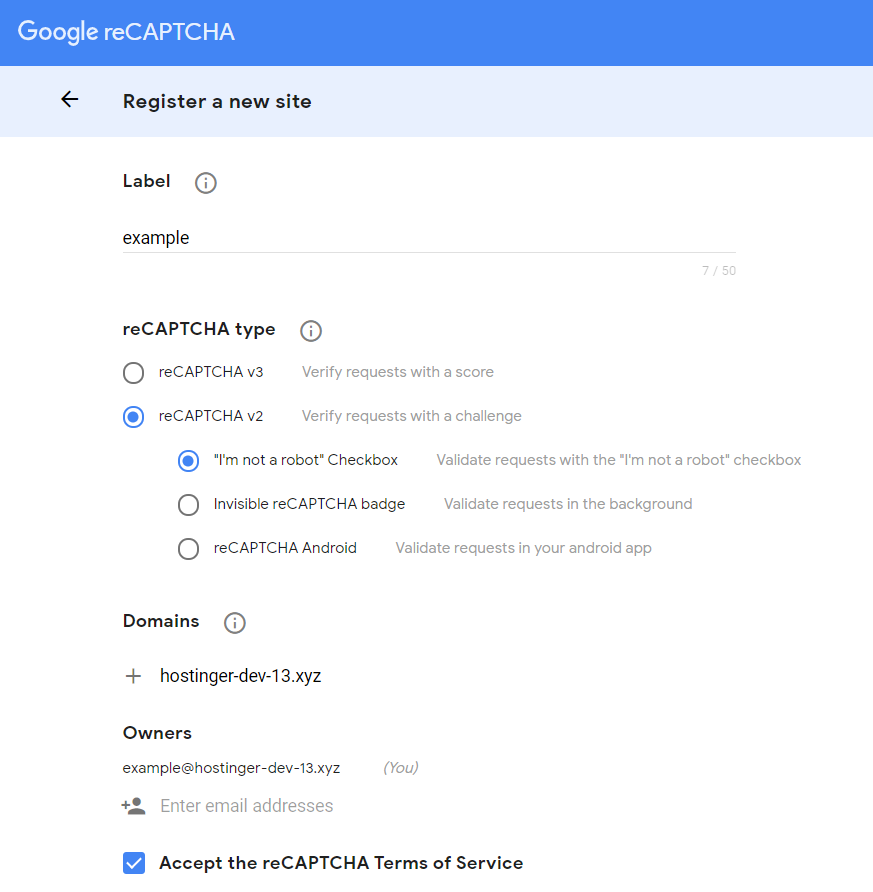
After you fill out the form, click on the Submit button. Google will generate a site key and a secret key. Use the site key in the HTML code of your site and the secret key for communication between your site and reCAPTCHA.
Once you have the site key and the secret key, the next step is to start the installation process.
Installing reCAPTCHA Manually
One of the ways to install reCAPTCHA manually is by using a PHP or HTML file. The first step is to access the root folder of your website. Then add the following code in the header of your form’s PHP or HTML file, preferably after the “title” line:
On the same file, paste the following code inside the form, before the submit line:
Change your_site_key with the Site Key from Google. Make sure to keep the key inside the quotation marks.
Then, add the secret key to the DNS records. If you use Hostinger as your web hosting provider, head to the DNS Zone Editor on your domain’s hPanel. On Manage DNS records, add data-sitekey under Name and your secret key under TXT value. Click on the Add Record button.
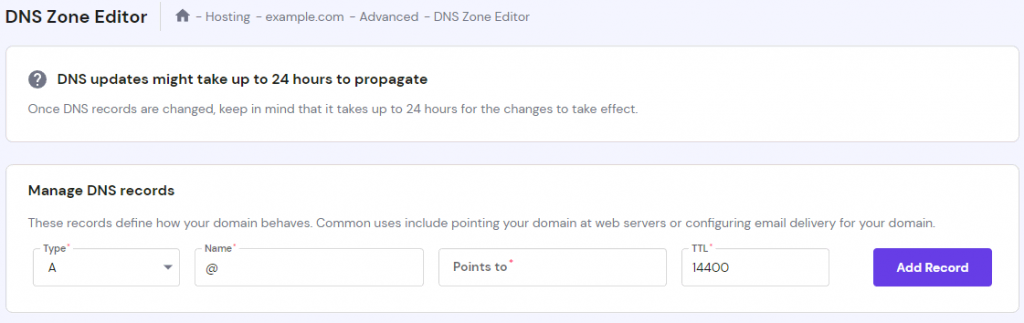
Remember that it might take up to 24 hours for changes to take effect.
Installing reCAPTCHA Using a Plugin (WordPress Only)
Installing reCAPTCHA using a plugin is a simple process. Keep in mind, however, that this option is only available for WordPress users.
To add the test to your websites and forms, first manually install a WordPress plugin for reCAPTCHA. While a couple of plugin options are available to add the test, there is no official reCAPTCHA plugin.
To look for all the reCAPTCHA plugins available, head to Dashboard -> Plugins -> Add New. Input reCAPTCHA search box – most of the search results will come up as contact form plugins.
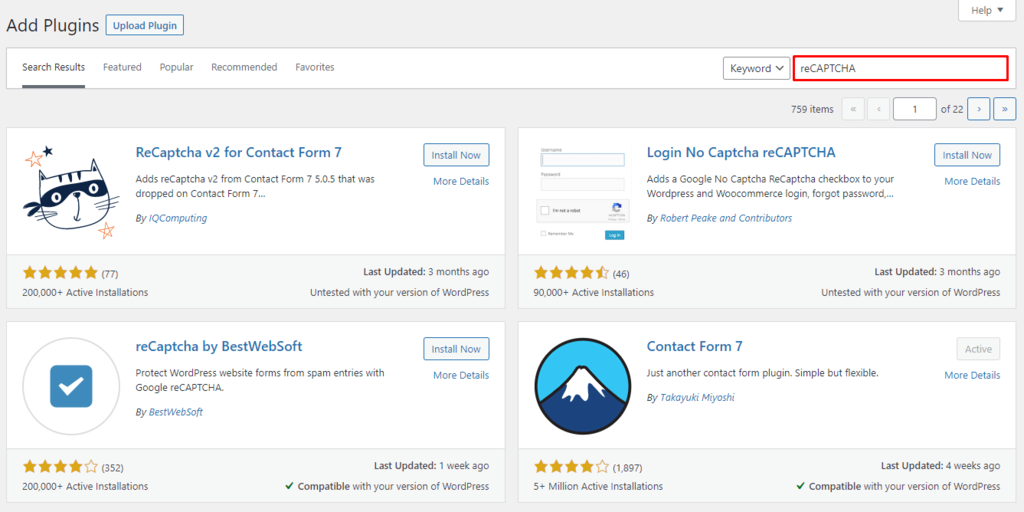
Before selecting the plugin, make sure that it is compatible with your version of WordPress. For this example, we will be using the Contact Form 7 plugin.
The Contact Form 7 plugin has the option to integrate reCAPTCHA protection on all of its forms. To do so, head to the Dashboard -> Contact -> Integration after you install and activate the plugin. Under the reCAPTCHA section, click on the Setup integration button.
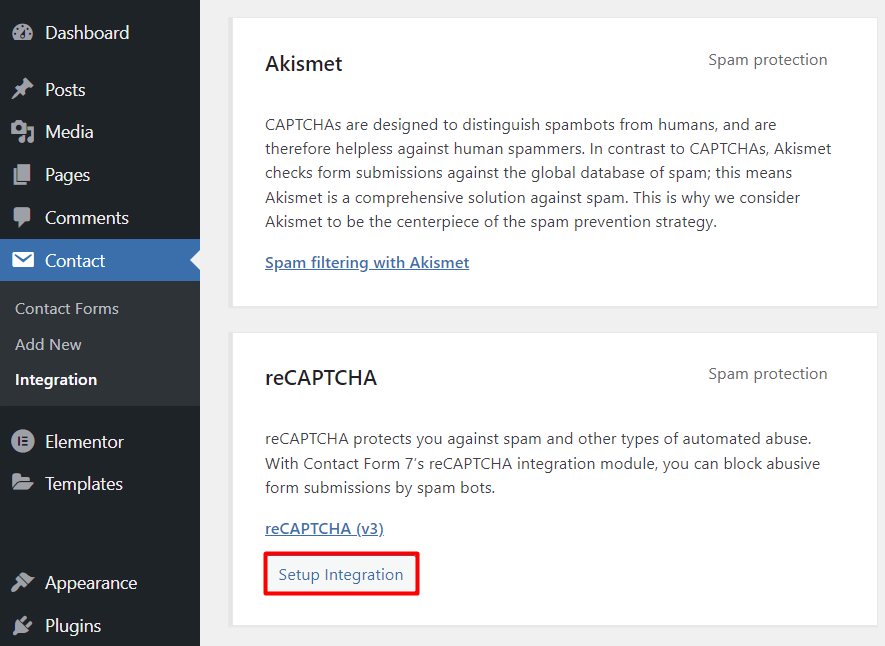
There, add the site key and the secret key from earlier. Once you’re done, click on the Save Changes button. Hit the Setup Integration button again.
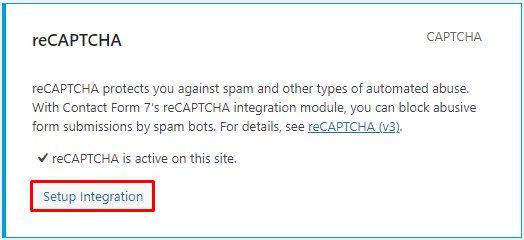
Once the integration process is complete, WordPress will show you the two keys.
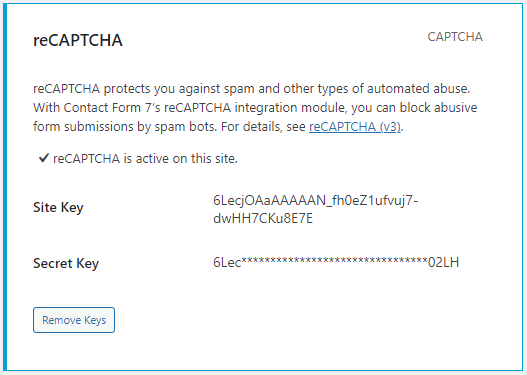
Then, head to Dashboard -> Contact -> Add New to add the necessary information for the form. Add a title in the Enter title here section to differentiate between the forms.
Once you edit the content of the form field, add “[recaptcha]” before the “[submit “Submit”]” line. Click the Save button. There will be a generated shortcode under the title.
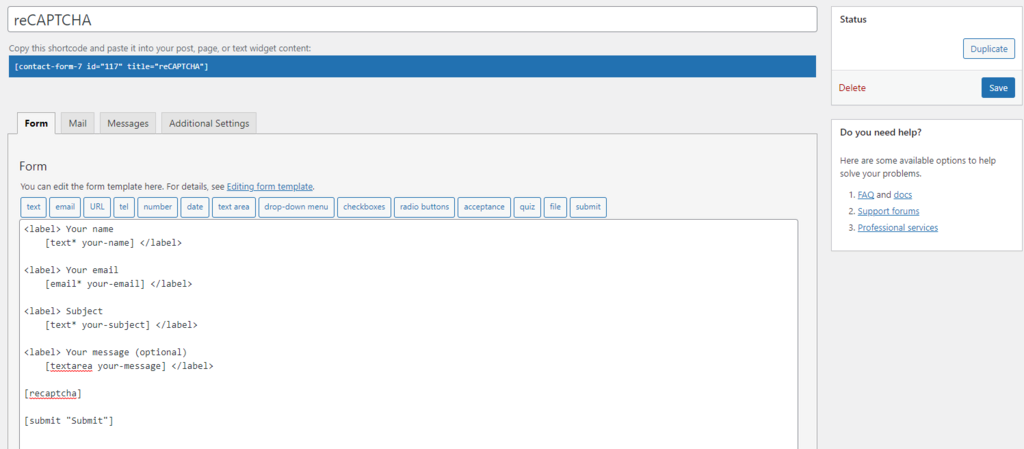
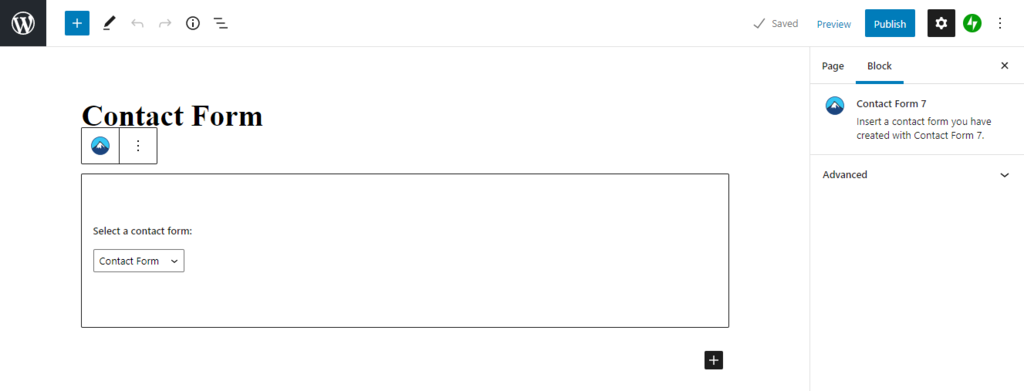
Copy the shortcode and head to the WordPress editor to add the form field you have created. On the Gutenberg editor, simply paste the shortcode, and the form will be automatically added, integrating your reCAPTCHA test as a result.
Conclusion
reCAPTCHA is a free automated Turing test to differentiate between a human user and a bot. There are multiple types of reCAPTCHAs, all with their unique ways of identifying bots.
Users might have to identify a specific object present in real-life images or check a box that says “I’m not a robot”. However, keep in mind that there are both benefits and downsides to using reCAPTCHA on your site. The test will help to identify bots, but it can also disrupt your visitor’s user experience.
In this article, we have shown different ways to install reCAPTCHA on your site:
- First, you’ll need to get a site and secret keys for your website.
- Afterward, there is the choice between installing reCAPTCHA manually or using a WordPress plugin.
Let us know in the comment section whether or how reCAPTCHA has helped to protect your website. Good luck!
Astari is a digital marketing expert, with a focus on SEO and WordPress. She loves to share her wealth of knowledge through her writing, and enjoys surfing the internet for new information when she’s not out in the waves or hiking a mountain. Her mission is to learn something new every day, and she firmly believes that there is no such thing as too much knowledge.
Basics of reCAPTCHA v3 — The new way to stop bots

Example: We want to secure our EC website against the bots with minimum to no friction for human users.
Our use cases can include,
- Login page — Prevent credential stuffing attacks
- Product page — Prevent abusive comments and send risky comments to moderation
- Identify risky transactions and Put your real sales ahead of bots
O ne solution could be “reCAPTCHA” from google.
Let’s understand what is CAPTCHA?
CAPTCHA an acronym for “Completely Automated Public Turing test to tell Computers and Humans Apart”. CAPTCHA is sometimes described as a reverse Turing test.
One of the earliest commercial uses of CAPTCHAs was in 2001, PayPal used such tests as part of a fraud prevention strategy in which they asked humans to “retype distorted text that programs have difficulty recognizing”. PayPal cofounder and CTO Max Levchin helped commercialize this early use.
Is Google Duplex has passed the Turing Test?
What is the Turing Test?
What is reCAPTCHA?
reCAPTCHA is a free service that protects your website from spam and abuse. reCAPTCHA is a CAPTCHA-like system designed to establish that a computer user is human.
In this system, users are asked to click on a checkbox (the system will verify whether the user is a human or not, for example, with some clues such as already-known cookies or mouse movements within the frame) or, if it fails, select one or more images from a selection of set of images. In 2018, Google started beta testing a completely invisible reCAPTCHA system which does not present any human verification visually. Instead, the new system actively monitors user actions across the entire property and returns a score which represents the probability if it is a human or a bot.
Versions of reCAPTCHA:
We will be trying latest version — reCAPTCHA v3. For your information, reCAPTCHA v1 has been shut down since March 2018.
How reCAPTCHA flow works?
-
. site key used in frontend and secret key is used in backend. For security purpose keep secret key safe.
- In frontend, We will use our site key to get token for our user. Each reCAPTCHA user response token is valid for two minutes, and can only be verified once to prevent replay attacks. If you need a new token, you can re-run the reCAPTCHA verification.
- from backend, Send token for verification.
- Based on “score” action could be taken. Scores range from 0.0 to 1.0, with 0.0 indicating abusive traffic and 1.0 indicating good traffic.
We have secured our site from bots. reCAPTCHA protects you against spam and other types of automated abuse.
Google Admin Console — reCAPTCHA v3
Conclusion:
Unfortunately, as bots get more and more advanced, CAPTCHA methods will have to become more and more intrusive to establish that you are in fact human. Users will need to sacrifice more of their privacy in order to remain safe from spam and bots on the internet, and by the looks of things, it’s something we’ve got to accept.
reCAPTCHA v3
reCAPTCHA v3 возвращает оценку для каждого запроса без трения со стороны пользователя. Оценка основана на взаимодействии с вашим сайтом и позволяет вам предпринять соответствующие действия для вашего сайта. Зарегистрируйте ключи reCAPTCHA v3 в консоли администратора reCAPTCHA .
На этой странице объясняется, как включить и настроить reCAPTCHA v3 на вашей веб-странице.
Размещение на вашем сайте
reCAPTCHA v3 никогда не будет прерывать работу ваших пользователей, поэтому вы можете запускать ее в любое время, не влияя на конверсию. reCAPTCHA работает лучше всего, когда у нее есть наибольший контекст взаимодействия с вашим сайтом, который возникает из-за того, что вы видите как законное, так и оскорбительное поведение. По этой причине мы рекомендуем включать проверку reCAPTCHA в формах или действиях, а также в фоновом режиме страниц для аналитики.
Вы можете выполнить reCAPTCHA для любого количества действий на одной странице.
Автоматически привязывать вызов к кнопке
Самый простой способ использовать reCAPTCHA v3 на вашей странице — включить необходимый ресурс JavaScript и добавить несколько атрибутов к вашей html-кнопке.
Загрузите API JavaScript.
Добавьте функцию обратного вызова для обработки токена.
Добавьте атрибуты к вашей html-кнопке.
Программно вызвать вызов
Если вы хотите иметь больший контроль над запуском reCAPTCHA, вы можете использовать метод execute в объекте grecaptcha . Для этого вам нужно добавить параметр render в загрузку скрипта reCAPTCHA.
Загрузите API JavaScript с помощью своего ключа сайта.
Вызовите grecaptcha.execute для каждого действия, которое вы хотите защитить.
Немедленно отправьте токен на серверную часть с запросом на проверку .
Интерпретация счета
reCAPTCHA v3 возвращает оценку (1.0, скорее всего, хорошее взаимодействие, 0.0, скорее всего, бот). На основе оценки вы можете предпринимать различные действия в контексте вашего сайта. Каждый сайт уникален, но ниже приведены несколько примеров того, как сайты используют оценку. Как и в приведенных ниже примерах, примите меры за кулисами, а не блокируйте трафик, чтобы лучше защитить свой сайт.
| Вариант использования | Рекомендация |
|---|---|
| домашняя страница | Просматривайте единое представление о своем трафике в консоли администратора во время фильтрации парсеров. |
| авторизоваться | При низких баллах требуется двухфакторная аутентификация или проверка электронной почты, чтобы предотвратить атаки с заполнением учетных данных. |
| Социальное | Ограничьте безответные запросы в друзья от оскорбительных пользователей и отправляйте рискованные комментарии на модерацию. |
| электронная коммерция | Ставьте свои реальные продажи выше продаж ботов и выявляйте рискованные транзакции. |
reCAPTCHA учится, видя реальный трафик на вашем сайте. По этой причине оценки в промежуточной среде или вскоре после внедрения могут отличаться от производственных. Поскольку reCAPTCHA v3 никогда не прерывает поток пользователей, вы можете сначала запустить reCAPTCHA без каких-либо действий, а затем выбрать пороговые значения, просмотрев свой трафик в консоли администратора . По умолчанию вы можете использовать порог 0,5.
Действия
reCAPTCHA v3 представляет новую концепцию: действия. Когда вы указываете имя действия в каждом месте выполнения reCAPTCHA, вы включаете следующие новые функции:
- Подробная разбивка данных по десяти основным действиям в консоли администратора.
- Адаптивный анализ рисков, основанный на контексте действия, поскольку оскорбительное поведение может варьироваться.
Важно отметить, что при проверке ответа reCAPTCHA вы должны убедиться, что имя действия соответствует ожидаемому.
Ответ на проверку сайта
Сделайте запрос на проверку токена ответа , как в случае с reCAPTCHA v2 или Invisible reCAPTCHA.
Ответ представляет собой объект JSON:
Советы
- grecaptcha.ready() запускает вашу функцию при загрузке библиотеки reCAPTCHA. Чтобы избежать условий гонки с помощью api.js , включите api.js перед сценариями, вызывающими grecaptcha, или продолжайте использовать обратный вызов onload , определенный в API версии 2.
- Попробуйте подключить вызов execute к интересным или конфиденциальным действиям, таким как Регистрация, Сброс пароля, Покупка или Игра.
- Используйте https://www.google.com/recaptcha/api.js?trustedtypes=true для загрузки кода, совместимого с Trusted Types .
Если не указано иное, контент на этой странице предоставляется по лицензии Creative Commons «С указанием авторства 4.0», а примеры кода – по лицензии Apache 2.0. Подробнее об этом написано в правилах сайта. Java – это зарегистрированный товарный знак корпорации Oracle и ее аффилированных лиц.