ASUS M4A78LT-M LE processor support and specifications
To determine part numbers for the ASUS M4A78LT-M LE motherboard, we use best guess approach based on CPU model, frequency and features. In some cases our guess may be incorrect. Please use specifications from the compatibility list to confirm processor’s part number before ordering.
Comments
Does it have to be the exact PCB Version?
Hi,
Under ‘PCB’, does a MB have to be exactly 1.00G to accept the CPUs labelled 1.00G, or can later versions (eg. 1.01G) accept them?
— Ash
Support for phenom x6 1055t 95watt shows supported on this site
but
does not show in support list on the asus particular motherboard site, would this be an issue? or do they not update support list
incorrect entrry
The Phenom II X6 1075T (125W) is mistakenly shown as supported by this board. It is not, the board supports cpus at 95W maximum.
1075T — HDT75TFBK6DGR / HDT75TFBGRBOX
1075T, 3 GHz, Rev. E0, 125W, Socket AM3, 6-Core, HDT75TFBK6DGR
mumst press F1 every startup
but computer working with this cpu
Another one:
Phenom II X4 955 is listed but is rated 125W.
It’s a 95 Watt version of the Phenom II 955. Strangely enough, ASUS had it listed before, but it’s no longer on their list.
Phenom II X4 955
About the cpu Phenom II X4 955:
Can I use it with the M4A78LT-M LE motherboard or not?
Yes, i set this processor on M4A78LT-M LE and all right
AMD Athlon II X2 280, 3.60 GHz support (Jan. 2023, by HG)
I use the motherboard ASUS M4A78LT-M LE from September 2017 with latest OFFICIAL ASUS BIOS v.0803 (2012.07.23).
I have fitted an AMD CPU Athlon II X2 280 ‘Regor’, 3.60 GHz, Tdp 65W, pushed at 4.05 MHz (mult. 18 x bus 225 MHz) without overvoltage and works very well at any load condition.
I use system memory Corsair Vengeance DDR3-1600MHz, 2x4GB (Tot. 8GB), CL 9-9-9-24, 1.50V, v.7.21, XMP 1.3, single rank.
ASUS does not officially report this CPU in their list of compatible processors for this motherboard, probably because this model (the more powerful Athlon II X2) came out too late: but the CPU is perfectly recognized and managed by the BIOS; I hope this information can help someone (by HG). /
AMD Athlon II X2 280, 3.60 GHz support with 2x8GB DDR3-1600MHz system memory (Jan. 2023, by HG)
ASUS M4A78LT-M LE motherboard with latest OFFICIAL ASUS BIOS v.0803 (2012.07.23) and AMD 760G/SB710 chipset officially, according to AMD and ASUS, would support Dual Channel at max. 8GB of system memory across two (2) slots, in 2x4GB mode.
However, reading the specifications of similar ASUS motherboards (such as the «little sister» M4A78LT-M) and MSI and Gigabyte competitors with the SAME chipset, it turns out that the manufacturers admit compatibility up to 16GB of system memory, but on four (4) slots expansion, in 2x(2x4GB) mode.
I therefore carried out a compatibility and stability test [with AMD Athlon II X2 280 CPU, 3.60GHz (Regor) fitted] with ONLY two (2) DDR3-1600MHz, 2x8GB (Tot. 16GB!), 1.50V modules, using pairs of PARTIOT Viper modules «Extreme Performance» PV316G160C0K, XMP 1.3, CL10-10-10-27: the result was that the PC after about twelve hours of intensive testing with Prime96, OCCT, SuperPI 1M and WinRAR SUPPORTS THIS MODE MAXIMUM MEMORIES EVEN ON ONLY TWO SLOTS.
In terms of overclocking I then «pushed» up to 4.05 GHz (bus 18 x 225 MHz, WITHOUT CPU/chipset/memory overvolt!), repeating all the tests and NOT encountering any type of instability of the operating system for each use .
FINAL NOTE: the use of faster memories (eg DDR3-1866MHz) is not recommended, because the memory controller of the Athlon II and Phenom II CPUs manages max. up to 1333MHz and the BIOS shows problems managing similar modules, which are more expensive and «wasted» in such a context.
I hope this work can be of help to those interested (by HG). /
AMD Athlon II X2 280, 3.60 GHz support with 2x8GB DDR3-1600MHz system memory (Jan. 2023, by HG)
ASUS M4A78LT-M LE motherboard with latest OFFICIAL ASUS BIOS v.0803 (2012.07.23) and AMD 760G/SB710 chipset officially, according to AMD and ASUS, would support Dual Channel at max. 8GB of system memory across two (2) slots, in 2x4GB mode.
However, reading the specifications of similar ASUS motherboards (such as the «little sister» M4A78LT-M) and MSI and Gigabyte competitors with the SAME chipset, it turns out that the manufacturers admit compatibility up to 16GB of system memory, but on four (4) slots expansion, in 2x(2x4GB) mode.
I therefore carried out a compatibility and stability test [with AMD Athlon II X2 280 CPU, 3.60GHz (Regor) fitted] with ONLY two (2) DDR3-1600MHz, 2x8GB (Tot. 16GB!), 1.50V modules, using pairs of PARTIOT Viper modules «Extreme Performance» PV316G160C0K, XMP 1.3, CL10-10-10-27: the result was that the PC after about twelve hours of intensive testing with Prime96, OCCT, SuperPI 1M and WinRAR SUPPORTS THIS MODE MAXIMUM MEMORIES EVEN ON ONLY TWO SLOTS.
In terms of overclocking I then «pushed» up to 4.05 GHz (bus 18 x 225 MHz, WITHOUT CPU/chipset/memory overvolt!), repeating all the tests and NOT encountering any type of instability of the operating system for each use .
FINAL NOTE: the use of faster memories (eg DDR3-1866MHz) is not recommended, because the memory controller of the Athlon II and Phenom II CPUs manages max. up to 1333MHz and the BIOS shows problems managing similar modules, which are more expensive and «wasted» in such a context.
I hope this work can be of help to those interested (by HG). /
AMD Phenom II X4 960T «Black Edition», 3.0/3.4 GHz support with 2x8GB DDR3-1600MHz system memory (March 2023, by HG)
In the motherboard in question, an ASUSTeK M4A78LT-M LE, pcb. rev.1.01g and with BIOS v..0803 (latest official as of 2012.07.23) CPUs with a MAXIMUM TDP of 95 watts can be mounted, due to the limitation on the processor power lines by the motherboard.
Officially ASUS declares that the most powerful CPUs that can be mounted are AMD Phenom II X6 1035T (2.60 GHz, 95W) & 1045T (2.70G Hz, 95W) «Thuban».
There are also two other «Thuban» CPU models, the Phenom I X6 1055T (2.80 GHz, 95W -> be careful: ONLY THIS!) and the Phenom II X6 1065T (2.90 GHz, 95W), the latter being the more powerful theoretically usable, even if ASUS doesn’t say anything about these two CPUs (probably because they came out after the first two!).
Mindful of the experience with the AMD Athlon II X2 280 CPU (3.6 GHz, 65W), I tried to mount a Phenom II X6 1065T: the CPU IS NOT SUPPORTED and the PC starts with a black screen and without emitting any «beep» in POST phase (NOTE: the 95W 1055T model has NOT been tested!).
So in the end I have seen that probably the most powerful CPU that can be mounted in this motherboard is the AMD Phenom II X4 960T, Black Edition, «Zosma» (3.0/3.4 GHz, 95W), with CPU multiplier UNLOCKED!
Indeed mounted, it works perfectly and without any problems, even in sustained overclock mode.
In my case, with a cfg. hardware:
Power Supply: Cooler Master RS-500-PSAP-J3, 500W;
CPU: AMD Phenom II X4 960T B.E. «Zosma» (3.0/3.40 GHz, 95W);
Heatsink: Antec C40, 1076 m3/min (38 CFM), heat pipe 4 x 6mm (direct contact type), fan 2 x 90 mm, TDP 120 W;
GPU: INNO3D GTX 1050 Ti, 4GB GDDR5 (single-slot ed., 75W);
System Memory: PATRIOT Viper «Extreme Performance», DDR3-1600 MHz (PC3-12800) 2x8GB, latency 10-10-10-6-27-39 1T (@ 800 MHz), 1.50 V;
I managed to reach a stable frequency (Rock Solid 24h/24, 7d/7) of 3.90 GHz (+ 30% . ) on the 4 CPU cores (@ 1.41250 V), 2.6 GHz (13x) on CPU-NB (@ 1.21875 V), 2.0GHz (10x) HT Link (@1.200 V) and with a standard bus frequency of 200 MHz; also I managed to set the memories to a latency 9-9-9-5-23-32, 1T, @ 1.560 V.
On Cinebench rel.15.038 I reached, on 4 cores,
400-410 points (1 core
102-105 points, in OpenGL 80-83 fps).
By mounting a better heat sink, with at least 5-6 «direct contact» 6 mm diameter heat pipes, I could have reached 4.0 GHz and beyond. but, at that point, energy consumption begins to become sensitive and , in my opinion, is not convenient in terms of energy efficiency.
I also tried to unlock the two deactivated CPU cores («Zosma» CPUs are nothing more than «Thuban» with two inactive cores due to production needs or because they are slightly/totally defective) but, unfortunately, the CPU in question it does not allow their activation even by overloading the CPU, a sign that they have been deactivated due to «serious» defects.
CONCLUSION: I was very impressed by the operational flexibility of the Phenom II with 45 nm technology. in practice in 2009 it was already possible to reach 4.0 GHz quite easily and without major problems on 4 cores, a sign that at the time AMD had performed an excellent optimization of that production process (in my case I obtained a frequency increase of + 30%. remarkable value operating on air cooling and with «Rock Solid» stability.
To this day with such a PC I can use it in various fields, with the exception of the latest generation AAA games (but with old titles, such as Serious Sam, COD, Insurgency. it works perfectly at 50
120 fps in Full HD and full settings).
I hope my experience can help some interested people (by HG). /
AMD Phenom II X4 960T «Black Edition», 3.0/3.4 GHz support with 2x8GB DDR3-1600MHz system memory (March 2023, by HG)
In the motherboard in question, an ASUSTeK M4A78LT-M LE, pcb. rev.1.01g and with BIOS v..0803 (latest official as of 2012.07.23) CPUs with a MAXIMUM TDP of 95 watts can be mounted, due to the limitation on the processor power lines by the motherboard.
Officially ASUS declares that the most powerful CPUs that can be mounted are AMD Phenom II X6 1035T (2.60 GHz, 95W) & 1045T (2.70G Hz, 95W) «Thuban».
There are also two other «Thuban» CPU models, the Phenom I X6 1055T (2.80 GHz, 95W -> be careful: ONLY THIS!) and the Phenom II X6 1065T (2.90 GHz, 95W), the latter being the more powerful theoretically usable, even if ASUS doesn’t say anything about these two CPUs (probably because they came out after the first two!).
Mindful of the experience with the AMD Athlon II X2 280 CPU (3.6 GHz, 65W), I tried to mount a Phenom II X6 1065T: the CPU IS NOT SUPPORTED and the PC starts with a black screen and without emitting any «beep» in POST phase (NOTE: the 95W 1055T model has NOT been tested!).
So in the end I have seen that probably the most powerful CPU that can be mounted in this motherboard is the AMD Phenom II X4 960T, Black Edition, «Zosma» (3.0/3.4 GHz, 95W), with CPU multiplier UNLOCKED!
Indeed mounted, it works perfectly and without any problems, even in sustained overclock mode.
In my case, with a cfg. hardware:
Power Supply: Cooler Master RS-500-PSAP-J3, 500W;
CPU: AMD Phenom II X4 960T B.E. «Zosma» (3.0/3.40 GHz, 95W);
Heatsink: Antec C40, 1076 m3/min (38 CFM), heat pipe 4 x 6mm (direct contact type), fan 2 x 90 mm, TDP 120 W;
GPU: INNO3D GTX 1050 Ti, 4GB GDDR5 (single-slot ed., 75W);
System Memory: PATRIOT Viper «Extreme Performance», DDR3-1600 MHz (PC3-12800) 2x8GB, latency 10-10-10-6-27-39 1T (@ 800 MHz), 1.50 V;
I managed to reach a stable frequency (Rock Solid 24h/24, 7d/7) of 3.90 GHz (+ 30% . ) on the 4 CPU cores (@ 1.41250 V), 2.6 GHz (13x) on CPU-NB (@ 1.21875 V), 2.0GHz (10x) HT Link (@1.200 V) and with a standard bus frequency of 200 MHz; also I managed to set the memories to a latency 9-9-9-5-23-32, 1T, @ 1.560 V.
On Cinebench rel.15.038 I reached, on 4 cores,
400-410 points (1 core
102-105 points, in OpenGL 80-83 fps).
By mounting a better heat sink, with at least 5-6 «direct contact» 6 mm diameter heat pipes, I could have reached 4.0 GHz and beyond. but, at that point, energy consumption begins to become sensitive and , in my opinion, is not convenient in terms of energy efficiency.
I also tried to unlock the two deactivated CPU cores («Zosma» CPUs are nothing more than «Thuban» with two inactive cores due to production needs or because they are slightly/totally defective) but, unfortunately, the CPU in question it does not allow their activation even by overloading the CPU, a sign that they have been deactivated due to «serious» defects.
CONCLUSION: I was very impressed by the operational flexibility of the Phenom II with 45 nm technology. in practice in 2009 it was already possible to reach 4.0 GHz quite easily and without major problems on 4 cores, a sign that at the time AMD had performed an excellent optimization of that production process (in my case I obtained a frequency increase of + 30%. remarkable value operating on air cooling and with «Rock Solid» stability.
To this day with such a PC I can use it in various fields, with the exception of the latest generation AAA games (but with old titles, such as Serious Sam, COD, Insurgency. it works perfectly at 50
120 fps in Full HD and full settings).
I hope my experience can help some interested people (by HG). /
AMD Phenom II X4 960T «Black Edition», 3.0/3.4 GHz support with 2x8GB DDR3-1600MHz system memory (March 2023, by HG)
In the motherboard in question, an ASUSTeK M4A78LT-M LE, pcb. rev.1.01g and with BIOS v..0803 (latest official as of 2012.07.23) CPUs with a MAXIMUM TDP of 95 watts can be mounted, due to the limitation on the processor power lines by the motherboard.
Officially ASUS declares that the most powerful CPUs that can be mounted are AMD Phenom II X6 1035T (2.60 GHz, 95W) & 1045T (2.70G Hz, 95W) «Thuban».
There are also two other «Thuban» CPU models, the Phenom I X6 1055T (2.80 GHz, 95W -> be careful: ONLY THIS!) and the Phenom II X6 1065T (2.90 GHz, 95W), the latter being the more powerful theoretically usable, even if ASUS doesn’t say anything about these two CPUs (probably because they came out after the first two!).
Mindful of the experience with the AMD Athlon II X2 280 CPU (3.6 GHz, 65W), I tried to mount a Phenom II X6 1065T: the CPU IS NOT SUPPORTED and the PC starts with a black screen and without emitting any «beep» in POST phase (NOTE: the 95W 1055T model has NOT been tested!).
So in the end I have seen that probably the most powerful CPU that can be mounted in this motherboard is the AMD Phenom II X4 960T, Black Edition, «Zosma» (3.0/3.4 GHz, 95W), with CPU multiplier UNLOCKED!
Indeed mounted, it works perfectly and without any problems, even in sustained overclock mode.
In my case, with a cfg. hardware:
Power Supply: Cooler Master RS-500-PSAP-J3, 500W;
CPU: AMD Phenom II X4 960T B.E. «Zosma» (3.0/3.40 GHz, 95W);
Heatsink: Antec C40, 1076 m3/min (38 CFM), heat pipe 4 x 6mm (direct contact type), fan 2 x 90 mm, TDP 120 W;
GPU: INNO3D GTX 1050 Ti, 4GB GDDR5 (single-slot ed., 75W);
System Memory: PATRIOT Viper «Extreme Performance», DDR3-1600 MHz (PC3-12800) 2x8GB, latency 10-10-10-6-27-39 1T (@ 800 MHz), 1.50 V;
I managed to reach a stable frequency (Rock Solid 24h/24, 7d/7) of 3.90 GHz (+ 30% . ) on the 4 CPU cores (@ 1.41250 V), 2.6 GHz (13x) on CPU-NB (@ 1.21875 V), 2.0GHz (10x) HT Link (@1.200 V) and with a standard bus frequency of 200 MHz; also I managed to set the memories to a latency 9-9-9-5-23-32, 1T, @ 1.560 V.
On Cinebench rel.15.038 I reached, on 4 cores,
400-410 points (1 core
102-105 points, in OpenGL 80-83 fps).
By mounting a better heat sink, with at least 5-6 «direct contact» 6 mm diameter heat pipes, I could have reached 4.0 GHz and beyond. but, at that point, energy consumption begins to become sensitive and , in my opinion, is not convenient in terms of energy efficiency.
I also tried to unlock the two deactivated CPU cores («Zosma» CPUs are nothing more than «Thuban» with two inactive cores due to production needs or because they are slightly/totally defective) but, unfortunately, the CPU in question it does not allow their activation even by overloading the CPU, a sign that they have been deactivated due to «serious» defects.
CONCLUSION: I was very impressed by the operational flexibility of the Phenom II with 45 nm technology. in practice in 2009 it was already possible to reach 4.0 GHz quite easily and without major problems on 4 cores, a sign that at the time AMD had performed an excellent optimization of that production process (in my case I obtained a frequency increase of + 30%. remarkable value operating on air cooling and with «Rock Solid» stability.
To this day with such a PC I can use it in various fields, with the exception of the latest generation AAA games (but with old titles, such as Serious Sam, COD, Insurgency. it works perfectly at 50
120 fps in Full HD and full settings).
I hope my experience can help some interested people (by HG). /
Thanks!
Hey, just wanted to say thanks for all the valuable info, especially the fact that 8GB sticks work on the mobo — I’ve been able to verify it myself with 2x8GB of HyperX Fury 12800 C10, running @1600C9 for 1.5v 👍 One day I’ll learn not to trust the manufacturer’s official specs. BTW, the P6T accepted 48GB (vs the official 24GB limit) with Xeon CPUs but only if it was 2Rx8 RAM, so maybe it’s a factor here too (I know the Fury is but no idea about the Viper).
PS- Sorry for the double post, I accidentally used the «post comment» button instead of the «reply» button the first time. To whoever may be able to, feel free to delete my other post.
Thanks !
Hey, just wanted to say thanks for the valuable info, especially the fact that 8GB sticks work on the mobo — I’ve been able to verify it myself with 2x8GB of HyperX Fury 12800 C10, running @1600C9 for 1.5v 👍 One day I’ll learn not to trust the manufacturer’s official specs. BTW, the P6T accepted 48GB (vs the official 24GB limit) with Xeon CPUs but only if it was 2Rx8 RAM, so maybe it’s a factor here too (I know the Fury is but no idea about the Viper).
Материнская плата Asus M4A78LT-M LE (AM3, AMD 760G, PCI-Ex16)
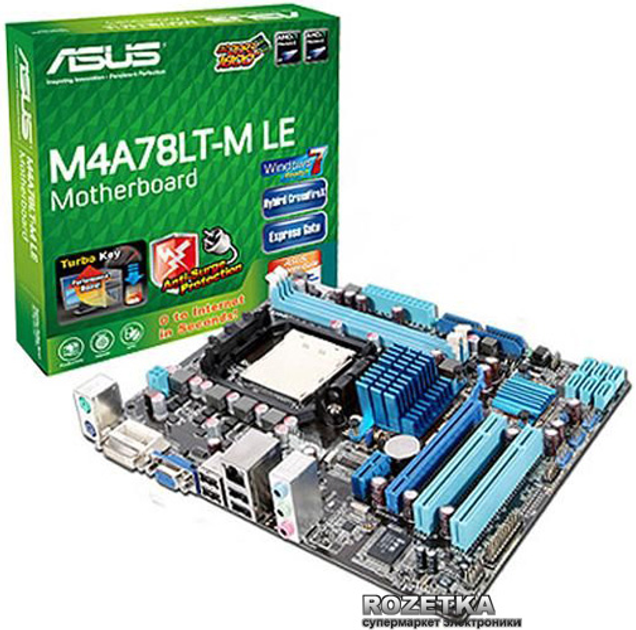
Характеристики Материнская плата Asus M4A78LT-M LE (AM3, AMD 760G, PCI-Ex16)
- Phenom II, Athlon II, Sempron (Deneb, Heka, Callisto, Propus, Rana, Regor, Sargas)
- 8 ГБ
- 1 x 24-pin ATX 1 x 4-pin ATX +12V
- 8-канальный HDA кодек VIA VT1708S
Отзывы покупателей 63
- Продавец: Rozetka
Потянит оперативку две по 4 Гб (DDR3 4GB 1600 MHz Elite Plus Team)
- Продавец: Rozetka
Поясніть, будь ласка, дана материнка підтримує тільки SATA 2 чи SATA 3 також? Якщо тільки SATA 2, то яку максимальну кількість HDD SATA 2 1 TB можна до неї підключити? Дякую за розуміння і відповідь
- Продавец: Rozetka
Чи піде Оперативная память Kingston DDR3-1600 8192MB PC3-12800 HyperX FURY
* Характеристики и комплектация товара могут изменяться производителем без уведомления
Процессор (CPU) для в городе Ивано-Франковск
➤ Подобраны товары из категории процессоры (cpu) подходящие для . Есть скидки по промокоду sidex250, процессор (cpu) для купить по акционной цене с доставкой или самовывозом в городе Ивано-Франковск, без предоплаты. Обязательно перед покупкой используйте промокод! Доставка в Ивано-Франковск.
Перед тем как купить процессор (cpu) для уточните совместимость у производителя. Выбирайте доставку или самовывоз в городе Ивано-Франковск . Контакты — Ивано-Франковск.
ASUS представила системные платы серий M4A78L-M и M4A78LT-M
Крупнейший производитель материнских плат, компания ASUS, представила новые «материнки» серий M4A78L-M и M4A78LT-M, ориентированных на применение в бюджетном сегменте. Они предназначены для работы с процессорами AMD в исполнении Socket AM2(+) и AM3 (Phenom II, Athlon II); всего увидят свет четыре различные модели.
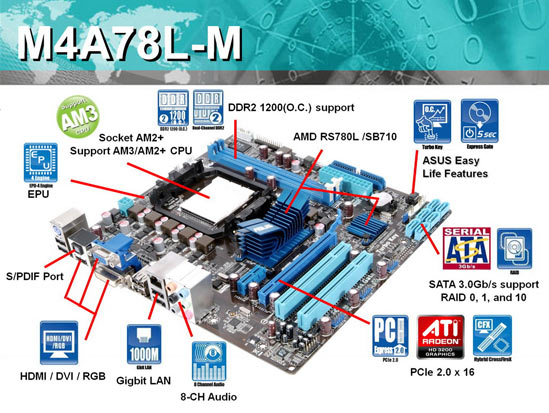
Все системные платы основаны на комбинации чипсета и южного моста AMD 760G(780L)/SB710, ASUS M4A78L-M и M4A78L-M LE используют оперативную память DDR2.

. а ASUSM4A78LT-M LE и M4A78LT-M – оперативную память DDR3.
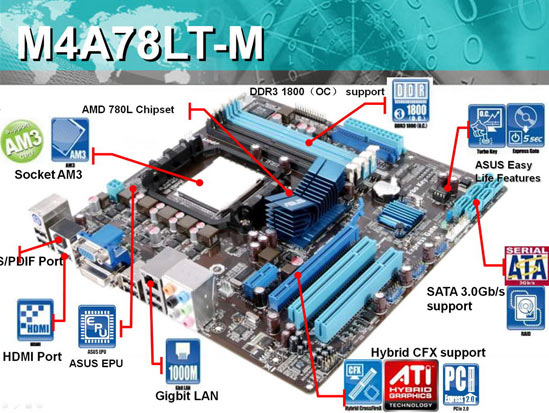
Новинки поддерживают фирменные технологии ASUS: Express Gate, EPU-4 Engine, AI NET2, CrashFree BIOS3 и другие.
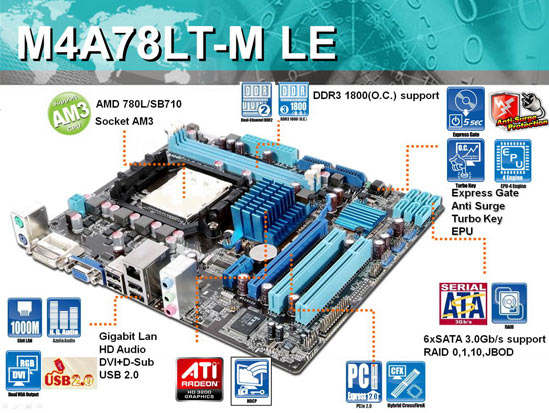
Перечисленные выше материнские платы могут послужить неплохой основой для достаточно производительного офисного компьютера, а благодаря наличию различных интерфейсов можно не переживать об их совместимости с имеющимся оборудованием.
О дате появления новых системных плат ASUS на полках магазинов не сообщается.