SQL условие IS NULL
В этом учебном материале вы узнаете, как использовать SQL условие IS NULL с синтаксисом и примерами.
Описание
Условие IS NULL используется в SQL для проверки значения NULL. Оно возвращает TRUE, если найдено значение NULL, в противном случае оно возвращает FALSE. Его можно использовать в операторе SELECT, INSERT, UPDATE или DELETE.
Синтаксис
Синтаксис для условия IS NULL в SQL:
Параметры или аргументы
Пример — использование IS NULL с оператором SELECT
При тестировании на NULL значение, IS NULL является рекомендуемым оператором сравнения для использования в SQL. Давайте начнем с примера, который показывает, как использовать условие IS NULL в запросе SELECT.
В этом примере у нас есть таблица customers со следующими данными:
| customer_id | first_name | last_name | favorite_website |
|---|---|---|---|
| 4000 | Justin | Bieber | google.com |
| 5000 | Selena | Gomez | bing.com |
| 6000 | Mila | Kunis | yahoo.com |
| 7000 | Tom | Cruise | oracle.com |
| 8000 | Johnny | Depp | NULL |
| 9000 | Russell | Crowe | google.com |
Введите следующий SQL оператор:
Будет выбрана 1 запись. Вот результаты, которые вы получите:
| customer_id | first_name | last_name | favorite_website |
|---|---|---|---|
| 8000 | Johnny | Depp | NULL |
В этом примере будут возвращены все записи из таблицы customers , где поле favourite_website содержит значение NULL.
Пример — использование IS NULL с оператором UPDATE
Далее давайте рассмотрим пример использования условия IS NULL в запросе UPDATE.
В этом примере у нас есть таблица products содержащая следующие данные:
| product_id | product_name | category_id |
|---|---|---|
| 1 | Pear | 50 |
| 2 | Banana | 50 |
| 3 | Orange | 50 |
| 4 | Apple | 50 |
| 5 | Bread | 75 |
| 6 | Sliced Ham | 25 |
| 7 | Kleenex | NULL |
Введите следующий запрос UPDATE:
Будет обновлена 1 запись. Снова выберите данные из таблицы products :
Вот результаты, которые вы должны получить:
| product_id | product_name | category_id |
|---|---|---|
| 1 | Pear | 50 |
| 2 | Banana | 50 |
| 3 | Orange | 50 |
| 4 | Apple | 50 |
| 5 | Bread | 75 |
| 6 | Sliced Ham | 25 |
| 7 | Kleenex | 110 |
В этом примере будут обновлены все значения category_id в таблице products до 110, где category_id содержит значение NULL. Как видите, category_id в последней строке обновлен до 110.
Пример — использование IS NULL с оператором DELETE
Далее давайте рассмотрим пример использования условия IS NULL в операторе DELETE.
В этом примере у нас есть таблица orders со следующими данными:
# NULLs
In SQL Server, NULL represents data that is missing, or unknown. This means that NULL is not really a value; it’s better described as a placeholder for a value. This is also the reason why you can’t compare NULL with any value, and not even with another NULL .
# COALESCE ()
COALESCE () Evaluates the arguments in order and returns the current value of the first expression that initially does not evaluate to NULL .
Although ISNULL() operates similarly to COALESCE(), the ISNULL() function only accepts two parameters — one to check, and one to use if the first parameter is NULL. See also ISNULL , below
SQL NULL Values
If a field in a table is optional, it is possible to insert a new record or update a record without adding a value to this field. Then, the field will be saved with a NULL value.
Note: A NULL value is different from a zero value or a field that contains spaces. A field with a NULL value is one that has been left blank during record creation!
How to Test for NULL Values?
It is not possible to test for NULL values with comparison operators, such as =, <, or <>.
We will have to use the IS NULL and IS NOT NULL operators instead.
IS NULL Syntax
IS NOT NULL Syntax
Demo Database
Below is a selection from the «Customers» table in the Northwind sample database:
The IS NULL Operator
The IS NULL operator is used to test for empty values (NULL values).
The following SQL lists all customers with a NULL value in the «Address» field:
Example
Tip: Always use IS NULL to look for NULL values.
The IS NOT NULL Operator
The IS NOT NULL operator is used to test for non-empty values (NOT NULL values).
The following SQL lists all customers with a value in the «Address» field:
SQL IS NULL and IS NOT NULL
In this tutorial, you will learn about the SQL IS NULL and NOT NULL with the help of examples.
In SQL, IS NULL and IS NOT NULL are used to check if a column in a table contains a NULL value or not.
IS NULL Syntax
In SQL, the IS NULL condition is used to select rows if the specified field is NULL . It has the following syntax:
- column1, column2, . are the table columns
- table is the table name from where we select the data
- column_name is the name of the column you want to check for NULL
Here, the above SQL query retrieves all the rows from the Employee table where the value of the email column is NULL .
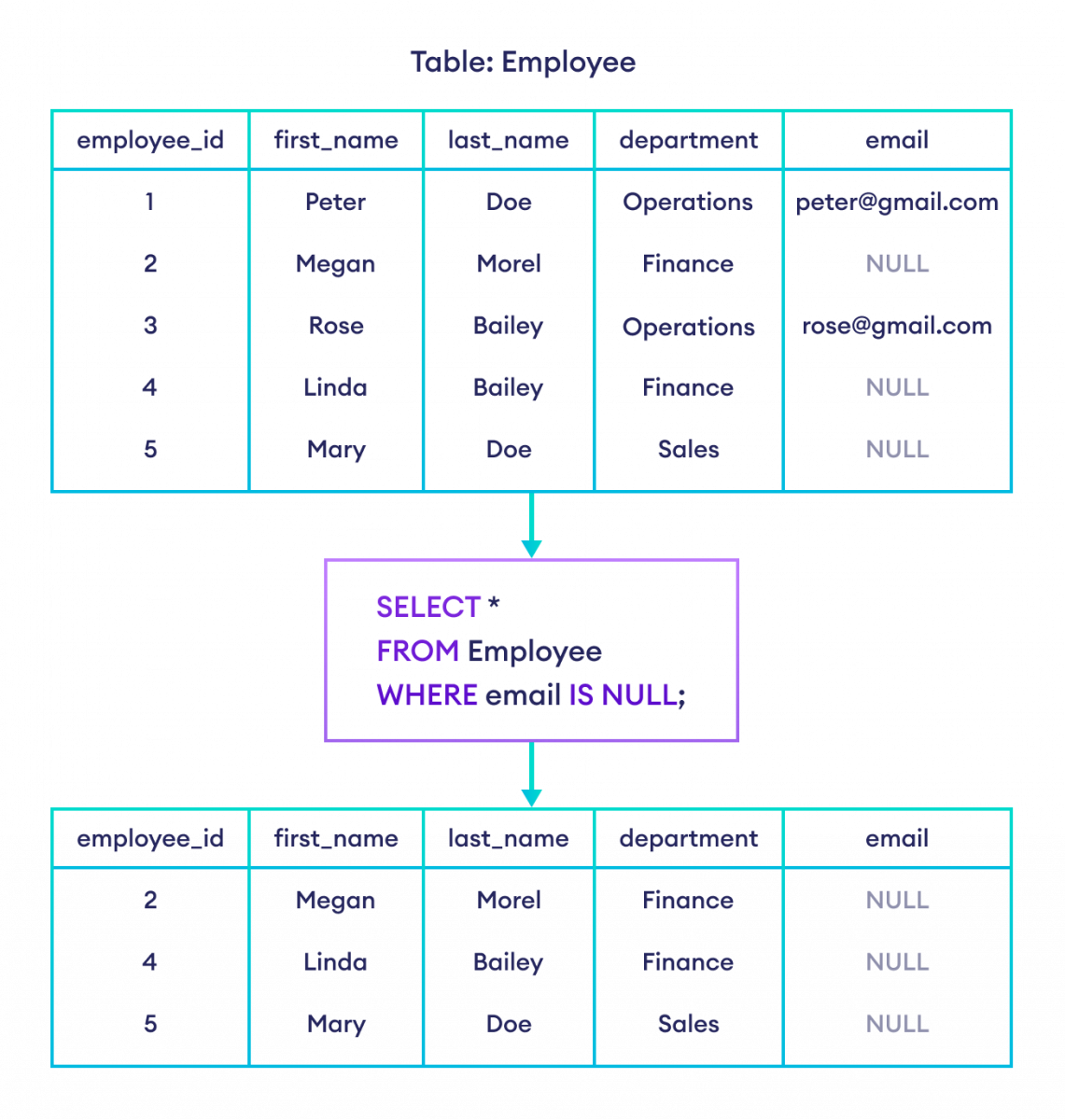
Example: IS NULL in SQL
Note: Empty values are considered NULL . However, space and 0 are not considered NULL .
IS NOT NULL
In SQL, the IS NOT NULL condition is used to select rows if the specified field is NOT NULL . It has the following syntax:
- column1, column2, . are the table columns
- table is the table name from where we select the data
- column_name is the name of the column you want to check for NOT NULL
Here, the above SQL query retrieves all the rows from the Employee table where the value of the email column is NOT NULL .
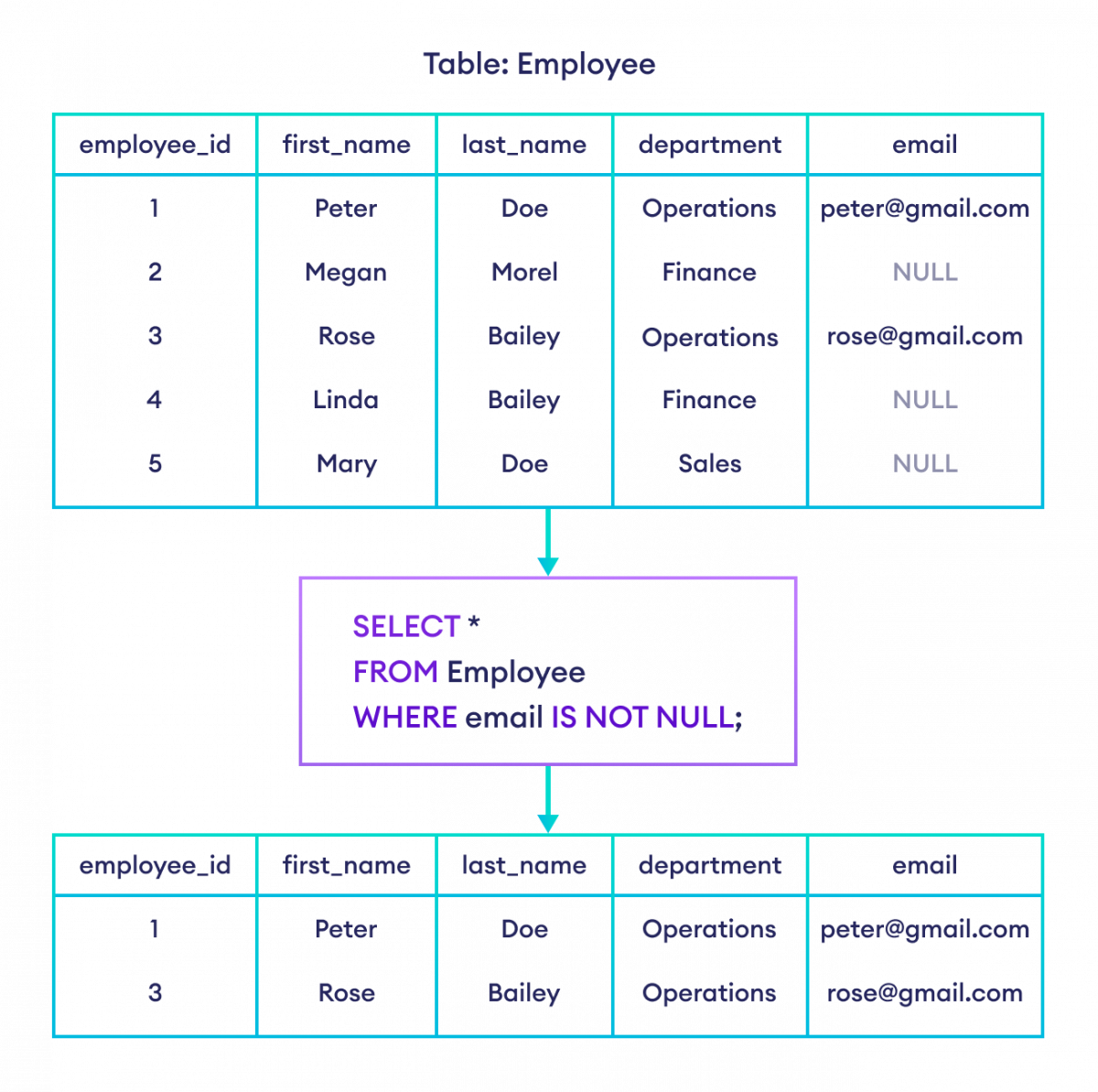
Example: IS NOT NULL in SQL
IS NULL With COUNT()
We can use the COUNT() function with IS NULL to count the number of rows with an empty field. For example,
Here, the SQL query retrieves the count of all the rows from the Employee table where the value of the email column is NULL .
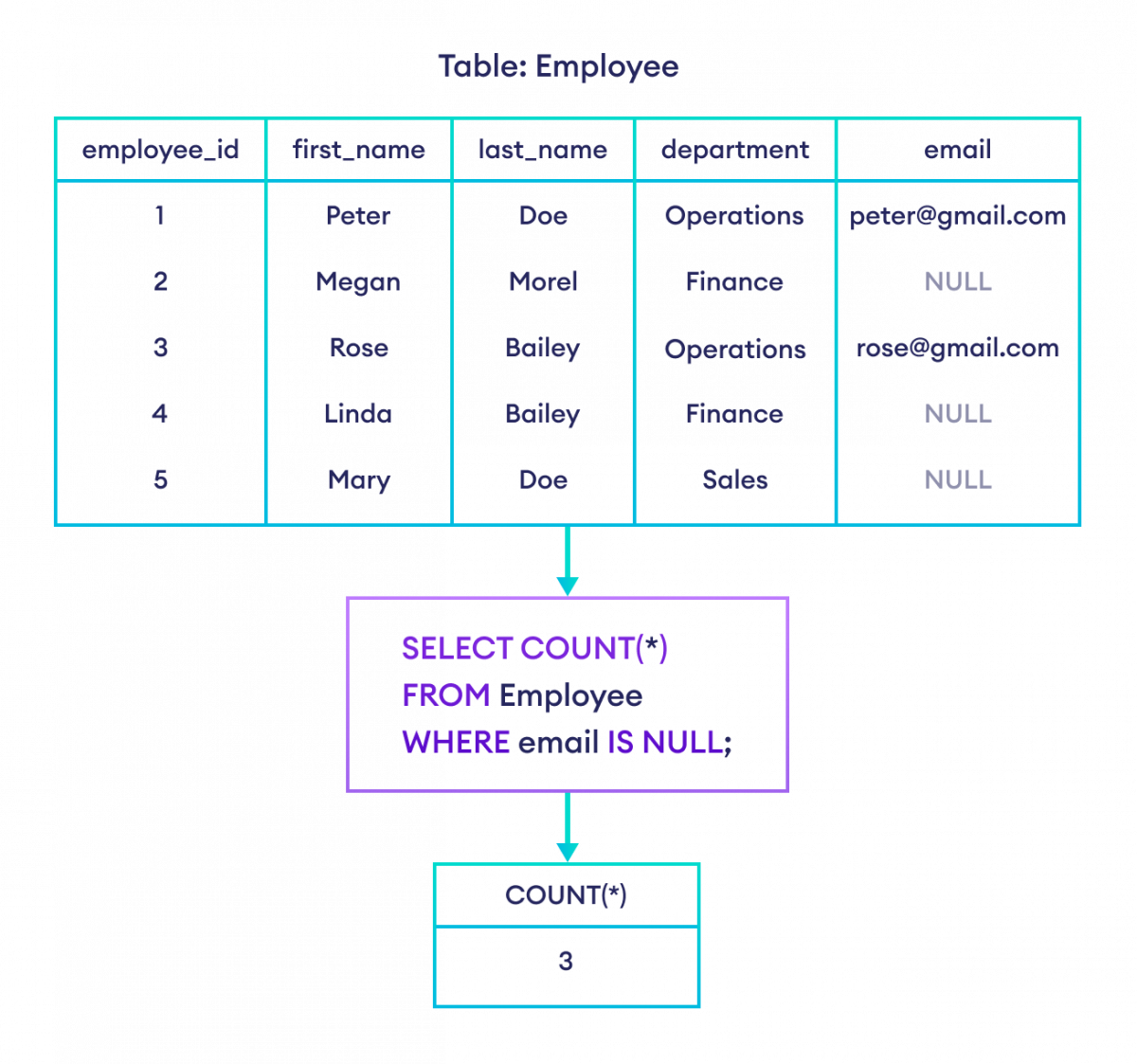
Example: IS NULL with COUNT() in SQL
Similarly, we can use the COUNT() function with IS NOT NULL to count the number of non-empty fields.