How to Create, Modify or Drop a SQL Server Trigger
You are getting your first steps into the SQL Server development world. You know how to write basic queries and stored procedures. Now you want to take advantage of triggers. You understand the concept of what a trigger is and how it works. The problem is that you don’t know how to implement it syntactically. In other words, you don’t know how to create, alter or drop a trigger. In this tip I will help you with that.
Solution
If you never coded an application that uses triggers you may feel nervous the first time working with them. But in this tip, I will walk through the syntax needed to work with triggers.
Working with SQL Server Triggers
There are three statements to use to create, modify or delete triggers.
- CREATE TRIGGER
- ALTER TRIGGER
- DROP TRIGGER
Using the SQL Server CREATE TRIGGER Statement
In the next code section you will see the basic CREATE TRIGGER syntax that you have to use when you want to create a trigger on a table or view. In the case you want to create a trigger into a memory optimized table the following template will work too, but there are some requirements that need to be met that I will explain with the description of the arguments.
Something I want to note is the fact that the [OR ALTER] portion of the CREATE TRIGGER statement was added in SQL Server 2016 so it won’t work in earlier versions. This enhancement allows a more efficient deployment of code because a script containing a CREATE OR ALTER TRIGGER statement won’t fail in case the trigger already exists in the target database.
In the next table, I describe each of the arguments of the CREATE TRIGGER syntax.
| Argument | Description |
|---|---|
| WITH <Options> | In this argument you can specify additional options for the creation of the trigger. I will cover this further on. |
| FOR | AFTER | INSTEAD OF | Indicates when the trigger must fire when a given event happens, like an insert, update or delete event. Something you must take into account is the fact that you cannot create an INSTEAD OF trigger on memory optimized tables. |
| [INSERT], [UPDATE], [DELETE] | The DML event (or list of events) that will cause the trigger to fire. |
| NOT FOR REPLICATION | Marks the trigger to not be executed when a replication agent modifies the table that's involved in the trigger. |
| WITH Option | Description | Notes |
|---|---|---|
| ENCRYPTION | Encrypts the Trigger code. | Doesn’t work with Memory Optimized Tables. |
| EXECUTE AS | Changes the security context on which the trigger will execute. | Required for triggers on memory-optimized tables. |
| NATIVE_COMPILATION | Compiles the trigger code into a binary to make it run natively. | Required for triggers on memory-optimized tables. |
| SCHEMABINDING | Ensures that tables that are referenced by a trigger cannot be dropped or altered. | Required for triggers on memory-optimized tables. |
Now I will show you an example about how to create a trigger, but first we need to set up a test environment.
In this test scenario we have an Employees table with employee’s data and also a column named EmployeeManager which contains the EmployeeID of the Manager of the current employee.
Here is the T-SQL to create the table.
Now we will create an AFTER INSERT trigger for the Employees table to check that the value provided for EmployeeManager is a valid EmployeeID in the Employees table. Triggers use two behind the scenes tables Inserted and Deleted to track what the data looks like for new data or for data that has been updated or deleted. In the example below we are using the Inserted table and joining to the Employees table based on the EmployeeID to see if it exists. In addition, we are looking at whether a value was passed for EmployeeManager.
Next we will insert some test data as follows:
- Mark Smith (id=1)
- Joe Wright (id=2)
- Manages
- Mark Hamilton (id=5)
- Manages
- Peter Rodriquez (id=4)
I am using the IDENTITY_INSERT so I can control the IDs for these first few records.
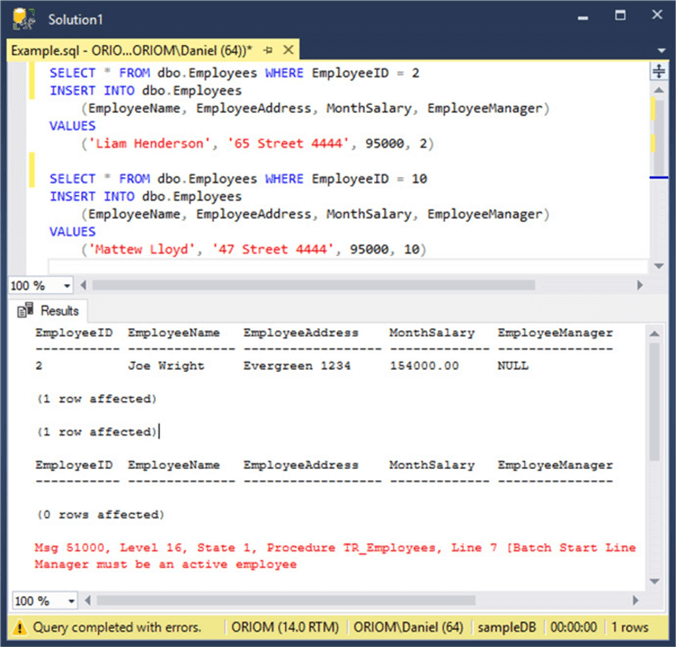
Finally, we can try our trigger by running the next code that tries to insert two employees into the Employees table. One of the records tries to insert a record for a manager (EmployeeManager value) that doesn’t exist.
As you can see on the next screen capture, the first insert worked, but the second did not becuase the trigger prevented us from inserting a row with the non-existing EmployeeID = 10 value for the EmployeeManager column.
Modifying the Code of a SQL Server Trigger
When you need to change the code of a trigger you can use any of the next methods.
- Use the ALTER TRIGGER statement
- Drop and re-create the trigger
- Use the CREATE OR ALTER statement (Only if your version of SQL Server is greater than SQL Server 2016)
Using the SQL Server ALTER TRIGGER Statement
If you need to change the code of a single trigger maybe the easiest way to do so is by using the ALTER TRIGGER statement. This is because most of the time you can use sp_helptext stored procedure to retrieve the text of the trigger�s code, change the CREATE word to ALTER, write your code and finally hit F5 key in SQL Server Management Studio.
But in such case, if you need to change other aspects of the trigger regardless the trigger code you can use the full syntax of the ALTER TRIGGER statement as shown below.
Additionally, the next table describes each of the arguments of the ALTER TRIGGER syntax. As you may guess, the arguments are identical to those of the CREATE TRIGGER statement.
Argument Description WITH <Options> In this argument you can specify additional options for the modification of the trigger. I will cover this further on. FOR | AFTER | INSTEAD OF /td> Indicates when the trigger must fire when a given event happens, like an insert, update or delete event. [INSERT], [UPDATE], [DELETE] The DML event (or list of events) that will cause the trigger to fire. NOT FOR REPLICATION Marks the trigger to not be executed when a replication agent modifies the table that's involved in the trigger. WITH Option Description Remarks ENCRYPTION Encrypts the Trigger code. Doesn’t work with Memory Optimized Tables. EXECUTE AS Changes the security context on which the trigger will execute. Required for triggers on memory-optimized tables. NATIVE_COMPILATION Compiles the trigger code into a binary to make it run natively. Required for triggers on memory-optimized tables. SCHEMABINDING Ensures that tables that are referenced by a trigger cannot be dropped or altered. Required for triggers on memory-optimized tables. Going back to our previous example, now we are going to modify the trigger we created before. The trigger was only validating the data inserted into the table, but it misses data being changed or deleted. Take a look at the following code where we add a validation for those cases.
After modifying the trigger lets run the next set of code so you can see the trigger doing its job.
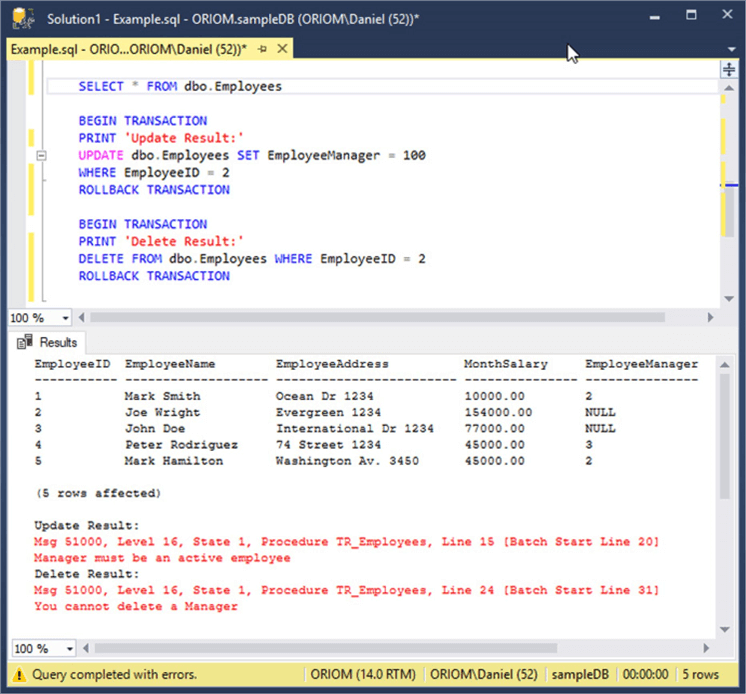
The next code attempts to update the employees table for EmployeeID = 2 to set the EmployeeManager to 100, but there is no EmployeeID = 100 in the table.
Additionally, the second query tries to delete from the employees table the row with EmployeeID = 2, but that EmployeeID is the manager of EmployeeID = 5.
On the next screen capture you can see the output of that query.
Using the DROP TRIGGER Statement
This is the easiest trigger statement to remember.
Something I want to note is that the [IF EXISTS] portion of the DROP TRIGGER statement was added in SQL Server 2016, so it won�t work in earlier versions. Basically, this enhancement added to the DROP TRIGGER statement is useful for deploying scripts such that if a trigger does not exist your deployment script will not fail.
For example, if we want to delete the trigger we created earlier we have to run the next statement.
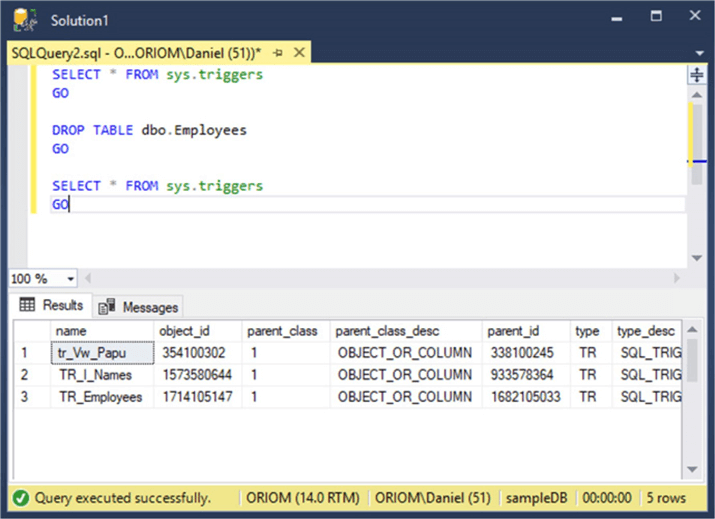
Another interesting fact is that when you delete a table or view that contains triggers, those triggers are also deleted automatically as you can see on the next screen capture.
Next Steps
- If you found it hard to understand the usage of the inserted and deleted tables take a look at this tip: Understanding SQL Server inserted and deleted tables for DML triggers.
- For an example of an INSTEAD OF trigger you can check out this tip: Using INSTEAD OF triggers in SQL Server for DML operations.
- In case you don’t know why I used a THROW statement in the trigger I suggest you to read the next tip: SQL Server 2012 THROW statement to raise an exception.
- You can see another example of a trigger in the next tip: SQL Server Trigger Example.
- Take a look at my previous tip SQL Server Referential Integrity across Databases Using Triggers.
- Stay tuned to SQL Server Triggers Tips Category for more tips and tricks.


About the author
 Daniel Farina was born in Buenos Aires, Argentina. Self-educated, since childhood he showed a passion for learning.
Comments For This Article
Very good introductory article. Just a comment about Triggers usage scenarios, they should not be the common procedure when coding business logic.
Triggers is one of those topics that generates a interesting controversy in the community and it is commonly said «Triggers are evil». I won’t be so extremist, they are useful in some scenarios, known by experienced DB Devs and DBAs, but for app devs not familiar with them and what involves, it is much safer to avoid them. I commonly say when asked for creating a trigger for adding some code «if you can do it with a SP, use a SP instead».
Triggers in SQL Server

In this article, we will review triggers in SQL Server, different types of trigger events, trigger order and NOT FOR REPLICATION in triggers. A trigger is a database object that runs automatically when an event occurs. There are three different types of events.
- DML Events
- DDL Events
- LOGON Event – Logon trigger is fired when a LOGON event occurs i.e. when a user session is being established
DML Triggers in SQL Server
DML triggers in SQL Server are fired when a DML event occurs. i.e. when data is inserted/ updated/deleted in the table by a user.
Creating triggers for a DML event
Let us create some sample tables and triggers in SQL Server.
We can create a DML trigger for a specific event or multiple events. The triggers in SQL Server(DML) fire on events irrespective to the number of rows affected.
Below is the sample syntax for creating a DML trigger for update event.

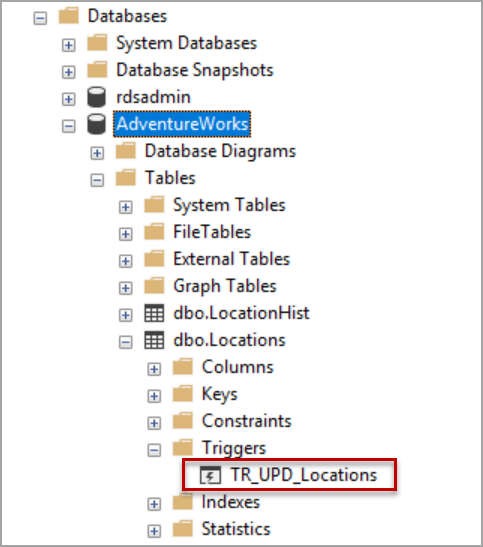
These triggers are created at the table level. Upon successful creation of trigger, we can see the triggers by navigating to Triggers folder at table level. Please refer to the below image.
Instead of triggers in SQL Server
These triggers are fired before the DML event and the actual data is not modified in the table.
For example, if we specify an instead of trigger for delete on a table, when delete statement is issued against the table, the instead of trigger is fired and the T-SQL block inside the triggers in SQL Server is executed but the actual delete does not happen.
T-SQL Syntax for creating an instead of trigger

- If there are multiple triggers along with instead of trigger on the table, the instead of trigger is fired first in the order
- INSTEAD of triggers can be created on views
- we can define only one instead of trigger per INSERT, UPDATE, or DELETE statement on a table or view
Enabling and disabling DML triggers on a table
Navigate to triggers folder at the table level, select the trigger, Right click on trigger and Click on Enable/Disable to Enable or disable the trigger using SSMS.
Disabling specific SQL Server trigger on a table using T-SQL.
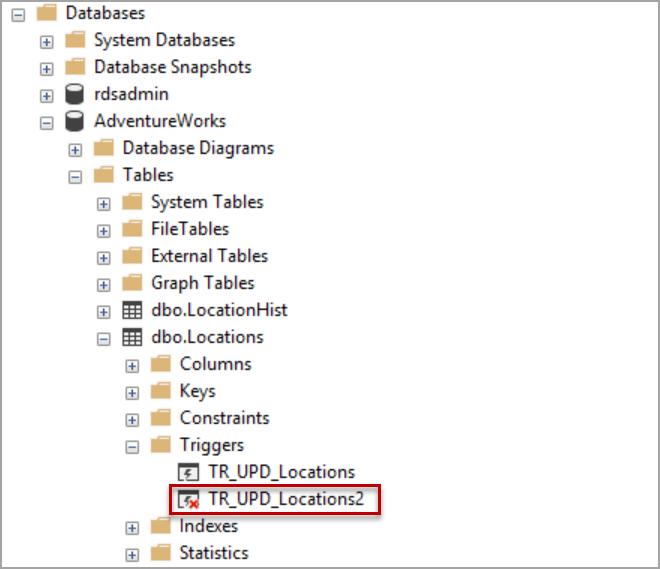
Enabling specific trigger on the table using T-SQL.
To enable all triggers on a table, use below syntax.
To disable all triggers on a table, use below syntax. This statement is not supported if the table is part of merge replication.
Dropping a trigger on a table.
To drop a DML trigger on the table using SQL Server management studio, navigate to the Triggers folder under the table. Select the table you want to drop, Right click on the trigger and click on Delete. Click Ok.
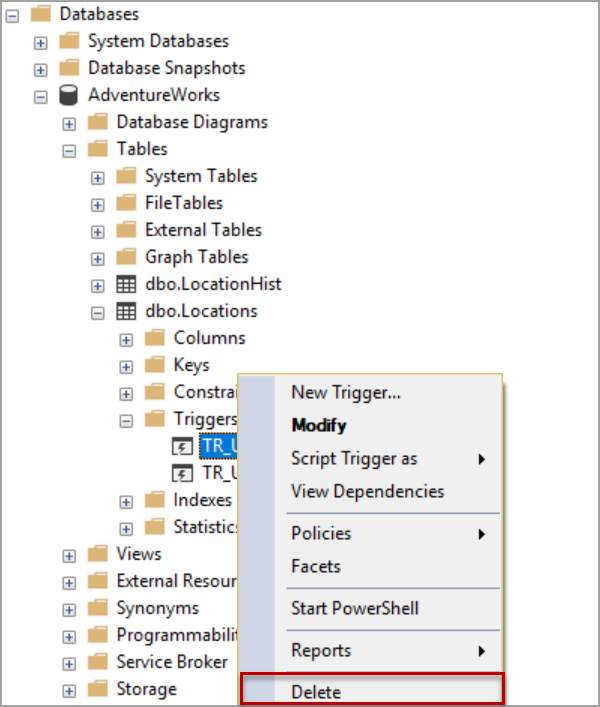
T-SQL to drop a trigger on the table.
Dropping a table will drop all the SQL Server triggers on the table along with the table.
DDL Triggers
DDL triggers in SQL Server are fired on DDL events. i.e. against create, alter and drop statements, etc. These triggers are created at the database level or server level based on the type of DDL event.
These triggers are useful in the below cases.
- Prevent changes to the database schema
- Audit database schema changes
- To respond to a change in the database schema
Creating a DDL trigger
Below is the sample syntax for creating a DDL trigger for ALTER TABLE event on a database which records all the alter statements against the table. You can write your custom code to track or audit the schema changes using EVENTDATA().
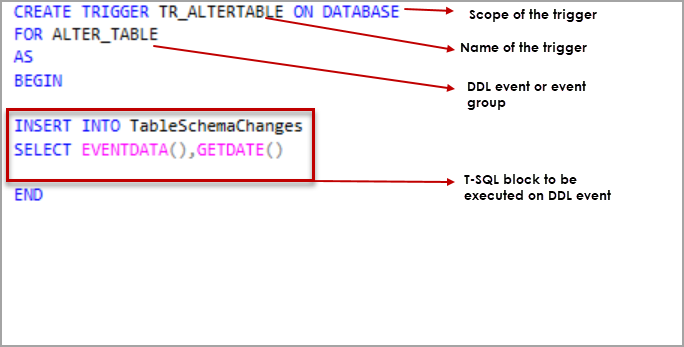
You can specify an event group which consists of different DDL events. If we specify an event group while creating a DDL trigger, the trigger is fired when a DDL event in the group occurs.
For example, if we want to create a trigger for all DDL events at the database level, we can just specify the DDL_DATABASE_LEVEL_EVENTS event group as shown in the below image.
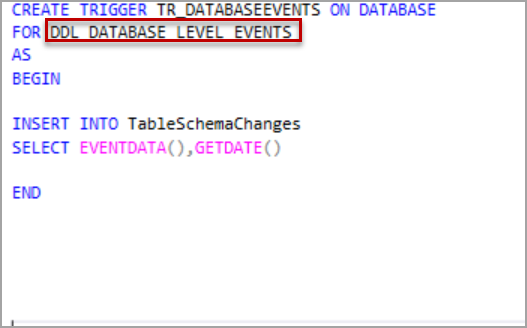
To view database level triggers, Login to the server using SQL Server management studio and navigate to the database. Expand the database and navigate to Programmability -> Database Triggers.
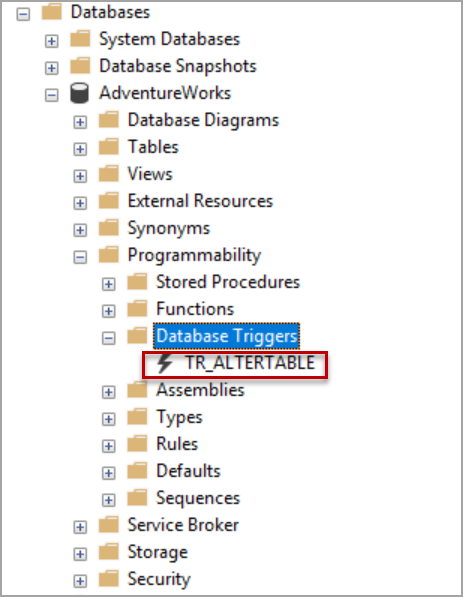
To view triggers at the server level, Login to Server using SSMS and navigate to Server Objects and then Triggers folder.
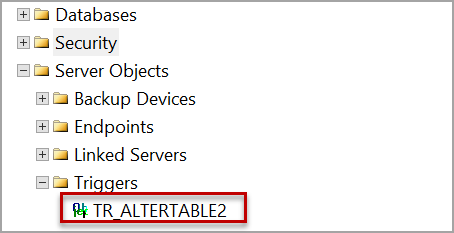
Enabling and disabling DDL triggers
Use below T-SQL syntax to disable or enable the DDL trigger at the database level.
Introduction to Triggers in SQL Server
SQL Server Triggers are used to execute after or before an INSERT, DELETE, or UPDATE operation on a table. You can use these SQL Server triggers on Views or Tables to perform the abovementioned activities. Remember, you can associate a trigger to a single table only.
We can call the SQL Server Trigger a special type of stored procedure that runs automatically when the specified event occurs on the database object. That can be DDL or DML operations.
Types of Triggers in SQL Server
There are two types of Triggers in SQL Server, and they are AFTER and INSTEAD OF.
SQL Server AFTER TRIGGERS
The SQL Server after/for triggers run on a table after an INSERT, DELETE, or an UPDATE. It means, Before this stored procedure starts running, all the operations should execute, and the statement must also succeed in the constraint check.
-
: It will fire after the completion of the Insert data operation on the Employee table. Once it completes inserting into the Employee table, it will start inserting into the audit table. Say, if it fails to insert into the Employee, then it won’t insert into the Audit table.
- AFTER UPDATE: The SQL Server update triggers will fire after the Update operation is completed on the Employees table. Once it ends Updating the Employee, it will start inserting/updating into the audit table. For instance, if it fails to update the Employees table, then it won’t insert it into the Audit.
- AFTER DELETE: The After delete will fire after completing the Delete statement operation on the Employee table. Once it completes deleting the records from the Employees, it will start inserting/deleting from the audit table. Say, if it fails to remove from the Employee, then it won’t insert into the Audit table.
- Schema_name: Please specify the schema name—for example, dbo, or Human Resources, etc.
- Trig_Name: You can specify any name you wish to give other than the system reserved keywords. Please try to use meaningful names so that you can identify them easily.
- Go to file T
- Go to line L
- Copy path
- Copy permalink
- Open with Desktop
- View raw
- Copy raw contents Copy raw contents
- ALTER DATABASE
- CREATE DATABASE
- DROP DATABASE
- RESTORE DATABASE
- RESTORE LOG
- RECONFIGURE
- CREATE INDEX (including CREATE SPATIAL INDEX and CREATE XML INDEX)
- ALTER INDEX
- DROP INDEX
- DROP TABLE
- DBCC DBREINDEX
- ALTER PARTITION FUNCTION
- ALTER TABLE when used to do the following:
- Add, modify, or drop columns.
- Switch partitions.
- Add or drop PRIMARY KEY or UNIQUE constraints.
[!NOTE]
Because [!INCLUDEssNoVersion] does not support user-defined triggers on system tables, we recommend that you do not create user-defined triggers on system tables.Optimizing DML Triggers
Triggers work in transactions (implied or otherwise) and while they’re open, they lock resources. The lock remains in place until the transaction is confirmed (with COMMIT) or rejected (with a ROLLBACK). The longer a trigger runs, the higher the probability that another process is then blocked. So, write triggers to lessen their duration whenever possible. One way to achieve shorter duration is to release a trigger when a DML statement changes zero rows.
To release the trigger for a command that doesn’t change any rows, employ the system variable ROWCOUNT_BIG.
The following T-SQL code snippet shows how to release the trigger for a command that doesn’t change any rows. This code should be present at the beginning of each DML trigger:
Remarks for DDL Triggers
DDL triggers, like standard triggers, launch stored procedures in response to an event. But, unlike standard triggers, they don’t run in response to UPDATE, INSERT, or DELETE statements on a table or view. Instead, they primarily run in response to data definition language (DDL) statements. The statement types include CREATE, ALTER, DROP, GRANT, DENY, REVOKE, and UPDATE STATISTICS. Certain system stored procedures that carry out DDL-like operations can also fire DDL triggers.
[!IMPORTANT]
Test your DDL triggers to determine their responses to system stored procedure execution. For example, the CREATE TYPE statement and the sp_addtype and sp_rename stored procedures fire a DDL trigger that’s created on a CREATE_TYPE event.For more information about DDL triggers, see DDL Triggers.
DDL triggers don’t fire in response to events that affect local or global temporary tables and stored procedures.
Unlike DML triggers, DDL triggers aren’t scoped to schemas. So, you can’t use functions such as OBJECT_ID, OBJECT_NAME, OBJECTPROPERTY, and OBJECTPROPERTYEX for querying metadata about DDL triggers. Use the catalog views instead. For more information, see Get Information About DDL Triggers.
[!NOTE]
Server-scoped DDL triggers appear in the [!INCLUDEssManStudioFull] Object Explorer in the Triggers folder. This folder is located under the Server Objects folder. Database-scoped DDL Triggers appear in the Database Triggers folder. This folder is located under the Programmability folder of the corresponding database.Logon triggers carry out stored procedures in response to a LOGON event. This event happens when a user session is established with an instance of [!INCLUDEssNoVersion]. Logon triggers fire after the authentication phase of logging in finishes, but before the user session is established. So, all messages originating inside the trigger that would typically reach the user, such as error messages and messages from the PRINT statement, are diverted to the [!INCLUDEssNoVersion] error log. For more information, see Logon Triggers.
Logon triggers don’t fire if authentication fails.
Distributed transactions aren’t supported in a logon trigger. Error 3969 returns when a logon trigger that contains a distributed transaction fire.
Disabling a Logon Trigger
A logon trigger can effectively prevent successful connections to the [!INCLUDEssDE] for all users, including members of the sysadmin fixed server role. When a logon trigger is preventing connections, members of the sysadmin fixed server role can connect by using the dedicated administrator connection, or by starting the [!INCLUDEssDE] in minimal configuration mode (-f). For more information, see Database Engine Service Startup Options.
General Trigger Considerations
The ability to return results from triggers will be removed in a future version of SQL Server. Triggers that return result sets may cause unexpected behavior in applications that aren’t designed to work with them. Avoid returning result sets from triggers in new development work, and plan to modify applications that currently do. To prevent triggers from returning result sets, set the disallow results from triggers option to 1.
Logon triggers always disallow the return of results sets and this behavior isn’t configurable. If a logon trigger generates a result set, the trigger fails to launch and the login attempt that fired the trigger is denied.
[!INCLUDEssNoVersion] lets you create multiple triggers for each DML, DDL, or LOGON event. For example, if CREATE TRIGGER FOR UPDATE is run for a table that already has an UPDATE trigger, an additional update trigger is created. In earlier versions of [!INCLUDEssNoVersion], only one trigger for each INSERT, UPDATE, or DELETE data modification event is allowed for each table.
[!INCLUDEssNoVersion] also supports recursive invocation of triggers when the RECURSIVE_TRIGGERS setting is enabled using ALTER DATABASE.
Recursive triggers enable the following types of recursion to occur:
With indirect recursion, an application updates table T1. This fires trigger TR1, updating table T2. Trigger T2 then fires and updates table T1.
In direct recursion, the application updates table T1. This fires trigger TR1, updating table T1. Because table T1 was updated, trigger TR1 fires again, and so on.
The following example uses both indirect and direct trigger recursion Assume that two update triggers, TR1 and TR2, are defined on table T1. Trigger TR1 updates table T1 recursively. An UPDATE statement runs each TR1 and TR2 one time. Additionally, the launch of TR1 triggers the execution of TR1 (recursively) and TR2. The inserted and deleted tables for a specific trigger contain rows that correspond only to the UPDATE statement that invoked the trigger.
[!NOTE]
The previous behavior occurs only if the RECURSIVE_TRIGGERS setting is enabled by using ALTER DATABASE. There’s no defined order in which multiple triggers defined for a specific event are run. Each trigger should be self-contained.Disabling the RECURSIVE_TRIGGERS setting only prevents direct recursions. To disable indirect recursion also, set the nested triggers server option to 0 by using sp_configure.
If any one of the triggers carries out a ROLLBACK TRANSACTION, regardless of the nesting level, no more triggers are run.
You can nest triggers to a maximum of 32 levels. If a trigger changes a table on which there’s another trigger, the second trigger activates and can then call a third trigger, and so on. If any trigger in the chain sets off an infinite loop, the nesting level is exceeded and the trigger is canceled. When a [!INCLUDEtsql] trigger launches managed code by referencing a CLR routine, type, or aggregate, this reference counts as one level against the 32-level nesting limit. Methods invoked from within managed code don’t count against this limit.
To disable nested triggers, set the nested triggers option of sp_configure to 0 (off). The default configuration supports nested triggers. If nested triggers are off, recursive triggers are also disabled, despite the RECURSIVE_TRIGGERS setting that’s set by using ALTER DATABASE.
The first AFTER trigger nested inside an INSTEAD OF trigger fires even if the nested triggers server configuration option is 0. But, under this setting, the later AFTER triggers don’t fire. Review your applications for nested triggers to determine if the applications follow your business rules when the nested triggers server configuration option is set to 0. If not, make the appropriate modifications.
Deferred Name Resolution
[!INCLUDEssNoVersion] allows for [!INCLUDEtsql] stored procedures, triggers, and batches to refer to tables that don’t exist at compile time. This ability is called deferred name resolution.
To create a DML trigger, it requires ALTER permission on the table or view on which the trigger is being created.
To create a DDL trigger with server scope (ON ALL SERVER) or a logon trigger, requires CONTROL SERVER permission on the server. To create a DDL trigger with database scope (ON DATABASE), requires ALTER ANY DATABASE DDL TRIGGER permission in the current database.
A. Using a DML trigger with a reminder message
The following DML trigger prints a message to the client when anyone tries to add or change data in the Customer table in the [!INCLUDEssSampleDBnormal] database.
B. Using a DML trigger with a reminder e-mail message
The following example sends an e-mail message to a specified person ( MaryM ) when the Customer table changes.
C. Using a DML AFTER trigger to enforce a business rule between the PurchaseOrderHeader and Vendor tables
Because CHECK constraints reference only the columns on which the column-level or table-level constraint is defined, you must define any cross-table constraints (in this case, business rules) as triggers.
The following example creates a DML trigger in the AdventureWorks2012 database. This trigger checks to make sure the credit rating for the vendor is good (not 5) when there’s an attempt to insert a new purchase order into the PurchaseOrderHeader table. To get the credit rating of the vendor, the Vendor table must be referenced. If the credit rating is too low, a message appears and the insertion doesn’t happen.
. code language=»sql» source=»../../relational-databases/triggers/codesnippet/tsql/use-the-inserted-and-del_1.sql».
D. Using a database-scoped DDL trigger
The following example uses a DDL trigger to prevent any synonym in a database from being dropped.
E. Using a server-scoped DDL trigger
The following example uses a DDL trigger to print a message if any CREATE DATABASE event occurs on the current server instance, and uses the EVENTDATA function to retrieve the text of the corresponding [!INCLUDEtsql] statement. For more examples that use EVENTDATA in DDL triggers, see Use the EVENTDATA Function.
Applies to: [!INCLUDEsql2008-md] and later.
F. Using a logon trigger
The following logon trigger example denies an attempt to log in to [!INCLUDEssNoVersion] as a member of the login_test login if there are already three user sessions running under that login.
SQL Server INSTEAD OF TRIGGERS
The SQL Server Instead of Triggers fired before the execution of an INSERT, DELETE, or an UPDATE on a table starts.
-
: Instead of insert trigger will fire before the Insert operation on the Employee table starts. Once it completes inserting into the Employee Audit table, it will begin to insert into the Employee. And if it fails for some reason, it won’t insert into the Employee table.: It will fire before updating the records in the Employee table. Once it completes the execution, it will start updating the records in the Employee. And if it fails, it won’t update the table.: It will fire before deleting records from the Employee table starts. Once it executes successfully, it will begin deleting records from the Employees table. And if it fails, it won’t remove any record from the Employee.
Data Definition Language Triggers in SQL Server
The Data definition language triggers fires in response to the DDL events, including CREATE, ALTER, DROP, etc. We can use them to prevent schema changes and record the events that occurred in the database schema. An example of this DDL trigger will be doing something or firing when dropping a database or table.
Data Manipulation Language Triggers in SQL Server
The DML triggers fires in response to data manipulation language events, including INSERT, DELETE, and UPDATE statements. These are the special type of stored procedures that are the first step to data integrity. If you further divide the data manipulation language or DML triggers, they are Instead of and after.
Logon Triggers
As the name suggests, the SQL server Logon triggers will fire when a user tries to LOGON or establish a connection to the server.
Create Trigger Statement in SQL Server
The basic syntax of creating SQL Server Instead Of Triggers is as shown below:
From the above statements, it is the same create statement that we used before, but we added INSTEAD OF INSERT | UPDATE | DELETE.
Let us see how to Create SQL Server triggers, Modify the existing ones, and delete them with an example.
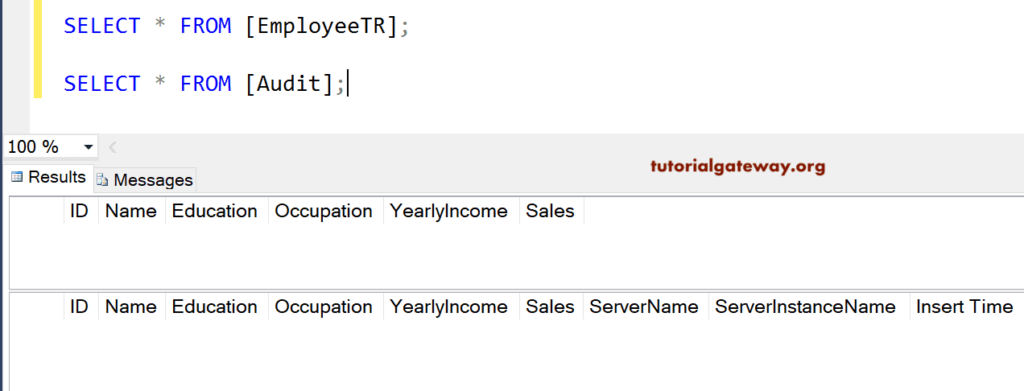
We are working with the Employee and audit table for the demonstration. As you can see, the emp and the audit tables are Empty.
Create Triggers in SQL Server Example
We can create them in two ways. This example shows you the steps involved in creating it using the Management Studio (SSMS). Before we start generating any, let us see whether or not our database has any existing ones.
To view the existing, Please select the Database object -> Expand the specified Table Name (on which it exists) -> Go to Triggers Folder and expand it. From the below screenshot, you can observe that our Employee table under the database has none.
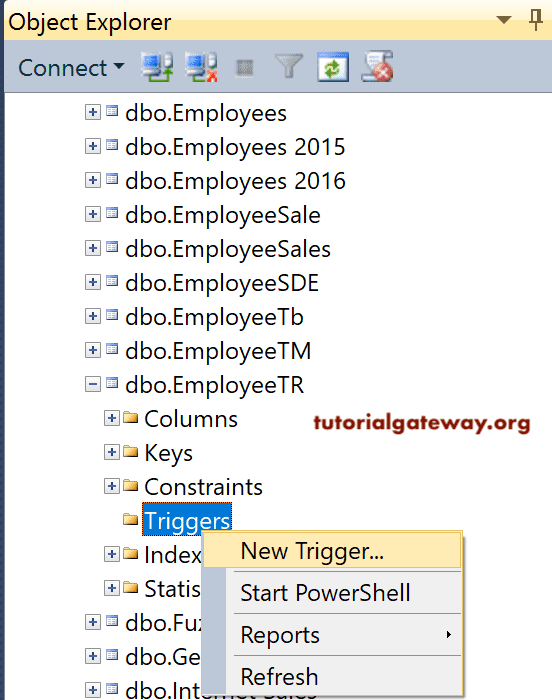
Right-click on the SQL Server Triggers folder will open the context menu. Please select the New.. option from it, as we have shown below.
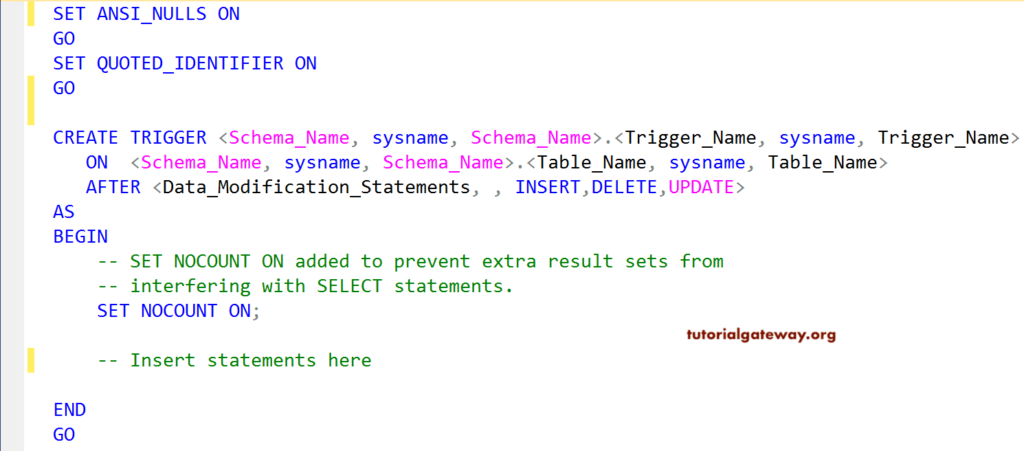
Once you click on that option, it will open the new Query window with the default Template, as we have shown below.
Here, you can add the Schema name, Trig_name, TableName, Data modification statements, and the statements you want to apply.
Create using transact query
For this demonstration, we are creating an After Insert Trigger in SQL Server to Insert the records into Employee Table Audit, along with the audit information.
We already explained the statements inside it in our previous article. I suggest you refer article AFTER INSERT to understand this code.
Run the above query
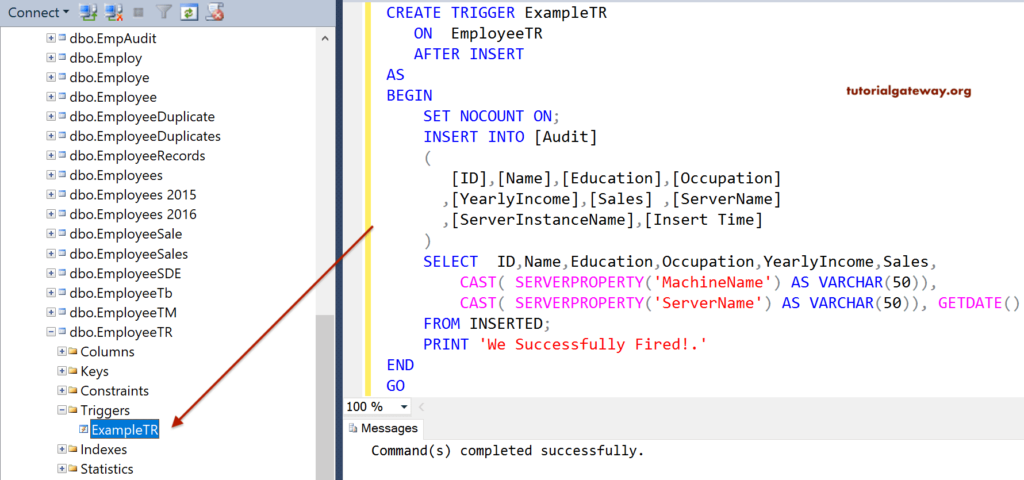
Let me show you the newly created one by opening the Object Explorer -> Go to the Database -> Go and expand the Employee -> and then expand the Folder.
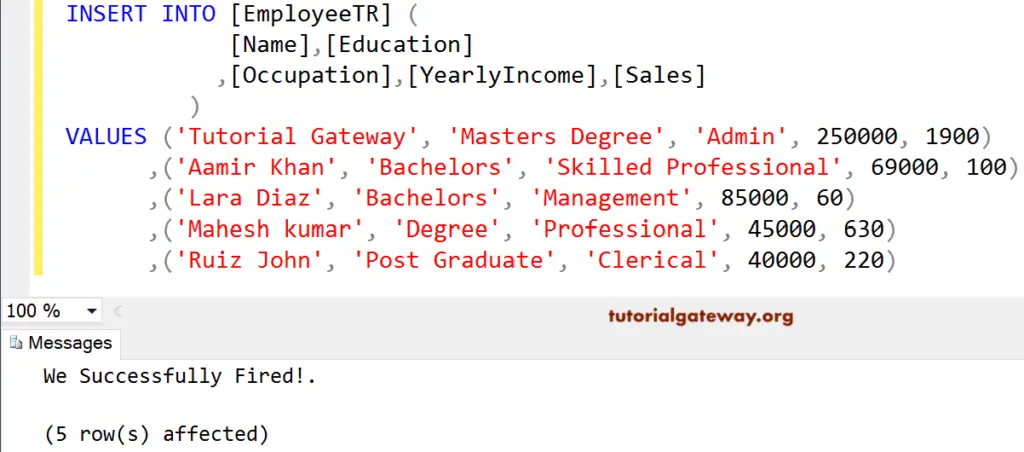
Let me insert 5 random records into the Employee for the demonstration purpose. It will help us check whether the After insert is fired.
From the above screenshot, you can see that our SQL Server trigger is fired. And also, it prints the message that we placed in it. Please use the following query to check the inserted records in the Employee.
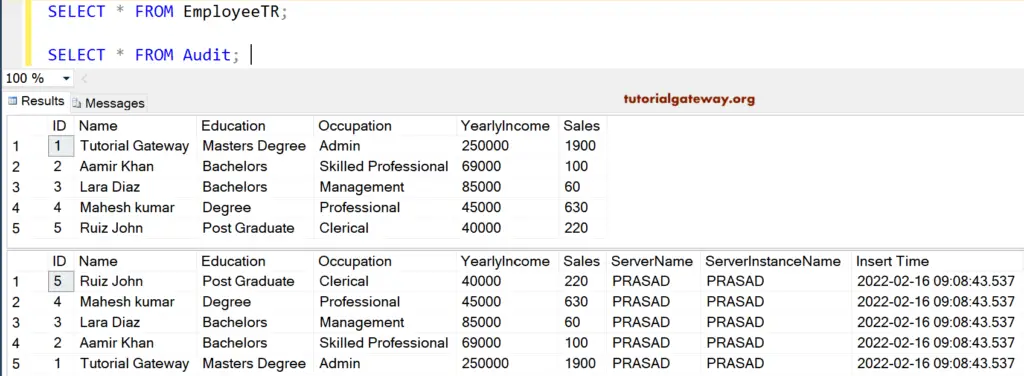
Next, check the records in the Audit table using the following query.
Alter Triggers in SQL Server to Modify Example
The following examples will help you understand the steps involved in modifying the existing one using the Management Studio and query.
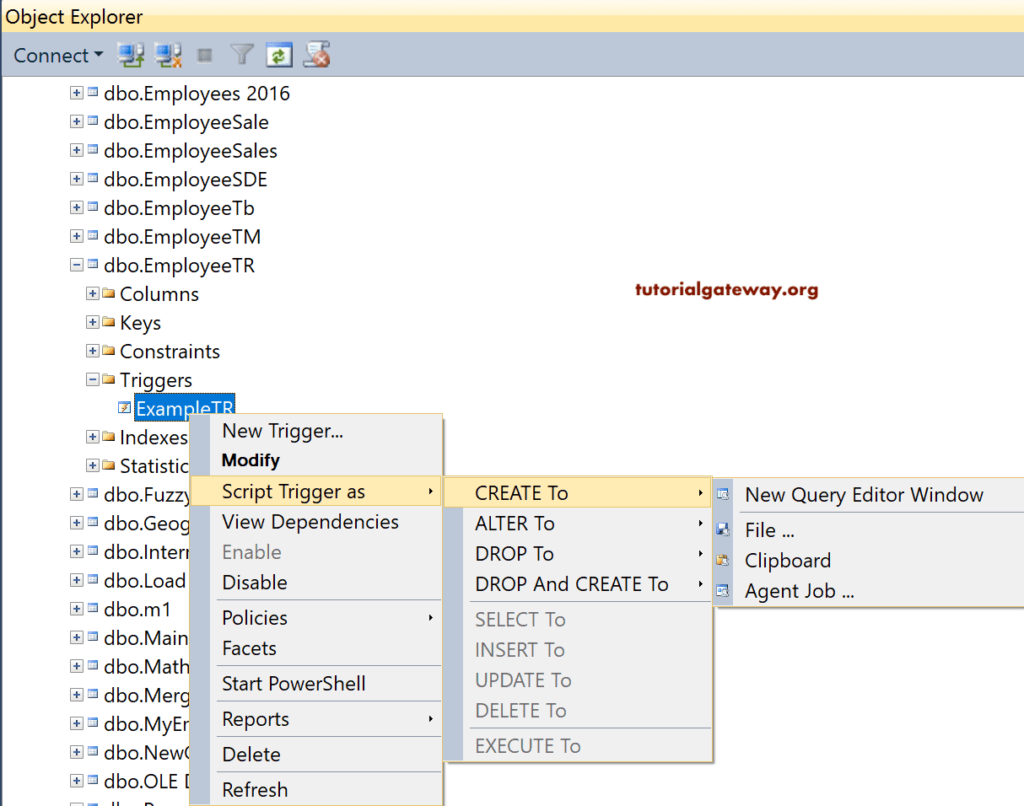
Before we get into the modification, let me show you the available options that Management Studio provides. As shown below, you can drop, drop, recreate, alter, and create triggers in SQL ServerManagement studio.
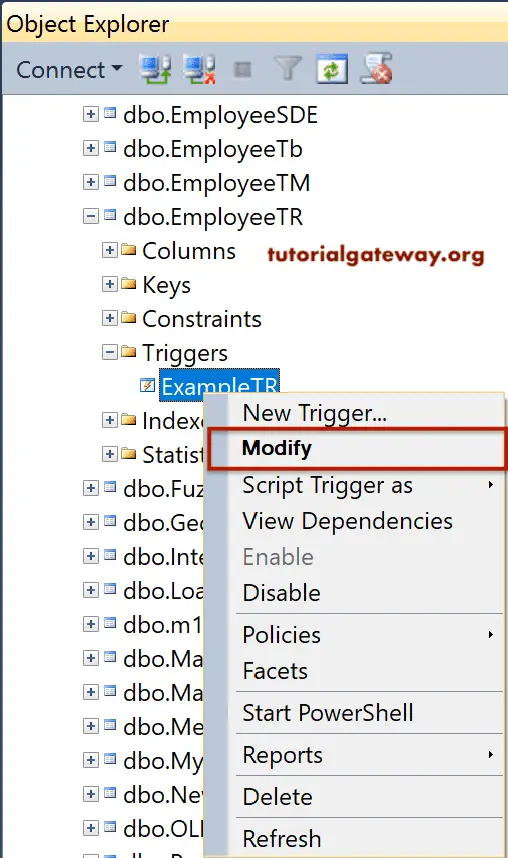
To modify it using the Management Studio, Please navigate to the table that holds them. Next, select the one you want to modify (ExampleTR), and right-click on it to open the context menu. Here, select the Modify option.
Once you choose the Modify option, a new query window will open with an auto-generated code. You can modify it as per your requirement.
Use Alter Trigger to Modify
The steps involved in modifying the existing SQL Server trigger using the ALTER statement. To do so, Click the New query and return the following query.
Delete Triggers in SQL Server Example
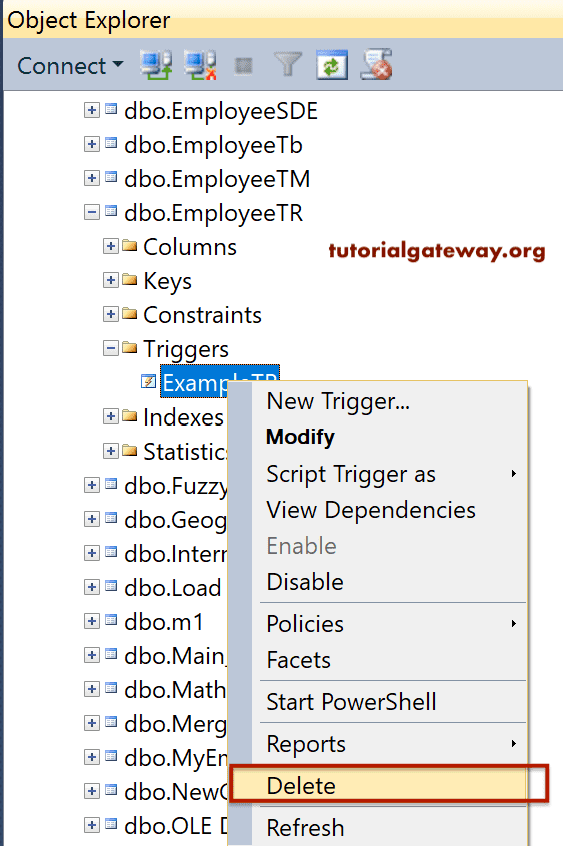
The following examples will show you, How to drop them using a query and Management Studio (SSMS). Here, we show you how to delete them using SSMS. To delete using the SSMS, right-click the name you want to delete to open the context menu. You can click on the Delete option.
Here, we will show you how to delete it using the SQL Server Drop Trigger statement.
Suresh is the founder of TutorialGateway and a freelance software developer. He specialized in Designing and Developing Windows and Web applications. The experience he gained in Programming and BI integration, and reporting tools translates into this blog. You can find him on Facebook or Twitter.
Name already in use
sql-docs / docs / t-sql / statements / create-trigger-transact-sql.md
Copy raw contents
Copy raw contents
CREATE TRIGGER (Transact-SQL)
Creates a DML, DDL, or logon trigger. A trigger is a special type of stored procedure that automatically runs when an event occurs in the database server. DML triggers run when a user tries to modify data through a data manipulation language (DML) event. DML events are INSERT, UPDATE, or DELETE statements on a table or view. These triggers fire when any valid event fires, whether table rows are affected or not. For more information, see DML Triggers.
DDL triggers run in response to a variety of data definition language (DDL) events. These events primarily correspond to [!INCLUDEtsql] CREATE, ALTER, and DROP statements, and certain system stored procedures that perform DDL-like operations.
Logon triggers fire in response to the LOGON event that’s raised when a user’s session is being established. You can create triggers directly from [!INCLUDEtsql] statements or from methods of assemblies that are created in the [!INCLUDEmsCoName] [!INCLUDEdnprdnshort] common language runtime (CLR) and uploaded to an instance of [!INCLUDEssNoVersion]. [!INCLUDEssNoVersion] lets you create multiple triggers for any specific statement.
[!IMPORTANT]
Malicious code inside triggers can run under escalated privileges. For more information on how to mitigate this threat, see Manage Trigger Security.[!NOTE]
The integration of .NET Framework CLR into SQL Server is discussed in this article. CLR integration does not apply to Azure SQL Database.. image type=»icon» source=»../../includes/media/topic-link-icon.svg» border=»false». Transact-SQL syntax conventions
SQL Server Syntax
Azure SQL Database Syntax
OR ALTER
Applies to: Azure [!INCLUDEssSDS], [!INCLUDEssNoVersion] (starting with [!INCLUDEsssql16-md] SP1).Conditionally alters the trigger only if it already exists.
schema_name
The name of the schema to which a DML trigger belongs. DML triggers are scoped to the schema of the table or view on which they’re created. schema_name can’t be specified for DDL or logon triggers.trigger_name
The name of the trigger. A trigger_name must follow the rules for identifiers, except that trigger_name can’t start with # or ##.table | view
The table or view on which the DML trigger runs. This table or view is sometimes referred to as the trigger table or trigger view. Specifying the fully qualified name of the table or view is optional. You can only reference a view by an INSTEAD OF trigger. You can’t define DML triggers on local or global temporary tables.DATABASE
Applies the scope of a DDL trigger to the current database. If specified, the trigger fires whenever event_type or event_group occurs in the current database.ALL SERVER
Applies to: [!INCLUDEsql2008-md] and later.Applies the scope of a DDL or logon trigger to the current server. If specified, the trigger fires whenever event_type or event_group occurs anywhere in the current server.
WITH ENCRYPTION
Applies to: [!INCLUDEsql2008-md] and later.Obscures the text of the CREATE TRIGGER statement. Using WITH ENCRYPTION prevents the trigger from being published as part of [!INCLUDEssNoVersion] replication. WITH ENCRYPTION can’t be specified for CLR triggers.
EXECUTE AS
Specifies the security context under which the trigger is executed. Enables you to control which user account the instance of [!INCLUDEssNoVersion] uses to validate permissions on any database objects that are referenced by the trigger.This option is required for triggers on memory-optimized tables.
NATIVE_COMPILATION
Indicates that the trigger is natively compiled.This option is required for triggers on memory-optimized tables.
SCHEMABINDING
Ensures that tables referenced by a trigger can’t be dropped or altered.This option is required for triggers on memory-optimized tables and isn’t supported for triggers on traditional tables.
FOR | AFTER
FOR or AFTER specifies that the DML trigger fires only when all operations specified in the triggering SQL statement have launched successfully. All referential cascade actions and constraint checks must also succeed before this trigger fires.You can’t define AFTER triggers on views.
INSTEAD OF
Specifies that the DML trigger launches instead of the triggering SQL statement, thus, overriding the actions of the triggering statements. You can’t specify INSTEAD OF for DDL or logon triggers.At most, you can define one INSTEAD OF trigger per INSERT, UPDATE, or DELETE statement on a table or view. You can also define views on views where each view has its own INSTEAD OF trigger.
You can’t define INSTEAD OF triggers on updatable views that use WITH CHECK OPTION. Doing so results in an error when an INSTEAD OF trigger is added to an updatable view WITH CHECK OPTION specified. You remove that option by using ALTER VIEW before defining the INSTEAD OF trigger.
< [ DELETE ] [ , ] [ INSERT ] [ , ] [ UPDATE ] >
Specifies the data modification statements that activate the DML trigger when it’s tried against this table or view. Specify at least one option. Use any combination of these options in any order in the trigger definition.For INSTEAD OF triggers, you can’t use the DELETE option on tables that have a referential relationship, specifying a cascade action ON DELETE. Similarly, the UPDATE option isn’t allowed on tables that have a referential relationship, specifying a cascade action ON UPDATE.
WITH APPEND
Applies to: [!INCLUDEsql2008-md] through [!INCLUDEsql2008r2].Specifies that an additional trigger of an existing type should be added. WITH APPEND can’t be used with INSTEAD OF triggers or if an AFTER trigger is explicitly stated. For backward compatibility, only use WITH APPEND when FOR is specified, without INSTEAD OF or AFTER. You can’t specify WITH APPEND if using EXTERNAL NAME (that is, if the trigger is a CLR trigger).
event_type
The name of a [!INCLUDEtsql] language event that, after launch, causes a DDL trigger to fire. Valid events for DDL triggers are listed in DDL Events.event_group
The name of a predefined grouping of [!INCLUDEtsql] language events. The DDL trigger fires after launch of any [!INCLUDEtsql] language event that belongs to event_group. Valid event groups for DDL triggers are listed in DDL Event Groups.After the CREATE TRIGGER has finished running, event_group also acts as a macro by adding the event types it covers to the sys.trigger_events catalog view.
NOT FOR REPLICATION
Applies to: [!INCLUDEsql2008-md] and later.Indicates that the trigger shouldn’t be run when a replication agent modifies the table that’s involved in the trigger.
sql_statement
The trigger conditions and actions. Trigger conditions specify additional criteria that determine whether the tried DML, DDL, or logon events cause the trigger actions to be run.The trigger actions specified in the [!INCLUDEtsql] statements go into effect when the operation is tried.
Triggers can include any number and type of [!INCLUDEtsql] statements, with exceptions. For more information, see Remarks. A trigger is designed to check or change data based on a data modification or definition statement; it should’t return data to the user. The [!INCLUDEtsql] statements in a trigger frequently include control-of-flow language.
DML triggers use the deleted and inserted logical (conceptual) tables. They’re structurally similar to the table on which the trigger is defined, that is, the table on which the user action is tried. The deleted and inserted tables hold the old values or new values of the rows that may be changed by the user action. For example, to retrieve all values in the deleted table, use:
DDL and logon triggers capture information about the triggering event by using the EVENTDATA (Transact-SQL) function. For more information, see Use the EVENTDATA Function.
[!INCLUDEssNoVersion] allows the update of text, ntext, or image columns through the INSTEAD OF trigger on tables or views.
[!IMPORTANT] ntext, text, and image data types will be removed in a future version of [!INCLUDEmsCoName] [!INCLUDEssNoVersion]. Avoid using these data types in new development work, and plan to modify applications that currently use them. Use nvarchar(max), varchar(max), and varbinary(max) instead. Both AFTER and INSTEAD OF triggers support varchar(MAX), nvarchar(MAX), and varbinary(MAX) data in the inserted and deleted tables.
For triggers on memory-optimized tables, the only sql_statement allowed at the top level is an ATOMIC block. The T-SQL allowed inside the ATOMIC block is limited by the T-SQL allowed inside native procs.
< method_specifier > Applies to: [!INCLUDEsql2008-md] and later.
For a CLR trigger, specifies the method of an assembly to bind with the trigger. The method must take no arguments and return void. class_name must be a valid [!INCLUDEssNoVersion] identifier and must exist as a class in the assembly with assembly visibility. If the class has a namespace-qualified name that uses ‘.’ to separate namespace parts, the class name must be delimited by using [ ] or » » delimiters. The class can’t be a nested class.
[!NOTE]
By default, the ability of [!INCLUDEssNoVersion] to run CLR code is off. You can create, modify, and drop database objects that reference managed code modules, but these references don’t run in an instance of [!INCLUDEssNoVersion] unless the clr enabled Option is enabled by using sp_configure.Remarks for DML Triggers
DML triggers are frequently used for enforcing business rules and data integrity. [!INCLUDEssNoVersion] provides declarative referential integrity (DRI) through the ALTER TABLE and CREATE TABLE statements. However, DRI doesn’t provide cross-database referential integrity. Referential integrity refers to the rules about the relationships between the primary and foreign keys of tables. To enforce referential integrity, use the PRIMARY KEY and FOREIGN KEY constraints in ALTER TABLE and CREATE TABLE. If constraints exist on the trigger table, they’re checked after the INSTEAD OF trigger runs and before the AFTER trigger runs. If the constraints are violated, the INSTEAD OF trigger actions are rolled back and the AFTER trigger isn’t fired.
You can specify the first and last AFTER triggers to be run on a table by using sp_settriggerorder. You can specify only one first and one last AFTER trigger for each INSERT, UPDATE, and DELETE operation on a table. If there are other AFTER triggers on the same table, they’re randomly run.
If an ALTER TRIGGER statement changes a first or last trigger, the first or last attribute set on the modified trigger is dropped, and you must reset the order value by using sp_settriggerorder.
An AFTER trigger is run only after the triggering SQL statement has run successfully. This successful execution includes all referential cascade actions and constraint checks associated with the object updated or deleted. An AFTER does not recursively fire an INSTEAD OF trigger on the same table.
If an INSTEAD OF trigger defined on a table runs a statement against the table that would ordinarily fire the INSTEAD OF trigger again, the trigger isn’t called recursively. Instead, the statement processes as if the table had no INSTEAD OF trigger and starts the chain of constraint operations and AFTER trigger executions. For example, if a trigger is defined as an INSTEAD OF INSERT trigger for a table. And, the trigger runs an INSERT statement on the same table, the INSERT statement launched by the INSTEAD OF trigger doesn’t call the trigger again. The INSERT launched by the trigger starts the process of running constraint actions and firing any AFTER INSERT triggers defined for the table.
When an INSTEAD OF trigger defined on a view runs a statement against the view that would ordinarily fire the INSTEAD OF trigger again, it’s not called recursively. Instead, the statement is resolved as modifications against the base tables underlying the view. In this case, the view definition must meet all the restrictions for an updatable view. For a definition of updatable views, see Modify Data Through a View.
For example, if a trigger is defined as an INSTEAD OF UPDATE trigger for a view. And, the trigger runs an UPDATE statement referencing the same view, the UPDATE statement launched by the INSTEAD OF trigger doesn’t call the trigger again. The UPDATE launched by the trigger is processed against the view as if the view didn’t have an INSTEAD OF trigger. The columns changed by the UPDATE must be resolved to a single base table. Each modification to an underlying base table starts the chain of applying constraints and firing AFTER triggers defined for the table.
Testing for UPDATE or INSERT Actions to Specific Columns
You can design a [!INCLUDEtsql] trigger to do certain actions based on UPDATE or INSERT modifications to specific columns. Use UPDATE() or COLUMNS_UPDATED in the body of the trigger for this purpose. UPDATE() tests for UPDATE or INSERT attempts on one column. COLUMNS_UPDATED tests for UPDATE or INSERT actions that run on multiple columns. This function returns a bit pattern that indicates which columns were inserted or updated.
CREATE TRIGGER must be the first statement in the batch and can apply to only one table.
A trigger is created only in the current database; however, a trigger can reference objects outside the current database.
If the trigger schema name is specified to qualify the trigger, qualify the table name in the same way.
The same trigger action can be defined for more than one user action (for example, INSERT and UPDATE) in the same CREATE TRIGGER statement.
INSTEAD OF DELETE/UPDATE triggers can’t be defined on a table that has a foreign key with a cascade on DELETE/UPDATE action defined.
Any SET statement can be specified inside a trigger. The SET option selected remains in effect during the execution of the trigger and then reverts to its former setting.
When a trigger fires, results are returned to the calling application, just like with stored procedures. To prevent results being returned to an application because of a trigger firing, don’t include either SELECT statements that return results or statements that carry out variable assignment in a trigger. A trigger that includes either SELECT statements that return results to the user or statements that do variable assignment, requires special handling. You’d have to write the returned results into every application in which modifications to the trigger table are allowed. If variable assignment must occur in a trigger, use a SET NOCOUNT statement at the start of the trigger to prevent the return of any result sets.
Although a TRUNCATE TABLE statement is in effect a DELETE statement, it doesn’t activate a trigger because the operation doesn’t log individual row deletions. However, only those users with permissions to run a TRUNCATE TABLE statement need be concerned about inadvertently circumventing a DELETE trigger this way.
The WRITETEXT statement, whether logged or unlogged, doesn’t activate a trigger.
The following [!INCLUDEtsql] statements aren’t allowed in a DML trigger:
Additionally, the following [!INCLUDEtsql] statements aren’t allowed inside the body of a DML trigger when it’s used against the table or view that’s the target of the triggering action.
- Manages