SQL List All Tables
Summary: in this tutorial, you will learn how to use commands to list all tables of a database in various database management systems.
Each database system has its own command to show all tables in a specified database. Here you can find the respective SQL command to list all tables in MySQL, PostgreSQL, Oracle, SQL Server, DB2, and SQLite.
SQL command to list all tables in MySQL
To list all tables in MySQL, first, you connect to the MySQL database server using the following command:
MySQL then prompts for the password; just enter the correct one for the user and press enter.
After that, select a database to work with:
And finally, issue the SHOW TABLES command to display all tables in the current database:
SQL command to list all tables in Oracle
In Oracle, you can use the SQL*Plus or SQL Developer connect to the Oracle Database server and show all tables in a database. Then issue one of the following SQL statement:
1) Show all tables owned by the current user:
2) Show all tables in the current database:
3) Show all tables that are accessible by the current user:
SQL command to list all tables in PostgreSQL
For PostgreSQL, you can use the psql command-line program to connect to the PostgreSQL database server and display all tables in a database.
First, connect to the PostgreSQL Database server:
PostgreSQL will prompt for the password; just enter the correct one and press enter.
Then, issue the following command to show all tables in the current database:
If you want to display also the size and description of the tables, you the following command:
SQL command to list all tables in SQL Server
In SQL Server, you can use the following query to find all tables in the currently connected database:
SQL command to list all tables in DB2
First, connect to a specific database on the DB2 database server:
Second, to list all table in the current database schema, you use the following command:
To list all tables, you use the command below:
SQL command to list all tables in SQLite
To show all tables in the current SQLite database, you use the following command:
If you want to query the tables based on a specific pattern e.g., all tables whose names start with test , you use the following command:
In this tutorial, you have learned commands to show all tables in a database in various database systems including MySQL, PostgreSQL, Oracle, SQL Server, DB2, and SQLite.
TablePlus
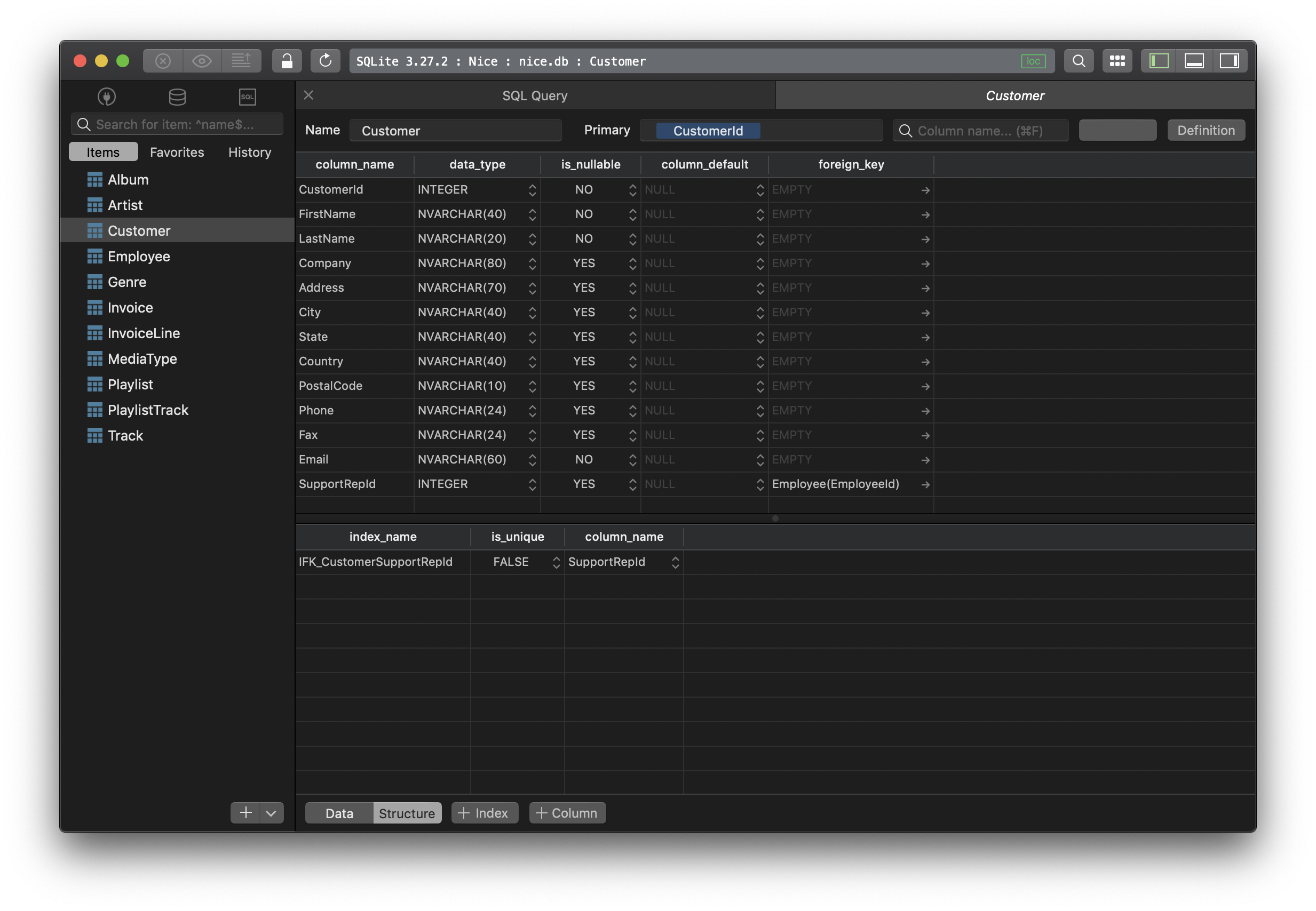
To show the table structure with all its column’s attributes: name, datatype, primary key, default value, etc.
In SQL Server, use sp_help function:
In MySQL and Oracle, you can use DESCRIBE :
In PostgreSQL, here is the go-to statement:
In SQLite, it’s as simple as this:
Example
We have to table Customers in SQLite, and to view the table structure:
Here is the results:
| cid | name | type | notnull | dflt_value | pk |
|---|---|---|---|---|---|
| 0 | CustomerId | INTEGER | 1 | 1 | |
| 1 | FirstName | NVARCHAR(40) | 1 | 0 | |
| 2 | LastName | NVARCHAR(20) | 1 | 0 | |
| 3 | Company | NVARCHAR(80) | 0 | 0 | |
| 4 | Address | NVARCHAR(70) | 0 | 0 | |
| 5 | City | NVARCHAR(40) | 0 | 0 | |
| 6 | State | NVARCHAR(40) | 0 | 0 | |
| 7 | Country | NVARCHAR(40) | 0 | 0 | |
| 8 | PostalCode | NVARCHAR(10) | 0 | 0 | |
| 9 | Phone | NVARCHAR(24) | 0 | 0 | |
| 10 | Fax | NVARCHAR(24) | 0 | 0 | |
| 11 | NVARCHAR(60) | 1 | 0 | ||
| 12 | SupportRepId | INTEGER | 0 | 0 |
In TablePlus, you can view the table structure by clicking on the structure button at the bottom of the window, or use the shortcut key Cmd + Shift + ]
Need a good GUI tool for databases? TablePlus provides a native client that allows you to access and manage Oracle, MySQL, SQL Server, PostgreSQL and many other databases simultaneously using an intuitive and powerful graphical interface.
Need a quick edit on the go? Download for iOS
Как посмотреть таблицу в MS SQL Server?
Щелкните правой кнопкой мыши таблицу Products в обозревателе объектов SQL Server и выберите Просмотреть данных.
Как зайти в таблицу SQL?
Для этого надо открыть SQL Server Management Studio, найти в разделе «Databases» нужную базу и раскрыть ее. Затем в разделе «Tables» выбрать таблицу и правой клавишей мыши вызвать контекстное меню.
Как посмотреть таблицу в MS SQL Server? Ответы пользователей
В Обозревателе объектов разверните узел Базы данных, разверните саму базу данных, а затем разверните узел Таблицы. · Щелкните таблицу правой .
Похожие материалы: Удаление MS SQL Server · Как быстро проверить подключение к серверу MS SQL · Установка SQL Server с помощью SysPrep · Как .
Чтобы открыть конструктор таблиц в среде SQL Server Management Studio, необходимо в обозревателе объектов найти нужную таблицу и щелкнуть по ней .
Из данного материала Вы узнаете три способа получения информации о таблицах в Microsoft SQL Server с помощью SQL запросов.
Кто-нибудь может подсказать как настроить(или переустановить) SQL Server 2008 Magagement Studio Express чтобы можно было просмотреть .
С помощью DESCRIBE
Настало время перейти от теории к практике. Для дальнейшего изучения SQL Server создадим маленькую БД. Для создания БД Вам необходимо скачать с проект для .
Основы работы с MS SQL Server Management Studio База данных представляет собой хранилище объектов. Основные из них: Таблицы: хранят данные.
Как посмотреть, какие данные заблокированы в СУБД MS SQL Server . Основные из них это — DATABASE — сама база данных; OBJECT — таблица или любой другой .
Как посмотреть таблицу в MS SQL Server? Видео-ответы
Создание, Удаление, Просмотр БД в MS SQL Server
Всем привет в этом видео я расскажу про основы работы с базой данных на базе ms sql server. О том как создавать базу .
Урок 3. Заполнение таблиц в MS SQL Server
Жду вас на своем сервере: Discord Robo-Lab https://discord.gg/aJFr9K9FQK Моя страница: https://vk.com/id571717564 Моя .
Уроки MS SQL Server. Создание таблиц
Начинаем занятия по MS SQL Server! Первые шаги: где скачать, как установить, как создать первую базу данных и первую .
Sql server как посмотреть таблицу

Этот форум закрыт. Благодарим вас за ваш вклад. Если вам нужна дополнительная информация о том, где еще можно найти помощь, вы можете посетить страницу ресурсов.
Лучший отвечающий
Вопрос
- Перемещено SachinW 2 октября 2010 г. 0:29 MSDN Forums Consolidation (От:SQL Server для разработчиков)
Ответы
- Помечено в качестве ответа I.Vorontsov 16 августа 2010 г. 7:25
- Предложено в качестве ответа Yury Iwtschenko 13 августа 2010 г. 19:23
- Помечено в качестве ответа I.Vorontsov 16 августа 2010 г. 7:25
Все ответы
- Предложено в качестве ответа Yury Iwtschenko 13 августа 2010 г. 19:22
- Помечено в качестве ответа I.Vorontsov 16 августа 2010 г. 7:25
спасибо! а подскажите с таким вопросом. Вот я получил список таблиц запросом
теперь мне нужно вставить имя таблицы в запрос
например как то так
Можно ли сделать такой фокус?
- Предложено в качестве ответа Yury Iwtschenko 13 августа 2010 г. 19:23
- Помечено в качестве ответа I.Vorontsov 16 августа 2010 г. 7:25
Имелось в виду, что вставить в запрос таблицу можно, а вот выполнить запрос только динамически, а автору топика могу предложить по вашей задаче такой вариант: