Everything You Need to Know About Cascade in SQL Server: Syntax, Rules, and Examples
As a database developer or administrator, you must have encountered the term Cascade in SQL Server. Cascading is a powerful feature that helps maintain data integrity by automatically propagating changes across related tables in a database. This article will explore the following:
- What is cascade in SQL Server?
- Why you should use it.
- How to create a foreign key with delete and update cascade rules.
We will also provide examples and explanations to help you understand the concept better.
SQL Delete Cascade
Table of Contents
What is Cascade in SQL Server?
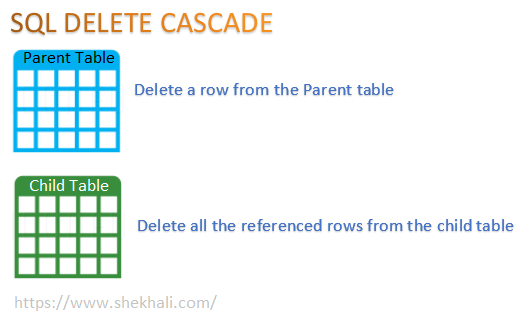
In SQL Server, cascade automatically propagates changes made to a parent table to its related child tables.
That means when you update or delete a record in the parent table, the corresponding records in the child tables will also be updated or deleted automatically.
Cascade ensures that the relationships between tables are maintained and data integrity is preserved.
Syntax
The syntax for defining cascade rules in SQL Server is as follows:
In the above example, we have defined a parent table (ParentTable) with three columns, including a primary key column (ParentID).
We have also defined a child table (ChildTable) with four columns, including a foreign key column (ParentID) that references the primary key column (ParentID) of the parent table.
The ON DELETE CASCADE and ON UPDATE CASCADE clauses specify the cascade rules for the foreign key constraint. When a record in the parent table is deleted or updated, the corresponding records in the child table will be deleted or updated automatically.
Why use Cascading in SQL Server?
There are several benefits of using cascading in SQL Server:
- Data integrity: Cascading helps maintain data integrity by ensuring that related data is consistent and up-to-date.
- Efficiency: Cascading eliminates the need to manually update or delete related records in child tables, saving time and effort.
- Simplicity: Cascading simplifies database management by automating the process of maintaining related data.
- Accuracy: Cascading reduces the risk of errors when manually updating or deleting related records in child tables.
SQL Delete Cascade
In this post, we will look at SQL DELETE CASCADE and UPDATE CASCADE rules in SQL Server foreign keys using multiple examples.
DELETE CASCADE: When we create a foreign key using delete cascade, it deletes the referencing rows in the child table when the referenced row in the parent table with a primary key is deleted.
That means no orphan row in the Child table will be left if a Parent row is deleted. All children`s rows that refer to the parent’s rows should also be deleted (removed). If any of these children have grandchildren (through another foreign key in another table) and ON DELETE CASCADE is defined, they must also be deleted.
Below is a SQL script that creates a parent table (Departments), a child table (Employees), and a foreign key to the child table without using the SQL delete cascade rule.
After running the above SQL script, the following Departments and Employees tables will be created in the database.
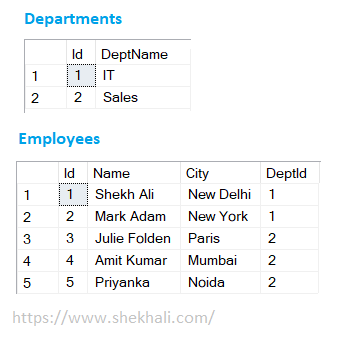
Delete related rows from the parent-child tables in SQL
When we delete a row from the Departments table, all the related rows from the Employees table must also be deleted.
For example, if we delete the IT department row from the Departments (Parent) table, we also want all the employees of the IT department to be deleted from the Employees (Child) table as well.
Here, the DeptId column in the Employees table is a foreign key that is referencing the Id (Primary key) column in the Departments table.
Let’s try to delete the IT department row from the Department’s table by running the following SQL script.
If we try to delete a row from the Departments table which has related rows in the Employees table, by default, we get the following reference constraints error message:
The DELETE statement conflicted with the REFERENCE constraint “FK_Key”. The conflict occurred in database “TestDB”, table “dbo.Employees”, column ‘DeptId’.
. The statement has been terminated.
Example: SQL Delete Cascade
To apply the SQL on delete cascade rule, first remove the current foreign key constraint from the Employees (Child) table. Here is a SQL script that will drop the foreign key constraint from the child table.
Now let’s recreate the foreign key constraint with cascading delete rule in the Employees table.
Now when we delete a row from the Departments table, all the related rows from the Employees table will also get deleted.
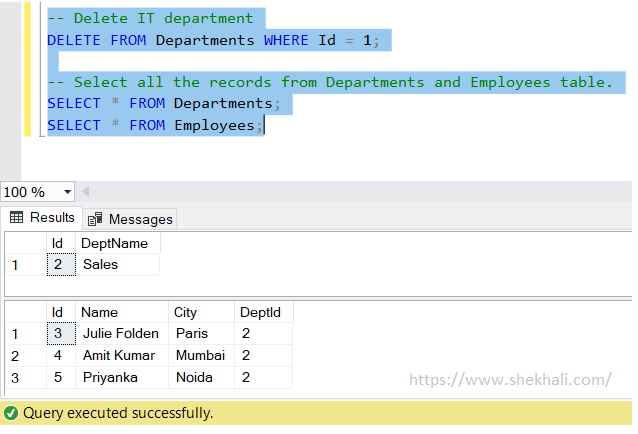
Once we run the above SQL query, the IT department will get deleted from the Departments table, and also all the referenced rows will be deleted from the Employees table.
In the following image, we can see that the IT department is no more available in the Departments table and referenced rows from the Employees table will be cleaned up automatically.
Row deletion actions in the parent table
When you delete one or more rows from the parent table, you have the option of performing one of the following actions:
| Action | Description |
|---|---|
| ON DELETE NO ACTION: | SQL Server raises an error and rolls back the delete action on the record in the parent table. |
| ON DELETE CASCADE: | When a row in the parent table is deleted, SQL Server deletes the corresponding row in the child table. |
| ON DELETE SET NULL: | SQL Server sets the rows in the child table to NULL when the corresponding rows in the parent table are deleted. The foreign key columns must be nullable in order for this action to be performed. |
| ON DELETE SET DEFAULT: | When the rows in the parent table are deleted, SQL Server update the rows in the child table to their default values. This process can only be carried out if the foreign key columns contain default definitions. |
If you don’t explicitly specify an action, SQL Server employs ON DELETE NO ACTION by default.
On Update Cascade in SQL Server
UPDATE CASCADE: When we create a foreign key using UPDATE CASCADE , the referencing rows in the child table are updated whenever the referred row in the parent table with a primary key is updated.
DELETE CASCADE and UPDATE CASCADE in SQL Server foreign key

In this article, we will review on DELETE CASCADE AND UPDATE CASCADE rules in SQL Server foreign key with different examples.
DELETE CASCADE: When we create a foreign key using this option, it deletes the referencing rows in the child table when the referenced row is deleted in the parent table which has a primary key.
UPDATE CASCADE: When we create a foreign key using UPDATE CASCADE the referencing rows are updated in the child table when the referenced row is updated in the parent table which has a primary key.
We will be discussing the following topics in this article:
- Creating DELETE and UPDATE CASCADE rule in a foreign key using SQL Server management studio
- Creating DELETE CASCADE and UPDATE CASCADE rule in a foreign key using T-SQL script
- Triggers on a table with DELETE or UPDATE cascading foreign key
Let us see how to create a foreign key with DELETE and UPDATE CASCADE rules along with few examples.
Creating a foreign key with DELETE and UPDATE CASCADE rules
Using the SQL Server Management Studio GUI:
Login to the SQL Server using SQL Server Management Studio, Navigate to the Keys folder in the child table. Right click on the Keys folder and select New Foreign Key.
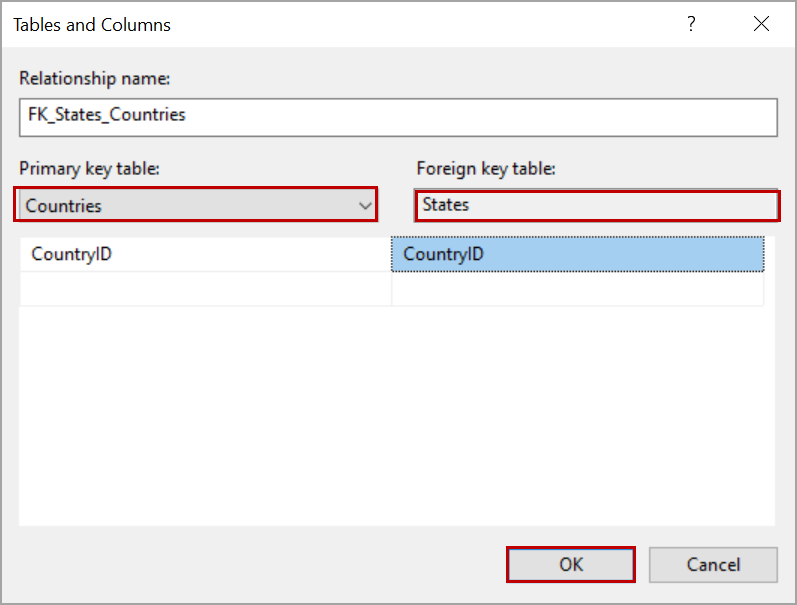
Edit table and columns specification by clicking … as shown in the below image.

Select the parent table and the primary key column in the parent table. select the foreign key column in the child table. Click on OK. Please refer to the below sample image.
In the INSERT and UPDATE specifications, select Cascade for the delete rule.
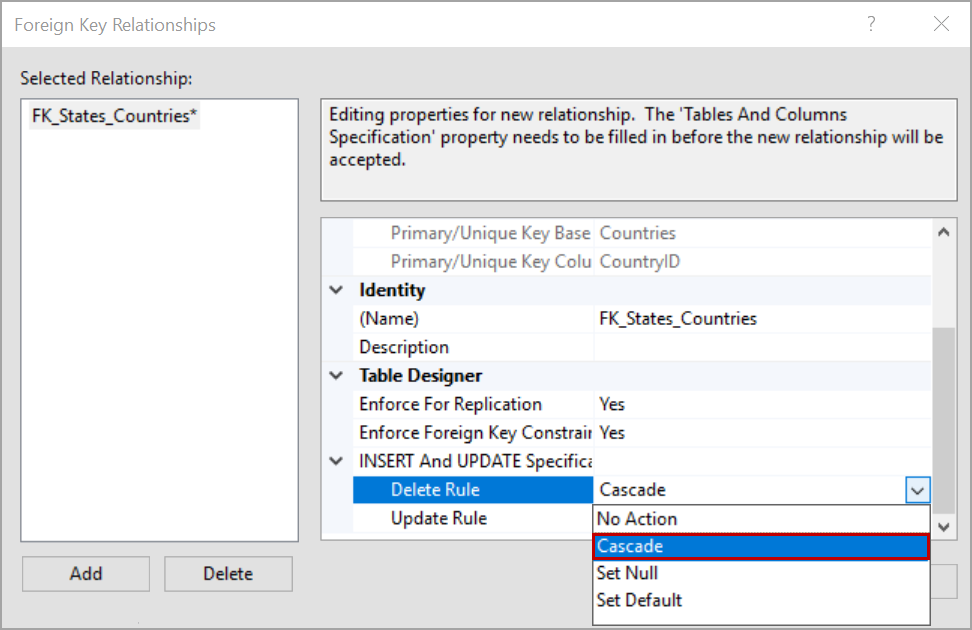
Click on Close and save the table in the designer. Click Yes in the warning message window.

Once you click on Yes, a foreign key with delete rule is created. Similarly, we can create a foreign key with UPDATE CASCADE rule by selecting CASCADE as an action for the update rule in INSERT and UPDATE specifications.

Using T-SQL:
Please refer to the below T-SQL script which creates a parent, child table and a foreign key on the child table with DELETE CASCADE rule.