SQL Count – How to Select, Sum, and Average Rows in SQL

In SQL, there are two built-in functions to sum or average the data in your table.
In this article I will show you how to use the SUM and AVG functions in SQL using code examples.
How to use the SUM function in SQL
If you need to add a group of numbers in your table you can use the SUM function in SQL.
This is the basic syntax:
The SELECT statement in SQL tells the computer to get data from the table.
The FROM clause in SQL specifies which table we want to list.
In this example, we have a table called students with the columns of id , name , date , and total . We want to add up the total number of candy bars sold by all of the students.

We can use this syntax to get the total number of candy bars sold:
The result would be 41.

We can also get the sum for each student using the GROUP BY clause.
The first part is to select the name and sum for the total number of candy bars sold, like this:
The second part is to group the sum by name:
Here is the complete code to group the total number of candy bars sold by student name.
This is what the result would look like in our table:

Right now the results are grouped alphabetically by student name.
We can modify the code to sort the list of results from largest total to smallest using the ORDER BY clause.
The DESC keyword tells the computer to sort from largest to smallest total.

If we wanted to sort the total from smallest to largest, then we would omit the DESC keyword.

How to use the AVG function in SQL
The AVG function finds the arithmetic mean for a group of records in a SQL table. An average, or arithmetic mean, is the sum of a group of numbers divided by the count for that group.
For example, 2+4+4+6+6+8 is 30 divided 6 which results in an average of 5.
This is the basic syntax for the AVG function:
In this example, we have a table called students , with columns of id , name , date , and scores . We want to find the average of all the students’ test scores in our table.

We have to use this syntax to get the average for the test scores:
The average would be 85.333.

We can also use the ROUND function to round our result to the nearest integer.

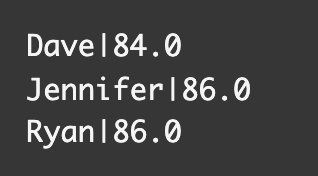
We can also get the average for each student using the GROUP BY clause.
The first part is to select the name and average for the scores, like this:
The second part is to group the average scores by name:
This is what the code looks like all together:
This is what the result looks like in the table:
Conclusion
There may be times were you need to find the sum or average of records in your table.
If you need to add a group of numbers in your table you can use the SUM function in SQL.
This is the basic syntax:
If you need to arrange the data into groups, then you can use the GROUP BY clause.
The AVG function finds the arithmetic mean for a group of records in a SQL table. An average, or arithmetic mean, is the sum of a group of numbers divided by the count for that group.
SQL AVG() function introduction and examples

In this article, we will learn the SQL Average function which is known as AVG() function in T-SQL. AVG() function is an aggregate function that calculates the average value of a numerical dataset that returns from the SELECT statement.
Introduction
Assume that we have a collection of numbers. Firstly, we add up all members of the collection and then divide the total member number of the collection. As a result, the obtained number will be the average. Let’s explain this mathematical notion with a straightforward example.
John is a student at university and decides to record his expenses every day. The following chart and table represent John’s last week’s expenses.
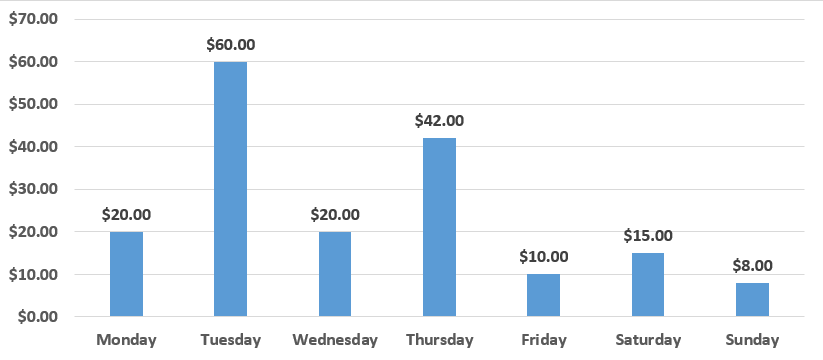
Now, we will calculate the last week’s average expense of John. At first, we will add up all the expenses for the aforementioned week.
($20+$60+$20+$42+$10+$15+$8) = $175 is the total amount of the expenses for the week.
In the second step, we will divide the total expense amount to 7 because this collection is formed on 7 members. In other words, a week consists of seven days.
$175 / 7 = $25 is the average expense of the week.
After discussing the mathematical concept of the average, let’s continue to learn the basics of the AVG() function in SQL.
Data Preparation
With the help of the following query, we will create the WeekExpense table and then insert John’s 3 weeks expenses. We will use this table in all examples of this article.
SQL Server AVG
Summary: in this tutorial, you will learn how to use the SQL Server AVG() function to calculate the average value from a group of values.
Introduction to SQL Server AVG() function
SQL Server AVG() function is an aggregate function that returns the average value of a group.
The following illustrates the syntax of the AVG() function:
- ALL instructs the AVG() function to take all values for calculation. ALL is used by default.
- DISTINCT instructs the AVG() function to operate only on unique values.
- expression is a valid expression that returns a numeric value.
The AVG() function ignores NULL values.
SQL Server AVG() function: ALL vs. DISTINCT
The following statements create a new table, insert some values into the table, and query data against it:
The following statement uses the AVG() function to calculate the average of all values in the t table:
The following picture shows the output:

In this example, we used ALL modifier, therefore, the average function considers all eight values in the val column in the calculation:
The following statement uses the AVG() function with DISTINCT modifier:
Here is the result:

Because of the DISTINCT modifier, the AVG() function performs the calculation on distinct values:
SQL Server AVG() function examples
Let’s take some examples to see how the AVG() function works.
A) SQL Server AVG() simple example
The following example returns the average list price of all products:
In this example, the AVG() function returned a single value for the whole table.
Here is the output:

B) SQL Server AVG() with GROUP BY example
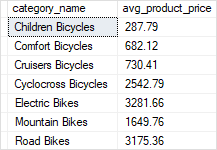
If you use the AVG() function with a GROUP BY clause, the AVG() function returns a single value for each group instead of single value for the whole table.
The following example returns the average list price for each product category:
The following picture shows the output:
C) SQL Server AVG() in HAVING clause example
See the following example:
Here is the output:

In this example:
- First, the GROUP BY clause divides the products by brands into groups.
- Second, the AVG() function calculates average list price for each group.
- Third, the HAVING clause removes the brand whose average list price is less than 500.
In this tutorial, you have learned how to use the SQL Server AVG() function to calculate the average value from a set of values.
MySQL AVG
Summary: in this tutorial, you will learn how to use MySQL AVG() function to calculate the average value of a set of values.
Introduction to MySQL AVG() function
The MySQL AVG() function is an aggregate function that allows you to calculate the average value of a set.
Here is the basic syntax of the AVG() function:
You use the DISTINCT operator in the AVG function to calculate the average value of the distinct values.
For example, if you have a set of values 1,1,2,3, the AVG function with DISTINCT operator will return 2 i.e., (1 + 2 + 3) / 3 .
MySQL AVG() function examples
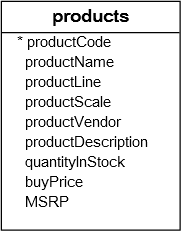
We will use the products table in the sample database for the demonstration:
A) Using MySQL AVG() function to calculate an average of all values in a column example
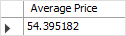
This example uses the AVG() function to calculate the average buy price of all products from the products table:
B) Using MySQL AVG() function with a WHERE clause example
The following example uses the AVG() function to calculate the average buy price of products in the product line Classic Cars :
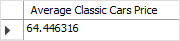
In this example, the WHERE clause has a condition that includes only the Classic Cars product line. Therefore, the AVG() function calculates the average value for the buy prices of products in Classic Cars only.
C) Using MySQL AVG with DISTINCT option example
This query checks if there are any products which have the same prices:

This query uses the AVG() function with the DISTINCT option to calculate the average of distinct buy prices:

Notice that the result is different from the average buy price without using the DISTINCT operator.
D) MySQL AVG with GROUP BY clause example
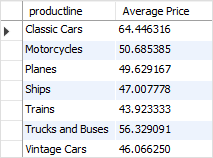
The AVG() function is often used in conjunction with the GROUP BY clause to calculate the average value for each group of rows in a table.
For example, to calculate the average buy price of products for each product line, you use the AVG() function with the GROUP BY clause as the following query:
E) Using MySQL AVG() function with a HAVING clause example
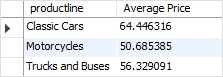
You can use the AVG() function in the HAVING clause to set conditions for the average values of groups.
For example, if you want to select only product lines that have the product’s average buy prices greater than 50, you can use the following query:
F) Using MySQL AVG() function with a subquery example
You can use the AVG() function in an SQL statement multiple times to calculate the average value of a set of average values.
This query uses the AVG() function to calculate the average buy price of the average buy prices of product lines:
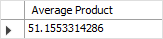
- The subquery calculates the average buy price by product lines.
- The outer query calculates the average buy price of the average buy prices of product lines returned from the subquery.
G) Using MySQL AVG() function with NULL example
The AVG() function ignores NULL values in the calculation. See the following example:
First, create a new table named t with two columns id and val . The val column can contain NULL values.
Second, insert some rows into the t table, including NULL value.
Third, calculate the average value of the values in the val column by using the AVG function:
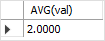
The statement returns 2 as expected because the NULL value is not included in the calculation of the AVG function.
H) Using MySQL AVG() function with control flow functions
To calculate the average value of a column and calculate the average value of the same column conditionally in a single statement, you use AVG() function with control flow functions e.g., IF, CASE, IFNULL, and NULLIF.
For example, to calculate the ratio of the average buy price of Classic Cars product line to average buy price of all products, you use the following statement:

The IF(productline=’Classic Cars’,buyprice,NULL) expression returns the buy price if the product line is Classic Cars , otherwise NULL .
Because the AVG() function ignores the NULL values in the calculation so the AVG(IF(productline=’Classic Cars’,buyprice,NULL)) expression returns the average buy price for only products whose product line is Classic Cars .
In this tutorial, you have learned some useful techniques to calculate the average value of a set of values by using the AVG() function.