Табличные выражения

называются подзапросы, которые используются там, где ожидается наличие таблицы. Существует два типа табличных выражений:
обобщенные табличные выражения.
Эти две формы табличных выражений рассматриваются в следующих подразделах.
Производные таблицы
— это табличное выражение, входящее в предложение FROM запроса. Производные таблицы можно применять в тех случаях, когда использование псевдонимов столбцов не представляется возможным, поскольку транслятор SQL обрабатывает другое предложение до того, как псевдоним станет известным. В примере ниже показана попытка использовать псевдоним столбца в ситуации, когда другое предложение обрабатывается до того, как станет известным псевдоним:
Попытка выполнить этот запрос выдаст следующее сообщение об ошибке:
Причиной ошибки является то обстоятельство, что предложение GROUP BY обрабатывается до обработки соответствующего списка инструкции SELECT, и при обработке этой группы псевдоним столбца enter_month неизвестен.
Эту проблему можно решить, используя производную таблицу, содержащую предшествующий запрос (без предложения GROUP BY), поскольку предложение FROM исполняется перед предложением GROUP BY:
Результат выполнения этого запроса будет таким:

Обычно табличное выражение можно разместить в любом месте инструкции SELECT, где может появиться имя таблицы. (Результатом табличного выражения всегда является таблица или, в особых случаях, выражение.) В примере ниже показывается использование табличного выражения в списке выбора инструкции SELECT:
Результат выполнения этого запроса:

Обобщенные табличные выражения
называется именованное табличное выражение, поддерживаемое языком Transact-SQL. Обобщенные табличные выражения используются в следующих двух типах запросов:
Эти два типа запросов рассматриваются в следующих далее разделах.
OTB и нерекурсивные запросы
Нерекурсивную форму OTB можно использовать в качестве альтернативы производным таблицам и представлениям. Обычно OTB определяется посредством предложения WITH и дополнительного запроса, который ссылается на имя, используемое в предложении WITH. В языке Transact-SQL значение ключевого слова WITH неоднозначно. Чтобы избежать неопределенности, инструкцию, предшествующую оператору WITH, следует завершать точкой с запятой.
далее показано использование OTB в нерекурсивных запросах. В примере ниже используется стандартное решение (здесь используется тестовая база данных AdventureWorks2012 из исходников):
Запрос в этом примере выбирает заказы, чьи общие суммы налогов (TotalDue) большие, чем среднее значение по всем налогам, и плата за перевозку (Freight) которых больше чем 40% среднего значения налогов. Основным свойством этого запроса является его объемистость, поскольку вложенный запрос требуется писать дважды. Одним из возможных способов уменьшить объем конструкции запроса будет создать представление, содержащее вложенный запрос. Но это решение несколько сложно, поскольку требует создания представления, а потом его удаления после окончания выполнения запроса. Лучшим подходом будет создать OTB. В примере ниже показывается использование нерекурсивного OTB, которое сокращает определение запроса, приведенного выше:
Синтаксис предложения WITH в нерекурсивных запросах имеет следующий вид:
Параметр cte_name представляет имя OTB, которое определяет результирующую таблицу, а параметр column_list — список столбцов табличного выражения. (В примере выше OTB называется price_calc и имеет один столбец — year_2005.) Параметр inner_query представляет инструкцию SELECT, которая определяет результирующий набор соответствующего табличного выражения. После этого определенное табличное выражение можно использовать во внешнем запросе outer_query. (Внешний запрос в примере выше использует OTB price_calc и ее столбец year_2005, чтобы упростить употребляющийся дважды вложенный запрос.)
OTB и рекурсивные запросы
В этом разделе представляется материал повышенной сложности. Поэтому при первом его чтении рекомендуется его пропустить и вернуться к нему позже. Посредством OTB можно реализовывать рекурсии, поскольку OTB могут содержать ссылки на самих себя. Основной синтаксис OTB для рекурсивного запроса выглядит таким образом:
Параметры cte_name и column_list имеют такое же значение, как и в OTB для нерекурсивных запросов. Тело предложения WITH состоит из двух запросов, объединенных оператором UNION ALL. Первый запрос вызывается только один раз, и он начинает накапливать результат рекурсии. Первый операнд оператора UNION ALL не ссылается на OTB. Этот запрос называется опорным запросом или источником.
Второй запрос содержит ссылку на OTB и представляет ее рекурсивную часть. Вследствие этого он называется рекурсивным членом. В первом вызове рекурсивной части ссылка на OTB представляет результат опорного запроса. Рекурсивный член использует результат первого вызова запроса. После этого система снова вызывает рекурсивную часть. Вызов рекурсивного члена прекращается, когда предыдущий его вызов возвращает пустой результирующий набор.
Оператор UNION ALL соединяет накопившиеся на данный момент строки, а также дополнительные строки, добавленные текущим вызовом рекурсивного члена. (Наличие оператора UNION ALL означает, что повторяющиеся строки не будут удалены из результата.)
Наконец, параметр outer_query определяет внешний запрос, который использует OTB для получения всех вызовов объединения обеих членов.
Для демонстрации рекурсивной формы OTB мы используем таблицу Airplane, определенную и заполненную кодом, показанным в примере ниже:
Таблица Airplane состоит из четырех столбцов. Столбец ContainingAssembly определяет сборку, а столбец ContainedAssembly — части (одна за другой), которые составляют соответствующую сборку. На рисунке ниже приведена графическая иллюстрация возможного вида самолета и его составляющих частей:

Таблица Airplane состоит из следующих 11 строк:

В примере ниже показано применение предложения WITH для определения запроса, который вычисляет общую стоимость каждой сборки:
Предложение WITH определяет список OTB с именем list_of_parts, состоящий из трех столбцов: assembly1, quantity и cost. Первая инструкция SELECT в примере вызывается только один раз, чтобы сохранить результаты первого шага процесса рекурсии. Инструкция SELECT в последней строке примера отображает следующий результат:

Первые пять строчек этого результата являются результирующим набором первого вызова опорного члена запроса, а все остальные строчки — результатом рекурсивного члена (вторая часть) запроса в этом примере. Рекурсивный член запроса вызывается дважды: первый раз для сборки фюзеляжа (fuselage), а второй раз для всего самолета (Airplane).
Запрос в примере ниже вычисляет стоимость каждой сборки со всеми ее составляющими:
Результат выполнения этого запроса дает следующий результат:

В рекурсивных запросах на OTB налагается несколько следующих ограничений:
определение OTB должно содержать, по крайней мере, две инструкции SELECT (опорный член и рекурсивный член), объединенные оператором UNION ALL;
опорный член и рекурсивный член должны иметь одинаковое количество столбцов (это является прямым следствием использования оператора UNION ALL);
столбцы в рекурсивном члене должны иметь такой же тип данных, как и соответствующие столбцы в опорном члене;
предложение FROM рекурсивного члена должно ссылаться на имя OTB только один раз;
определение рекурсивного члена не может содержать следующие параметры: SELECT DISTINCT, GROUP BY, HAVING, агрегатные функции, TOP и подзапросы. Кроме этого, единственным типом операции соединения, разрешенной в определении запроса, является внутреннее соединение.
Derived Tables in SQL Server
A derived table is an example of a subquery that is used in the FROM clause of a SELECT statement to retrieve a set of records. You can use derived tables to break a complex query into separate logical steps and they are often a neat alternative to using temporary tables.
You can learn more about derived tables — and their successors, CTEs or Common Table Expressions — on one of our SQL courses.
The Basic Syntax of a Derived Table
To create a derived table you need to start with a valid SELECT statement. Here's an example of a query which we will convert into a derived table:
To turn this into a derived table we need to nest it within the FROM clause of another query, like so:
SQL — Derived Tables
With SQL Server you have the ability to create derived tables on the fly and then use these derived tables within your query. In very basic terms, a derived table is a virtual table that’s calculated on the fly from a select statement.
In concept this is similar to creating a temporary table and then using the temporary table in your query, but the approach is much simpler, because it can all be done in one step. This can be tremendously useful in certain situations.
Boost Performance
The biggest benefit of using derived tables over using temporary tables is that they require fewer steps, and everything happens in memory instead of a combination of memory and disk. The fewer the steps involved, along with less I/O, the faster the performance.
Here are the steps when you use a temporary table:
- Lock tempdb database
- CREATE the temporary table (write activity)
- SELECT data & INSERT data (read & write activity)
- SELECT data from temporary table and permanent table(s) (read activity)
- DROP TABLE (write activity)
- Release the locks
Compare this with the number of steps it takes for a derived table:
- CREATE locks, unless isolation level of "read uncommitted" is used
- SELECT data (read activity)
- Release the locks
As is rather obvious from this example, using derived tables instead of temporary tables reduces disk I/O and can boost performance.
An example
Below, I’m going to use the Northwind database that included with MS-SQL 2000. Let’s say you’ve been asked to generate a report that shows off the total number of orders each customer placed in 1996. "Not a problem." you think to yourself. "This is just an easy aggregated join query." So, you sit down and generate your query and come up with:
Looks good, But there’s something missing. Customers that didn’t place an order in 1996 aren’t showing up. You could leave off customers that didn’t place an order, but in many cases the customers that didn’t buy place orders are the ones that are of the most interest.
If you think you can include those customers with a "is null" check, you’d be wrong. Run the following code and see if you notice what is wrong:
At first glance this may look right, but if you examine the results carefully you’ll see that the customers with the zero count have never placed an order. If a customer has placed an order, but just not in the year 1996 they won’t show up. This is because the "is null" check finds customers that have never placed an order — it still doesn’t do anything to add customers who’ve placed an order, but just not in 1996.
This is where a derived table can come in handy. Instead of using the "Orders" table, we’ll reduce the Orders table to a snapshot of itself — including only data from the year 1996.
Run the above query and examine the results. You should now see a row returned for each Customer and the total number or orders placed in the year 1996 — including the customers that didn’t place an order.
The Reason
This works is because the LEFT JOIN will include all matches or null values. If the LEFT JOIN has matches (like in our first query,) but non that match the criteria those rows are excluded. In our derived table, since we’re only running against the orders from the year 1996 we’re ensuring that we return results for each customer.
"I think this is the best and easy example to understand the concept of derived tables."
Now if you asked when and why to use derived tables then I’ll say that it all depends on the complexity of your query; you have to decide when to use derived tables, but I think derived tables are faster than Temporary tables. Read the following points for the when to use derived tables.
- If you face a challenge of whether to create a temporary table or a view to produce the desired query take a look at using a derived table instead
- Experiment with using derived tables, views and temporary tables to see what yields better performance results. There are several articles on the internet that have shown that using a derived table is faster then temporary tables, but try it for yourself.
Updating a derived table
Now the question of updating a derived table. I don’t think that it is a big issue, but still it’s a question asked about derived tables. So the answer is as follows,
— MS SQL 2000 — Not possible
— MS SQL 2005 — Possible
So, updating a derived table is not possible in SQL Server 2000. If you try to do so, then SQL Server will give you the following error.
I am not 100% sure that it is not possible to update a derived table in SQL Server 2000, but from what I have studied and searched on Internet, I believe that it is not possible.
However, in the case of SQL Server 2005, it is possible. I have executed the same query above in SQL Server 2005, and it is working perfectly and all rows are updated.
Conclusion
The power of SQL Server amaze me all the time, to see the power of SQL Server all you need is a little creativity and knowledge of the syntax. Some times derived tables can be more useful, likewise, you need to create a view for a single query and then you want to use it within another query and after that the view should be dropped because no use of the view after that action, then here derived tables can help you and benefits you by saving to create you a catalog entry in the form of view in the server.
For repeated queries, a SQL derived table used multiple times performs well with cached definition. It will not down your performance. A SQL derived table differs from a temporary table in that a SQL derived table exists only for the duration of the query, while a temporary table exists until the server is brought down and also it uses lot of disk space than a derived table in the temdb database. So it’s better to make use of Derived tables wherever possible by eliminating the one time use views and by eliminating the temporary tables. What I think is it will improve the performance of your query.
SQL Server Derived Table Example
A derived table is a subquery nested within a FROM clause. Because of being in a FROM clause, the subquery’s result set can be used similarly to a SQL Server table. The subquery in the FROM clause must have a name. One reason for including a derived table in an outer query is to simplify the outer query. This is because you can bury the complexity of a subquery in a derived table in a FROM clause and refer to subquery result column values in the derived table. Because you can treat derived tables like regular SQL Server tables, you can join two or more derived tables. Also, you can nest queries referencing a derived table inside of one another. A code sample in this part of the tutorial demonstrates this derived table capability for the enumeration of duplicate records in a data source.
Solution
For the examples below we are using the AdventureWorks2014 database. Download a copy and restore to your instance of SQL Server to test the below scripts.
Creating a Basic Derived Table
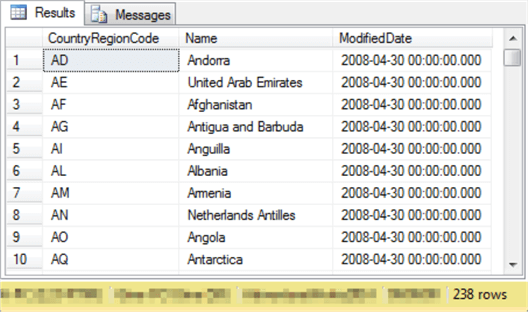
The following query will serve as the subquery for a derived table. It is often a good idea to examine the result set from a query before using the T-SQL for the subquery in a derived table. The following query lists the values for the three columns from the CountryRegion table in the AdventureWorks2014 database. Each row in the table is for a country. The CountryRegionCode column is the primary key for the CountryRegion table. This code is a short nvarchar data type field value that represents a country; you can think of it as a country name abbreviation. The Name column is the full name of the country on a row in the table. The ModifiedDate column is a datetime field denoting the last datetime the row was entered or changed, whichever is most recent.
Here’s an excerpt from the first ten rows in the result set from the preceding query. Notice from the right-hand corner of the display that there are two hundred thirty-eight rows in the full result set.
The next T-SQL code block is for a very basic derived table example. The inner-most query in the following script contains the query for the three columns from the CountryRegion table in its FROM clause. The subquery in the FROM clause has the name my_derived_table. The outer-most query uses the derived table as its source. In addition, three special operations are performed.
- First, a column named Country Alphabet index leads the list of SELECT items. This is a computed column based on the Name field from the inner-most query. The substring function extracts the first letter of the Name column value from the inner-most query.
- Second, the next SELECT item assigns an alias of Country Name to the Name column from the inner-most query. When the result set is displayed by a SELECT statement, it appears with the name of its alias. However, you must still reference the Name column from the inner-most query by its un-aliased name in SELECT list items as well as WHERE and ORDER BY clauses.
- Third, the outer-most query also sorts its result set by the first character of the Name column value from the derived table.
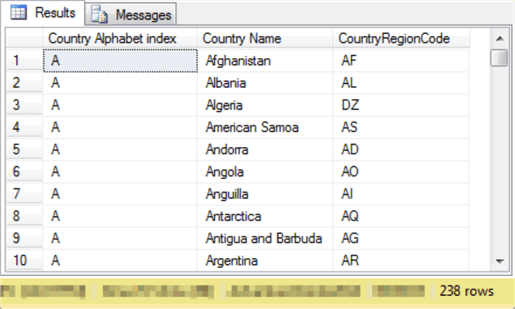
Here’s an excerpt showing the first ten result set rows from the preceding script. The columns are not all identical to those in the derived table.
- The first column has the name Country Alphabet index. The value for this index is just the first letter for the name of a country extracted via the substring function.
- The second column has a column header of Country Name, which is the alias for Name from the derived table.
- The third column has the same name as in the derived table – CountryRegionCode.
- The third column from the derived table is filtered out in the outer-most query. The filtering is performed by failing to include the column name ModifiedDate in the outer-most query.
- The order of rows in the result set is based on the ORDER BY clause at the end of the query. Notice that T-SQL code references the un-aliased name (name) and not the aliased name (Country Name) in the ORDER BY clause.
- Finally, notice that there are two hundred thirty-eight rows in the result set of the outer-most query. All the rows from the derived table pass through to the outer-most query. However, you can optionally use a filter in a WHERE clause to limit the passing of rows from the derived table to the outer-most query.
Joining Derived Tables
This section introduces two additional tables from the Adventureworks2014 database. The first of these tables is the CountryRegionCurrency table, and the second additional table is the Currency table.
- The CountryRegionCurrency table is a junction table between the CountryRegion table and the Currency table.
- The primary key for the CountryRegionCurrency table is a composite key based on two fields: CountryRegionCode and CurrencyCode. Recall that:
- The CountryRegionCode is also the primary key for the CountryRegion table.
- The CurrencyCode is also the primary key for the Currency table.
The following T-SQL scripts list all the rows in CountryRegionCurrency and Currency tables. A script for listing the rows of the CountryRegion table appears in the preceding example.
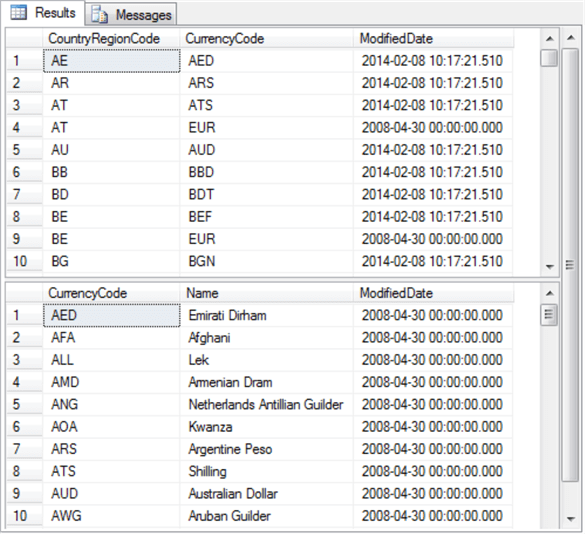
Here’s an excerpt with the first ten rows from each of the two preceding queries.
- The top pane depicts rows from the CountryRegionCurrency table.
- The bottom pane shows rows from Currency table.
- Not shown in the excerpt below is the count of rows in each table. There are 109 rows in the CountryRegionCurrency table, and 105 rows in the Currency table.
- Since there 238 rows in the CountryRegion table, this confirms that there are many countries in the CountryRegion table without a matching currency in the Currency table.
- Similarly, since the number of rows in the Currency table is less than the number of rows in the CountryRegionCurrency table this confirms that some countries can have more than one matching currency.
- Both rows are for Austria, which has a value of AT for its CountryRegionCode.
- The third row references the Austrian Shilling (ATS) as a currency.
- The fourth row denotes the Euro (EUR) as a currency.
The next script shows how to specify an inner join between two derived tables – one based on the CountryRegion table and the other based on the CountryRegionCurrency table.
- The derived table labelled cr returns a result set of 238 rows from the CountryRegion table.
- The derived table labelled crc returns a result set of 109 rows from the CountryRegionCurrency table.
- The inner join operator and its matching on keywords (CountryRegionCode) indicate that each row in the cr derived table result set should be matched to as many rows in crc derived table result set whenever the CountryRegionCode value is the same in both tables.
- Because there are just 109 rows in the crc derived table and each of its rows match one row in the cr derived table, the result set for the outer query contains 109 rows.
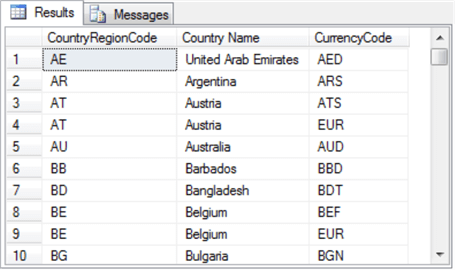
The following excerpt displays the first ten rows from the outer-most result set.
- The result set has three columns based on the SELECT list items from the outer query in the preceding script.
- The columns are for
- CountryRegionCode from the cr derived table
- Name from the cr derived table; this field is assigned an alias name of Country Name
- CurrencyCode from the crc derived table
One potential way to improve the usefulness of the preceding result set is to add currency name as a column. You can achieve this outcome by adding a left join of rows from the Currency table to the rows of the CountryRegionCurrency table in the preceding query. The following script illustrates how to accomplish this outcome with derived tables.
- This outer-most query references three derived tables.
- The cr derived table is for rows from the CountryRegion table.
- The crc derived table is for rows from the CountryRegionCurrency table.
- The c derived table is for rows from the Currency table.
- The left join facilitates the inclusion of currency name in the result set.
- The ORDER BY clause sorts the result set CountryRegionCode.
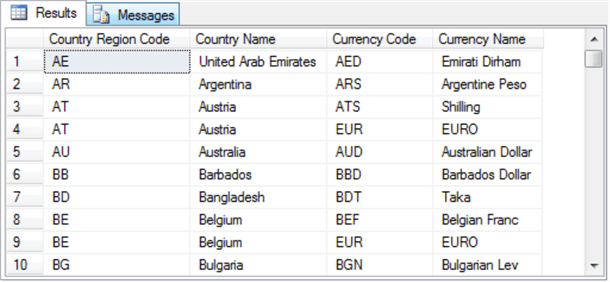
The screen shot below shows the top ten rows from the preceding script. Notice that it is the same as the preceding screen shot — except for the addition of a new column named Currency Name.
Detecting Duplicate Rows with a Subquery Based on a Derived Table
Duplicate rows in a data source have the same value for one or more columns. A common database task is to identify programmatically duplicate rows in a data source. Your final goal for identifying duplicate rows may be to delete all duplicate rows, update one or members of some duplicate sets, or delete all members of some duplicate sets. In the preceding screen shot, rows 3 and 4 as well as rows 8 and 9 comprise two different duplicate sets based on CountryRegionCode and Country Name.
The following script presents a pair of SELECT statements that will eventually be used for identifying and gathering information about duplicate column values in a set of rows.
- The top SELECT statement generates a result set with columns named CountryRegionCode, CurrencyCode, and Currency Name. This query is based on a left join of the Currency table to the CountryRegionCurrency table.
- Some rows in the result set from the top query have more than one Currency value for a single CountryRegionCode. One reason for this is because more than one row from the Currency table matches the same CountryRegionCode in the CountryRegionCurrency table.
- The second SELECT statement generates a list of all the CountryRegionCode values with more than one Currency.
- A derived table (myderivedtable) uses a Windows function to count the currency types partitioned by countryregioncode.
- The outer query includes a WHERE clause that returns only CountryRegionCode values with a count of more than one currency.
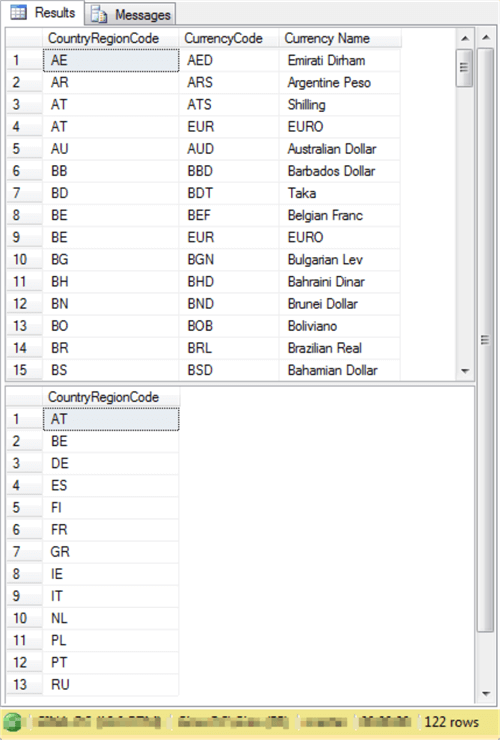
Here’s a screen shot with some output from both queries.
- The top pane shows an excerpt of the first 15 rows from the initial query. This query returns a separate row for all 109 rows within the CountryRegionCurrency table.
- The second pane shows the 13 CountryRegionCode values for countries that have more than one currency associated with them.
- The overall Results tab has 122 rows: 109 rows from the top query plus 13 rows from the bottom query.
The next query statement combines the preceding two queries to list the CountryRegionCode value, CurrencyCode value, and Currency Name for each CountryRegionCode value that has more than one currency associated with it.
- This outer-most query, which is the first of the preceding pair of queries, returns three columns. These columns have names of CountryRegionCode, CurrencyCode, and Currency Name.
- The outer-most query ends in a WHERE clause; this is a modification to the first of the preceding queries.
- The argument for the WHERE clause is the second query from the preceding pair of SELECT statements. This second query enumerates the CountryRegionCode values that have more than one currency associated with them.
- Therefore, the overall design of the full query is one in which an inner-most query that is based on a derived table is nested inside an outer-most query. The return values from the inner-most query constrain the values returned from the full query.
- Because the outer-most query includes separate columns for CountryRegionCode, CurrencyCode, and Currency Name, the result set from the full query shows all duplicate CountryRegionCode values with their matching currency names that cause the CountryRegionCode values to appear more than once.
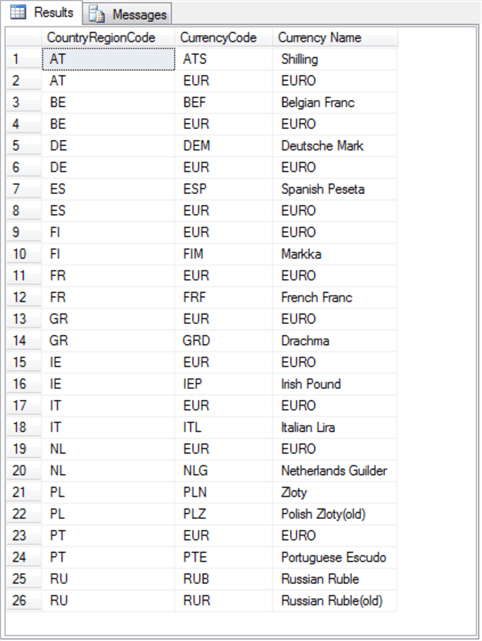
The result set from the preceding query appears next. As you can see, there are twenty-six rows in the result set. This is because each of the thirteen duplicate CountryRegionCode values appear with two different currencies. As mentioned above, the first step in deciding how to process duplicate values is to enumerate and review them. The preceding query accomplishes that goal.
Next Steps
Here are some links to resources that you may find useful to help you grow your understanding of content from this section of the tutorial.