SQL Server Collation

Collation is a set of rules dictating how each group of characters within SQL Server is treated. A list of collations and their definitions can be found using the following query.
There are two types of collations which will appear in the results of the query listed above. These are SQL collations and Windows Collations.
To further break down collations, they are made up of the following options.
-
Prefix: This establishes whether or not it is a SQL Server or Windows Collation.
EXAMPLE:
Omitted (Windows Collation)
SQL_ (SQL Server Collation)
EXAMPLE: ‘Latin1_General'(English)
EXAMPLE: ‘CP1251’ (Code page 1251)
EXAMPLES:
‘CI’ (Case Insensitive; A is the same as a; A=a)
‘CS’ (Case Sensitive; A is not the same as a; A!=a)
EXAMPLES:
‘AI’ (Accent Insensitive; a is the same as à; a=à)
‘AS’ (Accent Sensitive; A is not the same as à; a!=à )
EXAMPLES:
Omitted (Kanatype Insensitive)
KS (Kanatype Sensitive)
EXAMPLES:
Omitted (Width Insensitive;A6 is the same as A6; A6=A6 )
WS (Width Sensitive; A6 is not the same as A6; A6!=A6 )
Why is it important?
The most notable answer to this is language. SQL Server is used by a wide variety of people across the world. It is very important to configure SQL Server to accept commands and characters for the language and alphabet needed.
It is also important to set sensitivity levels at a database level correctly as SQL server will treat certain words as different or the same depending on the setting. If case sensitivity is set, ‘Test’ is not the same word as ‘test’. This will result in them being treated separately. If a table set to be case sensitive is queried for the word ‘Test’, only results with that casing would appear. This would also cause issues in queries if proper formatting isn’t followed. This applies to using accents as well if the query is accent sensitive. The following two queries would not be the same because the table names are capitalized differently.
SELECT * FROM Test
SELECT * FROM test
If the table were called “Test,” The second query would actually fail with the error “Invalid object name ‘test’”
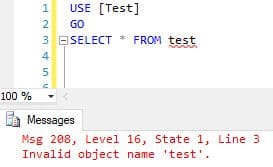
If the database is set to case sensitivity is enabled, multiple tables with the same name can also be created without error. Because of this, it’s even more important to following naming schemas.
It is important to test any collation changes in a test environment before doing any of the previously stated steps. Minor misformatting such as one uncapitalized table name could cause processes that already exist to start failing. It could also cause select statements to return the wrong values.
Using Case Insensitivity:
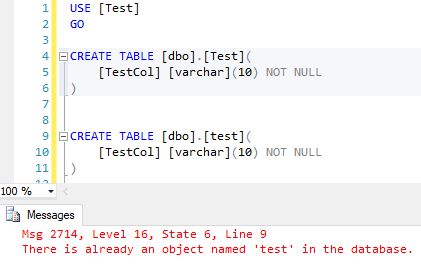
Using Case Sensitivity: 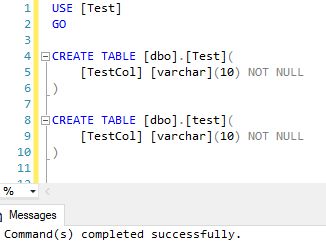
How is it set?
Server Level
This is done during the installation. Consideration should be taken before changing this setting as it is difficult to alter once set. The options chosen here will determine the default database level collation as well.
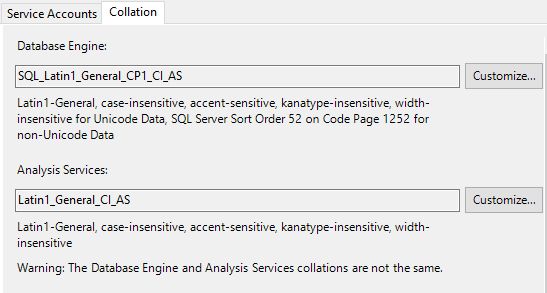
Database Level
A database can have its own collation separate from the server level. This setting overrides the server level setting. For any columns that currently exist and the collation is not set to “Database Default,“ the change at the database layer does not affect them but any new columns created will be created with the new setting at the database level unless otherwise specified.
The following might need to be dropped and recreated in order to change a database level collation.
- A computed column
- An index
- Distribution statistics, either generated automatically or by the CREATE STATISTICS statement
- A CHECK constraint
- A FOREIGN KEY constraint
Create Database with Collation:
T-SQL:
SSMS:
-
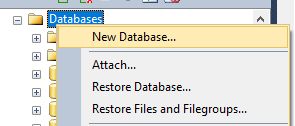
Right Click Databases and select ‘New Database.’
Alter Database Level Collation:
T-SQL:
SSMS:
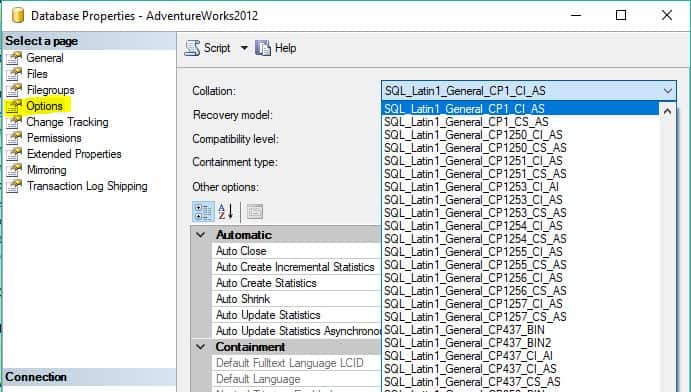
Open properties by right clicking on properties. Once there, access the ‘Options’ tab.
Column Level
Collations can be altered on a column level as well. This can be done during or after table creation. This setting overrides the server and table level collation.
The following might need to be dropped and recreated in order to change a column-level collation.
- A computed column
- An index
- Distribution statistics, either generated automatically or by the CREATE STATISTICS statement
- A CHECK constraint
- A FOREIGN KEY constraint
T-SQL set on creation:
T-SQL to alter after:
SSMS:
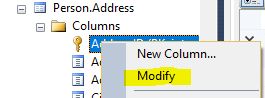
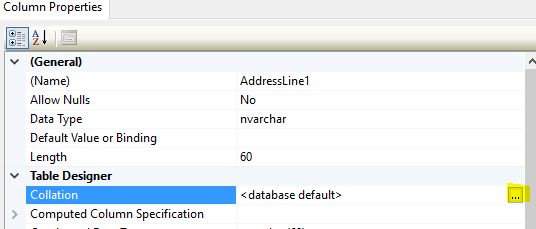
- Locate the table you would like to alter and expand the table and columns.
- Right-click any column and select ‘Modify’.
Temporary Collation T-SQL
Column Level Collation can be temporarily set within a query in the where or order by clause. This is useful when collation specific data is needed. The following example of its use in queries.
—Create Test Table
DECLARE @Test TABLE
(
testChar nvarchar(10)
)
INSERT @Test VALUES (‘Test’),(‘test’),(‘TEST’),(‘TeSt’)
—Basic Select
SELECT testChar
FROM @Test
—Capital First letter only
SELECT testChar
FROM @Test
where testChar COLLATE SQL_Latin1_General_CP1_CS_AS = ‘Test’
—All lower Case
SELECT testChar
FROM @Test
where testChar COLLATE SQL_Latin1_General_CP1_CS_AS = ‘test’
—ORDER BY Case
SELECT testChar
FROM @Test
ORDER BY testChar COLLATE SQL_Latin1_General_CP1_CS_AS
Final Thoughts
It is recommended to plan out collation settings ahead to time to prevent the need for changes later on. If changes are needed, this alters how SQL Server reads characters. Because of this, it is important to test these changes before adding them to a production environment. It could result in process failures and incorrect search results.
It is also helpful to plan out processes ahead of time to work on instances that have strict collations set just in case collation changes are needed in the future. This will prevent errors from happening, and it will make the switch go a lot smoother.
Submit a Comment Cancel reply
This site uses Akismet to reduce spam. Learn how your comment data is processed.
Name already in use
sql-docs / docs / t-sql / statements / collations.md
- Go to file T
- Go to line L
- Copy path
- Copy permalink
- Open with Desktop
- View raw
- Copy raw contents Copy raw contents
Copy raw contents
Copy raw contents
Defines a collation of a database or table column, or a collation cast operation when applied to character string expression. Collation name can be either a Windows collation name or a SQL collation name. If not specified during database creation, the database is assigned the default collation of the instance of [!INCLUDEssNoVersion]. If not specified during table column creation, the column is assigned the default collation of the database.
. image type=»icon» source=»../../includes/media/topic-link-icon.svg» border=»false». Transact-SQL syntax conventions
collation_name Is the name of the collation to be applied to the expression, column definition, or database definition. collation_name can be only a specified Windows_collation_name or a SQL_collation_name. collation_name must be a literal value. collation_name cannot be represented by a variable or expression.
Windows_collation_name is the collation name for a Windows Collation Name.
SQL_collation_name is the collation name for a SQL Server Collation Name.
database_default Causes the COLLATE clause to inherit the collation of the current database.
The COLLATE clause can be specified at several levels. These include the following:
Creating or altering a database.
You can use the COLLATE clause of the CREATE DATABASE or ALTER DATABASE statement to specify the default collation of the database. You can also specify a collation when you create a database using [!INCLUDEssManStudioFull]. If you do not specify a collation, the database is assigned the default collation of the instance of [!INCLUDEssNoVersion].
[!NOTE] Windows Unicode-only collations can only be used with the COLLATE clause to apply collations to the nchar, nvarchar, and ntext data types on column-level and expression-level data; these cannot be used with the COLLATE clause to define or change the collation of a database or server instance.
Creating or altering a table column.
You can specify collations for each character string column using the COLLATE clause of the CREATE TABLE or ALTER TABLE statement. You can also specify a collation when you create a table using [!INCLUDEssManStudioFull]. If you do not specify a collation, the column is assigned the default collation of the database.
You can also use the database_default option in the COLLATE clause to specify that a column in a temporary table use the collation default of the current user database for the connection instead of tempdb.
Casting the collation of an expression.
You can use the COLLATE clause to apply a character expression to a certain collation. Character literals and variables are assigned the default collation of the current database. Column references are assigned the definition collation of the column.
The collation of an identifier depends on the level at which it is defined. Identifiers of instance-level objects, such as logins and database names, are assigned the default collation of the instance. Identifiers of objects within a database, such as tables, views, and column names, are assigned the default collation of the database. For example, two tables with names different only in case may be created in a database with case-sensitive collation, but may not be created in a database with case-insensitive collation. For more information, see Database Identifiers.
Variables, GOTO labels, temporary stored procedures, and temporary tables can be created when the connection context is associated with one database, and then referenced when the context has been switched to another database. The identifiers for variables, GOTO labels, temporary stored procedures, and temporary tables are in the default collation of the server instance.
The COLLATE clause can be applied only for the char, varchar, text, nchar, nvarchar, and ntext data types.
COLLATE uses collate_name to refer to the name of either the [!INCLUDEssNoVersion] collation or the Windows collation to be applied to the expression, column definition, or database definition. collation_name can be only a specified Windows_collation_name or a SQL_collation_name and the parameter must contain a literal value. collation_name cannot be represented by a variable or expression.
Collations are generally identified by a collation name, except in Setup. In Setup, you instead specify the root collation designator (the collation locale) for Windows collations, and then specify sort options that are sensitive or insensitive to case or accents.
You can execute the system function fn_helpcollations to retrieve a list of all the valid collation names for Windows collations and SQL Server collations:
[!INCLUDEssNoVersion] can support only code pages that are supported by the underlying operating system. When you perform an action that depends on collations, the [!INCLUDEssNoVersion] collation used by the referenced object must use a code page supported by the operating system running on the computer. These actions can include the following:
- Specifying a default collation for a database when you create or alter the database.
- Specifying a collation for a column when you create or alter a table.
- When restoring or attaching a database, the default collation of the database and the collation of any char, varchar, and text columns or parameters in the database must be supported by the operating system.
[!NOTE] Code page translations are supported for char and varchar data types, but not for text data type. Data loss during code page translations is not reported.
If the collation specified or the collation used by the referenced object uses a code page not supported by Windows, [!INCLUDEssNoVersion] displays an error.
A. Specifying collation during a SELECT
The following example creates a simple table and inserts 4 rows. Then the example applies two collations when selecting data from the table, demonstrating how Chiapas is sorted differently.
Here are the results from the first query.
Here are the results from the second query.
B. Additional examples
For additional examples that use COLLATE, see CREATE DATABASE example G. Creating a database and specifying a collation name and options, and ALTER TABLE example V. Changing column collation.
SQL Server Collation Overview and Examples
While installing SQL Server or creating databases and tables, we often run with the defaults. In most cases, that’s not a bad thing. However, when it comes to setting the COLLATION, we again often run with the default settings. For a lot of DBA’s, we don’t change those options because we simply don’t understand what the different parts are and how they impact SQL Server.
Solution
We are going to break down the different parts of the COLLATE clause and give meaning to each part so you can better understand, and optionally tweak the clause to better suit your needs.
Breaking Down and Understanding the SQL Server Collation Setting
A quick look at a typical COLLATE clause that would be installed with English as the default language on a computer which is SQL_Latin1_General_CP1_CI_AS, so what does this mean?
Breaking it down into parts starting with the SQL_Latin1_General section we first need to understand that this is going to reference a «code page» or more appropriately a «Unicode table». Microsoft has created a small collection of these code pages, each setting the character set and sort order based on different languages.
There is a different code page for each language. For example, code page 1252 is for English, 1255 is for Hebrew and so on. The first 128 lines of code are the same for all the pages; the remaining lines of code differentiate the special character needs based on that particular language. You can use the following SQL query to return a complete list of collation page references.
Generally, you will not need to know the contents of these files and you certainly don’t want to attempt changing them. But, for curiosity sake, if you want to review them, they can be found at the following link.
Moving on to the next section of the collate clause, we have some arguments separated by an underscore. The table below lists the possible arguments in the left column with a general description in the right column.
| CS | Case sensitive or CI for case insensitive |
| AS | Accent sensitive or AI for accent insensitive |
| KS | Kana type-sensitive or if this set is missing then Kana type-insensitive |
| WS | Width sensitive or if this set is missing then width insensitive |
| VSS | Variation selector sensitive (not available in all versions) if missing, then VSS insensitive |
| _SC | Supplementary Character Support. (This one is optional). |
SQL Server Collation Settings Abbreviations and Definitions
Defining the above table in more detail:
«CS» / «CI» – Obviously, this one is just case sensitivity between upper and lower case. The default during SQL Server install as well as a database creation is «case insensitive». With case-insensitive, your queries will execute equally whether you use upper or lower case or a combination of both. However, if you set this to case-sensitive, you will need to get the upper and lower case correct or the query will not return the expected results. Thus, in a «CS» case-sensitive collation, HumanResources.Department is different from humanresources.department and SQL treats them as two different objects.
«AS» / «AI» – This is referring to accent sensitivity. An example would be that 'a' is the same as 'á' if accent-insensitive is set (using «AI» instead of «AS»), but 'a' is not the same as 'á' if accent-sensitive is called.
«KS» — Most people will never see or use this one. KS or Kanatype distinguishes between the two types of «Kana» characters for Japan. Those are Hiragana and Katakana. If «KS» is present, SQL Server treats them as equal for sorting purposes.
«WS» – Width sensitive distinguishes between a single-byte character and a double-byte character. If «WS» is not set/selected, SQL Server treats the single-byte and double-byte characters as the same for sorting purposes.
«VSS» – Somewhat relating back to the «KS» or Kanatype, this too is referencing Japanese characters so you most likely will not see nor use this in your day to day activities.
«_SC» – This will always be at the end of the arguments. It only affects how built-in functions work with surrogate pairs. Without «_SC» at the end, SQL Server doesn’t see single supplementary characters; instead it sees two code points that make up a surrogate pair.
While this is not an exhaustive list of all the arguments for the COLLATE clause, it does provide a basic foundation for better understanding the fundamental parts.
COLLATE Sort Order Explained
Although you may have originally created your SQL Server installation in the US and just used the default setting of «Latin» for your collation on the server level, you can set a different collation for your tables and views that you know will be accessed by co-workers in different countries.
Here’s a simple example:
First, let’s create a test database that we can drop when we finish testing.
Now, let’s switch to that database and create a table called «Locations».
Normally we would just add some basic data to the table such as cities within the United States (if that’s the country you live in). However, remember that we are a small business that expanded into Mexico and Chile.
With that said, let’s insert some data into our «Locations» table that includes cities from all three countries.
Here’s where the problem arises. A Spanish collation will sort the data in a different order than that of a Latin collation. Run these two SELECT statements to see the results. Look closely at the results from each one. Notice that they are returned in two different sort orders.
Here are the results.
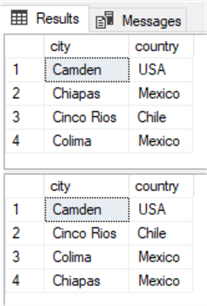
The big difference here is that «Chiapas» comes before «Cinco Rios» in the Latin collation, but it comes at the end on the «Spanish» collation.
Notice that we specified the collation on the table level by adding it after the «ORDER BY» clause. You could also apply the collation to individual columns instead of the whole table or you can apply the collation to the entire database.
And of course, you can create views based on these SELECT statements for your foreign co-workers to access so they will see the sort order that they are accustomed to.
More Tips on Collate
In the previous section we saw how to set the collation on the entire SELECT statement, so, here’s an example of setting the collation on a specific column(s) in a SELECT statement.
Setting Collate for a specific column in a SQL Server query
Setting Collate for a specific column when creating a table in SQL Server
And you can do this to set the collation at the table level when creating a table.
Setting Collate when creating a SQL Server database
And finally, setting the collation at the database level.
Next Steps
Check out these related articles.
- Case Sensitive Search on a Case Insensitive SQL Server
- Understanding the COLLATE Database Default
- How column COLLATION can affect query performance
- COLLATION and Code Pages


About the author
 Aubrey Love is a self-taught DBA with more than six years of experience designing, creating, and monitoring SQL Server databases as a DBA/Business Intelligence Specialist. Certificates include MCSA, A+, Linux+, and Google Map Tools with 40+ years in the computer industry. Aubrey first started working on PC�s when they were introduced to the public in the late 70’s.
SQL Server collation introduction with collate SQL casting

SQL Server collation refers to a set of character and character encoding rules, and influences how information is stored according to the order in the data page, how data is matched by comparing two columns, and how information is arranged in the T-SQL query statement. Collate SQL follows rules applied on a table when Select, Insert, Update or Delete operations are performed against contained data. Data always follows collation constraint rules, which are configured when creating an object.
When retrieving data using a T-SQL query, collation plays a fundamental role in the execution. It matters which collation is associated with a column when ordering clause is applied to that column. For example, information in the column can be case sensitive, and lowercase letters will not be treated the same as uppercase letters. This distinction is important for data sorting in the query result set.
SQL Server installation configuration sets the default collation for the created instance (Latin1_General_CI_AI). New databases will be configured with the default collation of the SQL Server. Users can change the collation settings at the database level but not at the SQL Server level. With the assistance of the SQL Server Installation setup, collation can be changed, however, the effect of that on the current database and its tables can be unpredictable. This is not recommended since it can influence existing query execution and query result sets.
A list of collations supported by the installed version of SQL Server can be generated using sys.fn_helpcollations() (a system DMV). SQL Server allows collations to be configured at different levels of the database engine, but, by default, every level will inherit the collation settings from the parent level. In descending order, these are:
- SQL Server instance
- Database
- Column
- Query
SQL Server instance level collation
A SQL Server instance collation is the default collation for the system databases. It includes master, tempdb and model. If a user’s database collation is configured differently than one of the SQL Server instance collation, then a comparison between tables in that database and in tempdb, when it comes to textual data comparison, will return an error. Tempdb will always be configured with the instance level default collation. If one of the user databases is restored with other than tempdb’s collation and the temp table is used in any T-SQL statement or procedure inside a user database that compares text-based columns using WHERE clause or JOIN conditions, the query will return an error because both of the tables do not have the same collation.
To find the SQL Server instance level collation use, the T-SQL shown below: