What is a foreign key? (with SQL examples)

ORMs are powerful tools, but they aren’t perfect. Learn the SQL you need (and none of what you don't) for building performant applications.
What is a foreign key? (TL;DR)
A foreign key is a column or columns in a database that (e.g. table_1.column_a ) that are linked to a column in a different table ( table_2.column_b ).
The existence of a foreign key column establishes a foreign key constraint – a database rule that ensures that a value can be added or updated in column_a only if the same value already exists in column_b .
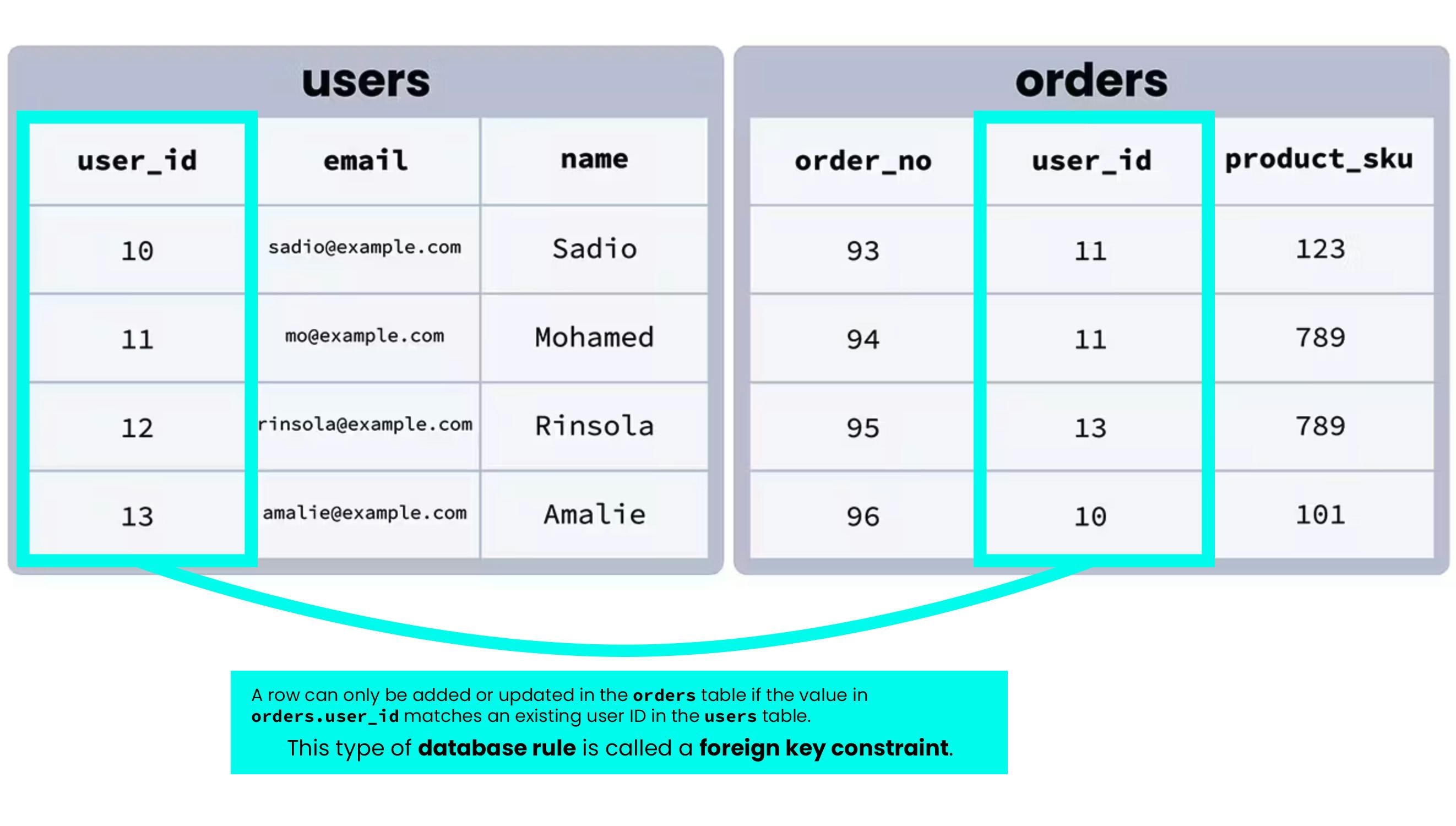
We can think about this like a “parent/child” relationship in programming. We can make a specific column in the “child” table a foreign key that references a specific column in the “parent” table, and the database will enforce that rule automatically – rows will only be added or updated in the child table if the value in the foreign key column of the row being updated matches an existing value in the referenced column of the parent table.
For example, a table of customer orders might have a user column with a foreign key attribute that links it to the user_id column in a users table (see above). This way, each row in the orders table can be associated with a specific user from the users table — and no orders can enter the system unless they’re connected to a valid, existing user.
In other words: foreign keys put the “relational” in “relational database” – they help define the relationships between tables. They allow developers to maintain referential integrity across their database. Foreign keys also help end-users by preventing errors and improving the performance of any operation that’s pulling data from tables linked by indexed foreign keys.
How foreign keys work
Here’s an illustration of how a foreign key constraint works visually:
Although this is a simplified example, we can see how foreign key constraints help establish clear relationships between tables across a database, and promote consistency by making it impossible to (for example) add a row in an orders table with a user who doesn’t exist in the users table.
Note that foreign keys are not mandatory, and a table may have no foreign keys. Conversely, every column in a table may have a foreign key constraint. Where you use foreign keys depends on the specifics of the data you’re storing in your database, how different data points relate to each other, and how you’d like your data to be validated as rows are added, updated, or removed.
Why use foreign keys?
To understand why foreign keys are useful in relational databases, it’s helpful to first take a look at primary keys so that we can understand the differences, and how the two interact to enforce the rules and relationships between data (in other words, the database schema) in a database.
Our example database
It’s easier to understand these concepts with concrete examples to look at, so we’ve set up a sample database to work with, depicted in the image below. It represents the sales database of a fictional online bookshop.
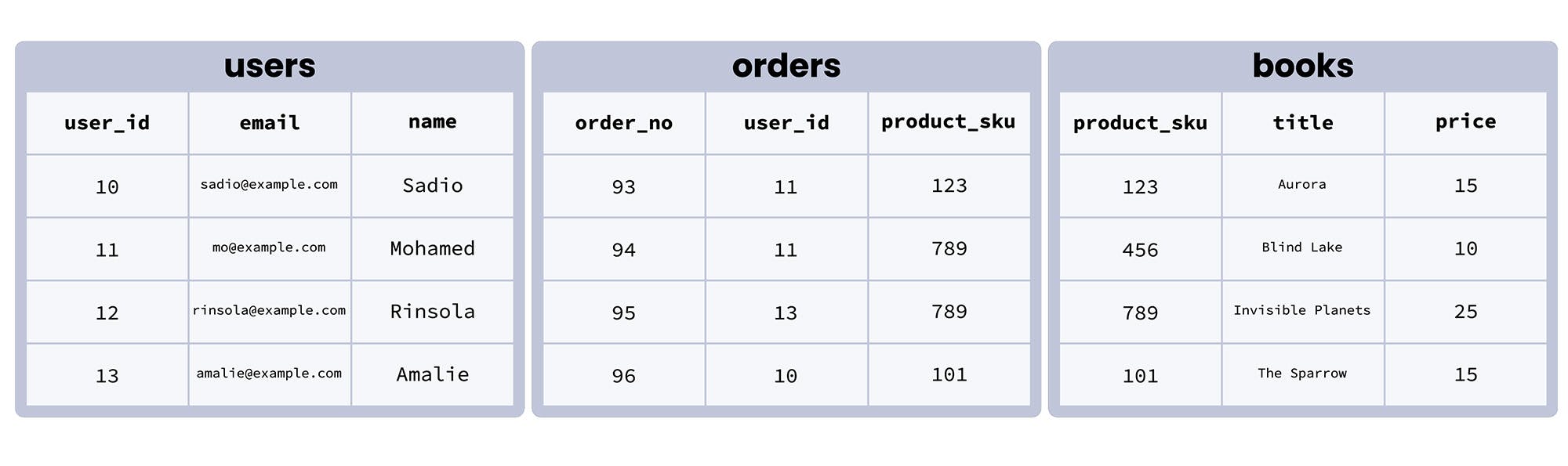
We can see that in this database, there are three tables:
- users contains data about users registered on the site
- orders contains data about specific orders placed through the site
- books contains data about the books that are available for sale
Now that we’ve got that database in mind, let’s return to talking about the differences between primary keys and foreign keys.
What is a primary key?
A primary key is a column in a table that is used as a unique identifier for each row, and used in the table’s primary index. (Technically, a primary key can be made up of multiple columns, but for our purposes here let’s think of it as a single column).
In other words, a primary key is like a row’s ID number. Just as your government ID identifies you uniquely even if other people share your name or live at your address, a table’s primary key column identifies each row uniquely even if some of the other values in the row are shared with other rows.
A table’s primary key column thus must be unique, and it cannot be empty or NULL .
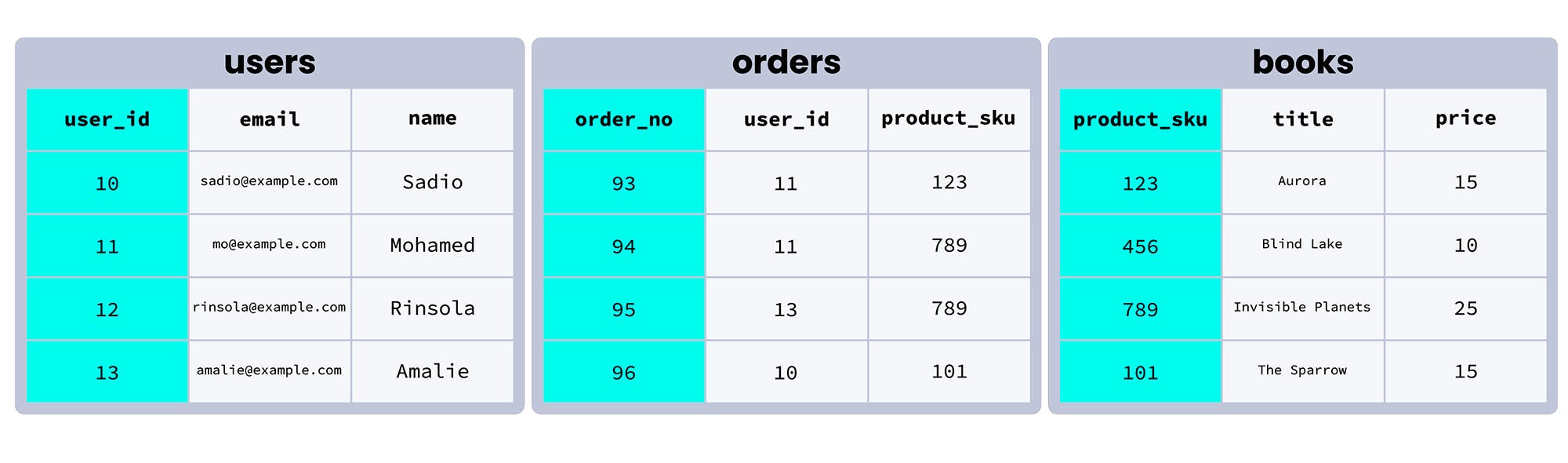
Consider the orders table in our example database. In this table, the primary key is order_no , a unique number that identifies each order individually.
In fact, in this table order_no is the only column that could be used as the primary key. user_id can contain duplicate data, since the same customer can place more than one order, and product_sku can also contain duplicate data, since two different customers might order the same product.
Here’s how our database looks with the primary key columns for each table highlighted:
What is the difference between primary keys and foreign keys?
Primary keys serve as unique identifiers for each row in a database table. Foreign keys link data in one table to the data in another table. A foreign key column in a table points to a column with unique values in another table (often the primary key column) to create a way of cross-referencing the two tables.
If a column is assigned a foreign key, each row of that column must contain a value that exists in the ‘foreign’ column it references. The referenced (i.e. “foreign”) column must contain only unique values – often it is the primary key of its table.
- Primary keys are used to uniquely identify and index each row within a single table.
- Foreign keys are used to link rows in two different tables such that a row can only be added or updated in table_a if the value in its foreign key column exists in the relevant column of table_b .
So what is the actual benefit of using foreign keys?
For a tangible example, let’s look at the orders table in our database. The user_id column here corresponds with the user_id column in the users table, and the product_sku column corresponds with the product_sku column in the books table.
When we’re setting up this table, it would make sense to add foreign key constraints to both orders.user_id and orders.product_sku :
- orders.user_id should reference users.user_id
- orders.product_sku should reference books.product_sku
Using these foreign keys saves us from having to store the same data repeatedly – we don’t have to store the user’s name in the orders table, because we can use orders.user_id to reference that user’s unique row in users.user_id to get their name and other information about them.
But the real purpose of foreign keys is that they add a restriction that helps establish and enforce consistent relationships within our data. Entries to the table with a foreign key must have a value that corresponds with the ‘foreign’ table column. This restriction is called a foreign key constraint.
For example, imagine we’ve set up our orders table with the foreign keys we laid out earlier: orders.user_id references users.user_id and orders.product_sku references books.product_sku . These rules mean that:
1. Any value entered into orders.user_id must already exist in users.user_id .
In other words, orders must be placed by a registered user – the orders table won’t accept a new row or a row update if the value in orders.user_id doesn’t already exist in users.user_id .
2. Any value entered into orders.product_sku must already exist in books.product_sku .
In other words, users can only order products that exist in the database – the orders table won’t accept a new row or a row update if the value in orders.product_sku doesn’t already exist in books.product_sku .
We can immediately see how even in this very simple example, foreign keys are helpful. When we look at orders in our database, we want to be able to see who ordered the items, and what items they ordered. If an order doesn’t have a valid user or product associated with it, there’s probably some kind of error, and we don’t want that invalid order to be entered into our database. The foreign keys we’ve established ensure that it won’t be – the foreign key constraints we’ve added mean that the database will reject any attempt to add or update rows in the orders table if they’re not valid.
How to use foreign keys in the real world
How do foreign keys actually work in practice? Let’s get practical, and learn more about foreign keys by looking at how they function in the context of a simple SQL database.
How to use primary and foreign keys with SQL
Now that we understand what primary and foreign keys are and how they work, let’s take a quick look at how we can assign these values when we’re creating a table in our database.
Note: we’ll be using CockroachDB SQL syntax. Different flavors of SQL may approach these tasks slightly differently, but we’ll stick with Cockroach since it offers a free cloud database that’s excellent for any project!
To create the orders table from our database with foreign keys:
In the code above, we’re setting the order_no column as the primary key, and then setting rules in the form of foreign key constraints for the other two columns:
- user_id has users.user_id as its foreign key (i.e. any values in orders.user_id must already exist in users.user_id ).
- product_sku has books.product_sku as its foreign key (i.e. any values in orders.product_sku must already exist in books.product_sku ).
You can check to see what foreign keys and other constraints already exist in a CockroachDB database like this:
How to handle updates, deletions, and more with foreign keys
Foreign keys give us the power to define relationships between two or more tables. This is great, but it does mean that we need to think carefully about what happens when a value that’s linked across tables is changed or deleted.
For example, let’s say that Mohamed, one of our bookshop’s customers, has requested we delete his account and all data associated with it. We could run the following query to remove him from the users table:
However, the way we set up our tables currently, that will only remove the relevant row in users . Two orders associated with this user exist in the orders table too, and those won’t be removed automatically; we’d have to remember to do that manually.
Thankfully, there’s a much easier way to handle this! When we’re adding foreign keys, we can also set rules for how our database should behave if a value that’s linked across tables is changed.
For example, with a CockroachDB database, we could create a table like this:
In the code above, ON DELETE CASCADE and ON UPDATE CASCADE specify that when a row is deleted or a value is updated (respectively) in one table, the same operation should be performed on the linked value or row in other tables.
So, if we built our table like that and then ran the query DELETE FROM users WHERE user_id = 11; , the data associated with Mohamed (user 11 ) would be deleted from the user table and orders associated with his account would also be deleted from the orders table.
Similarly, we could run this query…
…and Mohamed’s user_id value in users would be updated from 11 to 100 , and the user_id value associated with his orders in the orders table would be updated, too.
Depending on the circumstances, we might prefer that our database do something different. For example, we could also use ON DELETE SET NULL to set the all columns of a referencing row to NULL if the row in the table it’s referencing is deleted. We can also specify that we want the database to take NO ACTION , although this isn’t strictly necessary, as this is the default rule the database will follow if we don’t specify another action for it to take.
The full range of actions we can use with foreign keys is detailed in the CockroachDB docs.
Test yourself: have you mastered foreign keys?
Refresh yourself with our imaginary database, and the foreign key constraints we added to the orders table earlier in this article ( orders.user_id references users.user_id and orders.product_sku references books.product_sku ):
Now, see if you can answer the following questions:
What would be the result of running the following SQL command?
Answer: It would result in an error and the row would not be inserted, because the user_id value 14 does not exist in users.user_id .
Does the books table have any foreign key constraints?
Answer: No, and in this case it doesn’t need any. Although the orders table references books.product_sku , none of the columns in the books table correspond with values in other tables in a way that would make adding a foreign key constraint beneficial.
What would be the result of running the following SQL command?
Answer: It would result in a new row with those values being added to the orders table, because it meets all of the constraints that the primary and foreign keys impose on orders ’s columns:
- 412 is a unique value that doesn’t already exist in order_no , and is thus valid (the primary key constraint)
- 10 is a user ID that corresponds with an existing user in users.user_id , and is thus valid (a foreign key constraint)
- 101 is a product SKU that corresponds with an existing book in books.product_sku , and is thus valid (a foreign key constraint)
Go hands-on!
Want to build a little real-world experience with foreign keys and try working with this database for yourself in the cloud? Don’t worry, it’ll only take a few minutes!
Step 1: sign up for a free Cockroach Cloud account, and follow the instructions there to create a cluster.
Step 2: Follow the instructions here to install CockroachDB locally. If you’ve already installed it, you can skip this step.
Step 3: Download this .sql file, which contains the SQL queries needed to create the database pictured above. Run the following command in your terminal and the data and tables will be automatically added to your cluster’s defaultdb database.
(Note that you need to replace some of the details in the command below with details specific to your Cockroach Cloud account, and be sure you’ve specified the correct directories for your foreign_keys.sql and cc-ca.crt .)
Step 4: Run the following command in your terminal to start up the CockroachDB SQL shell and connect to your CockroachDB Dedicated cluster:
You’re in! Feel free to poke around. The CockroachDB docs on foreign keys will be a useful reference. Some questions to get you started:
Как создать первичные и внешние ключи MySQL
В этой инструкции рассказываем про первичный и внешний ключи SQL, зачем они нужны и как их создать различными способами.
Эта инструкция — часть курса «MySQL для новичков».
Смотреть весь курс
Введение
Работа современных приложений и сложных сайтов, которыми мы привыкли пользоваться, невозможна без баз данных. Поэтому правильно настроенные БД важны для приложения не меньше, чем их дизайн и код, который с этой базой взаимодействует. Работа современных реляционных баз данных сложно представить без корректно настроенных первичных и внешних ключей. В этой инструкции мы подробно разберем создание этих ключей MySQL, расскажем для чего они нужны и как их использовать.
Облачные базы данных
Что такое первичный и внешний ключи и зачем они нужны
Начнем рассмотрение данного вопроса с двух самых главных элементов: первичного и внешнего ключей.
Первичный ключ или primary key
Первичный ключ — особенное поле в SQL-таблице, которое позволяет однозначно идентифицировать каждую запись в ней. Как правило, эти поля используются для хранения уникальных идентификаторов объектов, которые перечислены в таблице, например, это может быть ID клиента или товара.
Первичный ключ имеет несколько свойств:
- каждая запись в таком поле должна быть уникальной;
- запись в поле не должна быть пустой;
- в одной таблице может быть только один ключ (существуют также составные ключи, которые могут включать в себя несколько полей, однако в этой статье мы не будем их рассматривать).
Внешний ключ или foreign key
Внешний ключ нужен для того, чтобы связать две разные SQL-таблицы между собой. Внешний ключ таблицы должен соответствует значению первичного ключа таблицы, с которой он связан. Это помогает сохранять согласованность базы данных путем обеспечения так называемой «ссылочной целостности» (referential integrity).
Давайте рассмотрим все это на примере простой базы данных. Для начала нам понадобится создать базу данных. Заходим в MySQL и создаем базу данных, в которой будут храниться записи о книгах в библиотеке:
Так как дальше мы будем работать с этой базой, вводим команду:
И создаем таблицу, в которой будут храниться записи о книгах в библиотеке:
Создание первичного ключа при создании таблицы и с помощью ALTER TABLE
В созданной выше таблице ни одно из полей не является первичным ключом. Увидеть это мы можем, выполнив команду:
Вывод команды будет выглядеть следующим образом:
Первичный ключ при создании таблицы
Вы можете также создать его при создании таблицы, добавив в команду для создания таблицы следующую запись:
В таком случае поле book_id после создания таблицы будет являться первичным ключом для таблицы books.
Создание первичного ключа при помощи ALTER TABLE
Если таблица уже создана, а первичный ключ в ней не указан, вы можете создать ключевое поле, с помощью команды ALTER TABLE. Команда ALTER TABLE помогает изменять уже существующие столбцы, удалять их или добавлять новые. Чтобы определить первичный ключ в поле book_id, выполните команду:
Установка внешнего ключа MySQL при создании таблицы и с помощью ALTER TABLE
Предположим, у нас есть еще одна таблица под названием authors, которую нам необходимо связать с текущей таблицей books с помощью внешнего ключа author_id.
Внешний ключ при создании таблицы
Для того, чтобы привязать к таблице внешний ключ сразу при создании таблицы, вам необходимо дополнить запрос, которым вы создаете таблицу следующей записью:
В итоге запрос, которым создается такая таблица будет выглядеть следующим образом:
Создание внешнего ключа при помощи ALTER TABLE
Если вам нужно определить поле уже созданной таблицы в качестве внешнего ключа, вы можете воспользоваться командой ALTER TABLE и создать внешний ключ в таблице командой:
Сценарии использования внешнего ключа
Внешний ключ является очень важным и мощным инструментом в работе современных баз данных. С помощью внешнего ключа, например, вы можете настроить параметры, которые зададут действия при удалении или обновлении строки в таблице, настроить каскадное удаление или запретить изменять строку в таблице. Давайте рассмотрим на примерах.
Каскадное удаление или CASCADE
Каскадное удаление позволит вам одновременно удалить строки из главной таблицы, а вместе с ними удалить все связанные строки в других таблицах. Задается каскадное удаление таким запросом:
Аналогично работает метод ON UPDATE CASCADE. При попытке изменить значение, записанное в поле первичного ключа, изменение будет применено к внешнему ключу, связанному с данным полем. Этот метод используется крайне редко, так как первичные ключи практически не являются изменяемыми полями.
RESTRICT
Опция RESTRICT позволяет отклонять все запросы на изменение или удаление строк в главной таблице при условии, что в связанной таблице также имеются строки. Задается данное ограничение следующим запросом:
Заключение
В данной статье мы рассмотрели что такое первичный и внешний ключи SQL, зачем они нужны и как их создать различными способами: при создании таблицы или при помощи ALTER TABLE. Также мы рассмотрели несколько сценариев использования внешнего ключа для управления таблицами.
SQL FOREIGN KEY Constraint
The FOREIGN KEY constraint is used to prevent actions that would destroy links between tables.
A FOREIGN KEY is a field (or collection of fields) in one table, that refers to the PRIMARY KEY in another table.
The table with the foreign key is called the child table, and the table with the primary key is called the referenced or parent table.
Look at the following two tables:
Persons Table
| PersonID | LastName | FirstName | Age |
|---|---|---|---|
| 1 | Hansen | Ola | 30 |
| 2 | Svendson | Tove | 23 |
| 3 | Pettersen | Kari | 20 |
Orders Table
| OrderID | OrderNumber | PersonID |
|---|---|---|
| 1 | 77895 | 3 |
| 2 | 44678 | 3 |
| 3 | 22456 | 2 |
| 4 | 24562 | 1 |
Notice that the "PersonID" column in the "Orders" table points to the "PersonID" column in the "Persons" table.
The "PersonID" column in the "Persons" table is the PRIMARY KEY in the "Persons" table.
The "PersonID" column in the "Orders" table is a FOREIGN KEY in the "Orders" table.
The FOREIGN KEY constraint prevents invalid data from being inserted into the foreign key column, because it has to be one of the values contained in the parent table.
SQL FOREIGN KEY on CREATE TABLE
The following SQL creates a FOREIGN KEY on the "PersonID" column when the "Orders" table is created:
SQL Server / Oracle / MS Access:
To allow naming of a FOREIGN KEY constraint, and for defining a FOREIGN KEY constraint on multiple columns, use the following SQL syntax:
MySQL / SQL Server / Oracle / MS Access:
SQL FOREIGN KEY on ALTER TABLE
To create a FOREIGN KEY constraint on the "PersonID" column when the "Orders" table is already created, use the following SQL:
MySQL / SQL Server / Oracle / MS Access:
To allow naming of a FOREIGN KEY constraint, and for defining a FOREIGN KEY constraint on multiple columns, use the following SQL syntax:
MySQL Foreign Keys Tutorial and Examples
In this article, we introduced what foreign keys are, the rules for foreign keys, and how to use them in MySQL.
In relational databases, foreign keys are used to define a constrained relationship between two entities. Foreign keys are useful for ensuring data integrity.
What is foreign keys?
Foreign keys are used to refer to other tables relative to the primary key. The foreign key associates the rows of the child table with the rows of the parent table through one or more columns of the child table corresponding to the primary key or unique key value of the parent table.
Let’s take a look at the tables country and city from Sakila sample database. Here is their relationship diagram:
country and city relationship
Here is some data from the country table:
Here is some data from the city table:
From this we can see that the country table and the city table is a one-to-many relationship. A country can have multiple cities, and a city can only be located in one country.
If a country already has a city, then you cannot easily delete the country from the country table, otherwise it will cause the city data to be incomplete. You also can’t set a non-existent for a city country_id , otherwise the city data will be wrong.
Foreign key constraints ensure that the data is complete and correct.
Foreign Key Syntax
Let’s look at the foreign key constraints defined by the city table:
Note some of it:
A foreign key is defined here:
After the CONSTRAINT keyword fk_city_country is the name of the foreign key. It is optional.
Following the FOREIGN KEY keyword is the column name that is the foreign key.
Following the REFERENCES keyword are the referenced tables and columns.
ON DELETE and ON UPDATE specify the constraint strategy to be taken when deleting or updating data in the referenced table. You can use one of the following 3 strategies:
- CASCADE : If a row in the referenced table is deleted or updated, the value of the matching row in child table is automatically deleted or updated.
- SET NULL : If a row in the referenced table is deleted or updated, the value of the matching row in child table is set to NULL .
- RESTRICT : A MySQL error is raised when attempting to delete or update a row in the referenced table if a row in the referenced table has a matching row in child table. This is the default policy.
Usually, the table to which the foreign key belongs is called the child table, and the table referenced by the foreign key is called the parent table.
Add Foreign Key Syntax
If the foreign key is not defined when the table is created, you can also add the foreign key later by using the following syntax:
- Use the ALTER TABLE statement to modify the definition of the table.
- Use to ADD [CONSTRAINT foreign_key_name] clause add a constraint named foreign_key_name . [CONSTRAINT foreign_key_name] is optional.
- A foreign key is defined using FOREIGN KEY (column)) REFERENCES parent_table_name (column) .
Delete Foreign Key Syntax
To drop a foreign key on a table, one of the following two syntaxes can be used:
- Use the ALTER TABLE statement to modify the definition of the table.
- Specify the foreign key name after DROP FOREIGN KEY , that is, the constraint name.
- Specify the constraint name after DROP CONSTRAINT . It can remove any constraint by name, not just foreign keys.
FOREIGN KEY Examples
The following example will create user and user_hobby two tables in the testdb database. Where foreign keys are used in the user_hobby table to reference the user table. Let’s create the user table first, and the user_hobby table will be created according to the respective situation in the following examples. Please follow the steps below:
Log in to the MySQL database as the root user:
Enter the password of the root user.
Note: You can also log in as any other user with appropriate database privileges.
Select the testdb database using the following statement:
If you haven’t created the database yet, run the following statement first:
Insert two rows in to the user table:
So far, we have created the user table.
CASCADE strategy
If ON DELETE and ON UPDATE use the CASCADE strategy:
- When a row in the parent table is deleted, the matching row in the child table is also deleted.
- When the key value of the row in the parent table is updated, the fields of the matching row in the child table are also updated.
Use the following SQL to create the user_hobby table with a foreign key using the CASCADE strategy.
Insert rows into two tables:
At this point the rows in the user_hobby table as following:
Let’s take a look at the associated operation of the child table caused by the UPDATE and DELETE operation on the parent table:
UPDATE operate on the parent table
We modify the value of the key user_id in the parent table user from 1 to 100 :
At this point the rows in the user_hobby table:
We found that the column values of those rows in the table user_hobby that match user_id = 1 in user table are also modified to 100 .
DELETE operate on the parent table
At this point the data in the user_hobby table:
We found that those rows in the user_hobby table that matched user_id = 100 in user table were deleted.
RESTRICT strategy
If the ON DELETE and ON UPDATE use the RESTRICT strategy:
- MySQL prohibits deletion of rows in parent tables that match child tables.
- MySQL prohibits deleting the value of the key of the row in the parent table that matches the child table.
Use the following SQL to create the user_hobby table with foreign keys using the RESTRICT strategy.
Insert data into two tables:
At this point the rows in the user_hobby table:
Let’s see the result of the UPDATE and DELETE operation on the parent table:
UPDATE operate on the parent table
The MySQL server returned the following error:
ERROR 1451 (23000): Cannot delete or update a parent row: a foreign key constraint fails (`testdb`.`user_hobby`, CONSTRAINT `fk_user` FOREIGN KEY (`user_id`) REFERENCES `user` (`user_id`) ON DELETE RESTRICT ON UPDATE RESTRICT)
DELETE operate on the parent table
The MySQL server returned the following error:
ERROR 1451 (23000): Cannot delete or update a parent row: a foreign key constraint fails (`testdb`.`user_hobby`, CONSTRAINT `fk_user` FOREIGN KEY (`user_id`) REFERENCES `user` (`user_id`) ON DELETE RESTRICT ON UPDATE RESTRICT)
SET NULL policy
If the ON DELETE and ON UPDATE use the SET NULL strategy:
- When a row of the parent table is deleted, the value of the column of the matching row in the child table is set to NULL .
- When the key value of a row in the parent table is updated, the column value of the matching row in the child table is set to NULL .
Use the following SQL to create the user_hobby table with foreign keys using the SET NULL strategy.
Insert data into two tables:
Let’s take a look at the associated operation of the child table caused by the UPDATE and DELETE operation on the parent table:
UPDATE operate on the parent table
At this point the data in the user_hobby table:
After updated the parent table rows, these rows related in the child table are set to NULL .
DELETE operate on the parent table
Since the above example modifies the data of the table, we reinitialize the data of the two tables:
At this point the data in the user_hobby table:
After deleted the parent table rows, these rows related in the child table are set to NULL .
Self-referencing foreign keys
Sometimes, the child table and the parent table may be the same table. A foreign key in such a table is called a self-referential foreign key.
Typically, self-referential foreign keys are defined in tables that represent tree-like data structures. For example, a table representing categories:
In this table, the parent_category_id column is a foreign key. It references the category_id column of the category table.
This table implements an infinite hierarchy of classification trees. A category can have multiple subcategories, and a subcategory can have 0 or 1 parent category;
Enable or Disable Foreign Key Constraints
To disable foreign key constraints, use the following statement:
To enable foreign key constraints, use the following statement:
Disabling foreign key constraints is useful when bulk importing data.
Conclusion
In this article, we introduced what foreign keys are, the rules for foreign keys, and how to use them in MySQL. Here are the main points of this article: