SQL-Ex blog

Я почти всегда использую планы выполнения в качестве отправной точки для решения проблем с производительностью запросов SQL.
- Эта статья.
.
.
Планы выполнения
SQL — это декларативный язык: вместо программирования деталей получения данных мы описываем, какие данные нам нужны, а SQL Server решает, как он должен вернуть их нам.
Для большинства запросов, производительность которых мы хотим настроить, оптимизатор запросов SQL server рассматривает множество вариантов, возвращающих требуемые данные. Он оценивает стоимость этих различных подходов и останавливается на одном, который он считает наиболее эффективным. Все эти варианты для получения данных и есть то, что называется планами выполнения запроса.
Большую часть времени этот процесс работает хорошо, и оптимизатор запросов останавливается свой выбор на плане запроса, который быстро возвращает затребованные данные. Однако это не означает, что SQL Server всегда выбирает «наиболее эффективный» план запроса. Оставляя в стороне вопрос о том, что считать «наиболее эффективным» в различных сценариях, скажем, что SQL Server не желает тратить часы, рассчитывая каждый из возможных способов вернуть нам данные, а использует только часть этого времени на поиск плана, который «достаточно хорош».
Проблемы возникают тогда, когда оптимизатор запросов выбирает план, который далеко не очень хороший. Это может вызвать большое число проблем, которые мы будем рассматривать в последующих частях этой серии статей.
Сейчас же мы поучимся получать планы выполнения наших запросов.
Просмотр планов выполнения
Чтобы увидеть план выполнения вашего запроса, выполните команду SET SHOWPLAN_ALL ON. Это даст текстовое представление дерева плана:

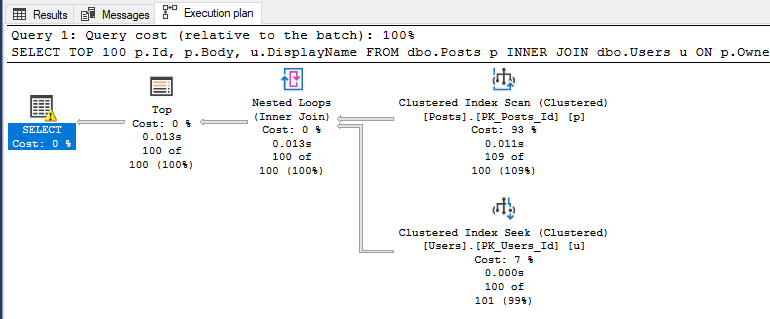
Это может выглядеть для вас знакомо, если вы просматривали планы в других средах реляционных баз данных, которые используют аналогичное представление плана в виде дерева. В SSMS у нас есть еще более визуальный вариант. Если щелкнуть по кнопке “Display Estimated Execution Plan” (показать предварительный план выполнения) или выполнить команду SET SHOWPLAN_XML ON, а затем ваш запрос, вы получите графический план выполнения вашего запроса:
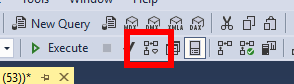
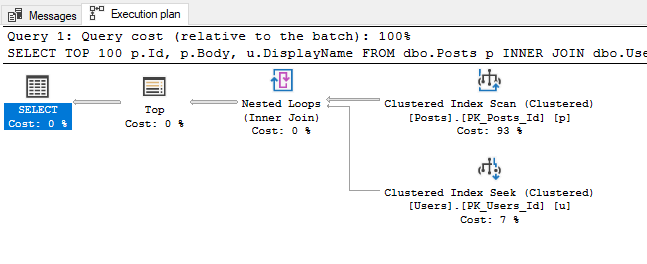
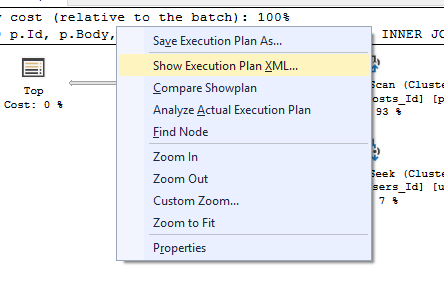
Я предпочитаю именно это графическое представление (его я и буду использовать в демонстрационных примерах этой серии), но важно знать, что, как подсказывает последняя команда, вы можете также выполнить щелчок правой кнопкой на этом графическом плане выполнения и выбрать “Show Execution Plan XML”, чтобы увидеть все, что он представляет, в формате XML:
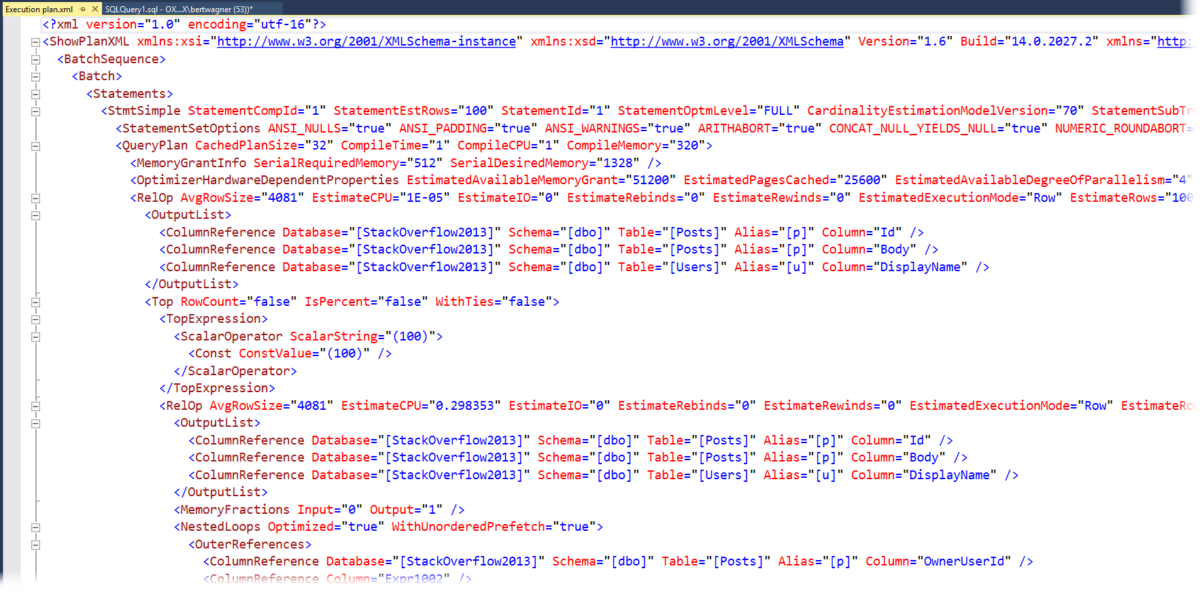
В то время как большинство людей не считают XML легким для просмотра по сравнению с графическим планом выполнения, полезно знать, что иногда вам придется погрузиться в XML, чтобы найти свойства, которые не отображаются в графической версии.
Актуальные планы
До сих пор каждый план, который мы видели был что называется «оценочным» планом выполнения. Название «оценочный» означает, что он содержит только «оценки» того, как много строк будет обработано, на основе внутренних метаданных, которые доступны SQL Server. Вы можете увидеть «актуальный» план выполнения, выбрав соответствующую иконку в SSMS:
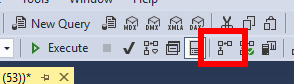
Часто путаница возникает из-за названий планов — «оценочный» (предполагаемый) и «актуальный». Разница состоит в том, что оценочный план рассчитывается до выполнения оператора SQL, и поэтому для него доступны только оценочные метаданные для отображения, в то время как актуальный план выполнения представляет собой тот же самый оценочный план выполнения, скорректированный информацией времени выполнения, например, количеством обработанных строк, объемом использованной памяти и т.д.
Живая статистика запроса (Live Query Statistics)
Живая статистика запроса дает вам лучшее из обоих планов, оценочного и актуального. При включении Live Query Statistics, SQL Server предоставляет оценочный план выполнения, но скорректированный реальной статистикой времени выполнения вверху плана в то время как запрос выполняется в реальном времени.
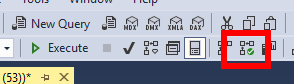
Живая статистика запроса прекрасна, поскольку она позволяет вам часто увидеть, «где» в плане выполнения запроса проявляется узкое место производительности. Это особенно полезно, если вы новичок в анализе планов выполнения и еще не изучили все обычные значки и операторы, которые могут указать на плохую производительность. Это также полезно, когда ваш запрос выполняется настолько медленно, что вы не в состоянии получить актуальный план выполнения для него (т.к. кажется, что он будет выполняться вечно).
Исторические планы
Расчет планов выполнения обходится недешево, поэтому SQL Server кэширует планы выполнения для повторного использования. Эти кэшированные планы можно увидеть в динамическом представлении (DMV) sys.dm_exec_query_plan:
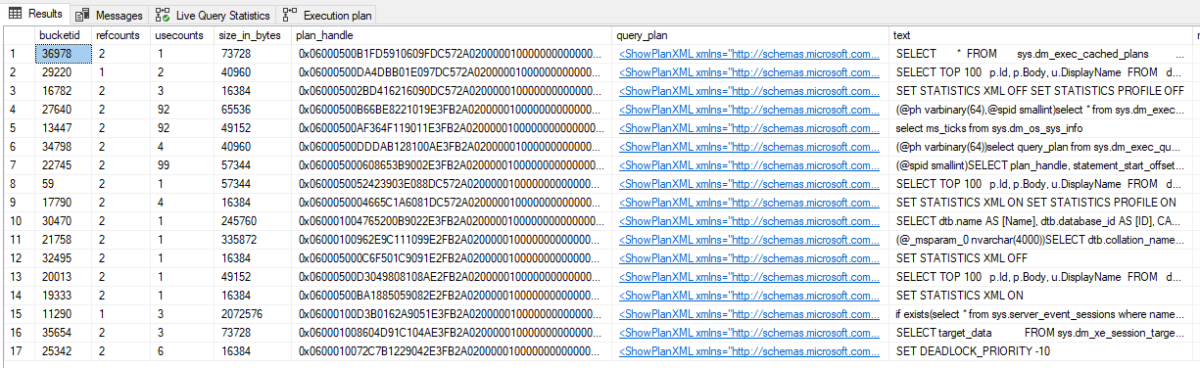
Важно отметить, что этот набор DMV показывает только те планы, которые еще находятся в кэше, и не показывают статистику актуального плана.
Если у вас включено хранилище запросов (Query Store) для вашей базы данных, вы можете также получит доступ к планам запросов, хранящихся в динамических представлениях Query Store, (или через его графический интерфейс):
Что такое план выполнения запроса sql
Knowledge of how to explain a statement and display its plan is essential to SQL tuning.
6.1 Introduction to Execution Plans
An execution plan is the sequence of operations that the database performs to run a SQL statement.
6.1.1 Contents of an Execution Plan
The execution plan operation alone cannot differentiate between well-tuned statements and those that perform suboptimally.
The plan consists of a series of steps. Every step either retrieves rows of data physically from the database or prepares them for the user issuing the statement. The following plan shows a join of the employees and departments tables:
The row source tree is the core of the execution plan. The tree shows the following information:
The join order of the tables referenced by the statement
In the preceding plan, employees is the outer row source and departments is the inner row source.
An access path for each table mentioned in the statement
In the preceding plan, the optimizer chooses to access employees using an index scan and departments using a full scan.
A join method for tables affected by join operations in the statement
In the preceding plan, the optimizer chooses a nested loops join.
Data operations like filter, sort, or aggregation
In the preceding plan, the optimizer filters on last names that begin with T and matches on department_id .
In addition to the row source tree, the plan table contains information about the following:
Optimization, such as the cost and cardinality of each operation
Partitioning, such as the set of accessed partitions
Parallel execution, such as the distribution method of join inputs
6.1.2 Why Execution Plans Change
Execution plans can and do change as the underlying optimizer inputs change.
To avoid possible SQL performance regression that may result from execution plan changes, consider using SQL plan management.
6.1.2.1 Different Schemas
Schemas can differ for various reasons.
Principal reasons include the following:
The execution and explain plan occur on different databases.
The user explaining the statement is different from the user running the statement. Two users might be pointing to different objects in the same database, resulting in different execution plans.
Schema changes (often changes in indexes) between the two operations.
6.1.2.2 Different Costs
Even if the schemas are the same, the optimizer can choose different execution plans when the costs are different.
Some factors that affect the costs include the following:
Data volume and statistics
Bind variable types and values
Initialization parameters set globally or at session level
6.2 Generating Plan Output Using the EXPLAIN PLAN Statement
The EXPLAIN PLAN statement enables you to examine the execution plan that the optimizer chose for a SQL statement.
6.2.1 About the EXPLAIN PLAN Statement
The EXPLAIN PLAN statement displays execution plans that the optimizer chooses for SELECT , UPDATE , INSERT , and DELETE statements.
EXPLAIN PLAN output shows how the database would have run the SQL statement when the statement was explained. Because of differences in the execution environment and explain plan environment, the explained plan can differ from the actual plan used during statement execution.
When the EXPLAIN PLAN statement is issued, the optimizer chooses an execution plan and then inserts a row describing each step of the execution plan into a specified plan table. You can also issue the EXPLAIN PLAN statement as part of the SQL trace facility.
The EXPLAIN PLAN statement is a DML statement rather than a DDL statement. Therefore, Oracle Database does not implicitly commit the changes made by an EXPLAIN PLAN statement.
Oracle Database SQL Language Reference to learn about the EXPLAIN PLAN statement
6.2.1.1 About PLAN_TABLE
PLAN_TABLE is the default sample output table into which the EXPLAIN PLAN statement inserts rows describing execution plans.
Oracle Database automatically creates a global temporary table PLAN_TABLE$ in the SYS schema, and creates PLAN_TABLE as a synonym. All necessary privileges to PLAN_TABLE are granted to PUBLIC . Consequently, every session gets its own private copy of PLAN_TABLE in its temporary tablespace.
You can use the SQL script catplan.sql to manually create the global temporary table and the PLAN_TABLE synonym. The name and location of this script depends on your operating system. On UNIX and Linux, the script is located in the $ORACLE_HOME/rdbms/admin directory. For example, start a SQL*Plus session, connect with SYSDBA privileges, and run the script as follows:
The definition of a sample output table PLAN_TABLE is available in a SQL script on your distribution media. Your output table must have the same column names and data types as this table. The common name of this script is utlxplan.sql . The exact name and location depend on your operating system.
Oracle Database SQL Language Reference for a complete description of EXPLAIN PLAN syntax.
6.2.1.2 EXPLAIN PLAN Restrictions
Oracle Database does not support EXPLAIN PLAN for statements performing implicit type conversion of date bind variables.
With bind variables in general, the EXPLAIN PLAN output might not represent the real execution plan.
From the text of a SQL statement, TKPROF cannot determine the types of the bind variables. It assumes that the type is VARCHAR , and gives an error message otherwise. You can avoid this limitation by putting appropriate type conversions in the SQL statement.
6.2.2 Explaining a SQL Statement: Basic Steps
Use EXPLAIN PLAN to store the plan for a SQL statement in PLAN_TABLE .
This task assumes that a sample output table named PLAN_TABLE exists in your schema. If this table does not exist, then run the SQL script catplan.sql .
To execute EXPLAIN PLAN , you must have the following privileges:
You must have the privileges necessary to insert rows into an existing output table that you specify to hold the execution plan
You must also have the privileges necessary to execute the SQL statement for which you are determining the execution plan. If the SQL statement accesses a view, then you must have privileges to access any tables and views on which the view is based. If the view is based on another view that is based on a table, then you must have privileges to access both the other view and its underlying table.
To examine the execution plan produced by an EXPLAIN PLAN statement, you must have the privileges necessary to query the output table.
To explain a statement:
Start SQL*Plus or SQL Developer, and log in to the database as a user with the requisite permissions.
Include the EXPLAIN PLAN FOR clause immediately before the SQL statement.
The following example explains the plan for a query of the employees table:
After issuing the EXPLAIN PLAN statement, use a script or package provided by Oracle Database to display the most recent plan table output.
The following example uses the DBMS_XPLAN.DISPLAY function:
Review the plan output.
For example, the following plan shows a hash join:
The execution order in EXPLAIN PLAN output begins with the line that is the furthest indented to the right. The next step is the parent of that line. If two lines are indented equally, then the top line is normally executed first.
The steps in the EXPLAIN PLAN output in this chapter may be different on your database. The optimizer may choose different execution plans, depending on database configurations.
Oracle Database SQL Language Reference for the syntax and semantics of EXPLAIN PLAN
6.2.3 Specifying a Statement ID in EXPLAIN PLAN: Example
With multiple statements, you can specify a statement identifier and use that to identify your specific execution plan.
Before using SET STATEMENT ID , remove any existing rows for that statement ID. In the following example, st1 is specified as the statement identifier.
Example 6-1 Using EXPLAIN PLAN with the STATEMENT ID Clause
6.2.4 Specifying a Different Location for EXPLAIN PLAN Output: Example
The INTO clause of EXPLAIN PLAN specifies a different table in which to store the output.
If you do not want to use the name PLAN_TABLE , create a new synonym after running the catplan.sql script. For example:
The following statement directs output to my_plan_table :
You can specify a statement ID when using the INTO clause, as in the following statement:
«PLAN_TABLE Columns» for a description of the columns in PLAN_TABLE
6.2.5 EXPLAIN PLAN Output for a CONTAINERS Query: Example
The CONTAINERS clause can be used to query both user-created and Oracle-supplied tables and views. It enables you to query these tables and views across all containers.
The following example illustrates the output of an EXPLAIN PLAN for a query using the CONTAINERS clause.
At Row 8 of this plan, CONTAINERS is shown in the Operation column as the value CONTAINERS FULL . The Name column in the same row shows the argument to CONTAINERS .
A query using the CONTAINERS clause is partitioned by default. At Row 7 in the plan, the PX PARTITION LIST ITERATOR in the Operation column indicates that the query is partitioned. Iteration over containers is implemented in this partition iterator. On the same row, the Pstart and Pstop values 1 and 9 are derived from the con_id < 10 predicate in the query.
A query using the CONTAINERS clause uses parallel execution servers by default. In Row 1 of the plan above, PX COORDINATOR in the Operation column indicates that parallel execution servers will be used. Each container is assigned to a parallel execution process ( P00* ). When the parallel execution process executes the part of the query EXECUTION PLAN that corresponds to CONTAINERS FULL , then the process switches into the container it has been assigned to work on. It retrieves rows from the base object by executing a recursive SQL statement.
6.3 Displaying Execution Plans
The easiest way to display execution plans is to use DBMS_XPLAN display functions or V$ views.
6.3.1 About the Display of PLAN_TABLE Output
To display the plan table output, you can use either SQL scripts or the DBMS_XPLAN package.
After you have explained the plan, use the following SQL scripts or PL/SQL package provided by Oracle Database to display the most recent plan table output:
DBMS_XPLAN.DISPLAY table function
This function accepts options for displaying the plan table output. You can specify:
A plan table name if you are using a table different than PLAN_TABLE
A statement ID if you have set a statement ID with the EXPLAIN PLAN
A format option that determines the level of detail: BASIC , SERIAL , TYPICAL , and ALL
Examples of using DBMS_XPLAN to display PLAN_TABLE output are:
This script displays the plan table output for serial processing
This script displays the plan table output including parallel execution columns.
Oracle Database PL/SQL Packages and Types Reference for more information about the DBMS_XPLAN package
6.3.1.1 DBMS_XPLAN Display Functions
You can use the DBMS_XPLAN display functions to show plans.
The display functions accept options for displaying the plan table output. You can specify:
A plan table name if you are using a table different from PLAN_TABLE
A statement ID if you have set a statement ID with the EXPLAIN PLAN
A format option that determines the level of detail: BASIC , SERIAL , TYPICAL , ALL , and in some cases ADAPTIVE
Table 6-1 DBMS_XPLAN Display Functions
This table function displays the contents of the plan table.
In addition, you can use this table function to display any plan (with or without statistics) stored in a table as long as the columns of this table are named the same as columns of the plan table (or V$SQL_PLAN_STATISTICS_ALL if statistics are included). You can apply a predicate on the specified table to select rows of the plan to display.
The format parameter controls the level of the plan. It accepts the values BASIC , TYPICAL , SERIAL , and ALL .
This table function displays the contents of an execution plan stored in AWR.
The format parameter controls the level of the plan. It accepts the values BASIC , TYPICAL , SERIAL , and ALL .
This table function displays the explain plan of any cursor loaded in the cursor cache. In addition to the explain plan, various plan statistics (such as. I/O, memory and timing) can be reported (based on the V$SQL_PLAN_STATISTICS_ALL VIEWS ).
The format parameter controls the level of the plan. It accepts the values BASIC , TYPICAL , SERIAL , ALL , and ADAPTIVE . When you specify ADAPTIVE , the output includes:
The final plan. If the execution has not completed, then the output shows the current plan. This section also includes notes about run-time optimizations that affect the plan.
Recommended plan. In reporting mode, the output includes the plan that would be chosen based on execution statistics.
Dynamic plan. The output summarizes the portions of the plan that differ from the default plan chosen by the optimizer.
Reoptimization. The output displays the plan that would be chosen on a subsequent execution because of reoptimization.
The format parameter controls the level of the plan. It accepts the values BASIC , TYPICAL , SERIAL , ALL , and ADAPTIVE . When you specify ADAPTIVE , the output includes the default plan. For each dynamic subplan, the plan shows a list of the row sources from the original that may be replaced, and the row sources that would replace them.
If the format argument specifies the outline display, then the function displays the hints for each option in the dynamic subplan. If the plan is not an adaptive query plan, then the function displays the default plan. When you do not specify ADAPTIVE , the plan is shown as-is, but with additional comments in the Note section that show any row sources that are dynamic.
This table function displays one or more execution plans for the specified SQL handle of a SQL plan baseline.
This function uses plan information stored in the plan baseline to explain and display the plans. The plan_id stored in the SQL management base may not match the plan_id of the generated plan. A mismatch between the stored plan_id and generated plan_id means that it is a non-reproducible plan. Such a plan is deemed invalid and is bypassed by the optimizer during SQL compilation.
This table function displays the execution plan of a given statement stored in a SQL tuning set.
The format parameter controls the level of the plan. It accepts the values BASIC , TYPICAL , SERIAL , and ALL .
Oracle Database PL/SQL Packages and Types Reference to learn more about DBMS_XPLAN display functions
6.3.1.2 Plan-Related Views
You can obtain information about execution plans by querying dynamic performance and data dictionary views.
Table 6-2 Execution Plan Views
Lists statistics for cursors and contains one row for each child of the original SQL text entered.
Starting in Oracle Database 19c , V$SQL.QUARANTINED indicates whether a statement has been terminated by the Resource Manager because the statement consumed too many resources. Oracle Database records and marks the quarantined plans and prevents the execution of statements using these plans from executing. The AVOIDED_EXECUTIONS column indicates the number of executions attempted but prevented because of the quarantined statement.
Explains why a particular child cursor is not shared with existing child cursors. Each column identifies a specific reason why the cursor cannot be shared.
The USE_FEEDBACK_STATS column shows whether a child cursor fails to match because of reoptimization.
Contains the plan for every statement stored in the shared SQL area.
The view definition is similar to PLAN_TABLE . The view includes a superset of all rows appearing in all final plans. PLAN_LINE_ID is consecutively numbered, but for a single final plan, the IDs may not be consecutive.
As an alternative to EXPLAIN PLAN , you can display the plan by querying V$SQL_PLAN . The advantage of V$SQL_PLAN over EXPLAIN PLAN is that you do not need to know the compilation environment that was used to execute a particular statement. For EXPLAIN PLAN , you would need to set up an identical environment to get the same plan when executing the statement.
Provides the actual execution statistics for every operation in the plan, such as the number of output rows and elapsed time. All statistics, except the number of output rows, are cumulative. For example, the statistics for a join operation also includes the statistics for its two inputs. The statistics in V$SQL_PLAN_STATISTICS are available for cursors that have been compiled with the STATISTICS_LEVEL initialization parameter set to ALL .
Contains memory usage statistics for row sources that use SQL memory (sort or hash join). This view concatenates information in V$SQL_PLAN with execution statistics from V$SQL_PLAN_STATISTICS and V$SQL_WORKAREA .
V$SQL_PLAN_STATISTICS_ALL enables side-by-side comparisons of the estimates that the optimizer provides for the number of rows and elapsed time. This view combines both V$SQL_PLAN and V$SQL_PLAN_STATISTICS information for every cursor.
«Monitoring Database Operations» for information about the V$SQL_PLAN_MONITOR view
Oracle Database Reference for more information about V$SQL_PLAN views
Oracle Database Reference for information about the STATISTICS_LEVEL initialization parameter
6.3.2 Displaying Execution Plans: Basic Steps
The DBMS_XPLAN.DISPLAY function is a simple way to display an explained plan.
By default, the DISPLAY function uses the format setting of TYPICAL . In this case, the plan the most relevant information in the plan: operation id, name and option, rows, bytes and optimizer cost. Pruning, parallel and predicate information are only displayed when applicable.
To display an execution plan:
Start SQL*Plus or SQL Developer and log in to the session in which you explained the plan.
Query PLAN_TABLE using DBMS_XPLAN.DISPLAY .
Specify the query as follows:
Alternatively, specify the statement ID using the statement_id parameter:
Example 6-2 EXPLAIN PLAN for Statement ID ex_plan1
This example explains a query of employees that uses the statement ID ex_plan1 , and then queries PLAN_TABLE :
Sample output appears below:
Example 6-3 EXPLAIN PLAN for Statement ID ex_plan2
This example explains a query of employees that uses the statement ID ex_plan2 , and then displays the plan using the BASIC format:
Sample output appears below:
Oracle Database PL/SQL Packages and Types Reference for more information about the DBMS_XPLAN package
6.3.3 Displaying Adaptive Query Plans: Tutorial
The adaptive optimizer is a feature of the optimizer that enables it to adapt plans based on run-time statistics. All adaptive mechanisms can execute a final plan for a statement that differs from the default plan.
An adaptive query plan chooses among subplans during the current statement execution. In contrast, automatic reoptimization changes a plan only on executions that occur after the current statement execution.
You can determine whether the database used adaptive query optimization for a SQL statement based on the comments in the Notes section of plan. The comments indicate whether row sources are dynamic, or whether automatic reoptimization adapted a plan.
This tutorial assumes the following:
The STATISTICS_LEVEL initialization parameter is set to ALL .
The database uses the default settings for adaptive execution.
As user oe , you want to issue the following separate queries:
Before executing each query, you want to query DBMS_XPLAN.DISPLAY_PLAN to see the default plan, that is, the plan that the optimizer chose before applying its adaptive mechanism.
After executing each query, you want to query DBMS_XPLAN.DISPLAY_CURSOR to see the final plan and adaptive query plan.
SYS has granted oe the following privileges:
GRANT SELECT ON V_$SESSION TO oe
GRANT SELECT ON V_$SQL TO oe
GRANT SELECT ON V_$SQL_PLAN TO oe
GRANT SELECT ON V_$SQL_PLAN_STATISTICS_ALL TO oe
To see the results of adaptive optimization:
Start SQL*Plus, and then connect to the database as user oe .
For example, use the following statement:
View the plan in the cursor.
For example, run the following commands:
The following sample output has been reformatted to fit on the page. In this plan, the optimizer chooses a nested loops join. The original optimizer estimates are shown in the E-Rows column, whereas the actual statistics gathered during execution are shown in the A-Rows column. In the MERGE JOIN operation, the difference between the estimated and actual number of rows is significant.
Run the same query of orders that you ran in Step 2.
View the execution plan in the cursor by using the same SELECT statement that you ran in Step 3.
The following example shows that the optimizer has chosen a different plan, using a hash join. The Note section shows that the optimizer used statistics feedback to adjust its cost estimates for the second execution of the query, thus illustrating automatic reoptimization.
Query V$SQL to verify the performance improvement.
The following query shows the performance of the two statements (sample output included).
The second statement executed, which is child number 1 , used statistics feedback. CPU time, elapsed time, and buffer gets are all significantly lower.
Explain the plan for the query of order_items .
For example, use the following statement:
View the plan in the plan table.
For example, run the following statement:
Sample output appears below:
In this plan, the optimizer chooses a nested loops join.
Run the query that you previously explained.
For example, use the following statement:
View the plan in the cursor.
For example, run the following commands:
Sample output appears below. Based on statistics collected at run time (Step 4), the optimizer chose a hash join rather than the nested loops join. The dashes ( — ) indicate the steps in the nested loops plan that the optimizer considered but do not ultimately choose. The switch illustrates the adaptive query plan feature.
Oracle Database Reference to learn about the STATISTICS_LEVEL initialization parameter
6.3.4 Display Execution Plans: Examples
These examples show different ways of displaying execution plans.
6.3.4.1 Customizing PLAN_TABLE Output
If you have specified a statement identifier, then you can write your own script to query the PLAN_TABLE .
Start with and given STATEMENT_ID .
Use the CONNECT BY clause to walk the tree from parent to child, the join keys being STATEMENT_ID = PRIOR STATMENT_ID and PARENT_ID = PRIOR ID .
Use the pseudo-column LEVEL (associated with CONNECT BY ) to indent the children.
The NULL in the Rows column indicates that the optimizer does not have any statistics on the table. Analyzing the table shows the following:
You can also select the COST . This is useful for comparing execution plans or for understanding why the optimizer chooses one execution plan over another.
These simplified examples are not valid for recursive SQL.
6.3.4.2 Displaying Parallel Execution Plans: Example
Plans for parallel queries differ in important ways from plans for serial queries.
6.3.4.2.1 About EXPLAIN PLAN and Parallel Queries
Tuning a parallel query begins much like a non-parallel query tuning exercise by choosing the driving table. However, the rules governing the choice are different.
In the serial case, the best driving table produces the fewest numbers of rows after applying limiting conditions. The database joins a small number of rows to larger tables using non-unique indexes.
For example, consider a table hierarchy consisting of customer , account , and transaction .
Figure 6-1 A Table Hierarchy
In this example, customer is the smallest table, whereas transaction is the largest table. A typical OLTP query retrieves transaction information about a specific customer account. The query drives from the customer table. The goal is to minimize logical I/O, which typically minimizes other critical resources including physical I/O and CPU time.
For parallel queries, the driving table is usually the largest table. It would not be efficient to use parallel query in this case because only a few rows from each table are accessed. However, what if it were necessary to identify all customers who had transactions of a certain type last month? It would be more efficient to drive from the transaction table because no limiting conditions exist on the customer table. The database would join rows from the transaction table to the account table, and then finally join the result set to the customer table. In this case, the used on the account and customer table are probably highly selective primary key or unique indexes rather than the non-unique indexes used in the first query. Because the transaction table is large and the column is not selective, it would be beneficial to use parallel query driving from the transaction table.
Parallel operations include the following:
A PARALLEL_TO_SERIAL operation is always the step that occurs when the query coordinator consumes rows from a parallel operation. Another type of operation that does not occur in this query is a SERIAL operation. If these types of operations occur, then consider making them parallel operations to improve performance because they too are potential bottlenecks.
If the workloads in each step are relatively equivalent, then the PARALLEL_TO_PARALLEL operations generally produce the best performance.
A PARALLEL_COMBINED_WITH_PARENT operation occurs when the database performs the step simultaneously with the parent step.
If a parallel step produces many rows, then the QC may not be able to consume the rows as fast as they are produced. Little can be done to improve this situation.
The OTHER_TAG column in «PLAN_TABLE Columns»
6.3.4.2.2 Viewing Parallel Queries with EXPLAIN PLAN: Example
When using EXPLAIN PLAN with parallel queries, the database compiles and executes one parallel plan. This plan is derived from the serial plan by allocating row sources specific to the parallel support in the QC plan.
The table queue row sources ( PX Send and PX Receive ), the granule iterator, and buffer sorts, required by the two parallel execution server set PQ model, are directly inserted into the parallel plan. This plan is the same plan for all parallel execution servers when executed in parallel or for the QC when executed serially.
Example 6-4 Parallel Query Explain Plan
The following simple example illustrates an EXPLAIN PLAN for a parallel query:
One set of parallel execution servers scans EMP2 in parallel, while the second set performs the aggregation for the GROUP BY operation. The PX BLOCK ITERATOR row source represents the splitting up of the table EMP2 into pieces to divide the scan workload between the parallel execution servers. The PX SEND and PX RECEIVE row sources represent the pipe that connects the two sets of parallel execution servers as rows flow up from the parallel scan, get repartitioned through the HASH table queue, and then read by and aggregated on the top set. The PX SEND QC row source represents the aggregated values being sent to the QC in random (RAND) order. The PX COORDINATOR row source represents the QC or Query Coordinator which controls and schedules the parallel plan appearing below it in the plan tree.
6.3.4.3 Displaying Bitmap Index Plans: Example
Index row sources using bitmap indexes appear in the EXPLAIN PLAN output with the word BITMAP indicating the type of the index.
Example 6-5 EXPLAIN PLAN with Bitmap Indexes
In this example, the predicate c1=2 yields a bitmap from which a subtraction can take place. From this bitmap, the bits in the bitmap for c2=6 are subtracted. Also, the bits in the bitmap for c2 IS NULL are subtracted, explaining why there are two MINUS row sources in the plan. The NULL subtraction is necessary for semantic correctness unless the column has a NOT NULL constraint. The TO ROWIDS option generates the rowids necessary for the table access.
Queries using bitmap join index indicate the bitmap join index access path. The operation for bitmap join index is the same as bitmap index.
6.3.4.4 Displaying Result Cache Plans: Example
When your query contains the result_cache hint, the ResultCache operator is inserted into the execution plan.
For example, consider the following query:
To view the EXPLAIN PLAN for this query, use the following command:
The EXPLAIN PLAN output for this query should look similar to the following:
In this EXPLAIN PLAN , the ResultCache operator is identified by its CacheId , which is b06ppfz9pxzstbttpbqyqnfbmy . You can now run a query on the V$RESULT_CACHE_OBJECTS view by using this CacheId .
6.3.4.5 Displaying Plans for Partitioned Objects: Example
Use EXPLAIN PLAN to determine how Oracle Database accesses partitioned objects for specific queries.
Partitions accessed after pruning are shown in the PARTITION START and PARTITION STOP columns. The row source name for the range partition is PARTITION RANGE . For hash partitions, the row source name is PARTITION HASH .
A join is implemented using partial partition-wise join if the DISTRIBUTION column of the plan table of one of the joined tables contains PARTITION(KEY) . Partial partition-wise join is possible if one of the joined tables is partitioned on its join column and the table is parallelized.
A join is implemented using full partition-wise join if the partition row source appears before the join row source in the EXPLAIN PLAN output. Full partition-wise joins are possible only if both joined tables are equipartitioned on their respective join columns. Examples of execution plans for several types of partitioning follow.
6.3.4.5.1 Displaying Range and Hash Partitioning with EXPLAIN PLAN: Examples
This example illustrates pruning by using the emp_range table, which partitioned by range on hire_date .
Assume that the tables employees and departments from the Oracle Database sample schema exist.
For the first example, consider the following statement:
Oracle Database displays something similar to the following:
The database creates a partition row source on top of the table access row source. It iterates over the set of partitions to be accessed. In this example, the partition iterator covers all partitions (option ALL ), because a predicate was not used for pruning. The PARTITION_START and PARTITION_STOP columns of the PLAN_TABLE show access to all partitions from 1 to 5.
For the next example, consider the following statement:
In the previous example, the partition row source iterates from partition 4 to 5 because the database prunes the other partitions using a predicate on hire_date .
Finally, consider the following statement:
In the previous example, only partition 1 is accessed and known at compile time; thus, there is no need for a partition row source.
Oracle Database displays the same information for hash partitioned objects, except the partition row source name is PARTITION HASH instead of PARTITION RANGE . Also, with hash partitioning, pruning is only possible using equality or IN -list predicates.
6.3.4.5.2 Pruning Information with Composite Partitioned Objects: Examples
To illustrate how Oracle Database displays pruning information for composite partitioned objects, consider the table emp_comp . It is range-partitioned on hiredate and subpartitioned by hash on deptno .
For the first example, consider the following statement:
This example shows the plan when Oracle Database accesses all subpartitions of all partitions of a composite object. The database uses two partition row sources for this purpose: a range partition row source to iterate over the partitions, and a hash partition row source to iterate over the subpartitions of each accessed partition.
In the following example, the range partition row source iterates from partition 1 to 5, because the database performs no pruning. Within each partition, the hash partition row source iterates over subpartitions 1 to 3 of the current partition. As a result, the table access row source accesses subpartitions 1 to 15. In other words, the database accesses all subpartitions of the composite object.
In the previous example, only the last partition, partition 5, is accessed. This partition is known at compile time, so the database does not need to show it in the plan. The hash partition row source shows accessing of all subpartitions within that partition; that is, subpartitions 1 to 3, which translates into subpartitions 13 to 15 of the emp_comp table.
Now consider the following statement:
In the previous example, the predicate deptno=20 enables pruning on the hash dimension within each partition. Therefore, Oracle Database only needs to access a single subpartition. The number of this subpartition is known at compile time, so the hash partition row source is not needed.
Finally, consider the following statement:
The last two examples are the same, except that department_id = : dno replaces deptno=20 . In this last case, the subpartition number is unknown at compile time, and a hash partition row source is allocated. The option is SINGLE for this row source because Oracle Database accesses only one subpartition within each partition. In Step 2, both PARTITION _ START and PARTITION _ STOP are set to KEY . This value means that Oracle Database determines the number of subpartitions at run time.
6.3.4.5.3 Examples of Partial Partition-Wise Joins
In these examples, the PQ_DISTRIBUTE hint explicitly forces a partial partition-wise join because the query optimizer could have chosen a different plan based on cost in this query.
Example 6-6 Partial Partition-Wise Join with Range Partition
In the following example, the database joins emp_range_did on the partitioning column department_id and parallelizes it. The database can use a partial partition-wise join because the dept2 table is not partitioned. Oracle Database dynamically partitions the dept2 table before the join.
The execution plan shows that the table dept2 is scanned serially and all rows with the same partitioning column value of emp_range_did (department_id) are sent through a PART (KEY) , or partition key, table queue to the same parallel execution server doing the partial partition-wise join.
Example 6-7 Partial Partition-Wise Join with Composite Partition
In the following example, emp_comp is joined on the partitioning column and is parallelized, enabling use of a partial partition-wise join because dept2 is not partitioned. The database dynamically partitions dept2 before the join.
The plan shows that the optimizer selects partial partition-wise join from one of two columns. The PX SEND node type is PARTITION (KEY) and the PQ Distrib column contains the text PART (KEY) , or partition key. This implies that the table dept2 is re-partitioned based on the join column department_id to be sent to the parallel execution servers executing the scan of EMP_COMP and the join.
6.3.4.5.4 Example of Full Partition-Wise Join
In this example, emp_comp and dept_hash are joined on their hash partitioning columns, enabling use of a full partition-wise join.
The PARTITION HASH row source appears on top of the join row source in the plan table output.
The PX PARTITION HASH row source appears on top of the join row source in the plan table output while the PX PARTITION RANGE row source appears over the scan of emp_comp . Each parallel execution server performs the join of an entire hash partition of emp_comp with an entire partition of dept_hash .
6.3.4.5.5 Examples of INLIST ITERATOR and EXPLAIN PLAN
An INLIST ITERATOR operation appears in the EXPLAIN PLAN output if an index implements an IN -list predicate.
Consider the following statement:
The EXPLAIN PLAN output appears as follows:
The INLIST ITERATOR operation iterates over the next operation in the plan for each value in the IN -list predicate. The following sections describe the three possible types of IN -list columns for partitioned tables and indexes.
6.3.4.5.5.1 When the IN-List Column is an Index Column: Example
If the IN -list column empno is an index column but not a partition column, then the IN -list operator appears before the table operation but after the partition operation in the plan.
The KEY(INLIST) designation for the partition start and stop keys specifies that an IN -list predicate appears on the index start and stop keys.
6.3.4.5.5.2 When the IN-List Column is an Index and a Partition Column: Example
If empno is an indexed and a partition column, then the plan contains an INLIST ITERATOR operation before the partition operation.
6.3.4.5.5.3 When the IN-List Column is a Partition Column: Example
If empno is a partition column and no indexes exist, then no INLIST ITERATOR operation is allocated.
If emp_empno is a bitmap index, then the plan is as follows:
6.3.4.5.6 Example of Domain Indexes and EXPLAIN PLAN
You can use EXPLAIN PLAN to derive user-defined CPU and I/O costs for domain indexes.
EXPLAIN PLAN displays domain index statistics in the OTHER column of PLAN_TABLE . For example, assume table emp has user-defined operator CONTAINS with a domain index emp_resume on the resume column, and the index type of emp_resume supports the operator CONTAINS . You explain the plan for the following query:
The database could display the following plan:
6.4 Comparing Execution Plans
The plan comparison tool takes a reference plan and an arbitrary list of test plans and highlights the differences between them. The plan comparison is logical rather than line by line.
6.4.1 Purpose of Plan Comparison
The plan comparison report identifies the source of differences, which helps users triage plan reproducibility issues.
The plan comparison report is particularly useful in the following scenarios:
You want to compare the current plan of a query whose performance is regressing with an old plan captured in AWR.
A SQL plan baseline fails to reproduce the originally intended plan, and you want to determine the difference between the new plan and the intended plan.
You want to determine how adding a hint, changing a parameter, or creating an index will affect a plan.
You want to determine how a plan generated based on a SQL profile or by SQL Performance Analyzer differs from the original plan.
6.4.2 User Interface for Plan Comparison
You can use DBMS_XPLAN.COMPARE_PLANS to generate a report in text, XML, or HTML format.
Compare Plans Report Format
The report begins with a summary. The COMPARE PLANS REPORT section includes information such as the user who ran the report and the number of plans compared, as shown in the following example:
The COMPARISON DETAILS section of the report contains the following information:
The information includes the plan number, the plan source, plan attributes (which differ depending on the source), parsing schema, and SQL text.
This section displays the plan rows, including the predicates and notes.
This section summarizes the comparison findings, highlighting logical differences such as join order, join methods, access paths, and parallel distribution method. The findings start at number 1 . For findings that relate to a particular query block, the text starts with the name of the block. For findings that relate to a particular object alias, the text starts with the name of the query block and the object alias. The following
DBMS_XPLAN.PLAN_OBJECT_LIST Table Type
The plan_object_list type allows for a list of generic objects as input to the DBMS_XPLAN.COMPARE_PLANS function. The syntax is as follows:
The generic object abstracts the common attributes of plans from all plan sources. Every plan source is a subclass of the plan_object_list superclass. The following table summarizes the different plan sources. Note that when an optional parameter is null, it can correspond to multiple objects. For example, if you do not specify a child number for cursor_cache_object , then it matches all cursor cache statements with the specified SQL ID.
Table 6-3 Plan Sources for PLAN_OBJECT_LIST
The parameters are as follows:
owner —The owner of the plan table
plan_table_name —The name of the plan table
statement_id —The ID of the statement (optional)
plan_id —The ID of the plan (optional)
The parameters are as follows:
sql_id —The SQL ID of the plan
child_number —The child number of the plan in the cursor cache (optional)
The parameters are as follows:
sql_id —The SQL ID of the plan
dbid —The database ID (optional)
con_dbid —The CDB ID (optional)
plan_hash_value —The hash value of the plan (optional)
The parameters are as follows:
sqlset_owner —The owner of the SQL tuning set
sqlset_name —The name of the SQL tuning set
sql_id —The SQL ID of the plan
plan_hash_value —The hash value of the plan (optional)
SQL plan management
The parameters are as follows:
sql_handle —The SQL handle of plans protected by SQL plan management
plan_name —The name of the SQL plan baseline (optional)
The profile_name parameter specifies the name of the SQL profile.
The parameters are as follows:
task_name —The name of the advisor task
execution_name —The name of the task execution
sql_id —The SQL ID of the plan
plan_id —The advisor plan ID (optional)
The interface for the compare plan tools is the following function:
The following table describes the parameters that specify that plans to be compared.
Table 6-4 Parameters for the COMPARE_PLANS Function
Specifies a single plan of type generic_plan_object .
Specifies a list of plan objects. An object might correspond to one or more plans.
Example 6-8 Comparing Plans from Child Cursors
This example compares the plan of child cursor number 2 for the SQL ID 8mkxm7ur07za0 with the plan for child cursor number 4 for the same SQL ID.
Example 6-9 Comparing Plan from Child Cursor with Plan from SQL Plan Baseline
This example compares the plan of child cursor number 2 for the SQL ID 8mkxm7ur07za0 with the plan from the SQL plan baseline. The baseline query has a SQL handle of SQL_024d0f7d21351f5d and a plan name of SQL_PLAN_sdfjkd .
Example 6-10 Comparing a Plan with Plans from Multiple Sources
This example prints the summary section only. The program compares the plan of child cursor number 2 for the SQL ID 8mkxm7ur07za0 with every plan in the following list:
All plans in the shared SQL area that are generated for the SQL ID 8mkxm7ur07za0
All plans generated in the SQL tuning set SH. SQLT_WORKLOAD for the SQL ID 6vfqvav0rgyad
All plans in AWR that are captured for database ID 5 and SQL ID 6vfqvav0rgyad
The plan baseline for the query with handle SQL_024d0f7d21351f5d with name SQL_PLAN_sdfjkd
The plan stored in sh.plan_table identified by plan_id=38
The plan identified by the SQL profile name pe3r3ejsfd
All plans stored in SQL advisor identified by task name TASK_1228 , execution name EXEC_1928 , and SQL ID 8mkxm7ur07za0
Oracle Database PL/SQL Packages and Types Reference for more information about the DBMS_XPLAN package
6.4.3 Comparing Execution Plans: Tutorial
To compare plans, use the DBMS_XPLAN.COMPARE_PLANS function.
This tutorial assumes that user sh issued the following queries:
To compare execution plans:
Start SQL*Plus, and log in to the database with administrative privileges.
Query V$SQL to determine the SQL IDs of the two queries.
The following query queries V$SQL for queries that contain the string products :
Log in to the database as user sh .
Execute the DBMS_XPLAN.COMPARE_PLANS function, specifying the SQL IDs obtained in the previous step.
For example, execute the following program:
Print the report.
For example, run the following query:
The Comparison Results section of the following sample report shows that only the first query used a join elimination transformation:
Oracle Database PL/SQL Packages and Types Reference for more information about the DBMS_XPLAN package
6.4.4 Comparing Execution Plans: Examples
These examples demonstrate how to generate compare plans reports for queries of tables in the sh schema.
Example 6-11 Comparing an Explained Plan with a Plan in a Cursor
This example explains a plan for a query of tables in the sh schema, and then executes the query:
Assume that the SQL ID of the executed query is 9mp7z6qq83k5y . The following PL/SQL program compares the plan in PLAN_TABLE and the plan in the shared SQL area:
The following sample report shows that the plans are the same:
Example 6-12 Comparing Plans in a Baseline and SQL Tuning Set
Assume that you want to compare the plans for the following queries, which differ only in the NO_MERGE hint contained in the subquery:
The plan for the first query is captured in a SQL plan management baseline with SQL handle SQL_c522f5888cc4613e . The plan for the second query is stored in a SQL tuning set named MYSTS1 and has a SQL ID of d07p7qmrm13nc . You run the following PL/SQL program to compare the plans:
The following output shows that the only the reference plan, which corresponds to the query without the hint, used a view merge:
Example 6-13 Comparing Plans Before and After Adding an Index
In this example, you test the effect of an index on a query plan:
You execute the following PL/SQL program to generate the report:
The following report indicates that the operations in the two plans are different:
Example 6-14 Comparing Plans with Visible and Invisible Indexes
In this example, an application executes the following query:
The plan for this query uses two indexes: sales_prod_bix and products_prod_status_bix . The database generates four plans, using all combinations of visible and invisible for both indexes. Assume that SQL plan management accepts the following plans in the baseline for the query:
sales_prod_bix visible and products_prod_status_bix visible
sales_prod_bix visible and products_prod_status_bix invisible
sales_prod_bix invisible and products_prod_status_bix visible
You make both indexes invisible, and then execute the query again. The optimizer, unable to use the invisible indexes, generates a new plan. The three baseline plans, all of which rely on at least one index being visible, fail to reproduce. Therefore, the optimizer uses the new plan and adds it to the SQL plan baseline for the query. To compare the plan currently in the shared SQL area, which is the reference plan, with all four plans in the baseline, you execute the following PL/SQL code:
The following report compares all five plans:
The preceding report shows the following:
Plan 1 is the reference plan from the shared SQL area. The plan does not use the indexes, which are both invisible, and does not reproduce a baseline plan.
Plan 2 is in the baseline and assumes sales_prod_bix is invisible and products_prod_status_bix is visible.
Plan 3 is in the baseline and assumes both indexes are invisible. Plan 1 and Plan 3 are the same.
Plan 4 is in the baseline and assumes sales_prod_bix is visible and products_prod_status_bix is invisible.
Plan 5 is in the baseline and assumes that both indexes are visible.
The comparison report shows that Plan 1 could not reproduce a plan from that baseline. The reason is that the plan in the cursor (Plan 1) was added to the baseline because no baseline plan was available at the time of execution, so the database performed a soft parse of the statement and generated the no-index plan. If the current cursor were to be invalidated, and if the query were to be executed again, then a comparison report would show that the cursor plan did reproduce a baseline plan.
Oracle Database PL/SQL Packages and Types Reference for more information about the DBMS_XPLAN package
Example 6-15 Comparing a Baseline That Fails to Reproduce
One use case is to compare a cost-based plan with a SQL plan baseline. In this example, you create a unique index. The database captures a plan baseline that uses this index. You then make the index invisible and execute the query again. The baseline plan fails to reproduce because the index is not visible, forcing the optimizer to choose a different plan. A compare plans report between the baseline plan and the cost-based plan shows the difference in the access path between the two plans.
Log in to the database as user hr , and then create a plan table:
Execute the following DDL statements, which create a table named staff and an index on the staff.employee_id column:
Execute the following statements to place a query of staff under the protection of SQL Plan Management, and then make the index invisible:
Explain the plan, and then query the plan table (sample output included):
As the preceding output shows, the optimizer chooses a full table scan because the index is invisible. Because the SQL plan baseline uses an index, the optimizer cannot reproduce the plan.
In a separate session, log in as SYS and query the handle and plan name of the SQL plan baseline (sample output included):
Compare the plans, specifying the SQL handle and plan baseline name obtained from the previous step:
Руководство по SQL: Как лучше писать запросы (Часть 2)
 Зная, что антипаттерны не статичны и эволюционируют по мере того, как вы растете как разработчик SQL, и тот факт, что есть много, что нужно учитывать, когда вы задумываетесь об альтернативах, также означает, что избежать антипаттернов и переписывания запросов может быть довольно сложной задачей. Любая помощь может пригодиться, и именно поэтому более структурированный подход к оптимизации запроса с помощью некоторых инструментов может быть наиболее эффективным.
Следует также отметить, что некоторые из антипаттернов, упомянутых в последнем разделе, коренятся в проблемах производительности, таких, как операторы AND , OR и NOT и их отсутствие при использовании индексов. Размышление о производительности требует не только более структурированного, но и более глубокого подхода.
Однако этот структурированный и углубленный подход будет в основном основан на плане запроса, который, как вы помните, является результатом запроса, впервые проанализированного в «дерево синтаксического анализа» или «дерево разбора» («parse tree»), и точно определяет, какой алгоритм используется для каждой операции и как координируется их выполнение.
Оптимизация запросов
Как вы прочитали во введении, может потребоваться проверить и настроить планы, которые составляются оптимизатором вручную. В таких случаях вам нужно будет снова проанализировать ваш запрос, посмотрев на план запроса.
Чтобы получить доступ к этому плану, необходимо использовать инструменты, предоставляемые системой управления базами данных. В вашем распоряжении могут быть следующие инструменты:
-
Некоторые пакеты содержат инструменты, которые генерируют графическое представление плана запроса. Рассмотрим следующий пример:
В остальной части этого раздела вы узнаете больше о EXPLAIN и ANALYZE , а также о том, как использовать их для получения дополнительной информации о плане запроса и его возможной производительности. Для этого начните с нескольких примеров, в которых вы будете работать с двумя таблицами: one_million и half_million .
Вы можете получить текущую информацию из таблицы one_million с помощью EXPLAIN ; Обязательно поместите его прямо над запросом, и после его выполнения он вернет вам план запроса:
В этом случае вы видите, что стоимость запроса равна 0.00..18584.82 , а количество строк равно 1025082 . Ширина числа столбцов равна 36 .
Кроме того, вы можете обновить статистическую информацию с помощью ANALYZE .
Помимо EXPLAIN и ANALYZE , вы также можете получить фактическое время выполнения с помощью EXPLAIN ANALYZE :
Недостатком использования EXPLAIN ANALYZE является то, что запрос выполняется фактически, поэтому будьте осторожны с этим!
До сих пор все алгоритмы, которые вы видели, — это Seq Scan (Sequential Scan) или Full Table Scan: это сканирование, выполненное в базе данных, где каждая строка сканируемой таблицы читается в последовательном (serial) порядке, и найденные столбцы проверяются на предмет соответствия условию или нет. Что касается производительности, последовательное сканирование, безусловно, не лучший план выполнения, потому что вы все еще выполняете полное сканирование таблицы (full table scan). Тем не менее, это не так уж плохо, когда таблица не помещается в память: последовательное чтение выполняется довольно быстро даже на медленных дисках.
Об этом вы узнаете позже, когда будем говорить о сканировании индекса (index scan).
Однако есть и другие алгоритмы. Возьмем, например, этот план запроса для соединения:
Вы видите, что оптимизатор запросов выбрал здесь Hash Join ! Запомните эту операцию, так как она понадобится вам для оценки временной сложности вашего запроса. Пока что обратите внимание, что в half_million.counter нет индекса, который добавим в следующем примере:
Вы видите, что, создав индекс, оптимизатор запросов теперь решил использовать объединение слиянием Merge join , когда происходит сканирование индекса Index Scan .
Обратите внимание на различие между сканированием индекса и полным сканированием таблицы или последовательным сканированием: первое, которое также называется «сканированием таблицы», сканирует данные или страницы индекса, чтобы найти соответствующие записи, в то время как второе сканирует каждую строку таблицы.
Вы видите, что общее время выполнения уменьшилось и производительность должна быть лучше, но есть два сканирования индекса, что делает память здесь более важной, особенно если таблица не помещается в неё. В таких случаях сначала необходимо выполнить полное сканирование индекса, которое выполняется с помощью быстрого последовательного чтения и не представляет проблем, но затем у вас есть много случайных операций чтения для выборки строк по значению индекса. Это те случайные операции чтения, которые обычно на несколько порядков медленнее, чем последовательные. В этих случаях полное сканирование таблицы действительно происходит быстрее, чем полное сканирование индекса.
Совет: если вы хотите узнать больше о EXPLAIN или рассмотреть примеры более подробно, подумайте о прочтении книги Гийома Леларжа «Understanding Explain».
Time Complexity и Big O
Теперь, когда вы кратко рассмотрели план запроса, вы можете начать копать глубже и подумать о производительности в более формальных терминах с помощью теории сложности вычислений. Эта область теоретической информатики, которая, помимо прочего, фокусируется на классификации вычислительных задач в зависимости от их сложности; Эти вычислительные проблемы могут быть алгоритмами, но также и запросами.
Однако для запросов они не обязательно классифицируются в зависимости от их сложности, а скорее в зависимости от времени, необходимого для их выполнения и получения результатов. Это называется временной сложностью (time complexity), и чтобы сформулировать или измерить этот тип сложности, вы можете использовать обозначение big O.
С обозначением big O вы выражаете время выполнения с точки зрения того, насколько быстро оно растет относительно ввода, так как ввод становится произвольно большим. Большая нотация O исключает коэффициенты и члены более низкого порядка, поэтому вы можете сосредоточиться на важной части времени выполнения вашего запроса: скорости его роста. При выражении таким образом, отбрасывая коэффициенты и члены более низкого порядка, говорят, что временная сложность описывается асимптотически. Это означает, что размер ввода уходит в бесконечность.
На языке баз данных сложность определяет, сколько времени требуется для выполнения запроса по мере увеличения размера таблиц данных и, следовательно, базы данных.
Обратите внимание, что размер вашей базы данных увеличивается не только от увеличения объема данных в таблицах, но и факт наличия индексов также играет роль в размере.
Оценка сложности времени вашего плана запроса
Как вы видели ранее, план выполнения, среди прочего, определяет, какой алгоритм используется для каждой операции, что позволяет логически выражать каждое время выполнения запроса как функцию от размера таблицы, включенной в план запроса, который называют функцией сложности. Другими словами, вы можете использовать обозначение big O и план выполнения для оценки сложности запроса и производительности.
В следующих подразделах вы получите общее представление о четырех типах временных сложностей, и вы увидите некоторые примеры того, как сложность времени запросов может изменяться в зависимости от контекста, в котором она выполняется.
Подсказка: индексы — часть этой истории!
Однако следует отметить, что существуют различные типы индексов, различные планы выполнения и различные реализации для различных баз данных, поэтому перечисленные ниже временные сложности являются весьма общими и могут изменяться в зависимости от конкретных настроек.
O(1): Constant Time
Говорят, что алгоритм работает в постоянном времени (in constant time), если ему требуется одинаковое количество времени независимо от размера входных данных. Когда речь идет о запросе, он будет выполняться в постоянное время (in constant time), если требуется одинаковое количество времени независимо от размера таблицы.
Этот тип запросов на самом деле не распространен, но вот один из таких примеров:
Сложность по времени постоянна, так как из таблицы выбирается одна произвольная строка. Следовательно, продолжительность времени не должна зависеть от размера таблицы.
Linear Time: O(n)
Говорят, что алгоритм работает в линейном времени, если время его выполнения прямо пропорционально размеру входных данных, то есть время линейно растет по мере увеличения размера входных данных. Для баз данных это означает, что время выполнения будет прямо пропорционально размеру таблицы: по мере роста числа строк в таблице растет время выполнения запроса.
Примером может служить запрос с условием WHERE для неиндексированного столбца: потребуется полное сканирование таблицы или Seq Scan , что приведет к временной сложности O(n). Это означает, что каждая строка должна быть прочитана, чтобы найти строку с нужным идентификатором (ID). У вас вообще нет ограничений, поэтому нужно считать каждую строку, даже если первая строка соответствует условию.
Рассмотрим также следующий пример запроса, который будет иметь сложность O (n), если на поле i_id нет индекса:
- Предыдущее также означает, что другие запросы, такие как запросы на вычисление количества строк COUNT (*) FROM TABLE; будут иметь временную сложность O(n), так как потребуется полное сканирование таблицы, потому что общее количество строк не сохранено для таблицы. Иначе временная сложность была бы похожа на O(1).
- Соединение хэшей (hash join) имеет ожидаемую сложность O(M+N).Классический алгоритм хеш-соединения для внутреннего объединения двух таблиц сначала подготавливает хеш-таблицу меньшей таблицы. Записи хеш-таблицы состоят из атрибута соединения и его строки. Доступ к хеш-таблице осуществляется путем применения хеш-функции к атрибуту соединения. Как только хеш-таблица построена, сканируется большая таблица, и соответствующие строки из меньшей таблицы находятся путем поиска в хеш-таблице.
- Соединение слиянием (merge joins) обычно имеют сложность O(M+N), но оно будет сильно зависеть от индексов столбцов соединения и, в случае отсутствия индекса, от того, отсортированы ли строки в соответствии с ключами, используемыми в соединении:
- Если обе таблицы отсортированы в соответствии с ключами, используемыми в соединении, то запрос будет иметь временную сложность O(M+N).
- Если у обеих таблиц есть индекс для соединенных столбцов, то индекс уже поддерживает эти столбцы упорядочными и сортировка не требуется. Сложность будет O(M+N).
- Если ни одна из таблиц не имеет индекса по соедиенным столбцам, сначала необходимо выполнить сортировку обеих таблиц, так что сложность будет выглядеть как O(M log M + N log N).
- Если только одна из таблиц имеет индекс на соедиенных столбцах, то только та таблица, которая не имеет индекса, должна быть отсортирована, прежде чем произойдет этап соединения, так что сложность будет выглядеть как O(M + N log N).
Logarithmic Time: O(log (n))
Говорят, что алгоритм работает в логарифмическом времени, если его время выполнения пропорционально логарифму входного размера; Для запросов это означает, что они будут выполняться, если время выполнения пропорционально логарифму размера базы данных.
Эта логарифмическая сложность времени справедлива для планов запросов, где выполняется сканирование индекса Index Scan или сканирование кластеризованного индекса. Кластеризованный индекс — это индекс, где конечный уровень индекса содержит фактические строки таблицы. Кластеризованный индекс аналогичен любому другому индексу: он определен в одном или нескольких столбцах. Они образуют ключ индекса. Ключ кластеризации — это ключевые столбцы кластеризованного индекса. Сканирование кластеризованного индекса — это, в основном, операция чтения вашей СУБД для строки или строк сверху вниз в кластеризованном индексе.
Рассмотрим следующий пример запроса, где есть индекс для i_id и который обычно приводит к сложности O(log(n)):
Обратите внимание, что без индекса сложность времени была бы O(n).
Quadratic Time: O(n^2)
Считается, что алгоритм выполняется за квадратичное время, если время его выполнения пропорционально квадрату входного размера. Опять же, для баз данных это означает, что время выполнения запроса пропорционально квадрату размера базы данных.
Возможным примером запроса с квадратичной временной сложностью является следующий:
Минимальная сложность может быть O(n log(n)), но максимальная сложность может быть O(n^2), основанная на информации индекса атрибутов соединения.
Подводя итоги, вы также можете взглянуть на следующую шпаргалку, чтобы оценить производительность запросов в зависимости от их временной сложности и их эффективности:
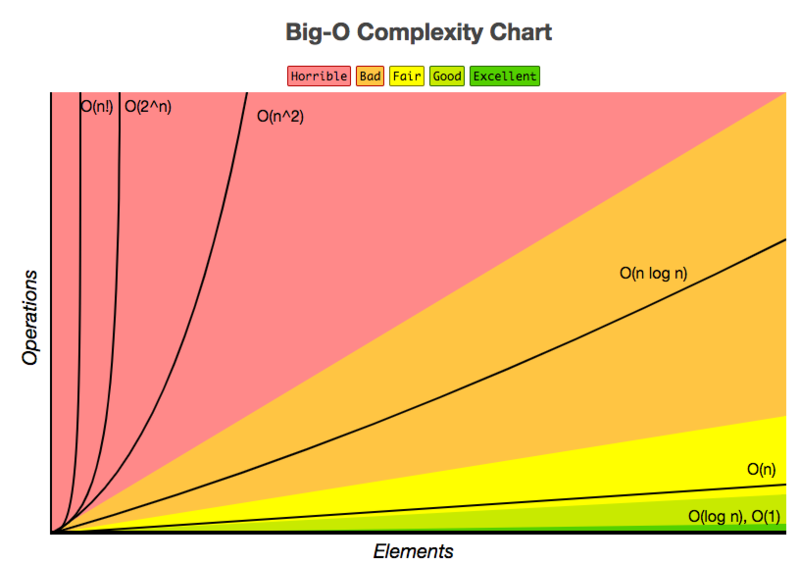
SQL Tuning
Учитывая план выполнения запроса и сложность времени, вы можете дополнительно настроить свой запрос SQL. Вы можете начать с уделения особого внимания следующим моментам:
- Замените ненужное полное сканирование больших таблиц (full table scans) сканированием индексов (index scans);
- Убедитесь, что применяется оптимальный порядок соединения таблиц.
- Убедитесь, что индексы используются оптимально. И
- Используется кэширование полнотекстовых сканирований малых таблиц (cache small-table full table scans.).
Дальнейшее использование SQL
Поздравляю! Вы дошли до конца этой статьи, которая только что дала вам небольшой взгляд на производительность SQL-запросов. Я надеюсь, что вы получили больше информации об антипаттернах, оптимизаторе запросов и инструментах, которые вы можете использовать для анализа, оценки и интерпретации сложности вашего плана запросов. Однако вам еще столько всего предстоит открыть! Если вы хотите узнать больше, почитайте книгу “Database Management Systems“ авторства R. Ramakrishnan и J. Gehrke.
Наконец, я не хочу отказывать вам в этой цитате от пользователя StackOverflow:
Мой любимый антипаттерн не проверяет ваши запросы.
Читаем планы SQL-запросов Greenplum на практическом примере и разбираемся с операциями

В недавней статье про оптимизацию SQL-запросов в Greenplum мы рассказывали про планы их выполнения и операторы просмотра этих планов. Сегодня разберем подробнее, какие операции с данными могут встретиться в отчете, сгенерированном командой EXPLAIN, а также рассмотрим, чем эта информация полезна дата-инженеру и аналитику данных.
5 операций в плане выполнения SQL-запросов в Greenplum: практический пример
Напомним, просмотреть план выполнения SQL-запроса в Greenplum можно с помощью команды EXPLAIN как в рамках самой СУБД, так и с помощью сторонних сервисов анализа и визуализации. Например, открытый сервис российской компании «Тензор» — https://explain.tensor.ru/ для PostgreSQL-совместимых баз данных, к которым относится и Greenplum . В итоге получим план выполнения запроса — отчет с подробным описанием шагов, которые определил оптимизатор СУБД, в виде дерева узлов, каждый из которых передает свой результат вышестоящему. На узле происходят операции с данными: сканирование, соединение, агрегирование или сортировка, которые могут быть выполнены различными методами.
Например, для запроса
SELECT gp_segment_id, count(*)
GROUP BY gp_segment_id;
Получим в сервисе компании «Тензор» https://explain.tensor.ru/ следующий план выполнения :
План выполнения SQL-запроса в Greenplum
Рассмотрим подробнее, какие операторы используются на узлах полученного плана, начав с конца. Последний узел выполняет операцию сканирования оператором Seq Scan. Вообще в Greenplum используются следующие операторы сканирования :
— Seq Scan — последовательное сканирование таблиц всех строк в таблице;
— Index Scan — просмотр индекса для извлечения строк из таблицы;
— Bitmap Heap Scan, который собирает указатели на строки в таблице из индекса и сортирует их по местоположению на диске;
— Dynamic Seq Scan, когда для сканирования выбираются отдельные разделы.
Результаты сканирования передаются вышестоящему узлу, где выполняется операция сортировки строк (Sort) в качестве подготовительного шага для другой операции, требующей упорядоченных данных. В частности, такой операцией и является агрегирование, которая выполняется на следующем шаге — GroupAggregate.
После этого выполняется перемещение данных (Redistribute motion), когда каждый сегмент Greenplum повторно хеширует данные и отправляет строки в разные сегменты в соответствии с хеш-ключом. Помимо Redistribute motion в Greenplum бывает еще 2 вида операций перемещения строк между сегментами :
— Broadcast motion — каждый сегмент отправляет свои собственные отдельные строки всем другим сегментам, чтобы каждый экземпляр сегмента имел полную локальную копию таблицы. Этот вариант широковещательной рассылки не стол оптимален, как Redistribute motion, поэтому оптимизатор обычно выбирает Broadcast motion только для небольших таблиц. Если данные не были распределены по ключу соединения, выполняется динамическое перераспределение необходимых строк из одной из таблиц в другой сегмент.
— Gather motion — данные результатов со всех сегментов собираются в единый поток. Это последняя операция для большинства планов запросов, что мы и видим на нашем примере.
Кроме операций, которые присутствуют в нашем примере, в плане выполнения SQL-запроса Greenplum можно встретить и другие, которые мы разберем далее.
Что еще можно встретить в отчете оператора EXPLAIN
JOIN-соединение найденных строк Greenplum выполняют следующие операторы :
— Hash Join — самый быстрый вариант, который строит хеш-таблицу из меньшей таблицы со столбцом соединения в качестве хеш-ключа. Далее он сканирует большую таблицу, вычисляя хэш-ключ для столбца соединения, чтобы найти строки в хэш-таблице с тем же хеш-ключом.
— Nested Loop — вложенный цикл, который итеративно выполняет операции со строками в большем наборе данных, просматривая строки в меньшей таблице на каждой итерации. Такие соединения требуют широковещательной передачи одной из таблиц, чтобы все ее строки можно было сравнить со всеми строками в другой таблице. Этот вариант хорошо работает с таблицами, небольшими по размеру или ограниченными индексом, используется для декартовых и диапазонных соединений. При работе с большими таблицами возникают проблемы с производительностью, поэтому рекомендуется установить параметр конфигурации сервера enable_nestloop в значение OFF, чтобы использовать Hash Join.
— Merge Join — сортирует оба набора данных и соединяет их вместе. Этот вариант выполняется быстро для предварительно упорядоченных данных, но редко применяется на практике. Чтобы использовать по умолчанию его вместо Hash Join, нужно задать для параметра конфигурации enable_mergejoin значение ON.
Также в планах выполнения SQL-запроса Greenplum можно встретить следующие операторы :
— Materialize — планировщик материализует подвыборку один раз, чтобы не повторять это для каждой строки верхнего уровня;
— InitPlan — предварительный запрос при динамическом удалении разделов, если планировщику до времени выполнения неизвестны значения, необходимые для определения разделов сканирования;
— Group By — группирует строки по одному или нескольким столбцам;
— Group/Hash Aggregate — объединяет строки с помощью хэша;
— Append— объединяет наборы данных, например, при соединении строк, отсканированных из разделов в таблице с большим количеством разделов;
— Filter — выбирает строки по критериям условия WHERE;
— Limit— ограничивает количество возвращаемых строк.
В заключение отметим, что использовать LIMIT надо с осторожностью. Добавление этого уточнения, изменит выдачу результата. Если указывается число LIMIT, вернется не более заданного числа строк. Применяя LIMIT, важно использовать также условие ORDER BY, чтобы строки результата выдавались в определённом порядке. Иначе будут возвращаться непредсказуемые подмножества строк. Оптимизатор запроса учитывает ограничение LIMIT, строя планы выполнения запросов. Различные значения LIMIT, выбирающие разные подмножества результатов запроса, приведут к несогласованности результатов, если не установить предсказуемую сортировку с помощью ORDER BY. Это неизбежное следствие того, что SQL не гарантирует вывод результатов запроса в некотором порядке, если порядок не определён явно условием ORDER BY .
Узнайте больше подробностей про администрирование и эксплуатацию MPP-СУБД Greenplum для эффективного хранения и аналитики больших данных на авторском курсе «Greenplum для инженеров данных» в нашем лицензированном учебном центре обучения и повышения квалификации для разработчиков, менеджеров, архитекторов, инженеров, администраторов, Data Scientist’ов и аналитиков Big Data в Москве.