SQL оператор DISTINCT
SQL оператор DISTINCT используется для удаления дубликатов из результирующего набора оператора SELECT.
Синтаксис
Синтаксис для оператора DISTINCT в SQL:
Параметры или аргументы
Примечание
- Если в операторе DISTINCT указано только одно выражение, запрос возвратит уникальные значения для этого выражения.
- Если в операторе DISTINCT указано несколько выражений, запрос извлекает уникальные комбинации для перечисленных выражений.
- В SQL оператор DISTINCT не игнорирует значения NULL. Поэтому при использовании DISTINCT в вашем операторе SQL ваш результирующий набор будет содержать значение NULL в качестве отдельного значения.
Пример — поиск уникальных значений в столбце
Давайте посмотрим, как использовать оператор DISTINCT для поиска уникальных значений в одном столбце таблицы.
В этом примере у нас есть таблица suppliers со следующими данными:
| supplier_id | supplier_name | city | state |
|---|---|---|---|
| 100 | Yandex | Moscow | Russia |
| 200 | Lansing | Michigan | |
| 300 | Oracle | Redwood City | California |
| 400 | Bing | Redmond | Washington |
| 500 | Yahoo | Sunnyvale | Washington |
| 600 | DuckDuckGo | Paoli | Pennsylvania |
| 700 | Qwant | Paris | Ile de France |
| 800 | Menlo Park | California | |
| 900 | Electronic Arts | San Francisco | California |
Давайте найдем все уникальные значения в таблице suppliers . Введите следующий SQL оператор:
Будет выбрано 6 записей. Вот результаты, которые вы должны получить:
| state |
|---|
| Russia |
| Ile de France |
| Pennsylvania |
| California |
| Washington |
| Michigan |
В этом примере возвращаются все уникальные значения состояния из таблицы поставщиков и удаляются все дубликаты из набора результатов. Как видите, штат Калифорния в наборе результатов отображается только один раз, а не четыре раза.
Пример — поиск уникальных значений в нескольких столбцах
Далее давайте рассмотрим, как использовать SQL DISTINCT для удаления дубликатов из более чем одного поля в операторе SELECT.
Используя ту же таблицу suppliers из предыдущего примера, введите следующий SQL оператор:
Будет выбрано 8 записей. Вот результаты, которые вы получите:
| city | state |
|---|---|
| Moscow | Russian |
| Lansing | Michigan |
| Redwood City | California |
| Redmond | Washington |
| Sunnyvale | Washington |
| Paoli | Pennsylvania |
| Paris | France |
| Menlo Park | California |
В этом примере будет возвращаться каждая уникальная комбинация city и state . В этом случае DISTINCT применяется к каждому полю, указанному после ключевого слова DISTINCT. Как видите, ‘Redwood City’, ‘California’ в наборе результатов отображается только один раз, а не дважды.
Пример — как DISTINCT обрабатывает значения NULL
Наконец, считает ли оператор DISTINCT NULL уникальным значением в SQL? Ответ — да. Давайте рассмотрим это дальше.
В этом примере у нас есть таблица products со следующими данными:
| product_id | product_name | category_id |
|---|---|---|
| 1 | Pear | 50 |
| 2 | Banana | 50 |
| 3 | Orange | 50 |
| 4 | Apple | 50 |
| 5 | Bread | 75 |
| 6 | Sliced Ham | 25 |
| 7 | Kleenex | NULL |
Теперь давайте выберем уникальные значения из поля category_id , которое содержит значение NULL. Введите следующий запрос SQL:
SQL DISTINCT
To remove duplicate rows from a result set, you use the DISTINCT operator in the SELECT clause as follows:
If you use one column after the DISTINCT operator, the DISTINCT operator uses values in that column to evaluate duplicates.
If you use two or more columns, the DISTINCT will use the combination of values in those columns to evaluate the duplicate.
Note that the DISTINCT only removes the duplicate rows from the result set. It doesn’t delete duplicate rows in the table.
If you want to select two columns and remove duplicates in one column, you should use the GROUP BY clause instead.
SQL DISTINCT examples
We will use the employees table in the sample database to demonstrate how the DISTINCT operator works.
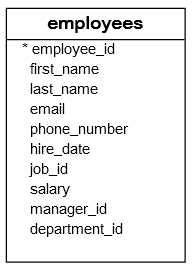
1) Using SQL DISTINCT operator on one column example
The following statement selects the salary data from the salary column of the employees table and sorts them from high to low:
The result set has some duplicates. For example, 17000, 12000, and 9000.
The following statement uses the DISTINCT operator to select unique values from the salary column of the employees table:
As you can see, the result set doesn’t contain any duplicate salary values.
2) Using SQL DISTINCT operator on multiple columns example
The following statement selects the job id and salary from the employees table:
The result set has some duplicate rows e.g., job id 5 salary 17000. It means that there are two employees with the same job id and salary.
The following statement uses the DISTINCT operator to remove the duplicate values in job id and salary:
Note that you still see the duplicate in the job_id column because the DISTINCT operator uses values from both job_id and salary to evaluate the duplicate, not just values in the job_id column.
SQL DISTINCT and NULL
In the database, NULL means unknown or missing data.
Unlike values like numbers, strings, dates, etc. NULL does not equal anything, even itself. The following expression will return unknown (or NULL):
Typically, the DISTINCT operator treats all NULL the same. Therefore, the DISTINCT operator keeps only one NULL in the result set.
Note that this behavior may be different between database products.
For example, the following statement returns the distinct phone numbers of employees:
SQL Оператор SELECT DISTINCT
Оператор SELECT DISTINCT используется для возврата только distinct — отдельных (разных) значений.
Столбец внутри таблицы часто содержит много повторяющихся значений; а иногда необходимо перечислить только разные (отдельные) значения.
Синтаксис SELECT DISTINCT
Демо-база данных
Ниже представлен выбор из таблицы "Customers" ("Клиенты") в образце базы данных Northwind:
Пример SELECT без DISTINCT
Следующий SQL оператор выбирает ВСЕ (включая дубликаты) значения из столбца «Country» в таблице «Customers»:
Пример
Теперь давайте используем ключевое слово DISTINCT с указанным выше оператором SELECT и посмотрим на результат.
Примеры SELECT DISTINCT
Следующий SQL оператор выбирает только значения DISTINCT из столбца «Country» в таблице «Customers»:
Пример
Следующий SQL оператор перечисляет количество разных (отдельных) стран-заказчиков:
Пример
Примечание: Приведенный выше пример не будет работать в Firefox! Потому что COUNT(DISTINCT column_name) не поддерживается в базах данных Microsoft Access. Firefox использует Microsoft Access в наших примерах.
Вот обходной путь для MS Access:
Пример
ПАЛИТРА ЦВЕТОВ
ПРИСОЕДИНЯЙТЕСЬ!
Получите ваш
Сертификат сегодня!
Связь с админом
Если вы хотите сообщить об ошибке, а также внести предложение о работе сайта, добавить объявление или рекламу на сайт, не стесняйтесь отправить админу электронное письмо на email:
Топ Учебники
Топ Справочники
Топ Примеры
Веб Сертификаты
Этот сайт оптимизирован для обучения и тестирования. Примеры могут быть упрощены для улучшения чтения и базового понимания. Учебные пособия, ссылки и примеры постоянно пересматриваются, чтобы избежать ошибок, но мы не можем гарантировать полную правильность и работоспособность всего контента. Используя этот сайт, вы соглашаетесь с тем, что прочитали и приняли условия использования, cookie и политику конфиденциальности.
Также вы можете абсолютно бесплатно скачать офлайн версию сайта W3Schools на русском архивом с GitHub и пользоваться локально на своём компьютере.
Также доступна версия сайта W3Schools на украинском языке.
Copyright 1999-2021 by Refsnes Data. All Rights Reserved.
Сайт работает на фреймворке W3.CSS.
The many faces of DISTINCT in PostgreSQL

I started my programming career as an Oracle DBA. It took a few years but eventually I got fed up with the corporate world and I went about doing my own thing.
When I no longer had the comfy cushion of Oracle enterprise edition I discovered PostgreSQL. After I gotten over not having proper partitions and MERGE statement (aka UPSERT) I found some nice unique features in PostgreSQL. Oddly enough, a lot of them contained the word DISTINCT.
DISTINCT
I created a simple Employee table with name, department and salary using mock data from this site:
What is DISTINCT?
SELECT DISTINCT eliminates duplicate rows from the result.
The simplest use of distinct is, for example, to get a unique list of departments:
(easy CS students, I know it’s not normalized…)
We can do the same thing with group by
but we are talking about DISTINCT.
DISTINCT ON
A classic job interview question is finding the employee with the highest salary in each department.
This is what they teach in the university:
Legal has two employees with the same high salary. Depending on the use case, this query can get pretty nasty.
If you graduated a while back, you already know a few things about databases and you heard about analytic and window functions, you might do this:
The result is the same without the duplicates:
Up until now, this is what I would have done.
Now for the real treat, PostgreSQL has a special nonstandard clause to find the first row in a group:
This is wild! Why nobody told me this is possible?
The docs explain DISTINCT ON:
SELECT DISTINCT ON ( expression [, …] ) keeps only the first row of each set of rows where the given expressions evaluate to equal
And the reason I haven’t heard about it is:
Nonstandard Clauses
DISTINCT ON ( … ) is an extension of the SQL standard.
PostgreSQL does all the heavy lifting for us. The only requirement is that we ORDER BY the field we group by ( department in this case). It also allows for “grouping” by more than one field which only makes this clause even more powerful.
IS DISTINCT FROM
Comparing values in SQL can result in three outcomes — true , false or unknown :
The result of comparing NULL with NULL using equality (=) is UNKNOWN (marked as NULL in the table).
In SQL 1 = 1 and NULL IS NULL but NULL != NULL.
It’s important to be aware of this subtlety because comparing nullable fields might yield unexpected results.
The full condition to get either true or false when comparing nullable fields is:
This is the result we want but it is very long. Is there a better way?
PostgreSQL implements the SQL standard for safely comparing nullable fields:
PostgreSQL wiki explain IS DISTINCT FROM :
IS DISTINCT FROM and IS NOT DISTINCT FROM … treat NULL as if it was a known value, rather than a special case for unknown.
Much better — short and verbose.
How other databases handle this?
- MySQL — a special operator<=> with similar functionality.
- Oracle — Provide a function called LNNVL to compare nullable fields (good luck with that…).
- MSSQL — Couldn’t find a similar function.
ARRAY_AGG (DISTINCT)
ARRAY_AGG was one of the major selling points of PostgreSQL when I was transitioning from Oracle.
ARRAY_AGG aggregates values into an array:
I find ARRAY_AGG useful mostly in the CLI for getting a quick view of the data, or when used with an ORM.
PostgreSQL took it the extra mile and implemented the DISTINCT option for this aggregate function as well. Using DISTINCT we can, for example, quickly view the unique salaries in each department:
We can immediately see that everyone in the support department are making the same salary.
How other databases handle this?
- MySQL — Has a similar function called GROUP_CONCAT.
- Oracle — Has an aggregate function called ListAgg. It has no support for DISTINCT. Oracle introduced the function in version 11.2 and up until then the world wide web was filled with custom implementations.
- MsSQL — The closest I found was a function called STUFF that accepts an expression.
Take away
The only take away from this article is that you should always go back to the basics!