Установка и загрузка программного обеспечения Epson Event Manager 3.11.53 для Windows и Mac
Установка программного обеспечения Epson Event Managerи Загрузить для Windows и Mac OS. Программное обеспечение Epson Event Manager — это инструмент, который поддерживает разблокировку сканера Epson и скрытых функций принтера. Вы можете получить полный доступ с помощью этого программного обеспечения. Это совершенно бесплатно для скачивания. Для загрузки или установки этого инструмента не требуется никаких знаний. Последняя версия программного обеспечения Epson Event Manager — v 3.11.53.
Epson — японская компания по производству электроники. это один из крупнейших производителей компьютерных сканеров, принтеров и оборудования для обработки изображений. Таким образом, программное обеспечение Epson Event Manager — это необходимый инструмент, который необходимо установить на вашем компьютере под управлением Windows или Mac, чтобы получить все преимущества лучших и основных функций вашего продукта Epson.
Что такое Epson Event Manager?
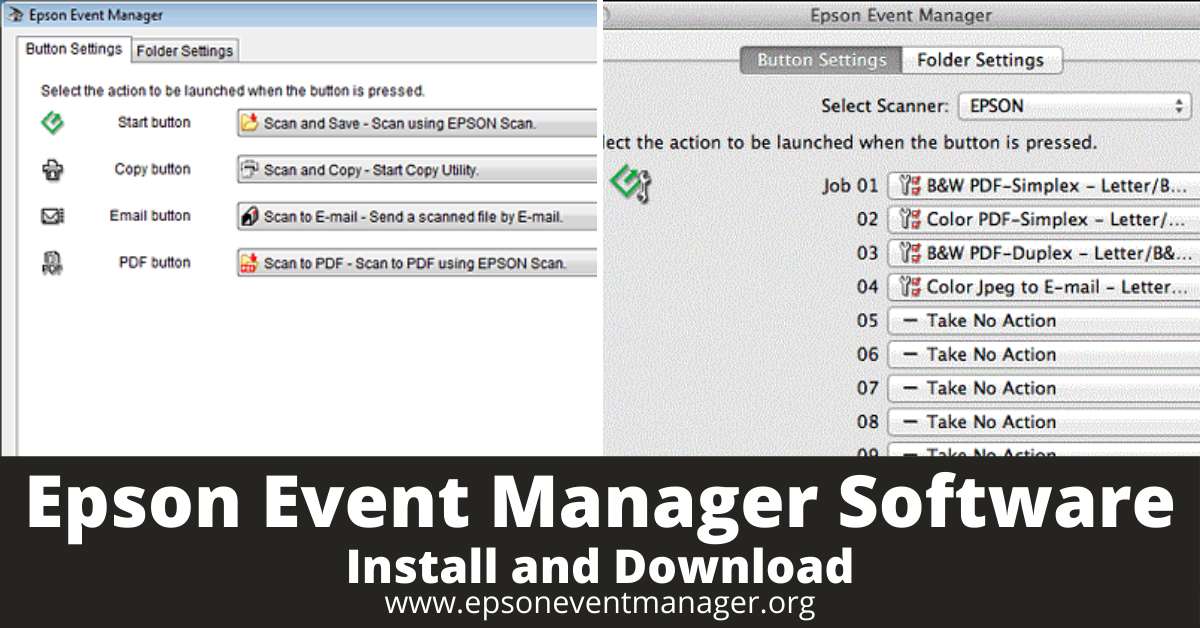
EPSON Event Managerпредоставляется для доступа к любой из кнопок продукта, чтобы открыть программное обеспечение для сканирования, вы можете сохранить настройки сканирования. Используя этот инструмент, вы можете ускорить сканирование проектов. Наименьшая версия — 3.11.50, более 70% всех установок в настоящее время используют эту версию. Во время установки создается точка регистрации запуска в Windows и статистика для загрузки ПК. Запланированная задача, добавленная в планировщик задач Windows для запуска программы. Эта утилита предназначена для подключения к Интернету и добавляет брандмауэр Windows.
Что делает Epson Event Manager?
Программное обеспечение Epson Event Manager обычно используется для сканеров Epson и сканирования в формате PDF, сканирования в электронную почту, сканирования на ПК и других целей. Нажатие кнопки сканирования открывает программу, которая дополнительно ускоряет сканирование. Кроме того, вы можете проверить такие параметры, как исходный размер, тип данных, разрешение, тип фотографии, формат документов, целевая папка и многие другие действия. Эта утилита работает в фоновом режиме и доступна из панели задач.
Основные ключевые особенности загрузки программного обеспечения Epson Event Manager
- Разрешить Varius Spodin Sacenner возможности.
- Лицензировано как бесплатное ПО.
- Удобный для пользователя. Так что не нужно дополнительных технических знаний.
- Сканирование и печать еще быстрее.
- Поддержка дополнительной проверки настроек. — Тип фотографии, начальный размер, целевая папка, разрешение, тип данных, формат документов и многие другие действия.
- Поддержка операционных систем Windows и Mac.
Загрузка более старой версии программного обеспечения Epson Event Manager
- Утилита Epson Event Manager 3.11.53
- Утилита Epson Event Manager 3.11.21
Как загрузить программу Epson Event Manager для 64- и 32-разрядной версии Windows 10
Сейчас доступна последняя версия программного обеспечения Epson Event Manager v 3.11.53. Вот самый мощный полный и исправленный баг. Итак, используя эту утилиту, вы получите доступ к своему продукту Epson.
- First, You needЗагрузка программного обеспечения Epson Event Manager.
- Нажмите кнопку «Загрузить» в верхней части этой страницы.
- Выберите место для сохранения этого программного обеспечения на ПК с Windows.
- После завершения загрузки программного обеспечения Epson Event Manager щелкните «Открыть папку» или щелкните «Загруженный файл». Имя файла заканчивается на .exe.
- Теперь вы можете установить Epson Event Manager для Windows.
Как установить программу Epson Event Manager для 64- и 32-разрядной версии Windows 10
- После завершения загрузки вы можете установить программное обеспечение Epson Event Manager.
- Найдите загруженный файл, дважды щелкните значок, чтобы открыть.
- Показать всплывающее сообщение, нажмите кнопку ОК, чтобы продолжить.
- Теперь начните процесс установки распаковки файлов.
- Завершить этот процесс. Автоматически открывает новую страницу.
- Примите лицензионное соглашение и нажмите кнопку «Далее».
- Теперь запустите установку Epson Event Manager.
- После завершения установки нажмите кнопку «Готово».
- Теперь вам нравится программа Epson Event Manager.
Программное обеспечение Epson Event Manager поддерживает ОС Windows:
32-разрядная версия Windows 10, 64-разрядная версия Windows 10, 32-разрядная версия Windows 8.1, 64-разрядная версия Windows 8.1, 32-разрядная версия Windows 8, 64-разрядная версия Windows 8, 32-разрядная версия Windows 7, 64-разрядная версия Windows 7, Windows XP 32-разрядная, Windows XP 64-разрядная, Windows Vista 32-разрядная, Windows Vista 64-разрядная
Как загрузить и установить программное обеспечение Epson Event Manager для Mac
Сейчас доступна последняя версия программного обеспечения Epson Event Manager для Mac v 2.51.64. Эта утилита поддерживает более быструю работу с продуктом Epson.
- Во-первых, вам нужноЗагрузка программного обеспечения Epson Event Manager для Mac.
- Выберите место для сохранения файла.
- После завершения загрузки найдите файл установки и дважды щелкните файл.
- Теперь откройте страницу установки.
- Следуйте инструкциям, чтобы установка прошла успешно.
- После полной установки нажмите кнопку «Готово».
Программа Epson Event Manager поддерживает ОС MAC:
macOS 10.14.x, macOS 10.13.x, macOS 10.12.x, Mac OS X 10.11.x, Mac OS X 10.10.x, Mac OS X 10.9.x, Mac OS X 10.8 .x, Mac OS X 10.7.x, Mac OS X 10.6.x, Mac OS X 10.5.x
Часто задаваемые вопросы (FAQ)
Как загрузить Epson Event Manager?
- СкачатьФайл программного обеспечения.
- Дважды щелкните загруженный файл и установите его.
- Следуйте инструкциям по установке.
Почему мне нужно платить за Epson Event Manager?
Epson Event Manager бесплатно. Не нужно платить за использование этой утилиты. Вы можете использовать сканеры и получить доступ ко всем продуктам Epson.
Как найти Epson Event Manager на Mac?
Доступен Epson Event Manager v 2.51.64 для Mac. Если вам нужно скачать, нажмите кнопку загрузки вверху этой страницы.
Как установить Epson Event Manager?
- Щелкните загруженный файл.
- Теперь покажите всплывающее предупреждение, нажмите кнопку ОК.
- Проверьте лицензионное соглашение и нажмите кнопку «Далее».
- Теперь запустите установку программного обеспечения Epson Event Manager.
- После завершения установки нажмите кнопку «Готово».
- Теперь вы можете запустить Утилиту.
Нужен ли мне Epson Event Manager?
Epson Event Manager — это программное обеспечение, с помощью которого вы можете получить расширенные функции продукта Epson. Разблокируйте все скрытые функции одним щелчком мыши.
Безопасен ли Epson Event Manager?
Да, это безопасно. Epson — лучшая компания, поэтому они предоставляют только лучшее и безопасное программное обеспечение для пользователей продуктов Epson.
Как избавиться от Epson Event Manager?
Перейдите в Панель управления> Найдите файл программы удаления> Найдите программное обеспечение Epson Event Manager> Затем нажмите кнопку «Удалить».
Как открыть Epson Event Manager?
Щелкните Windows или кнопку «Пуск»> Поиск программного обеспечения Epson> Щелкните значок файла, автоматически открывайте программное обеспечение диспетчера событий Eposin.
Epson Event Manager Software
The Epson Event Manager Software enables you to appoint anyone of the item buttons to open up a scanning program. You can likewise conserve check setups that you use frequently. It makes scanning your jobs even quicker. Select Applications Epson Software, and also double-click the Launch Event Manager icon.
the push-scan button feature to open a program in the Epson Event Manager to make scanning also quicker. You can make particular check settings such as the file type, initial Size, Photo Kind, Resolution, Target Folder, Documents Format, as well as various other actions.
Epson Event Manager Utility is a usually essential application to have installed on your COMPUTER if you would love to take advantage of the main features of your Epson product. Epson Event Manager Utility is typically utilized to supply support to various EPSON scanners as well as does things like promoting Scan to Email, Check as PDF, Check to PC, and other uses.
The application runs in the background as well as might be accessed from the system tray. It typically pays attention to events that have set off the scanner function of EPSON printers and all-in-one gadgets.
OS: Windows and Mac
Epson Event Manager Utility v3.11.53
File Size: 18 MB
Download the Epson Event Manager Software first above.
Save on PC or Laptop and.
Open it by clicking 2x, then the software will come out.
Just follow the instructions on the screen below.
Click Next , then select I accept the terms in the License Agreement .
Wait for the process to finish first.
Then click Finish .
How do I download Epson Event Manager?
how to download the Epson event manager is very easy, you can directly download it here, it is available for you, and you can download it for free.
What is the Epson Event Manager?
This utility allows you to scan from the control panel of your Epson product.
Note: The EPSON Scan or Epson Scan 2 Utility must be installed prior to using the Event Manager Utility.
Is Epson Event Manager free?
The software is free and you can download it for Windows 10, 8, 7, Mac here.
Приложение для настройки операций сканирования из панели управления ( Epson Event Manager )
Epson Event Manager — это приложение, позволяющее управлять сканированием с панели управления и сохранять изображения на компьютер. Можно добавлять собственные настройки в качестве предустановок, например тип документа, местоположение папки хранения и формат изображения. Подробности см. в справке по приложению.
Нажмите кнопку «Пуск» и выберите Epson Software > Event Manager .
Windows 8.1/Windows 8
С помощью кнопки «Поиск» введите название приложения, после чего нажмите появившийся значок.
Windows 7/Windows Vista/Windows XP
Нажмите кнопку «Пуск» и выберите Все программы или Программы > Epson Software > Event Manager .
Epson Event Manager Software
The Epson Event Manager Utility is a crucial piece of software that forms an integral part of the functionality of many Epson scanners and multifunction devices. This guide explores everything you need to know about this vital tool, enabling you to optimize its use and ensure the smooth running of your Epson hardware.
Table of Contents
Understanding Epson Event Manager Utility
The Epson Event Manager Utility is a powerful software application designed to assist users in getting the most out of their Epson scanning devices. By linking software actions to hardware buttons, this utility allows you to customize your device’s functionality to suit your specific needs.
The Importance of Epson Event Manager

Customizable Functionality
The Epson Event Manager offers the option of personalizing your Epson device according to your requirements. With the ability to assign different tasks to different hardware buttons, you can optimize your scanner or multifunction device for your specific workflow.
Seamless Integration
The Event Manager software effortlessly integrates with your Epson scanner or multifunction device, ensuring you can manage all tasks and settings from a single interface. This makes it easier to control various aspects of the device without the need for separate applications.
Key Features of Epson Event Manager Utility

The Epson Event Manager Utility offers several distinct features aimed at improving your overall productivity.
Event-Driven Actions
This utility enables you to set up event-driven actions. For example, the pressing of a specific button on your device can be programmed to trigger a scanning action or open a particular application.
Document Management
Epson Event Manager software aids in document management. It simplifies scanning multiple pages and converting them into a single PDF file, significantly enhancing your office productivity.
Downloading and Installing the Epson Event Manager Utility
The Epson Event Manager Utility is available for download from the official Epson website. Installation is simple, and within minutes, you’ll be ready to customize your Epson scanner or multifunction device.
Epson Event Manager Download
✅ Free: Freeware
✅ OS: for Windows and Mac
✅ Developer: Epson
Supported Devices
The Epson Event Manager is supported by a wide range of Epson scanners, including:
- All-in-One Printers ��
- Scanners ��
- Document Cameras ��
- Large Format Scanners��
Here are some additional details about the Epson Event Manager:
- The Event Manager is available for Windows ✅ and Mac OS X ✅.
- The Event Manager can be used to scan documents, photos, and other objects.
- The Event Manager supports a variety of file formats, including PDF, JPEG, and TIFF.
- The Event Manager can be used to scan to email and to scan to a network folder.
Here are some examples of Epson devices that are compatible with Epson Event Manager:
�� Epson ET-3760
�� Epson WF-2850
�� Epson ET-3750
�� Epson XP-4100
�� Epson XP-4105
�� Epson ET-4760
�� Epson XP 4100
�� Epson XP-2100
�� Epson XP-6100
�� Epson XP-7100
�� Epson WorkForce WF-2830
�� Epson WorkForce WF-3720
�� Epson WorkForce Pro WF-4740
�� Epson WorkForce Pro WF-7840
�� Epson SureColor P600
�� Epson SureColor P800
�� Epson SureColor P900
�� Epson Perfection V19
�� Epson Perfection V39
�� Epson Perfection V370 Photo
�� Epson Perfection V550 Photo
�� Epson Perfection V600 Photo
�� Epson Perfection V800 Photo
�� Epson Perfection V850 Pro
�� Epson WorkForce DS-40
�� Epson WorkForce DS-1630
�� Epson WorkForce DS-510
�� Epson WorkForce DS-560
How to Install Epson Event Manager Software for Windows and Mac
Installing Epson Event Manager on your Windows or macOS computer is a straightforward process. Here’s a step-by-step guide on how to install the software:
For Windows:
- Epson Event Manager Download Windows 11, 10, 8, 7 (32-bit or 64-bit).
- Double-click on the downloaded file to start the installation process.
- Follow the on-screen instructions to install the software.
- Once the installation is complete, open Epson Event Manager to start using it.
For macOS:
- Download the Epson event manager for Mac.
- Double-click on the downloaded file to mount the disk image.
- Double-click on the “Epson Event Manager” icon to start the installation process.
- Follow the on-screen instructions to install the software.
- Once the installation is complete, open Epson Event Manager to start using it.
How to Use the Epson Event Manager
The Epson Event Manager is user-friendly, with intuitive settings that make it easy to assign tasks to your Epson device’s buttons.
Assigning Actions
Assigning actions in Epson Event Manager is straightforward. Simply open the utility, select the button to which you want to assign an action, and select the desired action from the list.
Scanning to Email
The utility makes it possible to scan documents directly to your email. This feature can be activated by assigning the “Scan to Email” action to a particular button on your device.
Troubleshooting Epson Event Manager
Like any software, Epson Event Manager may sometimes encounter issues. However, most common problems can be easily solved by following a few simple steps.
In the day-to-day use of the Epson Event Manager, you may encounter occasional hitches. However, most of these issues can be addressed easily with just a few practical steps.
Issue 1: Epson Event Manager Not Recognizing Device
If your Epson Event Manager software is not detecting your device, it could be due to a couple of factors.
Solution: Check the Connection
First, ensure your Epson device is correctly plugged into your computer. Check if all cables are secure and if the device is powered on.
Solution: Update Device Drivers
Secondly, verify if the drivers for your device are up-to-date. Outdated drivers can cause the Epson Event Manager software not to recognize your device. To update your drivers, visit the official Epson website, find your device model, and download the latest drivers.
Issue 2: Epson Event Manager Buttons Not Responding
If the buttons on your Epson device aren’t responding as expected, it could be due to misconfigured settings within the Epson Event Manager.
Solution: Review Assigned Actions
To solve this issue, check the actions assigned to the buttons in question. Ensure the actions correspond to the tasks you want the buttons to perform. If needed, reassign the actions correctly.
Issue 3: Epson Event Manager Software Crashing
If the Epson Event Manager software crashes often, it may be a software-related issue.
Solution: Reinstall Epson Event Manager
In such cases, the most effective solution can often be to uninstall and reinstall the Epson Event Manager software. To do this, navigate to your control panel, select ‘Uninstall a program’, find Epson Event Manager in the list, and click ‘Uninstall’. Once the software is uninstalled, download the latest version from the official Epson website and follow the installation instructions.
By effectively troubleshooting any issues that arise with the Epson Event Manager, you can ensure that your Epson device remains efficient, productive, and customized to your needs.
Software Not Recognizing Device
If the software isn’t recognizing your Epson device, make sure that it’s properly connected and that the device drivers are up-to-date. If the issue persists, reinstalling the Event Manager software may solve the problem.
Buttons Not Responding
If your device’s buttons aren’t responding as expected, check that the actions have been correctly assigned in the Epson Event Manager Utility.
Epson Event Manager: Your Key to Optimized Productivity
In conclusion, the Epson Event Manager is an essential tool for any Epson scanner or multifunction device owner. It offers an array of functionalities that can significantly boost your productivity. By understanding its capabilities and learning how to customize it to your needs, you can unlock the full potential of your Epson device.
Conclusion
In conclusion, Epson Event Manager is a simple and effective software program for managing events related to Epson products. The software is easy to use and comes with several features that enhance productivity and efficiency. While the software may not be suitable for advanced workflows and integrations, it is an excellent tool for automating repetitive tasks and streamlining workflows.
Overall, Epson Event Manager is worth considering for businesses or individuals who use Epson products and want to save time and increase efficiency.
Here are a few frequently asked questions about Epson Event Manager:
Epson Event Manager is compatible with a wide range of Epson devices, including printers, scanners, and all-in-one machines.
However, it may not be compatible with all models, so it’s best to check the Epson website to make sure that your device is supported.
- Download the Epson Event Manager software.
- Double-click on the downloaded file to start the installation process.
- Follow the on-screen instructions to install the software on your computer.
- Connect your printer to your computer and turn it on.
- Launch the Epson Event Manager software and start using it to manage your printing tasks.
Yes, Epson Event Manager allows you to customize various settings and options for your Epson devices, such as scan resolutions and print quality.
You can access these options by clicking on the device and accessing the options in the side panel.
Yes, of course, the Epson Event Manager can be used on the Epson ET-3760 and other Epson types, such as Printers and Scanners, which you can download above.
Epson Event Manager Utility is a powerful and versatile software application that can help users manage their Epson printers more efficiently.
- Open the Epson Event Manager on your computer.
- Select the “Scan” option from the main menu.
- Choose the type of scan you would like to perform (e.g., Document, Photo, etc.).
- Follow the on-screen instructions to select your scan settings and preview the image.
- Click the “Scan” button to begin the scan.
Epson Event Manager can be accessed by clicking on the application icon or by accessing it through the Start menu or Applications folder on your computer.
To initiate tasks such as scans or print jobs with Epson Event Manager, simply select the device from the list and click the appropriate button.
You can also use the quick print feature to print documents or images directly from the application.
If you are having issues with Epson Event Manager, you can try checking the status tab to see if there are any error messages or warning messages that could be causing the issue.
You can also try restarting both the devices and your computer to see if that resolves the problem. If the issue persists, you can try checking the Epson support website for more information or contacting Epson customer support for assistance.
Epson Event Manager is designed to work with most Epson scanners, printers, and projectors. However, it may not be compatible with older or discontinued models.
Epson Event Manager is designed to work with Epson products only. It may not be compatible with products from other manufacturers.
Yes, Epson Event Manager has a simple and intuitive interface that is easy to use. Users can customize events and assign actions with just a few clicks.
Epson Event Manager is available for free on the Epson website. Users can download and use the software without any cost.