How to Become a Beta Tester for Discord
In this guide, we will elaborate on the method to become a Discord Beta tester on Desktop and Mobile.
How to Become a Discord Beta Tester on Desktop?
Discord beta tester is a Discord application used for beta testing to find current bugs. Basically, we can say that the Discord Beta tester is used for experimental purposes.
To download a Beta tester of Discord, we have provided some guidance that is effective enough.
Step 1: Download Discord Beta Tester
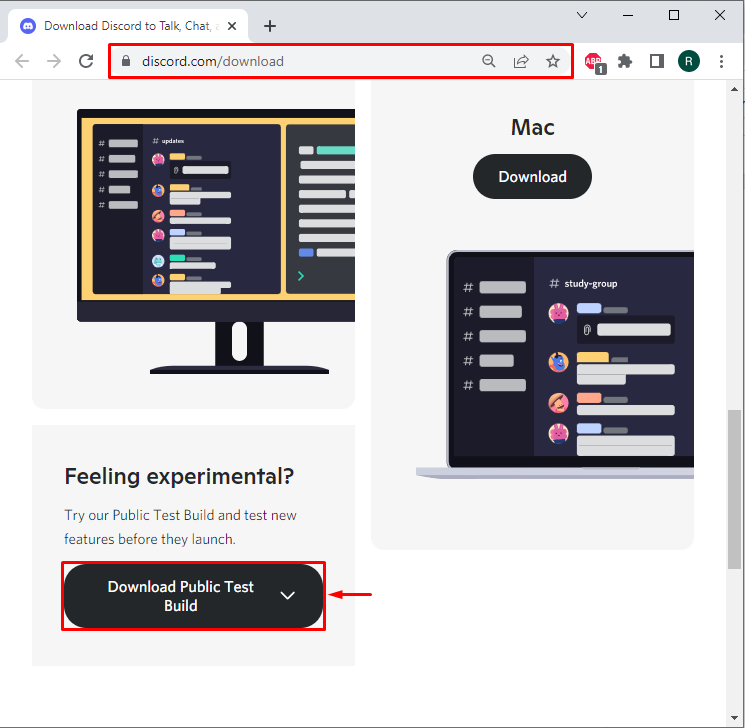
Firstly, open the Discord official website and click on the “Download Public Test Build” highlighted button:
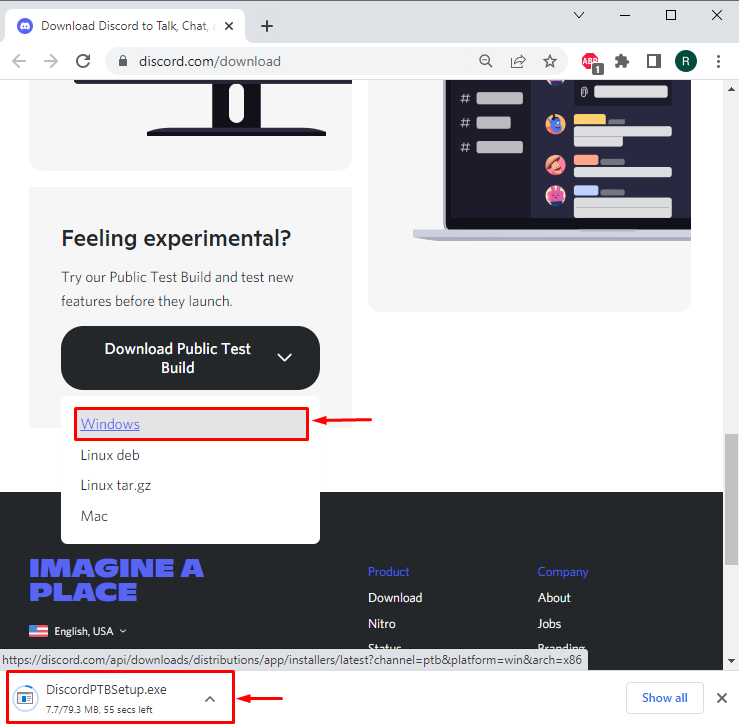
Selecting “Windows” will allow you to download the Discord beta tester for Windows. It can be seen that the downloading for the Discord beta installer has started:
Step 2: Execute Discord Beta Installer
Open the Downloads folder, and double-click on the Discord Beta installer to install it:

Step 3: Log in to Discord Account
After clicking on the installer, you will immediately be redirected to the login page. Enter your Discord username and password that you are using for the Stable Discord release. After that, hit the “Log in” button:

Mark the highlighted captcha for human verification:

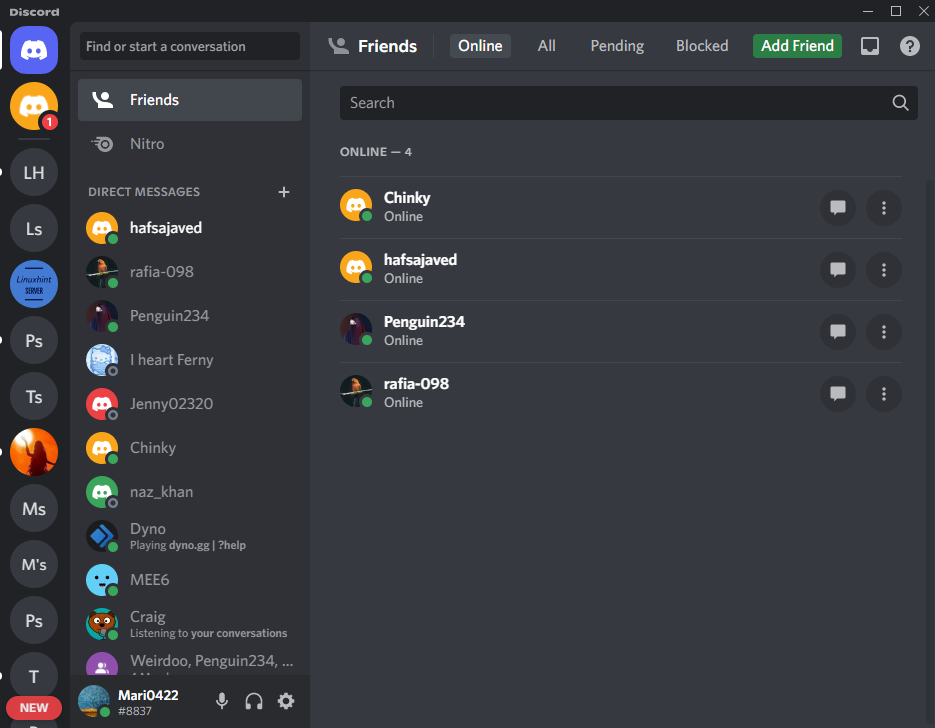
As you can see that we have logged into the Discord beta tester successfully:
Let’s move further to check how to become a Discord Beta tester on Mobile.
How to Become a Discord Beta Tester on Mobile?
To become a Beta tester for Discord on mobile, follow the below-mentioned steps.
Step 1: Open App Store
In the first step, navigate to the Google Play Store from your Android phone:

Step 2: Open User Profile
Click on the below highlighted profile icon to open your Google User Profile:

Step 3: Navigate Manage apps & device Settings
Then, navigate to the “Manage apps & device” settings:

Step 4: Open Discord
Next, open the “Manage” menu and scroll down to find the Discord application:

Now, to open Discord settings, click on the below highlighted Discord option. Do not mark the check box; only hit the Discord icon:

Step 5: Become a Discord Beta Tester
After opening the Discord settings, find the “Join the beta” section. After that, click on the below highlighted “Join” button to join Discord Beta Testing Community:

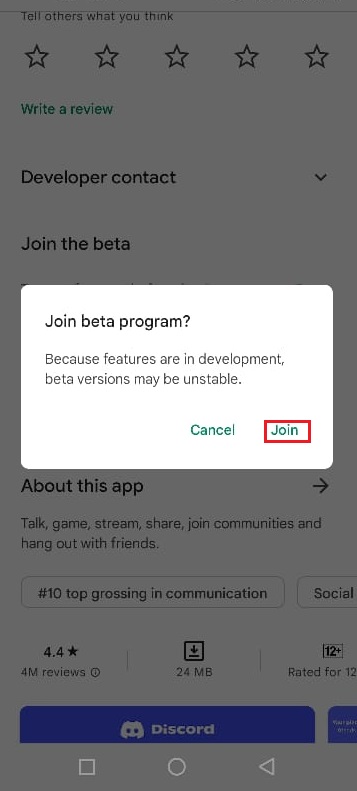
Upon doing so, the “Join Beta Program” verification box will appear on the screen. Hit the “Join” button:
Here, you can see we have successfully become Discord mobile beta testers:

You have learned the procedure to become a Beta tester for Discord both on Desktop and Mobile.
Conclusion
To become a Beta tester for Discord on Desktop, navigate to the Discord official website and download Discord beta tester for Windows. On Mobile, to become a Beta tester, open the Google Play Store application, open the “Manage apps & devices” settings, navigate to the Discord settings, and become a Beta Tester from the “Join the beta” menu. This blog has elaborated on the method to become a Discord Beta tester.
About the author

Rafia Zafar
I am graduated in computer science. I am a junior technical author here and passionate about Programming and learning new technologies. I have worked in JAVA, HTML 5, CSS3, Bootstrap, and PHP.
Sorry, you have been blocked
This website is using a security service to protect itself from online attacks. The action you just performed triggered the security solution. There are several actions that could trigger this block including submitting a certain word or phrase, a SQL command or malformed data.
What can I do to resolve this?
You can email the site owner to let them know you were blocked. Please include what you were doing when this page came up and the Cloudflare Ray ID found at the bottom of this page.
Cloudflare Ray ID: 7c713d248eec24b4 • Your IP: Click to reveal 88.135.219.175 • Performance & security by Cloudflare
How To Become A Beta Tester For Discord
If Are you looking to get solution of How To Become A Beta Tester For Discord then must check given helpful tips & tricks and guides. We have listed all of the similar and related references to provide you as much best possible solution.
1. Discord Testing Clients
Jul 30, 2021 — Beta – Also called public test build (PTB) for Desktop, for iOS it is Testflight, and for Android it is Beta. This version usually has more …
2. Alpha and Beta Testing – Discord
So, all your testers with a Beta Tester role, for example, will be able to get … Player A becomes inactive; you remove them from the Awesome Tester role.
3. Discord Testers
The official place to report Discord Bugs! Help find bugs, chat with others and be a part of the testers community! | 113365 members.
4. How do i become a beta tester?: discordapp – Reddit
Jun 11, 2021 — You cannot become a beta tester in another way than being chosen by Discord. This is available to people at random. 1.
Beta Testers Discord Server: gamedev – Reddit
Jan 24, 2019
Is there a beta test for new discord features: discordapp – Reddit
Jun 2, 2017
Is it possible to access the beta version of discord through the …
Sep 12, 2017
Discord beta app on IOS: discordapp – Reddit
Jun 4, 2021
More results from www.reddit.com
5. Join the Discord – Talk, Chat & Hangout beta – TestFlight – Apple
Take a screenshot on your device. · A thumbnail of your screenshot appears in the lower-left corner of your device. · Tap Share Beta Feedback. · Optionally, you …
6. Public Test Build – The Discord Wiki
The Public Test Build is the beta version of the Discord Client and the middle ground between the Stable and Canary clients. The Public Test Build (PTB) …
7. Beta Version – Google Play
No information is available for this page.
Learn why
8. Discord About Me 2021: How To Get, Edit And Change Bio?
How to Get Discord About Me Beta Feature (2021) — Can you get the About Me beta test? … guaranteed even if you become an alpha or beta tester.
9. Beta test the Google app for Android – Google Search Help
If you want to try experimental features of the Google app before they’re released, you can join the beta tester program. As a beta tester, you’ll become an …
10. How to apply for Genshin Impact 2.3 global beta test – GINX …
Sep 15, 2021 — Learn how to be part of Genshin Impact’s v2.3 global beta testing, … Genshin Impact 2.3 global beta test Discord announcement.
11. Become a Beta Tester – Niagara Launcher Knowledge Base
Sep 30, 2021 — Beta Download Links You can choose freely between the following sources: Discord (shared over the news channel): …
Join Our Discord and/or Join The Beta-Testers
Let’s do this together! (oh, and there’s a new extension)

A quick update on how to join the conversation on discord, how to join the beta testers and a sneak peek into a new Medium extension.
The wonderful Anthony Lawrence is a great source of inspiration for new ideas and he also does a tremendous job at finding bugs in…

Written by Martin van Soest
I write Medium Chrome Extensions and about anything that sparks my interest: hings that amaze, touch, or surprise me.