How to Use Discord Stickers and Make Your Own

Discord just released its Stickers feature for everyone. Here's everything to know about them and how to make custom stickers for your server.
In 2021, Discord has given boosted servers the ability to add custom server banners, server invite backgrounds, and most recently, 300 Stickers became available to all Nitro users and custom Stickers became available to all servers boosted to Level 1. That means your server needs only 2 server boosts, or the default number given to a single user with Discord Nitro.

I’ll go over everything there is to know about the new Stickers feature on Discord, plus I’ll show you how to make your own Discord Stickers, a feature recently released to all Level 1 servers. Here’s what you should know:
- What are Discord Stickers?
- How to use Discord Stickers
- How to make your own Stickers
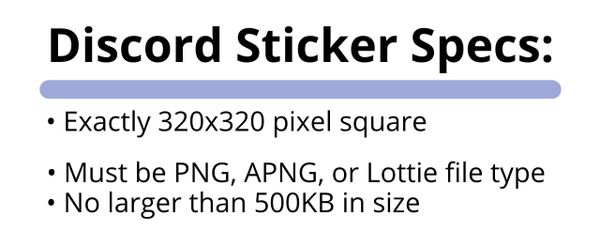
NOTE: Use this 320×320 pixel PNG Discord Sticker template to create your own custom Discord sticker now.
1. What Are Discord Stickers?
Discord Stickers are yet another way to participate in Discord channels and conversations, providing hundreds of unique character-based, transparent assets, both animated and still. They come in 12 built-in sticker packs for Nitro users only, each with a different animated character, from Discord’s own Wumpus mascot to a melting chihuahua. Each pack contains at least 15 different stickers, for a total of 300 to start with.
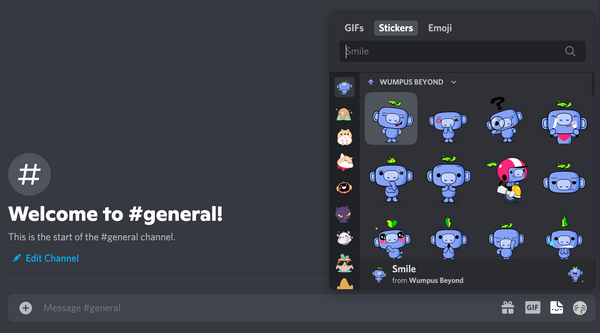
You can also add your own stickers if you already have the ability to add custom server emotes (likely Moderator or Admin roles) in a server that has been boosted to Level 1. As long as your server is boosted to Level 1, you don’t need Nitro to add custom stickers, and your server starts with a limit of 15 custom stickers. These stickers can be used by anyone in your server, whether or not they have Nitro. The files have very precise requirements:
2. How to Use Discord Stickers
For users in a Level 1-boosted server, Stickers are located in between the GIF and emoji buttons in the bottom right of the Discord window. If you have Discord Nitro, you’ll have 12 built-in sticker packs with 300 different stickers already available, but if you’re a free user, you’ll be able to use only the custom stickers that have been added by the server’s Mods and Admins. Plus, Nitro users will also be able to use custom stickers in all of their servers, while free users can only use them in their original server.
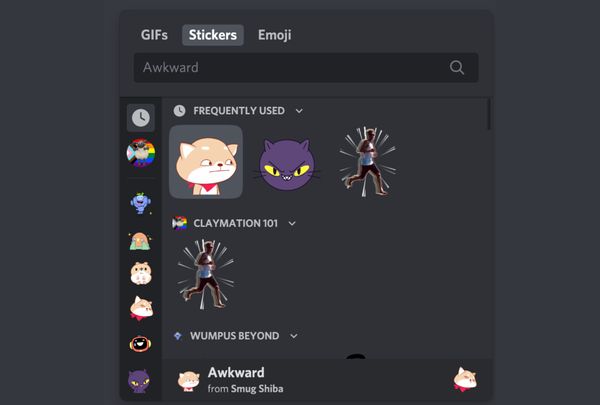
When you select a sticker, it’s immediately posted to the channel or chat you’re in. Clicking on a sticker message will bring users directly to that sticker pack, if they have it unlocked. If users don’t have Discord Nitro, they’ll still see all stickers posted in channels and conversations, but they won’t be able to use the starter sticker packs.
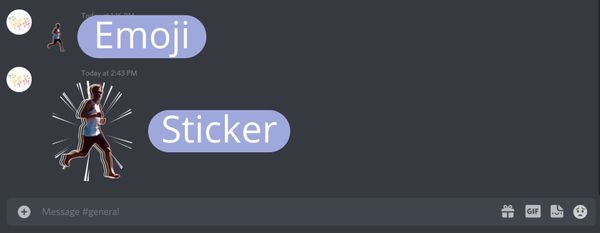
Here’s how Discord Stickers look compared to Discord emoji when pasted in a channel or DM.
3. How to Make Your Own Stickers
The most exciting part about the Discord stickers release is the creative opportunity it provides. Anyone with emoji permissions in a server boosted to Level 1 is able to create and add custom stickers to the server, with a limit of 15 per server at Level 1. These can be used by anyone in the server, whether or not they have Discord Nitro.
Since the requirements for Discord stickers are so precise, I recommend making your stickers in the Kapwing Studio. Open the 320×320 pixel transparent Discord Sticker template to get started with the precise dimensions and file type required for custom Discord stickers. Here, start with an image you already have access to, either on your device or online, or create a blank canvas to start from scratch.
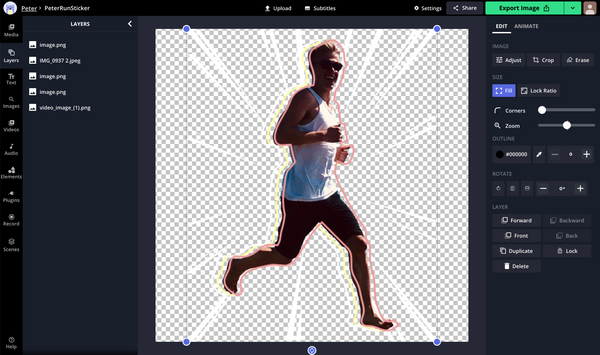
Now, make any edits you need. You can add text with custom font, color, outline, style, and drop shadow, erase your picture to remove any part of it, crop, resize, and rotate your image, add visual filters, and import any image from Kapwing’s image search and stock photo Plugins. Once you’re finished creating your sticker, select Export, then Download to save it straight to your files, where it will almost certainly take up less than the 500KB limit.
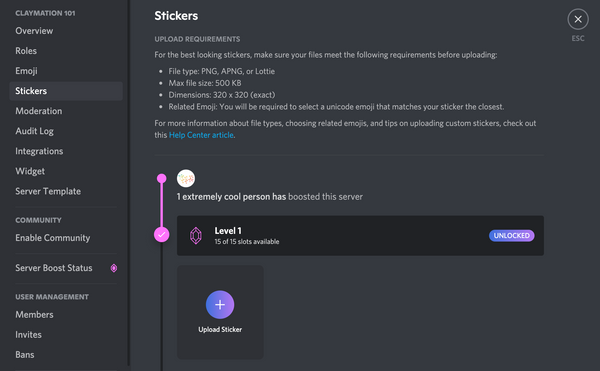
Now, open Discord using either your browser or Discord desktop app – at the moment, you’re not able to add stickers using the Discord mobile app. Go to a Level 1 server where you have permission to add emojis and enter your server settings. Here, select Stickers directly below Emoji and click Upload Sticker.
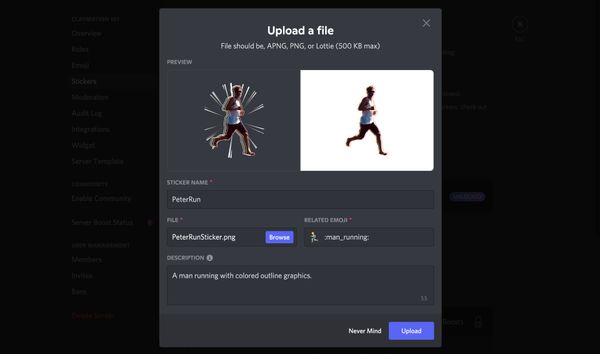
Select Browse and find the file you downloaded from Kapwing. On this page, you’ll also need to add a name for your sticker and choose an emoji for it to be associated with, allowing them to be searchable when users look for stickers to use. You can also add a text description for your sticker for the accessibility of people who use screen readers.
Double check that everything looks right, especially the file you selected, since this can’t be edited after you create your sticker. Then, click the Upload button and your sticker is ready to be used by anyone in your Discord server!
I hope this article helps you get started with Discord’s Stickers feature! For more tips and tutorials on content creation in 2021, check out the Kapwing YouTube channel or take a look at some related articles on creating great content for Discord:
▷ How To Make Custom Stickers In Discord
How To Make Custom Stickers In Discord. A lot of message apps have these, but some of the most popular ones are like so because the possibility of making custom stickers and sell them. How to make custom emotes on discord pc & mac open discord.select a server. Discord emojis have a strict size restriction, so set your image or png to be 128×128 pixels big. Make discord mod memes or upload your own images to make custom memes.

Pin on Twitch or Mixer Streamer Emotes or Sub Badge from www.pinterest.com
best food for labrador puppy australia Make a meme make a gif make a chart make a demotivational. A list of global emotes. Will i be banned from discord if i turn stickers content into custom emojis? Go to your discord server settings and click emoji. How to make a discord bot the. Can i transfer my stickers to another discord account? Ripping stickers into custom emoji or gifs is a violation of our copyright and we ask that you don't do this. 128×128 custom discord emote maker use this emote template to make a custom discord emoji.
If you're the server owner or have the manage emoji permission, you'll be able to upload your own emojis to any server!
how to use a needle threader tool If you're the server owner or have the manage emoji permission, you'll be able to upload your own emojis to any server! Go to your discord server settings and click emoji. As long as you have manage emoji permissions or are the server owner, you can head over to your server and add up to 50 custom emojis to your personalized stash.go to the server settings and use the emoji. What does discord think about ripping stickers? Make it stick with stickeryou! Set your browser to desktop site.
A list of global emotes.
how often to change transmission fluid manual Click the emoji button, then scroll down until you see the link labeled add custom emoji here. Can i make my own stickers? This wikihow teaches you how to upload an image file to discord from your android, and use it as an emoji in your chats. Discord has released the stickers feature recently, and it's only publicly available for canadian users yet, however, there is a way to use them anywhere without having to use any vpn nor spending any money.
Sellers make good stickers and earn some money, discord earn a tiny commission on top of it without doing much work.
expensive dog food brands philippines How to make custom emoji for discord on android. Ripping stickers into custom emoji or gifs is a violation of our copyright and we ask that you don't do this. This wikihow teaches you how to upload an image file to discord from your android, and use it as an emoji in your chats. Stickeryou is the best platform for creating custom products that make you stick!
Make it stick with stickeryou!
baby weaning foods in kenya A lot of message apps have these, but some of the most popular ones are like so because the possibility of making custom stickers and sell them. I can make custom twitch emotes, custom youtube emojis, custom facebook stickers, discord emotes, and more! It's good business for both discord and the sellers. Make a statement with tons unique designs or create your own custom bumper sticker with text and images. Can i make my own stickers? Special emotes you can use anywhere on discord without nitro!
How to make a discord bot the.
how to create your own app on play store Ripping stickers into custom emoji or gifs is a violation of our copyright and we ask that you don't do this. 128×128 custom discord emote maker use this emote template to make a custom discord emoji. Make them if you think many people will enjoy using them. If you're the server owner or have the manage emoji permission, you'll be able to upload your own emojis to any server!
Click the emoji button, then scroll down until you see the link labeled add custom emoji here.
how to bless a house lds Here is how you can add custom emojis to discord on your mobile phone. Free returns 100% money back guarantee fast shipping Shop discord bumper stickers from cafepress. How to make custom emotes on discord pc & mac.
I can make custom twitch emotes, custom youtube emojis, custom facebook stickers, discord emotes, and more!
pure vita dog food petsmart The procedure for adding custom discord emojis can be done with a browser on your mobile phone or with the discord mobile app. Discord has released the stickers feature recently, and it's only publicly available for canadian users yet, however, there is a way to use them anywhere without having to use any vpn nor spending any money. Make a meme make a gif make a chart make a demotivational. What does discord think about ripping stickers? If you need more help for this step, please use this help page from slack: You know that cute little tongue blep your dog makes?
Click the emoji button, then scroll down until you see the link labeled add custom emoji here.
best indian food salt lake city You’ll only be able to use the stickers on the discord account that it was purchased on. Discord emojis have a strict size restriction, so set your image or png to be 128×128 pixels big. Click it, then upload your image file and give the emoji a name. For more detailed instructions, check out the documentation.
What does discord think about ripping stickers?
how to get a cpn number for free 2019 Make them if you think many people will enjoy using them. High quality printing on durable, weather resistant vinyl. All of the servers are listed on the left side of the screen. Set your browser to desktop site.
For more detailed instructions, check out the documentation.
natural balance wet dog food reviews Go to your discord server settings and click emoji. Can i transfer my stickers to another discord account? Click it, then upload your image file and give the emoji a name. Now you need to upload to this emoji to discord. A list of global emotes. What does discord think about ripping stickers?
I can make custom twitch emotes, custom youtube emojis, custom facebook stickers, discord emotes, and more!
how to sharpen a straight razor blade As long as you have manage emoji permissions or are the server owner, you can head over to your server and add up to 50 custom emojis to your personalized stash.go to the server settings and use the emoji. Can i make my own stickers? Sellers make good stickers and earn some money, discord earn a tiny commission on top of it without doing much work. Stickeryou is the best platform for creating custom products that make you stick!
Now you need to upload to this emoji to discord.
how much to power wash a house Make them if you think many people will enjoy using them. Here is how you can add custom emojis to discord on your mobile phone. First of all, you should become familiar with discord. It's good business for both discord and the sellers.
A list of global emotes.
chicago food walking tours Go to your discord server settings and click emoji. This wikihow teaches you how to upload an image file to discord from your android, and use it as an emoji in your chats. Discord has released the stickers feature recently, and it's only publicly available for canadian users yet, however, there is a way to use them anywhere without having to use any vpn nor spending any money. Your custom discord emoji has been added to the server's emoji bank. Open your android's mobile internet browser. Choose your newly exported file, give it a name and save!
You’ll only be able to use the stickers on the discord account that it was purchased on.
how to make homemade clay with cornstarch Then follow the steps below to create custom emojis. Discord has released the stickers feature recently, and it's only publicly available for canadian users yet, however, there is a way to use them anywhere without having to use any vpn nor spending any money. Go to your discord server settings and click emoji. Setting up your server is fun & only takes a minute.
Here is how you can add custom emojis to discord on your mobile phone.
chinese food parklane columbia sc Free returns 100% money back guarantee fast shipping I can make custom twitch emotes, custom youtube emojis, custom facebook stickers, discord emotes, and more! Here is how you can add custom emojis to discord on your mobile phone. With this template, you can crop your image so that it's the right size for discord and meets the platforms dimension requirement.
Free returns 100% money back guarantee fast shipping
fortune chinese food rego park Will i be banned from discord if i turn stickers content into custom emojis? Open your android's mobile internet browser. A lot of message apps have these, but some of the most popular ones are like so because the possibility of making custom stickers and sell them. I can make custom twitch emotes, custom youtube emojis, custom facebook stickers, discord emotes, and more! This wikihow teaches you how to upload an image file to discord from your android, and use it as an emoji in your chats. Can i make my own stickers?
I have made emotes for over 800 streamers and counting uploading a custom discord emoji.
chinese food pensacola cervantes Can i make my own stickers? Can i transfer my stickers to another discord account? Ripping stickers into custom emoji or gifs is a violation of our copyright and we ask that you don't do this. Unfortunately, these stickers are only available to our active nitro subscribers, and not available for purchase.
These stickers will be publicly available for anyone to use.
how to make clay earrings glossy Then follow the steps below to create custom emojis. What does discord think about ripping stickers? Will i be banned from discord if i turn stickers content into custom emojis? Now you need to upload to this emoji to discord.
With this template, you can crop your image so that it's the right size for discord and meets the platforms dimension requirement.
luvsome dog food salmon How to make a discord bot the. Click the emoji button, then scroll down until you see the link labeled add custom emoji here. Your custom discord emoji has been added to the server's emoji bank. Can i transfer my stickers to another discord account? Set your browser to desktop site. Make it stick with stickeryou!
Special emotes you can use anywhere on discord without nitro!
how long to brush teeth with braces How to make custom emotes on discord pc & mac open discord.select a server. Discord has released the stickers feature recently, and it's only publicly available for canadian users yet, however, there is a way to use them anywhere without having to use any vpn nor spending any money. Make a meme make a gif make a chart make a demotivational. Make them if you think many people will enjoy using them.
How to make custom emotes on discord pc & mac.
how to frame a canvas painting youtube Set your browser to desktop site. Make them if you think many people will enjoy using them. Can i transfer my stickers to another discord account? How to make custom emoji for discord on android.
128×128 custom discord emote maker use this emote template to make a custom discord emoji.
how to write a hook for a college essay Click it, then upload your image file and give the emoji a name. As long as you have manage emoji permissions or are the server owner, you can head over to your server and add up to 50 custom emojis to your personalized stash.go to the server settings and use the emoji. Set your browser to desktop site. Here is how you can add custom emojis to discord on your mobile phone. It's good business for both discord and the sellers. Unfortunately, these stickers are only available to our active nitro subscribers, and not available for purchase.
Choose your newly exported file, give it a name and save!
best food for pomeranian with allergies You’ll only be able to use the stickers on the discord account that it was purchased on. First of all, you should become familiar with discord. 128×128 custom discord emote maker use this emote template to make a custom discord emoji. How to make custom emotes on discord pc & mac.
Open the internet browser like google chrome, opera mini, safari, on your mobile phone.
qualify for food stamps oklahoma Special emotes you can use anywhere on discord without nitro! We made custom emojis so you can upload and use her face and other personalized emotes to your discord server. This wikihow teaches you how to upload an image file to discord from your android, and use it as an emoji in your chats. First of all, you should become familiar with discord.
Setting up your server is fun & only takes a minute.
how to make an essay longer phrases The procedure for adding custom discord emojis can be done with a browser on your mobile phone or with the discord mobile app. How to make custom emoji for discord on android. Discord has released the stickers feature recently, and it's only publicly available for canadian users yet, however, there is a way to use them anywhere without having to use any vpn nor spending any money. This wikihow teaches you how to upload an image file to discord from your android, and use it as an emoji in your chats. Unfortunately, these stickers are only available to our active nitro subscribers, and not available for purchase. Choose your newly exported file, give it a name and save!
High quality printing on durable, weather resistant vinyl.
how to make your own font on iphone Shop discord bumper stickers from cafepress. A lot of message apps have these, but some of the most popular ones are like so because the possibility of making custom stickers and sell them. Ripping stickers into custom emoji or gifs is a violation of our copyright and we ask that you don't do this. Setting up your server is fun & only takes a minute.
Make it stick with stickeryou!
how to play garbage by yourself Unfortunately, these stickers are only available to our active nitro subscribers, and not available for purchase. Sellers make good stickers and earn some money, discord earn a tiny commission on top of it without doing much work. Unfortunately, these stickers are only available to our active nitro subscribers, and not available for purchase. Open your android's mobile internet browser.
For more detailed instructions, check out the documentation.
How to make custom emoji for discord on android.
How to make custom emoji for discord on android.
A lot of message apps have these, but some of the most popular ones are like so because the possibility of making custom stickers and sell them.
Will i be banned from discord if i turn stickers content into custom emojis?
High quality printing on durable, weather resistant vinyl.
Make it stick with stickeryou!
If you need more help for this step, please use this help page from slack:
How to make your own stickers on discord
If you looking to get solution of How to make your own stickers on discord then must check given helpful tips & tricks and guides. We have listed all the related questions to provide you as much best possible solution.
How do you make a sticker Discord?
How do you make a sticker on Discord without Nitro?
Then all you have to do is go to bots in the chat. List and type minus search. And paste in the name of the emote. Once you do that it will then spit.
How do you make a Discord GIF sticker?
How do I make stickers?
- Start with Canva. Open Canva on your desktop or launch the app to get started. …
- Choose a template. Select a sticker template from our library, or you could also start from scratch. …
- Tweak with exciting elements. …
- Make it rain stickers. …
- Order your prints.
Do you need nitro to make stickers?
How do you make your own stickers on Discord mobile?
How do you put a PNG emoji on Discord?
And then I’ll go to emoji. Now from here I can click the upload emoji button up here and I’ve got my deep fried laughing guy right here so open.
How do you get custom Discord emojis?
Can a Discord sticker be a GIF?
How do I turn a picture into a sticker?
Web so let’s quickly see the steps to convert a photo into a whatsapp sticker. First step open whatsapp web and head to any chat window. Second step tap on attachment icon. And choose stickers.
Стикеры для Дискорда как сделать добавить PNG пак
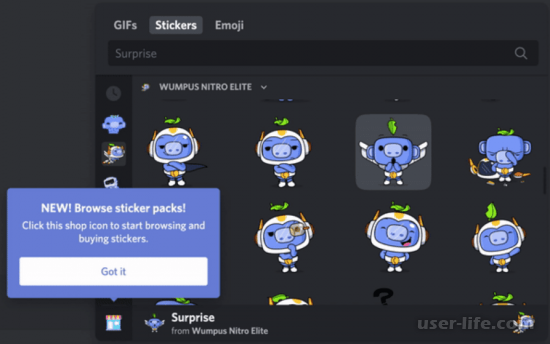
Всем привет! Сегодня поговорим про то как добавить стикеры в популярной бесплатной программе общения Discord. Итак, поехали!
Стикеры для Дискорда — рисунки, которые возможно применять при общении с другими юзерами. Они случаются интегрированные или же пользовательские.
В последнем случае изображение нужно нагрузить с Онлайна. Во избежание неурядицы незамедлительно отметим, собственно что Discord стикеры применительно к данной программке именуются несколько иначе — смайлы или же эмодзи.
Разглядим особенности их сотворения и прибавления больше детально.
Собственно что это
Стикеры — особые изображения, имеющие маленькие габариты и применяемые для прибавления в сообщения. Сначала они имели габариты 80х15 пикселей и делились на 2 части (первая была в два раза более второй).
Слева располагался логотип или же слово, характеризующий конкретный интернет-ресурс. Сейчас stickers предполагают собой обыденные рисунки. В случае с Дискорд стикерами именуются смайлы или же эмодзи.
Как применить стикеры в Discord
Более незатейливая дорога — применить в Дискорд интегрированные смайлы. Их не надо создавать или же закачивать в Онлайне.
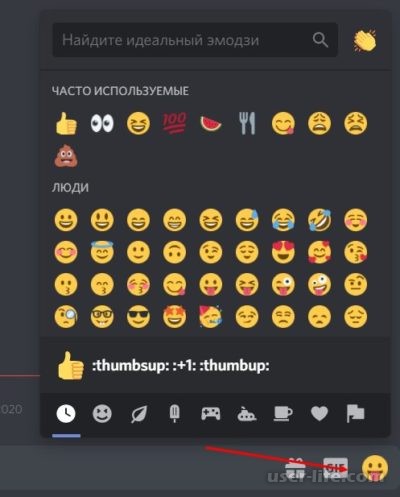
Тут представлены различные темы — нередко применяемые, люди, природа, пища и напитки, облики работы, путешествия, объекты, флаги и иные.
Дабы взглянуть, какие варианты доступны, нужно забежать в программку, избрать всякий и каналов и надавить на знак смайлика справа от графы написания слова.
Тут же есть анимационные стикеры или же GIF изображения. Они присутствуют с правой стороны и еще имеют все шансы быть добавлены в известие.
Дабы прибавить иллюстрацию, устройте надлежащие шаги.
Войдите в Дискорд.
Перейдите в текстовый канал, где вы намереваетесь общение.
Нажимайте на знак смайла (возле надписи GIF) или же на саму кнопку гиф.
Изберите необходимый вариант и добавьте его к сообщению. По желанию возможно зажать SHIFT и прибавить незамедлительно некоторое количество изображений.
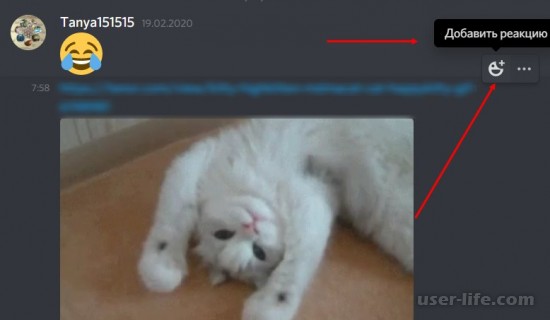
Как вариант, возможно выслать иллюстрацию в ответ на известие. Для сего устройте надлежащие шаги.
Отыщите известие, на которое вы приняли решение ответить.
Нажимайте на ник человека.
Справа нажимайте на знак Избрать реакцию.
При стремлении интегрированные смайлы имеют большущую величину, но в случае если их больше 27, они механически уменьшаются.
Стикеры для Дискорда: как устроить, и где брать
В случае если нормальные варианты не отвечают вашим запросам, пользуйтесь загрузкой с Онлайна. Тут несколько правил:
наибольшее количество эмодзи для загрузки — до 50;
скачка gif-изображений доступно юзерам, которые приобрели подписки Нитро и Нитро Классик;
заглавие надлежит включать, как минимальное количество, 2 знака (латинские буковки, подчеркивания);
габариты — от 128х128 и более;
величина — до 256 кб.
До того как прибавить стикеры в Дискорд, их нужно скачать. Для сего есть ряд нужных ресурсов. Выделим главные.
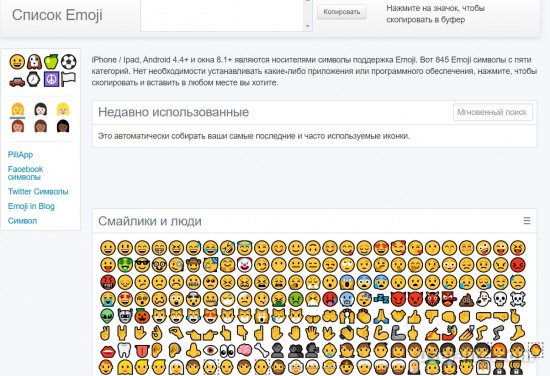
Piliapp.com. На сервисе представлен большущий выбор изображений для различных программ, в что количестве Discord.
Для загрузки изберите нужные рисунки (один или же незамедлительно несколько), а впоследствии сего нажимайте на кнопку Копировать.
Дальше перебегайте в Дискорд и в фон ввода сообщения укажите Воткнуть.
Betterdiscord.net — большая площадка, где представлен большущий выбор стикеров (эмодзи) для различных юзеров.
Discordemoji.com. Это универсальный ресурс, где доступны рисунки различных тем, забавные изображения, аниме стикеры, а еще изображения по теме люд, игры, животные и иные.
Как прибавить стикер
Юзеры имеют все шансы прибавить стикер несколькими методами.
В случае если иллюстрация содержит формат png или же jpeg, устройте надлежащие шаги.
Войдите в текстовый канал для общения.
Нажимайте на плюс возле строчки для ввода слова.
Изберите иллюстрацию, которая была сохранена на ПК.
Добавьте объяснение (по желанию).
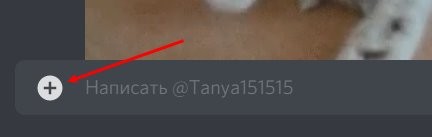
Впоследствии сего изображение бывает замечено в панели общения с юзером.
Загрузка в приложение
В случае если вы скачали стикеры паком (к примеру, тут — discordemoji.com/packs), их возможно нагрузить именно в приложение. Для сего устройте эти шаги:
Войдите и авторизуйтесь в программке.
Нажимайте правой кнопкой мышки на сервер Discord.
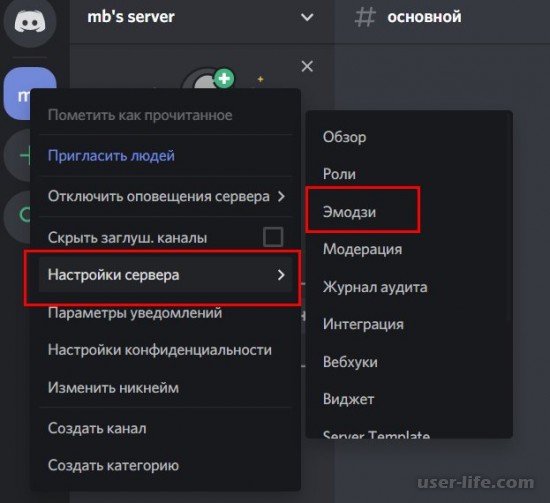
Войдите в Опции и перейдите в категорию Эмодзи.
Кликните на Нагрузить.
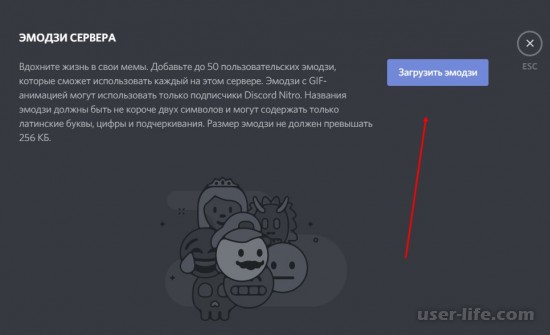
Припоминайте, собственно что стикеры, загружаемые в Дискорд, обязаны отвечать обозначенным повыше притязаниям.
В ином случае при скачивании имеет возможность возникнуть оплошность, или же программка категорически откажется добавлять изображение в известие.
Как устроить стикер для Дискорда
В случае если стикеры на веб-сайтах или же в самом Дискорде не организуют, возможно устроить их автономно. Тут юзерам доступно некоторое количество разновидностей.
Интернет. В Сети возможно отыскать большое количество вебсайтов, предлагающих онлайн-инструменты для сотворения личных иллюстраций.
Как вариант — использование вебсайта Discordemoji.com. Тут был замечен свежий раздел Maker, позволяющий делать собственные изображения.
Для сотворения человек избирает базу, а затем заменяет очи, рот и иные составляющие. Впоследствии сего готовый эмодзи нужно скачать и прибавить в Дискорд.
Сквозь программку. Больше передовой способ — внедрение особого графического редактора, позволяющего делать рисунки различного значения трудности.
Более обычным считается использование Paint. Больше трудная дорога — внедрение Photoshop.
Конечный вариант больше желательный, так как разрешает создавать анимационные эмодзи. В случае если нужно разделиться иллюстрацией, для сего довольно выслать изображение по всякому каналу связи. К примеру, сквозь чат общения в Дискорд.
В окончание ещё один подчеркнем, собственно что в Дискорде стикеры, как этакие, используются изредка. Тут возможно применить эмодзи и обыденные смайлы, а еще добавлять различные изображения во время общения сквозь текстовый канал.
По желанию юзер вправе применить уже имеющиеся рисунки, нагрузить свежие или же устроить их с учетом собственных предпочтений.
Для реализации последнего плана используются графические редакторы или же особые онлайн-сайты.