Купил по рекомендации ноутбук Acer Nitro 5 AN515-57, но в играх возникают лаги/ фризы/ подвисания. Помогите решить!
Всем добрый день. Я сам в ноутах вообще не разбираюсь. Купил по рекомендации ноутбук Acer Nitro 5 AN515-57 (NH.QESEP.00C) два дня назад, решил протестировать его в игре CSGO, в общем fps колеблется от 250 до 300. Но проблема в том, что иногда случаются лаги и зависания .
Тип матрицы: IPS
Процессор: Intel Core i5-11400H
Количество ядер процессора: 6
Оперативная память, ГБ:
Максимальный объем оперативной памяти, ГБ: 32
Жесткий диск, ГБ:
Графический адаптер, объем памяти: NVIDIA GeForce RTX 3050 Ti, 4 ГБ GDDR6.
Можете ли подсказать из-за чего просадки на относительно мощном ноуте и как их пофиксить?
Так ограничь фпс, не вывозит очевидно твой ноут под полной нагрузкой, хреновая система охлада, проц перегревается и троттлит.
Попробуй в профиле электропитания выставить — максимальная производительность.
Либо в самих "Твиках" ноута поищи такой же параметр.
У себя я видел только "сбалансированную" и "высокая" других нет.
Надо было слушать те рекомендации, где говорили купить настольный ПК
Нахера тебе 300 фпс, если там монитор на 144 герца?
У самого точно такой ноут,есть подписания при воспроизведении видео на Ютубе от батареи,в остальном такого нету.
Скачать проги от acer по типу Nitro sense и прочее с их сайта и обнови дрова,винда чистая?не сборка от васяна?
Проверь кстати на своей модели разрешение и частоту в параметрах экрана,у меня тоже по спекам должен был приехать FullHD 144(даже наклейка про это говорит),а по факту QuadHD 165
Попробуй обновить дрова на встройку ещё,зачем?крч у этого ноута сдешевили,изображение выводиться от дискретной ГПУ через встройку и поток на экран,если подключить внешний монитор,то сразу от дискретки выводиться картинка,ну и фпс будет чуть выше
А ну и ещё обеспечь ему забор воздуха и настрой винты в Nitro sense,там будет функция благоряда которой винты лучше молотят(coolbust) и принудительное врубление на Макс обороты или в ручном режиме управлять,вызываешь эту утилиту через кнопку отведённую на клаве кстати.Там же в утилите есть возможность отключить выключение подсветки Клавы спустя 30 сек.,просто раздражает.
У меня лично больше нагрев ЦП чем ГПУ,никогда ГПУ не мог перегреть,ток ЦП доходил до 80 градусов,но не тротлил,при авто режиме,при Макс оборотах винтов было 75 градусов но шум такой что без ушей слышно четко
У меня тоже больше ЦП нагревается. GeForce Game Ready обновил вчера, вроде помогло, но после двух часов игры опять пролаги появились.
На счёт винды хз, мне её устанавливали.
На счёт параметров экрана, то 144 обещанные стоят
Жду ответа, дорогой советчик
Вроде все мысли высказал,кроме как уже отметили тротлинга особо в голову ничего не лезть,ну и детские болячки вроде утилит и дров если ноут новый,у меня был выделен отдельный раздел при покупку где лежали все дрова,раздел был на 10гб
на счёт троттлита пробовал как писал, но у меня андервольтинг заблочен
Скорее всего из-за троттлтига.
Надо с прогой ThrottleStop играться.
Писал для i5-8300H
Скачать утилиту ThrottleStop на главном окошке в левом столбце поставить галку напротив Disable Turbo, нажать под таблицей FIVR, в средней колонке выбрать CPU Core, ниже поставить параметру Offset Voltage -160.2mV, выбрать CPU Cache, так же поставить Offset Voltage -160.2mV. Сохранить. Да будет счастье. При следующем запуске утилиты ничего изменять не надо. Можно в планировщике задач задать автозапуск.
Падения в производительности вообще не заметил. Зато температура, что на процессоре, что на видюхе не поднимается выше 74 градусов. Так же пропали резкие падения кадров.
Почему проседает fps в играх на Acer Nitro5
Купил ноутбук неделю назад. Запустил игру WarFace. Постоянные лаги, никакой гладкости. Мелкие фризы постоянно раз в 5-6 минут.
Характеристики: Intel CORE i5 8th Gen, 6 Гб оперативки, Nvidia Geforce GTX 1050 на 4 Гб.
Пытался в настройках Nvidia переключить с встроенной карты на дискретную, но лаги не прекратились. Как и после настройки карты Intel. Подскажите, что ещё можно сделать? Или, может, лучше обратиться к специалисту.
Для справки: ноутбук с Сore i5 7th gen 8 Гб и Nvidia geforce GTX 1050 на 2 Гб таких проблем не имеет без всякой предварительной настройки.
 Ответ эксперта:
Возможных причин очень много, даже с учётом того, что ноутбук у Вас новый. Чтобы понимать причины данной ситуации, нужно понимать, как ведёт себя не сама игра, а операционная система и компоненты ноутбука. Проводилось ли тестирование его работы специализированным программным обеспечением, например, OCCT? Проведите соответствующее тестирование и предоставьте полученные результаты для того, чтобы уже определиться с каким-то конкретным диагнозом. Нести его сейчас в сервисный центр просто бессмысленно, так как Вас по гарантийному ремонту просто не примут, а платное обслуживание результатов может не принести.
На Ваш вопрос ответил:
 Андрей Пономарев
 Ученые заявили о пользе компьютерных игр: 3 «за» для шутеров, «ходилок» и симуляторов
Как скачивать музыку с «ВКонтакте»
Всплывающие окна больше не мешают: как я убрала рекламу за 5 минут
Как скачать фото из инстаграма
Как установить мессенджеры на компьютер
Acer nitro 5 почему лагают игры
Acer Nitro 5 AMD Radeon Vega 8, Radeon RX 560X(AN515-42)
notebook: Windows 10
Сообщение отредактировал cemen8585 — 13.03.19, 08:43
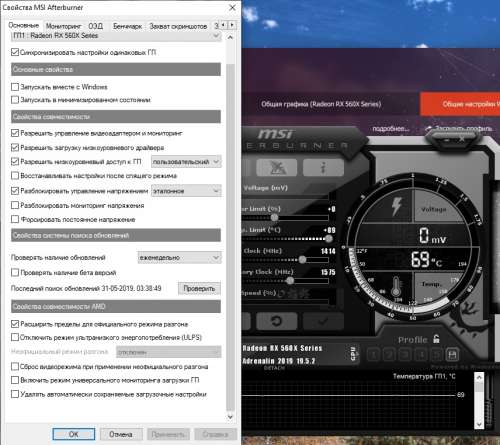
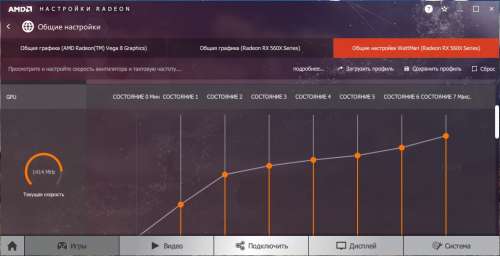
Сообщение отредактировал Ego_Zero — 15.06.19, 07:18
Может ручками в сервисе что то сделали.
Проверить на майнинг вирусы и наличие процессов что грузят систему, переустановить предыдущий видео драйвер/биос, создать план питания — сбалансированный с максимальной нагрузкой на ЦП 99%. Если это не поможет чистая переустановка виндовс. Если проблема осталась то возможно причина в термопасте или кулерах, лучше сдать по гарантии
Acer Nitro 5 Low FPS +11 Ways To Fix It

Acer Nitro 5 low fps is a big problem among many of the acer nitro 5 users, the laptop is quite famous among entry level laptop gamers and has gained popularity due to it’s impeccable performance at such a low price range.
But at a low price range the laptop also comes with a few problems, don’t get me wrong, the acer nitro 5 is a huge success and is well worth it, but it just has a few things that need to be optimized to get the most out of the gaming laptop.
And a common issue with the laptop is low fps, so in this post I’m going to tell you how to fix low fps on acer nitro 5.
Table of Contents
Why Does The Acer Nitro 5 Give Low FPS?
The laptop is notoriously known for thermal throttling and overheating, because of the poor design of the nitro 5 models, they usually experience higher than average overheating problems and to save the processor and GPU, the laptop starts to thermal throttle.
And as a result of that your nitro 5 laptop gives low fps. Sometimes due to thermal throttling the nitro 5 gives low GPU usage, fps spikes, and on the GTX 1650 model it gives FPS drops as well.
This doesn’t happen all the time, it only happens when the laptop overheats.
How Do I Fix The FPS Drop On My Acer Nitro 5?
1. Enable Game Mode On Windows 10
Enabling game mode is the first thing that you should do to really check if the laptop is thermal throttling or if it’s because of the operating system, you can enable game mode on windows 10 by following this:
Open Search > Type “settings” > Turn On Game Mode
2. Install The Latest Graphics Card Drivers
This is crucial if you want the maximum performance out of your acer nitro 5, uninstall the current graphics card drivers and install the latest version from Nvidia.
This will ensure that the graphics card is working optimally and there are no issues with it.
2. Check If Laptop Is Using Dedicated GPU
A common problem with most gaming laptops is that sometimes they’re using the integrated Intel HD graphics instead of the dedicated GPU that comes with the laptop. And as a result of that your laptop doesn’t give high FPS.
To fix that first right click on desktop > go to Nvidia Control Panel > click on “change resolution” and you should be able to see if your laptop is using the dedicated Nvidia GPU or the Intel GPU.
Additionally, you could also optimize the program/game itself through the Nvidia control panel by changing specific program settings and also switching to best performance instead of appearance.
4. Use A Laptop Cooling Pad
A laptop cooling pad will help to reduce the laptop temperature massively, and since the nitro 5 is known for thermal throttling and overheating, all the more reason then to buy a laptop cooling pad.
A $20-30 investment in a cooling pad will prolong the overall life of you acer nitro 5 and will keep it cool, when it prevents the laptop from overheating , thermal throttling doesn’t occur and when thermal throttling doesn’t occur, the FPS doesn’t spike and it remains constant.
Here’s a good cooling pad for Acer Nitro 5:
5. Set Power Management To Maximum Performance
Go into the power management settings of your laptop and switch the slider to best performance, this will push the laptop to it’s maximum capabilities when it’s not plugged in because the mode was made to preserve the battery.
So while best performance is enabled your laptop battery will drain really fast but it will also give maximum performance.
6. Uninstall And Reinstall Acer NitroSense
Acer Nitrosense is a software that comes pre-installed with the Acer Nitro 5, this software allows you to monitor the CPU and GPU temperatures, it also allows you to control the fan speed and manage the power plan of your laptop in an effecient way.
So in this case Nitrosense might be interfering with the hardware or causing a conflict with other programs due to which the laptop is going low fps, so the best way is to uninstall nitrosense and then reinstall it to make sure that it’s not causing any problem.
Additionally, you should also update Nitrosense.
7. Make Sure That Both Fans Are Working
The Nitro 5 has a dual fan ventilation system which can reach a speed of up to 5000RPM, so check that both of the fans are working because even if one of them stops working it will result in your laptop overheating.
To see if both fans are working use a benchmark tool such as furmark or just run a demanding application on your laptop, if you can hear a jet engine sound from both sides then rest assured, both the fans are working.
8. Try Overclocking The GPU
Overclocking in laptops is a short-term solution to a long-term problem and should only be used as a last resort, and before overclocking the GPU in your laptop you need to do thorough research because a slight miscalculation may result in a dead laptop.
The most popular and easy to use overclocking software is MSI Afterburner.
9. Upgrade The RAM And SSD
An easy way to fix low fps on acer nitro 5 is to simply upgrade the RAM and SSD, the RAM can be upgraded up to 64GB because the laptop has 2 RAM slots and if it has a traditional Hard drive then you should upgrade it to an SSD.
Here’s A Good SSD For The Nitro 5:
10. Check If Laptop Meets Game Requirements
It is essential that your nitro 5 meets atleast the minimum requirements of the game you’re trying to run because failing to do that will eventually result in low FPS so always make sure that the game you’re trying to run can be handled by your laptop.
11. Reinstall Operating System
If everything else fails then you should reinstall a clean version of the operating system, this will make sure that any kind of virus / malicious program and useless background applications are dealt with and is a surefire way to ensure that the software side of your laptop doesn’t have any problems.
Conclusion
The low fps on the Acer Nitro 5 is a common problem but if you follow the techniques above you should be able to restore your laptop to a better state.
Even after doing all of this if your laptop still gives low fps then it’s 100% your hardware problem and you should get it diagnosed by Acer Support only.