Что такое Windows Feature Experience Pack в Windows 10?
На днях Microsoft расширила доступность Windows 10 May 2020 Update для пользователей. Таким образом, больше пользователей могут установить версию 2004 и получить вместе с ней новый компонент «Windows Feature Experience Pack». Об данном пакете функций известно по крайней мере с декабря 2019 года, поэтому ожидалось, что Microsoft поделится подробной информации о нем по мере массового развертывания.

Мэри Джо Фоли, журналист портала из ZDNet, отправила запрос в Microsoft по поводу Feature Experience Pack. Официальный представитель компании был немногословен: «Microsoft нечего сказать по данному вопросу».
А что насчет неофициальных каналов? Мэри Джо Фоли удалось выяснить некоторую информацию про Windows Feature Experience Pack у своих источников.
Windows Feature Experience Pack перечислен в списке «Функции по запросу» для Windows 10 и Windows Server. В списке также присутствуют Internet Explorer, Блокнот, DirectX Configuration Database, Paint, PowerShell ISe, Быстрая помощь, консоль управления печатью и др. На странице Microsoft Docs указано, что Windows Feature Experience Pack доступен в Windows 10 версии 2004 и выше и «включает критически важную функциональность Windows». Microsoft рекомендует пользователям, не удалять данную коллекцию компонентов оболочки Windows, общий размер которой составляет 44,15 мегабайт.
Текущий Windows Feature Experience Pack не стоит путать с Windows Experience Pack для Windows XP, Vista и 7, которые предназначались для других целей. Новый пакет совмещает в себе функции, которые будут обновляться чаще, чем сама операционная система Windows 10. Windows Feature Experience Pack активирует набор функций Windows (не только изменения интерфейса), которые будут обновляться через Магазин Windows. Предполагается, что данную коллекцию приложений можно будет тестировать в связке, а не индивидуально.
На данный момент Windows Feature Experience Pack включает несколько приложений: обновленный «Набросок на фрагменте экрана», обновленная панель ввода текста и обновленный интерфейс подсказок оболочки. Ожидается, в будущем в Feature Experience Pack появится больше функций и компонентов оболочки Windows 10.
Уже некоторое время в Магазине Microsoft хранятся фиктивные пакеты Windows Feature Experience Pack для Windows 10 и Windows 10X. В описании версии для Windows 10 сообщается, что она работает со всеми версиями Windows и Xbox One. Напомним, что разработка Windows 10X в настоящее время затягивается, и компании занимается «переосмыслением» данной ОС для одноэкранных устройств.
Также существует предположение, что основная цель Windows Feature Experience Pack в долгосрочной перспективе — это отделение пользовательского интерфейса Windows 10 от базовой операционной системы Windows Core. Основная идея заключается в том, чтобы Microsoft могла переключать различные оболочки поверх базовой ОС в зависимости от используемого типа устройства Windows 10. Это еще в планах? Возможно, поскольку пакет Feature Experience Pack, по всей видимости, подключен к адаптивной оболочке Composable Shell.
Очень странно, что Microsoft не раскрывает предназначение данного пакета на устройствах Windows 10. В любом случае, при установке версии 2004, вы получите Windows Feature Experience Pack.
Microsoft представила новую систему доставки функций Windows 10 отдельно от глобальных патчей

На днях в официальном блоге Microsoft была представлена бета-версия новой системы доставки обновлений в Windows 10, которая будет работать параллельно с глобальными патчами, к коим привыкли пользователи за время существования этой ОС. Речь идет о Releasing Windows Feature Experience Pack — системе доставки новых фич и возможностей, разрабатываемых отдельно от ядра ОС, не дожидаясь глобальных патчей системы, которые выходят один-два раза в год.
Пока Releasing Windows Feature Experience Pack доступен только для пользователей инсайдерской версии Windows 10. Сами представители Microsoft заявляют, что тестируют новую систему доставки обновлений крайне ограниченно, так как она серьезно отличается от предыдущей политики компании по обновлению Windows 10.
Пользователям инсайдер-версии Windows 10 с бета-версией Windows Feature Experience Pack 120.2212.1070.0 были доставлены два небольших фикса:
- встроенный скриншот области экрана комбинацией клавиш WIN+SHIFT+S с указанием пути сохранения изображения через проводник;
- использование сенсорной клавиатуры в портретном режиме на тач-устройствах поддерживает «split keyboard mode».
Создание системы доставки обновлений Releasing Windows Feature Experience Pack — это серьезный шаг Microsoft к модели «Windows as Service», когда команда разработки, особенно разработчики, задействованные не на ядре, а на дополнительных функциях, смогут оперативно реагировать на запросы пользователей в плане функций и фиксов. Этот шаг Microsoft в очередной раз подтверждает взятый компанией курс на «вечную» разработку Windows 10 — то есть о полном отказе от выпуска новых «числовых» версий ОС в будущем.
Для пользователей новая система обновлений тоже может оказаться крайне комфортной, так как глобальные патчи зачастую «привозят» с собой крайне неудобные фичи, которые больше похожи на баги. Как пример, сейчас у многих пользователей Windows при переключении раскладки комбинацией ALT+SHIFT (именно в этом порядке нажатия клавиш), в правой части экрана на секунду появляется раздражающее окно со списком доступных раскладок. На эту «фичу» активно жалуются на странице саппорта, однако решения этой мелкой, в масштабах ежегодных патчей, проблемы до сих пор нет.
Скользящая система доставки обновлений позволит оперативно фиксить подобные сомнительные решения интерфейса, доставлять новые функции и в целом способна сделать жизнь Windows-пользователей комфортнее. При этом разработка ядра, которая, очевидно, не всегда успевает за разработкой фич и интерфейсов, перестанет тормозить последних.
Windows 10 будет получать новые функции быстрее, чем раньше
Microsoft уже приучила пользователей к стратегии двух крупных обновлений Windows 10 в течение года: одно выходит весной, другое – осенью. Сохранится эта тактика и в следующем году, но за счет нового механизма обновлений под названием Windows Feature Experience Pack новые функции в операционной системе будут появляться быстрее – пользователям не нужно будет дожидаться весеннего или осеннего апдейта.
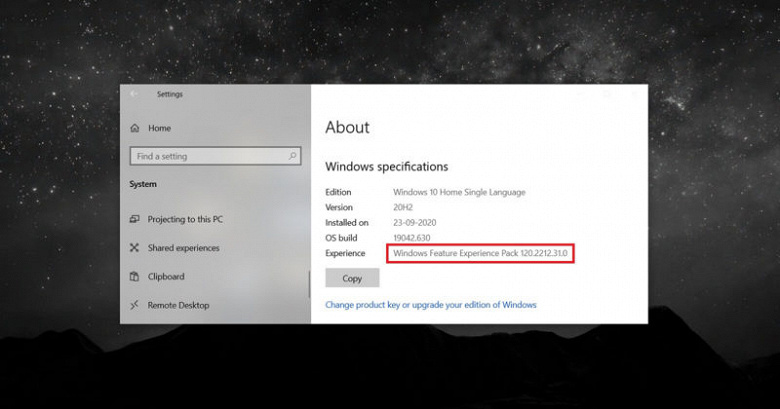
Как пишет источник, на данный момент Experience Pack – это небольшое обновление с «функциями, критически важными для функциональности Windows». Но, по сути, такой подход открывает путь к модульным, а не кумулятивным апдейтам операционной системы: Microsoft сможет добавлять в ОС новые возможности через Windows Update или Microsoft Store без необходимости обновления всей системы целиком. Таким образом, будет экономиться и время на установку апдейтов, и одновременно станет меньше их размер.
Что представляет собой Experience Pack, легко понять по описанию очередного такого обновления, которое выпущено по программе Windows Insider и пока недоступно в пользовательской версии. В нем появилась возможность создания и сохранения скриншотов сразу в папку по одновременному нажатию клавиш Win + Shift + S, а также появился режим разделенной виртуальной клавиатуры для устройств 2-в-1. В классическом случае этих новшеств можно было бы ждать полгода, но вариант с Experience Pack ускоряет их внедрение и распространение.
What Are Windows Feature Experience Packs and How Can You Get One?
Windows Feature Experience Packs are a new type of feature update, but how do you install it?
Windows executives remain stubbornly tight-lipped about what Windows Feature Experience Packs are actually for. However, the release of the first update has come with a few answers. They’re not enough to crack the mystery wide open, but they do set a foundation for theories to stand on.
If you don’t like waiting around for official answers, you could explore the matter for yourself. Here is everything we know and suspect about Microsoft’s packs, including how to check if you’re eligible to get them and how the company’s overall plans are likely to affect user experiences.
What’s in the First Windows Feature Experience Pack?
As Brandon LeBlanc explains on the Windows blog, the experience packs, Microsoft’s plan for improved upgrades, is still very much in its testing phase. That’s why the first pack is only available in beta form to Windows Insiders and contains two simple features:
- A built-in screenshot tool, by which you can snip and paste your selection into a folder.
- A split keyboard interface for 2-in-1 touch devices that stretches across the two screens when a device is in portrait mode.
What Is the Point of Windows Feature Experience Packs?
Another hint in LeBlanc’s statement reveals that the packs are a product of Microsoft exploring new and better ways to deliver updates. At first, eligible users will receive the packs outside of the monthly updates to Windows 10, but the company ultimately aims to include them in the normal process.
The how of it may be a mystery even to developers, which would explain all the secrecy. Something you can be sure of is that, if all goes well, updates to your Windows devices will happen faster and with less disruption.
How to Get Feature Experience Packs as a Windows User
As Microsoft starts testing its experience packs and you get to know them, there’s one requirement to keep in mind. You need Windows 10 and 20H2 19042.662 for the packs to work, though the requirements will change depending on Windows’s current release version.
Checking where you stand on this matter is easy. On your PC, for example, go to Settings and then Update & Security. In the Windows Update tab, click Check for updates. If your operating system supports it, the pack will download and work its magic after rebooting the device.
To make sure your computer is compatible, simply go to Settings > System > About. Here, under Windows Specifications, you should be able to see Experience and the upgrade’s name next to it.
Eventually, the official upgrade packs should be available through other methods.
Only a lucky few will get to see the new Windows features for now and the foreseeable future.
Extra Clues About Windows Feature Experience Packs
Up until now, the deafening silence on Microsoft’s end drove users wild with speculation. Even though the first pack’s release shed some light on the issue, any other hints we have are still a bit circumstantial. Nevertheless, it’s worth exploring them to start putting the pieces together.
The Packs are Features on Demand
One important clue is that Windows Feature Experience Packs are listed among Features on Demand for Windows 10 and Windows Server. This means that they’re an essential part of the operating system—or will be. Based on what we know so far, they’ll be responsible for updating it in some way or another.
The Microsoft Store Offers Packs for Windows 10X
Another interesting fact that came to light is that the Microsoft Store displays Windows Feature Experience Packs for all its operating systems, including Windows 10X. Despite the lack of helpful details, the nature of 10X could hold big answers in terms of how Microsoft’s experience packs are going to work.
If you want to understand what Windows 10X is, imagine the basic operating system as your device’s basic bottom layer and all applications as separate containers on top of it. Then, for example, developers can make changes to the apps without risking the whole system. Basically, Windows malfunctioning because of an update is less likely to happen.
An immediate point to consider is the connection between containers and packs. These little bundles of updates could fit very well in the structure of 10X.
Additionally, Microsoft does promise more efficient updates with Windows 10X and that the system will be compatible with all Windows devices, not just dual-screen ones.
The bottom line is that Microsoft could be working towards establishing Windows 10X as a standard operating system. If this is the case, the company might also be developing the Windows Feature Experience Packs to support operating system stability.
The Packs Align With Windows Core OS Plans
Microsoft wants to make life easier for users and developers alike. That’s why most of its strategy for the past few years has focused on making Windows Core OS a reality.
The upcoming system’s main purpose is for it to work on all devices and let programmers build components onto it easier, faster, and cheaper, especially when developing software for different devices.
How it relates to Windows Feature Experience Packs is minor, but it does confirm and expand on Microsoft’s goal for a super smooth operating system based on separate, adaptable elements as opposed to one solid system.
There’s a similar connection here as with Windows 10X. The experience packs could be part of Microsoft’s greater scheme for making its cross-platform capabilities a lot more effective. Ideally, the packs would make very precise updates and without getting in the way of your work.
Keep Unravelling the Windows Feature Experience Packs Mystery
As things stand, we know the experience packs exist to try and develop a better updating system for Windows users and developers. Beyond that, they might be a project with links to Microsoft’s greater plans for new and improved operating systems.
It shouldn’t take long for the next Windows Feature Experience Pack to hit the scene, along with more answers. Until then, feel free to dig around for more clues, but make sure your sources are reliable and don’t be shocked if Microsoft surprises us all.