What Is Mobile Services Manager and How To Disable It?
The mobile services manager is a pre-installed Android app that performs many functions without the user’s knowledge, including gaining access to information, installing and updating apps, and controlling some settings.
Some of the problems associated with the mobile service manager include slowing down the Android phone performance, mobile network state being disconnected, stealing the phone’s memory space and RAM, and consuming power.
Still, the mobile service manager app has some advantages, including installing some useful apps like Play Store and YouTube. As such, you may wonder, is the mobile service manager app good or bad for your Android phone? What are its functions? How can you disable it? Peer into this article to answer these questions.
Table of contents:
What is Mobile service manager app?
Let’s now get back to the meat and potato of this article- what the mobile services manager is. As mentioned at the outset, it is a pre-installed app such as an ant radio service that comes with your Samsung, Xiaomi, and other Android devices by the time you are buying it.
Like Spotify, Play Store, Phone, Messaging, etc., apps, the mobile service manager is already taking part of your device’s space by the time you are buying it. In fact, you may not know about its presence on the device until you check your Google Activity logs and see it listed among the recently accessed apps.
Is mobile service manager a pre-installed Samsung app?
Many people love android devices because they are efficient, easy to use, and still remain to be cost-friendly. As such, the brand celebrates an increasing number of users as they introduce new phones and better their services.
Still, the brand has its own problems, including offering phones with many pre-installed applications including com.tmobile.pr.adapt, and Ims service. In fact, you might buy a device and notice that about 20% of the total storage space has already been occupied.
Have you ever wondered where such a huge space goes to?
It’s filled with pre-installed apps, like the mobile service manager. While some of these apps may be useful, some are entirely useless, and you might never use them throughout the phone’s lifetime. You may wonder, who installs this mobile service management Android app? The next section addresses this question.
Do I need mobile services manager?
We have seen that the mobile services manager is a pre-installed app that comes fixed on your device by the time you are buying it. Still, you may want to know who installs it.
Although some of the pre-installed applications in your phone are there because android management did install them, the mobile services manager is exclusively installed by the brand that sells a phone.
That means if your device is Samsung Galaxy, say S8, the Samsung Cooperation is responsible for the app’s installation. The same is true for different companies like Nokia, Tecno, Infinix, etc.
The mobile services manager app function is technically the same across all Android devices, although the installation is run by different companies.
What is the function of the android application manager?
The previous sections have defined the mobile services app and who installs it. In this section, we focus on the function of this application. Interestingly, these very functions and features make the app either useful or disastrous. Below are the main functions or roles the Android application manager runs in your phone;
- It controls some settings without the user’s knowledge and consent
- It downloads and installs some apps without your knowledge
- In automatically updates some apps without the user’s knowledge
- It gains access to the Android device without the user’s knowledge
This sounds simple- the mobile services manager Android app automatically downloads, installs, and updates particular applications, gains access to the device, and has control over some settings.
The biggest underlying issue has to do with the fact that everything happens in the background and without the user’s knowledge and consent.
Really, shouldn’t you have control over what apps you have or don’t have, what permissions and settings you allow and don’t allow, and what level of access you allow apps to gain or not gain? Yet, here is a pre-installed app that does anything and everything without your knowledge and consent.
What problems are linked to the Android service manager?
The next concern is about the problems and challenges that come with the pre-installed mobile services manager app. Sadly, you might not have control over these issues until you know the underlying problem and remove or disable the app. Here are the commonest issues with the mobile services manager;
- Memory consumption
- Cellular data consumption
- Battery drainage
- Slowing down the device
Memory consumption
The mobile services manager is an app and consumes space while it sits on your device. Moreover, as it downloads and installs other apps on the device, it further takes more storage space. Besides, installing files come with bugs and filling cached files, further filling up space on your Android phone.
Cellular data consumption
Since the mobile service manager is always on the lookout to download, install, and update apps, it uses data in the background. Have you ever realized that somehow the data you had got depleted faster than usual? You might have the mobile services manager to blame. Moreover, the app has control over some settings, which further affects data consumption.
Battery drainage
Every single app running in the background consumes battery power, and so does the mobile service manager. Gaining access, controlling settings, and installing and updating apps all happen in the background, consuming huge storage spaces.
Slowing down the device
Since the mobile services manager downloads and installs applications, it allocates itself part of the RAM. RAM and memory storage consumption direly affects the device, possibly slowing it down. Imagine having an expensive device that slows down and cannot execute functions as fast as you want it? Nothing is that boring.
What are the benefits of the mobile services manager?
The points above are the negative sides of mobile service management, and you may wonder whether the application has any benefits to the device. Of course, it somehow helps the Samsung device, but the phone does not need it passe.
Imagine having a phone without the Play Store app or google play service keep stopping? You would have to install it first before installing other applications, isn’t that boring?
At least we saw the benefit of the app; we use the Play Store courtesy of the very mobile services manager. Nonetheless, after installation of the Play Store, you don’t need mobile service management, and you can delete it whenever you wish.
How to disable the mobile services manager Android app?
As long as the important apps that come with the mobile services manager are already installed, you don’t need them anymore. As such, you may choose to disable it.
Some Android devices may actually slow down or have a few issues after disabling the mobile services manager app. Here are steps to disable the app should you want to;
- Go to Settings from the main menu
- Locate My Apps or Application Manager or Apps depending on your android operating system.
- Search for DT IGNITE or a mobile service manager, then singly tap on it
- Confirm the action by clicking on uninstall or disable the mobile services manager
Conclusion
The mobile services manager is a pre-installed app like Skms Agent Service that comes with an android phone. Although it may help in some ways, it does more harm than help to the Android phone since it automatically installs and updates apps, gains control over some settings, and may have access to some information. It consumes space and RAM and may slow down the device. Should you want to disable it, follow the steps above.
What is mobile services manager? Everything You Need To Know
Mobile services manager, as the name suggests itself, it’s a service on your android device used to manage the services running on the device. This article explains all about mobile services manager on android. What is mobile services manager? What is the usage of mobile services manager on Android devices?
In This Article
We shall also explore the permissions and significance of mobile services manager. Is it a virus? Is it possible to remove or disable it? Let’s dig out the answers.
Mobile Services Manager App- An overview
Mobile Services Manager App
Mobile services manager is a system app on all Android devices pre-installed by the vendor that is accountable for installation and auto-update of the apps on android.
However, this is not an essential app that can be disabled easily. The Mobile services manager app is often used by manufacturers like Samsung with T-mobile vendors to promote and install unwanted apps.
The Mobile services manager keeps running in the background monitoring the apps for installation and updating.
The service app uses lots of mobile data for fetching and sync the data from the app server and android device.
What is the function of Mobile services manager?
Mobile manufacturers like AT&T, Verizon , as well as Vodafone and T-Mobile are well known for installing mobile services manager app on your Android device.
The only motto of installing the app is to promote sponsored applications which are quite annoying.
The basic function of the mobile services Manager app on your Android device is to monitor the installation and updating of the installed app on the device by syncing the app data from the app server.
There are other basic functions of mobile services Manager app which are as follows;
- It controls some settings without the user’s knowledge and consent
- It downloads and installs some apps without your knowledge
- In automatically updates some apps without the user’s knowledge
- It gains access to the Android device without the user’s knowledge
Moreover, you can consider it as bloatware that keeps running in the background eating up your mobiles data, battery, and other resources.
It may also interfere with the normal installation of your app and send your phone to optimizing App loop error .
What are the benefits of mobile services manager?
Like other several apps, mobile services manager has it’s own significance and benefits.
Imagine having a phone without the Play Store app or google play service keep stopping ? You would have to install it first before installing other applications, isn’t that boring?
At least we saw the benefit of the app; we use the Play Store courtesy of the very mobile services manager. Nonetheless, after installation of the Play Store, you don’t need mobile service management, and you can delete it whenever you wish.
What are the Problems linked with Mobile Services Manager?
Android phones are well known for installing tons of apps as stock or factory apps on the device. Besides the usability, the apps also have some significant drawbacks. Like other system apps on your android pre-installed mobile services manager app too has some negative points you must be aware of.
Here are some problems with the mobile services manager app;
- Memory consumption
- Cellular data consumption
- Battery draining
- Slowing down the device
Can I Disable Mobile Services Manager?
Unlike other system apps like MCM Client and MDM Client , it is possible to disable the Mobile services manager on android without affecting the normal operation of the device.
However, it depends on the personal preferences of the user if they want to keep it enabled or disable it completely.
Disabling mobile services managers may cause minor annoyances, as well as update unwanted apps, it is best for some to remove it from the device altogether.
Is it safe to disable Mobile Services Manager app?
As long as the important apps that come with the mobile services manager are already installed, you don’t need it anymore. As such, you may choose to disable it.
Some Android devices may actually slow down or have a few issues after disabling the mobile services manager app.
How To Remove Mobile Service Manager?
Removing the Mobile Service Manager may not be allowed on your Android. As some of the vendors tend to lock it from user access. But still, you can disable it permanently to restrict it from using the mobile data, battery, and RAM.
Here are the steps to disable Mobile Service Manager on Android
- Go to Settings on android mobile and tablet
- Open app drawer or app manager.
- Locate Mobile Service Manager(DT IGNITE on some carriers) and tap to open.
- Here tap on Disable.
- You can also tap on uninstall if available.
This will disable or uninstall the Mobile service manager on your android as per the action selected by the users. However, Users have reported encountering a pop-up saying “basic features of your device may no longer function as intended.” while disabling it.
In such here is the alternate method to disable the MSM.
- Go to Android settings
- Open app drawer or app manager.
- Tap on three vertical dots in the upper right corner to open the menu.
- Here select the show system apps option.
- Now locate “DT IGNITE”, or “Mobile Systems Manager” and tap to open.
- Disable or uninstall as per the available options.
Is Android Mobile Manager safe?
Yes, Android Mobile Manager is completely safe and does not contain any malware or spyware itself.
But, some vendors use it to install promoted or sponsored apps on your device without consent. Also, it keeps running in the background which may affect the battery life and mobile data on the device.
Is it OK to disable built-in apps on Android?
All the system apps installed on android have their own usage and significance.
So, disabling or removing the built-in apps on android depends on the usability of the app.
Disabling some system apps may affect the normal operation of the android system, While removing some system apps may not cause any error.
Also. it is not possible to remove or disable all system apps on android. Here is the list of system apps you can remove without affecting the android operation.
What is SIM Toolkit on my phone?
The SIM Toolkit is a stand-alone app found on Android devices only. The SIM Toolkit app is the control center of the KnowRoaming SIM Sticker. After applying the SIM Sticker to your SIM card and putting it back into your phone, the SIM Toolkit will be available in your Apps Menu.
OTHER POSTS:
- What is the RootPA app on Android?
- What is OMACP on Android?
- What is com.wssyncmldm?
- What Is a Text Mail Subscriber?
- What is ConfigAPK on Android?
- What is KLMS agent on Samsung Phones?
Final Words:
This was a complete guide to the Mobile services manager app on android. It is a system app that is used to monitor and update apps on android . Also, the mobile manufacturer uses it to install sponsored apps on your android without consent. It is a good idea to disable or uninstall the Mobile services manager app as it keeps running in the background and using battery and mobile data continuously. Also, don’t forget to visit the About section to know more about apps and services on Android.
What Is Mobile Services Manager? Should I Remove It Or Keep It?

W hat Is Mobile Services Manager and how should you remove it or disable it? Will your mobile stop working? Is mobile services manager virus or app? All this information you will get at this place. So let us begin and resolve all the queries that you have regarding the mobiles services manager .
What Is Mobile Services Manager?
Mobile Services manager is an app that is pre-installed on Android smartphones by the smartphone manufacturer . The mobile services manager app consumes a lot of data without the permission of the user and also the user is not aware of it. The other default apps that you have on your mobile phone gets automatically updated because of the mobile services manager. All this happens without any notification to you even if you use your smartphone daily. So let us read further for more information on what is mobile services manager app doing to your phone.
What Is Mobile Services Manager App And What It Does?
The pre-installed mobile services manager app does functions like update applications, access information, control some of the settings, etc. This device services manager comes along with the operating system of the mobile company. These companies may get paid for the promotion of installing this app or to use this app. Your phone may get slow because of the automatically downloading the android apps that you do not require. The mobile services manager app will make your device working very slow. However, sometimes it may suggest some good apps that can be useful.
How To Disable Mobile Services Manager?
If you have to disable the mobile services manager on your device then you will need to follow some of the steps properly. You will come to know about disabling the mobile services manager process in the below. So let’s read it carefully how to disable the mobile services manager apk by keeping your device safe.
To disable the android mobile services manager here is the correct process that you will need to follow step by step. There are two methods for disabling or removing the mobile services manager.
Method 1
- Go to Settings
- Search for the My Apps or Application Manager or Apps depending upon your android operating system.
- You will get DT IGNITE or a mobile service manager then click on it.
- After that, you will find options to uninstall or disable the mobile services manager
As there are different operating systems, the process to disable mobile services manager Samsung, LG, etc phones can also vary. So if the above process did not work for you then we have another method for you below. Let’s check this method also.
Method 2
- On your phone go to Android Settings
- Then click on Application manager
- Check for the three-dot menu on the top corner on the right-hand side.
- Now, click on the Show System app in the list
- Then search for mobile system manager or DT IGNITE
- At last, tap on the uninstall button
What Happens If You Delete Mobile Services Manager?
Your phone may work a little faster if you delete the mobile services manager. As android cell phones are manufactured by different manufacturers, they vary in their operating systems. On some phones, if you delete the mobile services manager then the phone may not work properly. Most of the unknown apps and unwanted apps will be prevented from automatically installing into your phone. The unnecessary use of the data and storage will be remaining clear for your use.
Is it safe to disable the mobile services manager app?
Yes, it is safe to disable the mobile services manager app. If you feel that your phone is being used without permission then you can disable the mobile services manager. In some cases, the particular company’s mobile phones may not work properly by disabling the app of managing mobile services. The reason for improper function may be that it is a default or pre-installed app of the manufacturer company. The mobile services manager is safe but it may affect sometimes the functioning of the mobile after disabling it.
visit here to get more information about Japanese Kimono dress .
Mobile Services Manager, Is It Threat?
Mobile services manager is not a threat but may slow down your phone. Your phone may be at risk or threat because of viruses or bugs that you may get from an unknown application. Mobile services manager may download and install unwanted apps that you do not require at all. Hence your phone memory and storage may get full with all such applications and may start working slow. Some of the phone settings are also controlled by the mobile services manager permission that can allow some of the apps to work on their own.
visit here to get the information about internet outages .
FAQ
Can I Uninstall Mobile Services App?
Since the Mobile Services App is a system app that keeps your Xfinity Mobile Android phone running optimally, it cannot be uninstalled.
Can I Tell If My Phone Is Being Tracked?
Can you tell if your phone is being monitored? Yes, there are signs that will tell you when your phone is being monitored. These signs include overheating of your device, the battery draining fast, receiving odd text messages, hearing weird sounds during calls, and random reboots of your phone.
Is My Phone Being Remotely Accessed?
Signs That Someone Has Remote Access to Your Phone
It shuts down or crashes often. The battery drains quickly even when not in use. Higher data usage than usual. Noises in the background when you’re on a phone call.
Which Kind Of App Permission You Should Avoid?
It’s the “dangerous” permissions that Android requires your permission to use. These “dangerous” permissions include access to your calling history, private messages, location, camera, microphone, and more. These permissions are not inherently dangerous, but have the potential for misuse.
Should I Disable Mobile Services Manager?
The mobile services manager app downloads and installs applications without notifying the users. It does not request permission to download. Often the downloaded apps are sponsored by the creators who pay the phone carrier for such downloads. Experts advise to disable at the time as the device set up is finished.
Can Someone Have Access To My Phone Without Me Knowing?
Yes, unfortunately, people can access and even control your phone remotely. There are plenty of spyware apps and bugs that let people hack into your phone without you even knowing about it. It’s usually through certain links or credentials that hackers do this.
What Is Mobile Services On My Samsung Phone?
Its primary function is to monitor, download applications and install updates for specific apps on your device. These apps are also pre-installed by your manufacturers and providers as a set package meant to be the default option on your device.
What Happens If I Disable All Services?
If you disable all the services, your system will become unstable and you will not be able to use it. If you have disabled all the services in MSCONFIG by mistake, you can try the solutions provided in this article.
Conclusion
We shared you with very informative data on the disabling and removal of the mobile services manager app. Your device may work fast and you will be saving a lot of your mobile data if you stop the mobile services manager. We explained to you what is mobile services manager on android smartphones. The unnecessary apps that may be installed or automatically updated will be prevented by disabling the mobile services manager. In some of the devices deleting the mobile services manager may cause problems that will slow down the functions and work of your phone. You came to know about what is mobile services manager in detail by reading this article.
Mobile services manager: Everything You need to know
Mobile services manager is an app for android phones. Smartphone manufacturers pre-installed this app on our android phones. This app consumes much storage of our phone. It doesn’t even need consent from the user to do that. The user is unaware of it. Many apps on our phones are automatically updated because of this app. Even if you use your smartphone regularly, you don’t notice it.

So, please keep reading to know about this unknown app.
What is a mobile services manager?
A mobile services manager is a pre-installed app. However, many android phones have this. This app runs on the KitKat Android version. So, this is mostly found in certain carriers like Vodafone, Verizon, T-mobile, and AT&T. Most android users don’t know about its presence on their phones. It activated at the time of setting up.
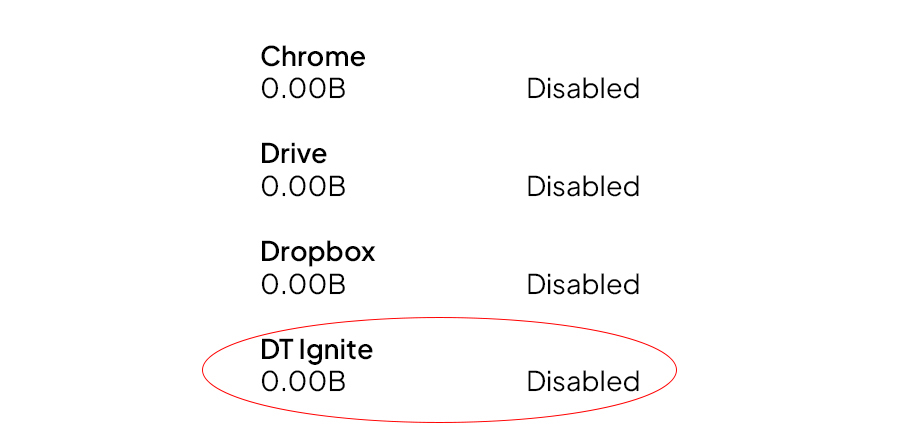
However, it always stays in the OS build of the carrier. It appears during the factory reset. Even the boot loader can’t remove or fix it. The carrier allows this app to run on the user’s smartphone. The publishers give money to the carrier to run it on the user’s android phone.
Mobile service managers use a lot of data
However, the pre-installed mobile services manager app performs tasks like updating programs, accessing information, controlling various settings, etc. Then, this device services manager is pre-installed on the mobile company’s operating system. Next, these companies may earn a lot of money for promoting the installation or usage of this app. However, your phone may become ruined due to the automatic download of Android apps. Also, the user is not aware of it. So, the mobile services management app will significantly slow down your device’s performance.
Disabling mobile service manager
Moreover, there are a few steps to disabling the mobile service manager. So, these steps are too easy. You will need to follow some steps below:
Method 1
- At first, go to settings.
- Then, search “My apps” on the search bar, or you can manually find “apps manager” options.
- Next, you need to find the “DT ignite” or “mobile service manager” app.
- At last, you see two options: “Uninstall” or “Disable” mobile service manager.
Because various operating systems are used, disabling mobile services managers on Samsung, LG, and other phones may change. So, if the previous steps don’t work for you, we have another method for you below. So, please check the other way below.

Method 2
- First, go to android settings on your android phone.
- Next, find and click on the app manager.
- Next, find the three-dot menu on the top corner on the right-hand side.
- Then, find and click on the show system app option.
- Next, you need to find the “DT ignite” or “mobile service manager” app.
- At last, you find two options: “Uninstall” or “Disable” mobile service manager.
Mobile services manager app Verizon
However, there are many various types of a wide range of wire data technology. So, WSN provides a low-power, low-cost solution for connecting to users to gather, share, and act on data via sensor networks. Next, cellular networks are built for cities or nations, and they take larger areas with mobility from one access point to another. Next, cellular network technology can be classified as 2G, 3G, 4G, or 5G. Then, Verizon’s cellular 4G LTE network reaches more than 98 percent of the American population. So, the firm for 3G cell phones created a data transmission network. Next, voice calls transmission over the data-only LTE network was released. Then, it provides cell phones for a variety of operating systems. Then, it also offers various voice and data plans.
Moreover, it introduced the 5G wireless network in 2015. Then, the LTE Advanced series in the US markets in 2016. Verizon launched the first commercial 5G Smartphone Services in April 2019.
What happens if you delete the mobile services manager
Moreover, if you uninstall the mobile services manager, your phone may run a little quicker because different manufacturers produce Android phones’ operating systems differently. So, you can delete the mobile services manager from some phones. But there is a huge possibility that the phone may not function correctly. So, many unimportant or worst apps will not be automatically installed on your phone. Then, the wasteful consumption of data and storage will be free and clean for your use.
Should I disable the mobile services manager?
- The majority of users have different viewpoints about it. Many people do not earn that level of money that they deserve. So, the major goal of developing such a program is to assist the carrier and app developer to earn more money.
- It uses several marketing methods. But those are useless to the device’s owner and should be uninstalled immediately.
- Many consumers are unaware that the unwanted programs are running on their devices. Next, it can run in the background. It also slows down mobile usage and consumes more data.
- It is reinstalled after each disabling and even when deactivated. Next, it operates in the background and uses the resource’s processing and data.
- Carriers gain profit from such worst apps. Therefore they should be prohibited from authorizing upgrades to such programs. Next, these updates slow down the device’s health and performance.
- What should remove the pre-installed app to avoid slowing down the mobile’s performance?
- It is a dangerous program that carriers should ban. The local authorities should make restrictions to deactivate it.
- Enter the settings and then go to Apps or app Manager on the smartphone. There scroll down the Smart Manager to search for and disable DT Ignite.
Why would a carrier allow mobile services managers?
According to some reports, service providers intentionally install such apps on mobile devices. They install these apps to collect consumer data. So, this data can be used to analyze user behavior and charge extra for data consumption on the customer’s phone bill. Then, the data carrier may install it on the user device to monetize the subscribers. However, many users argue that such apps install programs without their user’s permission.
So, there should be a way to stop or remove them. You can disable the mobile services manager in the new device setup. But, such apps have limitless access to private information. Also, they are constantly running on the device. Even if you disable it or reset the device, it still presents on a factory reset and loads the default settings. However, it may be difficult to disable the app. It helps the creator to make money. Its services are used by antivirus and anti-malware software.
Mobile service manager virus
Mobile phones have surfing capabilities, and corporations are developing smartphone-friendly websites to help them. Apps offer a variety of features such as instant messaging, WAP, location-based services, chat rooms, content rooms, and subscription-based – news and communication. However, subscription services based on media and cinema give explicit agreements when the user can acquire its services. Mobile Service is an operation management software. It assists in the administration of mobile employees to stay connected with others. Also, it gathers real-time data. For secure browsing and avoiding installing apps from unknown sources, you need to activate the browser’s block extension option.
Mobile service manager installing apps
Mobile services enable interpersonal data communication and contain unorthodox services such as wireless internet, which are made possible by connecting to LAN (or location network solution). It might be a mobile or PDA-based solution to build and assist managers in developing significant communication and marketing methods. It differs from e-services in terms of mobility and location awareness, time sensitivity, and personalization. The managers are in charge of user information, practical activities, traffic, news, chat rooms, games, and user activities connected to enjoyment. It collects data that may utilize to determine how to categorize people from a customer-centric standpoint to elevate user inputs through content, social settings, and consumption behavior.
Mobile services manager app at&t
It is an app for android. It is also available for play store.
Mobile services manager slow down mobile
Users hate Mobile Services Manager because it consumes the monthly data allocation without alerting them. Also, it shows spam alerts with advertisements in particular apps. At the installation time, the user needs to enable the app access. So, this is the access to the system and personal files. If the user accepts it, the system can operate in the background. If your device is turned off, it is still operating. It can install the worst apps onto the device without the user’s permission. Then, the app, which is part of the firmware, cannot be uninstalled. Also, what can only stop it for a limited period? It prevents displaying advertisements at any time. But even when disabled, it continues to operate in the background.
Mobile services manager DT Ignite
| DT IGNITE | After disabling it, it can automatically be re-enabled. It is re-enabled by the OS update. Then, users need to disable it. |
| It also hides itself. A normal user can’t find it in system apps or app managers. | |
| However, it is non-stop running on mobiles background. If you disabled it, it will be re-enabled by OS update. | |
| Some users also report that their mobile apps are not perfectly running. Even it gives trouble to the user, every time after resetting the phone. | |
| DT can enable itself after disabling or uninstalling it. | |
| It destroys the phone’s performance day by day. | |
| Next, it also takes a lot of storage and users face many troubles using it. | |
| It has many accessible powers like updating programs, accessing information, controlling various settings, and so on. |
Several users have claimed that such services consume a lot of power and data from devices since they enter and meddle with system activities without user authorization.
- Even with unlimited data plans, data consumption is regulated and metered. There may be roaming and maximum load constraints before data speed decrease or stop.
- When the device is not connected to Wi-Fi, this might be an issue.
- It takes data without the user’s awareness, and there are no options to prevent it from interfering with the device’s functioning.
- Then, it slows down the procedures since the advertising may appear in the middle of the job and annoy the user.
- It extracts battery power and processing resources to slow down the Android device.
Some frequently asked questions
What is a mobile services manager?
A mobile services manager is a pre-installed app. So, many android phones have this. This app runs on the KitKat Android version. Next, this is mostly found in certain carriers like Vodafone, Verizon, T-mobile, and AT&T. Most android users don’t know about its presence on their phone. It activated at the time of setting up.
However, it always stays in the OS build of the carrier. It appears during the factory reset. Even the boot loader cant remove or fix it. The carrier allows this app to run on the user’s smartphone. The publishers give money to the carrier to run it on the user’s android phone.
What is the Mobile Services app for?
The Mobile Services App maintains Android phones running the most up-to-date Xfinity Mobile apps. There is no setup or maintenance required. All Xfinity Mobile Android phones come with the Mobile Services App pre-installed.
What are phone services in Android?
Services in Android are specific components that permit an app to operate in the background to do long-running operation activities. The primary goal of a service is to keep the program running in the background so that the user may use numerous apps simultaneously.
How can I uninstall the mobile services manager?
There are a few steps to disabling the mobile service manager. These steps are too easy. You will need to follow some steps below:
Method 1
- At first, go to settings.
- Then, search “My apps” on the search bar, or you can manually find “apps manager” options.
- Next, you need to find the “DT ignite” or “mobile service manager” app.
- At last, you find two options: “Uninstall” or “Disable” mobile service manager.
Method 2
- First, go to android settings on your android phone.
- Next, find and click on the app manager.
- Next, find the three-dot menu on the top corner on the right-hand side.
- Then, find and click on the show system app option.
- Next, you need to find the “DT ignite” or “mobile service manager” app.
- At last, you find two options: “Uninstall” or “Disable” mobile service manager.
What are the categories of mobile services?
- The Mobile Internet. Mobile phones today are equipped with Internet browsers and large color screens.
- Next, Mobile Instant Messaging Services.
- Then, Mobile Chat Rooms.
- Premium Rate Mobile Content Services.
- Mobile phone subscription services.
- Mobile Dating Services.
How do I uninstall an MCM client?
- Initially, Go to your phone’s settings.
- Navigate now to the security panel to complete the process.
- Choose Device administrator settings from the drop-down list.
- After selecting it, click the Disable option to remove it from the list.
- Now, go back to your settings.
- A selection of apps is available here.
- Settings allow you to choose which programs you want to run.
- ManageEngine Mobile Device Manager Plus, maybe click from this page by clicking on the link.
- Uninstall the MDM agent by clicking on the uninstall button.
How do I find hidden apps on Android?
- Tap the ‘App Drawer icon in the bottom-right or bottom-center of the home screen. On the home screen, this will usually appear as two rows of three dots or squares;
- After that, press the menu icon. Depending on the version of Android you’re running, this will seem different. However, this is commonly represented by three dots, three bars, or a settings’ gear’ at the top of the apps list. If your Android has one, click the “menu” button in the bottom-right corner of the screen (near the Home button).
- Select ‘Show hidden apps (apps)’ from the menu. So, this shows a list of all apps that have been hidden from the home screen and app drawer.
- If the above choice does not display, there may be no hidden programs.
- To ensure that no hidden apps are present on your Android smartphone, hit ‘All’ to get a list of all programs.
Can I uninstall Mobile Installer?
It’s not something that would be pre-installed as some kind of default app on a typical phone, so you should be able to just go into the Settings >> Apps menu and Uninstall the app.