<strong> — элемент выделения важного текста
Элемент сильной значимости ( <strong> ) указывает на то, что его содержание имеет большое значение, серьёзность или срочность. Браузеры обычно отображают содержимое жирным шрифтом.
| Категории контента | Потоковой контент, Фразовый контент, явный контент. |
|---|---|
| Допустимый контент | Фразовый контент. |
| Опускание тегов | Нет, должен иметь как начальный тег, так и конечный тег. |
| Допустимые родители | Любой элемент, который принимает фразовый контент, или любой другой элемент, который принимает потоковой контент. |
| Допустимые ARIA-роли | Любые |
| DOM-интерфейс | HTMLElement |
Атрибуты
Этот элемент включает в себя глобальные атрибуты.
Замечания по использованию
Элемент <strong> предназначен для контента, который имеет «большое значение», включая вещи большой серьёзности или срочности (например, предупреждения). Это может быть предложение, которое имеет большое значение для всей страницы, или вы можете просто попытаться указать, что некоторые слова имеют большее значение по сравнению с соседним контентом.
Обычно этот элемент отображается по умолчанию с использованием жирного шрифта. Однако, он не должен быть использован просто для применения жирного стиля; используйте свойство CSS font-weight для этой цели. Используйте элемент <b> , чтобы привлечь внимание к определённому тексту без указания более высокого уровня важности. Используйте элемент <em> element для выделения текста, который имеет выраженный акцент.
Другим приемлемым использованием для <strong> является обозначение ярлыков абзацев, которые представляют заметки или предупреждения в тексте страницы.
<b> против <strong>
Это часто путает новых разработчиков, почему существует так много способов выразить одно и то же на представленном веб-сайте. <b> и <strong> возможно, является одним из наиболее распространённых источников путаницы, заставляя разработчиков задавать себе вопрос: «Должен ли я использовать <b> или <strong> ? Разве они не делают одно и тоже?»
Не совсем. Элемент <strong> для контента, который имеет большее значение, в то время как элемент <b> используется для привлечения внимания к тексту, не указывая на то, что это более важно.
Это может помочь понять, что оба являются правильным и семантическими элементами в HTML5, и это совпадение, что оба они имеют одинаковый стиль (полужирный) в большинстве браузеров (хотя некоторые старые браузеры фактически подчёркивают <strong> ). Каждый элемент предназначен для использования в определённых типах сценариев, и если вы хотите жирный шрифт просто для украшения, вместо этого вы должные использовать свойства CSS font-weight .
Предполагаемое значение или цель прилагаемого текста должно быть тем, что определяет, какой элемент вы используете. Значение общения — вот что такое семантика.
<em> против <strong>
Добавление к путанице заключается в том, что, хотя HTML 4 определяет <strong> как просто указывающий на более сильный акцент, HTML 5 определяет <strong> как представляющий «большое значение для его содержимого». Это важное различие.
В то время, как <em> используется для изменения значения предложения, поскольку делается устный акцент («Я люблю морковь» против «Я люблюморковь«), <strong> используется, для придания предложению порции особого значения (например, «Предупреждение! Это очень опасно.«) Оба элемента <strong> и <em> могут быть вложены для увеличения относительной степени важности или усиленного акцента, соответственно.
When to Use <strong>, <b>, <em>, and <i> Tags in Your Markup

As HTML continues to evolve and incorporate more useful native features that improve both the user and developer experience, confusion can arise when choosing the most appropriate tag among a list of similar options.
A good example of this is when trying to determine whether to use <strong> , <b> , <em> , or <i> tags in your markup. Stylistically, <strong> and <b> tags accomplish the same thing, as do <em> and <i> tags. So, how do you know which tag to use and when to use it?
When to Use the <strong> Tag
The <strong> tag is used when we want to indicate the importance, seriousness, or urgency of a word or section of content without changing the meaning of the content itself.¹
When to Use the <em> Tag
The <em> tag places stress emphasis on a particular piece of content in a way that changes the actual meaning of the content. Whenever we want to emphasize something in our markup with verbal stress, we should use <em> tags.²
When to Use the <i> Tag
The <i> tag is used to convey a different mood or voice from the surrounding content. It’s often used with foreign words or idiomatic phrases, technical terms, ship names, thoughts, etc.³
When to Use the <b> Tag
The <b> tag draws attentions to word or section of content for utilitarian purposes without conveying extra importance, emphasis, alternate voice or mood, etc.³ It is the least semantic of the HTML tags we’ve discussed in this post, and should only be used when no other tag is more appropriate.
Why So Many Tags?
Now that you know more about the above HTML tags and the best time to use them, you might be wondering why we have four tags to accomplish more or less the same two outcomes (increase importance or emphasis content).
Well, in the words of Puff Daddy:
As I’ve touched on before, taking advantage of more semantic HTML options gives your markup meaning to web browsers and screen readers, helps with SEO, makes it easier to read and debug, and provides a better overall experience to your users.
Bruce Lawson — co-author of Introducing HTML5 and self-proclaimed “Web Standards Lovegod” — recently declared semantics our “Flux Capacitor” when it comes to improving accessibility, usability, and future-proofing websites and applications. The best part is we get all of this enhanced functionality right out of the box — no extra work required! ��
Evolving HTML standards aimed at improving semantics have given us new, hyper-specific tags designed to make our markup even more precise and readable. This also means that we have very similar, yet subtly different tags to use in our markup, which can be confusing.
In the end, I think a bit of confusion (which can be alleviated by helpful resources like HTML5 Doctor) on which tags to use is a fair trade off for the semantic improvements we get by having both <strong> and <b> , or <em> and <i> tags at our disposal.
Thanks for reading! If you’re interested in learning more about the fundamentals of HTML, CSS, and JavaScript, follow Web Dev Basics on Medium. Ready to write some code? Sweet! Sign up for course and learn the basics of web development.
HTML5
If the a element has an href attribute, then it represents a hyperlink (a hypertext anchor) labeled by its contents.
If the a element has no href attribute, then the element represents a placeholder for where a link might otherwise have been placed, if it had been relevant, consisting of just the element’s contents.
The target , download , rel , hreflang , and type attributes must be omitted if the href attribute is not present.
If a site uses a consistent navigation toolbar on every page, then the link that would normally link to the page itself could be marked up using an a element:
The href , target , download , and attributes affect what happens when users follow hyperlinks or download hyperlinks created using the a element. The rel , hreflang , and type attributes may be used to indicate to the user the likely nature of the target resource before the user follows the link.
The activation behavior of a elements that create hyperlinks is to run the following steps:
If either the a element has a download attribute and the algorithm is not allowed to show a popup, or the element’s target attribute is present and applying the rules for choosing a browsing context given a browsing context name, using the value of the target attribute as the browsing context name, would result in there not being a chosen browsing context, then run these substeps:
If the target of the click event is an img element with an ismap attribute specified, then server-side image map processing must be performed, as follows:
- If the click event was a real pointing-device-triggered click event on the img element, then let x be the distance in CSS pixels from the left edge of the image’s left border, if it has one, or the left edge of the image otherwise, to the location of the click, and let y be the distance in CSS pixels from the top edge of the image’s top border, if it has one, or the top edge of the image otherwise, to the location of the click. Otherwise, let x and y be zero.
- Let the be a U+003F QUESTION MARK character, the value of x expressed as a base-ten integer using ASCII digits, a «,» (U+002C) character, and the value of y expressed as a base-ten integer using ASCII digits.
The IDL attributes , , , , , and , must reflect the respective content attributes of the same name.
The IDL attribute must reflect the rel content attribute.
The IDL attribute, on getting, must return the same value as the textContent IDL attribute on the element, and on setting, must act as if the textContent IDL attribute on the element had been set to the new value.
The a element also supports the URLUtils interface. [URL]
When the element is created, and whenever the element’s href content attribute is set, changed, or removed, the user agent must invoke the element’s URLUtils interface’s set the input algorithm with the value of the href content attribute, if any, or the empty string otherwise, as the given value.
The element’s URLUtils interface’s get the base algorithm must simply return the element’s base URL.
When the element’s URLUtils interface invokes its update steps with a string value , the user agent must set the element’s href content attribute to the string value .
The a element may be wrapped around entire paragraphs, lists, tables, and so forth, even entire sections, so long as there is no interactive content within (e.g. buttons or other links). This example shows how this can be used to make an entire advertising block into a link:
4.5.2 The element
The em element represents stress emphasis of its contents.
The level of stress that a particular piece of content has is given by its number of ancestor em elements.
The placement of stress emphasis changes the meaning of the sentence. The element thus forms an integral part of the content. The precise way in which stress is used in this way depends on the language.
These examples show how changing the stress emphasis changes the meaning. First, a general statement of fact, with no stress:
By emphasizing the first word, the statement implies that the kind of animal under discussion is in question (maybe someone is asserting that dogs are cute):
Moving the stress to the verb, one highlights that the truth of the entire sentence is in question (maybe someone is saying cats are not cute):
By moving it to the adjective, the exact nature of the cats is reasserted (maybe someone suggested cats were mean animals):
Similarly, if someone asserted that cats were vegetables, someone correcting this might emphasize the last word:
By emphasizing the entire sentence, it becomes clear that the speaker is fighting hard to get the point across. This kind of stress emphasis also typically affects the punctuation, hence the exclamation mark here.
Anger mixed with emphasizing the cuteness could lead to markup such as:
The em element isn’t a generic «italics» element. Sometimes, text is intended to stand out from the rest of the paragraph, as if it was in a different mood or voice. For this, the i element is more appropriate.
The em element also isn’t intended to convey importance; for that purpose, the strong element is more appropriate.
4.5.3 The element
The strong element represents strong importance, seriousness, or urgency for its contents.
Importance: The strong element can be used in a heading, caption, or paragraph to distinguish the part that really matters from other parts of the that might be more detailed, more jovial, or merely boilerplate.
For example, the first word of the previous paragraph is marked up with strong to distinguish it from the more detailed text in the rest of the paragraph.
Seriousness: The strong element can be used to mark up a warning or caution notice.
Urgency: The strong element can be used to denote contents that the user needs to see sooner than other parts of the document.
The relative level of importance of a piece of content is given by its number of ancestor strong elements; each strong element increases the importance of its contents.
Changing the importance of a piece of text with the strong element does not change the meaning of the sentence.
Here, the word «chapter» and the actual chapter number are mere boilerplate, and the actual name of the chapter is marked up with strong :
In the following example, the name of the diagram in the caption is marked up with strong , to distinguish it from boilerplate text (before) and the description (after):
In this example, the heading is really «Flowers, Bees, and Honey», but the author has added a light-hearted addition to the heading. The strong element is thus used to mark up the first part to distinguish it from the latter part.
Here is an example of a warning notice in a game, with the various parts marked up according to how important they are:
In this example, the strong element is used to denote the part of the text that the user is intended to read first.
4.5.4 The element
The small element represents side comments such as small print.
Small print typically features disclaimers, caveats, legal restrictions, or copyrights. Small print is also sometimes used for attribution, or for satisfying licensing requirements.
The small element does not «de-emphasize» or lower the importance of text emphasized by the em element or marked as important with the strong element. To mark text as not emphasized or important, simply do not mark it up with the em or strong elements respectively.
The small element should not be used for extended spans of text, such as multiple paragraphs, lists, or sections of text. It is only intended for short runs of text. The text of a page listing terms of use, for instance, would not be a suitable candidate for the small element: in such a case, the text is not a side comment, it is the main content of the page.
In this example, the small element is used to indicate that value-added tax is not included in a price of a hotel room:
In this second example, the small element is used for a side comment in an article.
This is distinct from a sidebar, which might be multiple paragraphs long and is removed from the main flow of text. In the following example, we see a sidebar from the same article. This sidebar also has small print, indicating the source of the information in the sidebar.
In this last example, the small element is marked as being important small print.
4.5.5 The element
The s element represents contents that are no longer accurate or no longer relevant.
The s element is not appropriate when indicating document edits; to mark a span of text as having been removed from a document, use the del element.
In this example a recommended retail price has been marked as no longer relevant as the product in question has a new sale price.
4.5.6 The element
The cite element represents a reference to a creative work. It must include the title of the work or the name of the author(person, people or organization) or an URL reference, which may be in an abbreviated form as per the conventions used for the addition of citation metadata.
Creative works include a book, a paper, an essay, a poem, a score, a song, a script, a film, a TV show, a game, a sculpture, a painting, a theatre production, a play, an opera, a musical, an exhibition, a legal case report, a web site, a web page, a blog post or comment, a forum post or comment, a tweet, a written or oral statement, etc.
Here is an example of the author of a quote referenced using the cite element:
This second example identifies the author of a tweet by referencing the authors name using the cite element:
In this example the cite element is used to reference the title of a work in a bibliography:
In this example the cite element is used to reference the title of a television show:
A very common use for the cite element is to identify the author of a comment in a blog post or forum, as in this example:
Another common use for the cite element is to reference the URL of a search result, as in this example:
A citation is not a quote (for which the q element is appropriate).
This is incorrect usage, because cite is not for quotes:
This is an example of the correct usage:
4.5.7 The element
The q element represents some phrasing content quoted from another source.
Quotation punctuation (such as quotation marks) that is quoting the contents of the element must not appear immediately before, after, or inside q elements; they will be inserted into the rendering by the user agent.
Content inside a q element must be quoted from another source, whose address, if it has one, may be cited in the attribute. The source may be fictional, as when quoting characters in a novel or screenplay.
If the cite attribute is present, it must be a valid URL potentially surrounded by spaces. To obtain the corresponding citation link, the value of the attribute must be resolved relative to the element. User agents may allow users to follow such citation links, but they are primarily intended for private use (e.g. by server-side scripts collecting statistics about a site’s use of quotations), not for readers.
The q element must not be used in place of quotation marks that do not represent quotes; for example, it is inappropriate to use the q element for marking up sarcastic statements.
The use of q elements to mark up quotations is entirely optional; using explicit quotation punctuation without q elements is just as correct.
Here is a simple example of the use of the q element:
Here is an example with both an explicit citation link in the q element, and an explicit citation outside:
In the following example, the quotation itself contains a quotation:
In the following example, quotation marks are used instead of the q element:
In the following example, there is no quote — the quotation marks are used to name a word. Use of the q element in this case would be inappropriate.
4.5.8 The element
The dfn element represents the defining instance of a term. The paragraph, description list group, or section that is the nearest ancestor of the dfn element must also contain the definition(s) for the term given by the dfn element.
: If the dfn element has a attribute, then the exact value of that attribute is the term being defined. Otherwise, if it contains exactly one element child node and no child Text nodes, and that child element is an abbr element with a title attribute, then the exact value of that attribute is the term being defined. Otherwise, it is the exact textContent of the dfn element that gives the term being defined.
If the title attribute of the dfn element is present, then it must contain only the term being defined.
The title attribute of ancestor elements does not affect dfn elements.
An a element that links to a dfn element represents an instance of the term defined by the dfn element.
In the following fragment, the term «Garage Door Opener» is first defined in the first paragraph, then used in the second. In both cases, its abbreviation is what is actually displayed.
With the addition of an a element, the reference can be made explicit:
4.5.9 The element
The abbr element represents an abbreviation or acronym, optionally with its expansion. The attribute may be used to provide an expansion of the abbreviation. The attribute, if specified, must contain an expansion of the abbreviation, and nothing else.
The paragraph below contains an abbreviation marked up with the abbr element. This paragraph defines the term «Web Hypertext Application Technology Working Group».
An alternative way to write this would be:
This paragraph has two abbreviations. Notice how only one is defined; the other, with no expansion associated with it, does not use the abbr element.
This paragraph links an abbreviation to its definition.
This paragraph marks up an abbreviation without giving an expansion, possibly as a hook to apply styles for abbreviations (e.g. smallcaps).
If an abbreviation is pluralized, the expansion’s grammatical number (plural vs singular) must match the grammatical number of the contents of the element.
Here the plural is outside the element, so the expansion is in the singular:
Here the plural is inside the element, so the expansion is in the plural:
Abbreviations do not have to be marked up using this element. It is expected to be useful in the following cases:
- Abbreviations for which the author wants to give expansions, where using the abbr element with a title attribute is an alternative to including the expansion inline (e.g. in parentheses).
- Abbreviations that are likely to be unfamiliar to the document’s readers, for which authors are encouraged to either mark up the abbreviation using an abbr element with a title attribute or include the expansion inline in the text the first time the abbreviation is used.
- Abbreviations whose presence needs to be semantically annotated, e.g. so that they can be identified from a style sheet and given specific styles, for which the abbr element can be used without a title attribute.
Providing an expansion in a title attribute once will not necessarily cause other abbr elements in the same document with the same contents but without a title attribute to behave as if they had the same expansion. Every abbr element is independent.
4.5.10 The element
The data element represents its contents, along with a machine-readable form of those contents in the value attribute.
The attribute must be present. Its value must be a representation of the element’s contents in a machine-readable format.
When the value is date- or time-related, the more specific time element can be used instead.
The element can be used for several purposes.
When combined with microformats or microdata, the element serves to provide both a machine-readable value for the purposes of data processors, and a human-readable value for the purposes of rendering in a Web browser. In this case, the format to be used in the value attribute is determined by the microformats or microdata vocabulary in use.
The element can also, however, be used in conjunction with scripts in the page, for when a script has a literal value to store alongside a human-readable value. In such cases, the format to be used depends only on the needs of the script. (The data-* attributes can also be useful in such situations.)
The IDL attribute must reflect the content attribute of the same name.
4.5.11 The element
The time element represents its contents, along with a machine-readable form of those contents in the datetime attribute. The kind of content is limited to various kinds of dates, times, time-zone offsets, and durations, as described below.
The attribute may be present. If present, its value must be a representation of the element’s contents in a machine-readable format.
A time element that does not have a datetime content attribute must not have any element descendants.
The of a time element is the value of the element’s datetime content attribute, if it has one, or the element’s textContent , if it does not.
The datetime value of a time element must match one of the following syntaxes.
Times with dates but without a time zone offset are useful for specifying events that are observed at the same specific time in each time zone, throughout a day. For example, the 2020 new year is celebrated at 2020-01-01 00:00 in each time zone, not at the same precise moment across all time zones. For events that occur at the same time across all time zones, for example a videoconference meeting, a valid global date and time string is likely more useful.
For times without dates (or times referring to events that recur on multiple dates), specifying the geographic location that controls the time is usually more useful than specifying a time zone offset, because geographic locations change time zone offsets with daylight savings time. In some cases, geographic locations even change time zone, e.g. when the boundaries of those time zones are redrawn, as happened with Samoa at the end of 2011. There exists a time zone database that describes the boundaries of time zones and what rules apply within each such zone, known as the time zone database. [TZDATABASE]
Times with dates and a time zone offset are useful for specifying specific events, or recurring virtual events where the time is not anchored to a specific geographic location. For example, the precise time of an asteroid impact, or a particular meeting in a series of meetings held at 1400 UTC every day, regardless of whether any particular part of the world is observing daylight savings time or not. For events where the precise time varies by the local time zone offset of a specific geographic location, a valid floating date and time string combined with that geographic location is likely more useful.
A valid week string Four or more ASCII digits, at least one of which is not «0» (U+0030) A valid duration string
Many of the preceding valid syntaxes describe «floating» date and/or time values (they do not include a time-zone offset). Care is needed when converting floating time values to or from global («incremental») time values (e.g., JavaScript’s Date object). In many cases, an implicit time-of-day and time zone are used in the conversion and may result in unexpected changes to the value of the date itself. [TIMEZONES]
The must be obtained from the element’s datetime value by using the following algorithm:
The algorithms referenced above are intended to be designed such that for any arbitrary string s , only one of the algorithms returns a value. A more efficient approach might be to create a single algorithm that parses all these data types in one pass; developing such an algorithm is left as an exercise to the reader.
The IDL attribute must reflect the element’s datetime content attribute.
The time element can be used to encode dates, for example in microformats. The following shows a hypothetical way of encoding an event using a variant on hCalendar that uses the time element:
Here, a fictional microdata vocabulary based on the Atom vocabulary is used with the time element to mark up a blog post’s publication date.
In this example, another article’s publication date is marked up using time , this time using the schema.org microdata vocabulary:
In the following snippet, the time element is used to encode a date in the ISO8601 format, for later processing by a script:
In this second snippet, the value includes a time:
A script loaded by the page (and thus privy to the page’s internal convention of marking up dates and times using the time element) could scan through the page and look at all the time elements therein to create an index of dates and times.
For example, this element conveys the string «Tuesday» with the additional semantic that the 12th of November 2011 is the meaning that corresponds to «Tuesday»:
In this example, a specific time in the Pacific Standard Time timezone is specified:
4.5.12 The element
The code element represents a fragment of computer code. This could be an XML element name, a file name, a computer program, or any other string that a computer would recognize.
There is no formal way to indicate the language of computer code being marked up. Authors who wish to mark code elements with the language used, e.g. so that syntax highlighting scripts can use the right rules, can use the class attribute, e.g. by adding a class prefixed with » language- » to the element.
The following example shows how the element can be used in a paragraph to mark up element names and computer code, including punctuation.
The following example shows how a block of code could be marked up using the pre and code elements.
A class is used in that example to indicate the language used.
See the pre element for more details.
4.5.13 The element
The var element represents a variable. This could be an actual variable in a mathematical expression or programming context, an identifier representing a constant, a symbol identifying a physical quantity, a function parameter, or just be a term used as a placeholder in prose.
In the paragraph below, the letter «n» is being used as a variable in prose:
For mathematics, in particular for anything beyond the simplest of expressions, MathML is more appropriate. However, the var element can still be used to refer to specific variables that are then mentioned in MathML expressions.
In this example, an equation is shown, with a legend that references the variables in the equation. The expression itself is marked up with MathML, but the variables are mentioned in the figure’s legend using var .
Here, the equation describing mass-energy equivalence is used in a sentence, and the var element is used to mark the variables and constants in that equation:
4.5.14 The element
The samp element represents (sample) output from a program or computing system.
See the pre and kbd elements for more details.
This example shows the samp element being used inline:
This second example shows a block of sample output. Nested samp and kbd elements allow for the styling of specific elements of the sample output using a style sheet. There’s also a few parts of the samp that are annotated with even more detailed markup, to enable very precise styling. To achieve this, span elements are used.
4.5.15 The element
The kbd element represents user input (typically keyboard input, although it may also be used to represent other input, such as voice commands).
When the kbd element is nested inside a samp element, it represents the input as it was echoed by the system.
When the kbd element contains a samp element, it represents input based on system output, for example invoking a menu item.
When the kbd element is nested inside another kbd element, it represents an actual key or other single unit of input as appropriate for the input mechanism.
Here the kbd element is used to indicate keys to press:
In this second example, the user is told to pick a particular menu item. The outer kbd element marks up a block of input, with the inner kbd elements representing each individual step of the input, and the samp elements inside them indicating that the steps are input based on something being displayed by the system, in this case menu labels:
Such precision isn’t necessary; the following is equally fine:
4.5.16 The and elements
The sup element represents a superscript and the sub element represents a subscript.
These elements must be used only to mark up typographical conventions with specific meanings, not for typographical presentation for presentation’s sake. For example, it would be inappropriate for the sub and sup elements to be used in the name of the LaTeX document preparation system. In general, authors should use these elements only if the absence of those elements would change the meaning of the content.
In certain languages, superscripts are part of the typographical conventions for some abbreviations.
The sub element can be used inside a var element, for variables that have subscripts.
Here, the sub element is used to represent the subscript that identifies the variable in a family of variables:
Mathematical expressions often use subscripts and superscripts. Authors are encouraged to use MathML for marking up mathematics, but authors may opt to use sub and sup if detailed mathematical markup is not desired. [MATHML]
4.5.17 The element
The i element represents a span of text in an alternate voice or mood, or otherwise offset from the normal prose in a manner indicating a different quality of text, such as a taxonomic designation, a technical term, an idiomatic phrase from another language, transliteration, a thought, or a ship name in Western texts.
Terms in languages different from the main text should be annotated with lang attributes (or, in XML, lang attributes in the XML namespace ).
The examples below show uses of the i element:
In the following example, a dream sequence is marked up using i elements.
Authors can use the class attribute on the i element to identify why the element is being used, so that if the style of a particular use (e.g. dream sequences as opposed to taxonomic terms) is to be changed at a later date, the author doesn’t have to go through the entire document (or series of related documents) annotating each use.
Authors are encouraged to consider whether other elements might be more applicable than the i element, for instance the em element for marking up stress emphasis, or the dfn element to mark up the defining instance of a term.
Style sheets can be used to format i elements, just like any other element can be restyled. Thus, it is not the case that content in i elements will necessarily be italicized.
4.5.18 The element
The b element represents a span of text to which attention is being drawn for utilitarian purposes without conveying any extra importance and with no implication of an alternate voice or mood, such as key words in a document abstract, product names in a review, actionable words in interactive text-driven software, or an article lede.
The following example shows a use of the b element to highlight key words without marking them up as important:
In the following example, objects in a text adventure are highlighted as being special by use of the b element.
Another case where the b element is appropriate is in marking up the lede (or lead) sentence or paragraph. The following example shows how a BBC article about kittens adopting a rabbit as their own could be marked up:
As with the i element, authors can use the class attribute on the b element to identify why the element is being used, so that if the style of a particular use is to be changed at a later date, the author doesn’t have to go through annotating each use.
The b element should be used as a last resort when no other element is more appropriate. In particular, headings should use the h1 to h6 elements, stress emphasis should use the em element, importance should be denoted with the strong element, and text marked or highlighted should use the mark element.
The following would be incorrect usage:
In the previous example, the correct element to use would have been strong , not b .
Style sheets can be used to format b elements, just like any other element can be restyled. Thus, it is not the case that content in b elements will necessarily be boldened.
4.5.19 The element
The u element represents a span of text with an unarticulated, though explicitly rendered, non-textual annotation, such as labeling the text as being a proper name in Chinese text (a Chinese proper name mark), or labeling the text as being misspelt.
In most cases, another element is likely to be more appropriate: for marking stress emphasis, the em element should be used; for marking key words or phrases either the b element or the mark element should be used, depending on the context; for marking book titles, the cite element should be used ; for labeling text with explicit textual annotations, the ruby element should be used; for labeling ship names in Western texts, the i element should be used.
The default rendering of the u element in visual presentations clashes with the conventional rendering of hyperlinks (underlining). Authors are encouraged to avoid using the u element where it could be confused for a hyperlink.
4.5.20 The element
The mark element represents a run of text in one document marked or highlighted for reference purposes, due to its relevance in another context. When used in a quotation or other block of text referred to from the prose, it indicates a highlight that was not originally present but which has been added to bring the reader’s attention to a part of the text that might not have been considered important by the original author when the block was originally written, but which is now under previously unexpected scrutiny. When used in the main prose of a document, it indicates a part of the document that has been highlighted due to its likely relevance to the user’s current activity.
This example shows how the mark element can be used to bring attention to a particular part of a quotation:
(If the goal was to mark the element as misspelt, however, the u element, possibly with a class, would be more appropriate.)
Another example of the mark element is highlighting parts of a document that are matching some search string. If someone looked at a document, and the server knew that the user was searching for the word «kitten», then the server might return the document with one paragraph modified as follows:
In the following snippet, a paragraph of text refers to a specific part of a code fragment.
This is separate from syntax highlighting, for which span is more appropriate. Combining both, one would get:
This is another example showing the use of mark to highlight a part of quoted text that was originally not emphasized. In this example, common typographic conventions have led the author to explicitly style mark elements in quotes to render in italics.
Note, incidentally, the distinction between the em element in this example, which is part of the original text being quoted, and the mark element, which is highlighting a part for comment.
The following example shows the difference between denoting the importance of a span of text ( strong ) as opposed to denoting the relevance of a span of text ( mark ). It is an extract from a textbook, where the extract has had the parts relevant to the exam highlighted. The safety warnings, important though they may be, are apparently not relevant to the exam.
4.5.21 The element
The ruby element allows one or more spans of phrasing content to be marked with ruby annotations. Ruby annotations are short runs of text presented alongside base text, primarily used in East Asian typography as a guide for pronunciation or to include other annotations. In Japanese, this form of typography is also known as furigana. Ruby text can appear on either side, and sometimes both sides, of the base text, and it is possible to control its position using CSS. A more complete introduction to ruby can be found in the Use Cases & Exploratory Approaches for Ruby Markup document as well as in CSS Ruby Module Level 1 . [RUBY-UC] [CSSRUBY]
The content model of ruby elements consists of one or more of the following sequences:
- One or more phrasing content nodes or rb elements.
- One or more rt or rtc elements, each of which either immediately preceded or followed by an rp elements.
The ruby , rb , rtc , and rt elements can be used for a variety of kinds of annotations, including in particular (though by no means limited to) those described below. For more details on Japanese Ruby in particular, and how to render Ruby for Japanese, see Requirements for Japanese Text Layout . [JLREQ] The rp element can be used as fallback content when ruby rendering is not supported.
Mono-ruby for individual base characters
Annotations (the ruby text) are associated individually with each ideographic character (the base text). In Japanese this is typically hiragana or katakana characters used to provide readings of kanji characters.
When no rb element is used, the base is implied, as above. But you can also make it explicit. This can be useful notably for styling, or when consecutive bases are to be treated as a group, as in the jukugo ruby example further down.
In the following example, notice how each annotation corresponds to a single base character.
Ruby text interspersed in regular text provides structure akin to the following image:
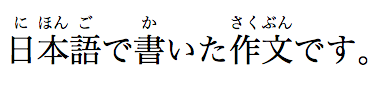
This example can also be written as follows, using one ruby element with two segments of base text and two annotations (one for each) rather than two back-to-back ruby elements each with one base text segment and annotation (as in the markup above):
Group ruby is often used where phonetic annotations don’t map to discreet base characters, or for semantic glosses that span the whole base text. For example, the word «today» is written with the characters 今日, literally «this day». But it’s pronounced きょう (kyou), which can’t be broken down into a «this» part and a «day» part. In typical rendering, you can’t split text that is annotated with group ruby; it has to wrap as a single unit onto the next line. When a ruby text annotation maps to a base that is comprised of more than one character, then that base is grouped.
The following group ruby:

Can be marked up as follows:
Jukugo refers to a Japanese compound noun, i.e. a word made up of more than one kanji character. Jukugo ruby is a term that is used not to describe ruby annotations over jukugo text, but rather to describe ruby with a behaviour slightly different from mono or group ruby. Jukugo ruby is similar to mono ruby, in that there is a strong association between ruby text and individual base characters, but the ruby text is typically rendered as grouped together over multiple ideographs when they are on the same line.
The distinction is captured in this example:
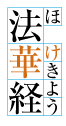
Which can be marked up as follows:
In this example, each rt element is paired with its respective rb element, the difference with an interleaved rb / rt approach being that the sequences of both base text and ruby annotations are implicitly placed in common containers so that the grouping information is captured.
For more details on Jukugo Ruby rendering, see Appendix F in the Requirements for Japanese Text Layout and Use Case C: Jukugo ruby in the Use Cases & Exploratory Approaches for Ruby Markup . [JLREQ] [RUBY-UC]
In some contexts, for instance when the font size or line height are too small for ruby to be readable, it is desirable to inline the ruby annotation such that it appears in parentheses after the text it annotates. This also provides a convenient fallback strategy for user agents that do not support rendering ruby annotations.
Inlining takes grouping into account. For example, Tokyo is written with two kanji characters, 東, which is pronounced とう, and 京, which is pronounced きょう. Each base character should be annotated individually, but the fallback should be 東京(とうきょう) not 東(とう)京(きょう). This can be marked up as follows:
Note that the above markup will enable the usage of parentheses when inlining for browsers that support ruby layout, but for those that don’t it will fail to provide parenthetical fallback. This is where the rp element is useful. It can be inserted into the above example to provide the appropriate fallback when ruby layout is not supported:
Sometimes, ruby can be used to annotate a base twice.
In the following example, the Chinese word for San Francisco (旧金山, i.e. “old gold mountain”) is annotated both using pinyin to give the pronunciation, and with the original English.
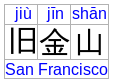
Which is marked up as follows:
In this example, a single base run of three base characters is annotated with three pinyin ruby text segments in a first (implicit) container, and an rtc element is introduced in order to provide a second single ruby text annotation being the city’s English name.
We can also revisit our jukugo example above with 上手 («skill») to show how it can be annotation in both kana and romaji phonetics while at the same time maintaining the pairing to bases and annotation grouping information.
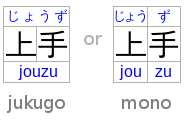
Which is marked up as follows:
Text that is a direct child of the rtc element implicitly produces a ruby text segment as if it were contained in an rt element. In this contrived example, this is shown with some symbols that are given names in English and French with annotations intended to appear on either side of the base symbol.
Similarly, text directly inside a ruby element implicitly produces a ruby base as if it were contained in an rb element, and rt children of ruby are implicitly contained in an rtc container. In effect, the above example is equivalent (in meaning, though not in the DOM it produces) to the following:
Within a ruby element, content is parcelled into a series of ruby segments. Each is described by:
- Zero or more , each of which is a DOM range that may contain phrasing content or an rb element.
- A base range, that is a DOM range including all the bases. This is the .
- Zero or more ruby text containers which may correspond to explicit rtc elements, or to sequences of rt elements implicitly recognised as contained in an anonymous ruby text container.
Each is described by zero or more each of which is a DOM range that may contain phrasing content or an rt element, and an annotations range that is a range including all the annotations for that container. A ruby text container is also known (primarily in a CSS context) as a .
Furthermore, a ruby element contains . Ignored ruby content does not form part of the document’s semantics. It consists of some inter-element whitespace and rp elements, the latter of which are used for legacy user agents that do not support ruby at all.
The process of associates ruby annotations with ruby bases. Within each ruby segment, each ruby base in the ruby base container is paired with one ruby text annotation from the ruby text container, in order. If there are not enough ruby text annotations in a ruby annotation container, the last one is associated with any excess ruby bases. (If there are not any in the ruby annotation container, an anonymous empty one is assumed to exist.) If there are not enough ruby bases, any remaining ruby text annotations are assumed to be associated with empty, anonymous bases inserted at the end of the ruby base container.
Informally, the segmentation and categorisation algorithm below performs a simple set of tasks. First it processes adjacent rb elements, text nodes, and non-ruby elements into a list of bases. Then it processes any number of rtc elements or sequences of rt elements that are considered to automatically map to an anonymous ruby text container. Put together these data items form a ruby segment as detailed in the data model above. It will continue to produce such segments until it reaches the end of the content of a given ruby element. The complexity of the algorithm below compared to this informal description stems from the need to support an author-friendly syntax and being mindful of inter-element white space.
At any particular time, the element is the result that would be obtained from running the following algorithm:
- Let root be the ruby element for which the algorithm is being run.
- Let index be 0.
- Let ruby segments be an empty list.
- Let current bases be an empty list of DOM ranges.
- Let current bases range be null.
- Let current bases range start be null.
- Let current annotations be an empty list of DOM ranges.
- Let current annotations range be null.
- Let current annotations range start be null.
- Let current annotation containers be an empty list.
- Let current automatic base nodes be an empty list of DOM Nodes.
- Let current automatic base range start be null.
- Process a ruby child: If index is equal to or greater than the number of child nodes in root , then run the steps to commit a ruby segment, return ruby segments , and abort these steps.
- Let current child be the index th node in root .
- If current child is not a Text node and is not an Element node, then increment index by one and jump to the step labelled process a ruby child.
- If current child is an rp element, then increment index by one and jump to the step labelled process a ruby child. (Note that this has the effect of including this element in any range that we are currently processing. This is done intentionally so that misplaced rp can be processed correctly; semantically they are ignored all the same.)
- If current child is an rt element, then run these substeps:
- Run the steps to commit an automatic base.
- Run the steps to commit the base range.
- If current annotations is empty, set current annotations range start to the value of index .
- Create a new DOM range whose start is the boundary point ( root , index ) and whose end is the boundary point ( root , index plus one), and append it at the end of current annotations .
- Increment index by one and jump to the step labelled process a ruby child.
- Run the steps to commit an automatic base.
- Run the steps to commit the base range.
- Run the steps to commit current annotations.
- Create a new ruby annotation container. It is described by the list of annotations returned by running the steps to process an rtc element and a DOM range whose start is the boundary point ( root , index ) and whose end is the boundary point ( root , index plus one). Append this new ruby annotation container at the end of current annotation containers .
- Increment index by one and jump to the step labelled process a ruby child.
- If current annotations is not empty, increment index by one and jump to the step labelled process a ruby child.
- Run the following substeps:
- Let lookahead index be set to the value of index .
- Peek ahead: Increment lookahead index by one.
- If lookahead index is equal to or greater than the number of child nodes in root , then abort these substeps.
- Let peek child be the lookahead index th node in root .
- If peek child is a Text node and is inter-element whitespace, then jump to the step labelled peek ahead.
- If peek child is an rt element, an rtc element, or an rp element, then set index to the value of lookahead index and jump to the step labelled process a ruby child.
- Run the steps to commit an automatic base.
- If current bases is empty, then set current bases range start to the value of index .
- Create a new DOM range whose start is the boundary point ( root , index ) and whose end is the boundary point ( root , index plus one), and append it at the end of current bases .
- Increment index by one and jump to the step labelled process a ruby child.
When the steps above say to , it means to run the following steps at that point in the algorithm:
- Run the steps to commit an automatic base.
- If current bases , current annotations , and current annotation containers are all empty, abort these steps.
- Run the steps to commit the base range.
- Run the steps to commit current annotations.
- Create a new ruby segment. It is described by a list of bases set to current bases , a base DOM range set to current bases range , and a list of ruby annotation containers that are the current annotation containers list. Append this new ruby segment at the end of ruby segments .
- Let current bases be an empty list.
- Let current bases range be null.
- Let current bases range start be null.
- Let current annotation containers be an empty list.
When the steps above say to , it means to run the following steps at that point in the algorithm:
- If current bases is empty, abort these steps.
- If current bases range is not null, abort these steps.
- Let current bases range be a DOM range whose start is the boundary point ( root , current bases range start ) and whose end is the boundary point ( root , index ).
When the steps above say to , it means to run the following steps at that point in the algorithm:
- If current annotations is not empty and current annotations range is null let current annotations range be a DOM range whose start is the boundary point ( root , current annotations range start ) and whose end is the boundary point ( root , index ).
- If current annotations is not empty, create a new ruby annotation container. It is described by an annotations list set to current annotations and a range set to current annotations range . Append this new ruby annotation container at the end of current annotation containers .
- Let current annotations be an empty list of DOM ranges.
- Let current annotations range be null.
- Let current annotations range start be null.
When the steps above say to , it means to run the following steps at that point in the algorithm:
- If current automatic base nodes is empty, abort these steps.
- If current automatic base nodes contains nodes that are not Text nodes, or Text nodes that are not inter-element whitespace, then run these substeps:
- It current bases is empty, set current bases range start to the value of current automatic base range start .
- Create a new DOM range whose start is the boundary point ( root , current automatic base range start ) and whose end is the boundary point ( root , index ), and append it at the end of current bases .
4.5.22 The element
An rb element’s end tag may be omitted if the rb element is immediately followed by an rb , rt , rtc or rp element, or if there is no more content in the parent element. Allowed ARIA role attribute values: Any role value. Allowed ARIA state and property attributes: Global aria-* attributes Any aria-* attributes applicable to the allowed roles. DOM interface: Uses HTMLElement .
The rb element marks the base text component of a ruby annotation. When it is the child of a ruby element, it doesn’t represent anything itself, but its parent ruby element uses it as part of determining what it represents.
An rb element that is not a child of a ruby element represents the same thing as its children.
4.5.23 The element
An rt element’s end tag may be omitted if the rt element is immediately followed by an rb , rt , rtc or rp element, or if there is no more content in the parent element. Allowed ARIA role attribute values: Any role value. Allowed ARIA state and property attributes: Global aria-* attributes Any aria-* attributes applicable to the allowed roles. DOM interface: Uses HTMLElement .
The rt element marks the ruby text component of a ruby annotation. When it is the child of a ruby element or of an rtc element that is itself the child of a ruby element, it doesn’t represent anything itself, but its ancestor ruby element uses it as part of determining what it represents.
An rt element that is not a child of a ruby element or of an rtc element that is itself the child of a ruby element represents the same thing as its children.
4.5.24 The element
An rtc element’s end tag may be omitted if the rtc element is immediately followed by an rb , rtc or rp element, or if there is no more content in the parent element. Allowed ARIA role attribute values: Any role value. Allowed ARIA state and property attributes: Global aria-* attributes Any aria-* attributes applicable to the allowed roles. DOM interface: Uses HTMLElement .
The rtc element marks a ruby text container for ruby text components in a ruby annotation. When it is the child of a ruby element it doesn’t represent anything itself, but its parent ruby element uses it as part of determining what it represents.
An rtc element that is not a child of a ruby element represents the same thing as its children.
When an rtc element is processed as part of the segmentation and categorisation of content for a ruby element, the following algorithm defines how to :
- Let root be the rtc element for which the algorithm is being run.
- Let index be 0.
- Let annotations be an empty list of DOM ranges.
- Let current automatic annotation nodes be an empty list of DOM nodes.
- Let current automatic annotation range start be null.
- Process an rtc child: If index is equal to or greater than the number of child nodes in root , then run the steps to commit an automatic annotation, return annotations , and abort these steps.
- Let current child be the index th node in root .
- If current child is an rt element, then run these substeps:
- Run the steps to commit an automatic annotation.
- Create a new DOM range whose start is the boundary point ( root , index ) and whose end is the boundary point ( root , index plus one), and append it at the end of annotations .
- Increment index by one and jump to the step labelled process an rtc child.
When the steps above say to , it means to run the following steps at that point in the algorithm:
- If current automatic annotation nodes is empty, abort these steps.
- If current automatic annotation nodes contains nodes that are not Text nodes, or Text nodes that are not inter-element whitespace, then create a new DOM range whose start is the boundary point ( root , current automatic annotation range start ) and whose end is the boundary point ( root , index ), and append it at the end of annotations .
- Let current automatic annotation nodes be an empty list of DOM nodes.
- Let current automatic annotation range start be null.
4.5.25 The element
An rp element’s end tag may be omitted if the rp element is immediately followed by an rb , rt , rtc or rp element, or if there is no more content in the parent element. Allowed ARIA role attribute values: Any role value. Allowed ARIA state and property attributes: Global aria-* attributes Any aria-* attributes applicable to the allowed roles. DOM interface: Uses HTMLElement .
The rp element is used to provide fallback text to be shown by user agents that don’t support ruby annotations. One widespread convention is to provide parentheses around the ruby text component of a ruby annotation.
The contents of the rp elements are typically not displayed by user agents which do support ruby annotations
An rp element that is a child of a ruby element represents nothing. An rp element whose parent element is not a ruby element represents its children.
The example shown previously, in which each ideograph in the text 漢字 is annotated with its phonetic reading, could be expanded to use rp so that in legacy user agents the readings are in parentheses (please note that white space has been introduced into this example in order to make it more readable):
In conforming user agents the rendering would be as above, but in user agents that do not support ruby, the rendering would be:
When there are multiple annotations for a segment, rp elements can also be placed between the annotations. Here is another copy of an earlier contrived example showing some symbols with names given in English and French using double-sided annotations, but this time with rp elements as well:
This would make the example render as follows in non-ruby-capable user agents:
4.5.26 The element
The bdi element represents a span of text that is to be isolated from its surroundings for the purposes of bidirectional text formatting. [BIDI]
The dir global attribute defaults to auto on this element (it never inherits from the parent element like with other elements).
This element is especially useful when embedding user-generated content with an unknown directionality.
In this example, usernames are shown along with the number of posts that the user has submitted. If the bdi element were not used, the username of the Arabic user would end up confusing the text (the bidirectional algorithm would put the colon and the number «3» next to the word «User» rather than next to the word «posts»).
4.5.27 The element
The bdo element represents explicit text directionality formatting control for its children. It allows authors to override the Unicode bidirectional algorithm by explicitly specifying a direction override. [BIDI]
Authors must specify the dir attribute on this element, with the value ltr to specify a left-to-right override and with the value rtl to specify a right-to-left override. The auto value must not be specified.
4.5.28 The element
The span element doesn’t mean anything on its own, but can be useful when used together with the global attributes, e.g. class , lang , or dir . It represents its children.
In this example, a code fragment is marked up using span elements and class attributes so that its keywords and identifiers can be color-coded from CSS:
4.5.29 The element
The br element represents a line break.
While line breaks are usually represented in visual media by physically moving subsequent text to a new line, a style sheet or user agent would be equally justified in causing line breaks to be rendered in a different manner, for instance as green dots, or as extra spacing.
br elements must be used only for line breaks that are actually part of the content, as in poems or addresses.
The following example is correct usage of the br element:
br elements must not be used for separating thematic groups in a paragraph.
The following examples are non-conforming, as they abuse the br element:
Here are alternatives to the above, which are correct:
If a paragraph consists of nothing but a single br element, it represents a placeholder blank line (e.g. as in a template). Such blank lines must not be used for presentation purposes.
Any content inside br elements must not be considered part of the surrounding text.
4.5.30 The element
The wbr element represents a line break opportunity.
In the following example, someone is quoted as saying something which, for effect, is written as one long word. However, to ensure that the text can be wrapped in a readable fashion, the individual words in the quote are separated using a wbr element.
Here, especially long lines of code in a program listing have suggested wrapping points given using wbr elements.
Any content inside wbr elements must not be considered part of the surrounding text.
<strong>: The Strong Importance element
The <strong> HTML element indicates that its contents have strong importance, seriousness, or urgency. Browsers typically render the contents in bold type.
Content categories Flow content, phrasing content, palpable content. Permitted content Phrasing content. Tag omission None, must have both a start tag and an end tag. Permitted parents Any element that accepts phrasing content, or any element that accepts flow content. Implicit ARIA role No corresponding role Permitted ARIA roles Any DOM interface HTMLElement Attributes
This element only includes the global attributes.
Usage notes
The <strong> element is for content that is of «strong importance,» including things of great seriousness or urgency (such as warnings). This could be a sentence that is of great importance to the whole page, or you could merely try to point out that some words are of greater importance compared to nearby content.
Typically this element is rendered by default using a bold font weight. However, it should not be used to apply bold styling; use the CSS font-weight property for that purpose. Use the <b> element to draw attention to certain text without indicating a higher level of importance. Use the <em> element to mark text that has stress emphasis.
Another accepted use for <strong> is to denote the labels of paragraphs which represent notes or warnings within the text of a page.
<b> vs. <strong>
It is often confusing to new developers why there are so many ways to express the same thing on a rendered website. <b> and <strong> are perhaps one of the most common sources of confusion, causing developers to ask «Should I use <b> or <strong> ? Don’t they both do the same thing?»
Not exactly. The <strong> element is for content that is of greater importance, while the <b> element is used to draw attention to text without indicating that it’s more important.
It may help to realize that both are valid and semantic elements in HTML5 and that it’s a coincidence that they both have the same default styling (boldface) in most browsers (although some older browsers actually underline <strong> ). Each element is meant to be used in certain types of scenarios, and if you want to bold text for decoration, you should instead actually use the CSS font-weight property.
The intended meaning or purpose of the enclosed text should be what determines which element you use. Communicating meaning is what semantics are all about.
<em> vs. <strong>
Adding to the confusion is the fact that while HTML 4 defined <strong> as indicating a stronger emphasis, HTML 5 defines <strong> as representing «strong importance for its contents.» This is an important distinction to make.