Элемент HTML Head
Элемент <head> является контейнером для метаданных (данные о данных) и помещается между тегом <html> и тегом <body> .
Метаданные HTML — это данные о HTML-документе. Метаданные не отображаются.
Метаданные обычно определяют название документа, набор символов, стили, ссылки, сценарии и другую мета-информацию.
Следующие теги описывают метаданные: <title> , <style> , <meta> , <link> , <script> и <base> .
Элемент HTML <Title>
Элемент <title> определяет название документа и является обязательным для всех документов HTML/XHTML.
- Определяет заголовок на вкладке «Обозреватель»
- предоставляет заголовок страницы при добавлении в избранное
- Отображает заголовок страницы в результатах поисковой системы
Пример
<body>
The content of the document.
</body>
Элемент HTML <Style>
Элемент <style> используется для определения сведений о стиле для одной страницы HTML:
Пример
Элемент HTML <Link>
Элемент <link> используется для связывания с внешними таблицами стилей:
Пример
Совет: Чтобы узнать все о CSS, посетите наш Учебник CSS.
Элемент HTML <meta>
Элемент <meta> используется для указания, какой набор символов используется, описание страницы, ключевые слова, автор и другие метаданные.
Метаданные используются браузерами (как отображать содержимое), поисковыми системами (ключевыми словами) и другими веб-службами.
Определите используемый набор символов:
Определите описание веб-страницы:
Определите ключевые слова для поисковых систем:
Определите автора страницы:
Обновлять документ каждые 30 секунд:
Пример <meta> тегов:
Пример
Настройка видового экрана
HTML5 ввел метод, позволяющий веб-дизайнерам управлять окном просмотра через тег <meta> .
Видовой экран — это видимая область пользователя веб-страницы. Она варьируется в зависимости от устройства, и будет меньше на мобильном телефоне, чем на экране компьютера.
На всех веб-страницах следует включить следующий элемент <meta> видового экрана:
Элемент видового экрана <meta> предоставляет обозревателю инструкции по управлению размерами страницы и масштабированию.
Ширина = устройство-ширина часть задает ширину страницы, чтобы следовать ширине экрана устройства (который будет варьироваться в зависимости от устройства).
Элемент начального масштаба = 1.0 задает начальный уровень масштабирования при первой загрузке страницы обозревателем.
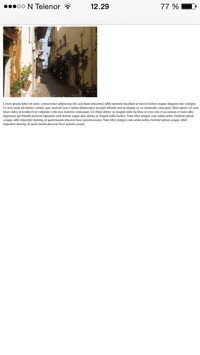
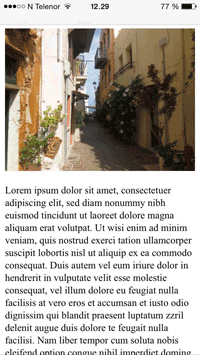
Ниже приведен пример веб-страницы без мета-тега видового экрана и той же веб-страницы с тегом видового экрана <meta> :
Совет: Если вы просматриваете эту страницу с телефоном или планшетом, вы можете нажать на две ссылки ниже, чтобы увидеть разницу.
Элемент HTML <script>
Элемент <script> используется для определения JavaScript-кода на стороне клиента.
Этот JavaScript пишет «Hello JavaScript!» в HTML-элемент с :
Пример
Совет: Чтобы узнать все о JavaScript, посетите наш Справочник по JavaScript.
Элемент HTML <base>
Элемент <base> указывает базовый URL-адрес и базовый целевой объект для всех относительных URL-адресов на странице:
Пример
Пропуск <HTML>, <head> и <BODY>?
Согласно стандарту HTML5; <html> , <body> и тег <head> могут быть опущены.
Следующий код будет проверяться как HTML5:
Примере
<h1>This is a heading</h1>
<p>This is a paragraph.</p>
Примечание:
хтмл5ксс не рекомендует опускать теги <html> и <body> . Пропуск этих тегов может привести к сбою программного обеспечения DOM или XML и подавать ошибки в старых браузерах (IE9).
Однако Пропуск тега <head> был распространенной практикой уже довольно давно.
HTML для JavaScript разработчика
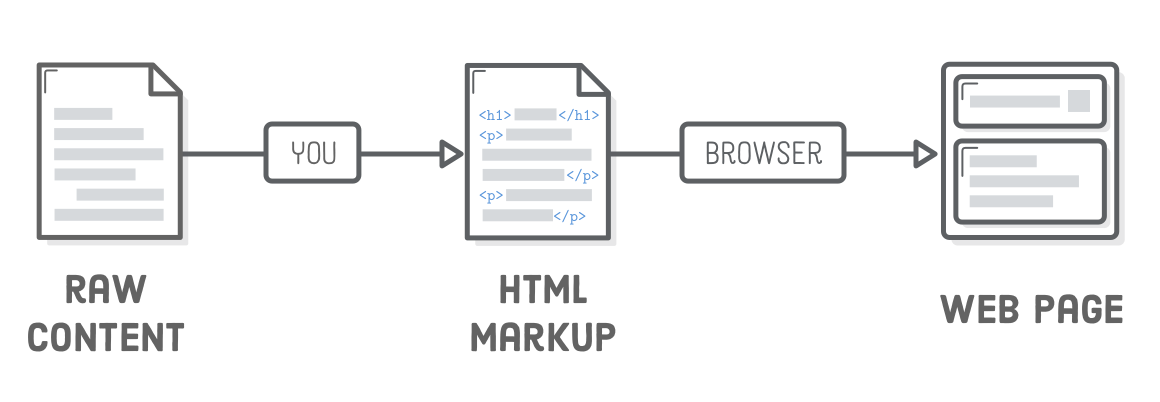
HTML определяет содержимое каждой веб-страницы в Интернете. «Пометив» свое исходное содержимое тегами HTML, вы говорите веб-браузерам, как вы хотите отображать различные части вашего контента. Создание HTML-документа с правильно размеченным контентом — это первый шаг к созданию веб-страницы.
Hpertext Markup Language является языком, описывающим структуру и семантику содержимого веб-документа.
2. Директива <!DOCTYPE html>
Большинство современных html-документов начинается с строки <!DOCTYPE html>, это говорит браузеру, что документ надо интерпретировать в соответствии с современными стандартом HTML (HTML5.*).
Это просто специальная строка в начале html-документа и она всегда должна выглядеть точно так же:
3. Понятие тега
HTML теги — это имена элементов, заключенные в угловые скобки.
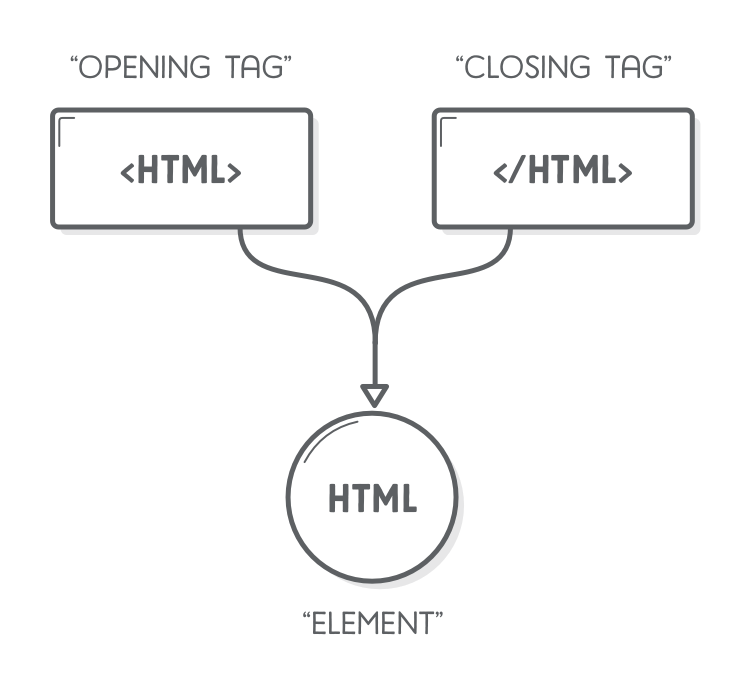
Весь текст, заключённый между начальным и конечным тегом, включая и сами эти теги, называется элементом. Сам же текст между тегами — содержанием элемента. Содержание элемента может включать в себя любой текст, в том числе и другие элементы.
У тегов может быть несколько форм. Элемент вроде тела, параграфа и ссылки начинается открывающим тегом <p> и заканчивается закрывающим </p>. Некоторые открывающие теги, типа ссылки <a>, содержат дополнительную информацию в виде имя=”значение”. Она называется «атрибутами».
Некоторые теги ничего не окружают, и их не надо закрывать. Пример – тег картинки
HTML разбирается парсером довольно либерально по отношению к возможным ошибкам. Если какие-то теги пропущены, браузер их воссоздаёт. Как именно это происходит, записано в стандартах, поэтому можно ожидать, что все современные браузеры будут делать это одинаково.
4. Структура HTML документа
Как уже говорилось ранее любая html5 страница начинается со строки <!DOCTYPE html>.
Затем вся наша веб-страница должна быть обернута в тег <html>. Все, что находится внутри тега, считается частью <html> элемента, который представляет собой саму веб-страницу.
Внутри элемента <html> у нас есть еще два элемента, называемые <head> и <body>. <head> веб-страницы содержит все ее метаданные, такие как заголовок страницы, любые таблицы стилей CSS и другие вещи, необходимые для отображения страницы. Основная же часть HTML-разметки будет находиться в элементе <body>, который представляет видимое содержимое страницы.
.png)
5. Cинтаксис HTML комментариев
Также обратите внимание на синтаксис комментариев HTML в приведенном ниже фрагменте. Все, что начинается с <!— и заканчивается —>, будет полностью игнорироваться браузером. Это полезно для документирования вашего кода и создания заметок самому себе.
6. Заголовок страницы
Одним из наиболее важных фрагментов метаданных является название вашей веб-страницы, определяемое тегом <title>. Браузеры отображают <title> на вкладке для вашей страницы, и Google отображает ее как результат поиска.
7. Paragraphs
Элемент <p> помечает весь текст внутри него как отдельный абзац.
.png)
8. Headings
Headings(заголовки) похожи на (title)заголовок, но на самом деле они отображаются на странице. HTML предоставляет шесть уровней заголовков, и соответствующие элементы: <h1>, <h2>, <h3>, . <h6>. Чем выше номер, тем менее заметен заголовок.
Первый заголовок страницы обычно должен быть <h1>.
.png)
Заголовки — это основной способ разметки различных разделов вашего контента. Они определяют схему вашей веб-страницы, которую видят как люди, так и поисковые системы.
9. Cписки
Списки предоставляют возможность упорядочить и систематизировать разные данные и представить их в наглядном и удобном для пользователя виде.
В HTML5 существует 3 типа списков: unordered lists (маркированный список) — <ul>, ordered lists (нумерованный список) — <ol> и список определений(тройка элементов предназначена для создания определений) — <dd>, <dt>, <dl>.
9.1 Unordered lists
Оборачивание содержимого тегами <ul> сообщает браузеру, что все, что находится внутри, должно отображаться как неупорядоченный список. Чтобы обозначить отдельные элементы(пункты) в этом списке, Вам нужно обернуть их в теги <li> (list item) следующим образом:
9.2 Ordered lists
Если последовательность элементов списка имеет значение, вам следует использовать упорядоченный список. Чтобы создать упорядоченный список, просто измените родительский элемент <ul> на <ol>.
Различие между неупорядоченным списком и упорядоченным списком может показаться глупым, но оно действительно имеет значение для веб-браузеров, поисковых систем и восприятие контента людьми. Это, также, проще, чем нумерация каждого элемента списка вручную.
9.3 Definition list
10. Emphasis (italic) elements
Часть, упакованная в теги <em>, должна отображаться как курсив, как показано ниже. Обратите внимание, что затронута только часть строки.
.png)
11. Strong (bold) elements
Если вы хотите зделать контент более выразительным, чем в теге <em>, вы можете использовать <strong>.
.png)
12. Пустые элементы HTML
Теги HTML, с которым мы столкнулись до сих пор,имели текстовое содержимое (например, <p>) или другие элементы HTML (например, <ol>) внутри. Это не относится ко всем HTML-элементам. Некоторые из них могут быть пустыми или самозакрывающимися. Наиболее распространенными пустыми элементами являются разрывы строк <br> и горизонтальные линии <hr>.
12.1 Разрывы строк <br>
.png)
12.2 Горизонтальные линии <hr>
.png)
13. Links и images
.png)
14. Forms
Форма — гипертекстовый контейнер контейнер, позволяющий установить обратную связь между посетителем веб-страницы и веб-приложением. Получение данных от пользователя осуществляется через типовые элементы управления : текстовые поля, кнопки, чекбоксы и т.п., размещаемых в теге form.
.png)
Также форма — способ взаимодействия(интерфейс) пользователя с бизнес логикой и данными на сервере посредством HTTP запросов.
.png)
14.1 Radio buttons
.png)
14.2 Select elements
14.3 Textareas
14.4 checkboxes
14.5 submit buttons
.png)
15. Semantic html
*. Таблицы
*. HTML Media
16. Emmet
16.1 Syntax
16.1.1 Child
16.1.2 Sibling
16.1.3 Climb-up
16.1.4 Grouping
16.1.5 Multiplication
16.1.6 Item numbering
16.1.7 ID and CLASS attributes
16.1.8 Custom attributes
16.1.9 Text
16.1.10 Implicit tag names
16.2 HTML
16.3 CSS
16.4 Cheat Sheet
17. HTML и JavaScript
В контексте нашего курса самый главный тег HTML — <script>. Он позволяет включать в документ программу на JavaScript.
Такой скрипт запустится сразу, как только браузер встретит тег <script> при разборе HTML. На странице появится диалог-предупреждение.
Включать большие программы в HTML непрактично. У тега <script> есть атрибут src, чтобы запрашивать файл со скриптом (текст, содержащий программу на JavaScript) с адреса URL.
18. Совместимость и браузерные войны
На ранних стадиях развития Веба браузер по имени Mosaic занимал большую часть рынка. Через несколько лет баланс сместился в сторону Netscape, который затем был сильно потеснён браузером Internet Explorer от Microsoft. В любой момент превосходства одного из браузеров его разработчики позволяли себе в одностороннем порядке изобретать новые свойства веба. Так как большинство людей использовали один и тот же браузер, сайты просто начинали использовать эти свойства, не обращая внимания на остальные браузеры.
Это были тёмные века совместимости, которые иногда называли «войнами браузеров». Веб-разработчики сталкивались с двумя или тремя несовместимыми платформами. Кроме того, браузеры около 2003 года были полны ошибок, причём у каждого они были свои. Жизнь людей, создававших веб-страницы, была тяжёлой.
Mozilla Firefox, некоммерческое ответвление Netscape, бросил вызов гегемонии Internet Explorer в конце 2000-х. Так как Microsoft особо не стремилась к конкуренции, Firefox отобрал солидную часть рынка. Примерно в это время Google представил свой браузер Chrome, а Apple – Safari. Это привело к появлению четырёх основных игроков вместо одного.
У новых игроков были более серьёзные намерения по отношению к стандартам и больше инженерного опыта, что привело к лучшей совместимости и меньшему количеству багов. Microsoft, видя сжатие своей части рынка, приняла эти стандарты. Если вы начинаете изучать веб-разработку сегодня – вам повезло. Последние версии основных браузеров работают одинаково и в них мало ошибок.
Нельзя сказать, что ситуация уже идеальная. Некоторые люди в вебе по причинам инерционности или корпоративных правил используют очень старые браузеры. Пока они не отомрут совсем, написание веб-страниц для них потребует мистических знаний об их недостатках и причудах. Эта книга не про причуды – она представляет современный, разумный стиль веб-программирования.
<title>: элемент заголовка документа
HTML-элемент заголовка ( <title> ) определяет заголовок документа, который отображается в заголовке окна браузера или на вкладке страницы. Он содержит только текст, а теги внутри элемента игнорируются.
| Категории контента | Метаданные. |
|---|---|
| Допустимое содержимое | Текст, который не является межэлементным разделителем. |
| Пропуск тегов | Открывающий и закрывающий теги обязательны. Обратите внимание, что отсутствие </title> заставляет браузер игнорировать остальную часть страницы. |
| Допустимые родители | Элемент <head> , который не содержит других элементов <title> . |
| Допустимые ARIA-роли | Нет |
| DOM-интерфейс | HTMLTitleElement (en-US) |
Атрибуты
К этому элементу применимы только глобальные атрибуты.
Примечание
Элемент <title> всегда используется внутри блока <head> .
Заголовок страницы и SEO
Содержимое заголовка страницы может иметь важное значение для поисковой оптимизации (SEO). Как правило, более длинный описательный заголовок будет лучше ранжироваться (Ranking), чем короткий или скучный. Не только содержимое заголовка является одним из компонентов, используемых алгоритмами для определения порядка, в котором перечисляются страницы в поисковой выдаче, но и сам заголовок является приёмом, которым вы привлекаете внимание читателей бегло просматривающих результаты поиска.
Несколько методических рекомендаций и советов для составления хороших заголовков:
- избегайте заголовков состоящих из одного или двух слов. Используйте описательные фразы или сочетание термин-определение для страниц глоссария (словарь терминов) или справки;
- поисковые системы, как правило, отображают примерно 55-60 первых символов заголовка страницы. Текст, превышающий это количество символов, может быть потерян, так что постарайтесь, чтобы заголовки не были длиннее. Если вам нужно использовать более длинный заголовок, убедитесь, что важные части появляются раньше и что нет ничего критического в части заголовка, которая может быть отброшена;
- избегайте специальных символов, когда это возможно; не все браузеры будут отображать их одинаково. Например, «<» часто отображается в строке заголовка окна как «<» — символ-мнемоника «меньше» в HTML (entity);
- не используйте ключевые слова («keyword blobs»). Если ваш заголовок состоит только из списка слов, то алгоритмы будут часто искусственно понижать позицию вашей страницы в поисковой выдаче;
- убедитесь, что ваш заголовок является уникальным на вашем сайте, насколько это возможно. Повторяющиеся или частично повторяющиеся заголовки могут способствовать неточным результатам поиска.
Пример
Этот пример устанавливает заголовок страницы (отображается в верхней части окна или вкладки браузера) как «Потрясающий заголовок страницы».
Проблемы доступности
Важно указать такое значение title , которое описывает назначение страницы.
Обычная техника навигации для пользователей вспомогательных технологий — прочитать заголовок страницы и определить какой контент она содержит. Это потому, что навигация по странице для определения её содержимого может занять время и, возможно, привести к путанице.
Пример
Для того чтобы помочь пользователю, обновите значение title , чтобы отразить важные изменения состояния страницы (например, проблемы с проверкой формы).
7 The global structure of an HTML document
7.1 Introduction to the structure of an HTML document
An HTML 4 document is composed of three parts:
- a line containing HTML version information,
- a declarative header section (delimited by the HEAD element),
- a body, which contains the document’s actual content. The body may be implemented by the BODY element or the FRAMESET element.
White space (spaces, newlines, tabs, and comments) may appear before or after each section. Sections 2 and 3 should be delimited by the HTML element.
Here’s an example of a simple HTML document:
7.2 HTML version information
A valid HTML document declares what version of HTML is used in the document. The document type declaration names the document type definition (DTD) in use for the document (see [ISO8879]).
HTML 4.01 specifies three DTDs, so authors must include one of the following document type declarations in their documents. The DTDs vary in the elements they support.
-
The HTML 4.01 Strict DTD includes all elements and attributes that have not been deprecated or do not appear in frameset documents. For documents that use this DTD, use this document type declaration:
The URI in each document type declaration allows user agents to download the DTD and any entity sets that are needed. The following (relative) URIs refer to DTDs and entity sets for HTML 4:
- «strict.dtd» — default strict DTD
- «loose.dtd» — loose DTD
- «frameset.dtd» — DTD for frameset documents
- «HTMLlat1.ent» — Latin-1 entities
- «HTMLsymbol.ent» — Symbol entities
- «HTMLspecial.ent» — Special entities
The binding between public identifiers and files can be specified using a catalog file following the format recommended by the Oasis Open Consortium (see [OASISOPEN]). A sample catalog file for HTML 4.01 is included at the beginning of the section on SGML reference information for HTML. The last two letters of the declaration indicate the language of the DTD. For HTML, this is always English («EN»).
Note. As of the 24 December version of HTML 4.01, the HTML Working Group commits to the following policy:
- Any changes to future HTML 4 DTDs will not invalidate documents that conform to the DTDs of the present specification. The HTML Working Group reserves the right to correct known bugs.
- Software conforming to the DTDs of the present specification may ignore features of future HTML 4 DTDs that it does not recognize.
This means that in a document type declaration, authors may safely use a system identifier that refers to the latest version of an HTML 4 DTD. Authors may also choose to use a system identifier that refers to a specific (dated) version of an HTML 4 DTD when validation to that particular DTD is required. W3C will make every effort to make archival documents indefinitely available at their original address in their original form.
7.3 The HTML element
Start tag: optional, End tag: optional
version = cdata [CN] Deprecated. The value of this attribute specifies which HTML DTD version governs the current document. This attribute has been deprecated because it is redundant with version information provided by the document type declaration.
Attributes defined elsewhere
After document type declaration, the remainder of an HTML document is contained by the HTML element. Thus, a typical HTML document has this structure:
7.4 The document head
7.4.1 The HEAD element
Start tag: optional, End tag: optional
profile = uri [CT] This attribute specifies the location of one or more meta data profiles, separated by white space. For future extensions, user agents should consider the value to be a list even though this specification only considers the first URI to be significant. Profiles are discussed below in the section on meta data.
Attributes defined elsewhere
The HEAD element contains information about the current document, such as its title, keywords that may be useful to search engines, and other data that is not considered document content. User agents do not generally render elements that appear in the HEAD as content. They may, however, make information in the HEAD available to users through other mechanisms.
7.4.2 The TITLE element
Start tag: required, End tag: required
Attributes defined elsewhere
Every HTML document must have a TITLE element in the HEAD section.
Authors should use the TITLE element to identify the contents of a document. Since users often consult documents out of context, authors should provide context-rich titles. Thus, instead of a title such as «Introduction», which doesn’t provide much contextual background, authors should supply a title such as «Introduction to Medieval Bee-Keeping» instead.
For reasons of accessibility, user agents must always make the content of the TITLE element available to users (including TITLE elements that occur in frames). The mechanism for doing so depends on the user agent (e.g., as a caption, spoken).
Titles may contain character entities (for accented characters, special characters, etc.), but may not contain other markup (including comments). Here is a sample document title:
7.4.3 The title attribute
title = text [CS] This attribute offers advisory information about the element for which it is set.
Unlike the TITLE element, which provides information about an entire document and may only appear once, the title attribute may annotate any number of elements. Please consult an element’s definition to verify that it supports this attribute.
Values of the title attribute may be rendered by user agents in a variety of ways. For instance, visual browsers frequently display the title as a «tool tip» (a short message that appears when the pointing device pauses over an object). Audio user agents may speak the title information in a similar context. For example, setting the attribute on a link allows user agents (visual and non-visual) to tell users about the nature of the linked resource:
The title attribute has an additional role when used with the LINK element to designate an external style sheet. Please consult the section on links and style sheets for details.
Note. To improve the quality of speech synthesis for cases handled poorly by standard techniques, future versions of HTML may include an attribute for encoding phonemic and prosodic information.
7.4.4 Meta data
Note. The W3C Resource Description Framework (see [RDF10]) became a W3C Recommendation in February 1999. RDF allows authors to specify machine-readable metadata about HTML documents and other network-accessible resources.
HTML lets authors specify meta data — information about a document rather than document content — in a variety of ways.
For example, to specify the author of a document, one may use the META element as follows:
The META element specifies a property (here «Author») and assigns a value to it (here «Dave Raggett»).
This specification does not define a set of legal meta data properties. The meaning of a property and the set of legal values for that property should be defined in a reference lexicon called a profile. For example, a profile designed to help search engines index documents might define properties such as «author», «copyright», «keywords», etc.
Specifying meta data
In general, specifying meta data involves two steps:
- Declaring a property and a value for that property. This may be done in two ways:
- From within a document, via the META element.
- From outside a document, by linking to meta data via the LINK element (see the section on link types).
Note that since a profile is defined for the HEAD element, the same profile applies to all META and LINK elements in the document head.
User agents are not required to support meta data mechanisms. For those that choose to support meta data, this specification does not define how meta data should be interpreted.
The META element
Start tag: required, End tag: forbidden
For the following attributes, the permitted values and their interpretation are profile dependent:
name = name [CS] This attribute identifies a property name. This specification does not list legal values for this attribute. content = cdata [CS] This attribute specifies a property’s value. This specification does not list legal values for this attribute. scheme = cdata [CS] This attribute names a scheme to be used to interpret the property’s value (see the section on profiles for details). http-equiv = name [CI] This attribute may be used in place of the name attribute. HTTP servers use this attribute to gather information for HTTP response message headers.
Attributes defined elsewhere
The META element can be used to identify properties of a document (e.g., author, expiration date, a list of key words, etc.) and assign values to those properties. This specification does not define a normative set of properties.
Each META element specifies a property/value pair. The name attribute identifies the property and the content attribute specifies the property’s value.
For example, the following declaration sets a value for the Author property:
The lang attribute can be used with META to specify the language for the value of the content attribute. This enables speech synthesizers to apply language dependent pronunciation rules.
In this example, the author’s name is declared to be French:
Note. The META element is a generic mechanism for specifying meta data. However, some HTML elements and attributes already handle certain pieces of meta data and may be used by authors instead of META to specify those pieces: the TITLE element, the ADDRESS element, the INS and DEL elements, the title attribute, and the cite attribute.
Note. When a property specified by a META element takes a value that is a URI, some authors prefer to specify the meta data via the LINK element. Thus, the following meta data declaration:
might also be written:
META and HTTP headers
The http-equiv attribute can be used in place of the name attribute and has a special significance when documents are retrieved via the Hypertext Transfer Protocol (HTTP). HTTP servers may use the property name specified by the http-equiv attribute to create an [RFC822]-style header in the HTTP response. Please see the HTTP specification ([RFC2616]) for details on valid HTTP headers.
The following sample META declaration:
will result in the HTTP header:
This can be used by caches to determine when to fetch a fresh copy of the associated document.
Note. Some user agents support the use of META to refresh the current page after a specified number of seconds, with the option of replacing it by a different URI. Authors should not use this technique to forward users to different pages, as this makes the page inaccessible to some users. Instead, automatic page forwarding should be done using server-side redirects.
META and search engines
A common use for META is to specify keywords that a search engine may use to improve the quality of search results. When several META elements provide language-dependent information about a document, search engines may filter on the lang attribute to display search results using the language preferences of the user. For example,
The effectiveness of search engines can also be increased by using the LINK element to specify links to translations of the document in other languages, links to versions of the document in other media (e.g., PDF), and, when the document is part of a collection, links to an appropriate starting point for browsing the collection.
Further help is provided in the section on helping search engines index your Web site.
META and PICS
This example illustrates how one can use a META declaration to include a PICS 1.1 label:
META and default information
The META element may be used to specify the default information for a document in the following instances:
- The default scripting language.
- The default style sheet language.
- The document character encoding.
The following example specifies the character encoding for a document as being ISO-8859-5
Meta data profiles
- As a globally unique name. User agents may be able to recognize the name (without actually retrieving the profile) and perform some activity based on known conventions for that profile. For instance, search engines could provide an interface for searching through catalogs of HTML documents, where these documents all use the same profile for representing catalog entries.
- As a link. User agents may dereference the URI and perform some activity based on the actual definitions within the profile (e.g., authorize the usage of the profile within the current HTML document). This specification does not define formats for profiles.
This example refers to a hypothetical profile that defines useful properties for document indexing. The properties defined by this profile — including «author», «copyright», «keywords», and «date» — have their values set by subsequent META declarations.
As this specification is being written, it is common practice to use the date formats described in [RFC2616], section 3.3. As these formats are relatively hard to process, we recommend that authors use the [ISO8601] date format. For more information, see the sections on the INS and DEL elements.
The scheme attribute allows authors to provide user agents more context for the correct interpretation of meta data. At times, such additional information may be critical, as when meta data may be specified in different formats. For example, an author might specify a date in the (ambiguous) format «10-9-97»; does this mean 9 October 1997 or 10 September 1997? The scheme attribute value «Month-Day-Year» would disambiguate this date value.
At other times, the scheme attribute may provide helpful but non-critical information to user agents.
For example, the following scheme declaration may help a user agent determine that the value of the «identifier» property is an ISBN code number:
Values for the scheme attribute depend on the property name and the associated profile .
Note. One sample profile is the Dublin Core (see [DCORE]). This profile defines a set of recommended properties for electronic bibliographic descriptions, and is intended to promote interoperability among disparate description models.
7.5 The document body
7.5.1 The BODY element
Start tag: optional, End tag: optional
background = uri [CT] Deprecated. The value of this attribute is a URI that designates an image resource. The image generally tiles the background (for visual browsers). text = color [CI] Deprecated. This attribute sets the foreground color for text (for visual browsers). link = color [CI] Deprecated. This attribute sets the color of text marking unvisited hypertext links (for visual browsers). vlink = color [CI] Deprecated. This attribute sets the color of text marking visited hypertext links (for visual browsers). alink = color [CI] Deprecated. This attribute sets the color of text marking hypertext links when selected by the user (for visual browsers).
Attributes defined elsewhere
- id , class (document-wide identifiers)
- lang (language information), dir (text direction)
- title (element title)
- style (inline style information)
- bgcolor (background color)
- onload , onunload (intrinsic events)
- onclick , ondblclick , onmousedown , onmouseup , onmouseover , onmousemove , onmouseout , onkeypress , onkeydown , onkeyup (intrinsic events)
The body of a document contains the document’s content. The content may be presented by a user agent in a variety of ways. For example, for visual browsers, you can think of the body as a canvas where the content appears: text, images, colors, graphics, etc. For audio user agents, the same content may be spoken. Since style sheets are now the preferred way to specify a document’s presentation, the presentational attributes of BODY have been deprecated.
DEPRECATED EXAMPLE:
The following HTML fragment illustrates the use of the deprecated attributes. It sets the background color of the canvas to white, the text foreground color to black, and the color of hyperlinks to red initially, fuchsia when activated, and maroon once visited.Using style sheets, the same effect could be accomplished as follows:
Using external (linked) style sheets gives you the flexibility to change the presentation without revising the source HTML document:
Framesets and HTML bodies. Documents that contain framesets replace the BODY element by the FRAMESET element. Please consult the section on frames for more information.
7.5.2 Element identifiers: the id and class attributes
id = name [CS] This attribute assigns a name to an element. This name must be unique in a document. class = cdata-list [CS] This attribute assigns a class name or set of class names to an element. Any number of elements may be assigned the same class name or names. Multiple class names must be separated by white space characters.
The id attribute has several roles in HTML:
- As a style sheet selector.
- As a target anchor for hypertext links.
- As a means to reference a particular element from a script.
- As the name of a declared OBJECT element.
- For general purpose processing by user agents (e.g. for identifying fields when extracting data from HTML pages into a database, translating HTML documents into other formats, etc.).
The class attribute, on the other hand, assigns one or more class names to an element; the element may be said to belong to these classes. A class name may be shared by several element instances. The class attribute has several roles in HTML:
- As a style sheet selector (when an author wishes to assign style information to a set of elements).
- For general purpose processing by user agents.
In the following example, the SPAN element is used in conjunction with the id and class attributes to markup document messages. Messages appear in both English and French versions.
The following CSS style rules would tell visual user agents to display informational messages in green, warning messages in yellow, and error messages in red:
Note that the French «msg1» and the English «msg1» may not appear in the same document since they share the same id value. Authors may make further use of the id attribute to refine the presentation of individual messages, make them target anchors, etc.
Almost every HTML element may be assigned identifier and class information.
Suppose, for example, that we are writing a document about a programming language. The document is to include a number of preformatted examples. We use the PRE element to format the examples. We also assign a background color (green) to all instances of the PRE element belonging to the class «example».
By setting the id attribute for this example, we can (1) create a hyperlink to it and (2) override class style information with instance style information.
Note. The id attribute shares the same name space as the name attribute when used for anchor names. Please consult the section on anchors with id for more information.
7.5.3 Block-level and inline elements
Certain HTML elements that may appear in BODY are said to be «block-level» while others are «inline» (also known as «text level»). The distinction is founded on several notions:
Content model Generally, block-level elements may contain inline elements and other block-level elements. Generally, inline elements may contain only data and other inline elements. Inherent in this structural distinction is the idea that block elements create «larger» structures than inline elements. Formatting By default, block-level elements are formatted differently than inline elements. Generally, block-level elements begin on new lines, inline elements do not. For information about white space, line breaks, and block formatting, please consult the section on text. Directionality For technical reasons involving the [UNICODE] bidirectional text algorithm, block-level and inline elements differ in how they inherit directionality information. For details, see the section on inheritance of text direction.
Style sheets provide the means to specify the rendering of arbitrary elements, including whether an element is rendered as block or inline. In some cases, such as an inline style for list elements, this may be appropriate, but generally speaking, authors are discouraged from overriding the conventional interpretation of HTML elements in this way.
The alteration of the traditional presentation idioms for block level and inline elements also has an impact on the bidirectional text algorithm. See the section on the effect of style sheets on bidirectionality for more information.
7.5.4 Grouping elements: the DIV and SPAN elements
Start tag: required, End tag: required
Attributes defined elsewhere
- id , class (document-wide identifiers)
- lang (language information), dir (text direction)
- title (element title)
- style (inline style information)
- align (alignment)
- onclick , ondblclick , onmousedown , onmouseup , onmouseover , onmousemove , onmouseout , onkeypress , onkeydown , onkeyup (intrinsic events)
The DIV and SPAN elements, in conjunction with the id and class attributes, offer a generic mechanism for adding structure to documents. These elements define content to be inline ( SPAN ) or block-level ( DIV ) but impose no other presentational idioms on the content. Thus, authors may use these elements in conjunction with style sheets, the lang attribute, etc., to tailor HTML to their own needs and tastes.
Suppose, for example, that we wanted to generate an HTML document based on a database of client information. Since HTML does not include elements that identify objects such as «client», «telephone number», «email address», etc., we use DIV and SPAN to achieve the desired structural and presentational effects. We might use the TABLE element as follows to structure the information:
Later, we may easily add style sheet declarations to fine tune the presentation of these database entries.
For another example of usage, please consult the example in the section on the class and id attributes.
Visual user agents generally place a line break before and after DIV elements, for instance:
which is typically rendered as:
7.5.5 Headings: The H1 , H2 , H3 , H4 , H5 , H6 elements
Start tag: required, End tag: required
Attributes defined elsewhere
- id , class (document-wide identifiers)
- lang (language information), dir (text direction)
- title (element title)
- style (inline style information)
- align (alignment)
- onclick , ondblclick , onmousedown , onmouseup , onmouseover , onmousemove , onmouseout , onkeypress , onkeydown , onkeyup (intrinsic events)
A heading element briefly describes the topic of the section it introduces. Heading information may be used by user agents, for example, to construct a table of contents for a document automatically.
There are six levels of headings in HTML with H1 as the most important and H6 as the least. Visual browsers usually render more important headings in larger fonts than less important ones.
The following example shows how to use the DIV element to associate a heading with the document section that follows it. Doing so allows you to define a style for the section (color the background, set the font, etc.) with style sheets.
This structure may be decorated with style information such as:
Numbered sections and references
HTML does not itself cause section numbers to be generated from headings. This facility may be offered by user agents, however. Soon, style sheet languages such as CSS will allow authors to control the generation of section numbers (handy for forward references in printed documents, as in «See section 7.2»).Some people consider skipping heading levels to be bad practice. They accept H1 H2 H1 while they do not accept H1 H3 H1 since the heading level H2 is skipped.
7.5.6 The ADDRESS element
Start tag: required, End tag: required
Attributes defined elsewhere
- id , class (document-wide identifiers)
- lang (language information), dir (text direction)
- title (element title)
- style (inline style information)
- onclick , ondblclick , onmousedown , onmouseup , onmouseover , onmousemove , onmouseout , onkeypress , onkeydown , onkeyup (intrinsic events)
The ADDRESS element may be used by authors to supply contact information for a document or a major part of a document such as a form. This element often appears at the beginning or end of a document.
For example, a page at the W3C Web site related to HTML might include the following contact information: