Как работать с PyScript — фреймворком для фронтенда на Python

В веб-разработке Python используется в основном на бэкенде с такими фреймворками, как Django и Flask. А сегодня, к старту курса по Fullstack-разработке на Python, расскажем о PyScript, который даёт возможность запускать Python прямо в HTML.
До сих пор Python не имел такой большой поддержки на фронтенде, как другие языки, например JavaScript. Но, к счастью, разработчики Python создали несколько библиотек для поддержки своего любимого языка в браузере, например Brython.
А на конференции PyCon 2022 анонсировали фреймворк PyScript от Anaconda для использования Python в вебе с помощью стандартного HTML. Вот твит о запуске фреймворка:
Нам понадобится
Чтобы писать код по этой статье, вам понадобятся следующие инструменты и знания:
любимый текстовый редактор или интегрированная среда разработки;
браузер (рекомендуется Google Chrome).
Что такое PyScript?
PyScript — это фронтенд-фреймворк для создания программ на Python в браузере с использованием HTML-интерфейса, а также мощи Emscripten, Pyodide, WASM и других современных веб-технологий. В соответствии со своими целями он призван дать такие возможности:
упрощённый и чистый API;
систему подключаемых и расширяемых компонентов;
поддержку и расширение стандартного HTML для чтения и надёжных, и своенравных компонентов с миссией «Программирование для 99% [людей]».
В последние 20 лет Python и продвинутые языки пользовательского интерфейса, такие как HTML, CSS и JavaScript, не работали вместе. В Python не было простого механизма создания привлекательных пользовательских интерфейсов для подготовки и развёртывания приложений, а на освоение современных HTML, CSS и JavaScript может уйти много времени.
С возможностью применять в Python соглашения из HTML, CSS и JavaScript решаются не только эти две проблемы, но и те, что связаны с разработкой, подготовкой к развёртыванию, собственно развёртыванием и распространением веб-приложений.
Однако PyScript не заменит JavaScript в браузере, а, скорее, даст разработчикам Python, особенно дата-сайентистам, больше гибкости и мощи.
Почему PyScript?
С PyScript язык получает последовательные правила оформления кода, простоту освоения и больше выразительности за счёт:
поддержки в браузере: с PyScript появляются поддержка Python и возможность размещения без серверов и конфигурации;
возможности взаимодействия Python и JavaScript: в программах может осуществляться двунаправленная связь между объектами и пространствами имён Python и JavaScript;
поддержки экосистемы: PyScript позволяет использовать популярные пакеты Python (Pandas, NumPy и др);
гибкости фреймворка: PyScript — гибкий фреймворк, на основе которого разработчики легко могут создавать расширяемые компоненты прямо в Python;
управления средой: PyScript позволяет разработчикам определять файлы и пакеты для запуска кода своей страницы;
разработки пользовательского интерфейса: с PyScript разработчики могут легко работать с доступными компонентами пользовательского интерфейса (кнопками, контейнерами и др.).
Начало работы с PyScript
PyScript довольно просто освоить: следуйте инструкциям на сайте или загрузите zip-архив.
В этой статье научимся использовать PyScript через сайт, связав компоненты в HTML-файле, и выведем первый Hello World в PyScript.
Создаём HTML-файл
HTML-файл нужен для отображения текста в браузере с помощью текстового редактора / интегрированной среды разработки:
Привязываем PyScript
После создания HTML-файла в теге <head> нужно указать в нём ссылку на PyScript, чтобы получить доступ к интерфейсу PyScript:
Выводим в браузере
Связав PyScript с HTML-файлом, выводим Hello World с помощью тега <py-script>, который позволяет запускать многострочные программы на Python и выводить результат выполнения на странице браузера. Помещаем тег внутри тега <body>:
Весь код HTML-файла:
В браузере вы должны увидеть:

Совет: в редакторе VSCode, чтобы перезагружать страницу при обновлении HTML-файла, используйте плагин Live Server.
Другие операции с PyScript
Прикрепляем метки к элементам
В PyScript переменные из кода на Python в HTML передаются с помощью метода write из модуля pyscript, в теге <pyscript>. Используя атрибут id, передаём строки, отображаемые в виде обычного текста.
В методе write принимаются две переменные: значение id и переменная, которая будет предоставлена:

Запускаем REPL в браузере
В PyScript код Python запускается и через интерфейс. С помощью тега <py-repl> компонент REPL добавляется на страницу, где пишется выполняемый код:
Мы получим вывод:

Импортируем файлы, модули и библиотеки
Одно из преимуществ PyScript — его гибкость. Здесь можно импортировать локальные файлы, встроенные модули или сторонние библиотеки. Для объявления зависимостей понадобится тег <py-env>.
Для локальных файлов Python можно поместить код в файл с расширением .py, а пути к локальным модулям указываются в строках вида пути: ключ (YAML) тега <py-env>.
Создадим файл Python example.py с функциями:
Импортируем его в HTML с тегом <py-env>, в <head>:
Вот что вернётся:

PyScript поддерживает сторонние библиотеки:
Настраиваем метаданные
С помощью тега <py config> в формате YAML можно задать и настроить общие метаданные приложения PyScript. Использовать этот тег можно так:
Вот необязательные значения, которые предоставляются <py-config>:
autoclose_loader (логическое значение): если оно false, загрузочный экран-заставка в PyScript не закроется;
name (строка): название пользовательского приложения;
version (строка): его версия;
runtimes (среды выполнения): список конфигураций среды выполнения с полями src, name и lang.
Заключение
Вы узнали, что такое PyScript и как его использовать в HTML-файлах для запуска кода Python в браузере, а также познакомились с различными операциями и функционалом PyScript. С помощью PyScript проще запускать и выполнять операции Python в вебе. Это отличный инструмент для всех, кому не терпится опробовать Python в Интернете.
PyScript находится на ранних стадиях разработки и активно дорабатывается. Он остаётся на стадии альфа-тестирования и сталкивается с известными проблемами, такими как время загрузки, которое может повлиять на удобство использования (на момент написания этой статьи другие операции не отображались из-за проблем с производительностью). Поэтому пока не стоит использовать его в продакшене: вероятно, будет много критических изменений.
А пока PyScript развивается, мы поможем прокачать ваши навыки или с самого начала освоить профессию, актуальную в любое время:
Introducing PyScript — How to Run Python in Your Browser
Anaconda’s CEO Peter Wang revealed something pretty interesting during PyCon US 2022. It’s PyScript — a JavaScript framework that allows you to create Python applications in the browser. That’s right, you can now embed Python code directly in HTML files, just as any JavaScript developer would do.
The idea behind PyScript is simple — data scientists can create websites around their models in their favorite language, provided they have fundamental HTML knowledge. HTML is kind of like SQL in one area — everyone knows it.
Will PyScript live up to its hype? Only time will tell. Today, I’ll show you two basic examples that will get you started with PyScript in minutes. Let me know if you want more advanced topics covered, such as machine learning and handling user input.
Don’t feel like reading? Watch my video instead:
What is PyScript and Why Should You Care?
PyScript is a system for interleaving Python in HTML (like PHP), according to Anaconda Cloud. This means you can write and run Python code in HTML, call JavaScript libraries, and handle pretty much anything web-development-related.
For data scientists, this means you can now create web applications around your data products. Everyone has access to a web browser, which makes the web an easier platform to get into than, let’s say, mobile.
Also, you don’t have to worry about deployment, as everything happens in the browser. You can share your models and dashboards as an HTML file, which will run the code whenever someone opens it in the web browser. Neat!
PyScript is built on Pyodide, which is a port of CPython to WebAssembly/Emscripten:
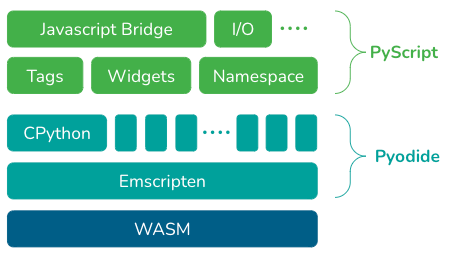
If you’re wondering, WebAssembly is a technology that makes it possible to write websites in Python. It’s a low-level assembly-like language with a compact binary format that runs with near-native performance and provides languages with a compilation target so they can run on the web, according to Mozilla.
But how can you actually use PyScript? Let’s answer that next.
How to Use PyScript
You can download the alpha release of PyScript on pyscript.net. We won’t download anything today. Instead, we’ll embed one stylesheet and one script in our HTML file. For reference, all HTML files that use PyScript must have a link to these:
PyScript allows you to write Python in HTML using the following components:
- py-env — Defines the Python packages needed to run your Python code.
- py-script — Part of the HTML file where you write your Python code.
- py-repl — Creates a REPL component that evaluates the code user enters and displays the result.
We’ll deal with the first two today and save the last one for some other time.
Let’s see how you can write a simple Hello World program in PyScript.
PyScript Example #1 — Hello World
In Visual Studio Code, you can write an exclamation sign followed by a Tab to create a base HTML document structure. Inside the <head> tag, add the two links mentioned in the previous section.
The hello world example doesn’t require any external Python libraries, so we can ditch the <py-env> part altogether.
Before the closing </body> tag, open a new <py-script> tag that will contain the Python logic. Just note the indentation — it’s best to remove it completely. The formatting doesn’t look nice, but you’ll get an error otherwise.
What we’ll do is simple — print a hello world message and the current datetime info:
Open the HTML file in the browser — here’s what you’ll see in a couple of seconds:
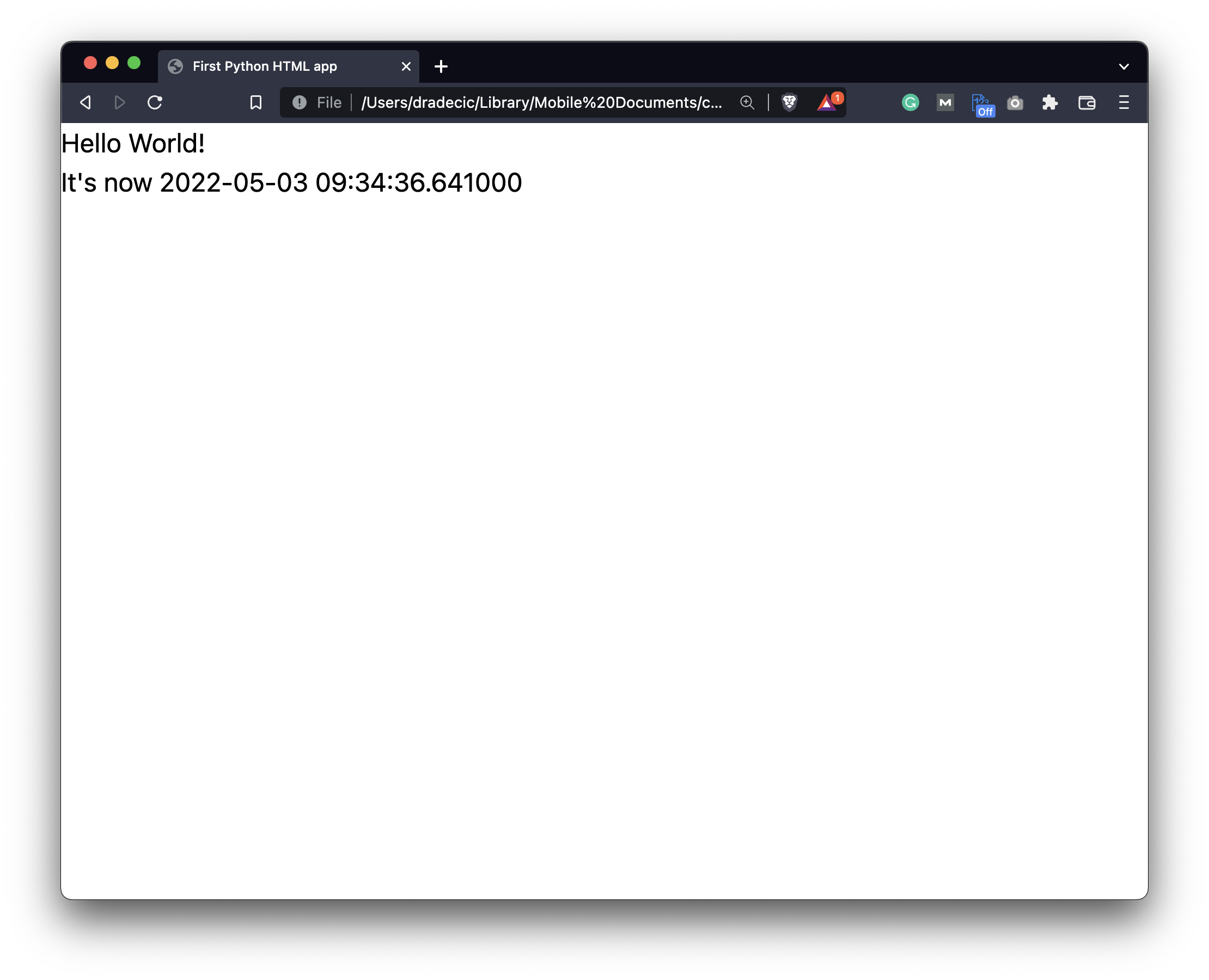
Image 1 — Using Python in your browser — Hello World example (image by author)
And there it is! This would take you much more time to code in Flask, so PyScript is already showing itself as a viable alternative. Let’s go over a more complex example next.
PyScript Example #2 — Charts with Bokeh
You can’t create dashboards around your data products without charts. As of now, PyScript doesn’t support Plotly, so we’ll have to settle for Matplotlib or Bokeh. Let’s go with the latter.
It requires a bunch of Bokeh JavaScript scripts, so just copy them from the snippet below.
This time, we rely on an external Python library — Bokeh — so make sure to specify it inside the <py-env> tag. I’ve copied the chart example from Bokeh gallery, just to make sure it works:
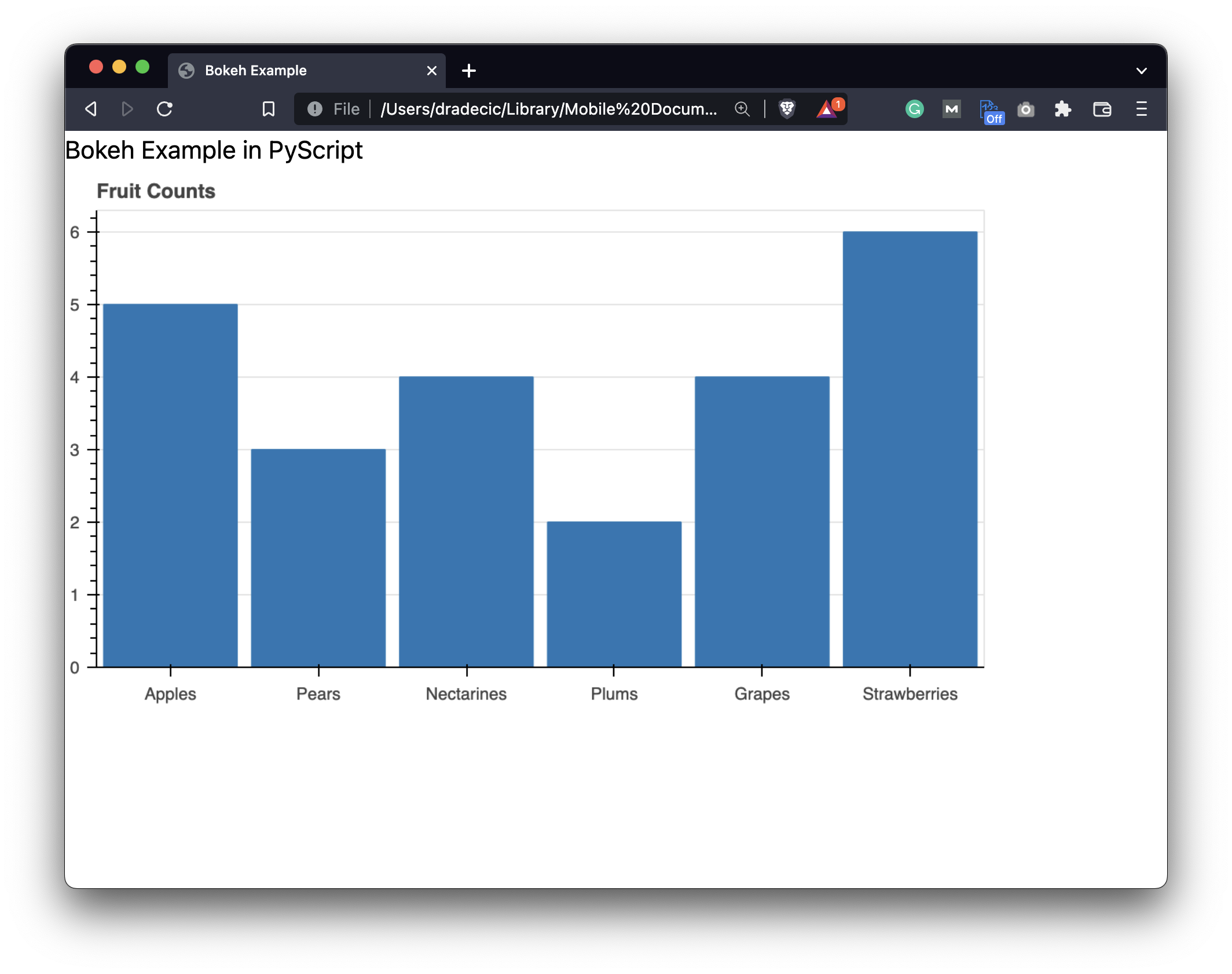
Image 2 — Using Python in your browser — Bokeh example (image by author)
And would you look at that! No need to code an entire web application just to show a simple chart. That’s where the power of PyScript lies.
Python for Web with PyScript — Where to Go from Here?
Long story short, PyScript simplifies the process of visually and interactively presenting your data product. Is it the best solution out there? No, at least not yet. Is it the easiest one to get started with? By a long shot.
I’m excited to see what the future PyScript releases will bring. As mentioned, it’s still in alpha, so a lot is expected to change in the future. Let me know if you’re interested in more advanced usage of PyScript — for example, creating a dashboard around a machine learning model.
What are your thoughts on PyScript? Do you plan to use it as a replacement for basic Python web apps? Let me know in the comment section below.
How can I include python script in a HTML file?

Something like this, if you want to create an html, not necessarily display it:

There’s now a solution to this, the solution is PyScript. This is a python framework that enables you to embed python scripts in HTML. Check out the sample code below.
If your web server supports it, you could run it as a CGI script to output an HTML file — more information here: http://www.penzilla.net/tutorials/python/cgi/
You would need to modify your script to ouput valid HTML, but that tutorial should get you started.

Not possible. Python isn’t like PHP; I can’t just do this
And be good to go.
However, if your web server has a Python interpreter (most all do, these days), you can write CGI (common gateway interface) scripts to make Python code run on your webpage.
If you’re trying to generate dynamic content (like change words in HTML), Javascript or PHP is better. Python is more suited to web applications.
if the script is in a server , you can run it using remote funcion call through JSON-RPC
you may refer the JSON-RPC documentation here
You can use <% %>tag in html and inside this you can write your python code.
Run Python in HTML
Web Development is a vast field, and there are endless opportunities and things that we can do. With complexity and demand come requirements. When building dynamic web pages, we often have to perform tasks that require the assistance of some programming language such as Python or PHP. In this article, we will learn how to run a Python script in HTML. We will talk about a few ways in which we can achieve this.
Run Python Scripts in HTML using PHP
We can use PHP or Hypertext Preprocessor to run Python scripts in HTML. Refer following code depicts a simple example.
HTML File — index.html
Python File — script.py
This will print the following in the console.
If we want to pass some values to the Python scripts, we can use the following code.
HTML File — index.html
Now, the Python script will look as follows.
Python File — script.py
The output will remain the same, as shown above.
Run Python script in HTML using Django
Django is a famous and robust Python-based web development framework. Since it is Python-based, it makes it easier to run Python scripts inside the HTML. The way we do this is by using template tags. Django has some pre-built template tags such as date , linebreaks , safe , random , etc. You can learn more about them here.
Since Django is very customizable, it offers developers an easy way to create their custom template tags. Using template tags, we can return data to HTML templates, which can be embedded inside the HTML template.
Follow the following steps to create a simple template tag. We are assuming that we have a core application in our Django project.
Create a new directory, templatetags , inside the core application. The app directory should look something like this.
Inside the templatetags folder, create a Python file named my_custom_tags.py .
Inside this file, add the following code.
my_custom_tags.py module will hold all the custom template tags. As shown in the code above, my_tag is a custom template tag that we just created and now it can be used inside any HTML template. This template tag will return «Hello World from my_tag() custom template tag.» this string to the template. We can create even more template tags here to perform specific and common tasks.
Now that we have created our first template tag, it is time to load it inside our HTML template and use it.
We first load the my_custom_tags.py module inside the template. Once the module is loaded, we can now use the template tags defined inside the my_custom_tags module. Note that it is important to first load a module with custom template tags before using those template tags.
Instead of using a template tag, we can also create an end-point and make an AJAX request to that end-point to perform some task or get some data. We can use fetch() or jquery or any other available method to make an AJAX request. While making an end-point to handle an AJAX request, it is important to ensure that the end-point is secure and doesn’t give easy access to sensitive data or website features. Since anyone can make AJAX requests if they know the end-point, we can add CSRF ( Cross Site Request Forgery ) validation to it and configure it to handle only POST requests. The POST data should contain the CSRF token.
You can learn more about CSRF here
Vaibhav is an artificial intelligence and cloud computing stan. He likes to build end-to-end full-stack web and mobile applications. Besides computer science and technology, he loves playing cricket and badminton, going on bike rides, and doodling.