Разметка текста с помощью HTML
Научимся добавлять на простейшую HTML-страницу текстовое содержание и правильно размечать его: абзацы, заголовки, подзаголовки, списки и многое другое.
Абзацы [1/17]
В курсе «Структура HTML-документа» вы познакомились с тегами, необходимыми для создания простейшей HTML-страницы, и с некоторыми служебными тегами, которые не отображаются в браузере.
В этом курсе мы будем изучать теги для логической разметки текста. Использовать их можно только внутри тега <body> .
Начнём с простейшего тега <p> , с помощью которого создаются абзацы. По умолчанию абзацы начинаются с новой строки и имеют вертикальные отступы, которыми можно управлять с помощью стилей.
Заголовки и подзаголовки [2/17]
Для создания структуры больших текстов обычно используются заголовки. В текстовых редакторах есть возможность выделить часть текста, найти пункт «Заголовок» нужного уровня в меню, и применить его.
В языке HTML для выделения заголовков предусмотрено целое семейство тегов: от <h1> до <h6> . Тег <h1> обозначает самый важный заголовок (заголовок верхнего уровня), а тег <h6> обозначает подзаголовок самого нижнего уровня.
На практике редко встречаются тексты, в которых встречаются подзаголовки ниже третьего уровня. Поэтому самыми часто используемыми тегами заголовков являются: <h1> , <h2> и <h3> .
Стоит отметить, что поисковые системы придают особое значение заголовкам, поэтому необходимо учиться правильно их использовать.
Неупорядоченный список [3/17]
Списки часто используются в различных документах. Иногда, чтобы сделать список, пользователь просто нумерует строчки текста. Такой подход не является хорошим, так как в документе отсутствует логическая сущность «список».
В HTML существует семейство тегов для создания списков: неупорядоченных, упорядоченных и списков определений. В последующих заданиях мы будем тренироваться работать с ними.
Неупорядоченные (или маркированные) списки создаются с помощью тега <ul> (Unordered List — неупорядоченный список), который может содержать внутри себя теги <li> (List Item, элемент списка), обозначающие «элемент списка».
Упорядоченный список [4/17]
Упорядоченный список создаётся с помощью тега <ol> , который может содержать внутри себя теги <li> .
Если элементы неупорядоченного списка по умолчанию отмечаются маркерами, то элементы упорядоченного списка — нумеруются.
Для упорядоченного списка можно задать атрибут start , который изменяет начало нумерации. Например, код:
Приведёт к такому результату:
- раз
- два
Многоуровневый список [5/17]
Создать многоуровневый список достаточно просто.
Сначала нужно создать список первого уровня, а затем внутрь любого элемента этого списка, между тегами <li> и </li> , добавить список второго уровня. При этом необходимо аккуратно закрывать все теги.
В примере с ошибкой вложенный список вставлен не внутрь элемента списка, а между элементами, что недопустимо.
Количество уровней в списках не ограничено. В многоуровневом списке можно использовать как упорядоченные, так и неупорядоченные списки.
В этом задании мы потренируемся работать с многоуровневыми списками.
Ещё более многоуровневый [6/17]
Хорошо. Вы создали двухуровневый список. Теперь задание посложнее.
В этом задании вам нужно будет создать четырёхуровневый список, наподобие этого:
- Разметка
- Основы HTML
- HTML-теги
- парные
- одиночные
- Селекторы
- по типу
- по классу
- вложенные
Список определений [7/17]
Список определений создаётся с помощью трёх тегов:
- <dl> (Definition List) обозначает сам список определений;
- <dt> (Definition Term) обозначает термин;
- <dd> (Definition Definition) обозначает определение термина.
Теги <dt> и <dd> пишутся парами внутри <dl> .
Важность. Теги strong и b [8/17]
Ещё раз отметим, что этот курс посвящён логической разметке текста, поэтому уделяется особое внимание смыслу элементов, их предназначению, а не визуальному форматированию.
В предыдущих заданиях вы познакомились с элементами, которые предназначены для разметки крупных блоков текста: заголовков, абзацев и списков. В этом и последующих заданиях мы познакомимся с элементами, предназначенными для разметки небольших фраз и отдельных слов.
Первые два тега предназначены, чтобы указать на важность слова или фразы.
Тег <strong> определяет важность отмеченного текста.
Тег <b> предназначен для выделения текста без придания ему особой важности.
Визуально оба тега одинаковы, они выделяют текст полужирным.
Лучше всего отличия этих тегов будут заметны людям, которые используют специальные настройки ОС, в частности, слепым и слабовидящим. Когда они включают функцию чтения текста, то «говорилка» будет интонацией выделять слова с тегом <strong> . То же самое касается и тегов <em> и <i> . Тег <em> «говорилка» будет выделять интонацией.
Акцентируем внимание. Теги em и i [9/17]
Следующие два тега предназначены для акцентирования внимания на слово или фразу.
Тег <em> определяет текст, на который сделан особый акцент, меняющий смысл предложения.
Например, если мы хотим подчеркнуть, что Кекс не любит питаться укропом (он больше за тунца), а любит только гонять его по полу, то разметим текст так:
Тег <i> обозначает текст, который отличается от окружающего текста, но не является более важным. Обычно так выделяют названия, термины, иностранные слова.
Например, если мы хотим указать, что инспектор — это какой-то специальный термин, то разметим текст так:
Визуально оба тега одинаковы, они выделяют текст курсивом.
Переносы и разделители. Теги br и hr [10/17]
Иногда возникает необходимость вставить в текст перенос строки, не создавая при этом абзац. Например, при разметке стихов или текстов песен.
Для этого в HTML предусмотрен одиночный тег <br> .
Одиночный тег <hr> используется для того, чтобы создать горизонтальную линию-разделитель. На внешний вид этой линии можно влиять с помощью атрибутов, но правильней делать это с помощью CSS (это будет изучаться в последующих курсах).
Как сделать заголовок в html
Course Navigation

So far, we have created the navigation bar for the header of our website. The next thing to complete the header is to include the image and text above the image as shown in below screenshot:
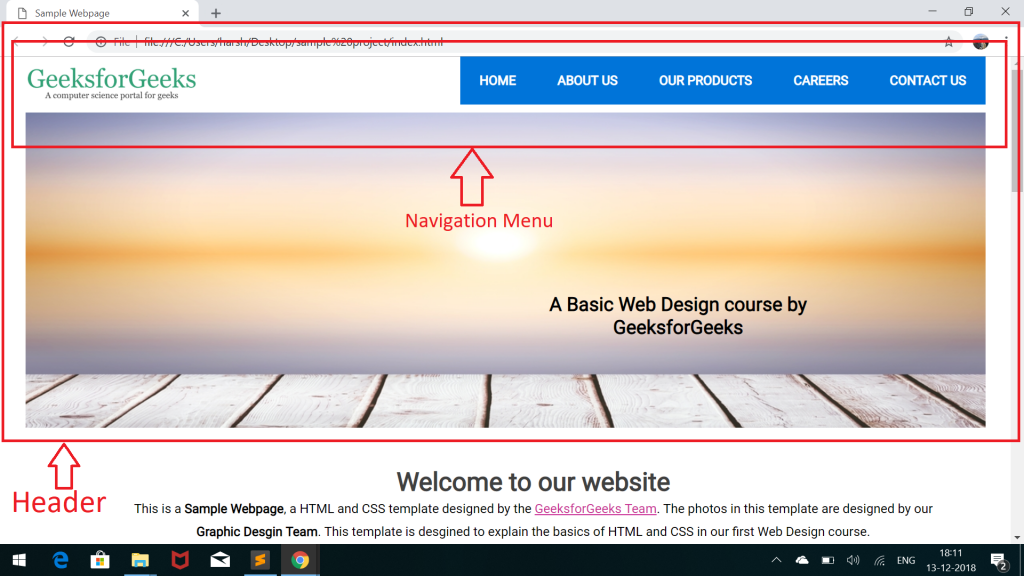
Let’s again look at the part of the code for the header in our index.html file. The highlighted part of the code shows the image menu of the header:
To complete the image menu, we first need to add the image and text inside the div tag with id “header-image-menu” as shown in the above code.
Adding Image:-
to download the given image.
- Add it to the images folder of your project.
- Include it inside the div with id = “header-image-menu”.
- Use them as necessary.
- Do a complete research and use the right keywords.
- Do not, Do not, Do not do “keyword stuffing”. It’s a complete waste of time as of 2018.
- Keep them relevant to your content.
- keep them natural where possible.
- Html Headings (H1 — H6)
- HTML Title
- General content
- Use heading tags for sections and subsection rather than using Bold if possible
- Use Heading tag H1 tag only once as your content TITLE
- Feel free to Use H2, H3 tags where necessary.
- Use__ H2__ tag to highlight subsections for H1 Heading tag
- Use H3 tag to highlight Subsection of H2 Heading tag
- Keep things and hierarchy natural.
- Make sure you use H1 Heading
- Always Nest headings by their level.
- Keep most important heading has at level 1
- Use headings with an equal or higher to begin a new section.
- Use headings with a lower level to begin a new subsection.
- Don’t skip heading levels as that can be confusing
- Always plan out a heading structure before composing a page.
Adding Text: Add the text inside an <h2> tag and give the tag an which will be used for adding styles.
Below is the final HTML code for the header menu after adding the images and text:Our webpage will now look like as in the below screenshot:

Can you point out what is wrong with the above image? The answer is that the text is below the image and not at its correct position as shown in the template.
We will have to use CSS to add styles to the text and image in order to place the text over the image. Let’s begin with adding CSS.HTML Heading Tags Best Practices

HTML Elements are an important part of On-Site SEO. Google algorithms consider HTML Heading Elements along with content to understand the structure, subject matter and the purpose of your content. This article attempts to explain the myths, the basics, and best practices for the use of Heading Tags (H1-H6).
What Is A Heading?
In an HTML document or webpage, as we may say it, a heading is used to introduce the content which follows.
Heading tags have a top-down hierarchy from h1 to h6
HTML defines six levels for headings.
h1 is used to define the most important heading. h6 is used to define the least important headings.
QUOTE: “There are six levels of headings in HTML with H1 as the most important and H6 as the least.” W3C
Why Are HTML Headings Important?
QUOTE: ‘We do use H tags to understand the structure of the text on a page better, John Mueller, Google
As the above quote from John Mueller states, HTML heading can affect your page rankings, both directly and indirectly.
Direct: Google uses Headings to understand and make sense of our content. If a good structure is placed, It will help Google to match your content with the search phrases put in Google Search Engine by its visitors. Helping Google is helping yourself, rank in Google.
Non-Direct: HTML Heading elements create an experience for your users. Headings introduce your content to your visitors. Headings help visitors locate what they are looking (skimming). Headings help visitors stay on your page (better bounce rate). Well explanatory and honest headings form good user experience. As Google is shifting towards user experience, this can help your page rank better.
Headings are important.
QUOTE: “High-quality websites provide clear and satisfying information for their purpose. YMYL websites demand a high degree of trust and need satisfying website information.” John Mueller, Google
How Can I View HTML Headings Elements On My Webpage?
By using View HTML Source Code: Using the Google Chrome browser, right-click in an HTML page and select “View Page Source” ( for IE — View Source).
In the window that opens use CTRL + F and type HTML header tag, you are looking for “h1” — “h6”.
By using Inspect an HTML Element: Using the Google Chrome browser, right-click on an element, and choose “Inspect”. This will open a side panel and you will be able to view both HTML and the CSS for that element.
By using Tools:
There are many tools in the market but most prominent ones are:
There is a tiny but very productive Title Tag Preview tool which I often use to check how my Title headings will appear in Google Search result: Title Tag Preview Tool
What Tools Can We Use To Optimize Heading Elements?
Website Auditor by Link-Assistant
Website Auditor provides In-depth site auditing, On-page analysis & optimization in just one application.
To check on your titles, open your WebSite Auditor’s project or create a new one, go to Content Analysis > Page Audit > Content optimization, and analyze the Title section.
Keyword Density Checker by Smallseotools
Keyword Density Checker will help you analyze the keyword density of a web page. Enter your text or web page URL, and the tool will analyze the density of the keywords for your text.
This tool is particularly helpful when you want to analyze the appearance of keywords in:
Does The Order Of HTML H1-H6 Elements Matter For SEO Purpose?
QUOTE “Heading hierarchy works the same way on the web as it does in print. Web users are generally in a hurry so they look for headings to see if they want to stop and take the time to read the whole web page. Web-users also skim in search of what they specifically are looking for. Having a heading hierarchy will help them find what it is they are looking for”. Heading Hierarchy | webpagemistakes.ca
We have six HTML heading elements because they represent six levels of section headings. All heading elements should be used according to the level they were intended for.
Following is the pattern I personally use to structure my content and it is recommended by W3C. It does the job pretty well.
"Correct structured data on your pages also makes your page eligible for many special features in Search results, including review stars, fancy decorated results, and more" Google | Search Engine Optimization (SEO) Starter Guide
As a matter of user experience, adopting good content structure is important and keep in mind the following:
If you want to learn HTML heading tags read: HTML H1 to H6 Tags
QUOTE: “You can use them all, or none at all. You can use as many as you want. You do not need to use all six HTML elements to structure your pages. Google ESPECIALLY is used to broken HTML on the web.” Shaun Anderson | Hobo-web
How Many Heading Elements Should I Use?
QUOTE: “Yeah I wouldn’t worry about it we handle h1s and h2s very well but don’t make your entire page h1 or h2” Matt Cutts, Google
You should use as many as necessary. There is no magic number.
If you have a page with thin content (and thin content doesn’t necessarily mean a bad thing), you probably will need a few. If you have a page with 2000 words or more, It is better to use more than a few correct HTML headings tags to help your readers find what they are looking for.
You do not need to use all HTML heading tags to structure your content. Heading H1 to H3 can do a good job for you. I rarely use H4.
QUOTE: “You can use as many H1 heading tags as you want on a single webpage”: John Mueller, Google
What Is The Right Amount Of Keywords Can I Use In My Heading Elements?
There is no definite answer to that. There are no official guidelines from Google or any Search Engine.
Headings have an influence on algorithms when they try to make sense of your content. But headings are only one of over 200 factors Google is using. Overstuffing your headings with keywords and then not adding any value in the content is most probably going to get your content marked down.
The simple and right way of doing this is to keep it natural. If your content has a purpose, you will know what it is about. Try to be honest about it.
One thing that you should do though, from SEO perspective is the research for the right “search” terms by using keyword analysis tools to see what are the best terms which not only describe your content best but are being queried on Google.
All human minds are different. All human minds translate their thoughts differently into the language. You need to research the best combination keywords people are searching for, that best relates to your content.
There is a lot of content out there which performs very well without any use of Heading tags. Which suggests, headings are not compulsory.
But there is another dimension to this question.
User Experience
The main target for our content is human beings for the foreseeable future at least. Use of relevant, well explanatory heading tags, in the right order, enhances user experience.
Also, remember that a need for HTML headings vary from content to content
Thin content, will need a very few headings. Detailed content will need to be divided into proper sections and subsections and labeled well for better understanding and user experience.
These days, users decide within seconds if the content is of any use to them by skimming quickly through headings and sub-headings and looking for the right words.
I always use H1, the heading tag for my content. When I divide my content into sections and subsections, I use H2 and H3 accordingly.
Use only one H1 tag for your content but you may use as many H2 and H3 as is necessary. But focus on keeping headings in balance. Use only what is necessary to add to user experience. Never overdo it so you don’t get marked down by algorithms.
Do Google Algorithms Consider Heading Elements For SEO Purpose?
QUOTE: ‘We do use H tags to understand the structure of the text on a page better, John Mueller, Google
As a matter of fact and experience, You definitely need at least one H1 HTML Heading. The heading is an introduction for your webpage. Webpage without an introduction is like a book without a title.
Not highlighting your content with an H1 heading can make your visitors leave without fully benefiting from it. Always use H1 Heading for your webpage.
Also, if you will not include H1 HTML heading tag in your webpage, you will leave it in the hands of Google to skim your content and bring up one itself using other HTML Elements like Description Meta Tag or even from the content itself. This is not an ideal approach.
And one H1 tag is all you need and all you should use. More is unnecessary and confusing.
Does Placement Of HTML Elements By Location In The Content Have An Effect On SEO?
HTML defines six levels of headings. The heading elements are H1, H2, H3, H4, H5, and H6 with H1 being the highest (or most important) level and H6 the least.
This is how Heading tags should be used. Where you place this heading has no effect on SEO what so ever.
For example, you might have to use H2 heading tags to highlight a paragraph, all the way down to the last one in your content.
Place where they are designed to be placed for. Maintain a natural hierarchy and don’t skip levels. Enhance the user experience.
QUOTE: “We do give it a slight boost if we see a clear heading on a page because we can understand this page is clearly about this topic but it’s not something that I’d say you absolutely need on every page to show up in search in a lot of pages don’t use H headings at all they just mark up the content with CSS” John Mueller, Google
Should My HTML H1 (Title) Always Match Page URL?
Not really. You can have a different URL and write completely different H1 heading as your Tittle. Google is not bothered if they are different.
Google algorithms are great in figuring out a lot from the title. In fact, your Title H1 tag is more of a value if you compare your URL with it.
I have seen pages rank absolutely well in SERPs which has completely different H1 Heading tag than their URL.
One of the reasons why Title Heading H1 relevancy with URL is not necessary is that to keep your content up to date you will need to keep your content relevant to the times. The title is part of the content and you may need to update that as well.
URL’s, on the other hand, stay constant. You may create a fresh page and use 301 redirects but it’s more of a hassle than just updating your content.
Consider an example: You have a webpage ranking high on SERPs for a few years about SEO tips like says
“10 SEO mistakes to avoid in 2017”.
Your research on the topic is exceptional and every year you add or update your page. Most of your tips are evergreen. Maybe you need to add or update a few more in 2018.
What is a better approach? Write a new article which 90% copy of the old article and fight and hope for it to rank in Google?
Or update and request Google to Fetch your content and stay on top of the search results?
H1, H2, H3, H4, H5, H6 HTML Elements Best Practices For 2019
In any web page, a heading tag is an introduction for the piece of content that follows. I keep things simple. It helps both my readers and Search Engines. Help them often, they will you back with good traffic.
Best Practices Are Simple:
I always use the H1 Heading elements and in fact, spend quite a bit of time on them. Also, I always use only one H1 element on a page.
I use H2 elements as many times as needed for sections.
I only reach level H3 for any subsections I have in the content.
H1, H2, H3 work for me just great.
Conclusion: Important Things To Remember When Using H1, H2, H3, H4, H5, H6 HTML Elements:
- HTML-теги
- Основы HTML