Заметка: использование HTML5 атрибута "download"

Thoriq Firdaus Last updated Apr 27, 2015
Создать ссылку на скачивание в HTML довольно просто; Добавляете тег <a> и в атрибуте href указываете путь к файлу. Однако, некоторые типы файлов (например изображения, .pdf, .txt, и .doc) не будут скачиваться. Вместо этого они откроются в браузере.
Существуют решения, которые можно использовать, если у вас есть серверный доступ к сайту, например настройка .htaccess для скачивания этих файлов напрямую. Если ваш сайт размещен на бесплатных площадках, таких как WordPress.com, Blogspot или Github, которые не позволяют этого сделать — следует использовать атрибут download .
Использование атрибута «Download»
Атрибут download является частью спецификации HTML5 и определяет ссылку именно как ссылку на скачивание, а не навигационную.
Он также позволяет переименовать файл после скачивания. Файл, находящийся на сервере, особенно если он создается автоматически, может называться например так acme-doc-2.0.1.txt . Но для пользователей было бы лучше скачивать файл с более разумным именем, возможно таким: Acme Documentation (ver. 2.0.1).txt (не забываем расширение файла).
Вот как это будет выглядеть:
Попробуйте скачать файл с этой страницы, он должен скачаться с названием, которое указано в атрибуте download .


Несколько замечаний:
- Firefox разрешает загрузку файлов лишь с текущего источника (same origin), заботясь о безопасности. Файл должен приходить именно с вашего сервера или домена, в противном случае он будет открыт в браузере.
- Пока загрузка cross-origin файлов поддерживается в Chrome и последней версии Opera (с Chromium/Blink), эти браузеры проигнорируют значение атрибута. Другими словами, имя файла останется неизменным.
Обеспечиваем Fallback
На время написания этой статьи поддержки атрибута download еще не было в Safari и (как можно было ожидать) в Internet Explorer. Cогласно modern IE status, эта фича в настоящее время находится в верхней части списка разработки и получает много голосов.


Тем временем, мы можем добавить неплохой запасной вариант (fallback) для браузеров, которые не поддерживают этот атрибут — показывать дополнительные инструкции под ссылкой на скачивание. Чтобы это сделать, нам нужно скачать Modernizr с включенным тестом на поддержку атрибута download .
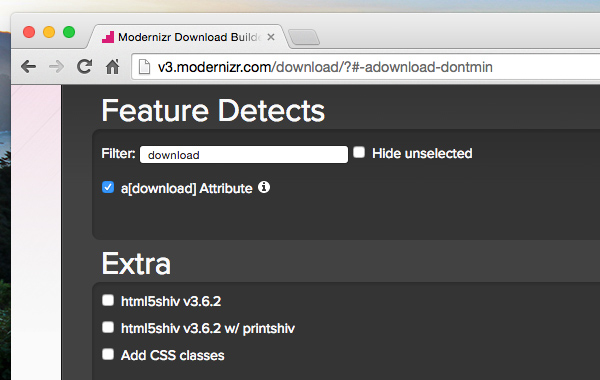
 Конфигурация сборки Modernizr.
Затем мы можем добавить следующий скрипт.
Скрипт проверит, поддерживает ли браузер данный атрибут; если нет — то под всеми ссылками с указанным download атрибутом будет добавлен новый <div> с подсказкой.

 Текстовая инструкция показывается в Safari.
Подводя итог
Атрибут download делает обработку ссылок на скачивание очень удобным для тех, кто не имеет доступа к серверным настройкам. С нетерпением жду, что Internet Explorer и Safari скоро реализуют поддержку атрибута download !
Как сделать ссылку на скачивание в html
There are so many downloads from the websites daily, we can’t even count it’s beyond imagination. But as a programmer, you should know about creating a download link for yourself too so that when you need to add it to your website, it will be easy for you to add this feature. In this article, we will learn how to create a download link with html.
Download Link is a link that will download the specific file when the user clicks on it. Now, let’s talk about the attribute which will be used in the code while writing it. The “download” attribute is used to make the link downloadable. It will specify the target (pdf, zip, jpg, doc, etc) that will be downloaded only when the user clicks on the link.
Note: The download attribute can be only used when the href attribute is set before.
Syntax:
Example: This example describes how to create a downloadable link.
How can I create download link in HTML?
I have a basic idea of HTML. I want to create the download link in my sample website, but I don’t have idea of how to create it. How do I make a link to download a file rather than visit it?

12 Answers 12
In modern browsers that support HTML5, the following is possible:
You also can use this:
This will allow you to change the name of the file actually being downloaded.

This answer is outdated. We now have the download attribute. (see also this link to MDN)
If by «the download link» you mean a link to a file to download, use
the target=_blank will make a new browser window appear before the download starts. That window will usually be closed when the browser discovers that the resource is a file download.
Note that file types known to the browser (e.g. JPG or GIF images) will usually be opened within the browser.
You can try sending the right headers to force a download like outlined e.g. here. (server side scripting or access to the server settings is required for that.)

In addition (or in replacement) to the HTML5’s <a download attribute already mentioned,
the browser’s download to disk behavior can also be triggered by the following http response header:
This was the way to do before HTML5 (and still works with browsers supporting HTML5).

A download link would be a link to the resource you want to download. It is constructed in the same way that any other link would be:

To link to the file, do the same as any other page link:
To force things to download even if they have an embedded plugin (Windows + QuickTime = ugh), you can use this in your htaccess / apache2.conf:
This thread is probably ancient by now, but this works in html5 for my local file.
<p><a href=»file:///. example.pdf» download target=»_blank»>test pdf</a></p>
This should open the pdf in a new windows and allow you to download it (in firefox at least). For any other file, just make it the filename. For images and music, you’d want to store them in the same directory as your site though. So it’d be like
There’s one more subtlety that can help here.
I want to have links that both allow in-browser playing and display as well as one for purely downloading. The new download attribute is fine, but doesn’t work all the time because the browser’s compulsion to play the or display the file is still very strong.
BUT.. this is based on examining the extension on the URL’s filename!You don’t want to fiddle with the server’s extension mapping because you want to deliver the same file two different ways. So for the download, you can fool it by softlinking the file to a name that is opaque to this extension mapping, pointing to it, and then using download’s rename feature to fix the name.
I was hoping just throwing a dummy query on the end or otherwise obfuscating the extension would work, but sadly, it doesn’t.
# Create a Downloadable Link using HTML5 Download Attribute
The default of your anchor tag is a navigational link, it will go to the link you specified in your href attribute.
However, when you add the download attribute, it will turn that into a download link. Prompting your file to be downloaded. The downloaded file will have the same name as the original filename. However, you can also set a custom filename by pass a value to the download attribute ��
# Download Restrictions
The download attribute only works for same-originl URLs. So if the href is not the same origin as the site, it won’t work. In other words, you can only download files that belongs to that website. This attribute follows the same rules outline in the same-origin policy.
# What is the same-origin policy?
This policy is a security mechanism that helps to isolate potentially malicious documents and reduce possible attack vectors. So what does that mean for our download attribute? Well, it means that users can only download files that are from the origin site. Let’s take a look at an example:
| Origin: https://www.samanthaming.com | |
|---|---|
| https://www.samanthaming.com/logo.png | This will work |
| https://www.google.com/logo.png | This won’t work |
You can learn more about this policy on the MDN Web Doc
# Browser Support
This feature is not supported by all browsers (cough cough IE). So if there is a specific browser you’re targeting, make sure you check compatibility before using this attribute.
# What’s the use case for passing a new filename?
Question: What would be use case for this? Isn’t it logical to name your file how you want it to be downloaded?
My response: Yes, that would be ideal. But sometimes you might have a custom file naming convention you need to follow which might not makes sense for the user. So being able to pass in a custom file name can be useful ��
: good use case: I keep track of my resume version number, but the recruiter that download it from my website doesn’t need to know what version it is.
: also you could programmatically change the file name, to included the date or user name for example. Neat tip!
# Community Feedback
: I have used this download attribute in my personal portfolio website to make my resume as downloadable(pdf). Simply powerful��
: A very handy tip. A little gotcha that caught me off guard initially is that this only works on same origin requests, not cross origin, where it is ignored: Stack Overflow