Как вернуть сразу несколько значений из функции в Python 3
Сегодня мы делимся с вами переводом статьи, которую нашли на сайте medium.com. Автор, Vivek Coder, рассказывает о способах возврата значений из функции в Python и объясняет, как можно отличить друг от друга разные структуры данных.

Фото с сайта Unsplash. Автор: Vipul Jha
Python удобен в том числе тем, что позволяет одновременно возвращать из функции сразу несколько значений. Для этого нужно воспользоваться оператором return и вернуть структуру данных с несколькими значениями — например, список общего количества рабочих часов за каждую неделю.
Структуры данных в Python используются для хранения коллекций данных, которые могут быть возвращены посредством оператора return . В этой статье мы рассмотрим способы возврата нескольких значений с помощью подобных структур (словарей, списков и кортежей), а также с помощью классов и классов данных (Python 3.7+).
Способ 1: возврат значений с помощью словарей
Словари содержат комбинации элементов, которые представляют собой пары «ключ — значение» ( key:value ), заключенные в фигурные скобки ( <> ).
Словари, на мой взгляд, это оптимальный вариант для работы, если вы знаете ключ для доступа к значениям. Далее представлен словарь, где ключом является имя человека, а соответствующим значением — возраст.
А теперь перейдем к функции, которая возвращает словарь с парами «ключ — значение».
Способ 2: возврат значений с помощью списков
Списки похожи на массивы, сформированные с использованием квадратных скобок, однако они могут содержать элементы разных типов. Списки также отличаются от кортежей, поскольку являются изменяемым типом данных. То есть любой список может меняться.
Списки — одна из наиболее универсальных структур данных в Python, потому что им не обязательно сохранять однородность (в них можно включать строки, числа и элементы). Иногда списки даже используют вместе со стеками или очередями.
Вот пример, где возвращается список с натуральными числами.
Способ 3: возврат значений с помощью кортежей
Кортежи — это упорядоченные неизменяемые объекты в Python, которые обычно используются для хранения коллекций неоднородных данных.
Кортежи напоминают списки, однако их нельзя изменить после того, как они были объявлены. А еще, как правило, кортежи быстрее в работе, чем списки. Кортеж можно создать, отделив элементы запятыми: x, y, z или (x, y, z) .
На этом примере кортеж используется для хранения данных о сотруднике (имя, опыт работы в годах и название компании).
А вот пример написания функции для возврата кортежа.
Обратите внимание: мы опустили круглые скобки в операторе return , поскольку для возврата кортежа достаточно просто отделить каждый элемент запятой (как показано выше).
Не забывайте, что кортеж можно создать с помощью запятой вместо круглых скобок. Круглые скобки требуются только в тех случаях, когда используются пустые кортежи или вам нужно избежать синтаксической неточности.
Чтобы лучше разобраться в кортежах, обратитесь к официальной документации Python 3 (документация приведена на английском языке. — Прим. ред.).
Ниже показан пример функции, которая использует для возврата кортежа круглые скобки.
Повторюсь, кортежи легко перепутать со списками (в конце концов, и те, и другие представляют собой контейнер, состоящий из элементов). Однако нужно помнить о фундаментальном различии: кортежи изменить нельзя, а списки — можно.
Способ 4: возврат значений с помощью объектов
Тут все так же, как в C/C++ или в Java. Можно просто сформировать класс (в C он называется структурой) для сохранения нескольких признаков и возврата объекта класса.
Способ 5: возврат значений с помощью классов данных (Python 3.7+)
Классы данных в Python 3.7+ как раз помогают вернуть класс с автоматически добавленными уникальными методами, модулем typing и другими полезными инструментами.
Чтобы лучше разобраться в классах данных, обратитесь к официальной документации Python 3 (документация приведена на английском языке. — Прим. ред.).
Вывод
Цель этой статьи — ознакомить вас со способами возврата нескольких значений из функции в Python. И, как вы видите, этих способов действительно много.
Учите матчасть и постоянно развивайте свои навыки программирования. Спасибо за внимание!
Python: Return Multiple Values from a Function

In this tutorial, you’ll learn how to use Python to return multiple values from your functions. This is a task that is often quite difficult in some other languages, but very easy to do in Python.
You’ll learn how to use tuples, implicitly or explicitly, lists, and dictionaries to return multiple values from a function. You’ll also learn how to identify which method is best suited for your use case. You’ll also learn how to unpack items of unequal length, using the unpacking operator ( * ).
Being able to work with functions is an incredibly useful skill that allows you to more readily follow the DRY (don’t repeat yourself) principle. Functions allow your code to be significantly more readable and less repetitive. All of this allows your code to be more maintainable and reduces complexity of the code.
The Quick Answer: Use Tuple Unpacking
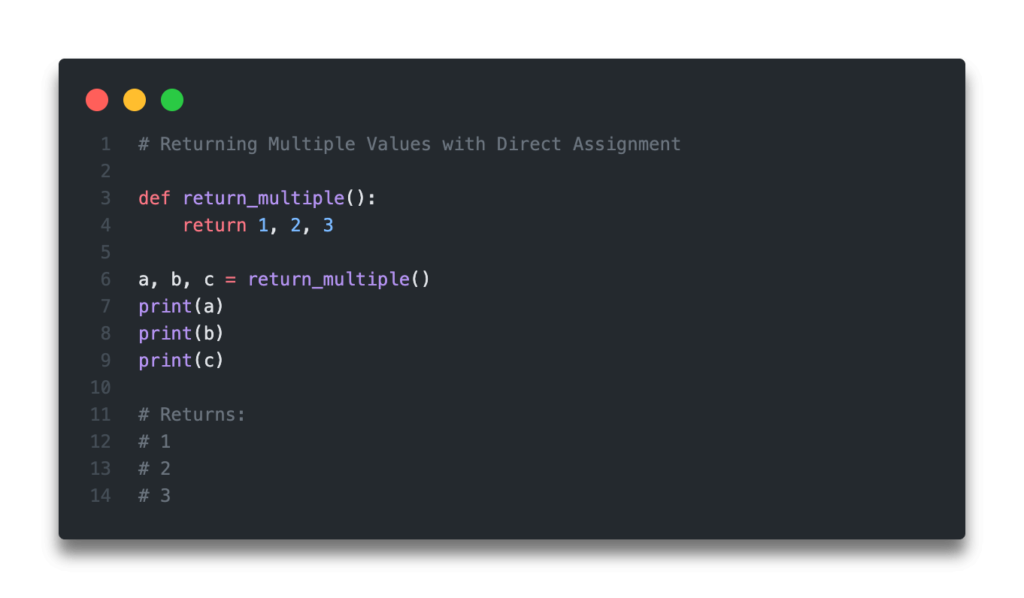
Table of Contents
How do Functions Return Values in Python?
Python functions are easy ways to structure code into dynamic processes that are readable and reusable. While Python functions can accept inputs, in this tutorial, we’ll be looking at function outputs. Specifically, we’ll be look at how functions return values.
Let’s take a look at how a function in Python is designed and how to return one value and how to return two values.
In the example above, we have defined two different functions, return_one() and return_two() . The former of these returns only a single value. Meanwhile, the latter function, return_two() , returns two values. This is done by separating the values by commas.
In the next section, you’ll learn how and why returning multiple values actually works.
Want to learn more about calculating the square root in Python? Check out my tutorial here, which will teach you different ways of calculating the square root, both without Python functions and with the help of functions.
How to Return Multiple Values from a Python Function with Tuples
In the previous section, you learned how to configure a Python function to return more than a single value.
The way that this works, is that Python actually turns the values (separated by commas) into a tuple. We can see how this works by assigning the function to a variable and checking its type.
We can see in the code above that when we assign our function to a variable, that a tuple is generated.
This may surprise you, however, since you don’t actually tell the function to return (1, 2, 3) . Python implicitly handles converting the return values into a tuple. It’s not the parentheses that turn the return value into a tuple, but rather the comma along with the parentheses.
We can verify this by checking the type of the value (1), for example. This returns: int .
Again, this might surprise you. If we changed our value to (1,) , however, we return a different result.
A lot of this may seem like semantics, but it allows you to understand why these things actually work. Now, let’s learn how to assign these multiple variables to different variables.
Let’s look at the same function as before. Instead of assigning the return values to a single tuple, let’s unpack our tuple and return three separate values.
The reason this works is that Python is handling unpacking these values for us. Because we have the same number of assignment variables as we do values in the return statement, Python handles the assignment of these values for us.
In the next section, you’ll learn how to unpack multiple values from a Python to variables with mismatched lengths.
Want to learn more about Python for-loops? Check out my in-depth tutorial that takes your from beginner to advanced for-loops user! Want to watch a video instead? Check out my YouTube tutorial here.
How to Unpack Multiple Values from a Python Function to Unequal Lengths
In the example above, you learned how to return multiple values from a Python function by unpacking values from the return tuple.
There may be many times when your function returns multiple values, but you only care about a few. You don’t really care about the other values, but Python will not let you return only a few of them.
Let’s see what this looks like:
This happens because our assignment needs to match the number of items returned.
However, Python also comes with an unpacking operator, which is denoted by * . Say that we only cared about the first item returned. We still need to assign the remaining values to another variable, but we can easily group them into a single variable, using the unpacking operator.
Let’s see how this works in Python:
Here, we have unpacked the first value to our variable a , and all other variables to the variable b , using the notation of *b .
In the next section, you’ll learn how to return multiple values from a Python function using lists.
Want to learn how to use the Python zip() function to iterate over two lists? This tutorial teaches you exactly what the zip() function does and shows you some creative ways to use the function.
How to Return Multiple Values from a Python Function with Lists
Similar to returning multiple values using tuples, as shown in the previous examples, we can return multiple values from a Python function using lists.
One of the big differences between Python sets and lists is that lists are mutable in Python, meaning that they can be changed. If this is an important characteristic of the values you return, then this is a good way to go.
Let’s see how we can return multiple values from a function, using both assignment to a single variable and to multiple variables.
In the next section, you’ll learn how to use Python dictionaries to better understand return values.
Want to learn more about Python list comprehensions? Check out this in-depth tutorial that covers off everything you need to know, with hands-on examples. More of a visual learner, check out my YouTube tutorial here.
How to Return Multiple Values from a Python Function with Dictionaries
In both examples above, if you’re returning all values to a single variable, it can be difficult to determine what each value represents. For example, while you can access all the items in a tuple or in a list using indexing, it can be difficult to determine what each value represents.
Let’s take a look at a more complicated function that creates variables for speed , time , and distance travelled for a car.
If we returned this as a tuple or as a list, then we would need to know which variable represents what item. However, we can also return these items as a dictionary. When we do this, we can access each item by its key.
Let’s see how we can do this in Python:
Need to check if a key exists in a Python dictionary? Check out this tutorial, which teaches you five different ways of seeing if a key exists in a Python dictionary, including how to return a default value.
Conclusion
In this tutorial, you learned how to return multiple values from Python functions. You learned how and why multiple values can be returned and how to optimize how values are returned for your use cases, by learning how to return tuples, lists, and dictionaries. You also learned how to unpack multiple values to variables of different lengths.
To learn more about Python functions, check out the official documentation here.
Функция return в Python
Оператор возврата в python используется для возврата значений из функции. Мы можем использовать оператор return только в функции. Его нельзя использовать вне функции Python.
Функция без оператора возврата
Каждая функция в Python что-то возвращает. Если функция не имеет никакого оператора возврата, она возвращает None.

Пример return
Мы можем выполнить некоторую операцию в функции и вернуть результат вызывающей стороне с помощью оператора return.

return с выражением
У нас могут быть выражения также в операторе return. В этом случае выражение оценивается и возвращается результат.

Логическое значение
Давайте посмотрим на пример, в котором мы вернем логическое значение аргумента функции. Мы будем использовать функцию bool(), чтобы получить логическое значение объекта.

Строка
Давайте посмотрим на пример, в котором наша функция вернет строковое представление аргумента. Мы можем использовать функцию str(), чтобы получить строковое представление объекта.

Кортеж
Иногда нам нужно преобразовать несколько переменных в кортеж. Давайте посмотрим, как написать функцию для возврата кортежа из переменного числа аргументов.

Функция, возвращающая другую функцию
Мы также можем вернуть функцию из оператора return. Это похоже на Currying, которое представляет собой метод перевода оценки функции, которая принимает несколько аргументов, в оценку последовательности функций, каждая из которых имеет один аргумент.

Функция, возвращающая внешнюю функцию
Мы также можем вернуть функцию, которая определена вне функции, с помощью оператора return.

Возврат нескольких значений
Если вы хотите вернуть несколько значений из функции, вы можете вернуть объект кортежа, списка или словаря в соответствии с вашими требованиями.
Однако, если вам нужно вернуть огромное количество значений, то использование последовательности – это слишком большая операция по перегрузке ресурсов. В этом случае мы можем использовать yield, чтобы возвращать несколько значений одно за другим.

Резюме
Оператор return в python используется для возврата вывода из функции. Мы узнали, что мы также можем вернуть функцию из другой функции. Кроме того, выражения оцениваются, а затем функция возвращает результат.
Python Return Multiple Values – How to Return a Tuple, List, or Dictionary

Amy Haddad

You can return multiple values from a function in Python.
To do so, return a data structure that contains multiple values, like a list containing the number of miles to run each week.
Data structures in Python are used to store collections of data, which can be returned from functions. In this article, we’ll explore how to return multiple values from these data structures: tuples, lists, and dictionaries.
Tuples
A tuple is an ordered, immutable sequence. That means, a tuple can’t change.
Use a tuple, for example, to store information about a person: their name, age, and location.
Here’s how you’d write a function that returns a tuple.
Notice that we didn’t use parentheses in the return statement. That’s because you can return a tuple by separating each item with a comma, as shown in the above example.
“It is actually the comma which makes a tuple, not the parentheses,” the documentation points out. However, parentheses are required with empty tuples or to avoid confusion.
Here’s an example of a function that uses parentheses () to return a tuple.
A list is an ordered, mutable sequence. That means, a list can change.
You can use a list to store cities:
Take a look at the function below. It returns a list that contains ten numbers.
Here’s another example. This time we pass in several arguments when we call the function.
It’s easy to confuse tuples and lists. After all, both are containers that store objects. However, remember these key differences:
- Tuples can’t change.
- Lists can change.
Dictionaries
A dictionary contains key-value pairs wrapped in curly brackets <> . Each “key” has a related “value.”
Consider the dictionary of employees below. Each employee name is a “key” and their position is the “value.”
Here’s how you’d write a function that returns a dictionary with a key, value pair.
In the above example, “Boston” is the key and “United States” is the value.
We’ve covered a lot of ground. The key point is this: you can return multiple values from a Python function, and there are several ways to do so.