Строки в Python
Строка — это последовательность символов.
Символ — это просто одиночный символ. Например, в английском языке 26 символов, букв.
Компьютер работает не с символами, а с числами в двоичной записи. Вы видит на экране символы, но компьютер хранит и обрабатывает их как комбинацию нулей и единиц.
Преобразование символа в число называется кодированием, а обратный процесс — декодированием. О самых известных стандартах кодирования вы, скорее всего, слышали. Это ASCII и Unicode.
В Python каждая строка — это последовательность символов Юникода, поскольку он позволяет использовать символы из всех языков мира и обеспечивает единообразие кодировки.
Как создать строку
Если заключить набор символов в одинарные » или двойные «» кавычки с двух сторон, получится строка. В Python можно использовать и тройные кавычки »»» , но их обычно используют для многострочных строк и строк документации.
Вывод:
Как получить доступ к символам в строке
1. По индексу
Получить доступ к отдельным символам в строке можно стандартным способом — по индексу.
Примечание. Первый элемент в строке (то есть первый символ) Python имеет индекс 0.
Индекс всегда должен быть целым числом, поэтому тип float не подойдет. Использование в качестве индекса числа с плавающей точкой приведет к ошибке TypeError.
Если вы попытаетесь получить доступ к символу с индексом, который больше длины строки, Python выдаст ошибку IndexError.
Индекс не обязательно должен быть положительным числом. Python поддерживает и «отрицательную индексацию». Индекс -1 ссылается на последний символ, -2 — на предпоследний и так далее.
2. С помощью среза
Получить доступ к символам в строке можно и с помощью слайсинга (от англ. «нарезание»). Таким способом удобно получать набор символов в заданном диапазоне.
Срезы задаются с помощью квадратных скобов [] и 2-3 аргументов через двоеточие : .
Вывод:
Если мы попытаемся получить доступ к символу с индексом вне допустимого диапазона или использовать не целые числа, получим ошибку.
Помните строку my_string?
Как изменить или удалить строку
Строка — неизменяемый тип данных. Это значит, что мы не можем изменить элементы строки после создания. Зато можем переназначать разные строки одной и той же переменной.
По той же причине нельзя удалять символы из строки. Зато можно полностью удалить строку: для этого используйте ключевое слово del .
Строковые операции
Строки — один из самых часто используемых типов данных в Python, поэтому для работы с ними существует куча встроенных операций.
Конкатенация строк
Конкатенация — это объединение двух или более строк в одну.
Эту операцию в Python выполняет оператор + . А с помощью оператора * можно повторить строку заданное количество раз — «умножить» строку на число.
Вывод:
Если просто написать рядом два строковых литерала, они тоже объединятся в одну строку. Еще можно использовать круглые скобки. Давайте рассмотрим пример.
Итерирование по строке
В Python можно «пройтись» по строке, то есть перебрать все символы в ней. Для этого нужно использовать цикл for.
Вывод:
Проверка на вхождение
В Python можно проверить, находится ли данная подстрока в строке или нет с помощью операторов членства in и not in .
Функции для работы со строками
Практически все встроенные функции, которые работают с последовательностями, точно так же работают со строками.
Самые полезные:
- enumerate() — позволяет перебирать строку, отслеживая индекс текущего элемента.
- len() — возвращает длину строки.
Вывод:
Методы строк
Разбивает строки по заданном разделителю (по умолчанию — пробел)
«Собирает» строку из списка с разделителем
find(подстрока, начало, конец)
Поиск подстроки в строке. Возвращает индекс первого вхождения слева. Если подстроки в строке нет, возвращает -1
index(подстрока, начало, конец)
Поиск подстроки в строке. Возвращает индекс первого вхождения. Если подстроки в строке нет, возвращает ValueError
Замена шаблона в строке
Проверяет, состоит ли строка из цифр. Возвращает True или False
Проверяет, состоит ли строка из букв. Возвращает True или False
Проверяет, состоит ли строка из символов в нижнем регистре. Возвращает True или False
Проверяет, состоит ли строка из символов в верхнем регистре. Возвращает True или False
Преобразует строку к верхнему регистру
Преобразует строку к нижнему регистру
Преобразует символ в ASCII-код
Преобразует ASCII-код в символ
Как форматировать строки
Управляющие последовательности
Допустим, нам нужно напечатать на экран такое сообщение: He said, «What’s there?» (Он сказал: «Что там?»). Проблема в том, что в этом тексте есть и двойные, и одинарные кавычки (апостроф), поэтому мы не можем использовать их для создания строки — это приведет к ошибке SyntaxError.
Эта проблема больше актуальная для английского языка, поскольку в русском не используют апострофы, но знать, как ее решить, надо всем.
Есть два способа обойти эту проблему: использовать тройные кавычки или escape-последовательности — их еще иногда называют управляющими последовательностями.
How to delete a specific line in a text file using Python?
Let’s say I have a text file full of nicknames. How can I delete a specific nickname from this file, using Python?
18 Answers 18
First, open the file and get all your lines from the file. Then reopen the file in write mode and write your lines back, except for the line you want to delete:
You need to strip(«\n») the newline character in the comparison because if your file doesn’t end with a newline character the very last line won’t either.
Solution to this problem with only a single open:
This solution opens the file in r/w mode («r+») and makes use of seek to reset the f-pointer then truncate to remove everything after the last write.
The best and fastest option, rather than storing everything in a list and re-opening the file to write it, is in my opinion to re-write the file elsewhere.
That’s it! In one loop and one only you can do the same thing. It will be much faster.

This is a "fork" from @Lother‘s answer (should be considered the right answer).
For a file like this:
- with open , which discards the usage of f.close()
- more clearer if/else for evaluating if string is not present in the current line
The issue with reading lines in first pass and making changes (deleting specific lines) in the second pass is that if you file sizes are huge, you will run out of RAM. Instead, a better approach is to read lines, one by one, and write them into a separate file, eliminating the ones you don’t need. I have run this approach with files as big as 12-50 GB, and the RAM usage remains almost constant. Only CPU cycles show processing in progress.
If you use Linux, you can try the following approach.
Suppose you have a text file named animal.txt :
Delete the first line:

I liked the fileinput approach as explained in this answer: Deleting a line from a text file (python)
Say for example I have a file which has empty lines in it and I want to remove empty lines, here’s how I solved it:
Note: The empty lines in my case had length 1
Probably, you already got a correct answer, but here is mine. Instead of using a list to collect unfiltered data (what readlines() method does), I use two files. One is for hold a main data, and the second is for filtering the data when you delete a specific string. Here is a code:
Hope you will find this useful! 🙂
I think if you read the file into a list, then do the you can iterate over the list to look for the nickname you want to get rid of. You can do it much efficiently without creating additional files, but you’ll have to write the result back to the source file.
Here’s how I might do this:
I’m assuming nicknames.csv contains data like:
Then load the file into the list:
Next, iterate over to list to match your inputs to delete:
Lastly, write the result back to file:

A simple solution not been proposed :
Inspired of precedent answers

In general, you can’t; you have to write the whole file again (at least from the point of change to the end).
In some specific cases you can do better than this —
if all your data elements are the same length and in no specific order, and you know the offset of the one you want to get rid of, you could copy the last item over the one to be deleted and truncate the file before the last item;
or you could just overwrite the data chunk with a ‘this is bad data, skip it’ value or keep a ‘this item has been deleted’ flag in your saved data elements such that you can mark it deleted without otherwise modifying the file.
Delete Lines From a File in Python
This article lets you know how to delete specific lines from a file in Python. For example, you want to delete lines #5 and #12.
After reading this article, you’ll learn:
- How to remove specific lines from a file by line numbers
- How to delete lines that match or contain the given text/string
- How to delete the first and last line from a text file.
Table of contents
Delete Lines from a File by Line Numbers
Please follow the below steps to delete specific lines from a text file by line number: –
-
in a read mode . Read all contents from a file into a list using a readlines() method. here each element of a list is a line from the file
- Close a file
- Again, open the same file in write mode.
- Iterate all lines from a list using a for loop and enumerate() function. The enumerate() function adds a counter to an iterable (such as list, string) and returns it in enumerate object. We used the enumerate object with a for loop to access the line number
- Use the if condition in each iteration of a loop to check the line number. If it matches the line number to delete, then don’t write that line into the file.
- Close a file
Example:
The following code shows how to delete lines from a text file by line number in Python. See the attached file used in the example and an image to show the file’s content for reference.
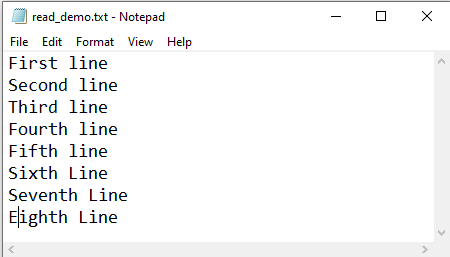
text file
In this example, we are deleting lines 5 and 8.
Our code deleted two lines. Here is a current data of a file
Note:
The enumerate() function adds a counter to an iterable (such as list, string) and returns it in enumerate object. We used the enumerate object with a for loop to access the line number. The enumerate() doesn’t load the entire list in memory, so this is an efficient solution.
Note: Don’t use del keywords to delete lines from a list and write the same list to file. Because when you delete a line from the list, the item’s index gets changed. So you will no longer be able to delete the correct line.
Using seek() method
The same can be accomplished using the seek() method by changing the pointer position so we don’t need to open a file twice.
- Open file in the read and write mode ( r+ )
- Read all lines from a file into the list
- Move the file pointer to the start of a file using seek() method
- Truncate the file using the truncate() method
- Iterate list using loop and enumerate() function
- In each iteration write the current line to file. Skip those line numbers which you want to remove
Example:
Delete First and Last Line of a File
To selectively delete certain content from the file, we need to copy the file’s contents except for those lines we want to remove and write the remaining lines again to the same file.
Use the below steps to delete the first line from a file.
- Open file in a read and write mode ( r+ )
- Read all lines from a file
- Move file pointer at the start of a file using the seek() method
- Truncate the file
- Write all lines from a file except the first line.
Output
Before deleting the first line
After deleting the first line
To delete the first N lines use list slicing.
If you are reading a file and don’t want to read the first line use the below approach instead of deleting a line from a file.
Use the below example to steps to delete the last line from a file
To delete last N lines use list slicing.
Deleting Lines Matching a text (string)
Assume files contain hundreds of line and you wanted to remove lines which match the given string/text. Let’s see how to remove lines that match the given text (exact match).
Steps:
- Read file into a list
- Open the same file in write mode
- Iterate a list and write each line into a file except those lines that match the given string.
Example 1: Delete lines that match the given text (exact match)
Also, you can achieve it using the single loop so it will be much faster.
Remove Lines that Contains a Specific Word
We may have to delete lines from a file that contains a particular keyword or tag in some cases. Let’s see the example to remove lines from file that contain a specific string anywhere in the line.
Example:
Remove Lines Starting with Specific Word/String
Learn how to remove lines from a file starting with a specific word. In the following example, we will delete lines that begin with the word ‘time‘.
Example:
Delete Specific Text from a Text File
It can also be the case that you wanted to delete a specific string from a file but not the line which contains it. Let’s see the example of the same
Delete all Lines From a File
To delete all the lines in a file and empty the file, we can use the truncate() method on the file object. The truncate() method removes all lines from a file and sets the file pointer to the beginning of the file.
Did you find this page helpful? Let others know about it. Sharing helps me continue to create free Python resources.
About Vishal
Founder of PYnative.com I am a Python developer and I love to write articles to help developers. Follow me on Twitter. All the best for your future Python endeavors!
Related Tutorial Topics:
Python Exercises and Quizzes
Free coding exercises and quizzes cover Python basics, data structure, data analytics, and more.
Как удалить строку в python
В рубрике «Готовые программы на языке python (скрипты, исходники)» сегодня представлен python скрипт «Как удалить строку из текстового файла в python?».
Рассмотрим скрипт «Как удалить строку из файла в python»:
Теперь мы стали чуть больше знать, как питоне (python) можно решить задачу «Как удалить строку из текстового файла в python».
Ещё больше python-рецептов (программ на языке python) смотрите в разделе «Python скрипты».
Если хотите поделиться своими python-скриптами, либо знаете, как улучшить предложенные python скрипты, либо заметили ошибку, пишите в обратную связь, либо оставляйте комментарии.