Python Take list as an input from a user
In this lesson, You will learn how to input a list in Python.
Using the Python input() function, we can accept a string, integer, and character input from a user. Now, let see how to get a list as input from a user.
Table of contents
Get a list of numbers as input from a user
How to take a list as input in Python
-
Use an input() function
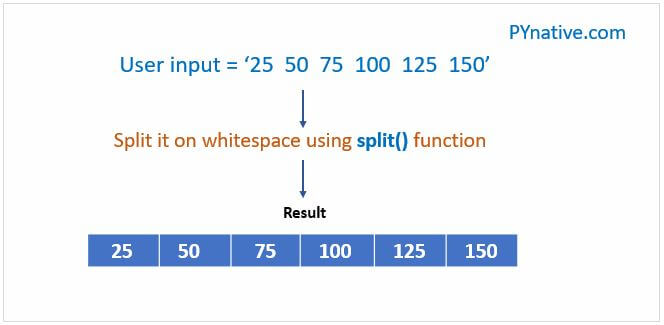
Use an input() function to accept the list elements from a user in the format of a string separated by space.
Next, use a split() function to split an input string by space. The split() method splits a string into a list.
Using a for loop and range() function, we can access each element of the list along with the index number.
Convert each list element to an integer using a int() function.
If you want a list of strings as input then skip this step.
Example 1: Get a list of numbers as input from a user and calculate the sum of it
Note: Python input() function always converts the user input into a string then returns it to the calling program. With those in mind, we converted each element into a number using an int() function. If you want to accept a list with float numbers you can use the float() function.
Solve:
Input a list using input() and range() function
Let’s see how to accept Python list as an input without using the split() method.
- First, create an empty list.
- Next, accept a list size from the user (i.e., the number of elements in a list)
- Run loop till the size of a list using a for loop and range() function
- use the input() function to receive a number from a user
- Add the current number to the list using the append() function
Output:
Input a list using a list comprehension
List comprehension is a more straightforward method to create a list from an existing list. It is generally a list of iterables generated to include only the items that satisfy a condition.
Let’ see how to use the list Comprehension to get the list as an input from the user. First, decide the size of the list.
Next, use the list comprehension to do the following tasks
- Get numbers from the user using the input() function.
- Split it string on whitespace and convert each number to an integer using an int() function.
- Add all that numbers to the list.
Output:
Input a list using the map function
Let’ see how to use the map() function to get a list as an input from the user.
- First, decide the list size.
- Next, accept numbers from the user separated by space
- Next, use the map() function to wrap each user-entered number in it and convert it into an int or float as per your need
Output:
Get a list of strings as an input from a user
Accept a string list from the user is very straightforward.
- Accept the list of strings from a user in the format of a string separated by space.
- Use split() function on input string to splits a string into a list of words.
Output:
Accept a nested list as input
In this example, Let’s see how to get evenly sized lists from the user. In simple words, Let’s see how to accept the following list of lists from a user.
Output:
Next Steps
Let me know your comments and feedback in the section below.
Solve:
Did you find this page helpful? Let others know about it. Sharing helps me continue to create free Python resources.
About Vishal
Founder of PYnative.com I am a Python developer and I love to write articles to help developers. Follow me on Twitter. All the best for your future Python endeavors!
Related Tutorial Topics:
Python Exercises and Quizzes
Free coding exercises and quizzes cover Python basics, data structure, data analytics, and more.
How do I convert user input into a list? [duplicate]
I’m wondering how to take user input and make a list of every character in it.
And say you entered «python rocks» I want a to make it a list something like this
But if I do this:
The magicList is just
6 Answers 6
Use the built-in list() function:
Output

It may not be necessary to do any conversion, because the string supports many list operations. For instance:
Another simple way would be to traverse the input and construct a list taking each letter

or you can simply do
and it converts the thing you typed it as a list

It converts the input into a list just like when we want to convert the input into an integer.
using list comprehension,
You can use str.join() to concatenate strings with a specified separator. Furthermore, in your case, str.format() may also help. However the apostrophes will not interfere with anything you do with the list. The apostrophes show that the elements are strings.
-
The Overflow Blog
Linked
Related
Hot Network Questions
Site design / logo © 2023 Stack Exchange Inc; user contributions licensed under CC BY-SA . rev 2023.6.8.43486
By clicking “Accept all cookies”, you agree Stack Exchange can store cookies on your device and disclose information in accordance with our Cookie Policy.