Файл requirements.txt в Python и как его создать
Файл requirements.txt — это список всех модулей и пакетов Python, которые нужны для полноценной работы вашей программы. Его использование позволяет легко отслеживать весь перечень нужных компонентов, избавляя пользователей от необходимости их ручного поиска и установки.
В данном материале мы расскажем вам о том, как создать файл requirements.txt , а также о его преимуществах и особенностях использования.
Преимущества использования файла зависимостей
-
Возможность отслеживать актуальный список всех модулей и пакетов Python, используемых в вашем проекте. Облегчение процесса установки недостающих компонентов. Удобство совместной работы. Если на ПК другого пользователя отсутствуют нужные модули, они будут быстро загружены из файла requirements.txt , обеспечив беспроблемный запуск программы. Если вы захотите удалить, добавить или обновить модуль, изменения будет достаточно внести только в файл requirements.txt . При загрузке requirements.txt , GitHub проверяет зависимости на наличие конфликтов, и в некоторых случаях устраняет уязвимости.
Как создать файл зависимостей
Для этого вам достаточно перейти в корневой каталог проекта, где хранятся ваши .py -файлы, и создать текстовый документ requirements.txt . Важно убедиться, чтобы название было именно таким.
Также этот файл может быть сгенерирован автоматически с помощью следующей команды:
pip freeze > requirements.txt
Она возвращает список всех установленных модулей с указанием версий и помещает их в текстовый файл. Обратите внимание, что pip freeze подразумевает использование виртуальной среды для текущего проекта. В противном случае, список зависимостей может включать в себя и те пакеты, которые установлены в другие виртуальные среды.
Дополнительный вариант использования этой команды, который возвращает только локальные установленные пакеты:
pip freeze —local
Добавление модулей в файл
После создания файла его необходимо заполнить названиями модулей и их версиями. Самый простой способ — сделать это вручную. Вот пример содержимого requirements.txt :
Перечислив все зависимости, сохраняем файл и закрываем его.
Второй способ — команда pip freeze > requirements.txt , которая работает, даже если файл уже существует. Его пустое содержимое будет заполнено списком пакетов так же, как и при генерации нового файла.
Установка модулей из файла
Для того чтобы установить пакеты из requirements.txt , необходимо открыть командную строку, перейти в каталог проекта и ввести следующую команду:
pip install -r requirements.txt
Если вы хотите обновить компоненты вместо их повторной установки, используйте команду pip install -U -r requirements.txt .
Как поддерживать requirements.txt в актуальном состоянии
Если вы уже создали файл с зависимостями ранее, но по какой-то причине не обновляли его содержимое, волноваться не стоит. Выполните следующие шаги:
-
Выведите список устаревших модулей с помощью pip list —outdated . Обновите выведенные пакеты вручную с помощью pip install -U PackageName или автоматически, используя pip install -U -r requirements.txt . Убедитесь, что ваша программа работает корректно. Используйте pip freeze > requirements.txt , чтобы актуализировать содержимое файла с необходимыми внешними зависимостями.
Таким образом вы сможете без проблем обновить информацию об используемых установленных пакетах, даже если в течение определенного времени не занимались управлением зависимостями.
Помните, что постоянное обновление файла requirements.txt помогает избежать многих проблем, связанных с устаревшими или отсутствующими модулями или пакетами. Как следствие, вы обеспечите корректную работу всех ваших сборок на любых ПК.
Как еще можно создать файл зависимостей?
Можно воспользоваться библиотекой pipreqs , которая сделает все за нас. Её запуск в командной строке сгенерирует файл с зависимостями:
При этом никто не запрещает вновь обратиться к pip freeze или заполнению документа вручную.
Как создать requirements txt файл python pycharm
Today, in the process of using pycharm, I think about how to configure the required requirements.txt for the program, because some of the programs we download from GitHub often carry the requirements.txt file, the required third-party dependencies can be Can be configured, one-click pip install -r requirements.txt to install the dependencies required by the program (generally, the python source code specified in github will provide a document called requirements.txt, the document is recorded to be installed The name and version of the package does provide us with the convenience of debugging other people’s programs. Here are the ways to find your own online search and your own practice as follows:
1. In Pycharm, there are two ways to install Python packages. One way is to install and uninstall packages using the plus and minus signs in the Project Interpreter interface. 
2. The other is to use pip install or conda install (if using the Anaconda management tool). If you only install a few dependencies, you can do both. Especially the first one seems to be more convenient, and you can choose the version you want. If you need to install a large number of dependencies with the requirements.txt file, it is much faster and easier to install using the pip command.
3, open the terminal of pycharm, as long as you go to the directory where requirements.txt is located, use the following command, you can import all the required packages in the current python environment:
4. Similarly, in our program, how to generate the requirements.txt file, use the following command:

5. Thus, Pycharm is added to add requirements.txt to its own Python program.
The method is derived from the Pycharm help documentation, you can view the following link
Is there any way to output requirements.txt automatically?
I want to output the requirements.txt for my Python 3 project in PyCharm. Any ideas?


5 Answers 5
Try the following command:
Pigar works quite well I just tested it
The answer above with pip freeze will only work properly if you have set up a virtualenv before you started installing stuff with pip. Otherwise you will end up with requirements which are «surplus to requirements». It seems that pigar goes and looks at all your import statements and also looks up the versions currently being used. Anyway, if you have the virtualenv set up before you start it will all be cleaner, otherwise pigar can save you. It looks in subdirectories too.
open the terminal in Pycharm and type in this command:
and the requirements.txt will be automatically created

Surely this post is a bit old but the same I contribute with what I learned, to generate the requirements.txt we can do it in three ways, as far as I know:
- using FREEZE
Before running the command be sure that the virtual environments is activated because the command will be executed in the same folder as the project.A file requirements.txt with Python dependencies will be generated in the same folder as the execution. If you use this command all requirements will be collected from the virtual environment. If you need to get requirements used only in the current project scope then you need to check next options.
- using DEEPHELL
- using PIPREQS
Note
Why to use pipreqs? Because pip freeze will collect all dependencies from the environments. While pipreqs will collect requirements used only in the current project!
plus freeze only saves the packages that are installed with pip install and saves all packages in the environment.
If you like to generate requirements.txt without installing the modules use pipreqs
If there were other ways to do it always grateful to continue learning 🙂
The A-Z of Make Requirements.txt in Python

In this article, we will discuss the make requirements.txt file in Python.
But before we discuss more, let’s first talk about package dependencies, what they are in reality, and why managing them well will make it easier to manage your Python project.
Dependencies are simply outside Python packages that your project depends on to carry out its intended functions. These dependencies are often located in other repository management solutions, such as the Python Package Index (PyPI), in the context of Python.
It may be difficult to manage dependencies in Python programs, especially for language beginners. In order to avoid having to reinvent the wheel while creating a new Python package, it is likely that you will also need to make use of a few other packages. This will help you write less code (in less time) and allows the reusability of your Python package for upcoming projects.
A requirements text file is the most popular method for managing dependencies and informing package management systems of the precise versions we require for our own project.
What is requirements.txt?
requirements.txt contains a list of every dependency needed by a particular Python project. As was previously mentioned, it could also have a dependence on other dependencies. The entries on the list may or may not be pinned. If a pin is utilized, you can indicate a particular package version (using ==), an upper or lower bound, or perhaps both, depending on the case. Let’s refer to a sample requirements.txt file.
Sample requirements.txt
Finally, you might use pip with the following command to install these dependencies in a virtual environment.
We identified a few dependencies in the sample requirements file above using various pins. For instance, if none of the additional dependencies has any conflicts with this, pip will often install the most recent version of the TensorFlow package, which has no pin associated with it. In this scenario, pip will often install the most recent version of TensorFlow that complies with the requirements set forth by the other dependencies.
Furthermore, the package management will install the specified version of pytest (i.e., 5.0.0) while installing the most recent version of sklearn, which must be greater than or equal to 3.5, again depending on whether another dependent specifies differently. Finally, pip will try to install the most recent version of the numpy module within versions 1.20.0 (included) and 1.21.0. (not included).
When all the requirements have been installed, pip freeze may be used to view the exact version of each module within the virtual environment . This command lists every package along with its unique pins, such as ==.
Why is requirements.txt Important?
The requirements.txt file, which identifies the packages required to run the code as well as registers their corresponding versions, is a crucial part of any Python Data Science or Machine Learning project.
By enabling others to, for example, construct a new virtual environment on personal computers, activate it, and execute pip install -r requirements.txt, these data improve the project’s repeatability.
As a result, the users will have acquired locally the same tools in the exact same versions in a matter of seconds.
Different Ways to Make requirements.txt in Python
1. Using pipreqs Module
Some source code may come with some dependencies but may not have a requirements.txt file. In this scenario, we can generate the requirements.txt file ourselves and install the dependencies.
Using the pipreqs module we can create the requirements.txt file for the source code.
You can also retrieve a list of all the dependencies and their versions by passing the pip freeze command.
2. Using pipenv Module
Pipenv is a popular Python project dependency management tool. It is similar in essence to Ruby’s bundler and Node.js’ npm if you are familiar with those technologies. Although pip alone is frequently adequate for personal use, Pipenv is suggested for team projects since it is a higher-level tool that makes dependency management simple for typical use scenarios.
3. Using pip-tools Module
The requirements.txt containing all the sub-modules will be created by pip-tools using the packages in requirements.in. For instance, pip-tools would create a package if requirements.in had the line pandas==2.0.2 .
In the requirements.txt file, numpy==3.13.5 # through pandas.
4. Using Conda Environment
Running the following command in a Conda terminal within your anaconda environment will create a requirements.txt file for you automatically.
How To Define requirements.txt in PyCharm
With PyCharm, you may track the unmet needs in your projects, build a virtual environment based on the requirements.txt file, and integrate with the main methods of requirements management.
Let’s see how to define requirements within Pycharm
Within the Tools menu, choose Sync Python Requirements.
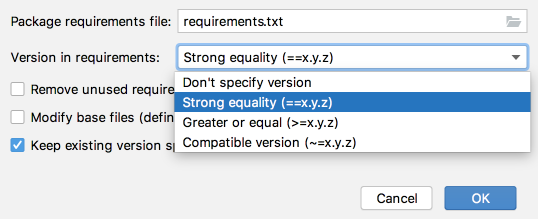
Specify the name of the requirements file within the dialog box. The universally accepted name is requirements.txt .
The Python Integrated tools are notified when a file with this name is introduced to the root project folder.
How to Use requirements.txt in Python Anaconda
One of the most well-known Python distribution platforms is the Anaconda Distribution, sometimes referred to as just Anaconda or Conda.
You will receive a basic Python environment without pip installed if you establish a new conda environment. If you have to build up your project using requirements.txt and pip, this might be an issue.
There are 2 ways to go about this.
Installing PIP within the Environment
Conda may easily be used to install pip if it is absent in that environment.
After installing PIP, we can install packages from requirements.txt
Creating an Environment using the requirements.txt file
When using conda to create an environment, you may do so by using the -file flag as follows:
The operation will identify and install the packages listed in the file in the environment.
FAQs on Make Requirements.txt Python
Just launch a terminal and go to the location wherever you need your requirements file to be. Then, you may use conda or venv to activate a virtual environment. All packages you have loaded in that environment will then be taken.
The file will contain all the dependencies required to run the program. Install all the required packages using the following command: