Содержание папки
Модуль стандартной библиотеки os (от «operation system») предоставляет множество полезных функций для произведения системных вызовов. Одна из базовых функций этого модуля — os.listdir .
С точки зрения операционной системы нет разницы между файлом, папкой или другим подобным объектом, типа ссылки. Поэтому os.listdir() возвращает список как файлов, так и папок. Обратите внимание, что порядок элементов возвращаемого списка не регламентируется, если вам нужно их отсортировать не забудьте сделать это:
Работа с путями к файлам и папкам
Модуль os содержит подмодуль os.path , который позволяет работать с путями файлов и папок. Импортировать этот модуль отдельно не нужно, достаточно выполнить import os .
Присоединение одной части пути к другой
Работа с путями к файлам и папкам как с простыми строками чревата множеством ошибок и может создать проблемы при переносе программы между различными операционными системами. Правильный путь объединить две части пути — это использование os.path.join :
Извлечение имени файла из пути
Функция os.path.split совершает обратное действие — отрезает имя файла или ниже лежащей папки от пути:
Извлечение расширения
Кроме того, может пригодиться функция os.path.splitext , котоая отрезает расширение файла:
Проверка типа файла
Кроме прочего, модуль os.path содержит функции для проверки существования файла и для определения его типа:
Манипуляции с файлами и папками
Производите все манипуляции с файлами с осторожностью, придерживайтесь правила «семь раз отмерь — один раз отрежь». Не забывайте программно производить все возможные проверки перед выполнением операций.
Создание файла
Нет ничего проще, чем создать пустой файл, достаточно открыть несуществующий файл с флагом ‘x’ :
Конечно, можно было бы использовать флаг ‘w’ , но тогда уже существующий файл был бы стёрт. С флагом ‘x’ open либо создаст новый файл, либо выбросит ошибку.
Создание папки
Для создания новой папки используйте os.mkdir(name) . Эта функция выбросит ошибку, если по указанному пути уже существует файл или папка. Если вам нужно создать сразу несколько вложенных папок, то смотрите функцию os.makedirs(name, exist_ok=False) .
Перемещение и переименование
Для удобной манипуляции с файлами и папками в стандартной библиотеки Python существует специальный модуль shutil . Функция shutil.move(source, destination) позволяет вам переместить любой файл или папку (даже непустую). Обратите внимание, что если destination — это уже существующая папка, то файл/папка будет перемещена внутрь неё, в остальных случаях файл/папка будут скопированы точно по нужному адресу. В случае успеха, функция вернёт новое местоположение файла. Если destination существует и не является папкой, то будет выброшена ошибка.
Как же переименовать файл? Несмотря на то, что os содержит специальную функцию для переименования, нужно понимать, что в рамках одной файловой системы перемещение и переименование — это одно и то же. Когда вы переименовываете файл, его содержимое не переписывается на носителе в другое место, просто файловая система теперь обозначает его положение другим путём.
Копирование
Скопировать файл можно с помощью функции shutil.copy(source, destination) . Правила расположения копии будут те же, что и при использовании shutil.move , за тем исключением, что если destination существует и не является файлом, то он будет заменён и ошибки это не вызовет.
Скопировать папку для операционной системы сложнее, ведь мы всегда хотим скопировать не только папку, но и её содержимое. Для копирования папок используйте shutil.copytree(source, destination) . Обратите внимание, что для этой функции destination всегда должно быть путём конечного расположения файлов и не может быть уже существующей папкой.
Удаление
Удалить файл можно с помощью функции os.remove , а пустую папку с помощью функции os.rmdir .
А вот для удаления папки с содержимым вновь понадобится shutil . Для удаления такой папки используйте shutil.rmtree .
Будьте осторожны, команды удаления стирают файл, а не перемещают его в корзину, вне зависимости от операционной системы! После такого удаления восстановить файл может быть сложно или вовсе невозможно.
Домашняя работа
- В текущей папке лежат файлы с расширениями .mp3 , .flac и .oga . Создайте папки mp3 , flac , oga и положите туда все файлы с соответствующими расширениями.
- В текущей папке лежит две других папки: vasya и mila , причём в этих папках могут лежать файлы с одинаковыми именами, например vasya/kursovaya.doc и mila/kursovaya.doc . Скопируйте все файлы из этих папок в текущую папку назвав их следующим образом: vasya_kursovaya.doc , mila_test.pdf и т.п.
- В текущей папке лежат файлы следующего вида: S01E01.mkv , S01E02.mkv , S02E01.mkv и т.п., то есть все файлы начинаются с S01 или S02 . Создайте папки S01 и S02 и переложите туда соответствующие файлы.
- В текущей папке лежат файлы вида 2019-03-08.jpg , 2019-04-01.jpg и т.п. Отсортируйте файлы по имени и переименуйте их в 1.jpg , 2.jpg , …, 10.jpg , и т.д.
- В текущей папке лежат две другие папки: video и sub . Создайте новую папку watch_me и переложите туда содержимое указанных папок (сами папки класть не надо).
- В текущей папке лежат файлы типа Nina_Stoletova.jpg , Misha_Perelman.jpg и т.п. Переименуйте их переставив имя и фамилию местами.
- В текущей папке лежит файл list.tsv , в котором с новой строки написаны имена некоторых других файлов этой папки. Создайте папку list и переложите в неё данные файлы.
Для тестирования вашей программы положите в репозиторий файлы и папки с соответствующими именами. Файлы должны быть пустыми, если не указано обратного.
io — Core tools for working with streams
The io module provides Python’s main facilities for dealing with various types of I/O. There are three main types of I/O: text I/O, binary I/O and raw I/O. These are generic categories, and various backing stores can be used for each of them. A concrete object belonging to any of these categories is called a file object . Other common terms are stream and file-like object.
Independent of its category, each concrete stream object will also have various capabilities: it can be read-only, write-only, or read-write. It can also allow arbitrary random access (seeking forwards or backwards to any location), or only sequential access (for example in the case of a socket or pipe).
All streams are careful about the type of data you give to them. For example giving a str object to the write() method of a binary stream will raise a TypeError . So will giving a bytes object to the write() method of a text stream.
Changed in version 3.3: Operations that used to raise IOError now raise OSError , since IOError is now an alias of OSError .
Text I/O
Text I/O expects and produces str objects. This means that whenever the backing store is natively made of bytes (such as in the case of a file), encoding and decoding of data is made transparently as well as optional translation of platform-specific newline characters.
The easiest way to create a text stream is with open() , optionally specifying an encoding:
In-memory text streams are also available as StringIO objects:
The text stream API is described in detail in the documentation of TextIOBase .
Binary I/O
Binary I/O (also called buffered I/O) expects bytes-like objects and produces bytes objects. No encoding, decoding, or newline translation is performed. This category of streams can be used for all kinds of non-text data, and also when manual control over the handling of text data is desired.
The easiest way to create a binary stream is with open() with ‘b’ in the mode string:
In-memory binary streams are also available as BytesIO objects:
The binary stream API is described in detail in the docs of BufferedIOBase .
Other library modules may provide additional ways to create text or binary streams. See socket.socket.makefile() for example.
Raw I/O
Raw I/O (also called unbuffered I/O) is generally used as a low-level building-block for binary and text streams; it is rarely useful to directly manipulate a raw stream from user code. Nevertheless, you can create a raw stream by opening a file in binary mode with buffering disabled:
The raw stream API is described in detail in the docs of RawIOBase .
Text Encoding
The default encoding of TextIOWrapper and open() is locale-specific ( locale.getencoding() ).
However, many developers forget to specify the encoding when opening text files encoded in UTF-8 (e.g. JSON, TOML, Markdown, etc…) since most Unix platforms use UTF-8 locale by default. This causes bugs because the locale encoding is not UTF-8 for most Windows users. For example:
Accordingly, it is highly recommended that you specify the encoding explicitly when opening text files. If you want to use UTF-8, pass encoding="utf-8" . To use the current locale encoding, encoding="locale" is supported since Python 3.10.
Python UTF-8 Mode can be used to change the default encoding to UTF-8 from locale-specific encoding.
Python 3.15 will make Python UTF-8 Mode default.
Opt-in EncodingWarning
New in version 3.10: See PEP 597 for more details.
To find where the default locale encoding is used, you can enable the -X warn_default_encoding command line option or set the PYTHONWARNDEFAULTENCODING environment variable, which will emit an EncodingWarning when the default encoding is used.
If you are providing an API that uses open() or TextIOWrapper and passes encoding=None as a parameter, you can use text_encoding() so that callers of the API will emit an EncodingWarning if they don’t pass an encoding . However, please consider using UTF-8 by default (i.e. encoding="utf-8" ) for new APIs.
High-level Module Interface
An int containing the default buffer size used by the module’s buffered I/O classes. open() uses the file’s blksize (as obtained by os.stat() ) if possible.
io. open ( file , mode = ‘r’ , buffering = — 1 , encoding = None , errors = None , newline = None , closefd = True , opener = None ) 
This is an alias for the builtin open() function.
This function raises an auditing event open with arguments path , mode and flags . The mode and flags arguments may have been modified or inferred from the original call.
io. open_code ( path ) 
Opens the provided file with mode ‘rb’ . This function should be used when the intent is to treat the contents as executable code.
path should be a str and an absolute path.
The behavior of this function may be overridden by an earlier call to the PyFile_SetOpenCodeHook() . However, assuming that path is a str and an absolute path, open_code(path) should always behave the same as open(path, ‘rb’) . Overriding the behavior is intended for additional validation or preprocessing of the file.
New in version 3.8.
This is a helper function for callables that use open() or TextIOWrapper and have an encoding=None parameter.
This function returns encoding if it is not None . Otherwise, it returns "locale" or "utf-8" depending on UTF-8 Mode .
This function emits an EncodingWarning if sys.flags.warn_default_encoding is true and encoding is None . stacklevel specifies where the warning is emitted. For example:
In this example, an EncodingWarning is emitted for the caller of read_text() .
See Text Encoding for more information.
New in version 3.10.
Changed in version 3.11: text_encoding() returns “utf-8” when UTF-8 mode is enabled and encoding is None .
This is a compatibility alias for the builtin BlockingIOError exception.
exception io. UnsupportedOperation 
An exception inheriting OSError and ValueError that is raised when an unsupported operation is called on a stream.
contains the standard IO streams: sys.stdin , sys.stdout , and sys.stderr .
Class hierarchy
The implementation of I/O streams is organized as a hierarchy of classes. First abstract base classes (ABCs), which are used to specify the various categories of streams, then concrete classes providing the standard stream implementations.
Note
The abstract base classes also provide default implementations of some methods in order to help implementation of concrete stream classes. For example, BufferedIOBase provides unoptimized implementations of readinto() and readline() .
At the top of the I/O hierarchy is the abstract base class IOBase . It defines the basic interface to a stream. Note, however, that there is no separation between reading and writing to streams; implementations are allowed to raise UnsupportedOperation if they do not support a given operation.
The RawIOBase ABC extends IOBase . It deals with the reading and writing of bytes to a stream. FileIO subclasses RawIOBase to provide an interface to files in the machine’s file system.
The BufferedIOBase ABC extends IOBase . It deals with buffering on a raw binary stream ( RawIOBase ). Its subclasses, BufferedWriter , BufferedReader , and BufferedRWPair buffer raw binary streams that are writable, readable, and both readable and writable, respectively. BufferedRandom provides a buffered interface to seekable streams. Another BufferedIOBase subclass, BytesIO , is a stream of in-memory bytes.
The TextIOBase ABC extends IOBase . It deals with streams whose bytes represent text, and handles encoding and decoding to and from strings. TextIOWrapper , which extends TextIOBase , is a buffered text interface to a buffered raw stream ( BufferedIOBase ). Finally, StringIO is an in-memory stream for text.
Argument names are not part of the specification, and only the arguments of open() are intended to be used as keyword arguments.
The following table summarizes the ABCs provided by the io module:
Mixin Methods and Properties
fileno , seek , and truncate
close , closed , __enter__ , __exit__ , flush , isatty , __iter__ , __next__ , readable , readline , readlines , seekable , tell , writable , and writelines
readinto and write
Inherited IOBase methods, read , and readall
detach , read , read1 , and write
Inherited IOBase methods, readinto , and readinto1
detach , read , readline , and write
Inherited IOBase methods, encoding , errors , and newlines
I/O Base Classes
The abstract base class for all I/O classes.
This class provides empty abstract implementations for many methods that derived classes can override selectively; the default implementations represent a file that cannot be read, written or seeked.
Even though IOBase does not declare read() or write() because their signatures will vary, implementations and clients should consider those methods part of the interface. Also, implementations may raise a ValueError (or UnsupportedOperation ) when operations they do not support are called.
The basic type used for binary data read from or written to a file is bytes . Other bytes-like objects are accepted as method arguments too. Text I/O classes work with str data.
Note that calling any method (even inquiries) on a closed stream is undefined. Implementations may raise ValueError in this case.
IOBase (and its subclasses) supports the iterator protocol, meaning that an IOBase object can be iterated over yielding the lines in a stream. Lines are defined slightly differently depending on whether the stream is a binary stream (yielding bytes), or a text stream (yielding character strings). See readline() below.
IOBase is also a context manager and therefore supports the with statement. In this example, file is closed after the with statement’s suite is finished—even if an exception occurs:
IOBase provides these data attributes and methods:
Flush and close this stream. This method has no effect if the file is already closed. Once the file is closed, any operation on the file (e.g. reading or writing) will raise a ValueError .
As a convenience, it is allowed to call this method more than once; only the first call, however, will have an effect.
True if the stream is closed.
Return the underlying file descriptor (an integer) of the stream if it exists. An OSError is raised if the IO object does not use a file descriptor.
Flush the write buffers of the stream if applicable. This does nothing for read-only and non-blocking streams.
Return True if the stream is interactive (i.e., connected to a terminal/tty device).
Return True if the stream can be read from. If False , read() will raise OSError .
Read and return one line from the stream. If size is specified, at most size bytes will be read.
The line terminator is always b’\n’ for binary files; for text files, the newline argument to open() can be used to select the line terminator(s) recognized.
Read and return a list of lines from the stream. hint can be specified to control the number of lines read: no more lines will be read if the total size (in bytes/characters) of all lines so far exceeds hint.
hint values of 0 or less, as well as None , are treated as no hint.
Note that it’s already possible to iterate on file objects using for line in file: . without calling file.readlines() .
Change the stream position to the given byte offset. offset is interpreted relative to the position indicated by whence. The default value for whence is SEEK_SET . Values for whence are:
SEEK_SET or 0 – start of the stream (the default); offset should be zero or positive
SEEK_CUR or 1 – current stream position; offset may be negative
SEEK_END or 2 – end of the stream; offset is usually negative
Return the new absolute position.
New in version 3.1: The SEEK_* constants.
New in version 3.3: Some operating systems could support additional values, like os.SEEK_HOLE or os.SEEK_DATA . The valid values for a file could depend on it being open in text or binary mode.
Return True if the stream supports random access. If False , seek() , tell() and truncate() will raise OSError .
Return the current stream position.
Resize the stream to the given size in bytes (or the current position if size is not specified). The current stream position isn’t changed. This resizing can extend or reduce the current file size. In case of extension, the contents of the new file area depend on the platform (on most systems, additional bytes are zero-filled). The new file size is returned.
Changed in version 3.5: Windows will now zero-fill files when extending.
Return True if the stream supports writing. If False , write() and truncate() will raise OSError .
Write a list of lines to the stream. Line separators are not added, so it is usual for each of the lines provided to have a line separator at the end.
Prepare for object destruction. IOBase provides a default implementation of this method that calls the instance’s close() method.
class io. RawIOBase 
Base class for raw binary streams. It inherits IOBase .
Raw binary streams typically provide low-level access to an underlying OS device or API, and do not try to encapsulate it in high-level primitives (this functionality is done at a higher-level in buffered binary streams and text streams, described later in this page).
RawIOBase provides these methods in addition to those from IOBase :
Read up to size bytes from the object and return them. As a convenience, if size is unspecified or -1, all bytes until EOF are returned. Otherwise, only one system call is ever made. Fewer than size bytes may be returned if the operating system call returns fewer than size bytes.
If 0 bytes are returned, and size was not 0, this indicates end of file. If the object is in non-blocking mode and no bytes are available, None is returned.
The default implementation defers to readall() and readinto() .
Read and return all the bytes from the stream until EOF, using multiple calls to the stream if necessary.
Read bytes into a pre-allocated, writable bytes-like object b, and return the number of bytes read. For example, b might be a bytearray . If the object is in non-blocking mode and no bytes are available, None is returned.
Write the given bytes-like object , b, to the underlying raw stream, and return the number of bytes written. This can be less than the length of b in bytes, depending on specifics of the underlying raw stream, and especially if it is in non-blocking mode. None is returned if the raw stream is set not to block and no single byte could be readily written to it. The caller may release or mutate b after this method returns, so the implementation should only access b during the method call.
class io. BufferedIOBase 
Base class for binary streams that support some kind of buffering. It inherits IOBase .
The main difference with RawIOBase is that methods read() , readinto() and write() will try (respectively) to read as much input as requested or to consume all given output, at the expense of making perhaps more than one system call.
In addition, those methods can raise BlockingIOError if the underlying raw stream is in non-blocking mode and cannot take or give enough data; unlike their RawIOBase counterparts, they will never return None .
Besides, the read() method does not have a default implementation that defers to readinto() .
A typical BufferedIOBase implementation should not inherit from a RawIOBase implementation, but wrap one, like BufferedWriter and BufferedReader do.
BufferedIOBase provides or overrides these data attributes and methods in addition to those from IOBase :
The underlying raw stream (a RawIOBase instance) that BufferedIOBase deals with. This is not part of the BufferedIOBase API and may not exist on some implementations.
Separate the underlying raw stream from the buffer and return it.
After the raw stream has been detached, the buffer is in an unusable state.
Some buffers, like BytesIO , do not have the concept of a single raw stream to return from this method. They raise UnsupportedOperation .
New in version 3.1.
Read and return up to size bytes. If the argument is omitted, None , or negative, data is read and returned until EOF is reached. An empty bytes object is returned if the stream is already at EOF.
If the argument is positive, and the underlying raw stream is not interactive, multiple raw reads may be issued to satisfy the byte count (unless EOF is reached first). But for interactive raw streams, at most one raw read will be issued, and a short result does not imply that EOF is imminent.
A BlockingIOError is raised if the underlying raw stream is in non blocking-mode, and has no data available at the moment.
Read and return up to size bytes, with at most one call to the underlying raw stream’s read() (or readinto() ) method. This can be useful if you are implementing your own buffering on top of a BufferedIOBase object.
If size is -1 (the default), an arbitrary number of bytes are returned (more than zero unless EOF is reached).
Read bytes into a pre-allocated, writable bytes-like object b and return the number of bytes read. For example, b might be a bytearray .
Like read() , multiple reads may be issued to the underlying raw stream, unless the latter is interactive.
A BlockingIOError is raised if the underlying raw stream is in non blocking-mode, and has no data available at the moment.
Read bytes into a pre-allocated, writable bytes-like object b, using at most one call to the underlying raw stream’s read() (or readinto() ) method. Return the number of bytes read.
A BlockingIOError is raised if the underlying raw stream is in non blocking-mode, and has no data available at the moment.
New in version 3.5.
Write the given bytes-like object , b, and return the number of bytes written (always equal to the length of b in bytes, since if the write fails an OSError will be raised). Depending on the actual implementation, these bytes may be readily written to the underlying stream, or held in a buffer for performance and latency reasons.
When in non-blocking mode, a BlockingIOError is raised if the data needed to be written to the raw stream but it couldn’t accept all the data without blocking.
The caller may release or mutate b after this method returns, so the implementation should only access b during the method call.
Raw File I/O
A raw binary stream representing an OS-level file containing bytes data. It inherits RawIOBase .
The name can be one of two things:
a character string or bytes object representing the path to the file which will be opened. In this case closefd must be True (the default) otherwise an error will be raised.
an integer representing the number of an existing OS-level file descriptor to which the resulting FileIO object will give access. When the FileIO object is closed this fd will be closed as well, unless closefd is set to False .
The mode can be ‘r’ , ‘w’ , ‘x’ or ‘a’ for reading (default), writing, exclusive creation or appending. The file will be created if it doesn’t exist when opened for writing or appending; it will be truncated when opened for writing. FileExistsError will be raised if it already exists when opened for creating. Opening a file for creating implies writing, so this mode behaves in a similar way to ‘w’ . Add a ‘+’ to the mode to allow simultaneous reading and writing.
The read() (when called with a positive argument), readinto() and write() methods on this class will only make one system call.
A custom opener can be used by passing a callable as opener. The underlying file descriptor for the file object is then obtained by calling opener with (name, flags). opener must return an open file descriptor (passing os.open as opener results in functionality similar to passing None ).
The newly created file is non-inheritable .
See the open() built-in function for examples on using the opener parameter.
Changed in version 3.3: The opener parameter was added. The ‘x’ mode was added.
Changed in version 3.4: The file is now non-inheritable.
FileIO provides these data attributes in addition to those from RawIOBase and IOBase :
The mode as given in the constructor.
The file name. This is the file descriptor of the file when no name is given in the constructor.
Buffered Streams
Buffered I/O streams provide a higher-level interface to an I/O device than raw I/O does.
class io. BytesIO ( initial_bytes = b» ) 
A binary stream using an in-memory bytes buffer. It inherits BufferedIOBase . The buffer is discarded when the close() method is called.
The optional argument initial_bytes is a bytes-like object that contains initial data.
BytesIO provides or overrides these methods in addition to those from BufferedIOBase and IOBase :
Return a readable and writable view over the contents of the buffer without copying them. Also, mutating the view will transparently update the contents of the buffer:
As long as the view exists, the BytesIO object cannot be resized or closed.
New in version 3.2.
Return bytes containing the entire contents of the buffer.
In BytesIO , this is the same as read() .
Changed in version 3.7: The size argument is now optional.
In BytesIO , this is the same as readinto() .
New in version 3.5.
A buffered binary stream providing higher-level access to a readable, non seekable RawIOBase raw binary stream. It inherits BufferedIOBase .
When reading data from this object, a larger amount of data may be requested from the underlying raw stream, and kept in an internal buffer. The buffered data can then be returned directly on subsequent reads.
The constructor creates a BufferedReader for the given readable raw stream and buffer_size. If buffer_size is omitted, DEFAULT_BUFFER_SIZE is used.
BufferedReader provides or overrides these methods in addition to those from BufferedIOBase and IOBase :
Return bytes from the stream without advancing the position. At most one single read on the raw stream is done to satisfy the call. The number of bytes returned may be less or more than requested.
Read and return size bytes, or if size is not given or negative, until EOF or if the read call would block in non-blocking mode.
Read and return up to size bytes with only one call on the raw stream. If at least one byte is buffered, only buffered bytes are returned. Otherwise, one raw stream read call is made.
Changed in version 3.7: The size argument is now optional.
A buffered binary stream providing higher-level access to a writeable, non seekable RawIOBase raw binary stream. It inherits BufferedIOBase .
When writing to this object, data is normally placed into an internal buffer. The buffer will be written out to the underlying RawIOBase object under various conditions, including:
when the buffer gets too small for all pending data;
when flush() is called;
when a seek() is requested (for BufferedRandom objects);
when the BufferedWriter object is closed or destroyed.
The constructor creates a BufferedWriter for the given writeable raw stream. If the buffer_size is not given, it defaults to DEFAULT_BUFFER_SIZE .
BufferedWriter provides or overrides these methods in addition to those from BufferedIOBase and IOBase :
Force bytes held in the buffer into the raw stream. A BlockingIOError should be raised if the raw stream blocks.
Write the bytes-like object , b, and return the number of bytes written. When in non-blocking mode, a BlockingIOError is raised if the buffer needs to be written out but the raw stream blocks.
class io. BufferedRandom ( raw , buffer_size = DEFAULT_BUFFER_SIZE ) 
A buffered binary stream providing higher-level access to a seekable RawIOBase raw binary stream. It inherits BufferedReader and BufferedWriter .
The constructor creates a reader and writer for a seekable raw stream, given in the first argument. If the buffer_size is omitted it defaults to DEFAULT_BUFFER_SIZE .
BufferedRandom is capable of anything BufferedReader or BufferedWriter can do. In addition, seek() and tell() are guaranteed to be implemented.
class io. BufferedRWPair ( reader , writer , buffer_size = DEFAULT_BUFFER_SIZE , / ) 
A buffered binary stream providing higher-level access to two non seekable RawIOBase raw binary streams—one readable, the other writeable. It inherits BufferedIOBase .
reader and writer are RawIOBase objects that are readable and writeable respectively. If the buffer_size is omitted it defaults to DEFAULT_BUFFER_SIZE .
BufferedRWPair does not attempt to synchronize accesses to its underlying raw streams. You should not pass it the same object as reader and writer; use BufferedRandom instead.
Text I/O
Base class for text streams. This class provides a character and line based interface to stream I/O. It inherits IOBase .
TextIOBase provides or overrides these data attributes and methods in addition to those from IOBase :
The name of the encoding used to decode the stream’s bytes into strings, and to encode strings into bytes.
The error setting of the decoder or encoder.
A string, a tuple of strings, or None , indicating the newlines translated so far. Depending on the implementation and the initial constructor flags, this may not be available.
The underlying binary buffer (a BufferedIOBase instance) that TextIOBase deals with. This is not part of the TextIOBase API and may not exist in some implementations.
Separate the underlying binary buffer from the TextIOBase and return it.
After the underlying buffer has been detached, the TextIOBase is in an unusable state.
Some TextIOBase implementations, like StringIO , may not have the concept of an underlying buffer and calling this method will raise UnsupportedOperation .
New in version 3.1.
Read and return at most size characters from the stream as a single str . If size is negative or None , reads until EOF.
Read until newline or EOF and return a single str . If the stream is already at EOF, an empty string is returned.
If size is specified, at most size characters will be read.
Change the stream position to the given offset. Behaviour depends on the whence parameter. The default value for whence is SEEK_SET .
SEEK_SET or 0 : seek from the start of the stream (the default); offset must either be a number returned by TextIOBase.tell() , or zero. Any other offset value produces undefined behaviour.
SEEK_CUR or 1 : “seek” to the current position; offset must be zero, which is a no-operation (all other values are unsupported).
SEEK_END or 2 : seek to the end of the stream; offset must be zero (all other values are unsupported).
Return the new absolute position as an opaque number.
New in version 3.1: The SEEK_* constants.
Return the current stream position as an opaque number. The number does not usually represent a number of bytes in the underlying binary storage.
Write the string s to the stream and return the number of characters written.
class io. TextIOWrapper ( buffer , encoding = None , errors = None , newline = None , line_buffering = False , write_through = False ) 
A buffered text stream providing higher-level access to a BufferedIOBase buffered binary stream. It inherits TextIOBase .
encoding gives the name of the encoding that the stream will be decoded or encoded with. It defaults to locale.getencoding() . encoding="locale" can be used to specify the current locale’s encoding explicitly. See Text Encoding for more information.
errors is an optional string that specifies how encoding and decoding errors are to be handled. Pass ‘strict’ to raise a ValueError exception if there is an encoding error (the default of None has the same effect), or pass ‘ignore’ to ignore errors. (Note that ignoring encoding errors can lead to data loss.) ‘replace’ causes a replacement marker (such as ‘?’ ) to be inserted where there is malformed data. ‘backslashreplace’ causes malformed data to be replaced by a backslashed escape sequence. When writing, ‘xmlcharrefreplace’ (replace with the appropriate XML character reference) or ‘namereplace’ (replace with \N <. >escape sequences) can be used. Any other error handling name that has been registered with codecs.register_error() is also valid.
newline controls how line endings are handled. It can be None , » , ‘\n’ , ‘\r’ , and ‘\r\n’ . It works as follows:
When reading input from the stream, if newline is None , universal newlines mode is enabled. Lines in the input can end in ‘\n’ , ‘\r’ , or ‘\r\n’ , and these are translated into ‘\n’ before being returned to the caller. If newline is » , universal newlines mode is enabled, but line endings are returned to the caller untranslated. If newline has any of the other legal values, input lines are only terminated by the given string, and the line ending is returned to the caller untranslated.
When writing output to the stream, if newline is None , any ‘\n’ characters written are translated to the system default line separator, os.linesep . If newline is » or ‘\n’ , no translation takes place. If newline is any of the other legal values, any ‘\n’ characters written are translated to the given string.
If line_buffering is True , flush() is implied when a call to write contains a newline character or a carriage return.
If write_through is True , calls to write() are guaranteed not to be buffered: any data written on the TextIOWrapper object is immediately handled to its underlying binary buffer.
Changed in version 3.3: The write_through argument has been added.
Changed in version 3.3: The default encoding is now locale.getpreferredencoding(False) instead of locale.getpreferredencoding() . Don’t change temporary the locale encoding using locale.setlocale() , use the current locale encoding instead of the user preferred encoding.
Changed in version 3.10: The encoding argument now supports the "locale" dummy encoding name.
TextIOWrapper provides these data attributes and methods in addition to those from TextIOBase and IOBase :
Whether line buffering is enabled.
Whether writes are passed immediately to the underlying binary buffer.
New in version 3.7.
Reconfigure this text stream using new settings for encoding, errors, newline, line_buffering and write_through.
Parameters not specified keep current settings, except errors=’strict’ is used when encoding is specified but errors is not specified.
It is not possible to change the encoding or newline if some data has already been read from the stream. On the other hand, changing encoding after write is possible.
This method does an implicit stream flush before setting the new parameters.
New in version 3.7.
Changed in version 3.11: The method supports encoding="locale" option.
A text stream using an in-memory text buffer. It inherits TextIOBase .
The text buffer is discarded when the close() method is called.
The initial value of the buffer can be set by providing initial_value. If newline translation is enabled, newlines will be encoded as if by write() . The stream is positioned at the start of the buffer which emulates opening an existing file in a w+ mode, making it ready for an immediate write from the beginning or for a write that would overwrite the initial value. To emulate opening a file in an a+ mode ready for appending, use f.seek(0, io.SEEK_END) to reposition the stream at the end of the buffer.
The newline argument works like that of TextIOWrapper , except that when writing output to the stream, if newline is None , newlines are written as \n on all platforms.
StringIO provides this method in addition to those from TextIOBase and IOBase :
Return a str containing the entire contents of the buffer. Newlines are decoded as if by read() , although the stream position is not changed.
A helper codec that decodes newlines for universal newlines mode. It inherits codecs.IncrementalDecoder .
Performance
This section discusses the performance of the provided concrete I/O implementations.
Binary I/O
By reading and writing only large chunks of data even when the user asks for a single byte, buffered I/O hides any inefficiency in calling and executing the operating system’s unbuffered I/O routines. The gain depends on the OS and the kind of I/O which is performed. For example, on some modern OSes such as Linux, unbuffered disk I/O can be as fast as buffered I/O. The bottom line, however, is that buffered I/O offers predictable performance regardless of the platform and the backing device. Therefore, it is almost always preferable to use buffered I/O rather than unbuffered I/O for binary data.
Text I/O
Text I/O over a binary storage (such as a file) is significantly slower than binary I/O over the same storage, because it requires conversions between unicode and binary data using a character codec. This can become noticeable handling huge amounts of text data like large log files. Also, TextIOWrapper.tell() and TextIOWrapper.seek() are both quite slow due to the reconstruction algorithm used.
StringIO , however, is a native in-memory unicode container and will exhibit similar speed to BytesIO .
Multi-threading
FileIO objects are thread-safe to the extent that the operating system calls (such as read(2) under Unix) they wrap are thread-safe too.
Binary buffered objects (instances of BufferedReader , BufferedWriter , BufferedRandom and BufferedRWPair ) protect their internal structures using a lock; it is therefore safe to call them from multiple threads at once.
TextIOWrapper objects are not thread-safe.
Reentrancy
Binary buffered objects (instances of BufferedReader , BufferedWriter , BufferedRandom and BufferedRWPair ) are not reentrant. While reentrant calls will not happen in normal situations, they can arise from doing I/O in a signal handler. If a thread tries to re-enter a buffered object which it is already accessing, a RuntimeError is raised. Note this doesn’t prohibit a different thread from entering the buffered object.
The above implicitly extends to text files, since the open() function will wrap a buffered object inside a TextIOWrapper . This includes standard streams and therefore affects the built-in print() function as well.
File Handling in Python – How to Create, Read, and Write to a File

David Fagbuyiro
In this tutorial, you will learn how to open a file, write to the file, and close it. You will also learn how to read from the file using Python.
By the end of this tutorial, you should know the basics of how to use files in Python.
File Handling in Python
File handling is an important activity in every web app. The types of activities that you can perform on the opened file are controlled by Access Modes. These describe how the file will be used after it has been opened.
These modes also specify where the file handle should be located within the file. Similar to a pointer, a file handle indicates where data should be read or put into the file.
In Python, there are six methods or access modes, which are:
- Read Only (‘r’): This mode opens the text files for reading only. The start of the file is where the handle is located. It raises the I/O error if the file does not exist. This is the default mode for opening files as well.
- Read and Write (‘r+’): This method opens the file for both reading and writing. The start of the file is where the handle is located. If the file does not exist, an I/O error gets raised.
- Write Only (‘w’): This mode opens the file for writing only. The data in existing files are modified and overwritten. The start of the file is where the handle is located. If the file does not already exist in the folder, a new one gets created.
- Write and Read (‘w+’): This mode opens the file for both reading and writing. The text is overwritten and deleted from an existing file. The start of the file is where the handle is located.
- Append Only (‘a’): This mode allows the file to be opened for writing. If the file doesn’t yet exist, a new one gets created. The handle is set at the end of the file. The newly written data will be added at the end, following the previously written data.
- Append and Read (‘a+’): Using this method, you can read and write in the file. If the file doesn’t already exist, one gets created. The handle is set at the end of the file. The newly written text will be added at the end, following the previously written data.
Below is the code required to create, write to, and read text files using the Python file handling methods or access modes.
How to Create Files in Python
In Python, you use the open() function with one of the following options – «x» or «w» – to create a new file:
- «x» – Create: this command will create a new file if and only if there is no file already in existence with that name or else it will return an error.
Example of creating a file in Python using the «x» command:
We’ve now created a new empty text file! But if you retry the code above – for example, if you try to create a new file with the same name as you used above (if you want to reuse the filename above) you will get an error notifying you that the file already exists. It’ll look like the image below:
- «w» – Write: this command will create a new text file whether or not there is a file in the memory with the new specified name. It does not return an error if it finds an existing file with the same name – instead it will overwrite the existing file.
Example of how to create a file with the «w» command:
With the code above, whether the file exists or the file doesn’t exist in the memory, you can still go ahead and use that code. Just keep in mind that it will overwrite the file if it finds an existing file with the same name.
How to Write to a File in Python
There are two methods of writing to a file in Python, which are:
The write() method:
This function inserts the string into the text file on a single line.
Based on the file we have created above, the below line of code will insert the string into the created text file, which is «myfile.txt.”
The writelines() method:
This function inserts multiple strings at the same time. A list of string elements is created, and each string is then added to the text file.
Using the previously created file above, the below line of code will insert the string into the created text file, which is «myfile.txt.”
How to Read From a Text File in Python
There are three methods of reading data from a text file in Python. They are:
The read() method:
This function returns the bytes read as a string. If no n is specified, it then reads the entire file.
The readline() method:
This function reads a line from a file and returns it as a string. It reads at most n bytes for the specified n. But even if n is greater than the length of the line, it does not read more than one line.
The readlines() method:
This function reads all of the lines and returns them as string elements in a list, one for each line.
You can read the first two lines by calling readline() twice, reading the first two lines of the file:
How to Close a Text File in Python
It is good practice to always close the file when you are done with it.
Example of closing a text file:
This function closes the text file when you are done modifying it:
The close() function at the end of the code tells Python that well, I am done with this section of either creating or reading – it is just like saying End.
Example:
The program below shows more examples of ways to read and write data in a text file. Each line of code has comments to help you understand what’s going on:
This is the output of the above code when run in the shell. I assigned «This is Lagos», «This is Python», and «This is Fcc» to «L» and then asked it to print using the »file.read» function.
The code above shows that the «readline()» function is returning the letter based on the number specified to it, while the «readlines()» function is returning every string assigned to «L» including the \n. That is, the «readlines()» function will print out all data in the file.
Conclusion
Hopefully, after going through this tutorial, you should understand what file handling is in Python. We also learned the modes/methods required to create, write, read, and close() a text file using some basic examples from Python.
Create File in Python
In this tutorial, you’ll learn how to create a file in Python.
Python is widely used in data analytics and comes with some inbuilt functions to work with files. We can create a file and do different operations, such as write a file and read a file using Python.
After reading this tutorial, you’ll learn: –
- Create a file in the current directory or a specified directory
- Create a file if not exists
- Create a file with a date and time as its name
- Create a file with permissions
Table of contents
Create A Empty Text File
We don’t have to import any module to create a new file. We can create a file using the built-in function open() .
Pass the file name and access mode to the open() function to create a file. Access mode specifies the purpose of opening a file.
Below is the list of access modes for creating an a file.
| File Mode | Meaning |
|---|---|
| w | Create a new file for writing. If a file already exists, it truncates the file first. Use to create and write content into a new file. |
| x | Open a file only for exclusive creation. If the file already exists, this operation fails. |
| a | Open a file in the append mode and add new content at the end of the file. |
| b | Create a binary file |
| t | Create and open a file in a text mode |
File access mode
Example: Create a new empty text file named ‘sales.txt’
Use access mode w if you want to create and write content into a file.
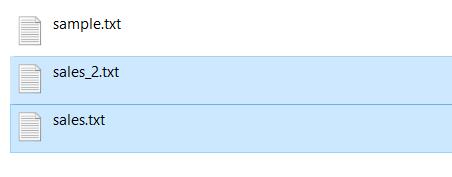
As you can see in the image two new files gets created in the account folder.
created files
Note:
- The file is created in the same directory where our program/script is running.
- If you have not specified any specific path(directory location), the file is created in the working directory. It is known as creating a file using the relative path. A relative path contains the current directory and then the file name.
You can verify the result using the following four approaches
- If the script executed without an error or exception
- By checking the working directory manually to look for a new file
- Use the os.listdir(directory_path) function to list all files from a folder before and after creating a file
- Use the os.path.isfile(file_path) function to verify if a newly created file exists in a directory.
Let’s verify our operation result.
Output
Create File In A Specific Directory
To create a file inside a specific directory, we need to open a file using the absolute path. An absolute path contains the entire path to the file or directory that we need to use.
It includes the complete directory list required to locate the file. For example, /user/Pynative/data/sales.txt is an absolute path to discover the sales.txt . All of the information needed to find the file is contained in the path string.
Let’s see the example to create a file for writing using the absolute path.
Note: Using the with statement a file is closed automatically it ensures that all the resources that are tied up with the file are released.
Let’s verify result using the absolute path.
Also, you can join directory path and file name to create file at the specified location.
If you have a directory path and file name in two variables, use the os.path.join() function to construct a full path. This function accepts the directory path and file name as arguments and constructs an absolute path to create a file.
Example:
Create a File If Not Exists
Sometimes it is essential not to create a new file if a file with the same name already exists in a given path. By default, when you open a file in write mode, it overwrites it if it exists. Else, create the new one.
We can create a file only if it is not present using the following two ways:
- Use os.path.exists(«file_path») function to check if a file exists.
- Use the access mode x in the open() function and exception handling.
Example 1: create file if not exists.
Example 2: Use file access mode x
The access mode x open a file for exclusive creation. If the file already exists, this operation fails with FileExistsError . Use try-except block to handle this error.
Create File with a DateTime
Let’s see how to create a text file with the current date as its name. Use the datetime module to get the current date and time and assign it to the file name to create a file with the date and time in its name.
- Python provides a datetime module that has several classes to access and manipulate the date and timestamp value.
- First, get the current datetime value
- Next, we need to format datetime into a string to use it as a file name.
- At last, pass it to the open() function to create a file
Example
Output:
Create a file with Permission
Let’s see how to create a file with permissions other users can write.
- To create a file with appropriate permissions, use os.open() to create the file descriptor and set the permission.
- Next, open the descriptor using the built-in function open()
Did you find this page helpful? Let others know about it. Sharing helps me continue to create free Python resources.
About Vishal
Founder of PYnative.com I am a Python developer and I love to write articles to help developers. Follow me on Twitter. All the best for your future Python endeavors!
Related Tutorial Topics:
Python Exercises and Quizzes
Free coding exercises and quizzes cover Python basics, data structure, data analytics, and more.