Python String to a Dict
Strings are used to send/communicate data over the network, but when this string is received by a program, it has to be converted into a data type that supports faster manipulations. In Python, there are dictionaries that allow the user to store data in the form of pairs or key-pair values. These are very similar to JSON, and in this post, you are going to learn how to convert a Python String into a dictionary.
The content of this guide is as follows:
Let’s start with the first method right away.
Method 1: Using the json.loads() Method to Convert String Into Dict
The loads() method is used to “load” a JSON string and convert it into a JSON, or in Python, a Dictionary. However, for this method to work, the string has to be in the specific format in which each “key” is encapsulated by quotation marks, separated by a colon from the “value”. And every pair is separated by a comma.
To demonstrate the working of the loads() method for string-to-dictionary conversion, use the following code snippet:
resultVar = json.loads ( stringVar )
print ( "Initial String: " ,stringVar )
print ( "After Conversion: " ,resultVar )
print ( "Type After Conversion: " , type ( resultVar ) )
In this code snippet:
- The “json” module is imported so that the user can utilize the loads() method.
- After that, the string “stringVar” is initialized
- The loads() method is applied on the stringVar and the result is stored in the “resultVar” variable
- Lastly, the original string, the resultVar, and the type of the resultVar are printed onto the terminal.
When this code is executed, it produces the following outcome on the terminal:
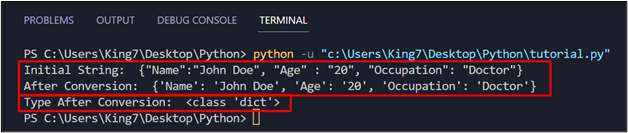
In this output, you can easily notice that the string has been successfully converted to a dict data type in Python.
Method 2: Using the ast.literal_eval() Method to Convert String Into Dict
The literal_eval() method from the “ast” package can also be used to do exactly the same job as the loads() method from the “json” package. To use this method, take a look at the following code:
resultVar = ast.literal_eval ( stringVar )
print ( "Initial String: " ,stringVar )
print ( "After Conversion: " ,resultVar )
print ( "Type After Conversion: " , type ( resultVar ) )
When this code is executed, it will produce the following result on the terminal:
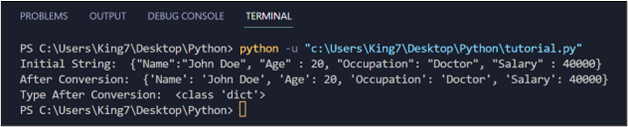
The output verifies that the string has been successfully converted into a Python Dict.
Method 3: Using the eval() Method to Convert String Into Dict
Another very similar method is the eval() method which is used to evaluate whether a string is correctly formatted or not and returns the converted dictionary back to the caller. To see its working, take the following code example:
resultVar = eval ( stringVar )
print ( "Using the eval() Method" )
print ( "Initial String: " ,stringVar )
print ( "After Conversion: " ,resultVar )
print ( "Type After Conversion: " , type ( resultVar ) )
When this code is executed, it will produce the following output on the terminal:
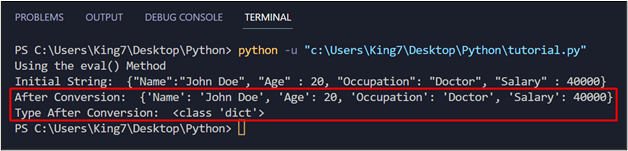
You have successfully converted a Python String into a Python dict using the eval() method.
Method 4: Using strip() and split() in Generator Expressions
Suppose that the string is not in the JSON String format, and you still want to convert it into a Python Dict. For this purpose, you would have to utilize various string manipulation methods like strip() and split(). For example, suppose the string contains key-value pairs, in which the key and value are separated by a hyphen “–”, and each pair is separated by a comma. For example, this is the string to be converted:
To do this, the user can utilize the generator expression, take a look at the following code:
stringVar = "Name — John Doe , Age — 20 , Occupation — Doctor, Martial_Status — Single"
print ( "Initial String: " ,stringVar )
print ( "AfterConversion: " ,resultVar )
print ( "Type After Conversion: " , type ( resultVar ) )
To understand this code, start from the innermost loop:
- The string is slit on every occurrence of a comma to get individual key-pairs
- For every key-pair substring, the string is split on the occurrence of a hyphen “–” and the two sections are allotted to variables “a” and “b”. The “a” holds the key part, whereas the “b” holds the value part.
- The strip() method is applied on both variables “a” and “b” to remove any blank spaces before or after the string.
- After that, both of these variables are passed into the dict() method to create a new Dictionary variable, “resultVar”
- Lastly, print the original string and the converted variable resultVar and its type onto the terminal using the print method()
When this code is executed, it produces the following output:
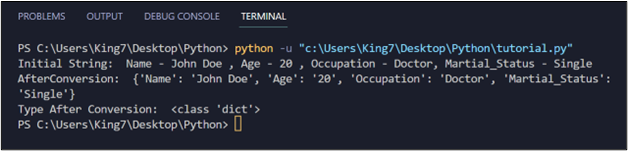
It can be easily observed that the string has been converted into a Python dict.
Conclusion
To convert a string into a Python “dict”, the user can use the loads() method from the “json” package or the literal_eval() method from the “ast” package. However, to use these two methods, the string should be a JSON String. Other than this, if the string is in a different format, then the user will have to use a combination of various string manipulation methods to come up with a working generator expression.
About the author

Abdul Mannan
I am curious about technology and writing and exploring it is my passion. I am interested in learning new skills and improving my knowledge and I hold a bachelor’s degree in computer science.
3 Ways to Convert String to Dictionary in Python
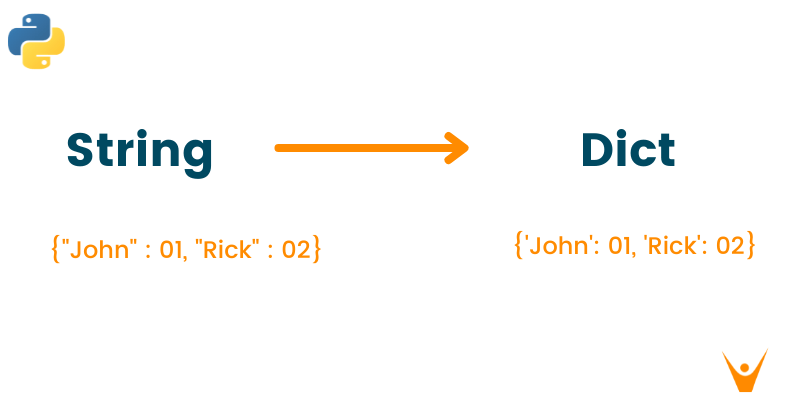
Converting one data type into another is a frequent problem in python programming and it is essential to deal with it properly. Dictionary is one of the data types in python which stores the data as a key-value pair. However, the exchange of data between the server and client is done by python json which is in string format by default.
As it is necessary to convert the python string to dictionary while programming, we have presented a detailed guide with different approaches to making this conversation effective and efficient. But before jumping on the methods, let us quickly recall python string and dictionary in detail.
What is Strings in Python?
Python string is an immutable collection of data elements. It is a sequence of Unicode characters wrapped inside the single and double-quotes. Python does not have a character data type and therefore the single character is simply considered as a string of length 1. To know more about the string data type, please refer to our article «4 Ways to Convert List to String in Python».
Check out the below example for a better understanding of strings in python
For Example
Output
What is Dictionary in Python?
A dictionary is an unordered collection of data elements that is mutable in nature. Python dictionary stores the data in the form of key-value pair.
Hence we can say that dictionaries are enclosed within the curly brackets including the key-value pairs separated by commas. The key and value are separated by the colon between them.
The most important feature of the python dictionaries is that they don’t allow polymorphism. Also, the keys in the dictionary are case-sensitive. Therefore, the uppercase and lowercase keys are considered different from each other. Later, you can access the dictionary data by referring to its corresponding key name.
Check out the below example for a better understanding of dictionaries in python.
For Example
Output
Convert String to Dict in Python
Below are 3 methods to convert string to the dictionary in python:
1) Using json.loads()
You can easily convert python string to the dictionary by using the inbuilt function of loads of json library of python. Before using this method, you have to import the json library in python using the “import” keyword.
The below example shows the brief working of json.loads() method:
For Example
Output
2) Using ast.literal.eval()
The ast.literal.eval() is an inbuilt python library function used to convert string to dictionary efficiently. For this approach, you have to import the ast package from the python library and then use it with the literal_eval() method.
Check out the below example to understand the working of ast.literal.eval() method.
For Example
Output
3) Using generator expression
In this method, we will first declare the string values paired with the hyphen or separated by a comma. Later we will use the strip() and split() method of string manipulation in the for loop to get the dictionary in the usual format. Strip() method will help us to remove the whitespace from the strings. This method is not as efficient for the conversion of string to dictionary as it requires a lot of time to get the output.
Check out the below example for the string to dictionary conversion using a generator expression
For Example
Output
Conclusion
String and dictionary data type has its own importance when it comes to programming in python. But when we wish to share the data over the network as a client-server connection, it is very important to convert a string into the dictionary for error-free data transfer. We have mentioned the three common methods to explicitly convert the string into a dictionary which will help you to make your programming faster and efficient. To learn more about dictionary and JSON in python, check our detailed guide on “5 Ways to Convert Dictionary to JSON in Python”.
Как из строки получить словарь (из str в dict)?
Такой вариант не канает, так как в словаре есть ‘address’, а в нем есть запятые, соотвествено этот метод пытаеться порезать значение на ключи и значения:
Так же не помогает:
Жду помощи ребяты
- Вопрос задан более трёх лет назад
- 15914 просмотров
Простой 2 комментария
- Вконтакте


- Вконтакте

Все указанные решения работают в некоторых частных случаях и могут сломаться в любой момент.
В общем случае, нет стандартного способа получить строку в указанном топикстартером виде и синтаксис он не указал, поэтому я предполагаю, что это результат какой-то разрушающей операции типа str от питоновского объекта. Если речь идёт действительно об str, то он вполне способен сгенерировать довольно разные строки, которые будут ломать любой из указанных способов.
Например, вариант с ремлейсом ломается если внутри уже есть кавычки. Вариант с эвалом не стоит советовать, так как на определенных данных он может привести к исполнению стороннего кода. Вариант с literal_eval сломается на сложных объектах (а так как мы не знаем, как автор получил свою строку, можно допустить, что там может быть что угодно)
How to Convert String to Dictionary in Python
To convert a string to a dictionary in Python, you can use the json.loads() function from the json module if the string is in a JSON-compliant format. The json.loads() function takes a json string as an argument and returns the dictionary.
Example
Output
You can see that the loads() function returns a dictionary, and we verified that using the type() method.
If the string is not in JSON format, you may need to parse it manually or use a custom parsing function depending on the specific format of the string.
Alternate methods
Using ast.literal_eval() function
The ast.literal_eval() is a built-in Python library function that converts a string to a dict.
To use the literal_eval() function, import the ast package and use its literal_eval() method.
Output
You can see that the output is the same as the loads() function, and it does the same thing.
Using generator expressions in Python
If we have enough strings to form a dictionary, use the generator expressions to convert the string to a dictionary.
Output
In this example, we have used many Python functions like dict(), strip(), int(), and split().
First, we split the string inside the for loop and converted them into a dictionary using the dict() method.
Next, the strip() method removes whitespace from the string and uses the int() function to convert the string to int for integer values.
FAQ
How to convert a string to a dictionary in Python?
You can convert a string to a dictionary in Python using the json module’s loads() function.
Can I convert a dictionary to a string in Python?
Yes, you can convert a dictionary to a string in Python using the json module’s dumps() function.
Can I convert a dictionary to a string in a specific format?
Yes, you can convert a dictionary to a string in a specific format by manually looping through the dictionary and constructing the string according to the desired format.