# JSON Module
The following snippet encodes the data stored in d into JSON and stores it in a file (replace filename with the actual name of the file).
# Retrieving data from a file
The following snippet opens a JSON encoded file (replace filename with the actual name of the file) and returns the object that is stored in the file.
# Formatting JSON output
Let’s say we have the following data:
Just dumping this as JSON does not do anything special here:
# Setting indentation to get prettier output
If we want pretty printing, we can set an indent size:
# Sorting keys alphabetically to get consistent output
By default the order of keys in the output is undefined. We can get them in alphabetical order to make sure we always get the same output:
# Getting rid of whitespace to get compact output
We might want to get rid of the unnecessary spaces, which is done by setting separator strings different from the default ‘, ‘ and ‘: ‘ :
# Creating JSON from Python dict
The above snippet will return the following:
# Creating Python dict from JSON
The above snippet will return the following:
# load vs loads , dump vs dumps
The json module contains functions for both reading and writing to and from unicode strings, and reading and writing to and from files. These are differentiated by a trailing s in the function name. In these examples we use a StringIO object, but the same functions would apply for any file-like object.
Here we use the string-based functions:
And here we use the file-based functions:
As you can see the main difference is that when dumping json data you must pass the file handle to the function, as opposed to capturing the return value. Also worth noting is that you must seek to the start of the file before reading or writing, in order to avoid data corruption. When opening a file the cursor is placed at position 0 , so the below would also work:
Having both ways of dealing with json data allows you to idiomatically and efficiently work with formats which build upon json, such as pyspark ‘s json-per-line:
# Calling json.tool from the command line to pretty-print JSON output
Given some JSON file "foo.json" like:
we can call the module directly from the command line (passing the filename as an argument) to pretty-print it:
The module will also take input from STDOUT, so (in Bash) we equally could do:
# JSON encoding custom objects
If we just try the following:
we get an error saying TypeError: datetime.datetime(2016, 9, 26, 4, 44) is not JSON serializable .
To be able to serialize the datetime object properly, we need to write custom code for how to convert it:
and then use this encoder class instead of json.dumps :
# Remarks
For full documentation including version-specific functionality, please check the official documentation
# Types
# Defaults
the json module will handle encoding and decoding of the below types by default:
# De-serialisation types:
| JSON | Python |
|---|---|
| object | dict |
| array | list |
| string | str |
| number (int) | int |
| number (real) | float |
| true, false | True, False |
| null | None |
The json module also understands NaN , Infinity , and -Infinity as their corresponding float values, which is outside the JSON spec.
# Serialisation types:
| Python | JSON |
|---|---|
| dict | object |
| list, tuple | array |
| str | string |
| int, float, (int/float)-derived Enums | number |
| True | true |
| False | false |
| None | null |
To disallow encoding of NaN , Infinity , and -Infinity you must encode with allow_nan=False . This will then raise a ValueError if you attempt to encode these values.
# Custom (de-)serialisation
There are various hooks which allow you to handle data that needs to be represented differently. Use of functools.partial allows you to partially apply the relevant parameters to these functions for convenience.
# Serialisation:
You can provide a function that operates on objects before they are serialised like so:
# De-serialisation:
There are various hooks that are handled by the json functions, such as object_hook and parse_float. For an exhaustive list for your version of python, see here
Convert Dictionary to JSON Python
While executing any program, we need data to work with. This data is either provided at the time of execution or built into the program. To store data in the most organized and easy-to-handle manner, we have the JSON format. While in python, the most formatted manner to store data is dictionaries, where data is stored as a sequence of elements like a map data structure containing the key: value pairs. In the below article, we shall be understanding how we can make use of json.dumps() function by utilizing its various parameters to convert the dict to JSON python.
Scope
- We shall be understanding the basic concepts around dictionary and JSON in python where we shall be covering its definition, syntax, and parameter will serve as building blocks for dict to JSON python.
- We will explore the key difference between dictionary and JSON in a tabular format to highlight the difference correctly.
- We shall then move into elaborative seven scenarios of code example where we shall explore how to write a python program to convert the dict to JSON python
- In the end we will have all the important points as a quick note summary to revise all the concepts at once and learn all the key takeaways from dict to JSON python.
What is a Dictionary in Python?
While coding we might have come across scenarios where we are required to convert dict to JSON python and store elements in pair format where one represents the key and the other represents its value. To simplify the coding experience, python has a dictionary for the same.
We define a dictionary as an unordered collection of data values where e can store data values like a map. A dictionary holds the elements in the form of pair elements where one is the key while the other corresponds to values in the key: value structure. This key: value structure is marked within the curly <> braces and separated by ‘comma’ to make out the different key: value pairs. One important point to note here is that the dictionary is the case- sensitive that is, in a dictionary, the values can be of any data type and even duplicated, while we need to keep the keys unique and immutable. An empty dictionary also exists where we can create it by placing curly braces<>.
Syntax:
The syntax of a dictionary is a pair of key: value pairs as shown below:
As seen above in the 'Dictionary' we have three distinct keys with three values.
Parameter:
The parameter that we need to pass while creating a dictionary is the key: value pairs marked by the curly braces. As shown above, we have three distinct keys and their respective values marked by the curly braces as the collection of data values representing the dictionary.
To know more about the dictionary in python, please refer to the link given below and expand your knowledge! [ need link to the dictionary in python ]
What is JSON in Python?
While writing files in JSON format, a good structure format is followed, which is quite easy to handle. JavaScript Object Notation, also abbreviated as JSON is the most popular, organized, and easy-to-handle data format that is used for representing the data structurally. We often transfer and receive data between a web browser and a server in JSON format. The JSON is a simple text that is written in the javascript object notation mostly used as a syntax for storing and exchanging data.
While working with python, we can make use of this JSON format by simply importing the built-in JSON package that can be used to work with JSON data. The below diagram represents what a JSON format looks like.

With the help of the JSON python module, we can work with JSON objects including parsing, serializing, deserializing, and many more. It also enables us to convert the dict to JSON python and work on it efficiently.
Syntax:
The syntax for a JSON which in python exists as string format:
As seen above in the 'JSON' we have two distinct keys with values against them and it's pretty common to store the JSON keys in file format.
Parameter:
The parameter that we need to pass while creating a JSON string is the object and the corresponding value that is marked by the square brackets and the JSON string is enclosed with curly braces. As shown above, we have two distinct keys and their respective values marked by the square braces as the collection of data values representing the JSON string.
To know more about JSON in Python, please refer to the link given below and expand your knowledge! [ need link to JSON in python ]
Difference between dict and JSON
Listed below are a few key differences you can find between a dict to JSON python. We have managed to put the differences in an easy-to-understand tabular format as it will distinguish between the two and we shall learn where we can leverage the dictionary or JSON as per our use case.
| JSON | Dictionary |
|---|---|
| The keys in JSON can be only strings. | The keys in the dictionary can be any hashable object. |
| In JSON, the keys are sequentially ordered and can be repeated. | In the dictionary, the keys cannot be repeated and must be distinct. |
| In JSON, the keys have a default value of undefined. | Dictionaries do not have any default value set. |
| IN JSON file format, the values are accessed by using the “.”(dot) or “[]” operator. | In the dictionary, the values are mostly accessed by the subscript operator. For example, if 'dict' = <'A':'123R' ,'B':'678S'>then by simply calling dict['A'] we can access values associated. |
| We are required to use the double quotation for the string object | We can use either a single or double quote for the string objects |
| The return object type in JSON is a ‘string’ object type | The return object type in a dictionary is the ‘dict’ object type |
Python Program to Convert dict to JSON
Now as we learned theoretically about the dictionary and JSON, we shall now walk through some scenarios where we shall explore various code examples to see how we can convert a dictionary to JSON python.
Method 1: Using dumps() Function
In python, we have an inbuilt module called 'JSON' which has an in-built function called dumps() . The dumps() function is used to convert dict to JSON python. We can do this by simply importing the "JSON" module which helps to easily parse the JSON strings that contain the JSON object.
Syntax: The syntax for the dumps() function is as below: json.dumps(dictionary, indent)
Parameters: As seen above, we have two parameters that are being passed that is, dictionary and indent. For the dictionary, we need to put the name of the dictionary which we want to convert into the JSON object. For indent, we mention the number of units for indentation. It is mandatory to always mention the dictionary parameter to tell in which dictionary should the dumps() function work. The indent parameter is optional.
Code:
Output:
Explanation: As seen above, we have started by importing the inbuilt JSON module from the python library. Then we are creating a dictionary and store some key: value pairs in it. We then implement the dumps() function to convert this dictionary into JSON format where we pass the dictionary and the indentation value as 8. Finally, we print the JSON object using the print statement and hence achieve the goal to convert the dictionary to JSON python.
Method 2: Converting Nested Dictionary to JSON
A nested dictionary in python can be created by simply declaring new dictionaries in the default dictionary. To convert dict to json python, we can use the dumps() function itself. Here, we have used indent=3, which refers to the space at the beginning of the code line:
Code:
Output:
Explanation: As seen above, we have started by importing the inbuilt JSON module from the python library. Then we are creating a dictionary named 'dictionary_employees' and store some key: value pairs in it. We then print the dictionary before we can actually convert dict to JSON python. Then, we implement the dumps() function with the dictionary and indent as parameters to convert dict to JSON python-format where we pass the dictionary and the indentation value as 9. Finally, we print the JSON object using the print statement and hence achieve the goal to convert dictionary to JSON python.
Method 3: Convert Dictionary to JSON Quotes
Now we are heading towards a scenario where we can convert dict to JSON python quotes. JSON quotes return the output in double quotes in JSON format as shown below.

Here we start by declaring a class. This class is used for the string representation to convert a dictionary into a JSON object. Then, by using the str(self) method and the variables 'assemble' and 'output' are declared which will help to assign with the class and convert the dictionary mentioned into the JSON object.
Code:
Output:
Explanation: In the above example, we are converting the dictionary to JSON quotes. Here we start by declaring a class called vegetables. This class is used for the string representation to convert the dictionary into a JSON object. Then, by using the str(self) method, we return the JSON object by using the dumps() function on self. We have declared the variables 'assemble' and 'output' that helps to assign with the class and convert the dictionary mentioned into the JSON object. Finally, we print our JSON object and achieve our goal to convert dict to JSON python.
Check out this article, also to learn more about Self in Python.
Method 4: Convert Dictionary to JSON Array
The JSON array is represented in an array format where we make use of for loop to print the key and value pair after validating them as shown below.

When we want to convert the dict to json python array, we first check the keys and values of the dictionary before converting it into a JSON object. Here we implement the for loop that will help to store the value. Then by using the dumps() function, we store the dictionary.
Code:
Output:
Explanation: In the above example, we are converting the dictionary into a JSON array. We first create a marks_dictuonary where we add some keys along with the values. Then we declare a marks_array where we check if we have respective keys and values for it, and we start to add them by using the for a loop. Then by implementing the dumps() function, we store the dictionary. Finally, we print our JSON array and achieve our goal to convert dict to JSON python.
Method 5: Convert Dictionary to JSON using sort_keys
The sort_keys is a parameter in json.dumps() function which allows us to sort the dictionary and convert dict to json python object if kept TRUE else not.
To convert a dict to JSON python using sort_keys, we use the sort_keys attribute inside the dumps() function to achieve the same. We need to set it to "True" to sort the dictionary and convert it into the JSON object. When we set it to "False", then the dictionary will not be sorted to find the JSON object.
Code:
Output:
Explanation: As seen above, we can convert the dictionary to JSON using sort_keys. For this, we first need to import our inbuilt JSON module in python. Then we created a dictionary where we stored a few keys with their respective values. Then we used the dumps() function from the JSON module where we declared the dictionary (employee_dictionary ) along with indentation as 8 and gave the sort_keys attribute as 'TRUE' . This attribute will now be able to sort the dictionary and convert it into the JSON object. Finally, we print the json object as seen from the output and achieve our goal to convert dict to JSON python.
Method 6: Convert Dictionary to JSON using Indentation
Here we shall be looking into the example where we shall be converting the dict to JSON python using the indentation. We learned before that the dumps() function needs one mandatory parameter after which it can take the dictionary object and convert it into a JSON string. With the following code, we shall create a dictionary named employee_dictionary containing the data of a particular employee record. Then we shall use the dumps() function with one argument which shall convert employee_dictionary into JSON data. Then, we make use of the dumps() function and pass two arguments where we give the employee_dictionary as one indentation value as 8 for JSON data . We finally see that with indentation the JSON output is different from that without indentation. One point to note is that the result of both the dictionary and JSON object is the same when no indentation is followed or used.
Code:
Output:
Explanation: As observed before, we have used the dumps() function to convert the dictionary to JSON format. Now here when we pass only one argument as its mandatory to pass at least one argument in the dumps() function then we see the output as a JSON string which is similar to the output we got from the dictionary and when we pass two arguments in the dump() function then we see that the by utilizing the indentation value as 8 it got changed as can be seen above in the output and achieve our goal to convert dict to JSON python.
Method 6: Converting Empty Dictionary to JSON
With the below code example, we will be converting an empty dict to JSON python format. To implement so, we start by passing an empty dictionary and implementing the dumps() function to convert it into the JSON format. As nothing was mentioned in the dictionary no unknown value appears in the JSON format.
Code:
Output:
Explanation: As seen above, we have an empty dictionary which we pass on as the argument in the dimps() function which converts it into JSON format. As the dictionary was empty hence we get the output of the JSON as empty and achieve our goal to convert dict to JSON python.
Method 7: Converting Dictionary with Different Types of Values to JSON
With the below example, we shall be exploring how can we convert the dictionary with different types of values to JSON. As a dictionary consists of a key: value pair, in this example we shall take a dictionary with different datatypes of values and convert it into the JSON string by implementing the dumps() function.
To do so, we shall use the json.dumps() function and pass the dictionary as a parameter. Finally, we obtain a JSON format with different types of data types.
Code:
Output:
Explanation: As seen above, we have a dictionary where we have key-value pairs with different data types. The first key: the value pair is of string data type, while the second is of integer data type and the third is a float data type. While we use the dump() function to convert the dictionary into a JSON format as shown above even when the datatypes in the dictionary are different.
Conclusion
A dictionary is an unordered collection of data values that can store data values in a map-like format. The dictionary holds the elements as pair of values in the [Key: Value] structure.
JavaScript Object Notation, also abbreviated as JSON is the most popular, organized, and easy-to-handle data format that is used for representing the data structurally.
How to convert dictionary to JSON in Python
In this Python tutorial, we will learn how to Convert dictionary to JSON in python and also we will cover these topics:
- How to convert nested dictionary to JSON in Python
- How to convert a dictionary to JSON string in Python
- How to convert a dictionary to JSON file in Python
- Python dictionary to JSON quotes
- Convert dictionary to JSON array in python
- Convert multiple dictionaries to JSON python
- Convert dictionary to JSON using sort_key python
Table of Contents
Convert dictionary to JSON Python
Here, we can see how to convert dictionary to Json in python.
- In this example, I have imported a module called json and declared a variable as a dictionary, and assigned key and value pair.
- Another variable details is declared to store the dictionary into json using json.dumps(), and used indent = 5. The indentation refers to space at the beginning of the code line.
The dumped dictionary can be seen in the output. You can refer to the below screenshot for the output.

This is how to convert dictionary to JSON in Python.
Convert nested dictionary to JSON python
Here, we can see how to convert nested dictionary to Json in python.
- In this example, I have imported a module called json and declared a variable as a dictionary, and assigned key and value pair. Here, I have taken two dictionaries as fruit and vegetable.
- Another variable details is declared to store the dictionary into json using json.dumps(), and used indent = 5. The indentation refers to space at the beginning of the code line.
The output will be in the nested dictionary format below screenshot shows the output.

Convert dictionary to JSON string python
Now, we can how to Convert dictionary to JSON string in python.
- In this example, I have imported a module called json and declared a Python dictionary as a student, and json.dumps() is used to store the dictionary. The indent = 2 is used to get the space in the lines of the code.
- Here, I have used two print statements one without indent and one with an indent.
Two string can be seen in the output one with indent and another without indent. Below screenshot shows the output.

Convert dictionary to JSON file Python
Here, we can see how to Convert dictionary to JSON file in python.
- In this example, I have imported a module called json, and declared a dictionary as a student and to open the json file I have used with open(‘data.json’, ‘w’) as f.
- The data.json is the name of the file and the ‘w’ mode is used to write the file. To store the file json.dump() is used to store the dictionary.
- To open the json file first, we have to check the location of the file and then we have to open it in the visual studio code by giving the filename.
Below screenshot shows the output value which is stored in the json file in visual studio code.

This is how to covert dictionary to JSON file in Python.
Python convert dictionary to JSON quotes
Here, we can how to convert dictionary to JSON quotes in python.
- In this example, I have imported a module called json.
- The class fruit is declared and defined as def__str__(self).
- The __str__(self) method used for the string representation, and a variable called combo is declared, and the quote variable is assigned with class fruits.
- The combo parameter is passed, to get the output I have used print(quote).
We can see th output as key value pair with double quotes. You can refer to below screenshot for the output.
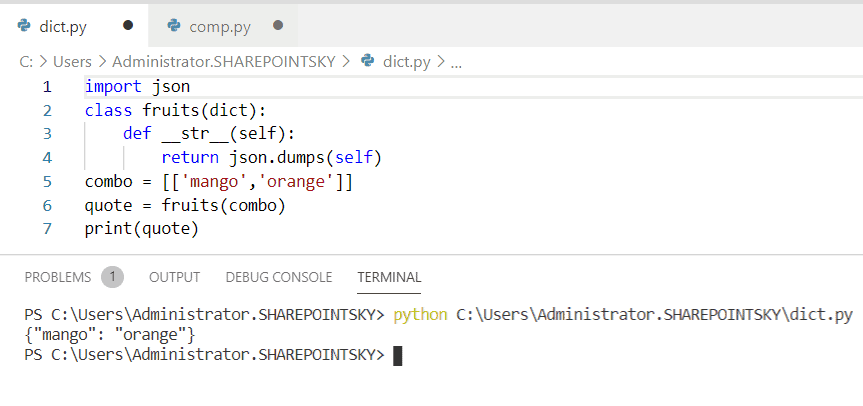
This is how to convert dictionary to JSON quotes in Python.
Convert dictionary to JSON array Python
Now, we can see how to Convert dictionary to JSON array in python.
- In this example, I have imported a module called json.
- The variable as dictionary and assigned key-value pair.
- Another variable is declared as an array and this is used to check which is key and which is value. The for loop is used to store the value, whereas the json.dumps() is used to store the dictionary.
In the output, we can clearly see which is key and which is value. You can refer to the below screenshot for the output.

This is how to convert dictionary to JSON array in Python.
Convert multiple dictionaries to JSON Python
Here, we can see how to convert multiple dictionary to json in python.
- In this example, I have imported a module called json, and declared a variable as a dictionary.
- And then we assigned multiple dictionaries to it, and used json.dumps() to store the dictionary, to get the output I have used print(details).
Below screenshot shows the output.

This is how to convert multiple dictionaries to JSON in Python.
Convert dictionary to JSON using sort_keys Python
Now, we can see how to convert dictionary to JSON using sort_keys in python.
- In this example, I have imported a module called json, and declared a variable called the dictionary, and assigned key and value pair.
- To store the value I have used json.dumps and also indent = 5 is used. The sort_keys = true is used to sort the dictionary, if we give False to the value, then the dictionary will not be sorted.
We can see the sorted dictionary as the output in the below screenshot.

This is how to convert dictionary to JSON using sort_keys in Python.
You may like the following Python tutorials:
In this tutorial, we have learned about how Convert dictionary to JSON in Python, and also we have covered these topics:
- Convert nested dictionary to JSON python
- Convert dictionary to JSON string python
- Convert dictionary to JSON file python
- Python dictionary to JSON quotes
- Convert dictionary to JSON array in python
- Convert multiple dictionaries to JSON python
- Convert dictionary to JSON using sort_key python

I am Bijay Kumar, a Microsoft MVP in SharePoint. Apart from SharePoint, I started working on Python, Machine learning, and artificial intelligence for the last 5 years. During this time I got expertise in various Python libraries also like Tkinter, Pandas, NumPy, Turtle, Django, Matplotlib, Tensorflow, Scipy, Scikit-Learn, etc… for various clients in the United States, Canada, the United Kingdom, Australia, New Zealand, etc. Check out my profile.
5 Ways to Convert Dictionary to JSON in Python
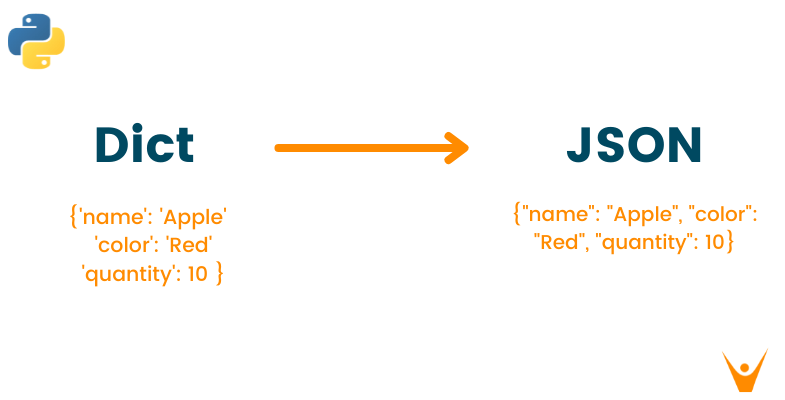
Most of the programs need data to work. This data is provided to the program while running or built into the program since the beginning. JSON is one of the ways to store this data in an organized and easy-to-handle manner. On the other hand, a python dictionary is one of the data types that can store a sequence of elements simultaneously in a well-formatted manner, just like JSON.
Therefore, in this article, let us understand some of the common methods to convert python Dict to JSON after a brief introduction of JSON and dictionary in python.
What is JSON in Python?
JSON(Javascript Object Notation) is a standard format to transfer the data as a text that can be sent over a network. JSON is a syntax for exchanging and storing data over the network. It uses lots of APIs and databases that are easy for humans and machines to read and understand. Python has an inbuilt package named ‘json’, which you can use to work with JSON data. To use this feature, you have to import the JSON package in python programming.
Python JSON stores the data in the form of key-value pairs inside curly brackets(<>), and hence, it is pretty similar to a python dictionary. But here, the JSON key is a string object with double quotation mark compulsorily. However, the value corresponding to the key could be of any data type, i.e., string, integer, nested JSON, or any other sequence data type similar to an array.
For Example
Output
Remember that the JSON exists as a string but not a string from the data context.
What is Dictionary in Python?
Dictionary is one of the data types in python used to store the sequence of data in a single variable. Python dictionary helps store the data values like a map that is not supported by any other data type which holds only a single value as an element. Dictionary is an unordered and changeable collection of data elements stored in the form of key:value pairs inside the curly brackets(<>). Here the colon(:) represents the key associated with its respective value.
Dictionary values can be of any data type and allow duplicate values, whereas dictionary keys are unique and immutable.
For Example
Output
Remember that dictionary keys are case sensitive; therefore, the same name but different cases of the key will be treated distinctly.
Difference Between Dictionary and JSON
Dictionary
JSON
Keys can be any hashable object
Keys can be only strings
Keys cannot be repeated
Keys can be ordered and repeated
No such default value is set
Keys has a default value of undefined
Values can be accessed by subscript
Values can be accessed by using “.”(dot) or “[]”
Can use a single or double quote for the string object
The double quotation is necessary for the string object
Returns ‘dict’ object type
Return ‘string’ object type
Convert Dict to JSON in Python
Below are 5 common methods you can use to convert a dict to JSON in python:
1) Using dumps() function
Python possesses a default module, ‘json,’ with an in-built function named dumps() to convert the dictionary into a JSON object by importing the «json» module. «json» module makes it easy to parse the JSON strings which contain the JSON object. The below example displays the conversion of a python dictionary to a JSON object.
For Example
Output
2) Converting nested dictionary to JSON
You can create a nested dictionary in the above example by declaring a new dictionary inside the default dictionary. To convert the nested dictionary into a json object, you can use the dumps function itself. Here, we have used indent=3, which refers to the space at the beginning of the code line:
For Example
Output
3) Convert dictionary to JSON quotes
You can declare a class and use it for the string representation to convert it into json object. Here, we have declared the class using the __str__(self) method, and the variable ‘collect’ is declared along with the variable ‘result’ to assign with the class and convert into the json object.
For Example
Output
4) Convert dictionary to JSON array
You can declare an array to check the keys and values of the dictionary and convert it into json object. The for loop stores the value, and the dumps() method stores the dictionary. Check out the below example for a better understanding of the approach.
For Example
Output
5) Convert dictionary to JSON using sort_keys
Using this method, you can use the sort_keys attribute inside the dumps() method and set it to “true” to sort the dictionary and convert it into json object. If you set it to false, the dictionary won’t be sorted to find the json object in python.
For Example
Output
Conclusion
As discussed above, JSON is a data format, and a dictionary in python is a data structure. If you wish to exchange data for different processes, you should use JSON format to serialize your python dictionary. Therefore, it is essential and recommended to learn all the above methods to convert python dictionaries to a json object and make your programming easy and efficient. To learn more about conversion in python, visit our article “3 Ways to Convert List to Tuple in Python”.