Добавляем в Jupyter Notebooks красоту и интерактивность
Многие используют в своей работе Jupyter Notebooks. Но с ростом сложности проекта появляются проблемы. В блокноте появляются ячейки с красными пометками для самого себя «перед запуском укажи число. » или «задай количество итераций исходя из. ». Какой-то откат к командной строке получается.
Да и вывод данных на экран не всегда воспринимается без пояснений сторонним человеком, который привык к красивым таблицам, картинкам и прочим современным элементам интерфейса.
Например, у нас есть данные по площадям городов и численности населения. Выведем их на экран в «традиционном виде»:
Видим в блокноте:
Современному, избалованному человеку такой формат отображения не всегда нравится. Нужно привести данные к более привычному табличному виду.
Можно использовать широко распространенную библиотеку pandas
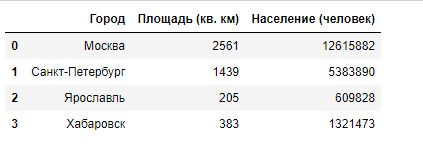
Если по каким-то причинам использование pandas не устраивает, можно воспользоваться другой библиотекой или написать свою функцию.
Рассмотрим одну из таких библиотек — tabulate (https://pypi.org/project/tabulate/)
Для установки запустите из командной строки pip install tabulate

Можно вывести данные в «псевдографическом» виде.

Можно добавить заголовки

И индексы
/>
tabulate позволяет получить визуально такой же результат как и pandas.
Можно написать свою функцию, которая потом обрастёт дополнительными возможностями.
Вывод изображений
Мы привыкли к пиктограммам и иконкам. Даже в прогнозе погоды мы видим картинки с солнышками и тучками. Чтобы добавить изображения в наши программы можно использовать библиотеку IPython. Ее функция Image позволяет работать с изображениями (PNG/JPEG/GIF), размещенными как локально, так и на интернет-ресурсах. Задавать их размеры.

Украшаем текст
Конечно, можно генерировать HTML напрямую, используя все его возможности:

А можно воспользоваться библиотекой termcolor. Она позмоляет не углубляясь в HTML задавать цвет текста и фона, задавать атрибуты шрифта. Описание библиотеки тут — pypi.org/project/termcolor

Отображаем прогресс выполнения задачи
Никому не нравится следить за ходом выполнения длительной задачи не понимая какая часть работы уже выполнена.

Видеть сколько осталось — гораздо приятнее (да-да, знаю, что скорость движения «червяка» может меняться).

Для установки используйте команды

Интерактивное взаимодействие с пользователем
Та же библиотека ipywidgets позволяет не только отображать, но и вносить информацию.
Самый, наверное, простой пример взаимодействия с пользователем — это реакция на нажатие кнопки. Библиотека ipywidgets позволяет создать кнопку с заданными параметрами (текстом, стилем и размерами) и назначить функцию-обработчик ее нажатия.

Размер кнопки задается при помощи свойства layout

Для удобного ввода пользователем чисел и дат есть компоненты FloatSlider и DatePicker.
Чтобы получить введенное значение — используется свойство <компонент>.value
Чтобы отловить момент изменения значений, нужно использовать событие observe
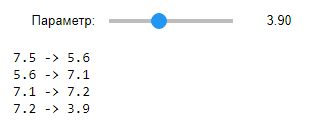
Проверим доступ к текущему значению:

Для выбора одного значения из нескольких вариантов есть список RadioButtons, выпадающий список Dropdown и группа кнопок ToggleButtons. value и observe для этих компонентов используются точно так же.
Значения можно задавать как в виде перечня строчных величин, так и в виде списка кортежей.
Попробуем самый простой вариант, со значениями в виде списка строк.
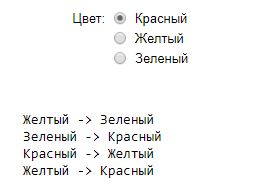
Выведем на экран значение:
В этом режиме значением rButtons1.value является строка.
Пробуем второй вариант задания списка значений:
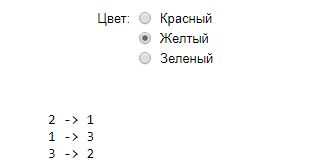
В этом режиме значением rButtons2.value является число, соответствующее выбранному значению.
Аналогично работает выпадающий список (Dropdown)

Для ввода булевых значений можно использовать Checkbox и ToggleButton. У них есть уже знакомые нам value и observe.


Для ввода многострочного текста служет компонент Textarea

ИИ (интерфейсные изыски)
Когда элементов интерфейса становится слишком много, хочется пойти по пути десктопных приложений и объединить отдельные элементы в обособленные группы.
Для этого нам пригодятся Accordion и Tab.


Библиотека ipywidgets не ограничивается элементами, которые я перечислил. В ней еще масса полезных вещей, которые могут сделать программы в Jupyter Notebooks более привлекательными.
6. Expressions
This chapter explains the meaning of the elements of expressions in Python.
Syntax Notes: In this and the following chapters, extended BNF notation will be used to describe syntax, not lexical analysis. When (one alternative of) a syntax rule has the form
and no semantics are given, the semantics of this form of name are the same as for othername .
6.1. Arithmetic conversions
When a description of an arithmetic operator below uses the phrase “the numeric arguments are converted to a common type”, this means that the operator implementation for built-in types works as follows:
If either argument is a complex number, the other is converted to complex;
otherwise, if either argument is a floating point number, the other is converted to floating point;
otherwise, both must be integers and no conversion is necessary.
Some additional rules apply for certain operators (e.g., a string as a left argument to the ‘%’ operator). Extensions must define their own conversion behavior.
6.2. Atoms
Atoms are the most basic elements of expressions. The simplest atoms are identifiers or literals. Forms enclosed in parentheses, brackets or braces are also categorized syntactically as atoms. The syntax for atoms is:
6.2.1. Identifiers (Names)
An identifier occurring as an atom is a name. See section Identifiers and keywords for lexical definition and section Naming and binding for documentation of naming and binding.
When the name is bound to an object, evaluation of the atom yields that object. When a name is not bound, an attempt to evaluate it raises a NameError exception.
Private name mangling: When an identifier that textually occurs in a class definition begins with two or more underscore characters and does not end in two or more underscores, it is considered a private name of that class. Private names are transformed to a longer form before code is generated for them. The transformation inserts the class name, with leading underscores removed and a single underscore inserted, in front of the name. For example, the identifier __spam occurring in a class named Ham will be transformed to _Ham__spam . This transformation is independent of the syntactical context in which the identifier is used. If the transformed name is extremely long (longer than 255 characters), implementation defined truncation may happen. If the class name consists only of underscores, no transformation is done.
6.2.2. Literals
Python supports string and bytes literals and various numeric literals:
Evaluation of a literal yields an object of the given type (string, bytes, integer, floating point number, complex number) with the given value. The value may be approximated in the case of floating point and imaginary (complex) literals. See section Literals for details.
All literals correspond to immutable data types, and hence the object’s identity is less important than its value. Multiple evaluations of literals with the same value (either the same occurrence in the program text or a different occurrence) may obtain the same object or a different object with the same value.
6.2.3. Parenthesized forms
A parenthesized form is an optional expression list enclosed in parentheses:
A parenthesized expression list yields whatever that expression list yields: if the list contains at least one comma, it yields a tuple; otherwise, it yields the single expression that makes up the expression list.
An empty pair of parentheses yields an empty tuple object. Since tuples are immutable, the same rules as for literals apply (i.e., two occurrences of the empty tuple may or may not yield the same object).
Note that tuples are not formed by the parentheses, but rather by use of the comma. The exception is the empty tuple, for which parentheses are required — allowing unparenthesized “nothing” in expressions would cause ambiguities and allow common typos to pass uncaught.
6.2.4. Displays for lists, sets and dictionaries
For constructing a list, a set or a dictionary Python provides special syntax called “displays”, each of them in two flavors:
either the container contents are listed explicitly, or
they are computed via a set of looping and filtering instructions, called a comprehension.
Common syntax elements for comprehensions are:
The comprehension consists of a single expression followed by at least one for clause and zero or more for or if clauses. In this case, the elements of the new container are those that would be produced by considering each of the for or if clauses a block, nesting from left to right, and evaluating the expression to produce an element each time the innermost block is reached.
However, aside from the iterable expression in the leftmost for clause, the comprehension is executed in a separate implicitly nested scope. This ensures that names assigned to in the target list don’t “leak” into the enclosing scope.
The iterable expression in the leftmost for clause is evaluated directly in the enclosing scope and then passed as an argument to the implicitly nested scope. Subsequent for clauses and any filter condition in the leftmost for clause cannot be evaluated in the enclosing scope as they may depend on the values obtained from the leftmost iterable. For example: [x*y for x in range(10) for y in range(x, x+10)] .
To ensure the comprehension always results in a container of the appropriate type, yield and yield from expressions are prohibited in the implicitly nested scope.
Since Python 3.6, in an async def function, an async for clause may be used to iterate over a asynchronous iterator . A comprehension in an async def function may consist of either a for or async for clause following the leading expression, may contain additional for or async for clauses, and may also use await expressions. If a comprehension contains either async for clauses or await expressions or other asynchronous comprehensions it is called an asynchronous comprehension. An asynchronous comprehension may suspend the execution of the coroutine function in which it appears. See also PEP 530.
New in version 3.6: Asynchronous comprehensions were introduced.
Changed in version 3.8: yield and yield from prohibited in the implicitly nested scope.
Changed in version 3.11: Asynchronous comprehensions are now allowed inside comprehensions in asynchronous functions. Outer comprehensions implicitly become asynchronous.
6.2.5. List displays
A list display is a possibly empty series of expressions enclosed in square brackets:
A list display yields a new list object, the contents being specified by either a list of expressions or a comprehension. When a comma-separated list of expressions is supplied, its elements are evaluated from left to right and placed into the list object in that order. When a comprehension is supplied, the list is constructed from the elements resulting from the comprehension.
6.2.6. Set displays
A set display is denoted by curly braces and distinguishable from dictionary displays by the lack of colons separating keys and values:
A set display yields a new mutable set object, the contents being specified by either a sequence of expressions or a comprehension. When a comma-separated list of expressions is supplied, its elements are evaluated from left to right and added to the set object. When a comprehension is supplied, the set is constructed from the elements resulting from the comprehension.
An empty set cannot be constructed with <> ; this literal constructs an empty dictionary.
6.2.7. Dictionary displays
A dictionary display is a possibly empty series of key/datum pairs enclosed in curly braces:
A dictionary display yields a new dictionary object.
If a comma-separated sequence of key/datum pairs is given, they are evaluated from left to right to define the entries of the dictionary: each key object is used as a key into the dictionary to store the corresponding datum. This means that you can specify the same key multiple times in the key/datum list, and the final dictionary’s value for that key will be the last one given.
A double asterisk ** denotes dictionary unpacking. Its operand must be a mapping . Each mapping item is added to the new dictionary. Later values replace values already set by earlier key/datum pairs and earlier dictionary unpackings.
New in version 3.5: Unpacking into dictionary displays, originally proposed by PEP 448.
A dict comprehension, in contrast to list and set comprehensions, needs two expressions separated with a colon followed by the usual “for” and “if” clauses. When the comprehension is run, the resulting key and value elements are inserted in the new dictionary in the order they are produced.
Restrictions on the types of the key values are listed earlier in section The standard type hierarchy . (To summarize, the key type should be hashable , which excludes all mutable objects.) Clashes between duplicate keys are not detected; the last datum (textually rightmost in the display) stored for a given key value prevails.
Changed in version 3.8: Prior to Python 3.8, in dict comprehensions, the evaluation order of key and value was not well-defined. In CPython, the value was evaluated before the key. Starting with 3.8, the key is evaluated before the value, as proposed by PEP 572.
6.2.8. Generator expressions
A generator expression is a compact generator notation in parentheses:
A generator expression yields a new generator object. Its syntax is the same as for comprehensions, except that it is enclosed in parentheses instead of brackets or curly braces.
Variables used in the generator expression are evaluated lazily when the __next__() method is called for the generator object (in the same fashion as normal generators). However, the iterable expression in the leftmost for clause is immediately evaluated, so that an error produced by it will be emitted at the point where the generator expression is defined, rather than at the point where the first value is retrieved. Subsequent for clauses and any filter condition in the leftmost for clause cannot be evaluated in the enclosing scope as they may depend on the values obtained from the leftmost iterable. For example: (x*y for x in range(10) for y in range(x, x+10)) .
The parentheses can be omitted on calls with only one argument. See section Calls for details.
To avoid interfering with the expected operation of the generator expression itself, yield and yield from expressions are prohibited in the implicitly defined generator.
If a generator expression contains either async for clauses or await expressions it is called an asynchronous generator expression. An asynchronous generator expression returns a new asynchronous generator object, which is an asynchronous iterator (see Asynchronous Iterators ).
New in version 3.6: Asynchronous generator expressions were introduced.
Changed in version 3.7: Prior to Python 3.7, asynchronous generator expressions could only appear in async def coroutines. Starting with 3.7, any function can use asynchronous generator expressions.
Changed in version 3.8: yield and yield from prohibited in the implicitly nested scope.
6.2.9. Yield expressions
The yield expression is used when defining a generator function or an asynchronous generator function and thus can only be used in the body of a function definition. Using a yield expression in a function’s body causes that function to be a generator function, and using it in an async def function’s body causes that coroutine function to be an asynchronous generator function. For example:
Due to their side effects on the containing scope, yield expressions are not permitted as part of the implicitly defined scopes used to implement comprehensions and generator expressions.
Changed in version 3.8: Yield expressions prohibited in the implicitly nested scopes used to implement comprehensions and generator expressions.
Generator functions are described below, while asynchronous generator functions are described separately in section Asynchronous generator functions .
When a generator function is called, it returns an iterator known as a generator. That generator then controls the execution of the generator function. The execution starts when one of the generator’s methods is called. At that time, the execution proceeds to the first yield expression, where it is suspended again, returning the value of expression_list to the generator’s caller, or None if expression_list is omitted. By suspended, we mean that all local state is retained, including the current bindings of local variables, the instruction pointer, the internal evaluation stack, and the state of any exception handling. When the execution is resumed by calling one of the generator’s methods, the function can proceed exactly as if the yield expression were just another external call. The value of the yield expression after resuming depends on the method which resumed the execution. If __next__() is used (typically via either a for or the next() builtin) then the result is None . Otherwise, if send() is used, then the result will be the value passed in to that method.
All of this makes generator functions quite similar to coroutines; they yield multiple times, they have more than one entry point and their execution can be suspended. The only difference is that a generator function cannot control where the execution should continue after it yields; the control is always transferred to the generator’s caller.
Yield expressions are allowed anywhere in a try construct. If the generator is not resumed before it is finalized (by reaching a zero reference count or by being garbage collected), the generator-iterator’s close() method will be called, allowing any pending finally clauses to execute.
When yield from <expr> is used, the supplied expression must be an iterable. The values produced by iterating that iterable are passed directly to the caller of the current generator’s methods. Any values passed in with send() and any exceptions passed in with throw() are passed to the underlying iterator if it has the appropriate methods. If this is not the case, then send() will raise AttributeError or TypeError , while throw() will just raise the passed in exception immediately.
When the underlying iterator is complete, the value attribute of the raised StopIteration instance becomes the value of the yield expression. It can be either set explicitly when raising StopIteration , or automatically when the subiterator is a generator (by returning a value from the subgenerator).
Changed in version 3.3: Added yield from <expr> to delegate control flow to a subiterator.
The parentheses may be omitted when the yield expression is the sole expression on the right hand side of an assignment statement.
The proposal for adding generators and the yield statement to Python.
PEP 342 — Coroutines via Enhanced Generators
The proposal to enhance the API and syntax of generators, making them usable as simple coroutines.
PEP 380 — Syntax for Delegating to a Subgenerator
The proposal to introduce the yield_from syntax, making delegation to subgenerators easy.
The proposal that expanded on PEP 492 by adding generator capabilities to coroutine functions.
6.2.9.1. Generator-iterator methods
This subsection describes the methods of a generator iterator. They can be used to control the execution of a generator function.
Note that calling any of the generator methods below when the generator is already executing raises a ValueError exception.
Starts the execution of a generator function or resumes it at the last executed yield expression. When a generator function is resumed with a __next__() method, the current yield expression always evaluates to None . The execution then continues to the next yield expression, where the generator is suspended again, and the value of the expression_list is returned to __next__() ’s caller. If the generator exits without yielding another value, a StopIteration exception is raised.
This method is normally called implicitly, e.g. by a for loop, or by the built-in next() function.
generator. send ( value ) 
Resumes the execution and “sends” a value into the generator function. The value argument becomes the result of the current yield expression. The send() method returns the next value yielded by the generator, or raises StopIteration if the generator exits without yielding another value. When send() is called to start the generator, it must be called with None as the argument, because there is no yield expression that could receive the value.
generator. throw ( value ) ¶ generator. throw ( type [ , value [ , traceback ] ] )
Raises an exception at the point where the generator was paused, and returns the next value yielded by the generator function. If the generator exits without yielding another value, a StopIteration exception is raised. If the generator function does not catch the passed-in exception, or raises a different exception, then that exception propagates to the caller.
In typical use, this is called with a single exception instance similar to the way the raise keyword is used.
For backwards compatibility, however, the second signature is supported, following a convention from older versions of Python. The type argument should be an exception class, and value should be an exception instance. If the value is not provided, the type constructor is called to get an instance. If traceback is provided, it is set on the exception, otherwise any existing __traceback__ attribute stored in value may be cleared.
Raises a GeneratorExit at the point where the generator function was paused. If the generator function then exits gracefully, is already closed, or raises GeneratorExit (by not catching the exception), close returns to its caller. If the generator yields a value, a RuntimeError is raised. If the generator raises any other exception, it is propagated to the caller. close() does nothing if the generator has already exited due to an exception or normal exit.
6.2.9.2. Examples
Here is a simple example that demonstrates the behavior of generators and generator functions:
For examples using yield from , see PEP 380: Syntax for Delegating to a Subgenerator in “What’s New in Python.”
6.2.9.3. Asynchronous generator functions
The presence of a yield expression in a function or method defined using async def further defines the function as an asynchronous generator function.
When an asynchronous generator function is called, it returns an asynchronous iterator known as an asynchronous generator object. That object then controls the execution of the generator function. An asynchronous generator object is typically used in an async for statement in a coroutine function analogously to how a generator object would be used in a for statement.
Calling one of the asynchronous generator’s methods returns an awaitable object, and the execution starts when this object is awaited on. At that time, the execution proceeds to the first yield expression, where it is suspended again, returning the value of expression_list to the awaiting coroutine. As with a generator, suspension means that all local state is retained, including the current bindings of local variables, the instruction pointer, the internal evaluation stack, and the state of any exception handling. When the execution is resumed by awaiting on the next object returned by the asynchronous generator’s methods, the function can proceed exactly as if the yield expression were just another external call. The value of the yield expression after resuming depends on the method which resumed the execution. If __anext__() is used then the result is None . Otherwise, if asend() is used, then the result will be the value passed in to that method.
If an asynchronous generator happens to exit early by break , the caller task being cancelled, or other exceptions, the generator’s async cleanup code will run and possibly raise exceptions or access context variables in an unexpected context–perhaps after the lifetime of tasks it depends, or during the event loop shutdown when the async-generator garbage collection hook is called. To prevent this, the caller must explicitly close the async generator by calling aclose() method to finalize the generator and ultimately detach it from the event loop.
In an asynchronous generator function, yield expressions are allowed anywhere in a try construct. However, if an asynchronous generator is not resumed before it is finalized (by reaching a zero reference count or by being garbage collected), then a yield expression within a try construct could result in a failure to execute pending finally clauses. In this case, it is the responsibility of the event loop or scheduler running the asynchronous generator to call the asynchronous generator-iterator’s aclose() method and run the resulting coroutine object, thus allowing any pending finally clauses to execute.
To take care of finalization upon event loop termination, an event loop should define a finalizer function which takes an asynchronous generator-iterator and presumably calls aclose() and executes the coroutine. This finalizer may be registered by calling sys.set_asyncgen_hooks() . When first iterated over, an asynchronous generator-iterator will store the registered finalizer to be called upon finalization. For a reference example of a finalizer method see the implementation of asyncio.Loop.shutdown_asyncgens in Lib/asyncio/base_events.py.
The expression yield from <expr> is a syntax error when used in an asynchronous generator function.
6.2.9.4. Asynchronous generator-iterator methods
This subsection describes the methods of an asynchronous generator iterator, which are used to control the execution of a generator function.
coroutine agen. __anext__ ( ) 
Returns an awaitable which when run starts to execute the asynchronous generator or resumes it at the last executed yield expression. When an asynchronous generator function is resumed with an __anext__() method, the current yield expression always evaluates to None in the returned awaitable, which when run will continue to the next yield expression. The value of the expression_list of the yield expression is the value of the StopIteration exception raised by the completing coroutine. If the asynchronous generator exits without yielding another value, the awaitable instead raises a StopAsyncIteration exception, signalling that the asynchronous iteration has completed.
This method is normally called implicitly by a async for loop.
coroutine agen. asend ( value ) 
Returns an awaitable which when run resumes the execution of the asynchronous generator. As with the send() method for a generator, this “sends” a value into the asynchronous generator function, and the value argument becomes the result of the current yield expression. The awaitable returned by the asend() method will return the next value yielded by the generator as the value of the raised StopIteration , or raises StopAsyncIteration if the asynchronous generator exits without yielding another value. When asend() is called to start the asynchronous generator, it must be called with None as the argument, because there is no yield expression that could receive the value.
coroutine agen. athrow ( value ) ¶ coroutine agen. athrow ( type [ , value [ , traceback ] ] )
Returns an awaitable that raises an exception of type type at the point where the asynchronous generator was paused, and returns the next value yielded by the generator function as the value of the raised StopIteration exception. If the asynchronous generator exits without yielding another value, a StopAsyncIteration exception is raised by the awaitable. If the generator function does not catch the passed-in exception, or raises a different exception, then when the awaitable is run that exception propagates to the caller of the awaitable.
coroutine agen. aclose ( ) 
Returns an awaitable that when run will throw a GeneratorExit into the asynchronous generator function at the point where it was paused. If the asynchronous generator function then exits gracefully, is already closed, or raises GeneratorExit (by not catching the exception), then the returned awaitable will raise a StopIteration exception. Any further awaitables returned by subsequent calls to the asynchronous generator will raise a StopAsyncIteration exception. If the asynchronous generator yields a value, a RuntimeError is raised by the awaitable. If the asynchronous generator raises any other exception, it is propagated to the caller of the awaitable. If the asynchronous generator has already exited due to an exception or normal exit, then further calls to aclose() will return an awaitable that does nothing.
6.3. Primaries
Primaries represent the most tightly bound operations of the language. Their syntax is:
6.3.1. Attribute references
An attribute reference is a primary followed by a period and a name:
The primary must evaluate to an object of a type that supports attribute references, which most objects do. This object is then asked to produce the attribute whose name is the identifier. This production can be customized by overriding the __getattr__() method. If this attribute is not available, the exception AttributeError is raised. Otherwise, the type and value of the object produced is determined by the object. Multiple evaluations of the same attribute reference may yield different objects.
6.3.2. Subscriptions
The subscription of an instance of a container class will generally select an element from the container. The subscription of a generic class will generally return a GenericAlias object.
When an object is subscripted, the interpreter will evaluate the primary and the expression list.
The primary must evaluate to an object that supports subscription. An object may support subscription through defining one or both of __getitem__() and __class_getitem__() . When the primary is subscripted, the evaluated result of the expression list will be passed to one of these methods. For more details on when __class_getitem__ is called instead of __getitem__ , see __class_getitem__ versus __getitem__ .
If the expression list contains at least one comma, it will evaluate to a tuple containing the items of the expression list. Otherwise, the expression list will evaluate to the value of the list’s sole member.
For built-in objects, there are two types of objects that support subscription via __getitem__() :
Mappings. If the primary is a mapping , the expression list must evaluate to an object whose value is one of the keys of the mapping, and the subscription selects the value in the mapping that corresponds to that key. An example of a builtin mapping class is the dict class.
Sequences. If the primary is a sequence , the expression list must evaluate to an int or a slice (as discussed in the following section). Examples of builtin sequence classes include the str , list and tuple classes.
The formal syntax makes no special provision for negative indices in sequences . However, built-in sequences all provide a __getitem__() method that interprets negative indices by adding the length of the sequence to the index so that, for example, x[-1] selects the last item of x . The resulting value must be a nonnegative integer less than the number of items in the sequence, and the subscription selects the item whose index is that value (counting from zero). Since the support for negative indices and slicing occurs in the object’s __getitem__() method, subclasses overriding this method will need to explicitly add that support.
A string is a special kind of sequence whose items are characters. A character is not a separate data type but a string of exactly one character.
6.3.3. Slicings
A slicing selects a range of items in a sequence object (e.g., a string, tuple or list). Slicings may be used as expressions or as targets in assignment or del statements. The syntax for a slicing:
There is ambiguity in the formal syntax here: anything that looks like an expression list also looks like a slice list, so any subscription can be interpreted as a slicing. Rather than further complicating the syntax, this is disambiguated by defining that in this case the interpretation as a subscription takes priority over the interpretation as a slicing (this is the case if the slice list contains no proper slice).
The semantics for a slicing are as follows. The primary is indexed (using the same __getitem__() method as normal subscription) with a key that is constructed from the slice list, as follows. If the slice list contains at least one comma, the key is a tuple containing the conversion of the slice items; otherwise, the conversion of the lone slice item is the key. The conversion of a slice item that is an expression is that expression. The conversion of a proper slice is a slice object (see section The standard type hierarchy ) whose start , stop and step attributes are the values of the expressions given as lower bound, upper bound and stride, respectively, substituting None for missing expressions.
6.3.4. Calls
A call calls a callable object (e.g., a function ) with a possibly empty series of arguments :
An optional trailing comma may be present after the positional and keyword arguments but does not affect the semantics.
The primary must evaluate to a callable object (user-defined functions, built-in functions, methods of built-in objects, class objects, methods of class instances, and all objects having a __call__() method are callable). All argument expressions are evaluated before the call is attempted. Please refer to section Function definitions for the syntax of formal parameter lists.
If keyword arguments are present, they are first converted to positional arguments, as follows. First, a list of unfilled slots is created for the formal parameters. If there are N positional arguments, they are placed in the first N slots. Next, for each keyword argument, the identifier is used to determine the corresponding slot (if the identifier is the same as the first formal parameter name, the first slot is used, and so on). If the slot is already filled, a TypeError exception is raised. Otherwise, the argument is placed in the slot, filling it (even if the expression is None , it fills the slot). When all arguments have been processed, the slots that are still unfilled are filled with the corresponding default value from the function definition. (Default values are calculated, once, when the function is defined; thus, a mutable object such as a list or dictionary used as default value will be shared by all calls that don’t specify an argument value for the corresponding slot; this should usually be avoided.) If there are any unfilled slots for which no default value is specified, a TypeError exception is raised. Otherwise, the list of filled slots is used as the argument list for the call.
CPython implementation detail: An implementation may provide built-in functions whose positional parameters do not have names, even if they are ‘named’ for the purpose of documentation, and which therefore cannot be supplied by keyword. In CPython, this is the case for functions implemented in C that use PyArg_ParseTuple() to parse their arguments.
If there are more positional arguments than there are formal parameter slots, a TypeError exception is raised, unless a formal parameter using the syntax *identifier is present; in this case, that formal parameter receives a tuple containing the excess positional arguments (or an empty tuple if there were no excess positional arguments).
If any keyword argument does not correspond to a formal parameter name, a TypeError exception is raised, unless a formal parameter using the syntax **identifier is present; in this case, that formal parameter receives a dictionary containing the excess keyword arguments (using the keywords as keys and the argument values as corresponding values), or a (new) empty dictionary if there were no excess keyword arguments.
If the syntax *expression appears in the function call, expression must evaluate to an iterable . Elements from these iterables are treated as if they were additional positional arguments. For the call f(x1, x2, *y, x3, x4) , if y evaluates to a sequence y1, …, yM, this is equivalent to a call with M+4 positional arguments x1, x2, y1, …, yM, x3, x4.
A consequence of this is that although the *expression syntax may appear after explicit keyword arguments, it is processed before the keyword arguments (and any **expression arguments – see below). So:
It is unusual for both keyword arguments and the *expression syntax to be used in the same call, so in practice this confusion does not often arise.
If the syntax **expression appears in the function call, expression must evaluate to a mapping , the contents of which are treated as additional keyword arguments. If a parameter matching a key has already been given a value (by an explicit keyword argument, or from another unpacking), a TypeError exception is raised.
When **expression is used, each key in this mapping must be a string. Each value from the mapping is assigned to the first formal parameter eligible for keyword assignment whose name is equal to the key. A key need not be a Python identifier (e.g. "max-temp °F" is acceptable, although it will not match any formal parameter that could be declared). If there is no match to a formal parameter the key-value pair is collected by the ** parameter, if there is one, or if there is not, a TypeError exception is raised.
Formal parameters using the syntax *identifier or **identifier cannot be used as positional argument slots or as keyword argument names.
Changed in version 3.5: Function calls accept any number of * and ** unpackings, positional arguments may follow iterable unpackings ( * ), and keyword arguments may follow dictionary unpackings ( ** ). Originally proposed by PEP 448.
A call always returns some value, possibly None , unless it raises an exception. How this value is computed depends on the type of the callable object.
a user-defined function:
The code block for the function is executed, passing it the argument list. The first thing the code block will do is bind the formal parameters to the arguments; this is described in section Function definitions . When the code block executes a return statement, this specifies the return value of the function call.
a built-in function or method:
The result is up to the interpreter; see Built-in Functions for the descriptions of built-in functions and methods.
A new instance of that class is returned.
a class instance method:
The corresponding user-defined function is called, with an argument list that is one longer than the argument list of the call: the instance becomes the first argument.
a class instance:
The class must define a __call__() method; the effect is then the same as if that method was called.
6.4. Await expression
Suspend the execution of coroutine on an awaitable object. Can only be used inside a coroutine function .
New in version 3.5.
6.5. The power operator
The power operator binds more tightly than unary operators on its left; it binds less tightly than unary operators on its right. The syntax is:
Thus, in an unparenthesized sequence of power and unary operators, the operators are evaluated from right to left (this does not constrain the evaluation order for the operands): -1**2 results in -1 .
The power operator has the same semantics as the built-in pow() function, when called with two arguments: it yields its left argument raised to the power of its right argument. The numeric arguments are first converted to a common type, and the result is of that type.
For int operands, the result has the same type as the operands unless the second argument is negative; in that case, all arguments are converted to float and a float result is delivered. For example, 10**2 returns 100 , but 10**-2 returns 0.01 .
Raising 0.0 to a negative power results in a ZeroDivisionError . Raising a negative number to a fractional power results in a complex number. (In earlier versions it raised a ValueError .)
This operation can be customized using the special __pow__() method.
6.6. Unary arithmetic and bitwise operations
All unary arithmetic and bitwise operations have the same priority:
The unary — (minus) operator yields the negation of its numeric argument; the operation can be overridden with the __neg__() special method.
The unary + (plus) operator yields its numeric argument unchanged; the operation can be overridden with the __pos__() special method.
(invert) operator yields the bitwise inversion of its integer argument. The bitwise inversion of x is defined as -(x+1) . It only applies to integral numbers or to custom objects that override the __invert__() special method.
In all three cases, if the argument does not have the proper type, a TypeError exception is raised.
6.7. Binary arithmetic operations
The binary arithmetic operations have the conventional priority levels. Note that some of these operations also apply to certain non-numeric types. Apart from the power operator, there are only two levels, one for multiplicative operators and one for additive operators:
The * (multiplication) operator yields the product of its arguments. The arguments must either both be numbers, or one argument must be an integer and the other must be a sequence. In the former case, the numbers are converted to a common type and then multiplied together. In the latter case, sequence repetition is performed; a negative repetition factor yields an empty sequence.
This operation can be customized using the special __mul__() and __rmul__() methods.
The @ (at) operator is intended to be used for matrix multiplication. No builtin Python types implement this operator.
New in version 3.5.
The / (division) and // (floor division) operators yield the quotient of their arguments. The numeric arguments are first converted to a common type. Division of integers yields a float, while floor division of integers results in an integer; the result is that of mathematical division with the ‘floor’ function applied to the result. Division by zero raises the ZeroDivisionError exception.
This operation can be customized using the special __truediv__() and __floordiv__() methods.
The % (modulo) operator yields the remainder from the division of the first argument by the second. The numeric arguments are first converted to a common type. A zero right argument raises the ZeroDivisionError exception. The arguments may be floating point numbers, e.g., 3.14%0.7 equals 0.34 (since 3.14 equals 4*0.7 + 0.34 .) The modulo operator always yields a result with the same sign as its second operand (or zero); the absolute value of the result is strictly smaller than the absolute value of the second operand 1.
The floor division and modulo operators are connected by the following identity: x == (x//y)*y + (x%y) . Floor division and modulo are also connected with the built-in function divmod() : divmod(x, y) == (x//y, x%y) . 2.
In addition to performing the modulo operation on numbers, the % operator is also overloaded by string objects to perform old-style string formatting (also known as interpolation). The syntax for string formatting is described in the Python Library Reference, section printf-style String Formatting .
The modulo operation can be customized using the special __mod__() method.
The floor division operator, the modulo operator, and the divmod() function are not defined for complex numbers. Instead, convert to a floating point number using the abs() function if appropriate.
The + (addition) operator yields the sum of its arguments. The arguments must either both be numbers or both be sequences of the same type. In the former case, the numbers are converted to a common type and then added together. In the latter case, the sequences are concatenated.
This operation can be customized using the special __add__() and __radd__() methods.
The — (subtraction) operator yields the difference of its arguments. The numeric arguments are first converted to a common type.
This operation can be customized using the special __sub__() method.
6.8. Shifting operations
The shifting operations have lower priority than the arithmetic operations:
These operators accept integers as arguments. They shift the first argument to the left or right by the number of bits given by the second argument.
This operation can be customized using the special __lshift__() and __rshift__() methods.
A right shift by n bits is defined as floor division by pow(2,n) . A left shift by n bits is defined as multiplication with pow(2,n) .
6.9. Binary bitwise operations
Each of the three bitwise operations has a different priority level:
The & operator yields the bitwise AND of its arguments, which must be integers or one of them must be a custom object overriding __and__() or __rand__() special methods.
The ^ operator yields the bitwise XOR (exclusive OR) of its arguments, which must be integers or one of them must be a custom object overriding __xor__() or __rxor__() special methods.
The | operator yields the bitwise (inclusive) OR of its arguments, which must be integers or one of them must be a custom object overriding __or__() or __ror__() special methods.
6.10. Comparisons
Unlike C, all comparison operations in Python have the same priority, which is lower than that of any arithmetic, shifting or bitwise operation. Also unlike C, expressions like a < b < c have the interpretation that is conventional in mathematics:
Comparisons yield boolean values: True or False . Custom rich comparison methods may return non-boolean values. In this case Python will call bool() on such value in boolean contexts.
Comparisons can be chained arbitrarily, e.g., x < y <= z is equivalent to x < y and y <= z , except that y is evaluated only once (but in both cases z is not evaluated at all when x < y is found to be false).
Formally, if a, b, c, …, y, z are expressions and op1, op2, …, opN are comparison operators, then a op1 b op2 c . y opN z is equivalent to a op1 b and b op2 c and . y opN z , except that each expression is evaluated at most once.
Note that a op1 b op2 c doesn’t imply any kind of comparison between a and c, so that, e.g., x < y > z is perfectly legal (though perhaps not pretty).
6.10.1. Value comparisons
The operators < , > , == , >= , <= , and != compare the values of two objects. The objects do not need to have the same type.
Chapter Objects, values and types states that objects have a value (in addition to type and identity). The value of an object is a rather abstract notion in Python: For example, there is no canonical access method for an object’s value. Also, there is no requirement that the value of an object should be constructed in a particular way, e.g. comprised of all its data attributes. Comparison operators implement a particular notion of what the value of an object is. One can think of them as defining the value of an object indirectly, by means of their comparison implementation.
Because all types are (direct or indirect) subtypes of object , they inherit the default comparison behavior from object . Types can customize their comparison behavior by implementing rich comparison methods like __lt__() , described in Basic customization .
The default behavior for equality comparison ( == and != ) is based on the identity of the objects. Hence, equality comparison of instances with the same identity results in equality, and equality comparison of instances with different identities results in inequality. A motivation for this default behavior is the desire that all objects should be reflexive (i.e. x is y implies x == y ).
A default order comparison ( < , > , <= , and >= ) is not provided; an attempt raises TypeError . A motivation for this default behavior is the lack of a similar invariant as for equality.
The behavior of the default equality comparison, that instances with different identities are always unequal, may be in contrast to what types will need that have a sensible definition of object value and value-based equality. Such types will need to customize their comparison behavior, and in fact, a number of built-in types have done that.
The following list describes the comparison behavior of the most important built-in types.
Numbers of built-in numeric types ( Numeric Types — int, float, complex ) and of the standard library types fractions.Fraction and decimal.Decimal can be compared within and across their types, with the restriction that complex numbers do not support order comparison. Within the limits of the types involved, they compare mathematically (algorithmically) correct without loss of precision.
The not-a-number values float(‘NaN’) and decimal.Decimal(‘NaN’) are special. Any ordered comparison of a number to a not-a-number value is false. A counter-intuitive implication is that not-a-number values are not equal to themselves. For example, if x = float(‘NaN’) , 3 < x , x < 3 and x == x are all false, while x != x is true. This behavior is compliant with IEEE 754.
None and NotImplemented are singletons. PEP 8 advises that comparisons for singletons should always be done with is or is not , never the equality operators.
Binary sequences (instances of bytes or bytearray ) can be compared within and across their types. They compare lexicographically using the numeric values of their elements.
Strings (instances of str ) compare lexicographically using the numerical Unicode code points (the result of the built-in function ord() ) of their characters. 3
Strings and binary sequences cannot be directly compared.
Sequences (instances of tuple , list , or range ) can be compared only within each of their types, with the restriction that ranges do not support order comparison. Equality comparison across these types results in inequality, and ordering comparison across these types raises TypeError .
Sequences compare lexicographically using comparison of corresponding elements. The built-in containers typically assume identical objects are equal to themselves. That lets them bypass equality tests for identical objects to improve performance and to maintain their internal invariants.
Lexicographical comparison between built-in collections works as follows:
For two collections to compare equal, they must be of the same type, have the same length, and each pair of corresponding elements must compare equal (for example, [1,2] == (1,2) is false because the type is not the same).
Collections that support order comparison are ordered the same as their first unequal elements (for example, [1,2,x] <= [1,2,y] has the same value as x <= y ). If a corresponding element does not exist, the shorter collection is ordered first (for example, [1,2] < [1,2,3] is true).
Mappings (instances of dict ) compare equal if and only if they have equal (key, value) pairs. Equality comparison of the keys and values enforces reflexivity.
Order comparisons ( < , > , <= , and >= ) raise TypeError .
Sets (instances of set or frozenset ) can be compared within and across their types.
They define order comparison operators to mean subset and superset tests. Those relations do not define total orderings (for example, the two sets <1,2>and <2,3>are not equal, nor subsets of one another, nor supersets of one another). Accordingly, sets are not appropriate arguments for functions which depend on total ordering (for example, min() , max() , and sorted() produce undefined results given a list of sets as inputs).
Comparison of sets enforces reflexivity of its elements.
Most other built-in types have no comparison methods implemented, so they inherit the default comparison behavior.
User-defined classes that customize their comparison behavior should follow some consistency rules, if possible:
Equality comparison should be reflexive. In other words, identical objects should compare equal:
x is y implies x == y
Comparison should be symmetric. In other words, the following expressions should have the same result:
x == y and y == x
x != y and y != x
x < y and y > x
x <= y and y >= x
Comparison should be transitive. The following (non-exhaustive) examples illustrate that:
x > y and y > z implies x > z
x < y and y <= z implies x < z
Inverse comparison should result in the boolean negation. In other words, the following expressions should have the same result:
x == y and not x != y
x < y and not x >= y (for total ordering)
x > y and not x <= y (for total ordering)
The last two expressions apply to totally ordered collections (e.g. to sequences, but not to sets or mappings). See also the total_ordering() decorator.
The hash() result should be consistent with equality. Objects that are equal should either have the same hash value, or be marked as unhashable.
Python does not enforce these consistency rules. In fact, the not-a-number values are an example for not following these rules.
6.10.2. Membership test operations
The operators in and not in test for membership. x in s evaluates to True if x is a member of s, and False otherwise. x not in s returns the negation of x in s . All built-in sequences and set types support this as well as dictionary, for which in tests whether the dictionary has a given key. For container types such as list, tuple, set, frozenset, dict, or collections.deque, the expression x in y is equivalent to any(x is e or x == e for e in y) .
For the string and bytes types, x in y is True if and only if x is a substring of y. An equivalent test is y.find(x) != -1 . Empty strings are always considered to be a substring of any other string, so "" in "abc" will return True .
For user-defined classes which define the __contains__() method, x in y returns True if y.__contains__(x) returns a true value, and False otherwise.
For user-defined classes which do not define __contains__() but do define __iter__() , x in y is True if some value z , for which the expression x is z or x == z is true, is produced while iterating over y . If an exception is raised during the iteration, it is as if in raised that exception.
Lastly, the old-style iteration protocol is tried: if a class defines __getitem__() , x in y is True if and only if there is a non-negative integer index i such that x is y[i] or x == y[i] , and no lower integer index raises the IndexError exception. (If any other exception is raised, it is as if in raised that exception).
The operator not in is defined to have the inverse truth value of in .
6.10.3. Identity comparisons
The operators is and is not test for an object’s identity: x is y is true if and only if x and y are the same object. An Object’s identity is determined using the id() function. x is not y yields the inverse truth value. 4
6.11. Boolean operations
In the context of Boolean operations, and also when expressions are used by control flow statements, the following values are interpreted as false: False , None , numeric zero of all types, and empty strings and containers (including strings, tuples, lists, dictionaries, sets and frozensets). All other values are interpreted as true. User-defined objects can customize their truth value by providing a __bool__() method.
The operator not yields True if its argument is false, False otherwise.
The expression x and y first evaluates x; if x is false, its value is returned; otherwise, y is evaluated and the resulting value is returned.
The expression x or y first evaluates x; if x is true, its value is returned; otherwise, y is evaluated and the resulting value is returned.
Note that neither and nor or restrict the value and type they return to False and True , but rather return the last evaluated argument. This is sometimes useful, e.g., if s is a string that should be replaced by a default value if it is empty, the expression s or ‘foo’ yields the desired value. Because not has to create a new value, it returns a boolean value regardless of the type of its argument (for example, not ‘foo’ produces False rather than » .)
6.12. Assignment expressions
An assignment expression (sometimes also called a “named expression” or “walrus”) assigns an expression to an identifier , while also returning the value of the expression .
One common use case is when handling matched regular expressions:
Or, when processing a file stream in chunks:
Assignment expressions must be surrounded by parentheses when used as sub-expressions in slicing, conditional, lambda, keyword-argument, and comprehension-if expressions and in assert and with statements. In all other places where they can be used, parentheses are not required, including in if and while statements.
New in version 3.8: See PEP 572 for more details about assignment expressions.
6.13. Conditional expressions
Conditional expressions (sometimes called a “ternary operator”) have the lowest priority of all Python operations.
The expression x if C else y first evaluates the condition, C rather than x. If C is true, x is evaluated and its value is returned; otherwise, y is evaluated and its value is returned.
See PEP 308 for more details about conditional expressions.
6.14. Lambdas
Lambda expressions (sometimes called lambda forms) are used to create anonymous functions. The expression lambda parameters: expression yields a function object. The unnamed object behaves like a function object defined with:
See section Function definitions for the syntax of parameter lists. Note that functions created with lambda expressions cannot contain statements or annotations.
6.15. Expression lists
Except when part of a list or set display, an expression list containing at least one comma yields a tuple. The length of the tuple is the number of expressions in the list. The expressions are evaluated from left to right.
An asterisk * denotes iterable unpacking. Its operand must be an iterable . The iterable is expanded into a sequence of items, which are included in the new tuple, list, or set, at the site of the unpacking.
New in version 3.5: Iterable unpacking in expression lists, originally proposed by PEP 448.
The trailing comma is required only to create a single tuple (a.k.a. a singleton); it is optional in all other cases. A single expression without a trailing comma doesn’t create a tuple, but rather yields the value of that expression. (To create an empty tuple, use an empty pair of parentheses: () .)
6.16. Evaluation order
Python evaluates expressions from left to right. Notice that while evaluating an assignment, the right-hand side is evaluated before the left-hand side.
In the following lines, expressions will be evaluated in the arithmetic order of their suffixes:
6.17. Operator precedence
The following table summarizes the operator precedence in Python, from highest precedence (most binding) to lowest precedence (least binding). Operators in the same box have the same precedence. Unless the syntax is explicitly given, operators are binary. Operators in the same box group left to right (except for exponentiation and conditional expressions, which group from right to left).
Note that comparisons, membership tests, and identity tests, all have the same precedence and have a left-to-right chaining feature as described in the Comparisons section.
Binding or parenthesized expression, list display, dictionary display, set display
Module: display 
When this object is returned by an input cell or passed to the display function, it will result in Audio controls being displayed in the frontend (only works in the notebook).
data : numpy array, list, unicode, str or bytes
- Numpy 1d array containing the desired waveform (mono)
- Numpy 2d array containing waveforms for each channel. Shape=(NCHAN, NSAMPLES). For the standard channel order, see http://msdn.microsoft.com/en-us/library/windows/hardware/dn653308(v=vs.85).aspx
- List of float or integer representing the waveform (mono)
- String containing the filename
- Bytestring containing raw PCM data or
- URL pointing to a file on the web.
If the array option is used the waveform will be normalized.
If a filename or url is used the format support will be browser dependent.
url : unicode
A URL to download the data from.
filename : unicode
Path to a local file to load the data from.
embed : boolean
Should the image data be embedded using a data URI (True) or should the original source be referenced. Set this to True if you want the audio to playable later with no internet connection in the notebook.
Default is True , unless the keyword argument url is set, then default value is False .
rate : integer
The sampling rate of the raw data. Only required when data parameter is being used as an array
autoplay : bool
Set to True if the audio should immediately start playing. Default is False .
Reload the raw data from file or URL.
class IPython.display. DisplayObject ( data=None, url=None, filename=None ) 
An object that wraps data to be displayed.
__init__ ( data=None, url=None, filename=None ) 
Create a display object given raw data.
When this object is returned by an expression or passed to the display function, it will result in the data being displayed in the frontend. The MIME type of the data should match the subclasses used, so the Png subclass should be used for ‘image/png’ data. If the data is a URL, the data will first be downloaded and then displayed. If
data : unicode, str or bytes
The raw data or a URL or file to load the data from
url : unicode
A URL to download the data from.
filename : unicode
Path to a local file to load the data from.
Reload the raw data from file or URL.
class IPython.display. FileLink ( path, url_prefix=», result_html_prefix=», result_html_suffix='<br>’ ) 
Class for embedding a local file link in an IPython session, based on path
e.g. to embed a link that was generated in the IPython notebook as my/data.txt
or in the HTML notebook, just:
path : str
path to the file or directory that should be formatted
directory_prefix : str
prefix to be prepended to all files to form a working link [default: ‘files’]
result_html_prefix : str
text to append to beginning to link [default: none]
result_html_suffix : str
text to append at the end of link [default: ‘<br>’]
Class for embedding local file links in an IPython session, based on path
e.g. to embed links to files that were generated in the IPython notebook under my/data , you would do:
or in the HTML notebook, just:
See FileLink for the path , url_prefix , result_html_prefix and result_html_suffix parameters.
included_suffixes : list Filename suffixes to include when formatting output [default: include all files] notebook_display_formatter : function Used to format links for display in the notebook. See discussion of formatter functions below. terminal_display_formatter : function Used to format links for display in the terminal. See discussion of formatter functions below.
Formatter functions must be of the form:
The function should return a list of lines that will be printed in the notebook (if passing notebook_display_formatter) or the terminal (if passing terminal_display_formatter). This function is iterated over for each directory in self.path. Default formatters are in place, can be passed here to support alternative formatting.
class IPython.display. HTML ( data=None, url=None, filename=None ) 
Generic class to embed an iframe in an IPython notebook
__init__ ( src, width, height, **kwargs ) ¶ class IPython.display. Image ( data=None, url=None, filename=None, format=’png’, embed=None, width=None, height=None, retina=False, unconfined=False, metadata=None ) 
__init__ ( data=None, url=None, filename=None, format=’png’, embed=None, width=None, height=None, retina=False, unconfined=False, metadata=None ) 
Create a PNG/JPEG image object given raw data.
When this object is returned by an input cell or passed to the display function, it will result in the image being displayed in the frontend.
data : unicode, str or bytes
The raw image data or a URL or filename to load the data from. This always results in embedded image data.
url : unicode
A URL to download the data from. If you specify url= , the image data will not be embedded unless you also specify embed=True .
filename : unicode
Path to a local file to load the data from. Images from a file are always embedded.
format : unicode
The format of the image data (png/jpeg/jpg). If a filename or URL is given for format will be inferred from the filename extension.
embed : bool
Should the image data be embedded using a data URI (True) or be loaded using an <img> tag. Set this to True if you want the image to be viewable later with no internet connection in the notebook.
Default is True , unless the keyword argument url is set, then default value is False .
Note that QtConsole is not able to display images if embed is set to False
width : int
Width to which to constrain the image in html
height : int
Height to which to constrain the image in html
retina : bool
Automatically set the width and height to half of the measured width and height. This only works for embedded images because it reads the width/height from image data. For non-embedded images, you can just set the desired display width and height directly.
unconfined: bool
Set unconfined=True to disable max-width confinement of the image.
metadata: dict
Specify extra metadata to attach to the image.
# embedded image data, works in qtconsole and notebook # when passed positionally, the first arg can be any of raw image data, # a URL, or a filename from which to load image data. # The result is always embedding image data for inline images. Image(‘http://www.google.fr/images/srpr/logo3w.png‘) Image(‘/path/to/image.jpg’) Image(b’RAW_PNG_DATA. ’)
# Specifying Image(url=. ) does not embed the image data, # it only generates <img> tag with a link to the source. # This will not work in the qtconsole or offline. Image(url=’http://www.google.fr/images/srpr/logo3w.png‘)
Reload the raw data from file or URL.
class IPython.display. JSON ( data=None, url=None, filename=None ) 
JSON expects a JSON-able dict or list
not an already-serialized JSON string.
Scalar types (None, number, string) are not allowed, only dict or list containers.
class IPython.display. Javascript ( data=None, url=None, filename=None, lib=None, css=None ) 
Create a Javascript display object given raw data.
When this object is returned by an expression or passed to the display function, it will result in the data being displayed in the frontend. If the data is a URL, the data will first be downloaded and then displayed.
In the Notebook, the containing element will be available as element , and jQuery will be available. Content appended to element will be visible in the output area.
data : unicode, str or bytes
The Javascript source code or a URL to download it from.
url : unicode
A URL to download the data from.
filename : unicode
Path to a local file to load the data from.
lib : list or str
A sequence of Javascript library URLs to load asynchronously before running the source code. The full URLs of the libraries should be given. A single Javascript library URL can also be given as a string.
css: : list or str
A sequence of css files to load before running the source code. The full URLs of the css files should be given. A single css URL can also be given as a string.
class IPython.display. Markdown ( data=None, url=None, filename=None ) 
class IPython.display. Math ( data=None, url=None, filename=None ) 
class IPython.display. Pretty ( data=None, url=None, filename=None ) 
class IPython.display. SVG ( data=None, url=None, filename=None ) 
class IPython.display. ScribdDocument ( id, width=400, height=300, **kwargs ) 
Class for embedding a Scribd document in an IPython session
Use the start_page params to specify a starting point in the document Use the view_mode params to specify display type one off scroll | slideshow | book
e.g to Display Wes’ foundational paper about PANDAS in book mode from page 3
ScribdDocument(71048089, width=800, height=400, start_page=3, view_mode=”book”)
__init__ ( id, width=400, height=300, **kwargs ) ¶ class IPython.display. TextDisplayObject ( data=None, url=None, filename=None ) 
Validate that display data is text
class IPython.display. VimeoVideo ( id, width=400, height=300, **kwargs ) 
Class for embedding a Vimeo video in an IPython session, based on its video id.
__init__ ( id, width=400, height=300, **kwargs ) ¶ class IPython.display. YouTubeVideo ( id, width=400, height=300, **kwargs ) 
Class for embedding a YouTube Video in an IPython session, based on its video id.
e.g. to embed the video from https://www.youtube.com/watch?v=foo , you would do:
To start from 30 seconds:
To calculate seconds from time as hours, minutes, seconds use datetime.timedelta :
15 Functions
Clear the output of the current cell receiving output.
wait : bool [default: false]
Wait to clear the output until new output is available to replace it.
Display a Python object in all frontends.
By default all representations will be computed and sent to the frontends. Frontends can decide which representation is used and how.
objs : tuple of objects
The Python objects to display.
raw : bool, optional
Are the objects to be displayed already mimetype-keyed dicts of raw display data, or Python objects that need to be formatted before display? [default: False]
include : list or tuple, optional
A list of format type strings (MIME types) to include in the format data dict. If this is set only the format types included in this list will be computed.
exclude : list or tuple, optional
A list of format type strings (MIME types) to exclude in the format data dict. If this is set all format types will be computed, except for those included in this argument.
metadata : dict, optional
A dictionary of metadata to associate with the output. mime-type keys in this dictionary will be associated with the individual representation formats, if they exist.
Display the HTML representation of an object.
objs : tuple of objects
The Python objects to display, or if raw=True raw HTML data to display.
raw : bool
Are the data objects raw data or Python objects that need to be formatted before display? [default: False]
metadata : dict (optional)
Metadata to be associated with the specific mimetype output.
Display the Javascript representation of an object.
objs : tuple of objects
The Python objects to display, or if raw=True raw javascript data to display.
raw : bool
Are the data objects raw data or Python objects that need to be formatted before display? [default: False]
metadata : dict (optional)
Metadata to be associated with the specific mimetype output.
Display the JPEG representation of an object.
objs : tuple of objects
The Python objects to display, or if raw=True raw JPEG data to display.
raw : bool
Are the data objects raw data or Python objects that need to be formatted before display? [default: False]
metadata : dict (optional)
Metadata to be associated with the specific mimetype output.
Display the JSON representation of an object.
Note that not many frontends support displaying JSON.
objs : tuple of objects
The Python objects to display, or if raw=True raw json data to display.
raw : bool
Are the data objects raw data or Python objects that need to be formatted before display? [default: False]
metadata : dict (optional)
Metadata to be associated with the specific mimetype output.
Display the LaTeX representation of an object.
objs : tuple of objects
The Python objects to display, or if raw=True raw latex data to display.
raw : bool
Are the data objects raw data or Python objects that need to be formatted before display? [default: False]
metadata : dict (optional)
Metadata to be associated with the specific mimetype output.
Displays the Markdown representation of an object.
objs : tuple of objects
The Python objects to display, or if raw=True raw markdown data to display.
raw : bool
Are the data objects raw data or Python objects that need to be formatted before display? [default: False]
metadata : dict (optional)
Metadata to be associated with the specific mimetype output.
Display the PDF representation of an object.
objs : tuple of objects
The Python objects to display, or if raw=True raw javascript data to display.
raw : bool
Are the data objects raw data or Python objects that need to be formatted before display? [default: False]
metadata : dict (optional)
Metadata to be associated with the specific mimetype output.
Display the PNG representation of an object.
objs : tuple of objects
The Python objects to display, or if raw=True raw png data to display.
raw : bool
Are the data objects raw data or Python objects that need to be formatted before display? [default: False]
metadata : dict (optional)
Metadata to be associated with the specific mimetype output.
Display the pretty (default) representation of an object.
objs : tuple of objects
The Python objects to display, or if raw=True raw text data to display.
raw : bool
Are the data objects raw data or Python objects that need to be formatted before display? [default: False]
metadata : dict (optional)
Metadata to be associated with the specific mimetype output.
Display the SVG representation of an object.
objs : tuple of objects
The Python objects to display, or if raw=True raw svg data to display.
raw : bool
Are the data objects raw data or Python objects that need to be formatted before display? [default: False]
metadata : dict (optional)
Metadata to be associated with the specific mimetype output.
Publish data and metadata to all frontends.
See the display_data message in the messaging documentation for more details about this message type.
The following MIME types are currently implemented:
- text/plain
- text/html
- text/markdown
- text/latex
- application/json
- application/javascript
- image/png
- image/jpeg
- image/svg+xml
data : dict
A dictionary having keys that are valid MIME types (like ‘text/plain’ or ‘image/svg+xml’) and values that are the data for that MIME type. The data itself must be a JSON’able data structure. Minimally all data should have the ‘text/plain’ data, which can be displayed by all frontends. If more than the plain text is given, it is up to the frontend to decide which representation to use.
metadata : dict
A dictionary for metadata related to the data. This can contain arbitrary key, value pairs that frontends can use to interpret the data. mime-type keys matching those in data can be used to specify metadata about particular representations.
source : str, deprecated
Set whether the inline backend closes all figures automatically or not.
By default, the inline backend used in the IPython Notebook will close all matplotlib figures automatically after each cell is run. This means that plots in different cells won’t interfere. Sometimes, you may want to make a plot in one cell and then refine it in later cells. This can be accomplished by:
To set this in your config files use the following:
close : bool
Should all matplotlib figures be automatically closed after each cell is run?
Select figure formats for the inline backend. Optionally pass quality for JPEG.
For example, this enables PNG and JPEG output with a JPEG quality of 90%:
IPython Display
A command shell, often known as IPython is a software application that makes an operating system’s features accessible to users or other applications. Based on the purpose and specific functioning of a device, operating system shells often employ either a command-line interface (CLI) or a graphical user interface (GUI). It was initially designed for the Python language, and it provides inspection, rich media, shell syntax, and history for computer communication in a range of languages. It is called a shell since it is the layer that surrounds the os. The following functions are available in IPython:
- Dynamic shells.
- A browser-based notepad environment that supports inline graphs, text, mathematical formulas, and code.
- Support for GUI toolbox use as well as engaging data visualization.
- Modular, inbuilt interpreters that one may add to their own projects.
- Equipment for parallel processing.
Parallel Computing
IPython is built on a synchronous and distributed computing system. The I (Interactive) in IPython refers to the ability to build, run, test, and supervise concurrent programmes interactively. Because of this architecture’s abstraction of concurrency, IPython is able to handle a wide range of parallelism types, including:
- Parallelism based on single programme, multiple data (SPMD)
- Parallelism for multiple programmes and multiple data (MPMD)
- MPI-based message passing
- Parallelism of tasks
- Parallelism of data
- Combining these strategies
- Individualized user-defined methods
The parallel processing features were made more flexible and made available underneath the ipyparallel python module with the introduction of IPython 4.0. Additionally, more established libraries like Dask now offer coverage for the majority of ipyparallel’s features.
NumPy and SciPy, two SciPy stack libraries that are typically installed with one of the various Scientific Python releases, are widely used in IPython. When used with the Jupyter Notebook, IPython’s interaction with several SciPy stack libraries—most notably matplotlib—produces inline graphs. IPython-specific hooks can be implemented by Python libraries to personalize rich object presentations. When utilized in an IPythonenvironment, SymPy, for instance, provides an interpretation of mathematical equations as rendered in LaTeX, while Pandas dataframe uses an HTML depiction.
Some more features
- Tkinter, PyGTK, PyQt/PySide, and wxPython can all communicate non-blocking using IPython. Asynchronous status callbacks and/or MPI can be used by IPython to govern multiprocessing clusters simultaneously.
- Ipython can also be employed to replace the system shell. Although its default functionality is generally identical to that of UNIX shells, it provides customization and the flexibility of running programmes in a real-time Python environment.
End of python 2 support
The final version of IPython to enable Python 2 is IPython 5. x series. As one of the initial projects to sign the Python 3 Declaration, the IPython project promised to stop supporting Python 2 after 2020. The 6. x series is exclusively interoperable with Python 3 and higher.
However, it is still feasible to use an IPython kernel and a Jupyter Notebook server on various Python editions, enabling individuals to continue using Python 2 with more recent Jupyter versions.
Moving to require Python 3
Both Python 3. x and Python 2.7 are currently supported by mostly all significant open-source Python modules, and many developments have been using these two variants of the technology for many years. Although we have created tools and methods to easily maintain interoperability, there is still some friction when writing a lot of code.
We want to make the most of Python 3 to the fullest extent possible. Therefore even while we wrote cross-compatible code to make the transfer easier, we had no intention of keeping it that way forever. Although it did not happen as quickly as we had planned, Python 3 is increasingly being used, taught, and recommended.
Recognizing that several users continued to use Python 2, the Python language’s creators extended support for Python 2.7 from 2015 until January 1, 2020. Since mainstream support for Python 2 has terminated, we consider that the additional five years were adequate to make the shift off of it. As a result, our projects no longer support Python 2 or will be doing so by the end of 2020. As a result, we will be able to streamline our code and utilize all of the recent additions to the Python language and standard library.
For a longer duration of time than we sustain our own projects on outdated Python editions, third-party candidates may charge a fee to support them. Since this is a fundamental tenet of free and publicly available software, we won’t stand in the way of it. But please switch to Python 3 if you value the free, first-party assistance for several projects, such as the Scientific Python stack.
As a result of service for Python 2.7 itself at the beginning of the year, the following projects have committed to discontinuing assistance for Python 2.7 no earlier than 2020.
Parameters
- data (Unicode, str, or bytes): The source data or a document or URL to extract the information from
- URL (Unicode): A URL where the data may be downloaded.
- filename (Unicode): A specific file’s path where the data will be loaded.
- metadata (dict): A dictionary with the metadata that will be associated with the shown item
classIPython.display.Code(data=None, url=None, filename=None, language=None)
Display program code with syntax indicated.
To spotlight the script for HTML and Latex printout, it utilizes Pygments.
Variables
- Data (str): The script is represented as a string
- URL (str): A URL from which to retrieve the code
- filename (str): A local directory to import the code is provided by filename (str).
- The brief title of a Pygmentslexer to be used for emphasizing is language (str). In the absence of a lexer specification, it will infer one from the directory or the script. Lexers are accessible at: http://pygments.org/docs/lexers.
__init__(data=None, url=None, filename=None, language=None)
Given some original data, build a display object.
The content will be shown in the front end whenever this object is produced by an equation or supplied to the display method. The MIME form of the data must match utilized subclasses; therefore, «image/png» data should utilize the Png subclass. If the information is a URL, it will first be retrieved before being shown.
Variables
- data (Unicode, str, or bytes): The original data or a directory or URL to download the information from
- URL (Unicode): A URL where the data may be downloaded.
- filename (Unicode): A native file’s Address where the data will be loaded.
- metadata (dict): A dictionary with the metadata that will be associated with the shown item
classIPython.display.HTML(data=None, url=None, filename=None, metadata=None)
__init__(data=None, url=None, filename=None, metadata=None)
Given some original data, develop a display object.
The content will be shown in the dashboard whenever this object is produced by an operation or supplied to the display method. The MIME form of the data must match the utilized subclasses. Therefore, «image/png» data should utilize the Png subclass. If the information is a URL, it would first be retrieved before being shown. If
Variables
- data (Unicode, str, or bytes): The actual data or a record or Address to import the data from
- URL (Unicode): A URL where the data may be downloaded.
- filename (Unicode): A native file’s Address where the data will be loaded.
- metadata (dict): A dictionary with the metadata that will be associated with the shown item
classIPython.display.Javascript(data=None, url=None, filename=None, lib=None, css=None)
__init__(data=None, url=None, filename=None, lib=None, css=None)
Given some original data, build a Javascript display object.
The content will be shown in the front end whenever this object is produced by an expression or supplied to the display method. If the information is a URL, it must first be retrieved before being shown.
The container element will be accessible in the Notebook as an item, and jQuery will be accessible. The output section will display content that has been added to the element.