Python FileNotFoundError: [Errno 2] No such file or directory
This error can come from calling the open() function or the os module functions that deal with files and directories.
To fix this error, you need to specify the correct path to an existing file.
Let’s see real-world examples that trigger this error and how to fix them.
Error from open() function
Suppose you use Python to open and read a file named output.txt as follows:
Python will look for the output.txt file in the current directory where the code is executed.
If not found, then Python responds with the following error:
If the file exists but in a different directory, then you need to specify the correct path to that file.
Maybe the output.txt file exists in a subdirectory like this:
To access the file, you need to specify the directory as follows:
This way, Python will look for the output.txt file inside the logs folder.
Sometimes, you might also have a file located in a sibling directory of the script location as follows:
In this case, the script.py file is located inside the code folder, and the output.txt file is located inside the logs folder.
To access output.txt , you need to go up one level from as follows:
The path ../ tells Python to go up one level from the working directory (where the script is executed)
This way, Python will be able to access the logs directory, which is a sibling of the code directory.
Alternatively, you can also specify the absolute path to the file instead of a relative path.
The absolute path shows the full path to your file from the root directory of your system. It should look something like this:
Pass the absolute path and the file name as an argument to your open() function:
You can add a try/except statement to let Python create the file when it doesn’t exist.
The code above will try to open and read the output.txt file.
When the file is not found, it will create a new file with the same name and write some strings into it.
Also, make sure that the filename or the path is not misspelled or mistyped, as this is a common cause of this error as well.
Error from os.listdir() function
You can also have this error when using a function from the os module that deals with files and directories.
For example, the os.listdir() is used to get a list of all the files and directories in a given directory.
It takes one argument, which is the path of the directory you want to scan:
The above code tries to access the assets directory and retrieve the names of all files and directories in that directory.
If the assets directory doesn’t exist, Python responds with an error:
The solution for this error is the same. You need to specify the correct path to an existing directory.
If the directory exists on your system but empty, then Python won’t raise this error. It will return an empty list instead.
Also, make sure that your Python interpreter has the necessary permission to open the file. Otherwise, you will see a PermissionError message.
Conclusion
Python shows the FileNotFoundError: [Errno 2] No such file or directory message when it can’t find the file or directory you specified.
To solve this error, make sure you the file exists and the path is correct.
Alternatively, you can also use the try/except block to let Python handle the error without stopping the code execution.
Python No Such File Or Directory
Python FileNotFoundError: [Errno 2] No Such File Directory
The best way to examine this type of error is to look at the first block of the error message.
Any error that starts with the FileNotFoundError block means that Python cannot find the file specified.
This forces Python to terminate as it cannot process the preceding code without accessing the specified file.
It is a built-in exception that is raised by the OS module when a requested file or directory does not exist. You can also raise this error manually, but that’s an article for another day.
NOTE: This error is not raised in operations such as creating new files or writing content to a file that does not exist,
Let us take an example code that will throw the FileNotFoundError.
from os import listdir
for f in listdir ( ‘/non_existing_dir’ ) :
in the example above, we start by importing the listdir function from the os module. Next, we print each file in the specified directory of the listdir() function.
Since the target directory does not exist, Python will return an error as:
FileNotFoundError: [WinError 3] The system cannot find the path specified: ‘/non_existing_dir’
FileNotFoundError: [Errno 2] No such file or directory: ‘/non_existing_dir’
As you can see, the code fails to execute as Python cannot find the set directory.
Possible Causes
There are three major causes of the FileNotFoundError in Python.
- The directory or filename has been misspelled.
- Incorrect file path or directory path
- Use of relative paths.
Solutions
The solutions are simple.
- Ensure that the full filename and directory name are spelled correctly, including the extension.
- Second, always make sure that the path you are specifying exists and is accessible.
- Python will not resolve relative paths. For example, instead of using the tilde (
In our example above, we can resolve the FileNotFoundError by creating the target directory as:
We can then re-run the code as shown:
The program should return the files and directory in that directory as:
Conclusion
In this article, we discussed how to resolve the Python No Such File Or Directory error and how to resolve it.
About the author

John Otieno
My name is John and am a fellow geek like you. I am passionate about all things computers from Hardware, Operating systems to Programming. My dream is to share my knowledge with the world and help out fellow geeks. Follow my content by subscribing to LinuxHint mailing list
Python FileNotFoundError: [Errno 2] No such file or directory Solution
![Python FileNotFoundError: [Errno 2] No such file or directory Solution](https://www.techgeekbuzz.com/media/post_images/uploads/2021/10/Python-FileNotFoundError-Errno-2-No-such-file-or-directory-Solution.jpg)
When we read data from a file using Python there, we need to specify the file name. And that file needs to exist in the specified directory. If the file we reference in our program does not exist in the specified directory or folder, we receive the FileNotFoundError: [Errno 2] No such file or directory Error.
This Python guide will thoroughly walk you through this error and help you solve it. We will also discuss an example to demonstrate this error in Python.
So let’s get started with the error statement.
Python Error — FileNotFoundError: [Errno 2] No such file or directory
The error statement FileNotFoundError: [Errno 2] No such file or directory has two parts
- FileNotFoundErrro (Exception Type)
- [Error 2] No such file or directory
1. FileNotFoundError
This FileNotFoundError is one of the standard Python exceptions. It comes under the base exception of OSError. It occurs when we try to access a file or directory that does not exist.
2. [Errno 2] No such file or directory
The [[Errno 2] No such file or directory] statement is the actual error message telling us that the file or directory we want to access in our Python program does not exist.
Common Example Scenario
When we want to read data from a file in Python, the file needs to be present in the specified directory. We need to specify its full name, including the file extension. If we pass a file name that does not exist in the specified directory or even forget to specify the full name, we receive the FileNotFoundError.
Example
Let’s say we want to read data from the data.txt file. While opening the file using the context manager with , we do not mention the .txt extension. See what happens to the program when we run it.
Output
Break the code
In this example, we received the error in line 5 as » with open(filename, ‘r’) as file » statement. We received it because the Python open() function could not find any data file in the directory.
Solution
To solve the above problem, we must ensure that we have mentioned the file’s full name. And in the above example, we are supposed to read the data.txt file not data .
Example Solution
Output
Some Other Reasons
Besides the file not existing in the directory or system, there are a few other reasons for the FileNotFoundError: [Error 2] No such file or dirctory error to occur. They are as follows:
1. Misspelled Filename
One of the reasons for this error to occur is the misspelled filename. It might be a case that you enter a filename with a typo. Hence, it is always helpful to recheck the entered filename.
2. Using Escape Sequences in a File Path Accidentally
Consider a path.
Here, the path contains a line break character, ‘\n’ in ‘Users\neo’.
Though it is not an error or wrong path name, the Python interpreter considers ‘\n’ as a line break character. The only solution to this problem is to use raw string literals for file paths.
Wrapping Up!
This was all about the FileNotFoundError: [Error 2] No such file or dirctory error. We get this error when we try to access a file that does not exist in a directory.
We will mostly encounter this error when we deal with file handling and operating system file management. When we specify the file or directory name to any method like open(), we need to specify the correct path and file name.
If you still get this error in your Python program, please share your code in the comment section. We will try to help you with debugging.
FileNotFoundError: [Errno 2] No such file or directory
In Python, the files play a crucial rule while reading or writing the data in bulk. To do so, various methods, such as open(), write(), readline(), etc., are used. However, sometimes while accessing the file, the error “No such file or directory” is invoked in Python. To fix this error, different solutions are provided in this article in detail.
This write-up will provide the causes and solutions of the error “no such file or directory” in Python using the following terms:
- Reason 1: File Does Not Exist
- Solution 1: Move the File to Python Working Directory
- Solution 2: Provide Correct Absolute Path of File
- Reason 2: Incorrect File Name
- Solution: Use the Correct File Name
Reason 1: File Does Not Exist
The “FileNotFoundError: [Errno 2] No such file or directory” appears in Python when a user tries to access a file that does not exist in the particular location, as shown below:
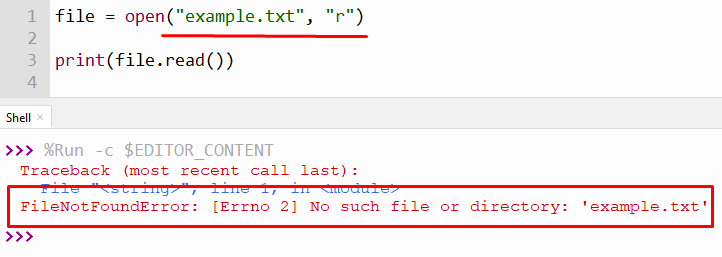
From the above snippet, it is verified that the program throws an error when we try to access a file that is not present in the directory.