Язык PHP: знакомство и установка
На языке PHP пишут сайты и веб-приложения — блоги, интернет-магазины или социальные сети. Основная сфера применения языка PHP — это веб, то есть сайты, которые мы каждый день посещаем через браузер компьютера или смартфона.
Важно понимать, что веб — это не весь интернет, а только самая большая и популярная его часть. Кроме веба через интернет работает электронная почта, мессенджеры, файлообменные сервисы, сетевые игры и многое другое.
Сегодня на PHP работает почти 78 миллионов сайтов.
Зачем нужен PHP
Основная задача PHP — это «оживление» HTML-страниц. Обычные HTML-страницы статичны. Это означает, что после того, как страницу создали и загрузили на сайт, при каждом обращении к этой странице браузер покажет её любому пользователю в неизменном виде.
Но этого не всегда достаточно.
Почти всегда пользователи приходят на сайт за информацией, которая всё время меняется, и нужно отображать её актуальное состояние. Например, показать курс валют, подсказать погоду на завтра или вывести счётчик посещений страницы.
Если использовать только HTML, то решить такие задачи не получится.

Как могут выглядеть счётчики на сайте
Здесь нам и понадобится PHP. Он позволяет изменять веб-страницу на сервере прямо перед тем, как она будет отправлена браузеру. Давайте разберёмся, как это работает.
PHP умеет исполнять код — так называемые сценарии. В ходе исполнения PHP может изменить или динамически создать любой HTML-код, который и является результатом исполнения сценария. Затем сервер отправляет этот код браузеру. При этом браузеру не известно, как была сформирована данная страница — статично сверстана верстальщиком, или динамически создана при участии PHP. Это не важно, так как браузер всегда работает только с тем, что получил от сервера.
Сценарий — это программа, которая находится на сервере и запускается в ответ на запрос от браузера.
Теперь мы можем понять, почему PHP называют препроцессором гипертекста. Когда браузер запрашивает страницу с адресом, который кончается на .php , веб-сервер обращается к PHP, и просит его выполнить сценарий из файла по этому адресу.
Выполнение сценария также называют его интерпретацией, а сам PHP — интерпретатором.
Вы можете попрактиковаться в создании динамических страниц с помощью PHP в этом тренажёре.
Установка и использование
Самая свежая версия PHP на момент выхода статьи — PHP 8. Рекомендуем использовать её.
Где скачать PHP
Под Windows мы рекомендуем использовать программную сборку OpenServer. После загрузки и установки на вашем компьютере появятся свежая версия PHP, веб-сервер, база данных, и много других программ и инструментов для удобной работы.
Для тех, кто пользуется MacOS или Linux, мы подготовили отдельные инструкции.
Программирование на php что это
Пример #1 Пример программирования на PHP
Вместо рутинного вывода HTML-кода командами языка (как это происходит, например, в Perl или C), скрипт PHP содержит HTML с встроенным кодом (в нашем случае, это вывод текста "Привет, я — скрипт PHP!"). Код PHP отделяется специальными начальным и конечным тегами <?php и ?> , которые позволяют "переключаться" в "PHP-режим" и выходить из него.
PHP отличается от JavaScript тем, что PHP-скрипты выполняются на сервере и генерируют HTML, который посылается клиенту. Если бы у вас на сервере был размещён скрипт, подобный вышеприведённому, клиент получил бы только результат его выполнения, но не смог бы выяснить, какой именно код его произвёл. Вы даже можете настроить свой сервер таким образом, чтобы обычные HTML-файлы обрабатывались процессором PHP, так что клиенты даже не смогут узнать, получают ли они обычный HTML-файл или результат выполнения скрипта.
PHP крайне прост для освоения, но вместе с тем способен удовлетворить запросы профессиональных программистов. Не пугайтесь длинного списка возможностей PHP. Вы можете быстро начать, и уже в течение нескольких часов сможете создавать простые PHP-скрипты.
Хотя PHP, главным образом, предназначен для работы в среде веб-серверов, область его применения не ограничивается только этим. Читайте дальше и не пропустите главу Возможности PHP либо, начните непосредственно с Вводного руководства, если вас интересует исключительно веб-программирование.
What Is PHP? Learning All About the Scripting Language
Hypertext Preprocessor (PHP) is an open-source, free server-side scripting language widely used in web development. According to Web Technology Surveys, PHP is used by 78.1% of all websites, including high-traffic websites like Facebook and Wikipedia.
Anyone can benefit from learning about PHP, but it is even more essential for those interested in web programming. PHP is available on all major operating systems, such as Linux, Microsoft Windows, and macOS. Most web servers, including Apache and IIS, also support PHP.
One of the main benefits of using PHP is advancing the customization of a WordPress site. Other features include great online support and documentation, so even beginners can learn PHP quickly.
This article will go over the basics of PHP. By the end of it, you will understand the full benefits of PHP and how to utilize it in WordPress.

What Is PHP? A Video Overview
For a quick, yet extensive overview on the subject, check out our video on PHP.

PHP is the language behind all WordPress plugins and themes. Knowing how to use PHP will improve your customization options. For example, if WordPress directories don’t have a design or tool you need for your website, you can simply create one with PHP.
To access a PHP file and edit its code, head to the File Manager of your web hosting server. With Hostinger, the File Manager button is under Files on the hPanel Dashboard.

From there, click on the PHP file you wish to edit, which will display the PHP content. Edit your PHP file there, and click the Save & Close button.
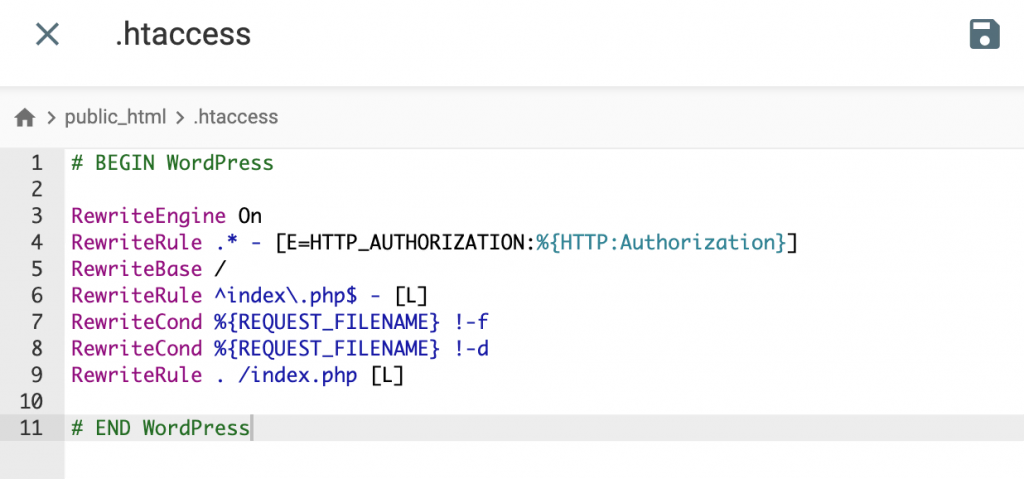
To edit a theme with PHP, head to your wp-content folder in File Manager and select the themes folder. Inside the themes folder, multiple PHP files indicate the site’s header, footer, comments, image, and function files.
Editing a PHP file will automatically make changes to your web page. For example, editing a website’s header can be done by making edits to the header.php file.
The same goes for editing a plugin. You may edit a plugin PHP file from the plugins folder inside your wp-content folder found in the root folder. The edits on each PHP file will directly affect the display of your web page.
To add PHP code to your posts or pages, install the Insert PHP Code Snippet plugin. Add the PHP code through Dashboard → XYZ PHP Code → PHPCode Snippets.
Select Add New PHP Code Snippet and insert your code into the field. To demonstrate, we’ve added the Hello World PHP script from the previous section next to the PHP code section.
For the Tracking Name, write down a name to label each PHP code. Then, click the Create button to continue.

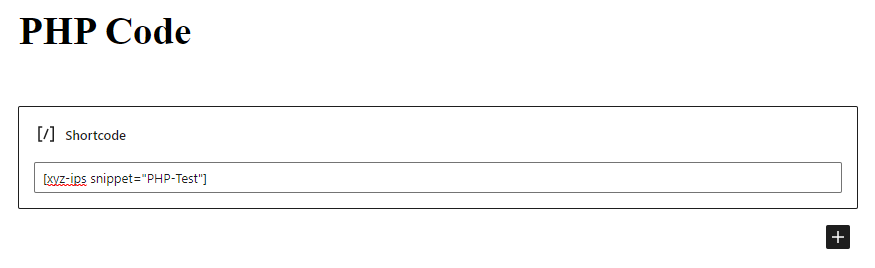
The plugin will generate a snippet shortcode, which will be the code for the post or page.

On the Gutenberg editor, add a Shortcode block. Then, copy and paste the snippet shortcode there. When you display the preview, it will show Hello World on your page or post.
Do You Need to Know PHP to Use WordPress?
Any user can use WordPress without knowing how to use PHP. However, since any user can create a plugin or a theme in WordPress as it is an open-source content management system (CMS), PHP can come in handy.
PHP also has extensive community documentation available for free that provides information for users of all levels.
Conclusion
PHP is a server-side scripting language that is popular in web development. PHP is executed on the server, which then gets translated into the client-side using HTML code. Your web browser will then create an output.
There are many reasons to use PHP, including:
- With PHP, you can create and customize eCommerce websites, blogs, social media, and additional email functionality.
- Information and documentation on PHP are widely available online, from the official documentation to many online tutorials.
- PHP is flexible and is available on all major operating systems and web servers.
PHP is especially beneficial for WordPress users, as it can be used to customize and develop themes and plugins. While learning PHP web development will be a great addition to your skillset as a WordPress webmaster, it is not a must.
What Is PHP FAQ
Is PHP a Coding Language?
Yes, PHP is a scripting language used mainly for server-side web development. Because of its open-source nature, PHP is a general-purpose language often used for other projects and graphical user interfaces.
What Does PHP Mean?
PHP stands for Hypertext Preprocessor. Originally, PHP was shorthand for Personal Home Page.
Why Should I Use PHP?
PHP was among the first scripting languages used to create interactive and dynamic websites. Being embedded in HTML, PHP makes it easy to add dynamic features to web pages without needing to rely on external data.
Astari is a digital marketing expert, with a focus on SEO and WordPress. She loves to share her wealth of knowledge through her writing, and enjoys surfing the internet for new information when she’s not out in the waves or hiking a mountain. Her mission is to learn something new every day, and she firmly believes that there is no such thing as too much knowledge.
Introduction to PHP
PHP (Hypertext Preprocessor) is a popular open-source programming language that is ideal for web development. It is frequently used in conjunction with other technologies to build dynamic and interactive webpages, such as HTML, CSS, and JavaScript.
This primer will cover the fundamentals of PHP and offer an overview of its essential features and capabilities. We will discuss subjects such as:
- Setting up a development environment
- Basic syntax and data types
- Variables and constants
- Control structures (if/else, loops, etc)
- Functions
- Arrays
- Working with forms and GET/POST data
- Connecting to databases
- Working with files and directories
- Error handling and debugging
- Best practices and security considerations
You will have a strong grasp of PHP and be able to construct simple scripts and web pages by the conclusion of this book. You will find more sophisticated features and capabilities as you continue to study and work with PHP, allowing you to construct more complex and dynamic web apps.
Before diving into PHP, it’s important to set up a development environment that will allow you to run PHP scripts. You can utilize a local development environment or a PHP-compatible hosting service. Following that, you may begin by studying PHP’s fundamental grammar, which includes variables, constants, data types, and control structures.
Next, you will learn about functions, which allow you to group related code together and make it easier to reuse and organize your code. Functions are a crucial element in every programming language for building manageable and reusable code.
Arrays are also an important topic to master when working with PHP. Arrays allow you to store and manipulate multiple values in a single variable. Arrays can be used to store and manipulate data, such as a list of items or a user’s personal information.
Another important aspect of web development is working with forms and GET/POST data. PHP provides several built-in functions that make it easy to access and process data submitted by forms. Connecting to databases and working with files and directories are other key concepts to grasp while working with PHP.
Finally, error handling and debugging are crucial skills to have when working with PHP. PHP provides several built-in functions and constructs that allow you to handle and debug errors and warnings that may occur during the execution of your code.
Furthermore, while dealing with PHP, security is a critical factor. PHP has a number of built-in functions and methods to assist you in securing your online application and protecting it from typical security risks.
To further deepen your understanding of PHP, it’s also important to explore and work with some popular PHP frameworks and libraries. Frameworks like Laravel, CodeIgniter, and Symfony give a set of pre-built methods and classes that can help you speed up development, enhance code organization, and make working with databases and other components simpler.
Additionally, it’s also a good idea to explore and learn how to use popular CMS (Content Management Systems) built on PHP such as WordPress, Joomla, and Drupal. These CMSs have a huge and active community, which means you can find a lot of resources, tutorials and plugins to improve your skills.
Finally, it’s also essential to keep up to date with the latest developments and trends in the PHP community. Follow blogs, forums, and social media accounts that focus on PHP development, and consider attending conferences and meetups to connect with other developers and learn about new tools and techniques.

Another important aspect of PHP development is the use of Object-Oriented Programming (OOP) concepts and design patterns. OOP allows you to represent real-world objects in your code, which can help with code structure and maintainability. It’s also a good idea to study and apply common design patterns like the Model-View-Controller (MVC) and Singleton patterns, which may help you arrange your code more logically and efficiently.
Furthermore, it’s important to understand the basics of web servers and how they work with PHP. Apache and Nginx are the most common web servers used with PHP, and understanding how they work can help you troubleshoot and optimize your PHP code. In order to quickly get started we recommend using XAMPP – which installs Apache, MySQL and PHP for you.
Another significant consideration while dealing with PHP is performance. Because PHP is an interpreted language, it can be slower than compiled languages such as C or C++. However, numerous approaches and technologies, such as caching, opcode caching, and profiling may be utilized to increase the efficiency of PHP code.
To summarize, PHP is a flexible and strong programming language commonly used in web development. This article gives a thorough introduction to PHP, including its essential features and capabilities. To master PHP, it is necessary to investigate frameworks and libraries, work with popular CMSs, stay current on the latest developments and trends in the PHP community, employ OOP concepts and design patterns, comprehend the fundamentals of web servers and how they interact with PHP, and consider performance optimization techniques. It’s also critical to practice and constantly enhance your abilities by constructing and working on projects. When it comes to PHP, whether you’re a newbie or an experienced developer, there’s always something new to learn and improve on.
Setting up a development environment
To set up a development environment for PHP, you will need to install a web server, a database management system, and a PHP runtime.
- Install a web server: The most commonly used web servers for PHP are Apache and Nginx. You can download and install either of these web servers on your local machine.
- Install a database management system: PHP works well with a variety of databases, but MySQL is the most commonly used. You can download and install MySQL on your local machine.
- Install a PHP runtime: PHP is a server-side scripting language, so it needs to be installed on your web server. You can download the latest version of PHP from the official website and install it on your web server.
- Configure the web server: After you have installed the web server, you will need to configure it to work with PHP. This will involve editing the server’s configuration files to add the PHP module and set the correct file associations.
- Test your setup: Once you have completed the above steps, you can test your setup by creating a PHP file with a simple script and accessing it through your web server. If everything is working correctly, you should see the output of the script in your browser.
- (optional) Developing Environment: Some developers prefer to use a development environment such as XAMPP, WAMP, or LAMP. These environments bundle Apache, MySQL, and PHP together and make it easy to set up and run a development server on your local machine.
It’s worth noting that the above steps may vary depending on the operating system and version you are using, you should follow the instructions for your specific system.
Instead of setting up the development environment yourself we recommend to use XAMPP.
Learn exactly how to set everything up by using our step-by-step development environment guide.
Basic syntax and data types
PHP has a syntax that is similar to that of many other programming languages, making it simple to learn for developers with prior familiarity with other languages.
- Basic Syntax:
- PHP code is surrounded by tags, which are intended to differentiate it from other languages such as HTML or JavaScript. The default tags are?php and?>, however if short tags are enabled in your php settings, you can use them instead.
- Comments in PHP are similar to comments in other languages, they start with a double forward slash (//) for single-line comments, or with /* and */ for multi-line comments.
- PHP statements are separated by semicolons (;) and the end of each statement. in PHP are denoted by a dollar sign ($), and must start with a letter or underscore and only contain letters, numbers and underscores.
- Data Types:
- PHP supports several data types, including:
- Integers: Whole numbers, such as -5, 0, and 42.
- Floats: Numbers with decimal points, such as 3.14159.
-
: Sequences of characters, such as “Hello World!” or “123”.
- Booleans: True or false values. : A collection of values, which can be of any data type. : A special data type that represents an instance of a class.
- Resources: A special data type that represents a external resources, like a database connection.
PHP automatically changes data types as needed, but it’s critical to understand and use the different data types effectively to avoid unexpected behavior. To determine the type of a variable, use the functions var dump() or print r().
It’s worth noting that strings in PHP may be expressed with single quotes (‘) or double quotes (“), with single quotes being somewhat quicker and requiring less memory. Single quotation marks will not parse escape sequences, however double quotation marks will.
To summarize, knowing the fundamental syntax and data types in PHP is critical for producing efficient and maintainable code. You can create variables, handle data, and implement fundamental control structures like as loops and conditional statements using this understanding.
Variables and constants
In addition to variables, PHP supports constants, which are identical to variables but cannot be modified once a value is given to a constant. Constants are defined with the define() function, which takes two arguments: the name of the constant and its value.
It’s worth noting that constants are case-sensitive by default, but you can make them case-insensitive by passing the third argument as true in the define function.
In conclusion, variables and constants are important notions in every programming language, and they are required for storing and manipulating data in PHP scripts. Variables can have their values reassigned, but constants retain the same value once defined. Constants allow you to declare values that you anticipate to remain constant during the life of your script, making your code more legible and manageable.
Control structures (if/else, loops, etc)
Control structures in PHP are used to control the flow of execution of your code, and include if/else statements, loops, and switch statements.
- If/Else Statements: The most basic control structure is the if statement, which allows you to execute a block of code if a certain condition is met. You can also use the else statement to execute another block of code if the condition is not met.
You can also use the elseif statement to chain multiple conditions together, and the ternary operator ( ?: ) as a shorthand for simple if/else statements.
- Loops: There are several types of loops in PHP, including for loops, while loops, and do-while loops. These allow you to repeat a block of code a specific number of times, or until a certain condition is met.
- Switch statements: A switch statement allows you to check the value of a variable against multiple cases. When a match is found, the code associated with that case is executed. If no match is found, the default case is executed if it exists.
In summary, control structures in PHP are used to regulate the flow of your code’s execution. If/else statements are used to make conditional judgments, loops to repeat a block of code, and switch statements to compare the value of a variable against various situations. Understanding and appropriately using these control structures can help you build more efficient and maintainable code.
Functions
Functions are a crucial element in every programming language for building manageable and reusable code. In PHP, functions allow you to organize a block of code and name it, which may then be called many times throughout your script.

To define a function in PHP, you use the function keyword, followed by the name of the function, a set of parentheses, and a block of code enclosed in curly braces. The function name must start with a letter or underscore, and only contain letters, numbers, and underscores.
Functions can also take one or more arguments as input, which are supplied to the function in parentheses when it is called. Within the function, these arguments can be utilized to do computations or make judgments.
Functions can also return a value using the return statement. This can be used to return the result of a calculation or the value of a variable.
In PHP, functions can be defined inside or outside of a class, when a function is defined inside a class it’s called a method, and it can access the properties of the class.
Functions can also be used to build a closure, also known as an anonymous function, which can be saved in a variable and then supplied as an argument to another function or returned as a value.
In summary, functions are a powerful tool in PHP that allow you to group a block of code together and name it, which can then be called multiple times throughout your script. Functions also allow you to take input parameters, return values, and create a closure, making it easier to write maintainable and reusable code. Functions can also be written as methods within a class, allowing you to encapsulate a class’s logic and attributes.
Learn more about functions our article Functions in PHP.
Arrays
An array is a data structure in PHP that allows you to store and organize a group of elements. These items can be of many sorts, such as integers, strings, or even other arrays. Each array element is given a unique index, which is used to access and manipulate the element. Arrays in PHP may be formed using the array() method or the square brackets [] syntax. They may also be modified using built-in methods like sort(), count(), and implode() (). Arrays are an integral aspect of every PHP developer’s arsenal for storing and manipulating vast amounts of data.
Read more about arrays in our Ultimate guide to PHP Arrays.
Working with forms and GET/POST data
When working with forms in PHP, the data submitted by the user is typically sent to the server using the GET or POST method. The GET method appends the form data to the end of the URL, while the POST method sends the data as part of the HTTP request body.
The $_GET global variable may be used to obtain data supplied by a form utilizing the GET technique. This variable is an associative array containing the form data’s key-value pairs. For example, if a form includes an input field called “name” and the user inputs “John Smith,” you may get the result by using $_GET[‘name’].
To access the data submitted by a form using the POST method, you can use the $_POST global variable. This variable works in the same way as $_GET, but it is used to access data submitted via the POST method.
It’s important to validate and sanitize the data before using it, to prevent security vulnerabilities such as SQL injection and cross-site scripting (XSS) attacks.
Additionally, you can use $_REQUEST variable to access data submitted by both GET and POST method.
Once you have access to the data, you can use it to perform various actions such as inserting the data into a database, sending an email, or displaying a message to the user.
In conclusion, forms and GET/POST data are critical in PHP web development. Understanding how to communicate with them is a critical component of developing dynamic and interactive online apps.
Connecting to databases
In PHP, there are several ways to connect to a database. One of the most popular ways is to use the MySQLi extension, which stands for MySQL Improved. The MySQLi extension provides an object-oriented interface for working with MySQL databases. To connect to a database using MySQLi, you will need to use the mysqli_connect() function. This function takes three parameters: the hostname of the database server, the username, and the password. Once you have connected to the database, you can use other MySQLi functions to execute queries, fetch data, and so on.

Here is an example of how to connect to a MySQL database using MySQLi in PHP:
The PDO (PHP Data Objects) extension is another common technique to connect to a database in PHP. PDO provides a consistent interface for interacting with several database types, such as MySQL, PostgreSQL, and SQLite. You must use the PDO() constructor to connect to a database using PDO. This constructor accepts three parameters: the database’s DSN (data source name), the username, and the password.
It is important to keep in mind that security best practices such as using prepared statements and avoiding SQL injection should always be considered when working with databases in PHP.
Continue reading about MySQL in our Connect to a MySQL database guide.
Working with files and directories
There are various built-in functions in PHP that enable you to operate with files and directories.
To read the contents of a file, you can use the file_get_contents() function. This function takes the path of the file as a parameter and returns the contents of the file as a string. Here is an example of how to read the contents of a file:
The file put contents() method can be used to write to a file. This function accepts two parameters: the file’s path and the contents to be written to the file. Here’s an example of writing to a file:
To check if a file exists, you can use the file_exists() function. This function takes the path of the file as a parameter and returns TRUE if the file exists and FALSE if it does not. Here is an example of how to check if a file exists:
The mkdir() method can be used to create a new directory. This method accepts the directory path as an argument and creates the directory with that path. Here’s an example of creating a new directory:
The rmdir() method can be used to delete a directory. This method accepts the directory’s path as an input and deletes the directory with the supplied path. Here’s an example of how to get rid of a directory:
When interacting with files and directories in PHP, it is critical to remember that suitable error handling should be established to manage any difficulties that may emerge, such as file not found, permission refused, and so on.
Error handling and debugging
The process of recording and dealing with problems that occur during the execution of a PHP script is referred to as error handling in PHP. PHP has various error-handling procedures and structures, such as the try and catch statements for managing exceptions and the trigger error() function for producing user-defined problems.
Debugging in PHP refers to the process of finding and fixing errors in a PHP script. PHP provides several tools for debugging, including the error_reporting() function for controlling the level of error reporting, and the var_dump() and print_r() functions for displaying the contents of variables. Additionally, many integrated development environments (IDEs) and text editors have built-in debugging functionality that can be used to step through code, set breakpoints, and inspect variables.
It’s also worth noting that PHP includes a development web server that may be used to execute and test PHP programs without the need for a full web server. This is particularly handy for debugging since it displays any issues that occur in the browser.
In general, adequate error handling and debugging should be implemented in your PHP programs. This can help you detect and solve errors before they create major problems, as well as making maintaining and updating your code easier.
Best practices and security considerations
There are several best practices and security considerations to keep in mind when working with PHP. Some of the most important include:

- Input validation: It’s important to validate all user input to ensure that it meets the expected format and type. This can help prevent common vulnerabilities such as SQL injection and cross-site scripting (XSS).
- Use prepared statements: When working with databases, it’s important to use prepared statements to protect against SQL injection attacks. Prepared statements allow you to separate data from the SQL query, so that user input is not directly inserted into the query.
- Escape output: When displaying user input on a web page, it’s important to properly escape any special characters to prevent XSS attacks. This can be done using the htmlspecialchars() function or similar.
- Use security functions: PHP has several built-in functions that can help improve security, such as password_hash() for storing hashed passwords, and random_bytes() for generating cryptographically secure random numbers.
- Keep software updated: It’s important to keep PHP and any other software used in your application up to date in order to take advantage of security fixes and patches.
- Avoid using global variables: Using global variables can lead to security issues and make the code difficult to understand and maintain. Instead, use function arguments, class properties, and other local variables to pass data around.
- Use a PHP framework: Using a well-established PHP framework can help you improve your code organization and also add more security features like CSRF protection and Input validation.
- Avoid using sensitive information in the codebase: It’s a bad practice to store sensitive information like database credentials and API keys in the codebase. It’s recommended to use environment variables to store them.
By following these best practices and security considerations, you can help protect your PHP application from common vulnerabilities and keep your code maintainable and secure.
Q: What is PHP?
A: PHP is an abbreviation for Hypertext Preprocessor. It is a server-side scripting language that is used for creating dynamic web pages. It is often used in combination with HTML, CSS, and JavaScript to create interactive and responsive websites.
Q: What type of websites can be built using PHP?
A: PHP can be used to create a wide range of websites, including e-commerce websites, content management systems, social media platforms, and more. Some popular examples of websites built using PHP include WordPress, Facebook, and Wikipedia.
Q: How does PHP work?
A: PHP code is executed on the server, and the resulting HTML is sent to the client’s web browser to be displayed. When a user requests a page that contains PHP code, the PHP code is executed by the server before the page is sent to the client. This allows for dynamic content to be generated on the fly, based on user input or other conditions.
Q: What are the main features of PHP?
A: Some of the main features of PHP include:
- Support for multiple databases, including MySQL, SQLite, and PostgreSQL.
- Support for object-oriented programming.
- Built-in functions for working with strings, arrays, and other data types.
- Support for file handling, including the ability to read and write files on the server.
- Support for cookies and sessions, which can be used to store data on the client’s web browser.
- Support for sending and receiving email.
Q: How do I install PHP on my computer?
A: The installation process for PHP depends on your operating system. On Windows, you can download a pre-compiled binary version of PHP from the official website and install it like any other software. On Mac and Linux, you can install PHP using a package manager like Homebrew or apt-get. Additionally, you will also need a web server like Apache or Nginx and a database management system like MySQL to run PHP on your computer.
Q: How do I run a PHP script?
A: To run a PHP script, you will need to have a web server installed on your computer. Once you have a web server running, you can place your PHP script in the appropriate directory (usually the “htdocs” or “public_html” folder) and then navigate to the script in your web browser. The server will execute the PHP code and return the resulting HTML to your browser.
Q: How do I debug a PHP script?
A: There are several ways to debug a PHP script. One common method is to use the “echo” statement to print out the values of variables and the results of calculations at various points in the script. Additionally, you can use the “var_dump()” function to print out the contents of an array or object. Other tools for debugging PHP include Xdebug, which provides more advanced features like stack traces and code coverage, and the “error_log()” function, which writes error messages to a log file.
Q: What are the best practices for writing PHP code?
A: Some best practices for writing PHP code include:
- Using proper indentation and whitespace to make the code more readable.
- Using descriptive variable and function names.
- Using comments to explain the purpose of the code and any complex algorithms.
- Using functions to organize your code and make it more reusable.
- Using classes and objects to organize your code and take advantage of object-oriented programming.
- Sanitizing user input to prevent security vulnerabilities like SQL injection.
Q: What are the common mistakes made by PHP developers?