Php как создать ассоциативный массив
Если выводить здесь вид массива, то:
Если в значении ассоциативного массива применяется два слова, например так:
То возникнет ошибка типа:
Чтобы не возникала данная ошибка ассоциативного массива, то нужно заключить строку с пробелом в кавычки!
Так, обычно, ассоциативный массив в строку не записывают — это просто неудобно. пишут каждую новую ячейку с новой строки:
$цена = array («помидоры» => 15,
«ключ» => «два слова»
Как сделать вывод ассоциативного массива php
Как вывести ассоциативный массив в php на экран!? Нам потребуется выше описанный массив, не сам массив а переменная и функция print_r, которая сможет вывести ассоциативный массив на экран:
Результат вывода ассоциативного массива в php
Пример многомерного «ассоциативного массива» в php
Объединим сразу и многомерный ассоциативный массив и вывод данного массива ! Далее мы видим, что внутри одного массива array , находится несколько других ассоциативных массива array !
Вывод ассоциативного массива с помощью print_r
Для того, чтобы вывести какой-то ассоциативный массив на экран, его нужно сделать, давайте возьмем вот такой:
Теперь, применим функцию print_r к нашему ассоциативному массиву:
И выведем результат работы print_r с ассоциативным массивом прямо здесь:
Как вывести ассоциативный массив через цикл
Возьмем тот же ассоциативный массив , что мы выводили выше :
Вывод из массива ячейки под именем рост:
foreach ($array as $key => $value)
Это было просто! Давайте все, что есть в массиве выведем через foreach .. начиная с ключа, до значений..
$array_keys = ( array_keys ($array ));
foreach ($array as $key => $value)
echo 'имя ключа ='. $array_keys[$i].' | , значение ячейки рост = '. $array [$key][рост]. ' | , значение ячейки вес = '. $array [$key][вес].'<br>';
Как вывести все ключи ассоциативного массива!?
Опять возьмем выше идущий ассоциативный массив и применим к нему функцию array_keys :
Результат вывода всех ключей ассоциативного массива
Вывод значения определенного ключа ассоциативного массива
Это делается очень просто! пишем наш ассоциативный массив, далее квадратные скобки и внутри записываем эту фамилию, и нам остается только вывести определенную ассоциативного массива:
Результат вывода определенной ячейки ассоциативного массива
Вывод значения определенной ячейки ассоциативного массива -> второго уровня
Результат вывода значения определенной ячейки ассоциативного массива -> второго уровня
Вывод значения по номеру ключа ассоциативного массива
Результат вывода значения по номеру ключа ассоциативного массива
Заменить значение по ключу ассоциативного массива
Не будем выводить весь массив, выведем только ячейку массива:
Результат изменения значения ячейки ассоциативного массива по ключу
[имя] => Новое значение
добавить в ассоциативный массив
Опять же. не будем выводить весь массив, выведем только ячейку массива:
Результат добавления новой ячейки в ассоциативный массив
[имя] => Новое значение
[новый_ключ] => Новое значение нового ключа
Как удалить ячейку/элемент в ассоциативный массив
Собственно массив, который мы возьмем выше. Именно в таком виде.
Далее нам потребуется функция unset. Применяем её к той ячейке «ассоциативного массива«, который мы хотим удалить:
И далее выведем этот же массив с помощью print_r:
Разместим данный код прямо здесь и посмотрим, что у нас получилось!
Результат удаления ячейки/элемента в ассоциативный массив
[имя] => Новое значение
[новый_ключ] => Новое значение нового ключа
Как переименовать ключ в ассоциативном массиве
Итак. предположим, что нам нужно изменить имя ключа, без изменения его значения.
К сожалению в случае переименования ключа в ассоциативном массиве , нет никакой такой замечательной функции rename_key_array.
Поэтому, придется совершить пару телодвижений!
Сверху у нас есть массив и там же есть ячейка «$array[Аминев][рост]» — выведем её с помощью echo $array[Аминев][рост]; :
Из результата мы можем сделать вывод, что ключ массива [рост] — существует и его значение — 178
Переименуем ключ массива:
Для того, чтобы переименовать ключ массива, нам нужно :
Создаем новый ключ :
Ему присваиваем значение ключа , который разбирали выше.
Старый ключ со значением удаляем:
Теперь, мы можем вывести значение переименованного ключа:
Выведем полностью массив с помощью print_r($array);
Результат переименовывания ключа в ассоциативном массиве
[имя] => Новое значение
[новый_ключ] => Новое значение нового ключа
Получить первую ячейку ассоциативного массива
Для этого вам понадобится массив(ассоциативный) который вы уже видели выше($цена).
Навигация по пункту:
Получить первую ячейку ассоциативного массива с помощью array_shift
Внимание! данная функция отрезает от существующего массива первый элемент и ваш первоначальный массив становится на первую ячейку меньше!
Если вам нужен первоначальный массив, тто поступаем так:
И далее вы без боязни можете получить первую ячейку ассоциативного массива:
Создание массивов в PHP. Простой, многомерный, ассоциативный
В этой небольшой статье мы рассмотрим несколько способов работы с массивами. Стоит отметить, это один из самых важных типов данных и современные языки программирования даже сложно представить без них. Что же такое массив?
Массив представляет собой структурированный набор данных.
По их структуре можно определить это простой массив или ассоциативный. Нельзя сказать наверняка какой из них лучше, т.к. применять тот или иной тип нужно по ситуации.
Как создать простой массив в PHP
Вот как выглядит простой массив:
Сразу же хочу обратить ваше внимание на данные (да, я специально их так записал �� ). Данные типа строка, или string всегда записывайте в кавычках, не важно в каких, пойдут и одинарные и двойные (главное чтобы строка начиналась и закрывалась такой же кавычкой). У числа 29 тип integer, или число – для таких типов данных кавычки не нужны.
Проверим как выглядит массив $my_array:
так выглядит простой массив.
0,1,2 – индексы нашего массива. С помощью индексов мы можем вывести что-то конкретное из массива.
Также, мы можем создать такой же массив если напишем:
И, есть еще третий способ:
индексы будут заполнены от 0.
PHP что такое ассоциативный массив
Что такое простой массив мы уже разобрались. Ассоциативный массив отличается тем, что вместо индексов используют ключи. То есть, для доступа к значениям мы уже не будем использовать 0,1 или 2. Запишем наш простой массив как ассоциативный:
И для вызова мы будем использовать
Вместо цифры (индекса) мы задаем осмысленное название (ассоциацию) и наш индекс теперь можно назвать ключем массива (item, sky, number). Наиболее популярная и, пожалуй, самая удобная запись ассоциативного массива:
Многомерный массив
Буквально пару слов про этого гиганта ��
Как вы поняли, вместо значения, которым раньше была строка или число, теперь выступает такой тип данных как массив (сделаю тебе массив в массиве, чтобы когда ты вызывал массив там был еще один массив :)).
автор: Dmitriy
З 2011 року займаюся веб-розробкою. Зараз я – PHP Full Stack Developer.
Обговорити ваш проект, а також дізнатися більше про мене ви можете на цьому сайті:
dev.forwww.com
2 коментаря
Напомним, что массивы JavaScript могут содержать в качестве элементов другие массивы. Эту особенность можно использовать для создания многомерных массивов. Для доступа к элементам в массиве массивов достаточно использовать кадратные скобки дважды.
Что такое ассоциативные массивы в PHP: как создать, вывести и изменить

Массив в PHP (от англ. Array) — это глобальный объект для хранения данных упорядоченным образом. Как устроен: упорядоченный список элементов всегда имеет собственный ключ, он называется индексом, а каждое значение в такой коллекции данных называется элементом. При этом отсчет индекса всегда начинается с нуля.
Самые частые примеры упорядоченных коллекций в реальном мире — списки данных, например, список HTML-элементов, список пользователей, список продуктов, список адресов.
Если обычный массив похож на числовую линейку, то двумерный — это как массив массивов. Вот как происходит обращение к элементам такого объекта:
- В стандартном одномерном массиве вы можете получить доступ к любому объекту по его номеру в ряду, например, array[21] даст вам 22-й элемент.
- В двумерном к элементам обращаются по строке и столбцу, например, array2d[5][6] даст вам 7-й элемент 6-го элемента.
Аналогичным образом организованы и ещё более многомерные варианты, доступ к которым осуществляется как array[5][3][4][7][. ]. Такие называются многомерными, поскольку они существуют более чем в одном измерении.
Простыми словами, массив PHP — это упорядоченный список элементов с указанным индексом (ключом к ним) для быстрого получения доступа к любому элементу.
В чём отличие ассоциативного массива от простого массива. Как создать ассоциативный массив
Так же, как мы объявляем любой объект типа array:
Разница заключается в том, что это ассоциативный тип. В стандартном массиве, напомним, вы обращаетесь к элементу по его позиции, например, так:
В ассоциативном массиве в качестве такого ключа используются данные, а не индекс, как в данном случае. Например:
Чтобы получить доступ к этому значению, мы используем тот же ключ, как показано ниже:
Array_keys(). Использовать функцию можно в тех случаях, когда нужно получить список всех ключей, используемых в массиве, или функци.
Array_values(). Подойдет, когда нужно получить простой массив значений в некоторой произвольной последовательности.
Вы можете инициализировать ассоциативный массив при его объявлении. Например, вот так:
И какой-нибудь разработчик наверняка будет использовать соответствующие объекты гораздо чаще, чем ассоциативные массивы. Например, только тогда, когда нужна классическая карта, например – массив объектов, индексированных по их атрибуту ‘id’.
Давайте перейдём от абстрактных случаев к более реальным. Допустим, что у нас имеется список пользователей и на нужно иметь возможность быстро найти их по адресу электронной почты. Учитывая вышесказанное, построить их карту можно, например, вот таким образом:
Как создать. Примеры
Итак, ассоциативный массив — это массив, использующий именованные ключи, которые им присваивается.
Существует два способа создания ассоциативного массива.
Затем такие именованные ключи можно использовать в сценарии:
Цикл по ассоциативному типу. Пример
Чтобы просмотреть и вывести все значения ассоциативного массива, можно использовать цикл foreach, например, вот так:
Что такое ассоциативный массив + пример
Ассоциативный вид объекта array — это структура данных, которая позволяет хранить пары типа ключ-значение (с уникальными строками в качестве ключей).
Ассоциативные массивы часто используются, когда нужно хранить данные в структурированном виде, но с возможностью их лёгкого извлечения впоследствии. Например, вы можете использовать ассоциативный тип массива для хранения информации о пользователе, где каждый ключ — это имя атрибута пользователя (например, «имя», «email», «возраст»), а каждое значение — соответствующее значение этого атрибута. Чтобы получить данные, хранящиеся в ассоциативном массиве, нужно использовать ключ для поиска соответствующего значения.
Вот пример того, как можно использовать ассоциативный массив в PHP:
В этом примере мы создали ассоциативный массив $user, в котором хранится информация о пользователе. Мы можем получить доступ к значениям, хранящимся в нем, используя ключи (например, «name», «email», «age»), указанные в квадратных скобках после имени массива.
Не знаете с чего начать обучение? Прежде чем браться за изучение полноценного языка программирования PHP, разумно будет пройти курс «Веб-разработчик». Если PHP кажется слишком сложным — запишитесь на курс «Основы вёрстки». В указанных курсах вы получите базис для дальнейшего освоения не только PHP но и других языков программирования.
Как вывести ассоциативный массив. С примером
Для вывода воспользуемся print_r. Например, вот таким образом:
Получаем следующий вывод:
Что такое многомерный ассоциативный массив + пример
Многомерный массив — это массив, содержащий один или несколько массивов.
PHP поддерживает многомерные массивы глубиной в два / три / четыре / пять и более уровней. Однако, объекты глубиной более трех уровней сложны в управлении даже для опытных разработчиков.
Размерность указывает на количество индексов, необходимых для выбора элемента:
Для двумерного требуется два индекса.
Для трехмерного потребуется три индекса для выбора элемента.
Двухмерный. Примеры
Двумерный — это как массив массивов (а трехмерный — это массив массивов массивов и так далее).
Многомерный тип массива используется для хранения объекта в непостоянных значениях.
Ассоциативный тип, напомним, хранит данные в виде пар ключ-значение, где ключ может быть целым числом или строкой.
Многомерный ассоциативный тип часто используется для хранения данных в групповом отношении.
Как создать двухмерный тип
На секунду представим, что в нашем мире существуют два сюрреалистических языка — Peton и PeeHpee. И попробуем описать их главные характеристики используя массивы:
Вывод будет таким:
В чем отличие от ассоциативного массива
Оба типа используются для хранения нескольких значений. Разница заключается в том, как они организованы и как их индексировать.
Многомерный массив может иметь любое количество измерений:
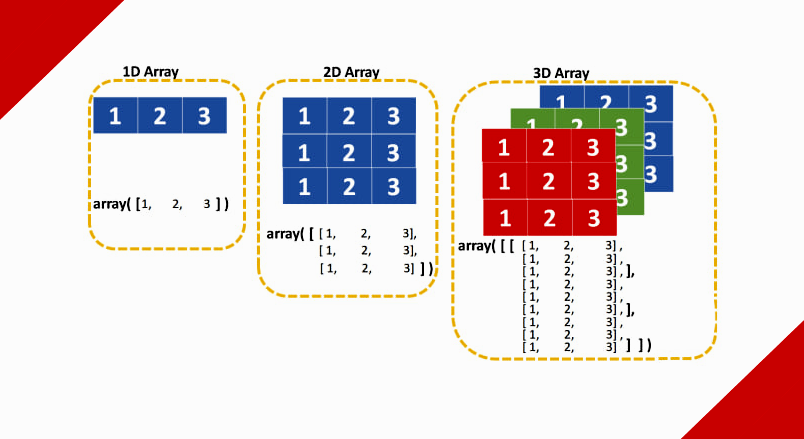
Сравнение одномерных, двухмерных и трёхмерных объектов типа Array
Чтобы найти значение, необходимо указать его позицию в самом массиве. Так в одномерным массиве нужно будет указать только индекс, в двухмерном — строку и столбец, в трёхмерном — плоскость, строку и столбец. Существуют массивы гораздо большей размерности (более глубокие), просто их трудно будет представить.
Ассоциативный тип — это совсем другое. В многомерных массивах вы находите данные по позиции. В ассоциативном – по ключу, который может быть любым, например, строкой, датой, цветом и так далее.
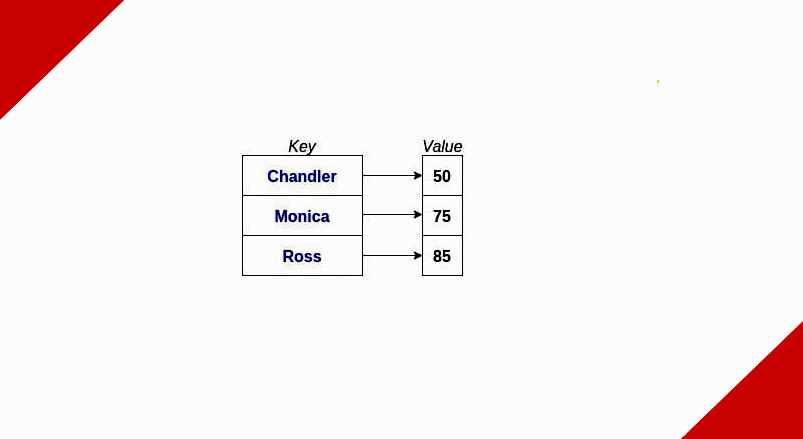
Пример ассоциативного типа
В данном случае, если вы спросите «Какое значение для Chandler?», array вернет 50 и так далее.
Вообще существует множество структур данных, которые можно использовать для реализации ассоциативных типов. Двоичные деревья и hashtable — самые популярные из них. И вы можете комбинировать эти структуры: например, значение в ассоциативном массиве может быть многомерным массивом.
Как заменить значение по ключу ассоциативного массива. Примеры
Здесь нет ничего сложного. Допустим у нас есть такой объект-ключ:
Наша задача — произвести замену согласно ключу. Элементарно берём и присваиваем любое новое значение. Например, вот по такому шаблону:
А теперь попробуем сделать вывод не объекта целиком, а лишь одной ячейки:
Таким образом, мы успешно заменили значение в массиве согласно его ключу.
Как добавить элемент + пример
Чтобы добавить новый элемент в ассоциативный массив, нужно указать новый ключ и присвоить ему значение. Другие методы предполагают использование функции array_push() — для добавления нового элемента в конец массива.
Приведенный ниже пример демонстрирует, как просто добавить новый элемент в существующий ассоциативный массив.
Используя echo и print_r(), мы выводим массив до и после добавления нового элемента.
Как удалить элемент + пример
Вы можете использовать функцию unset() для удаления целого элемента из ассоциативного массива. Укажите массив и ключ внутри функции unset, и она удалит элемент.
В примере ниже будет удален элемент с ключом «Jorik».
Таким образом, элемент с ключом ‘Jorik’ успешно удалён из нашего массива.
Полезные видео
Чтобы лучше закрепить тему обязательно посмотрите эти пять видео — они помогут разобраться в теме чуть подробнее.
Вы усвоите синтаксис для доступа к отдельным элементам в массиве. Вы также подробнее узнаете об ассоциативных массивах, которые позволяют связывать ключ с каждым значением.
Вы узнаете все, что вам нужно знать о массивах, чтобы начать их использовать. Подробнее об индексации таких объектов, а также как происходит переиндексация. Также вы узнаете, как проверить, существует ли элемент в массиве по определенному ключу, и в чем разница между array_key_exists и isset().
Видео расскажет о тонкостях создания ассоциативного массива простым языком, лишь на одном, простом примере.
В этом коротком видео вы узнаете, как создать ассоциативный массив, выполнить цикл и вывести значение отдельных элементов. Это видео также поможет понять: как заполнять элементы HTML-формы, перебирая элементы массива.
Различия между простыми и ассоциативными массивами в PHP. Немного о том, как использовать метод foreach для циклического просмотра любого типа массива.
PHP — неотъемлемая часть бэкэнд-разработки в 2023 году. Успей попасть в группу сегодня и получи профессию разработчика уже завтра!
Php как создать ассоциативный массив
Array elements can be accessed using the array[key] syntax.
Example #7 Accessing array elements
var_dump ( $array [ «foo» ]);
var_dump ( $array [ 42 ]);
var_dump ( $array [ «multi» ][ «dimensional» ][ «array» ]);
?>
The above example will output:
Note:
Prior to PHP 8.0.0, square brackets and curly braces could be used interchangeably for accessing array elements (e.g. $array[42] and $array <42>would both do the same thing in the example above). The curly brace syntax was deprecated as of PHP 7.4.0 and no longer supported as of PHP 8.0.0.
Example #8 Array dereferencing
<?php
function getArray () <
return array( 1 , 2 , 3 );
>
$secondElement = getArray ()[ 1 ];
?>
Note:
Attempting to access an array key which has not been defined is the same as accessing any other undefined variable: an E_WARNING -level error message ( E_NOTICE -level prior to PHP 8.0.0) will be issued, and the result will be null .
Note:
Array dereferencing a scalar value which is not a string yields null . Prior to PHP 7.4.0, that did not issue an error message. As of PHP 7.4.0, this issues E_NOTICE ; as of PHP 8.0.0, this issues E_WARNING .
Creating/modifying with square bracket syntax
An existing array can be modified by explicitly setting values in it.
This is done by assigning values to the array , specifying the key in brackets. The key can also be omitted, resulting in an empty pair of brackets ( [] ).
If $arr doesn't exist yet or is set to null or false , it will be created, so this is also an alternative way to create an array . This practice is however discouraged because if $arr already contains some value (e.g. string from request variable) then this value will stay in the place and [] may actually stand for string access operator. It is always better to initialize a variable by a direct assignment.
Note: As of PHP 7.1.0, applying the empty index operator on a string throws a fatal error. Formerly, the string was silently converted to an array.
Note: As of PHP 8.1.0, creating a new array from false value is deprecated. Creating a new array from null and undefined values is still allowed.
To change a certain value, assign a new value to that element using its key. To remove a key/value pair, call the unset() function on it.
<?php
$arr = array( 5 => 1 , 12 => 2 );
$arr [] = 56 ; // This is the same as $arr[13] = 56;
// at this point of the script
$arr [ «x» ] = 42 ; // This adds a new element to
// the array with key «x»
unset( $arr [ 5 ]); // This removes the element from the array
unset( $arr ); // This deletes the whole array
?>
Note:
As mentioned above, if no key is specified, the maximum of the existing int indices is taken, and the new key will be that maximum value plus 1 (but at least 0). If no int indices exist yet, the key will be 0 (zero).
Note that the maximum integer key used for this need not currently exist in the array . It need only have existed in the array at some time since the last time the array was re-indexed. The following example illustrates:
<?php
// Create a simple array.
$array = array( 1 , 2 , 3 , 4 , 5 );
print_r ( $array );
// Now delete every item, but leave the array itself intact:
foreach ( $array as $i => $value ) <
unset( $array [ $i ]);
>
print_r ( $array );
// Append an item (note that the new key is 5, instead of 0).
$array [] = 6 ;
print_r ( $array );
// Re-index:
$array = array_values ( $array );
$array [] = 7 ;
print_r ( $array );
?>
The above example will output:
Array destructuring
Arrays can be destructured using the [] (as of PHP 7.1.0) or list() language constructs. These constructs can be used to destructure an array into distinct variables.
<?php
$source_array = [ ‘foo’ , ‘bar’ , ‘baz’ ];
[ $foo , $bar , $baz ] = $source_array ;
echo $foo ; // prints «foo»
echo $bar ; // prints «bar»
echo $baz ; // prints «baz»
?>
Array destructuring can be used in foreach to destructure a multi-dimensional array while iterating over it.
foreach ( $source_array as [ $id , $name ]) <
// logic here with $id and $name
>
?>
Array elements will be ignored if the variable is not provided. Array destructuring always starts at index 0 .
<?php
$source_array = [ ‘foo’ , ‘bar’ , ‘baz’ ];
// Assign the element at index 2 to the variable $baz
[, , $baz ] = $source_array ;
echo $baz ; // prints «baz»
?>
As of PHP 7.1.0, associative arrays can be destructured too. This also allows for easier selection of the right element in numerically indexed arrays as the index can be explicitly specified.
<?php
$source_array = [ ‘foo’ => 1 , ‘bar’ => 2 , ‘baz’ => 3 ];
// Assign the element at index ‘baz’ to the variable $three
[ ‘baz’ => $three ] = $source_array ;
echo $three ; // prints 3
$source_array = [ ‘foo’ , ‘bar’ , ‘baz’ ];
// Assign the element at index 2 to the variable $baz
[ 2 => $baz ] = $source_array ;
echo $baz ; // prints «baz»
?>
Array destructuring can be used for easy swapping of two variables.
echo $a ; // prints 2
echo $b ; // prints 1
?>
Note:
The spread operator ( . ) is not supported in assignments.
Note:
Attempting to access an array key which has not been defined is the same as accessing any other undefined variable: an E_WARNING -level error message ( E_NOTICE -level prior to PHP 8.0.0) will be issued, and the result will be null .
Useful functions
There are quite a few useful functions for working with arrays. See the array functions section.
Note:
The unset() function allows removing keys from an array . Be aware that the array will not be reindexed. If a true "remove and shift" behavior is desired, the array can be reindexed using the array_values() function.
<?php
$a = array( 1 => ‘one’ , 2 => ‘two’ , 3 => ‘three’ );
unset( $a [ 2 ]);
/* will produce an array that would have been defined as
$a = array(1 => ‘one’, 3 => ‘three’);
and NOT
$a = array(1 => ‘one’, 2 =>’three’);
*/
$b = array_values ( $a );
// Now $b is array(0 => ‘one’, 1 =>’three’)
?>
The foreach control structure exists specifically for array s. It provides an easy way to traverse an array .
Array do's and don'ts
Why is $foo[bar] wrong?
Always use quotes around a string literal array index. For example, $foo['bar'] is correct, while $foo[bar] is not. But why? It is common to encounter this kind of syntax in old scripts:
This is wrong, but it works. The reason is that this code has an undefined constant ( bar ) rather than a string ( 'bar' — notice the quotes). It works because PHP automatically converts a bare string (an unquoted string which does not correspond to any known symbol) into a string which contains the bare string . For instance, if there is no defined constant named bar , then PHP will substitute in the string 'bar' and use that.
The fallback to treat an undefined constant as bare string issues an error of level E_NOTICE . This has been deprecated as of PHP 7.2.0, and issues an error of level E_WARNING . As of PHP 8.0.0, it has been removed and throws an Error exception.
Note: This does not mean to always quote the key. Do not quote keys which are constants or variables, as this will prevent PHP from interpreting them.
The above example will output:
More examples to demonstrate this behaviour:
<?php
// Show all errors
error_reporting ( E_ALL );
$arr = array( ‘fruit’ => ‘apple’ , ‘veggie’ => ‘carrot’ );
// Correct
print $arr [ ‘fruit’ ]; // apple
print $arr [ ‘veggie’ ]; // carrot
// Incorrect. This works but also throws a PHP error of level E_NOTICE because
// of an undefined constant named fruit
//
// Notice: Use of undefined constant fruit — assumed ‘fruit’ in.
print $arr [ fruit ]; // apple
// This defines a constant to demonstrate what’s going on. The value ‘veggie’
// is assigned to a constant named fruit.
define ( ‘fruit’ , ‘veggie’ );
// Notice the difference now
print $arr [ ‘fruit’ ]; // apple
print $arr [ fruit ]; // carrot
// The following is okay, as it’s inside a string. Constants are not looked for
// within strings, so no E_NOTICE occurs here
print «Hello $arr [ fruit ] » ; // Hello apple
// With one exception: braces surrounding arrays within strings allows constants
// to be interpreted
print «Hello < $arr [ fruit ]>» ; // Hello carrot
print «Hello < $arr [ 'fruit' ]>» ; // Hello apple
// This will not work, and will result in a parse error, such as:
// Parse error: parse error, expecting T_STRING’ or T_VARIABLE’ or T_NUM_STRING’
// This of course applies to using superglobals in strings as well
print «Hello $arr [ ‘fruit’]» ;
print «Hello $_GET [ ‘foo’]» ;
// Concatenation is another option
print «Hello » . $arr [ ‘fruit’ ]; // Hello apple
?>
When error_reporting is set to show E_NOTICE level errors (by setting it to E_ALL , for example), such uses will become immediately visible. By default, error_reporting is set not to show notices.
As stated in the syntax section, what's inside the square brackets (' [ ' and ' ] ') must be an expression. This means that code like this works:
This is an example of using a function return value as the array index. PHP also knows about constants:
Note that E_ERROR is also a valid identifier, just like bar in the first example. But the last example is in fact the same as writing:
because E_ERROR equals 1 , etc.
So why is it bad then?
At some point in the future, the PHP team might want to add another constant or keyword, or a constant in other code may interfere. For example, it is already wrong to use the words empty and default this way, since they are reserved keywords.
Note: To reiterate, inside a double-quoted string , it's valid to not surround array indexes with quotes so "$foo[bar]" is valid. See the above examples for details on why as well as the section on variable parsing in strings.
Converting to array
For any of the types int , float , string , bool and resource , converting a value to an array results in an array with a single element with index zero and the value of the scalar which was converted. In other words, (array)$scalarValue is exactly the same as array($scalarValue) .
If an object is converted to an array , the result is an array whose elements are the object 's properties. The keys are the member variable names, with a few notable exceptions: integer properties are unaccessible; private variables have the class name prepended to the variable name; protected variables have a '*' prepended to the variable name. These prepended values have NUL bytes on either side. Uninitialized typed properties are silently discarded.
class A <
private $B ;
protected $C ;
public $D ;
function __construct ()
<
$this -> < 1 >= null ;
>
>
var_export ((array) new A ());
?>
The above example will output:
These NUL can result in some unexpected behaviour:
class A <
private $A ; // This will become ‘\0A\0A’
>
class B extends A <
private $A ; // This will become ‘\0B\0A’
public $AA ; // This will become ‘AA’
>
The above example will output:
The above will appear to have two keys named 'AA', although one of them is actually named '\0A\0A'.
Converting null to an array results in an empty array .
Comparing
It is possible to compare arrays with the array_diff() function and with array operators.
Array unpacking
An array prefixed by . will be expanded in place during array definition. Only arrays and objects which implement Traversable can be expanded. Array unpacking with . is available as of PHP 7.4.0.
It's possible to expand multiple times, and add normal elements before or after the . operator:
Example #9 Simple array unpacking
<?php
// Using short array syntax.
// Also, works with array() syntax.
$arr1 = [ 1 , 2 , 3 ];
$arr2 = [. $arr1 ]; //[1, 2, 3]
$arr3 = [ 0 , . $arr1 ]; //[0, 1, 2, 3]
$arr4 = [. $arr1 , . $arr2 , 111 ]; //[1, 2, 3, 1, 2, 3, 111]
$arr5 = [. $arr1 , . $arr1 ]; //[1, 2, 3, 1, 2, 3]
function getArr () <
return [ ‘a’ , ‘b’ ];
>
$arr6 = [. getArr (), ‘c’ => ‘d’ ]; //[‘a’, ‘b’, ‘c’ => ‘d’]
?>
Unpacking an array with the . operator follows the semantics of the array_merge() function. That is, later string keys overwrite earlier ones and integer keys are renumbered:
Example #10 Array unpacking with duplicate key
<?php
// string key
$arr1 = [ «a» => 1 ];
$arr2 = [ «a» => 2 ];
$arr3 = [ «a» => 0 , . $arr1 , . $arr2 ];
var_dump ( $arr3 ); // [«a» => 2]
// integer key
$arr4 = [ 1 , 2 , 3 ];
$arr5 = [ 4 , 5 , 6 ];
$arr6 = [. $arr4 , . $arr5 ];
var_dump ( $arr6 ); // [1, 2, 3, 4, 5, 6]
// Which is [0 => 1, 1 => 2, 2 => 3, 3 => 4, 4 => 5, 5 => 6]
// where the original integer keys have not been retained.
?>
Note:
Keys that are neither integers nor strings throw a TypeError . Such keys can only be generated by a Traversable object.
Note:
Prior to PHP 8.1, unpacking an array which has a string key is not supported:
$arr1 = [ 1 , 2 , 3 ];
$arr2 = [ ‘a’ => 4 ];
$arr3 = [. $arr1 , . $arr2 ];
// Fatal error: Uncaught Error: Cannot unpack array with string keys in example.php:5
$arr4 = [ 1 , 2 , 3 ];
$arr5 = [ 4 , 5 ];
$arr6 = [. $arr4 , . $arr5 ]; // works. [1, 2, 3, 4, 5]
?>
Examples
The array type in PHP is very versatile. Here are some examples:
<?php
// This:
$a = array( ‘color’ => ‘red’ ,
‘taste’ => ‘sweet’ ,
‘shape’ => ’round’ ,
‘name’ => ‘apple’ ,
4 // key will be 0
);
$b = array( ‘a’ , ‘b’ , ‘c’ );
// . . .is completely equivalent with this:
$a = array();
$a [ ‘color’ ] = ‘red’ ;
$a [ ‘taste’ ] = ‘sweet’ ;
$a [ ‘shape’ ] = ’round’ ;
$a [ ‘name’ ] = ‘apple’ ;
$a [] = 4 ; // key will be 0
// After the above code is executed, $a will be the array
// array(‘color’ => ‘red’, ‘taste’ => ‘sweet’, ‘shape’ => ’round’,
// ‘name’ => ‘apple’, 0 => 4), and $b will be the array
// array(0 => ‘a’, 1 => ‘b’, 2 => ‘c’), or simply array(‘a’, ‘b’, ‘c’).
?>
Example #11 Using array()
<?php
// Array as (property-)map
$map = array( ‘version’ => 4 ,
‘OS’ => ‘Linux’ ,
‘lang’ => ‘english’ ,
‘short_tags’ => true
);
// strictly numerical keys
$array = array( 7 ,
8 ,
0 ,
156 ,
— 10
);
// this is the same as array(0 => 7, 1 => 8, . )
$switching = array( 10 , // key = 0
5 => 6 ,
3 => 7 ,
‘a’ => 4 ,
11 , // key = 6 (maximum of integer-indices was 5)
‘8’ => 2 , // key = 8 (integer!)
’02’ => 77 , // key = ’02’
0 => 12 // the value 10 will be overwritten by 12
);
Example #12 Collection
<?php
$colors = array( ‘red’ , ‘blue’ , ‘green’ , ‘yellow’ );
foreach ( $colors as $color ) <
echo «Do you like $color ?\n» ;
>
The above example will output:
Changing the values of the array directly is possible by passing them by reference.
Example #13 Changing element in the loop
<?php
foreach ( $colors as & $color ) <
$color = strtoupper ( $color );
>
unset( $color ); /* ensure that following writes to
$color will not modify the last array element */
The above example will output:
This example creates a one-based array.
Example #14 One-based index
The above example will output:
Example #15 Filling an array
Array s are ordered. The order can be changed using various sorting functions. See the array functions section for more information. The count() function can be used to count the number of items in an array .
Example #16 Sorting an array
Because the value of an array can be anything, it can also be another array . This enables the creation of recursive and multi-dimensional array s.
Example #17 Recursive and multi-dimensional arrays
<?php
$fruits = array ( «fruits» => array ( «a» => «orange» ,
«b» => «banana» ,
«c» => «apple»
),
«numbers» => array ( 1 ,
2 ,
3 ,
4 ,
5 ,
6
),
«holes» => array ( «first» ,
5 => «second» ,
«third»
)
);
// Some examples to address values in the array above
echo $fruits [ «holes» ][ 5 ]; // prints «second»
echo $fruits [ «fruits» ][ «a» ]; // prints «orange»
unset( $fruits [ «holes» ][ 0 ]); // remove «first»
// Create a new multi-dimensional array
$juices [ «apple» ][ «green» ] = «good» ;
?>
Array assignment always involves value copying. Use the reference operator to copy an array by reference.
<?php
$arr1 = array( 2 , 3 );
$arr2 = $arr1 ;
$arr2 [] = 4 ; // $arr2 is changed,
// $arr1 is still array(2, 3)
$arr3 = & $arr1 ;
$arr3 [] = 4 ; // now $arr1 and $arr3 are the same
?>
User Contributed Notes 21 notes
I think your first, main example is needlessly confusing, very confusing to newbies:
It should be removed.
For newbies:
An array index can be any string value, even a value that is also a value in the array.
The value of array[«foo»] is «bar».
The value of array[«bar»] is «foo»
The following expressions are both true:
$array[«foo»] == «bar»
$array[«bar»] == «foo»
«If you convert a NULL value to an array, you get an empty array.»
This turns out to be a useful property. Say you have a search function that returns an array of values on success or NULL if nothing found.
<?php $values = search (. ); ?>
Now you want to merge the array with another array. What do we do if $values is NULL? No problem:
<?php $combined = array_merge ((array) $values , $other ); ?>
Voila.
Since PHP 7.1, the string will not be converted to array automatically.
Below codes will fail:
$a=array();
$a[‘a’]=»;
$a[‘a’][‘b’]=»;
//Warning: Illegal string offset ‘b’
//Warning: Cannot assign an empty string to a string offset
You have to change to as below:
$a[‘a’]=array(); // Declare it is an array first
$a[‘a’][‘b’]=»;
— quote —
Note:
Both square brackets and curly braces can be used interchangeably for accessing array elements
— quote end —
At least for php 5.4 and 5.6; if function returns an array, the curly brackets does not work directly accessing function result, eg. WillReturnArray() <1>. This will give «syntax error, unexpected ‘<' in. ".
Personally I use only square brackets, expect for accessing single char in string. Old habits.
Beware that if you’re using strings as indices in the $_POST array, that periods are transformed into underscores:
<html>
<body>
<?php
printf ( «POST: » ); print_r ( $_POST ); printf ( «<br/>» );
?>
<form method=»post» action default»><?php echo $_SERVER [ ‘PHP_SELF’ ]; ?> «>
<input type=»hidden» name=»Windows3.1″ value=»Sux»>
<input type=»submit» value=»Click» />
</form>
</body>
</html>
Once you click on the button, the page displays the following:
POST: Array ( [Windows3_1] => Sux )
Note that array value buckets are reference-safe, even through serialization.
<?php
$x = ‘initial’ ;
$test =array( ‘A’ =>& $x , ‘B’ =>& $x );
$test = unserialize ( serialize ( $test ));
$test [ ‘A’ ]= ‘changed’ ;
echo $test [ ‘B’ ]; // Outputs «changed»
?>
This can be useful in some cases, for example saving RAM within complex structures.
to know the depth (dimension) of a ARRAY, you can use this:
function Dim_Ar($A, $i) <
if(!is_array($A))return 0;
$t[] = 1;
foreach($A AS $e)if(is_array($e))$t[] = Dim_Ar($e, ++ $i) + 1;
return max($t);
>
$Q = ARRAY(ARRAY(ARRAY()), ARRAY(ARRAY()));// here depth/dimension is three
Regarding the previous comment, beware of the fact that reference to the last value of the array remains stored in $value after the foreach:
<?php
foreach ( $arr as $key => & $value )
<
$value = 1 ;
>
// without next line you can get bad results.
//unset( $value );
$value = 159 ;
?>
Now the last element of $arr has the value of ‘159’. If we remove the comment in the unset() line, everything works as expected ($arr has all values of ‘1’).
Bad results can also appear in nested foreach loops (the same reason as above).
So either unset $value after each foreach or better use the longer form:
//array keys are always integer and string data type and array values are all data type
//type casting and overwriting(data type of array key)
//—————————————————-
$arr = array(
1=>»a»,//int(1)
«3»=>»b»,//int(3)
«08»=>»c»,//string(2)»08″
«80»=>»d»,//int(80)
«0»=>»e»,//int(0)
«Hellow»=>»f»,//string(6)»Hellow»
«10Hellow»=>»h»,//string(8)»10Hellow»
1.5=>»j»,//int(1.5)
«1.5»=>»k»,//string(3)»1.5″
0.0=>»l»,//int(0)
false=>»m»,//int(false)
true=>»n»,//int(true)
«true»=>»o»,//string(4)»true»
«false»=>»p»,//string(5)»false»
null=>»q»,//string(0)»»
NULL=>»r»,//string(0)»» note null and NULL are same
«NULL»=>»s»,//string(4)»NULL» . In last element of multiline array,comma is better to used.
);
//check the data type name of key
foreach ($arr as $key => $value) <
var_dump($key);
echo «<br>»;
>
//NOte :array and object data type in keys are Illegal ofset.
[Editor’s note: You can achieve what you’re looking for by referencing $single, rather than copying it by value in your foreach statement. See http://php.net/foreach for more details.]
Don’t know if this is known or not, but it did eat some of my time and maybe it won’t eat your time now.
I tried to add something to a multidimensional array, but that didn’t work at first, look at the code below to see what I mean:
$a1 = array( «a» => 0 , «b» => 1 );
$a2 = array( «aa» => 00 , «bb» => 11 );
$together = array( $a1 , $a2 );
foreach( $together as $single ) <
$single [ «c» ] = 3 ;
>
foreach( $together as $key => $value ) <
$together [ $key ][ «c» ] = 3 ;
>
// Before php 5.4
$array = array(1,2,3);
// since php 5.4 , short syntax
$array = [1,2,3];
// I recommend using the short syntax if you have php version >= 5.4
Used to creating arrays like this in Perl?
Looks like we need the range() function in PHP:
<?php
$array = array_merge (array( ‘All’ ), range ( ‘A’ , ‘Z’ ));
?>
You don’t need to array_merge if it’s just one range:
There is another kind of array (php>= 5.3.0) produced by
$array = new SplFixedArray(5);
Standard arrays, as documented here, are marvellously flexible and, due to the underlying hashtable, extremely fast for certain kinds of lookup operation.
Supposing a large string-keyed array
$arr=[‘string1’=>$data1, ‘string2’=>$data2 etc. ]
when getting the keyed data with
php does *not* have to search through the array comparing each key string to the given key (‘string1’) one by one, which could take a long time with a large array. Instead the hashtable means that php takes the given key string and computes from it the memory location of the keyed data, and then instantly retrieves the data. Marvellous! And so quick. And no need to know anything about hashtables as it’s all hidden away.
However, there is a lot of overhead in that. It uses lots of memory, as hashtables tend to (also nearly doubling on a 64bit server), and should be significantly slower for integer keyed arrays than old-fashioned (non-hashtable) integer-keyed arrays. For that see more on SplFixedArray :
Unlike a standard php (hashtabled) array, if you lookup by integer then the integer itself denotes the memory location of the data, no hashtable computation on the integer key needed. This is much quicker. It’s also quicker to build the array compared to the complex operations needed for hashtables. And it uses a lot less memory as there is no hashtable data structure. This is really an optimisation decision, but in some cases of large integer keyed arrays it may significantly reduce server memory and increase performance (including the avoiding of expensive memory deallocation of hashtable arrays at the exiting of the script).
Function unset can delete array’s element by reference only when you specify source array. See example:
<?php
$array = [ 1 , 2 , 3 , 4 , 5 ];
foreach ( $array as $k => & $v ) <
if ( $k >= 3 ) <
unset( $v );
>
>
echo count ( $array ); // 5
?>
In this case unset delete only reference, however original array didn’t change.
Or different example:
<?php
$arr = [ 1 , 2 ];
$a = & $arr [ 0 ];
unset( $a );
count ( $arr ); // 2
?>
So for deleting element from first example need use key and array.
<?php
// .
unset( $array [ $k ]);
// .
?>
When creating arrays , if we have an element with the same value as another element from the same array, we would expect PHP instead of creating new zval container to increase the refcount and point the duplicate symbol to the same zval. This is true except for value type integer.
Example:
$arr = [‘bebe’ => ‘Bob’, ‘age’ => 23, ‘too’ => 23 ];
xdebug_debug_zval( ‘arr’ );
(refcount=2, is_ref=0)
array (size=3)
‘bebe’ => (refcount=1, is_ref=0)string ‘Bob’ (length=3)
‘age’ => (refcount=0, is_ref=0)int 23
‘too’ => (refcount=0, is_ref=0)int 23
but :
$arr = [‘bebe’ => ‘Bob’, ‘age’ => 23, ‘too’ => ’23’ ];
xdebug_debug_zval( ‘arr’ );
(refcount=2, is_ref=0)
array (size=3)
‘bebe’ => (refcount=1, is_ref=0)string ‘Bob’ (length=3)
‘age’ => (refcount=0, is_ref=0)int 23
‘too’ => (refcount=1, is_ref=0)string ’23’ (length=2)
or :
$arr = [‘bebe’ => ‘Bob’, ‘age’ => [1,2], ‘too’ => [1,2] ];
xdebug_debug_zval( ‘arr’ );
(refcount=2, is_ref=0)
array (size=3)
‘bebe’ => (refcount=1, is_ref=0)string ‘Bob’ (length=3)
‘age’ => (refcount=2, is_ref=0)
array (size=2)
0 => (refcount=0, is_ref=0)int 1
1 => (refcount=0, is_ref=0)int 2
‘too’ => (refcount=2, is_ref=0)
array (size=2)
0 => (refcount=0, is_ref=0)int 1
1 => (refcount=0, is_ref=0)int 2