Как узнать версию php
Язык программирования PHP — один из самых популярных языков для создания веб-сайтов и различных веб-приложений. Когда вы устанавливаете какую-либо систему управления контентом, например, WordPress, Joomla, ModX или что-либо другое, обычно у них есть требование к минимальной версии PHP.
Поэтому часто бывает необходимо узнать версию PHP, установленную на сервере. Это можно сделать несколькими способами, но в обоих случаях у вас должен быть доступ к серверу.
Просмотр версии в терминале
Для того чтобы узнать установленную версию PHP в терминале надо иметь SSH доступ к серверу. Подключитесь к серверу по SSH и выполните такую команду:
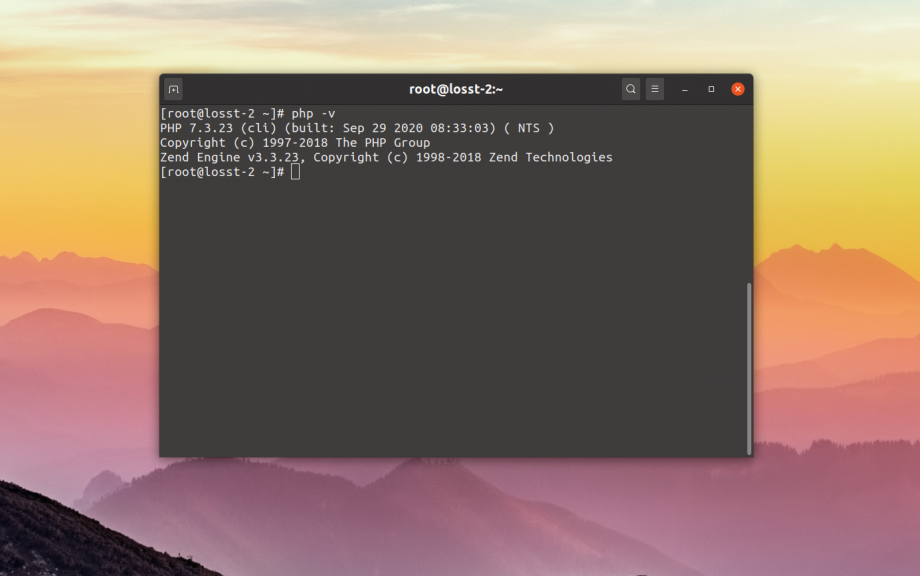
Утилита покажет информацию о сборке PHP, а также её версию. Однако, такой способ позволяет узнать версию используемую по умолчанию в консоли или php-cli. Если вы используете какую-либо панель управления сервером, то обычно панели устанавливают свои версии PHP отдельно в папку /opt. Чтобы посмотреть версию PHP установленной панелью надо использовать браузер.
Просмотр версии в браузере
Подключитесь по FTP или по SSH к серверу и перейдите в корневой каталог вашего сайта. Там создайте небольшой скрипт со следующим содержимым:
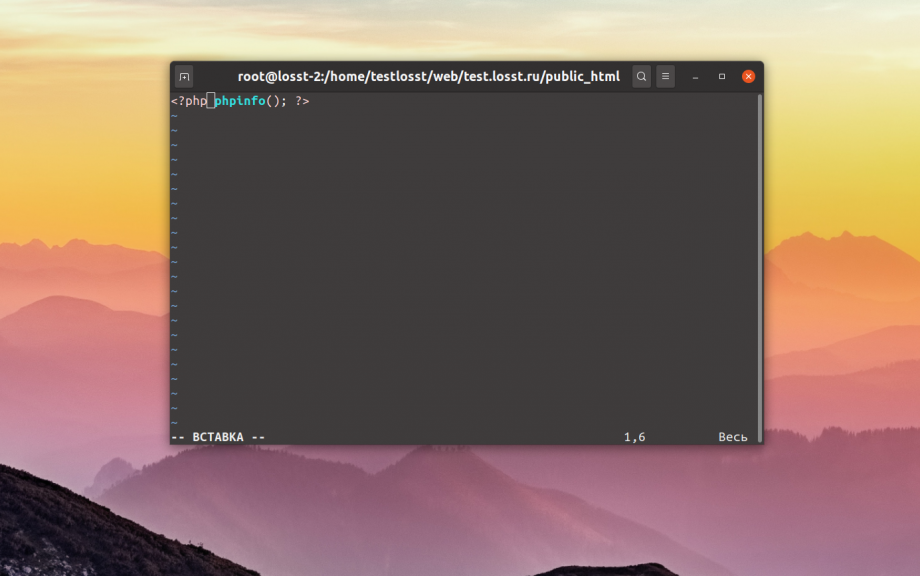
Затем откройте ваш сайт и допишите в адресной строке адрес этого файла:

Если всё сделано верно, будет выведена огромная таблица с информацией про PHP и установленные расширения, а в самом верху страницы будет версия PHP.
Если вы не хотите выводить всю таблицу с информацией о PHP, то можно вывести только версию с помощью функции phpversion. Например:
<?php echo phpversion(); ?>
Тогда, в результате вы получите такую страницу:
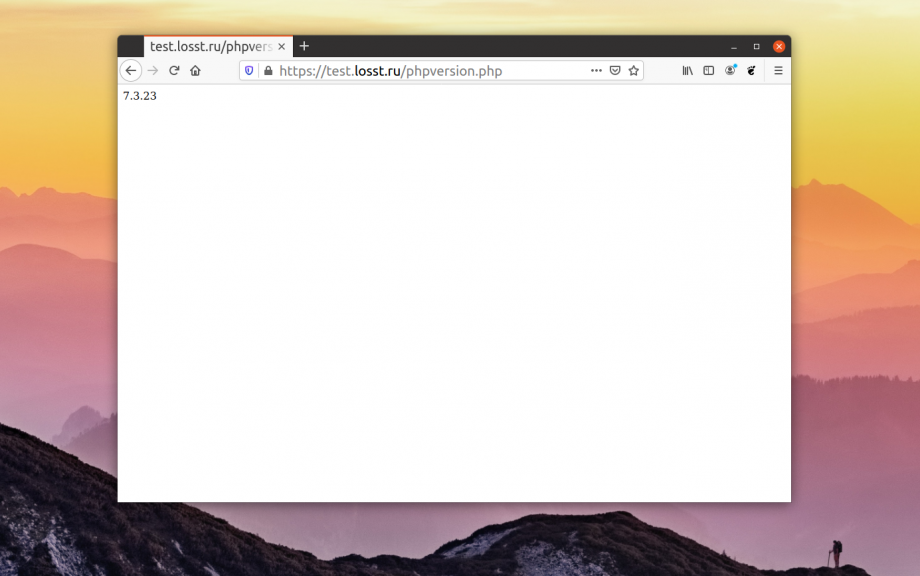
Как видите, проверить версию PHP не так уже и сложно. А какие способы знаете вы? Напишите в комментариях!
Обнаружили ошибку в тексте? Сообщите мне об этом. Выделите текст с ошибкой и нажмите Ctrl+Enter.
Как узнать версию PHP сайта — 2.5 способа
Сейчас покажу как быстро узнать какая версия PHP установлена на сервере для сайта.
Да, я не ошибся: PHP на сервере для сайта, т.к. современные хостинги предлагают возможность ставить для каждого сайта в отдельности свою версию PHP.
Способ 1: через файл
Это самый сложный способ. Но начну инструкцию именно с него, т.к. такой вариант универсальный и подойдет абсолютно всем.
Открываем стандартный блокнот Windows или любой редактор кода (Notepad++, Sublime Text, WebStorm, Atom и прочее) и вставляем этот кусок кода:
Все. Просто сохраняем этот файл с названием phpinfo.php и закидываем его в корень своего сайта по FTP. Там обычно у вас лежит файл robots.txt, фавикон и прочее.

Остается открыть этот файл в браузере. Пишем site.ru/phpinfo.php , где site.ru — это ваш домен.

Сразу в шапке пишет, что у меня версия PHP 8.0.3
Задача решена . Файл phpinfo.php можно удалить, т.к. он уже не нужен.
Способ 2: через панель хостинга
В самом начале обратил внимание, что на современных хостингах можно задавать каждому сайту свою версию PHP? Покажу на примере двух популярных в русском сегменте интернета хостингов.
Первый Beget, на котором у меня почти все проекты. В панели перехожу в пункт «Сайты».

Здесь меня интересует иконка шестеренки напротив нужного сайта.

И во всплывающем окне видим текущую версию PHP и тут же можем сменить ее на любую другую из доступных: клик по стрелке и появится выпадающий список.

А теперь на примере Спринтхост . У них немного по-другому все сделано. Здесь ты создаешь виртуальные сервера и уже на них размещаешь сайты.

Суть уловили? Если у вас другой хостинг, то все-равно будет что-то похожее на представленное выше. Могут отличаться названия пунктов или добраться до настройки сложнее.
Способ 0.5: для сайтов на WordPress
Половинчатый, но полностью рабочий способ, т.к. он актуален только для сайтов на CMS WordPress.
Заходим в админку и в боковой консоли Инструменты > Здоровье сайта > Информация > Сервер

И видим что искали.

И еще. Если у вас слишком старая версия PHP, то WordPress вас предупредит прямо на первой странице админки вот таким сообщением:

Остались вопросы? Добро пожаловать в комментарии.

Привет. Я автор этого блога и ридера вебмастеров/SEO-специалистов WMSN.ru
Можешь оставить свой вопрос в комментариях к статье или предложить идею для новой статьи. Не стесняйся.
phpinfo
Outputs a large amount of information about the current state of PHP. This includes information about PHP compilation options and extensions, the PHP version, server information and environment (if compiled as a module), the PHP environment, OS version information, paths, master and local values of configuration options, HTTP headers, and the PHP License.
Because every system is setup differently, phpinfo() is commonly used to check configuration settings and for available predefined variables on a given system.
phpinfo() is also a valuable debugging tool as it contains all EGPCS (Environment, GET, POST, Cookie, Server) data.
Parameters
The output may be customized by passing one or more of the following constants bitwise values summed together in the optional flags parameter. One can also combine the respective constants or bitwise values together with the bitwise or operator.
| Name (constant) | Value | Description |
|---|---|---|
| INFO_GENERAL | 1 | The configuration line, php.ini location, build date, Web Server, System and more. |
| INFO_CREDITS | 2 | PHP Credits. See also phpcredits() . |
| INFO_CONFIGURATION | 4 | Current Local and Master values for PHP directives. See also ini_get() . |
| INFO_MODULES | 8 | Loaded modules and their respective settings. See also get_loaded_extensions() . |
| INFO_ENVIRONMENT | 16 | Environment Variable information that's also available in $_ENV . |
| INFO_VARIABLES | 32 | Shows all predefined variables from EGPCS (Environment, GET, POST, Cookie, Server). |
| INFO_LICENSE | 64 | PHP License information. See also the » license FAQ. |
| INFO_ALL | -1 | Shows all of the above. |
Return Values
Always returns true .
Examples
Example #1 phpinfo() Example
// Show all information, defaults to INFO_ALL
phpinfo ();
// Show just the module information.
// phpinfo(8) yields identical results.
phpinfo ( INFO_MODULES );
Notes
Note:
In versions of PHP before 5.5, parts of the information displayed are disabled when the expose_php configuration setting is set to off . This includes the PHP and Zend logos, and the credits.
Note:
phpinfo() outputs plain text instead of HTML when using the CLI mode.
See Also
- phpversion() — Gets the current PHP version
- phpcredits() — Prints out the credits for PHP
- ini_get() — Gets the value of a configuration option
- ini_set() — Sets the value of a configuration option
- get_loaded_extensions() — Returns an array with the names of all modules compiled and loaded
User Contributed Notes 21 notes
A simple method to style your own phpinfo() output.
<style type=»text/css»>
#phpinfo <>
#phpinfo pre <>
#phpinfo a:link <>
#phpinfo a:hover <>
#phpinfo table <>
#phpinfo .center <>
#phpinfo .center table <>
#phpinfo .center th <>
#phpinfo td, th <>
#phpinfo h1 <>
#phpinfo h2 <>
#phpinfo .p <>
#phpinfo .e <>
#phpinfo .h <>
#phpinfo .v <>
#phpinfo .vr <>
#phpinfo img <>
#phpinfo hr <>
</style>
ob_start () ;
phpinfo () ;
$pinfo = ob_get_contents () ;
ob_end_clean () ;
// the name attribute «module_Zend Optimizer» of an anker-tag is not xhtml valide, so replace it with «module_Zend_Optimizer»
echo ( str_replace ( «module_Zend Optimizer» , «module_Zend_Optimizer» , preg_replace ( ‘%^.*<body>(.*)</body>.*$%ms’ , ‘$1’ , $pinfo ) ) ) ;
This is necessary to obtain a W3C validation (XHTML1.0 Transitionnal).
phpinfo’s output is declared with that DTD :
— «System ID» has the wrong url to validate : «DTD/xhtml1-transitional.dtd» rather than «http://www.w3.org/TR/xhtml1/DTD/xhtml1-transitional.dtd»
— Some module names contains space and the function’s output use the name in anchors as ID and NAME. these attributes can’t be validated like that (unique name only).
ob_start (); // Capturing
phpinfo (); // phpinfo ()
$info = trim ( ob_get_clean ()); // output
// Replace white space in ID and NAME attributes. if exists
$info = preg_replace ( ‘/(id|name)(=[«\’][^ «\’]+) ([^ «\’]*[«\’])/i’ , ‘$1$2_$3’ , $info );
$info_doc = new DOMDocument ( ‘1.0’ , ‘utf-8’ );
/* Parse phpinfo’s output
* operator @ used to avoid messages about undefined entities
* or use loadHTML instead
*/
@ $info_doc -> loadXML ( $info );
$doc -> documentElement -> appendChild ( // Adding HEAD element to HTML
$doc -> importNode (
$info_doc -> getElementsByTagName ( ‘head’ )-> item ( 0 ),
true // With all the subtree
)
);
$doc -> documentElement -> appendChild ( // Adding BODY element to HTML
$doc -> importNode (
$info_doc -> getElementsByTagName ( ‘body’ )-> item ( 0 ),
true // With all the subtree
)
);
// Now you get a clean output and you are able to validate.
/*
echo ($doc->saveXML ());
// OR
echo ($doc->saveHTML ());
*/
// By that way it’s easy to add some style declaration :
$style = $doc -> getElementsByTagName ( ‘style’ )-> item ( 0 );
$style -> appendChild (
$doc -> createTextNode (
‘/* SOME NEW CSS RULES TO ADD TO THE FUNCTION OUTPUT */’
)
);
// to add some more informations to display :
$body = $doc -> getElementsByTagName ( ‘body’ )-> item ( 0 );
$element = $doc -> createElement ( ‘p’ );
$element -> appendChild (
$doc -> createTextNode (
‘SOME NEW CONTENT TO DISPLAY’
)
);
$body -> appendChild ( $element );
// to add a new header :
$head = $doc -> getElementsByTagName ( ‘head’ )-> item ( 0 );
$meta = $doc -> createElement ( ‘meta’ );
$meta -> setAttribute ( ‘name’ , ‘author’ );
$meta -> setAttribute ( ‘content’ , ‘arimbourg at ariworld dot eu’ );
$head -> appendChild ( $meta );
// As you wish, take the rest of the output and add it for debugging
$out = ob_get_clean ();
$pre = $doc -> createElement ( ‘div’ ); // or pre
$pre -> setAttribute ( ‘style’ , ‘white-space: pre;’ ); // for a div element, useless with pre
$pre -> appendChild ( $doc -> createTextNode ( $out ));
$body -> appendChild ( $pre );
$doc -> formatOutput = true ; // For a nice indentation
$doc -> saveXML ();
?>
All that could be done with only RegExp but I prefer the use of DOM for manipulating documents
This function parses the phpinfo output to get details about a PHP module.
<?php
/** parse php modules from phpinfo */
function parsePHPModules () <
ob_start ();
phpinfo ( INFO_MODULES );
$s = ob_get_contents ();
ob_end_clean ();
$s = strip_tags ( $s , ‘<h2><th><td>’ );
$s = preg_replace ( ‘/<th[^>]*>([^<]+)<\/th>/’ , «<info>\\1</info>» , $s );
$s = preg_replace ( ‘/<td[^>]*>([^<]+)<\/td>/’ , «<info>\\1</info>» , $s );
$vTmp = preg_split ( ‘/(<h2>[^<]+<\/h2>)/’ , $s ,- 1 , PREG_SPLIT_DELIM_CAPTURE );
$vModules = array();
for ( $i = 1 ; $i < count ( $vTmp ); $i ++) <
if ( preg_match ( ‘/<h2>([^<]+)<\/h2>/’ , $vTmp [ $i ], $vMat )) <
$vName = trim ( $vMat [ 1 ]);
$vTmp2 = explode ( «\n» , $vTmp [ $i + 1 ]);
foreach ( $vTmp2 AS $vOne ) <
$vPat = ‘<info>([^<]+)<\/info>’ ;
$vPat3 = «/ $vPat \s* $vPat \s* $vPat /» ;
$vPat2 = «/ $vPat \s* $vPat /» ;
if ( preg_match ( $vPat3 , $vOne , $vMat )) < // 3cols
$vModules [ $vName ][ trim ( $vMat [ 1 ])] = array( trim ( $vMat [ 2 ]), trim ( $vMat [ 3 ]));
> elseif ( preg_match ( $vPat2 , $vOne , $vMat )) < // 2cols
$vModules [ $vName ][ trim ( $vMat [ 1 ])] = trim ( $vMat [ 2 ]);
>
>
>
>
return $vModules ;
>
?>
Sample Output:
[gd] => Array
(
[GD Support] => enabled
[GD Version] => bundled (2.0.28 compatible)
[FreeType Support] => enabled
[FreeType Linkage] => with freetype
[FreeType Version] => 2.1.9
[T1Lib Support] => enabled
[GIF Read Support] => enabled
[GIF Create Support] => enabled
[JPG Support] => enabled
[PNG Support] => enabled
[WBMP Support] => enabled
[XBM Support] => enabled
)
[date] => Array (
[date/time support] => enabled
[Timezone Database Version] => 2005.14
[Timezone Database] => internal
[Default timezone] => America/Los_Angeles
[Directive] => Array (
[0] => Local Value
[1] => Master Value
)
[date.timezone] => Array (
[0] => no value
[1] => no value
)
)
<?php
/** get a module setting */
function getModuleSetting ( $pModuleName , $pSetting ) <
$vModules = parsePHPModules ();
return $vModules [ $pModuleName ][ $pSetting ];
>
?>
Example: getModuleSetting(‘gd’,’GD Version’); returns «bundled (2.0.28 compatible)»
This is a slight modification to the previous code by «code at adspeed dot com» that extracts the PHP modules as an array. I used it on PHP 4.1.2 and it failed as the <h2> tags also had an align=»center». So this update changes the regex for those tags:
/* parse php modules from phpinfo */
function parsePHPModules () <
ob_start ();
phpinfo ( INFO_MODULES );
$s = ob_get_contents ();
ob_end_clean ();
$s = strip_tags ( $s , ‘<h2><th><td>’ );
$s = preg_replace ( ‘/<th[^>]*>([^<]+)<\/th>/’ , «<info>\\1</info>» , $s );
$s = preg_replace ( ‘/<td[^>]*>([^<]+)<\/td>/’ , «<info>\\1</info>» , $s );
$vTmp = preg_split ( ‘/(<h2[^>]*>[^<]+<\/h2>)/’ , $s ,- 1 , PREG_SPLIT_DELIM_CAPTURE );
$vModules = array();
for ( $i = 1 ; $i < count ( $vTmp ); $i ++) <
if ( preg_match ( ‘/<h2[^>]*>([^<]+)<\/h2>/’ , $vTmp [ $i ], $vMat )) <
$vName = trim ( $vMat [ 1 ]);
$vTmp2 = explode ( «\n» , $vTmp [ $i + 1 ]);
foreach ( $vTmp2 AS $vOne ) <
$vPat = ‘<info>([^<]+)<\/info>’ ;
$vPat3 = «/ $vPat \s* $vPat \s* $vPat /» ;
$vPat2 = «/ $vPat \s* $vPat /» ;
if ( preg_match ( $vPat3 , $vOne , $vMat )) < // 3cols
$vModules [ $vName ][ trim ( $vMat [ 1 ])] = array( trim ( $vMat [ 2 ]), trim ( $vMat [ 3 ]));
> elseif ( preg_match ( $vPat2 , $vOne , $vMat )) < // 2cols
$vModules [ $vName ][ trim ( $vMat [ 1 ])] = trim ( $vMat [ 2 ]);
>
>
>
>
return $vModules ;
>
?>
check out this cool and fantastic colourful phpinfo()!
ob_start ();
phpinfo ();
$phpinfo = ob_get_contents ();
ob_end_clean ();
preg_match_all ( ‘/#[0-9a-fA-F]<6>/’ , $phpinfo , $rawmatches );
for ( $i = 0 ; $i < count ( $rawmatches [ 0 ]); $i ++)
$matches [] = $rawmatches [ 0 ][ $i ];
$matches = array_unique ( $matches );
$j = 0 ;
foreach ( $matches as $match )
<
$r = ‘#’ ;
$searches [ $j ] = $match ;
for ( $i = 0 ; $i < 6 ; $i ++)
$r .= substr ( $hexvalue , mt_rand ( 0 , 15 ), 1 );
$replacements [ $j ++] = $r ;
unset( $r );
>
for ( $i = 0 ; $i < count ( $searches ); $i ++)
$phpinfo = str_replace ( $searches , $replacements , $phpinfo );
echo $phpinfo ;
?>
REMARK/INFO: if Content-Security-Policy HTTP header
is
Content-Security-Policy «default-src ‘self’;»;
phpinfo() is shown without a table
After reading and trying various functions, I couldn’t find one that correctly parses all the configurations, strips any left-over html tag and converts special characters into UTF8 (e.g. ' into ‘), so I created my own by improving on the existing ones:
function phpinfo2array() <
$entitiesToUtf8 = function($input) <
// http://php.net/manual/en/function.html-entity-decode.php#104617
return preg_replace_callback(«/(&#[0-9]+;)/», function($m) < return mb_convert_encoding($m[1], "UTF-8", "HTML-ENTITIES"); >, $input);
>;
$plainText = function($input) use ($entitiesToUtf8) <
return trim(html_entity_decode($entitiesToUtf8(strip_tags($input))));
>;
$titlePlainText = function($input) use ($plainText) <
return ‘# ‘.$plainText($input);
>;
$phpinfo = array(‘phpinfo’ => array());
// Strip everything after the <h1>Configuration</h1> tag (other h1’s)
if (!preg_match(‘#(.*<h1[^>]*>\s*Configuration.*)<h1#s’, ob_get_clean(), $matches)) <
return array();
>
$input = $matches[1];
$matches = array();
The output looks something like this (note the headers are also included but are prefixed with ‘# ‘, e.g. ‘# Directive’):
Array
(
[phpinfo] => Array
(
[0] => PHP Version 5.6.5
[System] => Darwin Calins-MBP 15.0.0 Darwin Kernel Version 15.0.0: Wed Aug 26 19:41:34 PDT 2015; root:xnu-3247.1.106
5/RELEASE_X86_64 x86_64
[Build Date] => Feb 19 2015 18:34:18
[Registered Stream Socket Transports] => tcp, udp, unix, udg, ssl, sslv3, sslv2, tls, tlsv1.0
[Registered Stream Filters] => zlib.*, bzip2.*, convert.iconv.*, string.rot13, string.toupper, string.tolower, string.strip_tags, convert.*, consumed, dechunk
[1] => This program makes use of the Zend Scripting Language Engine:Zend Engine.
)
[apache2handler] => Array
(
[Apache Version] => Apache/2.4.16 (Unix) PHP/5.6.5 OpenSSL/0.9.8zg
[Apache API Version] => 20120211
[Server Administrator] => webmaster@dummy-host2.example.com
[Hostname:Port] => sitestacker.local:0
[# Directive] => Array
(
[0] => # Local Value
[1] => # Master Value
)
To extract all of the data from phpinfo into a nested array:
<?php
ob_start ();
phpinfo ();
$phpinfo = array( ‘phpinfo’ => array());
if( preg_match_all ( ‘#(?:<h2>(?:<a name=».*?»>)?(.*?)(?:</a>)?</h2>)|(?:<tr(?: )?><t[hd](?: )?>(.*?)\s*</t[hd]>(?:<t[hd](?: )?>(.*?)\s*</t[hd]>(?:<t[hd](?: )?>(.*?)\s*</t[hd]>)?)?</tr>)#s’ , ob_get_clean (), $matches , PREG_SET_ORDER ))
foreach( $matches as $match )
if( strlen ( $match [ 1 ]))
$phpinfo [ $match [ 1 ]] = array();
elseif(isset( $match [ 3 ]))
$phpinfo [ end ( array_keys ( $phpinfo ))][ $match [ 2 ]] = isset( $match [ 4 ]) ? array( $match [ 3 ], $match [ 4 ]) : $match [ 3 ];
else
$phpinfo [ end ( array_keys ( $phpinfo ))][] = $match [ 2 ];
?>
Some examples of using individual values from the array:
<?php
foreach( $phpinfo as $name => $section ) <
echo «<h3> $name </h3>\n<table>\n» ;
foreach( $section as $key => $val ) <
if( is_array ( $val ))
echo «<tr><td> $key </td><td> $val [ 0 ] </td><td> $val [ 1 ] </td></tr>\n» ;
elseif( is_string ( $key ))
echo «<tr><td> $key </td><td> $val </td></tr>\n» ;
else
echo «<tr><td> $val </td></tr>\n» ;
>
echo «</table>\n» ;
>
?>
Note: In order to properly retrieve all of the data, the regular expression matches table headers as well as table data, resulting in ‘Local Value’ and ‘Global Value’ showing up as ‘Directive’ entries.
One note on the very useful example by «jon at sitewizard dot ca».
The following statements:
Statement 1:
$phpinfo[end(array_keys($phpinfo))][$match[2]] = isset($match[4]) ? array($match[3], $match[4]) : $match[3];
Statement 2:
$phpinfo[end(array_keys($phpinfo))][] = $match[2];
These two lines will produce the error «Strict Standards: Only variables should be passed by reference in. «. The root of the error is in the incorrect use of the end() function. The code works but thows the said error.
To address this try using the following statements:
Statement 1 revision:
$keys = array_keys($phpinfo);
$phpinfo[end($keys)][$match[2]] = isset($match[4]) ? array($match[3], $match[4]) : $match[3];
Statement 2 revision:
$keys = array_keys($phpinfo);
$phpinfo[end($keys)][] = $match[2];
This fixes the error.
To wrap it all in an example:
<?php
function quick_dev_insights_phpinfo () <
ob_start ();
phpinfo ( 11 );
$phpinfo = array( ‘phpinfo’ => array());
if( preg_match_all ( ‘#(?:<h2>(?:<a name=».*?»>)?(.*?)(?:</a>)?</h2>)|(?:<tr(?: )?><t[hd](?: )?>(.*?)\s*</t[hd]>(?:<t[hd](?: )?>(.*?)\s*</t[hd]>(?:<t[hd](?: )?>(.*?)\s*</t[hd]>)?)?</tr>)#s’ , ob_get_clean (), $matches , PREG_SET_ORDER )) <
foreach( $matches as $match ) <
if( strlen ( $match [ 1 ])) <
$phpinfo [ $match [ 1 ]] = array();
>elseif(isset( $match [ 3 ])) <
$keys1 = array_keys ( $phpinfo );
$phpinfo [ end ( $keys1 )][ $match [ 2 ]] = isset( $match [ 4 ]) ? array( $match [ 3 ], $match [ 4 ]) : $match [ 3 ];
>else <
$keys1 = array_keys ( $phpinfo );
$phpinfo [ end ( $keys1 )][] = $match [ 2 ];
if(! empty( $phpinfo )) <
foreach( $phpinfo as $name => $section ) <
echo «<h3> $name </h3>\n<table >\n» ;
foreach( $section as $key => $val ) <
if( is_array ( $val )) <
echo «<tr><td> $key </td><td> $val [ 0 ] </td><td> $val [ 1 ] </td></tr>\n» ;
>elseif( is_string ( $key )) <
echo «<tr><td> $key </td><td> $val </td></tr>\n» ;
>else <
echo «<tr><td> $val </td></tr>\n» ;
>
>
>
echo «</table>\n» ;
>else <
echo «<h3>Sorry, the phpinfo() function is not accessable. Perhaps, it is disabled<a href=’http://php.net/manual/en/function.phpinfo.php’>See the documentation.</a></h3>» ;
>
>
?>
Frankly, I went thought the trouble of adding this note because the example by «jon at sitewizard dot ca» is probably the best on the web, and thought it unfortunate that it throws errors. Hope this is useful to someone.
Simple JS snippet to print phpinfo() inline with it’s styles renamed. Thus leaving the container page unaffected and pretty.
<script>
document.write(`<div > <?php phpinfo ( 61 ) ?> </div>`);
var x = document.querySelector(‘#phpinfo > style’);
x.innerText = x.innerText.replaceAll(‘\n’, ‘#phpinfo ‘);
</script>
Here my version of saving php_info into an array:
<?php
function phpinfo_array ()
<
ob_start ();
phpinfo ();
$info_arr = array();
$info_lines = explode ( «\n» , strip_tags ( ob_get_clean (), «<tr><td><h2>» ));
$cat = «General» ;
foreach( $info_lines as $line )
<
// new cat?
preg_match ( «
» , $line , $title ) ? $cat = $title [ 1 ] : null ;
if( preg_match ( «
» , $line , $val ))
<
$info_arr [ $cat ][ $val [ 1 ]] = $val [ 2 ];
>
elseif( preg_match ( «
» , $line , $val ))
<
$info_arr [ $cat ][ $val [ 1 ]] = array( «local» => $val [ 2 ], «master» => $val [ 3 ]);
>
>
return $info_arr ;
>
// example:
echo «<pre>» . print_r ( phpinfo_array (), 1 ). «</pre>» ;
?>
Removes sensitive data like AUTH_USER and AUTH_PASSWORD from the phpinfo output:
<?php
// start output buffering
ob_start ();
// send phpinfo content
phpinfo ();
// get phpinfo content
$html = ob_get_contents ();
// flush the output buffer
ob_end_clean ();
// remove auth data
if (isset( $_SERVER [ ‘AUTH_USER’ ])) $html = str_replace ( $_SERVER [ ‘AUTH_USER’ ], ‘<i>no value</i>’ , $html );
if (isset( $_SERVER [ ‘AUTH_PASSWORD’ ])) $html = str_replace ( $_SERVER [ ‘AUTH_PASSWORD’ ], ‘<i>no value</i>’ , $html );
big thanx 2 Mardy dot Hutchinson at gmail dot com
very good!
some fixes to correct result displaying:
1. we need to trim $matches [1], ’cause there can be empty lines;
2. not bad to remove <body> tag ’cause styles for it not apply correctly.
3. . and change styles a little (remove «body» selector)
we need to change two lines:
<?php
preg_split ( ‘/\n/’ , $matches [ 1 ] )
?>
to
<?php
preg_split ( ‘/\n/’ , trim ( preg_replace ( «/\nbody/» , «\n» , $matches [ 1 ])) )
?>
That’s all! Now we have a really flexible addition to phpinfo();
// NOTE: When accessing a element from the above phpinfo_array(), you can do:
$array = phpinfo_array ();
// This will work
echo $array [ «General» ][ «System » ];
// This should work also, but it doesn’t because there is a space after System in the array.
echo $array [ «General» ][ «System» ];
// I hope the coder will fix it, so as to save someone else from wasting time. Otherwise, nice script.
One note on the above functions for cleaning up the phpinfo() HTML and throwing it into an array data structure. In order to catch all of the info tidbits the preg_match_all has to be tweaked to deal with 2 and 3 column tables.
I have changed the preg_match_all() here so that the last <td></td> is optional
<?php
function parsePHPConfig () <
ob_start ();
phpinfo (- 1 );
$s = ob_get_contents ();
ob_end_clean ();
$a = $mtc = array();
if ( preg_match_all ( ‘/<tr><td >(.*?)<\/td><td >(.*?)<\/td>(:?<td >(.*?)<\/td>)?<\/tr>/’ , $s , $mtc , PREG_SET_ORDER ))
foreach( $mtc as $v ) <
if( $v [ 2 ] == ‘<i>no value</i>’ ) continue;
$a [ $v [ 1 ]] = $v [ 2 ];
>
>
return $a ;
>
?>
Embedding phpinfo within your page, that already has style information:
The phpinfo output is wrapped within a <div >, and we privatize all the style selectors that phpinfo() creates.
Yes, we cheat on preparing the selector list.
preg_match ( ‘%<style type=»text/css»>(.*?)</style>.*?(<body>.*</body>)%s’ , ob_get_clean (), $matches );
# $matches [1]; # Style information
# $matches [2]; # Body information
echo «<div ><style type=’text/css’>\n» ,
join ( «\n» ,
array_map (
create_function (
‘$i’ ,
‘return «.phpinfodisplay » . preg_replace( «/,/», «,.phpinfodisplay «, $i );’
),
preg_split ( ‘/\n/’ , $matches [ 1 ] )
)
),
«</style>\n» ,
$matches [ 2 ],
«\n</div>\n» ;
?>
Perhaps one day the phpinfo() function will be modified to output such a safe string on its own.
I wanted a simple *function* to convert the output of phpinfo into an array. Here’s what I came up with thanks to alot of the previous authors tips, and the source file: php-5.2.6/ext/standard/info.c
Call this function like phpinfo_array() prints the array, phpinfo_array(1) returns the array for your own processing.
== Sample Output ==
[PHP Configuration] => Array
(
[PHP Version] => 5.2.6
[PHP Egg] => PHPE9568F34-D428-11d2-A769-00AA001ACF42
[System] => Linux askapache 2.6.22.19-grsec3
[Build Date] => Nov 11 2008 13:09:07
[Configure Command] => ./configure —prefix=/home/grsec/bin/php
[Server API] => FastCGI
[IPv6 Support] => enabled
[Zend Egg] => PHPE9568F35-D428-11d2-A769-00AA001ACF42
[PHP Credits Egg] => PHPB8B5F2A0-3C92-11d3-A3A9-4C7B08C10000
)
[mbstring] => Array
(
[mbstring.http_input] => pass
[mbstring.internal_encoding] => Array
(
[0] => ISO-8859-1
[1] => no value
)
[mcrypt] => Array
(
[Version] => 3.5.7
[Api No] => 20031217
)
<?php
function phpinfo_array ( $return = false ) <
/* Andale! Andale! Yee-Hah! */
ob_start ();
phpinfo (- 1 );
$sections = explode ( ‘<h2>’ , strip_tags ( $pi , ‘<h2><th><td>’ ));
unset( $sections [ 0 ]);
$pi = array();
foreach( $sections as $section ) <
$n = substr ( $section , 0 , strpos ( $section , ‘</h2>’ ));
preg_match_all (
‘#%S%(?:<td>(.*?)</td>)?(?:<td>(.*?)</td>)?(?:<td>(.*?)</td>)?%E%#’ ,
$section , $askapache , PREG_SET_ORDER );
foreach( $askapache as $m )
$pi [ $n ][ $m [ 1 ]]=(!isset( $m [ 3 ])|| $m [ 2 ]== $m [ 3 ])? $m [ 2 ]: array_slice ( $m , 2 );
>
return ( $return === false ) ? print_r ( $pi ) : $pi ;
>
I needed a way to quickly scroll through the phpinfo which is a large list of information. so here it is. In the top there is a list with sections, the new section loaded extensions will hold the links to the anchors of the loaded modules. the section session variables will show the current loaded sessions. It’s using Domdocument for manipulation so you should have that loaded:
<?php
ob_start ();
$exts = get_loaded_extensions ();
phpinfo ();
$phpinfo = ob_get_contents ();
ob_end_clean ();
//print $phpinfo;
$html_str = $phpinfo ;
$html = new DOMDocument ();
$html -> loadHTML ( $html_str );
$title = $html -> getElementsByTagName ( «title» )-> item ( 0 );
$title -> nodeValue = «PHP Version » . phpversion ();
$body = $html -> getElementsByTagName ( «body» )-> item ( 0 );
$body -> setAttribute ( «style» , «background-color:beige;» );
$table = $body = $html -> getElementsByTagName ( «table» )-> item ( 3 )-> nextSibling ;
$head = $html -> getElementsByTagName ( «table» )-> item ( 0 )-> nextSibling ;
ob_start ();
?>
<h2><a name=»session_variables»>Session variables</a></h2>
<table border=»0″ cellpadding=»2″ width=»600″>
<tr ><th>Variables</th><th>Value</th></tr>
<?php foreach( $_SESSION as $key => $value ) <
if( is_bool ( $value )) <
$value = ( $value )? «true» : «false» ;
>else if( is_array ( $value )) <
$value = ‘<pre>’ . print_r ( $value , true ). ‘</pre>’ ;
>else if(empty( $value ) && $value != «0» ) <
$value = «<i>no value</i>» ;
>
?>
<tr>
<td > <?=$key?> </td>
<td > <?=$value?> </td>
</tr>
<?php
>
?>
</table>
natcasesort ( $exts );
foreach( $exts as $value ) <
$version = phpversion ( $value );
?>
<tr>
<td style=»width:150px;»><a href default»><?=$value?> » style=»color:black; background-color:#ccccff;»> <?=$value?> </a></td>
<td > <?= (!empty( $version ))? $version : «<i>Unknown</i>» ?> </td>
</tr>
<?php
>
?>
</table><br />
<?php
$txt_str = ob_get_contents ();
ob_end_clean ();
$txt = new DOMDocument ();
$txt -> loadHTML ( $txt_str );
$txt_body = $txt -> getElementsByTagName ( «body» )-> item ( 0 );
foreach( $txt_body -> childNodes as $child ) <
$child = $html -> importNode ( $child , true );
$table -> parentNode -> insertBefore ( $child , $table );
>
$h2 = $html -> getElementsByTagName ( «h2» );
foreach( $h2 as $item ) <
if( $item -> getElementsByTagName ( «a» )-> length == 0 ) <
$value = $item -> nodeValue ;
$item -> nodeValue = «» ;
$a = $html -> createElement ( «a» );
$a -> setAttribute ( «name» , strtolower ( str_replace ( » » , «_» , $value )));
$a -> nodeValue = $value ;
$item -> appendChild ( $a );
>
$a = $item -> getElementsByTagName ( «a» )-> item ( 0 );
if(! in_array ( $a -> nodeValue , $exts )) <
$menu [ strtolower ( str_replace ( » » , «_» , $a -> nodeValue ))] = $a -> nodeValue ;
>
$top_a = $html -> createElement ( «a» );
if(! in_array ( $a -> nodeValue , $exts )) <
$txt = $html -> createTextNode ( «(Go to top)» );
$top_a -> appendChild ( $txt );
$top_a -> setAttribute ( «href» , «#» );
>else <
$txt = $html -> createTextNode ( «(Go to extensionlist)» );
$top_a -> appendChild ( $txt );
$top_a -> setAttribute ( «href» , «#loaded_extensions» );
>
$top_a -> setAttribute ( «style» , «background-color:beige; font-size:12px; margin-left:5px; margin-top:-5px; color:black;» );
$item -> appendChild ( $top_a );
>
ob_start ();
?>
<br />
<table border=»0″ cellpadding=»2″ width=»600″>
<tr ><th colspan=»2″>Sections</th></tr>
<tr>
<?php
$i = 0 ;
foreach( $menu as $key => $item ) <
print «<td ><a href=’# $key ‘ style=’background-color:#cccccc; color:black;’> $item </a></td>» ;
if( $i % 2 ) <
print ‘</tr><tr>’ ;
>
$i ++;
>
if( $i % 2 ) <
print ‘<td ></td>’ ;
>
?>
</tr>
</table>
<?php
$txt_str = ob_get_clean ();
$txt = new DOMDocument ();
$txt -> loadHTML ( $txt_str );
$txt_body = $txt -> getElementsByTagName ( «body» )-> item ( 0 );
foreach( $txt_body -> childNodes as $child ) <
$child = $html -> importNode ( $child , true );
$table -> parentNode -> insertBefore ( $child , $head );
>
print $html -> saveHTML ();
?>
Checking PHP version from the PHP Info page
Your PHP version can be set on the PHP Configuration page. That is the PHP version, which applies to your website. To check, which PHP version is currently used, go to Websites → Manage, search for PHP info on the sidebar and click on it:

Your current PHP version will be displayed at the top:

Checking PHP version using files
A different PHP version can be applied to a specific folder or subdomain. To check, if the change was done correctly, all you need to do is access the folder which you would like to test. Then, create a new file with php extension, for example, phpinfo.php .
Add the following code to the file:
The file will look like this:

After this, access this file by URL. Just type your domain name, then the folder, and add the filename. For the file above, the path would be:
The PHP version should be displayed at the top:

Changing PHP versions using files is not recommended, as it doesn't include PHP extensions and options. Thus, it might affect the website's work