Review Lenovo B570e-N2F23GE Notebook

According to Lenovo, the models of the B-series are "budget-friendly notebooks for home and home office". The features and the price range certainly support this statement. Our test sample comes equipped with an Intel Pentium B960 dual-core CPU, an Intel HD Graphics (Sandy Bridge) GPU, and 4GB of system RAM. The hard drive has a capacity of 320GB. Even a DVD-RW drive is on board. We reviewed another member of the series – the Lenovo B570-M58G4GE (Intel Core i3-2330M, Intel HD Graphics 3000) — not too long ago.
The first look leaves no doubt: this notebook is designed to be a tool. The chassis is very similar to the one Lenovo uses for the B570-M58G4GE, but the surfaces are textured differently. The B570e-N2F23GE is entirely made from matte, black plastic. Only the display is glossy. Since the surface isn’t smooth, it’s not very susceptible to fingerprints. The quality of the construction and overall sturdiness is quite acceptable. For more information on the chassis, please take a look at the review of the Lenovo B570-M58G4GE.
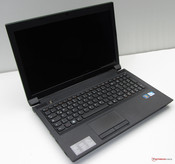 The notebook’s construction: matte, black plastic.
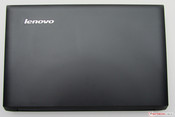 The textured surface is not prone to finger prints.
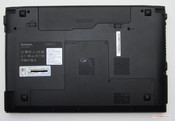 Access hatch at the bottom.
Connectivity
The number of the ports and their location is identical to the Lenovo B570-M58G4GE, although the Lenovo B570e-N2F23GE lacks the USB 2.0/eSATA combination port. In addition, the fingerprint reader is also missing. Otherwise all ports one might need are included, even though USB 3.0 is not offered on any notebook in the Lenovo B570 and B570e series.
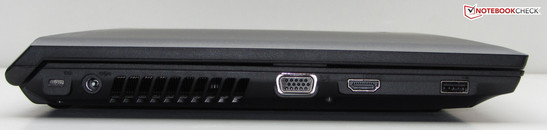
The left side features a USB 2.0 port, a HDMI port, a VGA port, the connector for the power adapter, and a Kensington lock slot to secure the laptop.
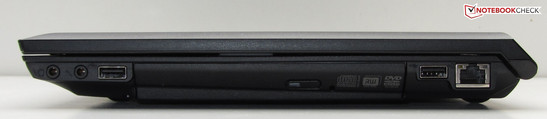
The right side of the notebooks houses two additional USB 2.0 ports, the Gigabit-Ethernet connector, two audio jacks (microphone in, headphones) and a DVD-RW drive.
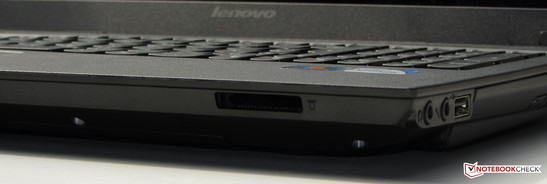
The front features a card reader, which supports the following types of storage media: SD, SDHC, MMC, Memory Stick, Memory Stick Pro, and xD.
Communication
Our test system features a (not identified) WLAN module from Broadcom. The module supports the usual standards 802.11 b/g/n. For wired connections via RJ45, Lenovo sources a well-known Gigabit-Ethernet controller from Realtek (RTL8168/8111 family). A Bluetooth module is not part of the package. The display frame houses a webcam.
Accessories
The only additional items in the box are a quick-start guide and pamphlets with security and warranty information.
Operating System
The Lenovo B570e-N2F23GE ships with Windows 7 Home Premium (64 Bit). A Windows 7 DVD is not included. Potential restores rely on the recovery partition.
Lenovo OneKey Recovery
Power button on the left, OneKey Recovery button on the right.
Lenovo OneKey Recovery
System recovery is very easy: with the notebook turned off, the user only needs to press the OneKey Recovery button (the small button next to the power button). The notebook then turns on and starts the Lenovo OneKey Recovery automatically. Once the option "OneKey Recovery" is selected and the image to restore has been selected (either the factory image or one the user has subsequently created), the restore starts. Important to keep in mind: the system will be reset and all data created (and programs installed) after the image date will be erased.
Lenovo is pretty generous with the included software. We found the following programs pre-installed: Adobe Reader X, Google Chrome, Cyberlink PowerDVD 10, Cyberlink Power2Go (DVD-/CD burner software), Cyberlink Youcam (webcam software), McAfee Antivirus Plus, Microsoft Office 2010 Starter, and Windows Live Essentials 2011. In addition, Lenovo supplies some specific tools. One example is the Lenovo EE Boot Optimizer, which optimizes and accelerates the system boot and startup process. Port Locker might be more interesting for the business user: it can prevent unauthorized data copy to or from USB attached devices or media cards, unless the user supplies a password.
Maintenance
The underside of the notebook is home to a fairly large maintenance cover. Hard drive, RAM, BIOS battery, and WLAN module are all accessible (but the system cooling fan is not). Unlike the B570-M58G4GE, the B570e only comes with one RAM slot (which is home to a 4GB module). Maximum RAM is 8GBbut requires removal of the already installed module.
It’s pretty easy to swap out the hard drive. One screw needs to be removed — then the hard drive caddy can be taken out. After the old drive has been swapped out for the new one, the caddy gets re-inserted. One caveat: Lenovo uses a drive that is 7 millimeter thick — and not the 2.5-inch typical standard of 9.5 millimeter.
Lenovo offers a 12 month depot warranty. In case of a defect, the customer needs to send the notebook directly to the manufacturer. Lenovo offers an extension of the warranty to 24 or 36 months for 30 or 80 Euros, respectively. A tip: the Lenovo Online Shop allows the user to enter the serial number of the notebook to find out what warranty options they have available. An extended warranty can then also be purchased directly from a dealer, not just online.
Input Devices
The keyboard of the Lenovo B570e-N2F23GE is the same one found on the Lenovo B570-M58G4GE. Keystrokes are quite precise and the keyboard is well suited for those who need to type a lot.
The 10 x 5 centimeter (3.94 x 1.97 inches) touchpad is also identical to the one used in the Lenovo B570-M58G4GE. The surface is slightly rough but fingers glide easily. Since the touchpad is multi-touch enabled, functions like zooming with two fingers and other gestures are supported. The two mouse buttons underneath the touchpad feature clear tactile feedback.
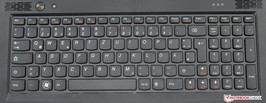
The keyboard has no backlight.
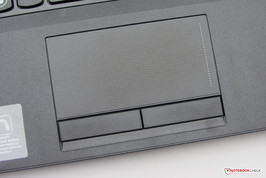
The touchpad is multitouch capable.
Ноутбук Lenovo B570e, обзор, технические характеристики

Ноутбук Lenovo B570e, относится к серии бюджетных ноутбуков, но при этом имеет очень качественный корпус, на котором, благодаря необычному покрытию сложно оставить отпечатки пальцев и сравнительно большой экран 15,6′ которого хватает для просмотра видео, сёрфинга и работы с документами.
А вот поиграть на нём во что-то требовательное к железу вряд ли удастся.
На момент написания статьи такие ноутбуки можно купить только с рук, например здесь.
Существует много моделей этого ноутбука, отличающихся внутренним содержимым, можно посмотреть таблицу возможных технических характеристик:
lenovo b570e апгрейд.
Изготовитель компьютера LENOVO
Модель компьютера Emerald Lake
Операционная система (ОС) Microsoft Windows 7 Ultimate Edition (build 7600), 64-bit
Операционная система, сборка (ОС) 7600
Версия операционной системы 6.1.7600
Язык ОС 0419
Системная память 4,0 GB
Версия ПО .NET Framework 3.5.30729.4926
Устройства CD или DVD HALEJG 9EJC9QBKDQZ SCSI CdRom Device
Обзор жестких дисков системы
Общий объем памяти для хранения данных: 465,7 GB
Устройства CD или DVD PLDS DVD-RW DS8A8SH
Локальный диск :D:\ 419,2 GB
Занято: 361,6 GB
Свободно: 57,6 GB
Локальный диск :C:\ 46,5 GB
Занято: 45,2 GB
Свободно: 1,3 GB
Информация о памяти
Полный объем физической памяти 4,0 GB
Доступная физическая память 1,6 GB
Общий объем виртуальной памяти 2,0 GB
Физический диск 0
Изготовитель ST950032
Модель 5AS
Тип шины SATA
Физический диск 0
Изготовитель ST950032
Модель 5AS
Тип шины SATA
Обозреватель Интернета [101] Internet Explorer
Версия обозревателя Интернета [101] 9.0.8112.16421
Обозреватель Интернета [102] Firefox
Версия обозревателя Интернета [102] 30.0
ИНФОРМАЦИЯ О ГРАФИЧЕСКОМ РЕШЕНИИ
Графическое решение [1] NVIDIA GeForce 410M
Версия драйвера графической подсистемы 9.18.13.5012
Ускорение 3D Да
Аппаратная поддержка обработки преобразования и освещения Да
Видеопамять 2,7 GB
Поддержка вертексных шейдеров 4.1
Поддержка пиксельных шейдеров 4.1
Версия Microsoft DirectX* 11.0
Текущее разрешение экрана 1366×768
Текущая глубина цвета 32 Bits Per Pixel
Графическое решение [2] NVIDIA GeForce 410M
Ускорение 3D Да
Аппаратная поддержка обработки преобразования и освещения Да
Видеопамять 2,7 GB
Поддержка вертексных шейдеров 5.0
Поддержка пиксельных шейдеров 5.0
ИНФОРМАЦИЯ О СИСТЕМНОЙ ПЛАТЕ
Производитель не обнаружено
Модель Emerald Lake
Номер AA не обнаружено
Производитель BIOS LENOVO
Версия BIOS LENOVO 44CN45WW
Дата выпуска BIOS 02/16/12
Системная память 4,0 GB
Звуковая плата Realtek High Definition Audio
ИНФОРМАЦИЯ О ПРОЦЕССОРЕ
Производитель Intel
Модель Intel® Core™ i3-2328M CPU @ 2.20GHz
Средства Intel® для анализа процессора Средства Intel® для анализа процессора
Тактовая частота процессора 2,2 GHz
Ссылка на спецификацию процессора Ссылка на спецификацию процессора
Модификация процессора 1B
Тип процессора 00
Семейство процессора 06
Модель процессора 2A
Степпинг процессора 7
ИНФОРМАЦИЯ О ПРОВОДНОМ СЕТЕВОМ РЕШЕНИИ
Проводная сетевая продукция Realtek PCIe GBE Family Controller
Версия драйвера 7.65.1025.2012
Коды оборудования PCI\VEN_10EC&DEV_8168&SUBSYS_397517AA&REV_06
ИНФОРМАЦИЯ О БЕСПРОВОДНОМ СЕТЕВОМ РЕШЕНИИ
Беспроводное сетевое решение Atheros AR9285 Wireless Network Adapter #2
Версия драйвера 9.2.0.504
Коды оборудования ms_ndiswanipv6
очень сильно интересует видеокарта и процессор, а также оператива. а так прошу, специалисты, отпишите что я могу поменять в моем ноутбуке. и на что(желательно самое лучшее). спасибо. рассмотрю все варианты))
если что видеокарты две, одна дискретная интеловская, и вторая нвидиа 410м. вдруг поможет)
Sorry, you have been blocked
This website is using a security service to protect itself from online attacks. The action you just performed triggered the security solution. There are several actions that could trigger this block including submitting a certain word or phrase, a SQL command or malformed data.
What can I do to resolve this?
You can email the site owner to let them know you were blocked. Please include what you were doing when this page came up and the Cloudflare Ray ID found at the bottom of this page.
Cloudflare Ray ID: 7cfce2686dc72498 • Your IP: Click to reveal 88.135.219.175 • Performance & security by Cloudflare