Как скачать приложение для робота пылесоса Mi Home Xiaomi
Если вы хотите сделать уборку дома проще и удобнее, вам нужен робот пылесос Xiaomi, который может самостоятельно очищать полы от пыли и грязи. Но чтобы полностью раскрыть потенциал этого умного помощника, вам также нужно скачать специальное приложение для мобильного устройства, которое позволит вам управлять роботом. В этой статье рассмотрим откуда скачать приложение Mi Home для робота пылесоса Xiaomi.
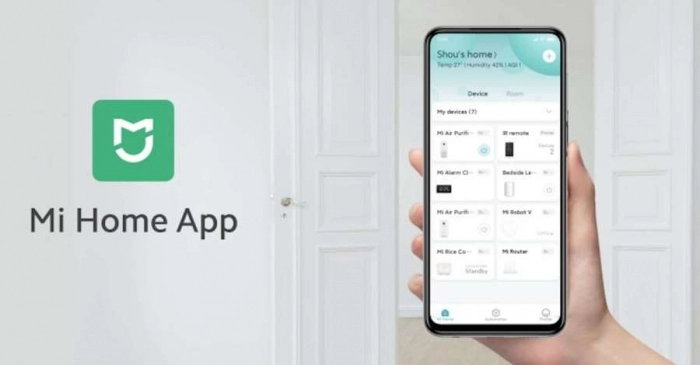
Что такое Mi Home?
Mi Home — это официальное приложение от компании Xiaomi, которое подходит для всех устройств смарт-дома этого бренда. С его помощью вы можете:
- Включать и выключать робот пылесос Xiaomi.
- Выбирать режимы уборки (стандартный, тихий, турбо и т.д.).
- Настраивать график уборки по дням и часам.
- Просматривать карту помещения, которую строит робот.
- Задавать запретные зоны или виртуальные стены для робота.
- Контролировать уровень заряда батареи и износ расходных материалов.
- Обновлять прошивку робота и получать новые функции.
- Связываться с технической поддержкой Xiaomi в случае проблем.
Как понятно, приложение Mi Home делает использование робота пылесоса Xiaomi ещё более комфортным и эффективным. Рассмотрим далее как скачать это приложение на свой смартфон. Это займёт несколько минут.
Как скачать приложение Mi Home для Android?
Если вы обладатель смартфона на базе операционной системы Android, то, чтобы скачать Mi Home для робота пылесоса Xiaomi, сделайте так:
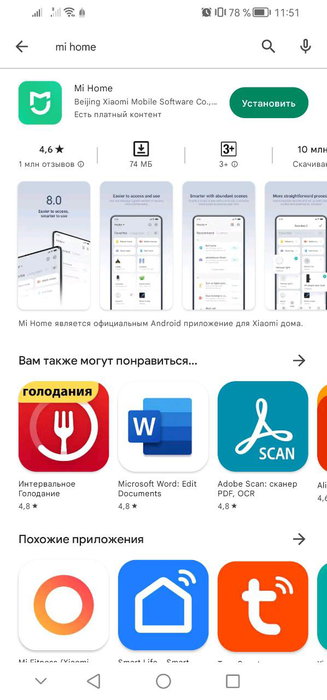
- Откройте на своем смартфоне магазин приложений Google Play.
- Введите в строке поиска «Mi Home» и нажмите на значок лупы.
- Выберите из списка приложение Mi Home и нажмите на кнопку «Установить».
Как скачать Mi Home если нет Google Play
Если вы не можете скачать приложение Mi Home из Google Play потому что у вас нет этого магазина, то у вас есть несколько альтернативных способов.
- Во-первых, обратитесь к другим магазинам приложений, которые обязательно есть на вашем смартфоне. На устройствах Samsung, Huawei и многих других брендов есть собственные магазины приложений, и Mi Home скорее всего тоже присутствует.
- Во-вторых, вы можете скачать APK-файл приложения Mi Home из других сайтов, например Uptodown или FreeSoft. Вам нужно будет разрешить установку приложений из неофициальных источников в настройках вашего смартфона.
- В-третьих, на упаковке вашего пылесоса или в инструкции есть QR-код, отсканировав который, вы сможете получить приложение на свой смартфон.
Кстати, иногда можно использовать другие приложения для управления устройствами Xiaomi, например, Yeelight или Mi Remote. Однако, они могут поддерживать не все устройства или функции, которые доступны в приложении Mi Home.
Как скачать приложение Mi Home для iOS?
Если вы пользуетесь смартфоном на базе операционной системы iOS, то скачать приложение Mi Home для робота пылесоса Xiaomi тоже не составит труда. Вам нужно сделать следующее:
- Откройте на своем смартфоне магазин приложений App Store.
- Введите в строке поиска название приложения «Mi Home» или кириллицей «Ми Хоум» и нажмите на значок для начала поиска.
- Тапните в списке на найденное приложение Mi Home и нажмите на кнопку «Загрузить».
- Если потребуется, то для подтверждения загрузки и установки приложения на ваш смартфон, введите пароль или подтвердите действие с помощью Face ID.
- Запустите приложение Mi Home и войдите в свой аккаунт Xiaomi или зарегистрируйтесь, если у вас его ещё нет.
- Синхронизируйте робот пылесос Xiaomi со смартфоном через полученное приложение, следуя простым инструкциям.
- Теперь робот готов к работе.
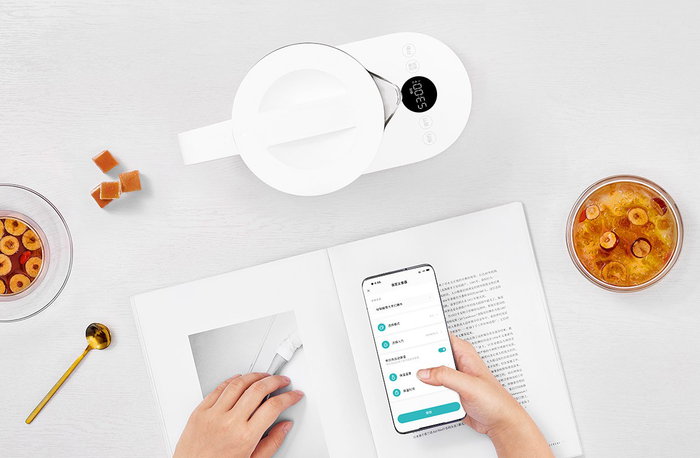
Какой телефон нужен для Ми Хоум?
Для использования приложения Mi Home ваш смартфон должен удовлетворять некоторые требования. Во-первых, устройство должно поддерживать операционную систему Android 4.4 или выше, или iOS 9.0 или выше. Во-вторых, ваш смартфон должен иметь достаточно свободного места в памяти для установки приложения и его плагинов. В-третьих, на мобильном должен быть доступ к интернету для загрузки и обновления приложения и его плагинов, а также для связи с устройствами смарт-дома Xiaomi. В-четвёртых, смартфон должен иметь включенный Bluetooth для подключения к некоторым моделям пылесосов Xiaomi.
Все смартфоны, которые в данный момент имеются на рынке, подходят для установки Mi Home и комфортной работы с этим приложением. Даже самые бюджетные варианты. Не подойти могут разве что очень старые модели мобильных устройств, которые уже не продаются.
Mi Home

Mi Home (Ми Хоум) – приложение от Xiaomi для управления устройствами из серии «умный дом» с помощью смартфона. С помощью приложения Вы можете следить за датчиками и регулировать температуру воздуха в помещении или использовать смартфон как пульт дистанционного управления. С прогрессом электроники все больше устройств можно наделить «интеллектом». Это могут быть климатические датчики, система охраны и другие датчики, которые следят за обстановкой в доме и отвечают за комфорт в жилище. Приложение Mi Home для Андроид поможет взять под контроль все домашние гаджеты и управлять ими с одного устройства. Например, приложение может имитировать работу пульта от телевизора или кондиционера. Это возможно после состыковки специальных контроллеров с сервисом.
Чтобы взять под управление все «умные» устройства и датчики в доме, необходимо скачать Mi Home на Андроид телефон или планшет. Приложение может контролировать широкий перечень устройств, а радиус действия достигает 20 метров. После установки Mi Home, Вам необходимо создать аккаунт и покопаться в его настройках. Приложение от компании Xiaomi и разрабатывалось для использования на территории Китая, поэтому в качестве локации необходимо указать «Материковый Китай». Зарегистрировавшись, в основном меню Вы сможете добавить устройства и приступить к работе с ними. Если в процессе добавления устройств возникнут трудности, можно обратиться на форум приложения, где разбираются все возможные неполадки и способы их исправления. Каждый девайс можно привязать к определенной комнате, чтобы было проще сориентироваться в меню приложения, если в Вашем доме слишком много «умных» устройств.
Как подключить Mi Home к смартфону?
Система Mi Home состоит из нескольких датчиков, задачей которых является отслеживание многих процессов и создание для жильцов наиболее комфортных условий. С помощью датчиков умного дома Сяоми становится возможным отслеживание температурного режима в комнатах, обеспечение защиты от несанкционированного проникновения, управление бытовыми приборами на расстоянии и многое другое. В статье вы найдете инструкцию о том, как подключить Ми Хоум.
Последовательность действий
Для этого необходимо зайти на онлайн-площадку Play Маркет, найти приложение Mi Home. Обратите внимание, что разработчиком должен быть Xiaomi Inc. Теперь программу нужно скачать и установить на телефон.
Важным моментом является выбор региона, который обязательно должен быть Mainland China, т.е. материковый Китай. Запускаем утилиту и входим в Ми-аккаунт.
Справа сверху располагается значок «+». Нажмите на него, что позволит добавить устройство в Mi Home. Выбираем пункт All device с последующим подключением основного шлюза к сети.
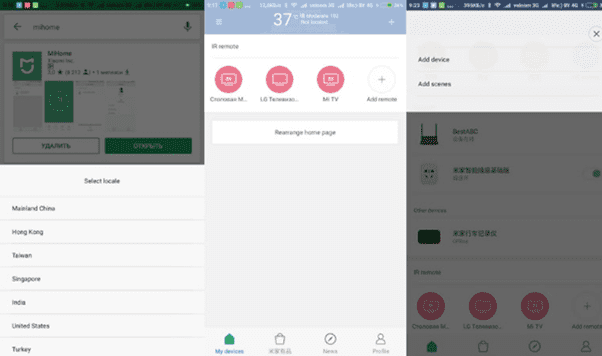
В появившемся списке появится надпись Geteway3f35. Если ее нет, что следует активировать ручной режим сканирования – Scan.
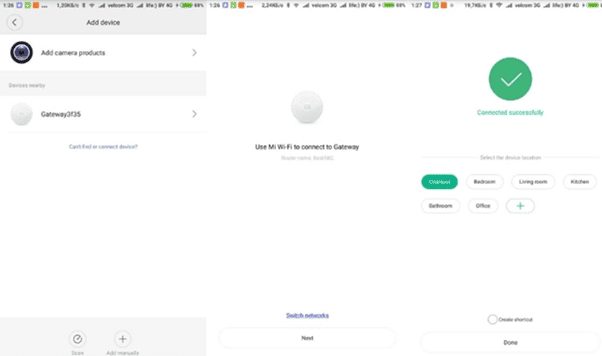
Теперь следует выбрать сети для подключения и ввести пароль. Кликаем по кнопке Next, и в течение пары минут подключение будет завершено, о чем будет свидетельствовать сообщение Connected successfully.
Нужно выбрать место установки и нажать на Done. На экране смартфона появится основное меню умного дома Ксиаоми.
В верхней части дисплея находим вкладку Device – Add subdevice, что позволит добавить новый гаджет в систему.
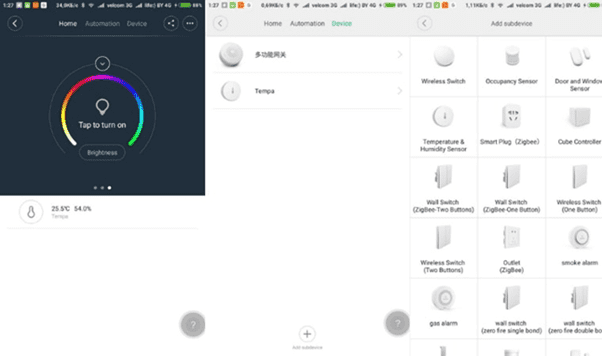
Для того чтобы активировать девайсы, следует воспользоваться скрепкой, которая является составной частью комплекта шлюза. Ее нужно вставить в соответствующее отверстие и удерживать в таком положение в течение 3-4 секунд. После этого на телефоне высветится надпись Add successful. Определяем место установки и кликаем по Next. Остается выбрать название для подключенного аппарата и нажать на Completed.
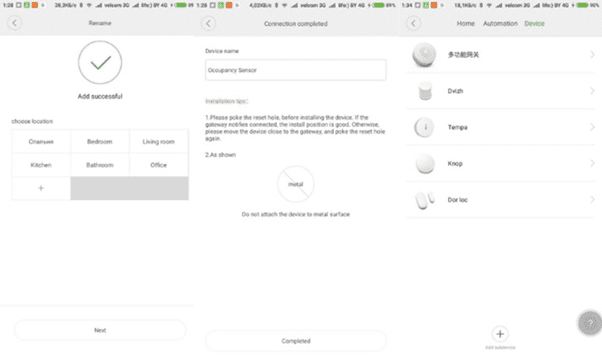
Затем повторяем действия по подключению, которые совершенно одинаковы для всех подключаемых устройств.
Xiaomi Home

Hi, There you can download APK file "Mi Home" for Huawei P Smart free, apk file version is 8.3.702 to download to your Huawei P Smart just click this button. It's easy and warranty. We provide only original apk files. If any of materials on this site violates your rights, report us
Manage and communicate to devices.
Connect devices to network.
Connect devices to each other.
tips: device support are different in different areas, please refer to product manual or official website
What's New:
• Adapted to MIUI14 bluetooth half-off state, devices can still be connected to the network when the bluetooth is half-off
Optimization:
• Optimized the visual style of the camera card, you can click "Enter" to view the camera playback
• Optimized the display of operating status in the notification center and supported ignoring consumables and fault
• Environment information can be set more conveniently within the environment module
What's New:
• Adapted to MIUI14 bluetooth half-off state, devices can still be connected to the network when the bluetooth is half-off
Optimization:
• Optimized the visual style of the camera card, you can click "Enter" to view the camera playback
• Optimized the display of operating status in the notification center and supported ignoring consumables and fault
• Environment information can be set more conveniently within the environment module
What's New:
• Added scene logs and device offline messages in the message center
Optimization:
• Optimized device pairing performance experience
• Optimized plugin startup
Optimization:
• Optimized the experience related to automation
Fixed:
• Fixed privacy popup related issues
What's New:
• Some shortcut-cameras could be rotated in fullscreen
Fixed:
• Fixed the occasional issue of failing to create curtain group
What's New:
• Some shortcut-cameras could be rotated in fullscreen
Fixed:
• Fixed the occasional issue of failing to create curtain group
Optimization:
• Optimized the experience when the app is first launched
Fixed:
• Fixed the crash issue when opening plugins
• Fixed the display issue of update popup in dark mode
What's New:
• Added direct access to report issues when failing to pair a device
Optimization:
• Optimized whole-house control center experience
Fixed:
• Fixed the failure issue when sharing page to WhatApp and Line
Major update:
Brand new version of Mi Home 7.0 arrived with the whole-house control center which once enabled will become the new home page to facilitate the control of speakers, favorite sences, lights, environment, curtains, and cameras of the whole house.
Others:
• Added official news function in the message center providing official platform news
• Added support for creating infrared remote control overseas
• Display Mi Account Help Center in Help and Feedback when not logged in
What's New:
• Added a reminder when the network is insecure while adding a new device
Optimization:
• Optimized the experience of some functions on the tablet
• Optimized the message push framework
Fixed:
• Fixed the issue that the progress bar overlapped when downloading the plug-in
What's New:
• Added a reminder when the network is insecure while adding a new device
Optimization:
• Optimized the experience of some functions on the tablet
• Optimized the message push framework
Fixed:
• Fixed the issue that the progress bar overlapped when downloading the plug-in
What's New:
• Added a reminder when the network is insecure while adding a new device
Optimization:
• Optimized the experience of some functions on the tablet
• Optimized the message push framework
Fixed:
• Fixed the issue that the progress bar overlapped when downloading the plug-in
What's New:
• Shared home now supports multiple administrators(This function is currently testing with only some users can see)
Optimization:
• Notification center adds room name and family name of the device
• The message center improves family screening, information classification, quick operations, etc., with visual enhancement
• Message setting structure and visual revision with the new support of equipment screening
• Optimized the display of some pages on the pad
What's New:
• Multi-key switch can be easily turned on and off on the home page
• Added shooting and uploading video functions on the feedback page
Optimization:
• Adjusted the logic of camera permission acquisition
Fixed:
• Fixed the occasional issue of white screen when opening plug-in
Optimization:
• Door lock security protocol upgrade
Fixed:
• Fixed the bug of allowing to confirm when renaming the device without entering any content
"What's New:
• Added Experimental features into Profile with new feature of Dark mode of plugins
Optimization:
• Optimized the security verification logic of the door lock: when changing the phone, or reinstalling the APP, or changing the security password, you can use the door lock plug-in remotely without entering the security verification code"
What's New:
• New version of recommended scene of the device plug-ins
• Added effective time period function for some recommended scenes
Optimization:
• Optimized the interactive animation of loading
• Optimized the error message when failing to add some devices
• Optimized the sorting rules of recommended scenes
What's New:
• Added the temperature unit setting function, supporting temperature display to switch between Fahrenheit and Celsius
• Added the verification reset function for forgetting the security setting password
• Added filters for security settings and voice control authorization management
• Live video of cameras supports zooming up to 6 times
Optimization:
• Optimized the interactive animation of refreshing
Fixed:
• Fixed the crash issue when sharing printers
What's New:
• Added the camera shortcut feature which allows you to play the real-time video of the camera on the homepage
Optimization:
• Shared cameras with "view only" permissions now cannot control direction
• User experience improvement program content update
What's New:
• Homepage display adapts to each screen size
Optimization:
• Optimized the experience of of the device pairing process
• Optimized the security settings feature, supporting to set global password and flexibly select the device to which the password is applied
What's New:
• Homepage display adapts to each screen size
Optimization:
• Optimized the experience of of the device pairing process
• Optimized the security settings feature, supporting to set global password and flexibly select the device to which the password is applied
What's New:
• Homepage display adapts to each screen size
Optimization:
• Optimized the experience of of the device pairing process
• Optimized the security settings feature, supporting to set global password and flexibly select the device to which the password is applied
What's New:
• Added Dark Mode (automatically switch on/off following the system settings)
• Added the recommended scenes of "Turn on the light at night" and "Good night"
• Added the function of reconnecting to the camera after disconnection
• Added the FAQ related to the account in Help and Feedback
Optimization:
• Optimized the dark mode of the camera plugins
• Optimized the error recognition function of housekeeping message of the camera
• Optimized the upgrade speed of some device
What's New:
• A brand-new visual style that is simple and warm, with a wide range of wallpapers to choose from
• Brand-new Scene: Smart scenes at the touch of a button
• Frequently used scenes can now be quickly executed from the homepage
Optimization:
• Optimized the performance of opening plugins and the display of plug-in loading progress
Fixed:
• Fixed the crash when opening the plug-in
What's New:
• New feature for cameras: Picture in Picture live view! On MIUI 12, tapping a camera in the control center will show a live view in PIP.
• Auto-update for firmwares. This feature only works on verified devices and firmwares, which will be rolling out later. (Exclusive for mainland China)
Optimization
• Optimized Xiaomi Easy Connect to discover the device faster
• Optimized the strategy of scanning and discovering some devices to improve the connection success rate
What's New:
• New feature for cameras: Picture in Picture live view! On MIUI 12, tapping a camera in the control center will show a live view in PIP.
• Auto-update for firmwares. This feature only works on verified devices and firmwares, which will be rolling out later. (Exclusive for mainland China)
Optimization
• Optimized Xiaomi Easy Connect to discover the device faster
• Optimized the strategy of scanning and discovering some devices to improve the connection success rate
Fixed some bugs in the Content tab.
Recent Updates:
• Added a whole new Content tab (Beta version). (Mainland China only)
• Added the recommendation of automation when adding new devices. (Mainland China only)
• Optimized the response speed when scanning QR code.
• Optimized the BLE device firmware updating experience.
• Optimized instructions when the Bluetooth device needs to reset.
What's New:
• Added a whole new Content tab (Beta version). (Mainland China only)
Optimization:
• Optimized the response speed when scanning QR code.
• Optimized the BLE device firmware updating experience.
• Optimized instructions when the Bluetooth device needs to reset.
• A whole new Content tab.(Mainland China only)
• Added the recommendation of automation when adding new devices.(Mainland China only)
• Added the recommendation of Flex Switch in smart light plugin.(Mainland China only)
Optimization:
• Optimized the response speed when scanning QR code.
• Optimized the BLE device firmware updating experience.
• Optimized instructions when the Bluetooth device needs to reset.
• Optimized the click area of opening the gateway function in the BLE gateway.
What's New:
• Added a function to quickly arrange a device to the top of the page.
• In the Bluetooth gateway page, added the number of devices connected to the Bluetooth gateway.
Optimization:
• Optimized the experience of sorting cards on the homepage.
• Optimized the prompt display logics when near an unconnected Bluetooth device.
Fixed:
• Fixed the inconsistent sorting sequence of devices among multiple clients.
What's New:
• Added a function to quickly arrange a device to the top of the page.
• In the Bluetooth gateway page, added the number of devices connected to the Bluetooth gateway.
Optimization:
• Optimized the experience of sorting cards on the homepage.
• Optimized the prompt display logics when near an unconnected Bluetooth device.
Fixed:
• Fixed the inconsistent sorting sequence of devices among multiple clients.
What's New:
• Added a function to quickly arrange a device to the top of the page.
• In the Bluetooth gateway page, added the number of devices connected to the Bluetooth gateway.
Optimization:
• Optimized the experience of sorting cards on the homepage.
• Optimized the prompt display logics when near an unconnected Bluetooth device.
Fixed:
• Fixed the inconsistent sorting sequence of devices among multiple clients.
What's New:
• Added a function to quickly arrange a device to the top of the page.
• In the Bluetooth gateway page, added the number of devices connected to the Bluetooth gateway.
Optimization:
• Optimized the experience of sorting cards on the homepage.
• Optimized the prompt display logics when near an unconnected Bluetooth device.
Fixed:
• Fixed the inconsistent sorting sequence of devices among multiple clients.